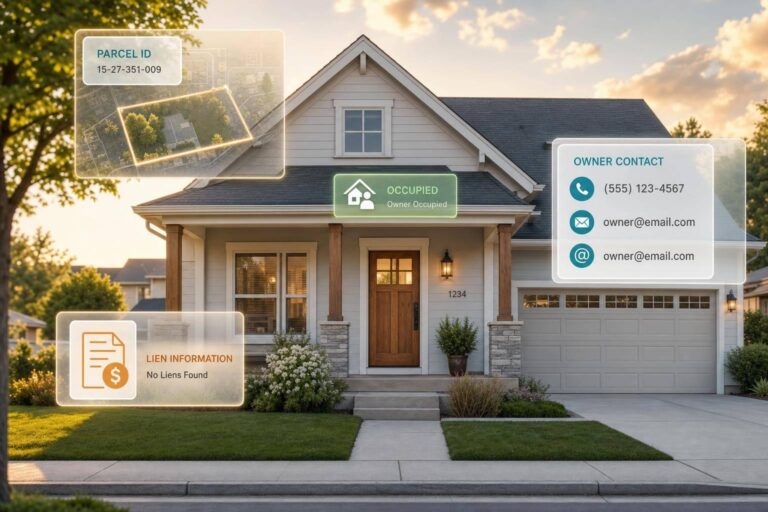
If I had to boil this down to one line, it’s this: use Parcel ID to match the property, use phone/email/mailing address to reach the owner, and use lien data plus occupancy status to decide who to act on first.
That’s the core of the article.
I’m looking at 7 fields that show up again and again in U.S. real estate enrichment:
- Owner name
- Parcel ID (APN/PIN)
- Mailing address
- Lien data
- Phone
- Occupancy status
And I’m judging them across the jobs most teams care about:
- Match accuracy
- Outreach
- Lead targeting
- Scale
A few takeaways stand out fast:
- Parcel ID is usually the steadiest property match field.
- Owner name helps start identity matching, but it can shift across people, LLCs, and trusts.
- Phone and email are the main outreach fields, but both can go stale.
- Mailing address matters most for absentee-owner mail campaigns.
- Lien data and occupancy status are better for sorting leads than for matching them.
- The article points to datasets tied to more than 155 million U.S. property records.
If you want the short version: anchor first, contact second, filter third.
Quick Comparison
| Field | Best Use | Main Issue | Best For |
|---|---|---|---|
| Owner Name | Identity lookup | Name variation | Skip tracing, personalization |
| Parcel ID (APN/PIN) | Property match | Not a contact field | Master record building |
| Mailing Address | Direct mail | Formatting and moves | Absentee-owner outreach |
| Lien Data | Distress screening | County timing lag | Deal sourcing, risk checks |
| Phone | Direct contact | Reassigned or stale numbers | Call outreach, reverse lookup |
| Digital contact | Old inboxes, deliverability | Fast owner or buyer outreach | |
| Occupancy Status | Segmentation | Changes over time | Vacancy and absentee targeting |
So if I’m building a workflow, I’d usually start with Parcel ID or owner name, append mailing address, phone, and email, then sort the list with lien and occupancy signals.
1. Owner Name
Owner name is a handy enrichment field, but it’s not the steadiest match key. Unlike a parcel ID, a name can show up in several forms across county records, especially when the owner is an individual, LLC, trust, or some other entity.
Match Stability
Owner name is a useful anchor, but it shifts across county records, entities, and aliases.
Name matching often returns ranked possibilities, not one exact result. That matters when a name has variations, aliases, or shared contact points like a household phone number. Using an owner-of-record marker helps separate the current title holder from past owners or other contacts tied to the property record. When the name data gets messy, parcel ID is usually the cleaner next move.
Outreach Effectiveness
Owner name helps with personalization and compliance, but it doesn’t drive delivery. It tells you who to contact. Phone and email do the rest.
Tracing a phone number or email back to the owner is especially useful for wholesalers and acquisitions teams that need to qualify unknown leads on the spot. Adding litigation and deceased flags straight to a name record helps teams avoid TCPA and DNC violations before outreach starts. For unknown leads, that makes owner name a bridge to phone and email, not the final contact key.
Targeting and Risk Signal
Owner name enrichment can show ownership type – individual, LLC, trust, or corporation – and that shapes how you approach outreach. Ownership type helps sort people from entities, which makes outreach more precise. But as a targeting signal, name by itself doesn’t show motivation. Lien data and occupancy status are stronger risk signals. Use owner name to classify the holder first, then check lien and occupancy fields for intent.
Scalability in Enrichment Workflows
Owner name works well in batch lookups. It’s smart to capture aliases and ownership-type tagging in batch lookups so match quality holds up at scale. That makes owner name a strong first-pass field before parcel-level matching.
sbb-itb-8058745
2. Parcel ID (APN/PIN)
If owner name is your starting point, Parcel ID is the anchor.
A Parcel ID – also called an Assessor’s Parcel Number (APN) or Property Identification Number (PIN) – is assigned by the county to a specific piece of land. And unlike an owner name, it doesn’t change when the property changes hands. That’s what makes it the most reliable match key for property data enrichment. Put simply: if you need a steady field for matching records at scale, Parcel ID is usually the best place to start.
Match Stability
Owner names change every time a property sells. Street addresses can get messy too, with formatting issues and differences between situs and mailing records. Parcel ID works differently. It’s tied to the land itself, which gives you a fixed reference point.
That means you can connect a person to a specific property even if the owner name or address has already changed. And while owner name searches may return a ranked set of possible matches, Parcel ID usually points to one result.
Outreach Effectiveness
Once a Parcel ID resolves to the right owner, contact data becomes much more dependable. You’re attaching contact details to the correct property owner, not a former owner or someone else with the same name.
BatchData‘s workflows can also include compliance signals like DNC and TCPA flags, which helps keep outreach inside legal limits.
Targeting and Risk Signal
A Parcel ID can connect a lot of property data in one place, including:
- ownership
- mortgage data
- permit data
- foreclosure data
- land use
- property class
- subdivision data
That matters when you’re building a pricing or risk model. Using Parcel ID as the anchor keeps results consistent from one run to the next, even when upstream data coverage shifts. The same steady link helps with batch enrichment and model inputs too.
Scalability in Enrichment Workflows
BatchData provides access to more than 155 million U.S. property records. When that data comes in with a standard identifier, it’s much easier to parse and model against.
For automated models, that consistency cuts processing overhead and keeps outputs comparable across large record sets.
3. Mailing Address
Parcel ID is the anchor for a property record. But the mailing address shows where the owner can actually be reached. In plain terms, it connects the property to the owner’s contact point.
Match Stability
Mailing addresses don’t stay as fixed as Parcel IDs, but they hold up better than owner names. Names can shift across aliases, spelling changes, or LLC setups. Parcel IDs usually stay put. A mailing address sits in the middle.
To keep records matchable across county systems, standardize mailing addresses with ZIP+4 and county codes. That matters most when your goal is outreach, not just database cleanup.
Outreach Effectiveness
Mailing address matters most when the owner doesn’t live at the property. If the mailing address and situs address don’t match, that’s often a sign of an absentee owner, which is a common direct-mail segment.
Verified mailing addresses also cut wasted mail spend. And that adds up fast. More than 96% of investor-owned single-family homes are held by small operators that own 10 properties or fewer. At that size, clean mailing address matching can make direct mail a lot less hit-or-miss.
Targeting and Risk Signal
When the mailing address differs from the property address, the record often points to absentee ownership or an entity owner. Pair that with vacancy status or ownership type, and mailing address becomes a strong way to sort records for investor targeting and risk review.
Once you know where the owner is, the next question is simple: which records need attention first? That’s where lien data starts to matter more.
Scalability in Enrichment Workflows
Mailing address enrichment works well at scale. BatchData supports up to 100 inputs per API call synchronously, and bigger datasets can move through asynchronous bulk delivery in CSV, JSON, or Parquet.
So the flow is pretty straightforward: mailing address helps resolve the owner, and lien data helps flag urgency or risk.
4. Lien Data
After contact fields, lien data adds urgency and risk context. Mortgage and foreclosure records help you understand what’s going on with a property, but they should not be used as the main match key. First, resolve the property with Parcel ID or a standardized address. Then add lien data on top.
Match Stability
Lien data changes too often to support cross-county matching on its own. Counties update records on different schedules, so the same property can look different depending on when and where the data was pulled. That’s why you should match the record first with Parcel ID or a standardized address, then append lien data after that. Once the match is set, lien data becomes useful as a sorting signal for outreach and risk.
Outreach Effectiveness
Lien data doesn’t help you contact someone the way skip tracing for a phone number or mailing address does. Its job is different: it helps you decide who to contact first. Real estate wholesalers, fix-and-flip operators, and disposition teams use pre-foreclosure status and other lien signals to qualify leads and spot motivated sellers before spending budget on outreach.
Targeting and Risk Signal
Lien data can point to distressed ownership patterns and sharpen risk screening for lenders and insurers. Lenders and insurers also use lien and ownership signals to flag file mismatches and identify higher-risk applicants or claimants. When you pair lien data with occupancy status in section 7, you get a clearer read on both distress and likely motivation.
Scalability in Enrichment Workflows
At scale, lien data only works well if it shows up in a consistent format across every property. If field shapes vary too much, automated systems have a harder time comparing records in a reliable way. Keep lien payloads lean and consistent so systems can compare, parse, and model records fast, with suppression flags delivered inline.
5. Phone
Once lien data shows urgency, phone data answers a more practical question: can you reach this person at all? That’s what makes phone different from Parcel ID or lien data. A phone number isn’t just another record field. It’s an action field because it lets you contact someone directly.
Match Stability
Phone numbers change more often than owner names or property addresses. A single number can also belong to more than one person, whether that’s a shared household line or a number that got reassigned. So while property fields tend to stay put, phone data can go stale fast.
That’s why recency and verification matter more here than they do for static property details. To deal with shared or reassigned numbers, some systems return ranked matches.
Outreach Effectiveness
Phone data adds value in two ways.
- In forward skip tracing, you start with a name or address and append a phone number so outreach can begin.
- In reverse enrichment, you start with an inbound number and trace it back to a person and the property they own.
That second use case matters when leads come in from calls or form fills tied to a phone record. Reverse skip trace requests can handle up to 100 inputs per call.
Line type, carrier, and reachability signals also help teams focus on numbers that are more likely to work. In plain English, this helps cut wasted dials. Filtering lead lists by "recently reachable" flags can improve dialer efficiency .
Targeting and Risk Signal
Phone enrichment also helps with compliance. Teams can embed TCPA, DNC, litigator, and deceased flags in the response, then filter risky contacts before anyone places a call.
Scalability in Enrichment Workflows
At scale, phone enrichment has to work for both instant checks and large-volume processing. Synchronous API endpoints fit inbound lead qualification, where speed matters and the answer needs to come back right away. Bulk delivery through SFTP in CSV, JSON, or Parquet fits bigger list-processing jobs.
In many setups, usage is metered by matched records. Organizations often scale these efforts using tailored real estate data solutions to manage costs.
When phone confidence is low, email is usually the next contact field to check.
6. Email
Email is a contact field, not a property key. That matters. Unlike a parcel ID, an email address doesn’t point to a property on its own. You first have to match it to a property record to find the current owner.
Match Stability
If phone data is thin or missing, email is usually the next field to check. But timing makes a big difference. A three-year-old email is much less dependable than a fresh inbound email.
People also tend to collect multiple email addresses over time. Some get abandoned. Some become backup accounts. Some are used once and forgotten. That’s why email enrichment works best when it includes deliverability checks and match ranking. Put simply, not every email on file deserves the same level of trust.
There’s another layer here too: pairing email with a phone number in the same lookup creates a stronger identity match than using either field by itself. One signal can help. Two signals usually tell a clearer story.
Outreach Effectiveness
For matching, email sits below parcel ID. For outreach, it performs better than name alone. That makes it useful when speed matters and the starting point is limited.
BatchData’s Ivo Draginov notes that many users begin with a phone number or email and need to identify the owner fast. In dispositions, email can help teams reach cash buyers and portfolio owners without much delay.
Targeting and Risk Signal
Email enrichment can return deliverability and suppression flags before a message goes out. That’s a practical check. No one wants to burn time or sender reputation on bad addresses.
In insurance and lending, enriched email data can also reveal gaps between inbound contact data and what’s already in file. Those mismatches can act as a risk signal. A small detail like that can hint that something doesn’t line up.
Scalability in Enrichment Workflows
Email enrichment can scale through real estate APIs for real-time qualification or through bulk files for high-volume list processing. So whether the workflow handles one lead at a time or large batches, email can fit into both setups.
Billing is also usually tied to matched person records, not API calls.
If email shows who can be reached, occupancy status shows whether the property is actually occupied.
7. Occupancy Status
Occupancy status is the last filter you use for targeting, not a field you use to make a match. It won’t identify a property like a parcel ID, and it won’t show you how to contact someone like a phone number or email address. What it will do is help you sort properties into three useful buckets: owner-occupied, absentee-owned, or vacant.
Match Stability
This field changes more often than many of the others in this section. People move. Owners turn a primary home into a rental. Tenants leave. That means occupancy status can shift fast, and stale data becomes a problem if you don’t refresh it on a regular basis. Pulling from more than one source helps fill in holes, but this is still a field that moves around.
Outreach Effectiveness
Occupancy status is best used for segmentation. It helps you decide who to go after, while phone and email tell you how to reach them. That distinction matters.
If you send mail to the property address, there’s a chance it lands in a tenant’s hands instead of the owner’s. Pair occupancy status with mailing address data, and that issue gets smaller. For home services, lending, and refinance campaigns, checking owner-occupancy first can cut wasted outreach. In plain English: this is a screening field, not a contact field.
Targeting and Risk Signal
After you segment a record, occupancy status starts doing another job: it acts as a risk signal. Vacancy stands out in real estate data and is often used in automated valuation and investment screening to find motivated sellers or mispriced listings. It’s also handy when you need to separate owner-occupied homes from absentee-owned properties.
Scalability in Enrichment Workflows
Occupancy status can be added alongside other property fields in the same payload, which helps keep large-batch workflows efficient. If billing is based on matched records instead of raw API calls, unmatched lookups won’t push costs up for no reason. That makes occupancy status useful for one-off checks and for bulk enrichment at scale.
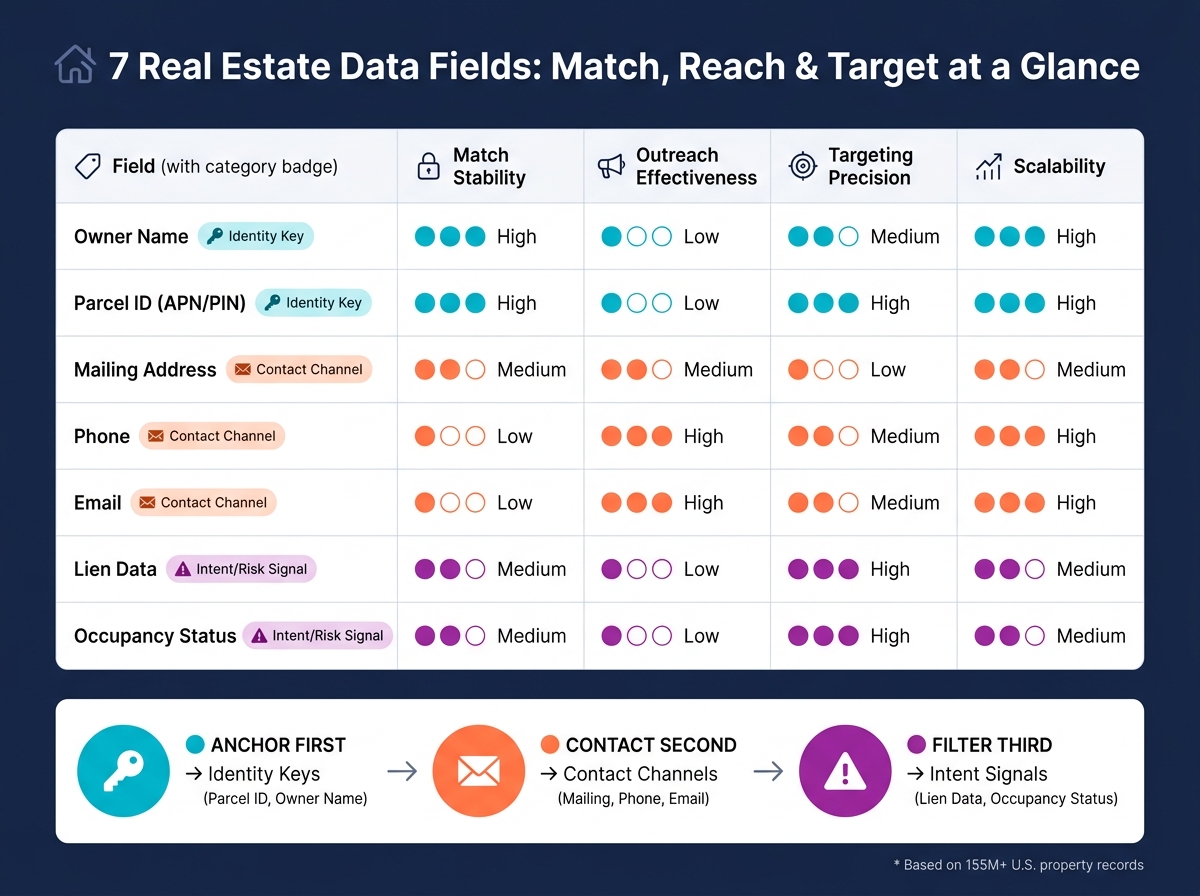
How All 7 Fields Compare Across Key Decision Criteria
7 Real Estate Data Fields: Match, Reach & Target at a Glance
Different fields do different jobs. Some help you anchor a record, some help you reach the owner, and some help you decide who to act on first. After looking at each field on its own, it helps to compare them side by side.
The table below lines up all seven fields across four decision points: match stability, outreach effectiveness, targeting precision, and scalability.
| Field | Category | Match Stability | Outreach Effectiveness | Targeting Precision | Scalability |
|---|---|---|---|---|---|
| Owner Name | Identity Key | Medium | Low | Medium | High |
| Parcel ID (APN/PIN) | Identity Key | High | Low | High | High |
| Mailing Address | Contact Channel | Medium | Medium | Low | Medium |
| Phone | Contact Channel | Low | High | Medium | High |
| Contact Channel | Low | High | Medium | High | |
| Lien Data | Intent/Risk Signal | Medium | Low | High | Medium |
| Occupancy Status | Intent/Risk Signal | Medium | Low | High | Medium |
That tradeoff is pretty straightforward: anchor first, contact second, then filter by risk.
The seven fields fit into three groups:
- Identity keys anchor the record
- Contact channels help reach the owner
- Intent signals help prioritize the record
Parcel ID ranks highest for match stability. Owner Name comes next, but it can shift across individuals, LLCs, and trusts. Phone and Email rank highest for outreach effectiveness, though both need refreshes to stay reliable. And here’s the catch: input quality changes from source to source, so average match rates don’t always tell the full story.
When you’re working at scale, identity keys and direct contact fields are usually the easiest to automate. Identity keys and contact fields are the easiest to scale, while Lien Data and Occupancy Status need more frequent refreshes. BatchData supports bulk append and property search workflows at scale, with usage metered by matched records returned.
Pros and Cons of Each Field Type
Each field does a different job, and each one comes with a tradeoff. The table below gives a quick side-by-side view.
| Field | Main Strength | Main Limitation | Biggest Quality Risk |
|---|---|---|---|
| Owner Name | Foundation for identity resolution and personalization | LLC and trust masking can hide the actual decision-maker | Aliases and entity masking reduce match precision |
| Parcel ID (APN/PIN) | Uniquely anchors a property record with very high stability | Not actionable for direct outreach on its own | Very low; it is mainly a technical anchor rather than a data-quality problem |
| Mailing Address | Essential for physical mail campaigns | Needs standardization and validation to stay deliverable | Unstandardized address formatting lowers deliverability |
| Lien Data | Strong distress signal for motivated seller targeting | Can lag behind market shifts | Recording lag can make it less current than other fields |
| Phone | Highest immediate outreach value | Reassigned numbers and compliance issues can reduce usable reach | Stale or reassigned numbers reduce reach |
| Low-cost, scalable digital outreach | Deliverability drops without regular testing | Stale records reduce effective reach | |
| Occupancy Status | Helps identify absentee owners | May not reflect recent move-ins or short-term vacancies | Recent changes can be missed if source data is not refreshed |
Here’s the plain-English version: no single field does everything.
Owner Name helps you figure out who you’re dealing with. Parcel ID (APN/PIN) ties the record to the right property. Mailing Address, Phone, and Email are what make outreach possible. Lien Data and Occupancy Status help you spot cases that may deserve extra attention.
That said, contact fields are only useful if they’re clean. Owner names, mailing addresses, phone numbers, and email addresses still need standardization and verification before they can work at scale.
That’s why many enrichment workflows start with Parcel ID as the anchor, then add contact and risk fields on top. It’s the easiest way to keep the property record stable first, then make it usable for outreach and targeting.
Conclusion
After looking at each field side by side, the choice comes down to workflow. There isn’t one field that works best for every job. The right pick depends on what you’re trying to do.
A simple way to think about it: start with a stable anchor like Parcel ID or owner name. Then expand your reach with mailing address, phone, or email. After that, sort and screen with lien data and occupancy status.
Here’s the shortest path to the right mix.
| Workflow | Lead With | Then Add |
|---|---|---|
| Owner Outreach | Phone, email | Compliance flags, mailing address |
| Deal Sourcing | Lien data, occupancy status | Owner name, mailing address |
| Skip Tracing | Owner name, mailing address | Phone, email |
| Risk Review | Lien data, occupancy status | Parcel ID, owner name |
| Master Record Creation | Parcel ID | Owner name, mailing address |
This order helps keep enrichment stable at the start, then makes the record more usable for outreach and risk screening.
BatchData provides access to more than 155 million U.S. property records.
FAQs
Which field should I start with first?
Start with the field you already have.
If your CRM, lead forms, or inbound calls give you contact data, use that first. A phone number or email is enough to kick off reverse contact enrichment.
If you have a property address, begin there. That works best for forward skip tracing.
And if you’re running valuation or buyer-matching workflows, start with the subject property address. From there, you can find comparable properties or active investors.
When should I use Parcel ID instead of owner name?
Use Parcel ID when you need a precise, machine-readable way to make sure you’re working with the right property record. It’s especially useful for data integration and bulk processing, where even a small mismatch can cause problems.
Owner names can get messy fast. Common names, nicknames, aliases, and recording differences can all point to the wrong record. Parcel ID avoids that issue because it links straight to the property itself, not the way a person’s name happens to appear in public records.
How often should I refresh phone, email, lien, and occupancy data?
Refresh data based on your analysis or business needs, not a fixed quarterly schedule.
If you’re doing market research or revaluing a portfolio, update value, equity, and turnover trends as fresh neighborhood sales data comes in. That gives you a current read on what’s happening on the ground instead of leaning on an old calendar-based refresh.
For contact data, BatchData reachability signals and recent activity flags can help you see whether phone numbers and email records are still current.