
Data quality drives real estate success. With over 90% of investment decisions relying on property data, choosing the right API provider is critical. A trial ensures your chosen platform meets your needs before committing to a contract.
Key Highlights:
- 1,000+ property data points per property: Includes ownership, financial indicators, distress signals, and new metrics like climate risk scores.
- Boost efficiency: Reduce underwriting labor costs by 50% and achieve a 76% right-party contact rate.
- Developer-friendly access: BatchData offers instant sandbox access, real-time APIs, and bulk delivery options for seamless testing.
What to Test:
- Match rates and data depth across property records.
- Nationwide coverage and data update frequency.
- Compliance with TCPA and Federal DNC regulations.
- API performance (latency, error rates) under load.
Start your trial with a clear plan, test critical metrics, and scale confidently for enterprise use.
Real Estate Data Masterclass 2025: AI + Automation
Core Metrics for Evaluating Property Enrichment APIs
When testing an API, the metrics it provides can vary widely. To make the trial worthwhile, engineering teams need a clear plan for what to measure and a solid understanding of what qualifies as "good" performance.
Match Rate and Data Depth
Match rate measures how many of your input records – like addresses, parcel IDs, or owner name-plus-address combinations – are successfully enriched with useful data. It’s best to calculate match rates separately for each enrichment goal rather than lump them into a single figure. For U.S. real estate data, here are some benchmark match rates to aim for:
| Enrichment Goal | Strong Match Rate Benchmark |
|---|---|
| Property identity (clean address) | 90%+ |
| Owner identity + at least one contact method | 70–85% |
| Full contact profile (owner + mobile + email) | 50–70% |
Beyond match rate, data depth determines how practical and actionable the enriched records are. To evaluate this, check the API’s performance across five key areas:
- Ownership details: Owner name, entity type, and mailing address
- Property characteristics: Square footage, bed/bath count, year built
- Transaction history: Last sale date, price, and deed type
- Financial indicators: Estimated equity, mortgage history, lien data
- Distress signals: Pre-foreclosure status, tax delinquency
A straightforward scoring system – assigning one point per completed field in each record – lets you calculate an "average fields per property" metric. This makes it easier to compare vendors objectively. For example, during a BatchData trial, you can test all five dimensions using live data. Their enrichment endpoint returns a complete property profile, including financial distress indicators and tools for resolving entities behind LLCs – an essential feature for investment platforms.
From here, you’ll also want to assess the API’s geographic coverage and data update frequency to get a clearer picture of its reliability.
US Market Coverage and Data Freshness
Match rates alone don’t tell the whole story. It’s also important to test the API’s nationwide coverage and how up-to-date its data is. Nationwide coverage claims should be validated by testing across different U.S. regions – Northeast, Midwest, South, and West – and include both urban areas and rural counties. By calculating match rates and attribute completeness for each region, you can identify any geographic gaps.
Data freshness is another critical factor. Outdated ownership or distress data can lead to poor underwriting decisions or wasted outreach efforts. During the trial, check timestamps and event dates in the API’s output. Metrics like "median age of last sale record" or "time since last pre-foreclosure status change" can help you gauge how current the data is. For high-value use cases, most enterprise teams require updates every 30–90 days, so confirm the API can meet that schedule through polling, webhooks, or bulk refreshes. This is a key checkpoint during the trial.
Compliance and Privacy Readiness
For enterprise use, compliance is just as important as data quality. After evaluating match rates and coverage, you need to ensure the API meets critical compliance standards. This isn’t something to address after the trial – it should be part of the trial itself. For U.S. real estate outreach, the two most important compliance requirements are TCPA readiness and Federal DNC adherence. Under the TCPA, violations can cost $500 per instance, with willful violations reaching up to $1,500. A single mass-dialing campaign using non-compliant data could lead to millions in potential liability.
To minimize risk, compliance flags should be embedded directly in the API output, not handled as a separate downstream process. BatchData, for example, integrates compliance indicators into its enrichment data. These include Federal DNC list matching, known litigator scrubbing, and real-time phone validation to filter out disconnected numbers before they reach a dialer.
"Shield your users from lawsuits with known litigator and Federal DNC scrubbing." – BatchData
During the trial, test a sample of contacts through these compliance features to verify their accuracy and consistency. Ensure the compliance metadata is structured for seamless integration into your CRM or dialing workflows. When compliance data is delivered inline, it reduces both engineering effort and large-scale legal risks significantly.
Technical Considerations for Enterprise Integration
Once your data quality and compliance are verified, the next step is ensuring your API functions smoothly within your production environment. This involves testing everything from performance and delivery methods to compatibility with your existing technology stack – not just focusing on data accuracy.
API Design and Performance Testing
To understand how your API performs under real-world conditions, measure P95 and P99 response latencies. These metrics provide insight into how the API behaves under load. For instance, the real-time API offers sub-second responses and guarantees a 99.99% uptime SLA, making it a solid choice for enterprise-grade reliability.
During testing, simulate peak load scenarios by sending parallel requests to evaluate concurrency limits. This helps identify potential throttling or performance drops. For workloads requiring higher throughput, BatchData provides custom enterprise plans with dedicated infrastructure and volume-based rate limits. Additionally, you can optimize performance by using compound queries to retrieve multiple datasets in a single call, reducing the overall request volume.
Apart from real-time calls, explore alternative data delivery methods to accommodate different workload requirements.
Data Pipelines and Bulk Delivery
Not every workflow requires real-time API calls. For tasks like enriching a portfolio of 500,000 properties or training a machine learning model, bulk data delivery is often more efficient than individual REST calls. BatchData supports three main delivery options, allowing you to choose the best fit for your specific needs:
| Delivery Method | Best Use Case | Supported Formats/Platforms |
|---|---|---|
| Real-Time REST API | Transactional lookups, user-facing apps | JSON, SDKs (Python, Node.js) |
| Direct Cloud Access | Large-scale analytics, BI, ML models | Snowflake, BigQuery, Databricks |
| Bulk File Delivery | Data warehousing, database enrichment | CSV, Parquet via S3 or Google Drive |
For modern data workflows, Snowflake Data Sharing simplifies the process by delivering enriched property data directly into your data warehouse, eliminating the need for custom import pipelines.
AI and Automated Workflow Readiness
Once your API and data pipelines are in place, focus on preparing your system for AI-driven automation. Whether your team is developing AI-powered underwriting tools, automated CRM workflows, or research agents using large language models (LLMs), testing BatchData’s Model Context Protocol (MCP) compatibility is a smart move during the trial phase.
The MCP server connects property data tools directly to AI clients like Claude (available on Desktop, Web, and Mobile), ChatGPT in developer mode, Cursor, and Claude Code. Authentication can be handled via OAuth (recommended for its automatic token refreshing) or a manual API token for legacy systems.
The MCP toolset supports key functionalities such as property lookups, skip tracing, phone verification with DNC/TCPA status, and address standardization. These features can be accessed directly from an AI agent or IDE. For teams building automated enrichment pipelines, this integration eliminates the need to create custom middleware, streamlining the connection between your AI layer and data layer.
Step-by-Step Guide to Running a BatchData API Trial
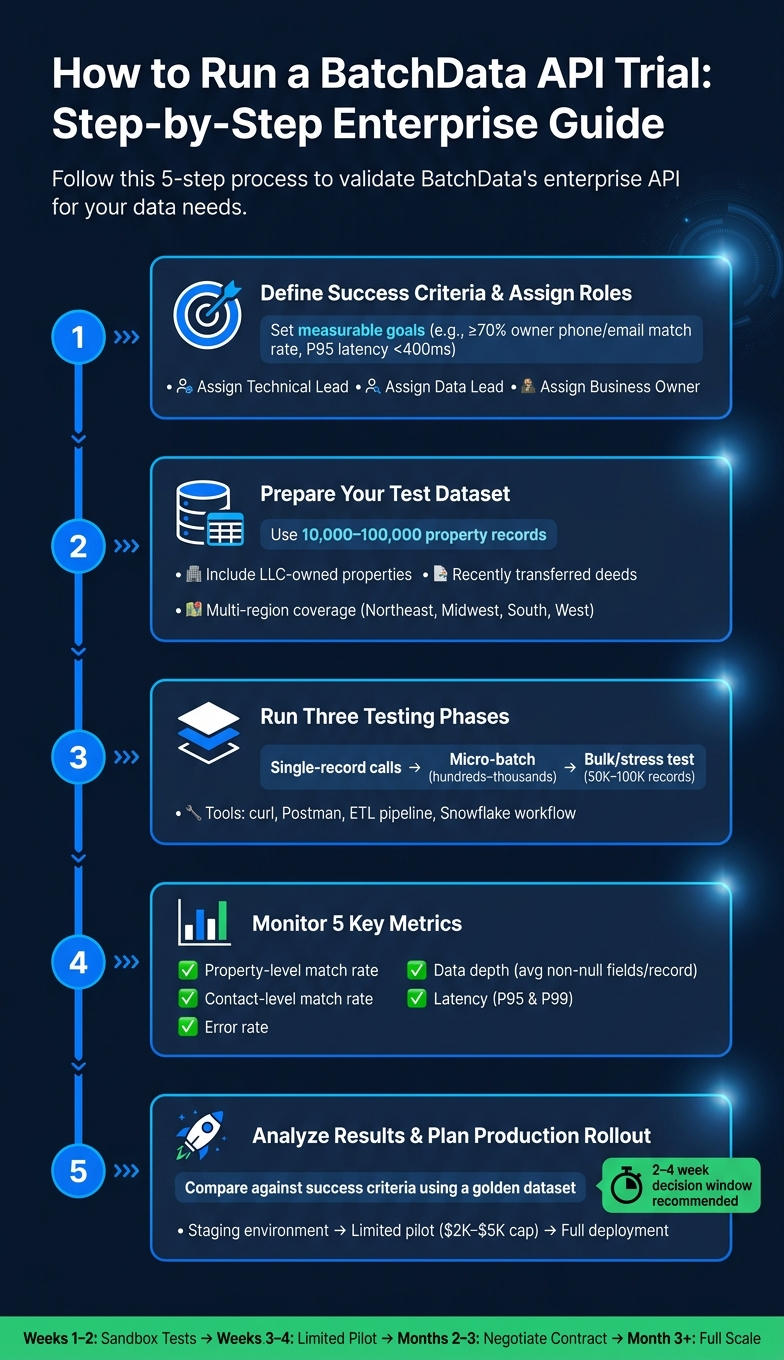
How to Run a BatchData API Trial: 5-Step Enterprise Guide
Start your trial with a clear goal in mind and a structured plan to test the API effectively.
Preparation and Trial Access
Before diving in, define specific and measurable success criteria. For instance, a strong objective might be: "Achieve ≥70% owner phone and email match rate across 50,000 test properties in California, Texas, and Florida, with P95 latency under 400 ms." Avoid vague goals, as they often lead to unclear outcomes.
Assign key roles upfront: a technical lead to handle integrations, a data lead to oversee dataset preparation, and a business owner to align the trial with broader objectives. Once roles are set, developers can sign up for a free API key directly through the BatchData dashboard. This allows you to start making live calls right away – no lengthy sales process required. For larger-scale enterprise needs, it’s best to consult with a data expert. They can help configure custom rate limits, dedicated infrastructure, and a trial scope tailored to your use case.
The dataset you choose for testing is critical. Aim for a sample of 10,000–100,000 property records that represents a variety of regions, price ranges, and transaction histories. Include challenging records, such as LLC-owned properties, recently transferred deeds, and known data gaps from previous providers. The closer your test dataset aligns with your production needs, the more actionable your trial results will be.
Running the Trial and Measuring Results
Break your testing into three phases:
- Single-record calls: Use tools like curl or Postman to validate schema mapping and error handling.
- Micro-batch tests: Process a few hundred to a few thousand records through your actual integration setup, such as a backend service, ETL pipeline, or Snowflake workflow. This helps identify bottlenecks in your system.
- Bulk or stress tests: Run larger batches of 50,000–100,000 records to simulate high-demand scenarios, like a campaign launch or a portfolio-wide data enrichment.
Throughout the trial, monitor these five key metrics:
- Property-level match rate: The percentage of input parcels that return a valid record.
- Contact-level match rate: The percentage of records with at least one verified phone number or email address.
- Data depth: The average number of non-null enrichment fields per record.
- Latency: P95 and P99 latency under realistic levels of concurrency.
- Error rate: The frequency of errors during processing.
BatchData’s extensive coverage ensures reliable performance, even during stress tests. If match rates seem lower than expected, check whether your input addresses are properly standardized. While the API can handle variations like "St." versus "Street", malformed inputs can reduce accuracy.
Use the results from these tests to fine-tune your approach for production.
Reading Results and Planning for Production
Once the trial is complete, compare your metrics against the success criteria you established during preparation. To cross-check data quality, use a small golden set of properties where you already have verified owner contact data from previous campaigns or your CRM. This helps confirm whether the API is delivering high-quality matches, independent of any dataset design issues.
"What used to take 30 minutes now takes 30 seconds. BatchData makes our platform superhuman." – Chris Finck, Director of Product Management
If the API performs well on key metrics like contact data and distress indicators, prioritize those endpoints for your initial production integration. Plan a gradual rollout: replicate your trial setup in a staging environment first, then run a limited production pilot with active monitoring. Once everything checks out, scale to full integration. Be sure to document the process for consistency and ongoing validation.
Pricing and Scaling for Enterprise Use
Once you’ve confirmed API performance and integration readiness, the next step is to dive into pricing and scaling options for enterprise deployment.
How BatchData Pricing Works
BatchData offers two pricing models: pay-as-you-go for flexible usage and custom enterprise agreements for large-scale operations.
The pay-as-you-go option is ideal for teams just starting out. You can begin with a free API key and only pay for the data you consume, which is especially useful during trials or when usage patterns are still uncertain. As your needs stabilize, transitioning to a custom enterprise plan makes sense. These agreements typically include API access, bulk data delivery, compliance scrubbing, and dedicated support, all bundled into a negotiated contract.
To estimate costs after your trial, calculate your expected call volume and multiply it by the per-record price, factoring in the level of data enrichment. For example, basic property records are cheaper than enriched profiles that include verified phone numbers, email addresses, and financial distress indicators. Let’s say your CRM enrichment process handles 100,000 records monthly at an 80% match rate, with enriched contacts priced at $0.06 per matched record. Your monthly spend would be around $4,800 (100,000 × 0.80 × $0.06). Use trial data – like total calls, match rates, and endpoint usage – to guide your pricing and scaling decisions.
Another key cost consideration is the delivery method. Real-time REST API calls are priced per request and are best for workflows requiring low latency, such as CRM lookups or underwriting. Bulk delivery options, like AWS S3, SFTP, or Snowflake Data Sharing, use a per-property pricing model, offering better cost efficiency for large-scale operations. For instance, refreshing a 2,000,000-property portfolio quarterly via bulk delivery could cost about $20,000 per quarter (at $0.01 per property per refresh), compared to individually querying the API for each record.
Don’t overlook compliance-related costs. Features like built-in TCPA/DNC scrubbing might be part of your base plan or available as add-ons, depending on your contract. You should also account for legal reviews of data usage rights and indemnification terms, as these can impact your overall cost structure, even if the per-record rate seems appealing.
Armed with a clear understanding of pricing, you’ll be ready to move from trial to full-scale deployment.
Moving From Trial to Full Deployment
Transitioning from trial to production typically happens in four stages. In the first two weeks, run sandbox tests to evaluate match rates, latency, and data completeness across your target regions. Weeks three and four are for a limited production pilot, usually in one market or for a specific feature, with spending capped between $2,000 and $5,000. By months two and three, you’ll have enough data to negotiate the right contract tier and commitment level. After three months, scale up across all markets and use cases, adding advanced features like financial distress indicators, Portfolio Monitoring webhooks, or Snowflake Data Sharing as they demonstrate value.
As your usage grows, BatchData supports scaling with features like increased rate limits, dedicated infrastructure, and tiered support. For smaller volumes, self-serve documentation is sufficient, but enterprise users benefit from white-glove onboarding and a dedicated Slack channel. The platform also guarantees 99.99% uptime SLA for its real-time API, a critical metric for mission-critical deployments.
Here’s a quick overview of how delivery, support, and pricing evolve across different usage stages:
| Stage | Delivery Method | Support Model | Pricing Structure |
|---|---|---|---|
| Trial / Sandbox | REST API | Self-serve docs & developer portal | Free API key |
| Production (Standard) | REST API | Standard support | Pay-as-you-go |
| Enterprise / High-Volume | API + Bulk (S3, Snowflake, SFTP) | White-glove onboarding + dedicated Slack | Custom contract with volume discounts |
Conclusion: Next Steps for Building on BatchData
By now, you’ve seen how the BatchData enterprise trial delivers property data solutions across 99.9% of U.S. properties. It includes verified homeowner contacts, daily data refreshes, and a 99.99% uptime SLA – all designed to provide reliable and actionable information.
To move forward, start by confirming your API configuration. This includes endpoints, field selections, geographic filters, and version control alongside match-rate benchmarks and latency profiles (P95/P99). This setup is the foundation for a controlled pilot. Begin by deploying BatchData in one high-impact workflow, like a single outbound campaign or an underwriting queue, limited to specific states or ZIP codes. Use this pilot to measure key metrics, such as contactability or model accuracy improvements, against your baseline before scaling further.
Next, secure approvals from key stakeholders:
- Engineering: Ensure performance and integration readiness.
- Finance/Procurement: Confirm monthly spend projections.
- Legal/Compliance: Address compliance with TCPA, FCRA, and data retention requirements.
Aim for a 2–4 week decision window after the trial to keep up momentum and avoid getting stuck in "trial purgatory."
Once internal approvals are in place, leverage the trial’s benefits to shape your broader product and AI strategies. Verified contact data can unlock omnichannel outreach opportunities, while equity and distress indicators enhance propensity-to-sell models. With BatchData’s Model Context Protocol (MCP) support, you can seamlessly integrate enrichment into AI-powered underwriting tools and internal copilots.
After rollout, maintain a proactive approach with clear monitoring and review processes. Implement a 30–60 day post-launch monitoring period to track performance. Set budget alerts at 75% and 90% of your monthly spend limit to avoid surprises. Schedule quarterly ROI reviews to compare enrichment costs against revenue impact, and run your golden dataset through the API monthly to detect potential data drift early. The trial provided the baseline; now it’s time to ensure production delivers on its promise.
FAQs
What data should I include in my trial test file?
Your trial test file should include key details such as the property address or APN, ownership information, and property characteristics like the number of bedrooms, bathrooms, square footage, lot size, and year built. It should also cover valuation data, tax assessments, sales history, mortgage and lien details, along with verified contact information such as phone numbers and emails. Including these elements helps ensure precise testing of match rates and the depth of data.
How do I measure match rate and data depth during the trial?
To determine the match rate, calculate the percentage of property records that were successfully enriched during the trial period. Aiming for a rate above 95% is ideal. For data depth, assess how complete the returned profiles are. Look for essential details such as owner contact information, property attributes, and financial indicators. These metrics provide a clear picture of how well the API performs in enriching data and the level of detail it can deliver.
What should I load-test for latency and error rates?
To make sure your API performs reliably, it’s essential to load-test response times. Aim to keep them under 500ms, with error rates staying below 1% and maintaining 99.9% uptime. Pay close attention to key latency metrics like P95 (95th percentile) and P99 (99th percentile), which highlight how your API performs under heavier traffic. Also, verify that your infrastructure can support high levels of concurrency without throttling. These steps help ensure your API can handle demanding, real-world scenarios effectively.