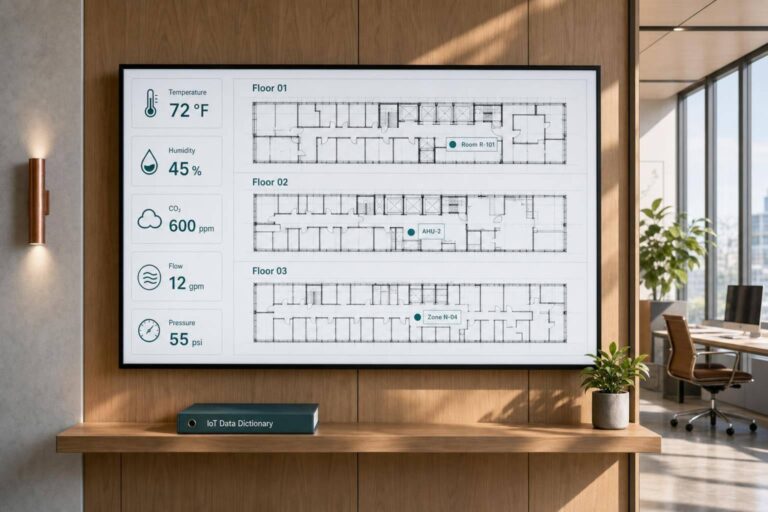
If your IoT fields are not named, formatted, and linked the same way across systems, your alerts, reports, and work orders can break.
I’d boil this article down to one point: a usable IoT data dictionary tells every team exactly what each field means, where it comes from, which units and formats it uses, and what action it should drive. In property management, that means standard dates like 07/10/2026, times like 08:15 AM, temperatures in °F, and matching IDs for properties, units, zones, devices, and events.
Here’s the short version of what matters most:
- Define fields in plain English first. Then add data type, units, source, sample value, and update frequency.
- Keep telemetry and events separate. A steady reading like 72.5°F every 60 seconds is not the same as an event like water detected.
- Split records by use case. Device data, business events, and maintenance records should not live in the same structure.
- Map every record to a place. Use the same
property_id,building_id,unit_number, andzone_idrules everywhere. - Treat occupancy, access, and alerts as different data streams. They can connect through shared location IDs, but they should not replace one another.
- Tie thresholds to action. A threshold should connect to severity, routing, SLA, and whether a work order should open.
- Separate alarms from notifications. One needs fast action; the other can wait for a normal review cycle.
- Use a small set of required fields. In many cases, 7 core field details and a few event-specific fields are enough to keep data clean across a portfolio.
A few numbers stand out in the article and show how this works in practice:
- Temperature telemetry example: 72.4°F, 72.8°F, 73.1°F
- Sample update rate: every 60 seconds
- Sample alert rule: temperature > 90°F for 15 minutes
- Sample occupancy rule: lower a setpoint to 68°F after 10:00 PM
- Sample comfort SLA: 24–48 hours
- Sample critical SLA: within 1 hour
- Sample predictive maintenance confidence: 0.87
- Sample inspection lead time: within 14 days
What I like here is the focus on consistency over size. You do not need a giant field catalog. You need one source of truth that keeps dashboards, automations, and portfolio reporting from drifting out of sync.
Data, Data Everywhere: How IoT is Transforming FM into Data Management
Core IoT Terms Used in Buildings and Property Systems
These terms show up across HVAC, leak detection, access control, lighting, and building monitoring systems. Getting them straight early helps you avoid messy mismatches when data from different vendors ends up in the same dashboard.
Sensor, IoT Device, Sensor Event, and Telemetry
A sensor is the hardware that measures a physical condition, such as temperature, humidity, motion, water presence, vibration, or air quality. An IoT device is the connected endpoint that contains one or more sensors and sends data over a network.
That distinction matters. You want separate entries for what is being measured and what is sending the data. For example, a leak detector under a sink is one IoT device with a water sensor.
Once those device types are clear, the next job is separating continuous readings from discrete events.
A sensor event is a discrete occurrence, like "water detected", "door opened", "motion detected", or "smoke alarm triggered." It logs something that happened at a point in time.
Telemetry is different. It’s the steady stream of readings a device sends over time, such as 72.4°F at 8:05 AM, 72.8°F at 8:10 AM, and 73.1°F at 8:15 AM. A freezer unit might send telemetry every 5 minutes without setting off any alert. But the second that reading crosses a threshold, it creates a sensor event.
Standardize telemetry fields as timestamp, device_id, reading_value, unit, event_type, and location_id, mapped to a unit, suite, or zone. Sensor events should add severity to that list.
| Term | What It Represents | Property Example |
|---|---|---|
| Sensor | Hardware that measures a condition | Water sensor under a sink |
| IoT Device | Connected endpoint that sends data | Smart thermostat in a unit |
| Sensor Event | A discrete occurrence | "Leak detected" |
| Telemetry | Ongoing stream of readings | 72.4°F every 5 minutes from an HVAC zone |
Device Status, Gateway, Cloud Platform, and Edge Device
Device status tells you whether a device is online and healthy. Common values include online, offline, battery_low, fault, and inactive.
A leak sensor with a low battery may still send readings, but marking it as battery_low tells staff it needs service before it disappears entirely. A fault status usually means the device failed a self-test or is reporting an internal error. That’s different from simply missing a check-in.
A gateway is the local bridge that gathers data from nearby devices and sends it to a cloud platform or building management system. Many sensors and building devices use protocols like Zigbee, Z-Wave, LoRaWAN, BACnet, Modbus, or MQTT and can’t connect straight to the internet. In an apartment building, a gateway in a mechanical room might collect data from leak sensors, door sensors, and HVAC devices across a full floor before sending that data upstream.
An edge device goes one step beyond that. While a gateway mostly moves data, an edge device processes data on-site before sending it along. It can apply rules, filter noise, or make local control decisions without waiting on the cloud. A building controller that shuts off ventilation when a room is unoccupied, or suppresses repeated alerts from a noisy sensor, is acting as an edge device.
For time-sensitive events like water leaks, that difference matters. Waiting for a cloud round trip adds latency, and that delay can mean more damage.
The cloud platform is where data from all of these sources gets stored, visualized, and analyzed. It’s where property teams watch alerts across buildings and where historical HVAC telemetry can be analyzed for energy trends.
These terms form the base layer for mapping device data to spaces, units, and occupancy.
Occupancy, Space, and Unit Mapping Terms
This section maps device data to units, zones, and occupancy records. Start with device-level terms, then connect each record to the space it actually serves.
Occupancy Sensor, Occupancy Signal, and Access Event
An occupancy sensor detects presence in a space. It sends that status back to the building system when the space is in use.
An occupancy signal is the state reported by that sensor, usually occupied or vacant. Common fields include sensor_id, signal_state, timestamp, and, in some cases, duration_seconds. Keep access records as a separate event stream rather than using them in place of occupancy.
An access event logs a door or credential interaction. If a resident uses a key fob to enter Apt 304 at 07/10/2026 08:15:00 AM, the record should include door_id, user_id, event_type such as badge_entry, result such as success, and timestamp. Store access events separately from occupancy signals, then connect them through shared location IDs.
| Term | What It Captures | Key Fields |
|---|---|---|
| Occupancy Sensor | Hardware detecting presence | sensor_id, sensor_type, unit_number, device_status |
| Occupancy Signal | Reported state from sensor | signal_state, timestamp, duration_seconds |
| Access Event | Door or badge interaction | door_id, user_id, event_type, result, timestamp |
Unit Mapping, Zone Mapping, and Space Utilization Metrics
After occupancy is defined, connect each record to the correct leased space. Unit mapping links each device record to a specific lease space with fields like property_id, building_id, unit_number, and zone_id.
Use zone mapping when the building runs on shared systems instead of unit-by-unit control. This groups devices into larger operating areas, such as floors, wings, or common spaces, for HVAC, lighting, or access control.
Space utilization metrics turn occupancy and access data into rates you can track over time. In plain terms, they convert those records into an occupancy rate or utilization rate, usually calculated as occupied time divided by available time × 100. Store both the source counts and the derived rates in your analytics tables so dashboards can show trends without recalculating everything from scratch.
sbb-itb-8058745
Thresholds, Alerts, and Maintenance Triggers
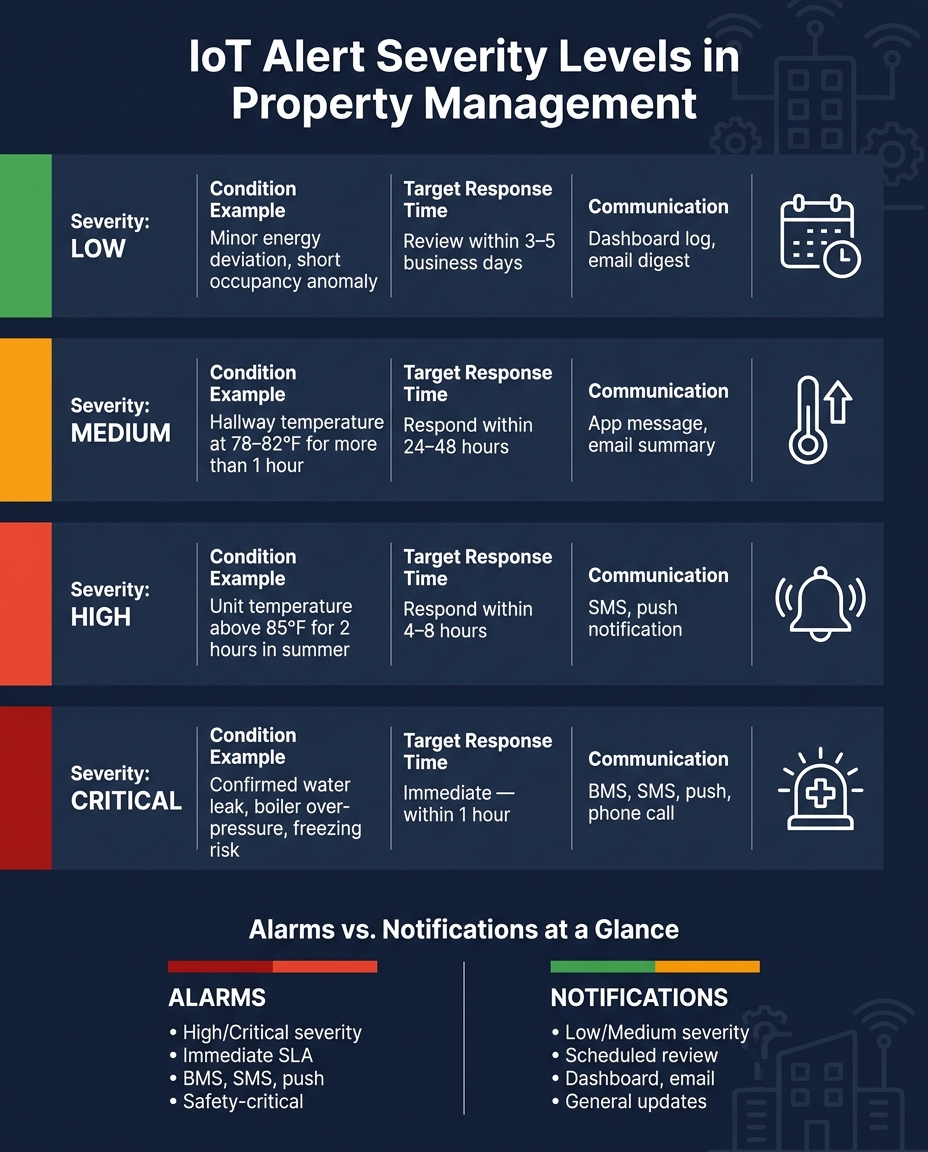
IoT Alert Severity Levels: Response Times & Escalation Rules for Property Management
Once occupancy and unit mapping are set up, the next step is routing rules. These rules watch incoming sensor data and turn it into messages, work orders, or escalations.
Alert, Alert Threshold, Condition Threshold, and Severity
An alert is a record the system creates when a sensor reading crosses a defined rule. An alert threshold is the exact numeric limit behind that rule. For example, temperature > 90°F for 15 minutes, or pressure < 60 psi.
Store alerts with these fields:
alert_idalert_typesuch astemperature_highorwater_leak_detecteddevice_idlocation_idorunit_idtimestampthreshold_valuecomparison_operatoractual_valuedurationseverity
A condition threshold is a higher-level operating rule that says when a condition needs attention. Say a property sets a rule that residential units must not go above 80°F for more than 30 minutes during occupied hours. That is the condition threshold. The alert thresholds are the system rules used to enforce it.
One condition threshold can map to several alert thresholds at different severity levels. That separation matters. It lets property managers change the operating rule without having to rewrite each technical rule in the system.
Severity decides who gets the alert and how fast they need to act. Keep it plain and tied to operating impact:
| Severity | Condition Example | Target Response Time |
|---|---|---|
| Low | Minor energy deviation, short occupancy anomaly | Review within 3–5 business days |
| Medium | Hallway temperature at 78–82°F for more than an hour | Respond within 24–48 hours |
| High | Unit temperature above 85°F for 2 hours in summer | Respond within 4–8 hours |
| Critical | Confirmed water leak, boiler over-pressure, freezing risk | Immediate, within 1 hour |
Each severity level should also define the preferred communication channels and the responsible party, whether that’s the onsite engineer, remote monitoring team, or on-call staff. Severity should connect straight to escalation and work-order rules.
Maintenance Trigger, Predictive Maintenance Event, and Alarm vs. Notification
Once alerts are mapped out, the data dictionary should also spell out what can create work orders on its own.
A maintenance trigger is a data condition that creates or recommends a work order. Its core fields are trigger_id, trigger_type such as condition_based or usage_based, condition_expression such as vibration_index > 1.3 for 10 minutes, recommended_action, and auto_create_work_order, which is a boolean.
When auto_create_work_order is true, the system also needs a work_order_template_id. That way, it can generate a standard task with the correct steps already attached.
A predictive maintenance event goes a step further. Instead of relying on one fixed threshold, it uses trend analysis and anomaly detection to flag a likely failure before it happens. Add fields such as model_name, prediction_type such as failure_likelihood, confidence_score, and time_to_failure_estimate.
For example, a pump’s vibration sensor might show rising anomalies over several weeks. That could produce a predictive event with confidence_score = 0.87 and a note that bearing inspection is recommended within 14 days, well before any hard threshold is crossed. This gives teams time to act before a hard failure turns into an alert.
Use static thresholds for hard safety limits. Use adaptive thresholds for comfort or energy rules.
The last distinction here is alarms versus notifications. An alarm marks an urgent condition. It triggers immediate alerts through the BMS, SMS, or push notification and carries an immediate SLA. A notification is informational. It might cover an upcoming filter replacement, a minor comfort issue, or a usage trend. It gets logged to a dashboard or sent in a daily email digest without interrupting staff.
| Aspect | Alarms | Notifications |
|---|---|---|
| Typical severity | High or critical | Low or medium |
| Response expectation | Immediate or short SLA | Review during scheduled checks |
| Communication channels | BMS, SMS, push, sometimes phone | Dashboards, email summaries, app messages |
| Resident visibility | Limited to safety-related cases | More common for general updates |
| Examples | Water leak, boiler over-pressure, freezing risk | Upcoming maintenance, occupancy pattern change |
Tag each alert type in the dictionary with an event_category field: alarm or notification. Then link it to the right escalation_policy_id and delivery_channels. That keeps routing and response timing in sync across properties.
How to Build and Use an IoT Data Dictionary Across Property Systems
A Simple Data Dictionary Template for IoT Fields
Now that the core terms are set, the next move is to standardize how each field gets recorded across systems.
Each field in your IoT dictionary should answer two basic questions:
- What does this mean to the person running the building?
- Where does the data come from?
Start with a plain-language business definition before you get into the technical side. That keeps the dictionary useful for both operations teams and system teams.
A compact template entry should include seven elements: field name, business definition, data type, units, source system, example value, and update frequency.
Here’s a completed example for a common temperature sensor:
- Field name: Room Temperature (°F)
- Business definition: Temperature measured inside a tenant-occupied room, used for comfort monitoring and HVAC control.
- Data type: Decimal
- Units: °F
- Source system: Building IoT platform – reading from a Zigbee thermostat, sent every 60 seconds through the gateway.
- Example value: 72.5
- Update frequency: 60 seconds
It also helps to keep separate schemas for device data, business events, and maintenance records. That way, you don’t end up mixing sensor readings with leasing activity or work-order data.
| Event Type | Required Fields |
|---|---|
| Sensor event | Event ID, Device ID, Sensor type, Property ID, Unit/Space ID, Timestamp (MM/DD/YYYY hh:mm AM/PM, time zone), Value, Units, Source system |
| Business event | Event ID, Event type, Property ID, Unit/Space ID, Tenant/Account ID, Timestamp, Source system, Related sensor event ID |
| Maintenance event | Event ID, Asset ID, Property ID, Location, Maintenance type, Severity, Trigger type, Open/Close datetime, Responsible team, Cost ($), Source system |
Separating these event types keeps operational records clean and reporting consistent.
Normalization, Portfolio Analytics, and Integration with Property Systems
Once event types are split out, the same field names can support portfolio reporting and system joins.
This is where standardization starts to pay off. If you want to compare performance across multiple properties, the fields have to mean the same thing everywhere. That includes using one unit set across the portfolio.
You should also keep Property ID and Unit/Space ID formats consistent across systems so sensor, lease, and asset records join cleanly. If one platform says “Unit 12B” and another says “12-B,” things get messy fast.
Conclusion: The Minimum Fields Every Property IoT Dictionary Should Define
The goal isn’t a big dictionary. It’s a usable one.
A working IoT data dictionary does not need to be long. It needs to be consistent. Define every term in plain language first, then add the technical detail. Keep location IDs consistent across systems. Define threshold and trigger fields in the dictionary. Use the same seven-field template for every entry so reporting, automation, and future integrations can all read from the same source of truth.
FAQs
Why do telemetry and events need separate schemas?
They need separate schemas because they do two different jobs. Telemetry is continuous, time-series data like temperature or energy readings. Events are one-off occurrences, like an occupancy signal or a maintenance trigger.
Keeping them separate makes it much easier to query historical telemetry trends and trigger immediate actions from events, without sorting through routine sensor data.
What minimum fields should every IoT record include?
Every IoT record should include a few core fields.
- A unique device identifier
- A precise timestamp
- A location identifier, such as a unit number
- The telemetry value and its unit of measure
- Status flags or error codes
These fields make day-to-day tracking more consistent. They also help with clear data mapping, smoother interoperability, and system health monitoring.
How should alerts connect to work orders and SLAs?
Alerts should kick off automated maintenance workflows by tying device telemetry to predefined SLAs. When a sensor event crosses a set alert threshold, the system should automatically create a work order and assign the right priority.
That gives maintenance teams a clear path to act within SLA timeframes, cuts down on manual follow-up, and helps fix property issues before they turn into bigger problems.