If your real estate data updates once a night, your team is often working with old information for 12–24 hours. I’d sum up the fix like this: send each change as it happens, use one shared ID and schema, and let every system listen to the same event stream.
Here’s the core idea in plain English:
- Batch imports lag behind fast-changing MLS, rent, contact, and public-record data
- Duplicate records grow when systems use different IDs like MLS IDs, APNs, and internal record keys
- Point-to-point connections get messy as more tools are added
- Event-driven integration cuts delay to seconds by publishing changes once and sending them to all subscribed systems
- The best starting events are listing status, price changes, owner/contact updates, lease events, and rent events
- The setup only works well if I use canonical IDs, schema versioning, idempotent processing, and dead-letter queues
- Batch still has a place for backfills, audits, and heavy transforms
A few examples make the value clear:
- A
StatusChangedevent can update the CRM, pause ads, and refresh dashboards at the same time - An
OwnerRecordUpdatedevent can sync verified owner data and opt-out changes across marketing and property systems - A
LeaseSignedevent can trigger billing, portal setup, and maintenance tasks without manual re-entry - A
RentPaymentFailedevent can start collections steps right away instead of the next day
| Problem | Event-driven fix | Result |
|---|---|---|
| Listings go stale across systems | PriceChanged and StatusChanged events |
Data updates in seconds |
| Owner records don’t match | Golden-record layer plus OwnerRecordUpdated |
Fewer duplicates |
| Lease handoffs are manual | LeaseSigned workflows |
Less rekeying |
| Missed rent is found late | RentPaymentFailed events |
Faster follow-up |
| Reporting trails behind the market | Warehouse subscribes to event stream | Same-day dashboards |
So the short version is simple: publish small, well-defined events for the data that changes most, keep batch for slower jobs, and make IDs and schemas the center of the design. That’s how I’d keep listings, contacts, leasing, finance, and reporting aligned without the usual sync problems.
Event-Driven Integration: Capabilities You Need for Real-Time Business
sbb-itb-8058745
The Main Data Integration Problems Real Estate Teams Face
Real estate data is scattered across systems, and the mess stacks up fast. MLS feeds, public records, CRMs, property management systems, and marketing tools all run on different update schedules, use different fields, and rely on different IDs. That mismatch tends to show up in three familiar ways: duplicate records, stale updates, and fragile integrations.
Fragmented systems produce duplicate and mismatched property records
A single property can show up as several records across different systems. The main reason is simple: the identifiers don’t line up. One system may use an MLS ID, another may rely on the county APN, and a third may use an internal GUID. Without a dependable crosswalk between those IDs, one physical property turns into several disconnected records. And if address matching is weak, things get worse fast. One unit can be split into separate records, or two nearby properties can get merged by mistake.
Owner and contact records run into the same problem. A property owner might appear in a CRM as an individual, then again as part of an LLC, and then a third time as a buyer lead, each version carrying different contact details. If deduplication rules are too aggressive, teams can merge separate investors who should stay separate. If the rules are too loose, pipelines get bloated and outreach gets sent to the wrong place. RESO helps with MLS schema inconsistency, but adoption and setup still vary from one system to the next.
Even when records do line up, timing can still wreck the workflow.
Batch jobs produce stale data and slow response times
Nightly ETL jobs and CSV imports often delay updates by 12–24 hours or more. That means a price cut or status change can sit unseen for hours, even when the team needs to act right away. In real estate, that lag matters. A slow pipeline doesn’t just slow reporting; it slows follow-up, decision-making, and execution.
Teams usually try to patch the gap with manual cleanup, but that only works for so long. Once data volume grows, the process starts to creak.
The issue gets even worse when each system needs its own one-off connection.
Point-to-point integrations make scaling costly and fragile
In a point-to-point setup, every system connection is its own custom build. That means separate authentication, separate field mappings, and separate error handling for each link. As more systems get added, the number of connections grows at roughly n². In plain English: complexity grows faster than the team can keep up with it.
Instead of getting a smoother stack, teams end up with fragile integration sprawl:
- Transformation logic gets duplicated across pipelines and drifts out of sync
- Failures stay silent until a downstream report looks wrong
- Product roadmaps slow down because each new feature touches several brittle pipelines
A single MLS field rename can break multiple downstream workflows at once, and there may be no central place to catch the issue or retry the failure.
These breakdowns all point in the same direction: event-driven integration.
How Event-Driven Integration Addresses These Problems
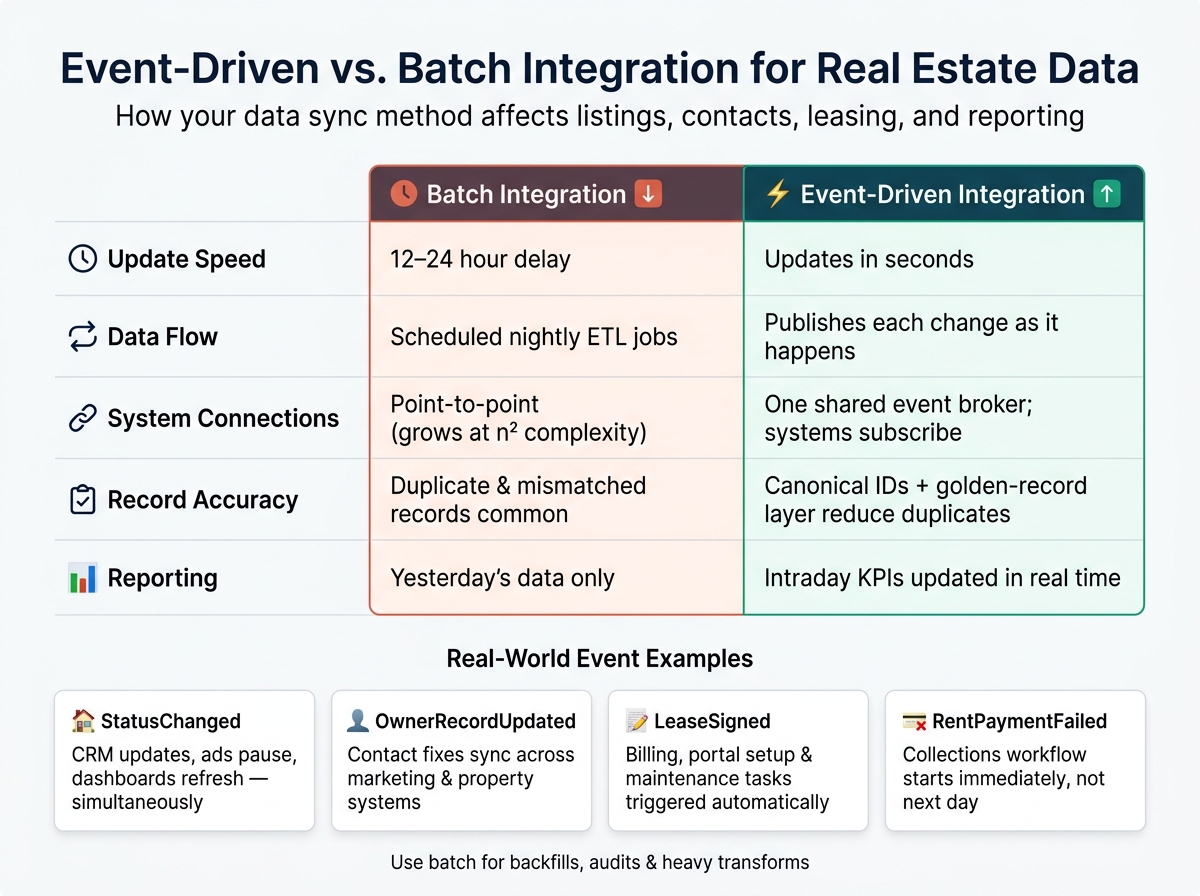
Event-Driven vs. Batch Integration for Real Estate Data
Event-driven integration flips the model. Instead of systems asking, "what changed?" on a schedule, they publish each change as soon as it happens. A price cut, a signed lease, or a corrected phone number becomes an event that goes straight to every system that needs it.
Events, brokers, and schemas for real estate workflows
This setup has three main parts. A broker or streaming layer takes in events from source systems and sends them to subscribed systems without messy point-to-point wiring. Schemas spell out the exact structure and data type for each event. That includes canonical IDs like propertyId and ownerId, plus standard currency fields and U.S. date formats. That kind of consistency cuts down on ID mix-ups and duplicate records.
Common event types include:
ListingStatusChangedOwnerRecordUpdatedLeaseSignedRentPaymentReceived
Each event carries only the fields needed to keep downstream systems in sync.
Those pieces keep listing, contact, and operations systems aligned in real time.
Real-time sync across listings, contacts, and operations
Say a listing moves from Active to Under Contract in the MLS adapter. One ListingStatusChanged event flows to the CRM, where the pipeline stage updates; to the marketing platform, where portal ads pause; and to the analytics layer, where the active listing count changes. No point-to-point API calls. No waiting for the next batch job. The stale data issue shrinks fast because every system gets the update in seconds.
The same idea works for contact data. If a phone number gets verified or fixed through skip tracing property owners, an OwnerRecordUpdated event updates the matching contact record across the property management system, marketing suppression lists, and contactability scores at the same time. That replaces brittle one-off integrations that used to need separate updates in each system.
Rent events follow the same pattern. A RentPaymentReceived event updates the ledger, the delinquency report, and any automated reminder workflow all at once. Every consumer reads from the same stream, so latency drops to seconds. And when a new tool comes online, it only needs to subscribe.
The same pattern also supports workflow automation and live reporting.
Live market analytics instead of delayed reporting
Nightly ETL jobs can only show what the market looked like yesterday. Event streams let analytics systems calculate intraday KPIs like days on market, rent per square foot, vacancy, and lead-to-lease conversion as changes happen throughout the day.
That changes the feel of reporting. Instead of looking in the rearview mirror, teams can react while the day is still unfolding.
Unlike batch pipelines, event-driven analytics also support replay and targeted reprocessing for each consumer. That makes them a good fit for live dashboards, especially when stale data can affect decisions.
Use events for freshness-critical data. Use batch for backfills, heavy transforms, and audits.
The next step is choosing which event types to standardize first.
Event-Driven Patterns Real Estate Teams Can Apply
Start with the event types that touch the most systems and change the most often.
Listing lifecycle events for consistent property data across systems
Listings move fast. They get created, repriced, switched to a new status, expired, and closed. If each system handles those changes in its own way, data drifts almost immediately. A better move is to standardize those updates as a small set of canonical events so every tool works from the same source.
Define ListingCreated, ListingUpdated, PriceChanged, StatusChanged, ListingExpired, and ListingClosed, then publish each change to one event broker. Every event should include a stable ListingID, a normalized address, price in USD such as $425,000.00, square footage, and a timestamp like 2026-06-18T14:30:00-05:00. Websites, CRMs, underwriting tools, and dashboards can all subscribe to the same stream and pull only the fields they need. That keeps MLS, CRM, and analytics in sync even as market conditions change throughout the day.
If you want to add assessor data, don’t slow down the core stream. Put that into a separate ListingEnriched event. When a ListingCreated event fires, a downstream enrichment service can look up the parcel by APN or address, fetch assessor data like year built, lot size in square feet, assessed value in USD, and property tax amounts, then publish the enriched payload tied to the same ListingID. That split keeps live listing updates fast, even when assessor feeds refresh on a 24-hour cycle.
The same idea works for identity data too. In that case, one canonical update matters more than whichever source system sent it first.
Golden-record updates for owner and contact data consistency
Use a golden-record layer between raw inputs and downstream systems. It takes in noisy signals like ContactCreated, LeadCapturedFromWebsite, and ContactImportedFromCRM, then applies deterministic and probabilistic matching across name, normalized U.S. phone number, email, and mailing address. When it finds a match or updates a canonical record, it publishes one OwnerRecordUpdated event. CRM, marketing automation, leasing, and collections systems subscribe to that event and stay aligned without manual cleanup.
Enrichment fits neatly into this flow. When a new owner record enters the MDM layer, it can publish an OwnerEnrichmentRequested event. A worker picks it up and calls BatchData, which provides skip tracing to surface alternative contact points, phone verification to validate U.S. numbers, address verification to standardize to USPS formats, and bulk enrichment APIs for large backfills. The worker then publishes an OwnerEnriched event with verified fields and metadata flags such as phone_verified=true or address_deliverable=true. The MDM layer consumes that event, updates the golden record, and emits a final OwnerRecordUpdated event for all consumers.
For large legacy cleanups, say 500,000 records, teams can push a batch file to BatchData and stream the results back into the broker as a series of OwnerEnrichedBulkResult events. That lets them roll out cleaner records gradually without interrupting live systems.
Once the main records stay aligned, the same event stream can trigger downstream work on its own.
Event-driven workflow automation for leasing, finance, and service teams
Manual handoffs slow down leasing, finance, and maintenance. Event-driven workflows cut those delays by letting systems subscribe and act the moment something happens.
When a LeaseSigned event fires, it can update the unit status to leased in the property management system, provision the resident portal account, create move-in inspection tasks for maintenance, trigger first-month rent and deposit invoices in accounting, and send a welcome SMS. No one has to rekey the same data five times. The same setup works for finance and service events too. Many operators report 20–40% reductions in handoff delays and major gains in resident and owner satisfaction.
The table below shows common integration problems, the event-driven patterns that fit them, and the outcomes teams usually want:
| Integration Problem | Event-Driven Pattern | Expected Outcome |
|---|---|---|
| Leasing team rekeys applicant data into multiple systems | LeaseSigned and ApplicantApproved drive automatic provisioning of resident profiles, accounting entries, and portal access |
Faster lease processing; fewer data entry errors |
| Late detection of missed rent payments | RentPaymentFailed triggers immediate resident notification and collections workflow |
Quicker resolution; improved cash flow predictability |
| Work orders lost in email or paper logs | WorkOrderCreated auto-assigns tickets, notifies technicians, and updates maintenance dashboards |
Higher first-time fix rates; better SLA compliance |
| Stale listing data in marketing and valuation tools | StatusChanged and PriceChanged events propagate to all subscribed systems in seconds |
Marketing and valuation tools reflect live market conditions |
| Fragmented owner records across CRMs and property management systems | OwnerRecordUpdated from the MDM layer syncs canonical contact data to all consumers |
Fewer duplicate records; improved campaign deliverability |
Implementation Priorities and Conclusion
Data design, governance, and reliability requirements
Once the event model is set, success in production comes down to three things: IDs, schema control, and delivery you can count on.
Each property event should use a canonical property ID plus normalized address fields, so records line up cleanly across systems. That ID is the anchor. Without it, the same property gets harder to match across your stack, and cleanup turns into a headache.
Two habits matter a lot once volume grows. First, send full-state payloads instead of partial diffs. That way, downstream systems can stay accurate even if they missed an earlier event. Second, enforce schema versioning through a registry, so consumers don’t break when fields change. Add idempotent processing so retries don’t create duplicate records, and use Dead-Letter Queues for failed messages so teams can catch and inspect problems without losing data.
For compliance and access control, move sensitive data through secure delivery channels. Use real-time APIs for engineering teams, and scheduled S3 or SFTP delivery for downstream consumers, so each one gets data in the format it expects.
Where enrichment and analytics fit in the pipeline
After ingestion, enrich operational data and treat the warehouse as just another subscriber.
Enrichment should happen after ingestion but before the operational database. When the system detects a major change, a dedicated consumer can enrich the record and send the updated version downstream. That keeps the core event stream lean and fast, while enriched data moves through its own path into operational systems.
Analytics follow the same model. The data warehouse subscribes to the same event feed used by operations and enrichment. Streaming events into a columnar warehouse keeps dashboards current and queries fast. BatchData supports data enrichment and real-time or scheduled delivery of updated records, which helps operational systems stay aligned inside the same pipeline.
Conclusion: Faster updates, cleaner records, better decisions
Event-driven integration replaces slow batch cycles with updates that move through the system as soon as they happen. Teams that get the most from this setup pair canonical identifiers with schema governance, idempotent processing, and enrichment workflows that keep records complete without slowing the core stream. The payoff is simple: fewer duplicates, faster workflows, and reporting that reflects the current state of the market.
FAQs
How do I start event-driven integration without replacing everything?
You don’t need to rebuild everything to get started with event-driven integration. A layered setup lets you add it next to your current systems instead of tearing those systems apart.
Start by mapping your current data sources. Then look for workflows that depend on real-time updates. From there, add an asynchronous event layer that handles triggers in the background without getting in the way of your core user-facing systems.
That approach gives you room to roll out event-driven services step by step while keeping day-to-day operations stable.
What events should be standardized first in a real estate stack?
Start with high-frequency, time-sensitive events:
- listing status updates
- price changes
- property identity fields, such as MLS IDs and address formats
- contact updates and new lead submissions
These matter most for market accuracy, user trust, data consistency, duplicate prevention, and responsive enrichment and follow-up workflows.
When should I use batch instead of real-time events?
Use batch processing when volume and completeness matter more than immediate freshness. It fits jobs like market analysis, quarterly reporting, large-scale portfolio scans, or bulk enrichment such as address validation. Put simply, if the goal is to process a lot of data on a schedule, batch is usually the better pick.
Use real-time events for time-sensitive workflows like lead generation, fraud detection, or listing status changes. When something needs to happen now, real-time is the way to go.
A hybrid model can balance both.