
In the fast-moving world of U.S. real estate, relying on outdated or static data can put you at a disadvantage. Custom real estate datasets, powered by real-time updates, combine MLS feeds, county records, tax data, and ownership history to give you a comprehensive view of the market. This approach helps professionals make faster, more informed decisions.
Key takeaways:
- Why it matters: Real-time updates capture changes like price reductions or new listings within minutes, helping you act before competitors.
- Use cases: From spotting undervalued properties to monitoring portfolio risks, tailored datasets provide actionable insights.
- How to start: Define your goals, choose reliable data sources, and plan for frequent updates. Use tools like BatchData to enrich records and skip trace property owners for contact details.
This guide explains how to build these datasets, covering data sources, real-time pipelines, and quality control to ensure accuracy and reliability.
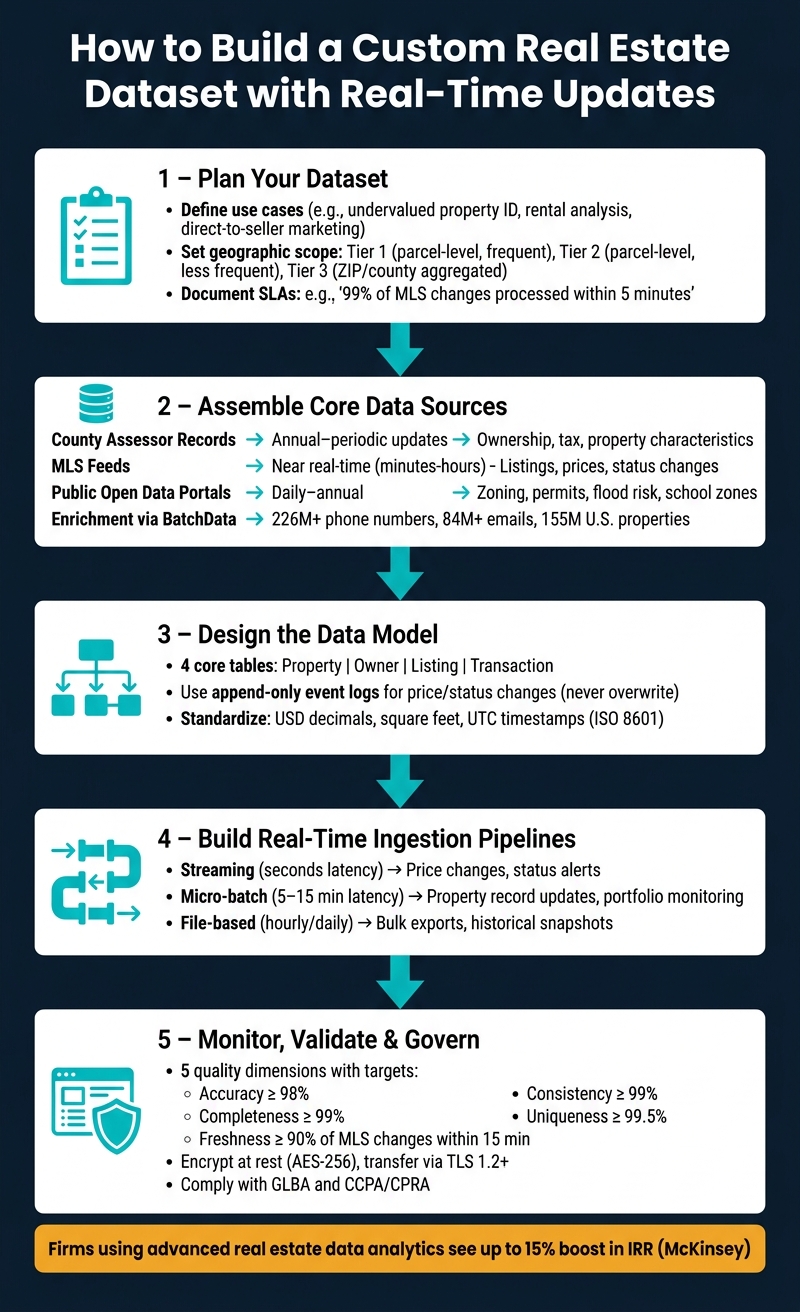
How to Build a Custom Real Estate Dataset with Real-Time Updates
Real Estate Data Masterclass 2025: AI + Automation
sbb-itb-8058745
Planning Your Custom Real Estate Dataset
Careful planning is crucial before diving into coding or locking in data contracts, especially when your goal involves dynamic, live data updates. Skipping this step often leads to stalled projects, with teams grappling with overly complex schemas, mismatched update schedules, and data that fails to support critical decisions.
Define Your Use Cases and Data Objectives
Start by translating your business goals into specific, measurable questions. For example, if your aim is to “identify undervalued single-family homes to flip in Phoenix, AZ”, you might ask: Which properties are priced at least 15% below market value? Which are single-family homes built after 1980? Which properties are non-owner-occupied? These questions help pinpoint the exact data fields you’ll need to collect and maintain.
For each use case, document the key decision, the responsible team, the KPIs, and the minimum data fields required. This approach prevents unnecessary data clutter and provides a clear framework for selecting data providers or designing your schema. Here’s an example of how common real estate use cases translate into specific data needs:
| Use Case | Core Entities | Essential Fields |
|---|---|---|
| Undervalued property identification | Property, Valuation | APN, property type, year built, square footage, last sale price, AVM estimate, distress indicators |
| Rental market analysis | Property, Market | Bed/bath count, occupancy status, census tract, school district, walk score |
| Direct-to-seller marketing | Owner, Contact | Owner name, ownership type, mailing address, equity estimate, verified phone/email, ownership start date |
Set Geographic Scope and Granularity
Your dataset’s geographic scope should align with your strategy and capacity. A small investor testing a market might focus on a few ZIP codes in one county, while a larger institutional buyer may require coverage across multiple metropolitan areas.
One way to organize this is by defining market tiers:
- Tier 1: Parcel-level data with frequent updates.
- Tier 2: Parcel-level data with less frequent updates.
- Tier 3: Aggregated ZIP or county-level data for broader trend analysis.
Parcel-level data, identified by the Assessor Parcel Number (APN), is essential for acquisition and underwriting decisions. On the other hand, aggregated data at the ZIP code or census tract level can work for analyzing neighborhood trends or portfolio allocation. You might also want to include operational boundaries like school districts, zoning overlays, or city limits as spatial identifiers in your schema.
Document Real-Time Update Requirements
Different types of data have varying update frequencies, so it’s essential to establish Service Level Agreements (SLAs) for each domain. For example, tax assessments are usually updated annually by most counties, though some jurisdictions may update quarterly or semiannually. Other data domains, like MLS status changes, often require near-instant updates.
A data requirements matrix can help capture these details. For each type of data, specify acceptable latency, update frequency, and measurable SLAs. Examples might include:
- “99% of MLS status changes processed within 5 minutes of a source update.”
- “Daily county deed ingest completed by 6:00 AM ET with a 99% success rate.”
SLAs should also address coverage (e.g., ensuring at least 98% of parcels in a target county are included) and accuracy (e.g., keeping APN-to-address match errors below 0.5%). Defining these metrics upfront – while collaborating with both business and engineering teams – ensures alignment and sets clear benchmarks for evaluating data vendors.
Once you’ve outlined your use cases, geographic scope, and SLAs, you’re ready to identify and assemble the core data sources needed for your project.
Assembling Core Data Sources
Once you’ve outlined your use cases, geographic scope, and SLAs, the next step is to pinpoint and connect the data sources that will form the backbone of your dataset.
Identify the Right Real Estate Data Sources
Creating a custom dataset means combining various data sources to fill in gaps and provide a complete picture.
County assessor records are your starting point. These records offer parcel-level ownership details, assessed values, tax history, land use classifications, and legal descriptions, all tied to a specific Assessor Parcel Number (APN). While these records are reliable, they have limitations: updates are typically annual or semiannual, data quality can vary by jurisdiction, and recent property transfers may not be reflected promptly. With over 3,000 counties in the U.S., each maintaining its own system, most teams turn to aggregators instead of sourcing directly from each county.
MLS feeds cover market activity. They provide data on active, pending, and sold listings, including list prices, days on market, status changes, and property features added by agents. This data is essential for valuation models, brokerage operations, and tracking live market trends. However, accessing MLS data can be tricky. The U.S. has over 500 local MLSs, each with its own rules and structures, so achieving multi-market coverage often requires working with an aggregator or unifying provider.
Public open data portals add valuable context to your dataset. These portals, often built on platforms like Socrata or CKAN, provide information such as zoning maps, building permits, code violations, school boundaries, flood-risk zones, and crime statistics. When combined with parcel data, these layers can support risk analysis, development planning, and neighborhood research. The downside? Open data is often inconsistent and fragmented, so you’ll need to invest time in cleaning and tracking versions for each source.
| Source | Core Content | Update Frequency | Access Method |
|---|---|---|---|
| County Assessor Records | Ownership, legal, tax, property characteristics | Annual–periodic | Download, via APIs |
| MLS Feeds | Listings, status, prices, days on market | Near real-time (minutes–hours) | RESO Web API, flat files |
| Public Open Data Portals | Zoning, permits, violations, school zones, flood risk | Daily–annual (varies by dataset) | Bulk download, open APIs |
Next, you’ll need to enrich these foundational records with additional owner and property details.
Enrich Your Data with BatchData
While public records and MLS feeds provide a solid starting point, they often leave gaps, particularly when it comes to actionable owner contact information. Assessor records, for instance, frequently lack up-to-date or complete details for reaching property owners. This is where data enrichment becomes critical.
BatchData specializes in filling these gaps. Once your base property records are standardized and linked to a consistent identifier (like APN or a standardized address), BatchData can append verified owner contact details, including phone numbers and email addresses. Their database includes over 226 million phone numbers and 84 million email addresses, covering 155 million U.S. properties. BatchData also provides property attributes, equity estimates, lien data, and distress indicators. For hard-to-find owners or decision-makers, skip tracing can help locate them, while phone verification ensures that appended numbers are valid and reachable before they’re added to your workflows.
BatchData offers flexibility with both on-demand API queries for record-by-record enrichment and bulk delivery options (via CSV, Snowflake, or S3) for large-scale dataset builds or periodic updates. This adaptability makes it easy to integrate BatchData into most data pipelines.
Plan Data Acquisition and Update Methods
Your data acquisition strategy should align with how quickly you need updates and the volume of data you’re handling. A hybrid approach is often the best fit for real estate datasets:
- Use real-time APIs for data that changes frequently and where low latency is crucial, such as MLS status updates or event-driven lead routing.
- Opt for scheduled batch jobs for sources with predictable update cycles, like assessor records, enrichment refreshes, or syncing open data portals.
- Choose bulk file delivery for large historical datasets, data warehouse imports, or model training where throughput matters more than timeliness.
The key is to match the acquisition method to the volatility of the data. Before integrating any source, document its refresh frequency, field mapping, deduplication logic, and failure handling. Also, establish how you’ll reconcile discrepancies when two feeds provide conflicting information about the same property. This structured approach ensures your dataset stays dynamic and aligned with your goals.
Designing the Data Model for Real-Time Updates
Once you’ve gathered the core data sources, the next step is building a strong data model to handle real-time updates. This ensures that real estate data remains accurate and dependable. Before diving into pipeline code, you need a schema that mirrors the behavior of U.S. real estate data – stable in some areas, constantly shifting in others.
Model Core Entities and Relationships
At the heart of a U.S. real estate dataset are four main tables: Property, Owner, Listing, and Transaction.
- Property: This table represents the physical asset. Use a surrogate primary key like
property_id(UUID or bigint) instead of relying on addresses or APNs (Assessor’s Parcel Numbers), which can change. Store the APN alongside the county for a stable join key. Key fields include the USPS-standardized address, latitude/longitude, property type (e.g., single-family, condo), year built, living area in square feet, lot size in square feet, and zoning code. - Owner: This table tracks ownership details for individuals or entities. Since properties can have multiple co-owners and ownership evolves over time, use a
property_ownerjunction table. Include fields like ownership percentage, role (e.g., primary owner, co-owner), and start and end dates. This approach preserves historical ownership without altering the original property record. - Listing: This table logs every instance a property is marketed. It references
property_idas a foreign key and includes details like list price (USD), listing status (e.g., Active, Pending, Sold), list date, MLS ID, and source (e.g., ARMLS for Phoenix). A property can have multiple listings over time but typically only one active listing per channel at any moment. - Transaction: This table captures completed sales or transfers. Fields include
property_id, buyer and sellerowner_id, contract date, closing date, recorded date, and sale price in USD.
For real-time dashboards or property data APIs, avoid running heavy joins during every query. Instead, create denormalized materialized views or search indexes (e.g., Elasticsearch) that pre-join key details like the current owner, latest list price, and last sale price. Keep the write path normalized and denormalize only for the read layer.
The next step is managing dynamic changes through event logging instead of overwriting data.
Handle Real-Time Changes and Event Logs
When data changes, don’t overwrite current values. For example, if a property’s listing price drops from $489,000 to $475,000, this price reduction is a valuable data point for analytics like “average days between price cuts” or “number of status changes before sale.”
Adopt an append-only event log. Use it for high-frequency changes (e.g., price, status), while slower changes (e.g., ownership or property characteristics) can follow SCD Type 2 practices. Add fields like effective_start_date, effective_end_date, and an is_current flag to dimension tables. Create a listing_event table to track changes, with fields such as:
event_idlisting_idevent_type(e.g., PRICE_CHANGE, STATUS_CHANGE, NEW_LISTING)old_valueandnew_valueevent_timestamp(stored in UTC)- Source system name
Every change appends a new row instead of overwriting existing data. The current state can then be derived by materializing the latest relevant event into a “current listings” table, updated by your stream processor. This structure allows you to answer “as-of” questions, like who owned a property on a specific date or what its characteristics were at that time.
Once changes are captured, the last step is standardizing units and formats for consistency.
Standardize Units, Formats, and Validation Rules
Consistency in formatting, established during ingestion, is critical for reliable outputs and seamless integration.
- Monetary fields: Store values as
DECIMALin USD with clear column names likelist_price_usdorsale_price_usd. Avoid mixing currencies or using strings for dollar amounts. - Area: Use square feet as the standard unit, stored as a
DECIMAL. Validate values to ensure they fall within realistic ranges (e.g., flag a single-family home under 200 sq ft or over 20,000 sq ft). - Distances: Use miles as the default unit.
- Temperature: For HVAC-related data, use Fahrenheit.
- Dates and timestamps: Store everything in UTC using ISO 8601 format (e.g.,
2026-05-15T18:30:00Z). Convert to local time zones or formats (e.g.,mm/dd/yyyy) only at the display or export layer. This ensures backend consistency across markets spanning multiple time zones.
Finally, apply referential integrity checks at ingestion. For example:
year_builtmust be less than or equal to the current year.list_price_usdmust be greater than 0.- Foreign keys like
property_id,owner_id, andlisting_idmust resolve to existing records before committing a row.
Setting Up Real-Time Data Ingestion and Processing
Once your data model is ready and validation rules are in place, the next step is ensuring data flows into that model consistently and efficiently. The way you design your pipeline significantly affects how fresh your data stays, how much it costs, and how easy it is to maintain. Let’s dive into selecting the right real estate data provider and ingestion approach to meet your data freshness needs.
Choose an Ingestion Pattern
Your choice of ingestion pattern depends on how much delay your system can tolerate.
| Pattern | Typical Latency | Ideal For | Tradeoff |
|---|---|---|---|
| Streaming | Seconds | Instant updates like price changes or status alerts | Greater complexity and higher monitoring needs |
| Micro-batch | 5–15 minutes | Tasks like updating property records or portfolio monitoring | Slight delay but easier to manage than full streaming |
| File-based | Hourly or daily | Bulk data exports or historical snapshots | Least timely; requires file checks and validation |
For instance, a property alert system that instantly notifies investors when a listing status changes from Active to Pending would need streaming. On the other hand, an internal tool that refreshes comparable property prices every 10 minutes could use a micro-batch approach, reducing operational complexity. Always aim for the simplest pattern that meets your freshness goals. Clearly document these goals, such as “updates visible within 60 seconds” or “daily refresh completed by 6:00 a.m. ET.”
“Traditional real estate data APIs operate on a ‘pull’ model… This is inefficient, costly, and slow. By the time your query finds a property, the data is already aging.” – BatchData
Connect APIs and Source Connectors
Setting up reliable connections to pull or receive data requires handling several technical details: authenticating, selecting endpoints, managing pagination, retrying failed requests, and mapping responses to your internal schema.
Pagination often trips up new pipelines. Since large datasets rarely come in a single response, your connector needs to loop through all pages until the data is fully retrieved. Use a cursor or watermark to resume from where the last successful page left off. For temporary issues like rate limits or timeouts, implement exponential backoff and log key details like request IDs, page numbers, and timestamps.
For high-volume scenarios, BatchData supports bulk delivery via CSV or Parquet to Amazon S3 or SFTP. This fits well with a file-based ingestion approach and eliminates the need for custom ETL pipelines.
“The moment a property in our national database matches your profile, we instantly push that event to you via a webhook or direct integration. This isn’t a list; it’s a real-time stream of opportunities.” – BatchData
Build Transformation and Upsert Logic
Once your connections are stable, the focus shifts to transforming and upserting data effectively. Avoid loading raw API responses directly into your system. Instead, route all incoming data through a structured process:
- Raw Landing Zone: Temporarily store the data as it arrives.
- Transformation Layer: Clean and normalize the data to fit your schema.
- Serving Dataset: Load the transformed data into the final table.
Deduplication is critical – use a stable identifier to ensure each record is unique. When updating the primary table, replace outdated records with the latest canonical version. Keep a detailed event log to track every change, and include timestamps like updated_at for key fields such as sale_price_usd, listing_status, and owner contact details. This approach allows you to reconstruct any prior state if needed.
Monitoring, Quality Control, and Data Governance
Once your pipeline is live, keeping a close eye on it is essential to ensure trustworthy data. According to Gartner, poor data quality costs organizations around $12.9 million annually, and Experian reports that 95% of organizations suffer measurable effects from data quality issues. In real estate, where a single incorrect record can lead to bad acquisition decisions or false alerts, the stakes – and costs – rise rapidly. Ensuring the accuracy and timeliness of custom real estate datasets is critical.
Define and Monitor Data Quality Metrics
Think of data quality as a service with measurable goals. When evaluating real estate APIs for U.S. datasets, focus on five key dimensions: accuracy, completeness, freshness, consistency, and uniqueness. Each should have a specific Service Level Indicator (SLI) tied to a measurable target.
| Dimension | Example Metric | Suggested Target |
|---|---|---|
| Accuracy | % of records where list price, bed/bath count, and ZIP match county assessor data | ≥ 98% |
| Completeness | % of active listings with address, APN, square footage, and list price populated | ≥ 99% |
| Freshness | % of MLS price changes ingested within 15 minutes | ≥ 90% |
| Consistency | % of records with no cross-table conflicts (e.g., duplicate prices) | ≥ 99% |
| Uniqueness | % of properties with only one active record per 24-hour window | ≥ 99.5% |
Break these metrics down by state, county, and data source to avoid masking regional gaps behind a strong national average. Use color-coded dashboards (green, yellow, red) to align with your SLAs, and set up automated alerts through tools like Slack or email for any breaches. For BatchData enrichment, include vendor-specific metrics like enrichment success rates and phone verification pass rates in your monitoring panels.
Once these metrics are in place, the next step is to automate checks and catch anomalies quickly.
Automate Validation and Anomaly Detection
Validation should happen at every stage of the pipeline. During ingestion, use schema checks to reject records missing key fields like the street address, state (USPS two-letter code), ZIP, or property type. Route failed records to a quarantine store with detailed error logs. During transformation, apply business rules: for instance, ensure list_price is between $1 and $100,000,000 for residential properties, year_built is between 1800 and the current year, and square_footage is between 100 and 50,000 sq ft. Also, confirm that property_type falls within an approved list (e.g., SFR, Condo, Townhouse, Multi-Family, Land, Commercial).
For anomaly detection, monitor regional baselines (by ZIP or county) for metrics like median price per square foot and listing volume. Flag any day-over-day shifts that exceed three standard deviations or a more than 50% drop in daily ingestion volume from a critical source. A freshness check is another safeguard – trigger an alert if no new events arrive from a key source within 15 minutes during market hours (9:00 a.m.–6:00 p.m. ET). Mark suspicious records (suspected_outlier=true) and send them to a review queue for further inspection.
With validation and anomaly detection in place, the final step is securing and governing the data.
Secure and Govern Sensitive Data
While monitoring and validation ensure data integrity, securing sensitive information is the final layer of protection. Real estate datasets often include sensitive owner details, so strict governance is non-negotiable. Start by classifying fields into public property data (e.g., APN, list price, square footage) and restricted PII (e.g., owner contact details, vesting information, homestead exemption status). Implement role-based access control to ensure only authorized teams like acquisitions or compliance can access sensitive details, and anonymize these fields for broader analytics use.
Protect data at rest with AES-256 encryption and secure all transfers with TLS 1.2+ protocols. For bulk data transfers, rely on secure methods like SFTP or encrypted S3. Maintain detailed audit logs for every access and modification to sensitive fields, and review them regularly for unusual activity. If your organization handles financial data tied to mortgages or lending, comply with the GLBA Safeguards Rule by documenting an information security program that includes risk assessments, safeguards, and oversight of service providers. Similarly, if you operate in California or serve its residents, ensure compliance with CCPA/CPRA by integrating rights around data deletion and opt-out options into your data policies.
Conclusion: Key Takeaways and Next Steps
Creating a custom real estate dataset with real-time updates isn’t just a one-time task – it’s an ongoing process. Here’s the bottom line: start with a clear use case, build a data model that captures properties, owners, transactions, and events, and design pipelines that deliver updates in minutes, not days. Keep in mind that data quality and governance aren’t optional – they’re essential, especially when handling sensitive details like owner contact information.
Here’s a standout insight: firms leveraging advanced data and analytics in real estate decision-making have seen up to a 15% boost in IRR compared to those using traditional methods, according to McKinsey. This advantage becomes even more pronounced as markets move faster and competitors rely on fresher, more actionable data.
If your team is ready to take this from concept to reality, here’s a practical 30–60 day roadmap:
- Week 1: Identify 1–2 specific use cases and define measurable success metrics.
- Weeks 2–3: Draft your core schema, select reliable data sources, and start building ingestion pipelines.
- Weeks 4–8: Implement basic upsert logic, validate data formats for U.S. standards (like ZIP codes and
MM/DD/YYYYdates), and connect this dataset to your first workflow – whether that’s acquisitions, marketing, or underwriting.
For teams looking to speed things up, BatchData offers a ready-to-use foundation, including verified owner contact details, skip tracing, phone verification, and flexible delivery options. This allows your team to focus on analysis and decision-making instead of struggling with infrastructure.
The key challenges? Over-scoping your initial version or skipping governance. Start small – pick a focused geography, test your pipeline with real data, and expand gradually. By building a solid infrastructure, you’ll support every data-driven decision your team makes moving forward.
FAQs
What counts as “real-time” for real estate data?
In the real estate world, real-time refers to data – such as listing updates, price changes, or new leads – being shared across platforms within seconds. Unlike traditional batch updates that run on set schedules, real-time systems rely on event-driven methods like webhooks or WebSockets to push updates instantly. This approach allows decision-makers to respond to the latest market changes immediately, reducing delays and providing a noticeable competitive advantage with near-zero latency.
How do I link MLS, county, and tax records to the same property?
To connect MLS, county, and tax records to a property, property data APIs are your go-to tool. These APIs rely on standardized identifiers, such as Assessor’s Parcel Numbers (APNs) or geocoding techniques for address normalization. By using these unique identifiers as keys, the APIs integrate datasets efficiently. They deliver a structured JSON response that brings together information from tax assessors, county recorders, and MLS feeds, creating a unified and highly accurate property profile.
How can I keep owner contact data accurate and compliant?
BatchData’s tools make it easier to maintain accurate and compliant owner contact information through data enrichment and validation. With multi-source verification and daily updates, BatchData achieves an impressive 76% right-party contact accuracy rate.
Compliance is streamlined by integrating fields like DNC status and litigator flags directly into your CRM. Additionally, real-time API checks and phone validation processes help ensure adherence to TCPA and CCPA standards, while also filtering out disconnected numbers and litigator entries.