Most real estate document integrations fail because teams connect software before they fix how work moves. If I had to boil this down to a few steps, I’d say: pick one source of truth, standardize names and fields, automate only the repeatable steps, and lock down access, retention, and audit logs.
Here’s the short version:
- Fix the workflow first. Bad handoffs, messy file names, and split ownership will break any integration.
- Make the DMS the main document record. Let the CRM, accounting tool, and e-sign platform pass status and field data back and forth.
- Standardize metadata and folder rules. Use the same file format, transaction ID, and field names across every system.
- Choose the right integration pattern. Most teams do well with connector-led iPaaS. API-first code takes more work. MCP-style routing fits higher document volume.
- Automate the work that repeats. File creation, routing, linking, review steps, and retention rules are good places to start.
- Use AI only where rules fall short. Scanned PDFs, missing fields, and unstructured files are where AI helps most. Keep an 85% confidence threshold and send weak results to human review.
- Protect the process. Role-based access, version history, secure portals, MFA, and retention rules cut risk and help with audits.
- Add property and contact data to documents. That makes records easier to search, match, and review.
A few numbers make the case plain:
- 60%–70% of digital change efforts in real estate fall short.
- 22% of U.S. transactions hit deadline-related delays.
- Those delays cost about $1,847 per incident on average.
- Admin time can drop from 15 hours to under 2 hours per deal with the right setup.
- On-time closing rates can move from 78% to 95%.
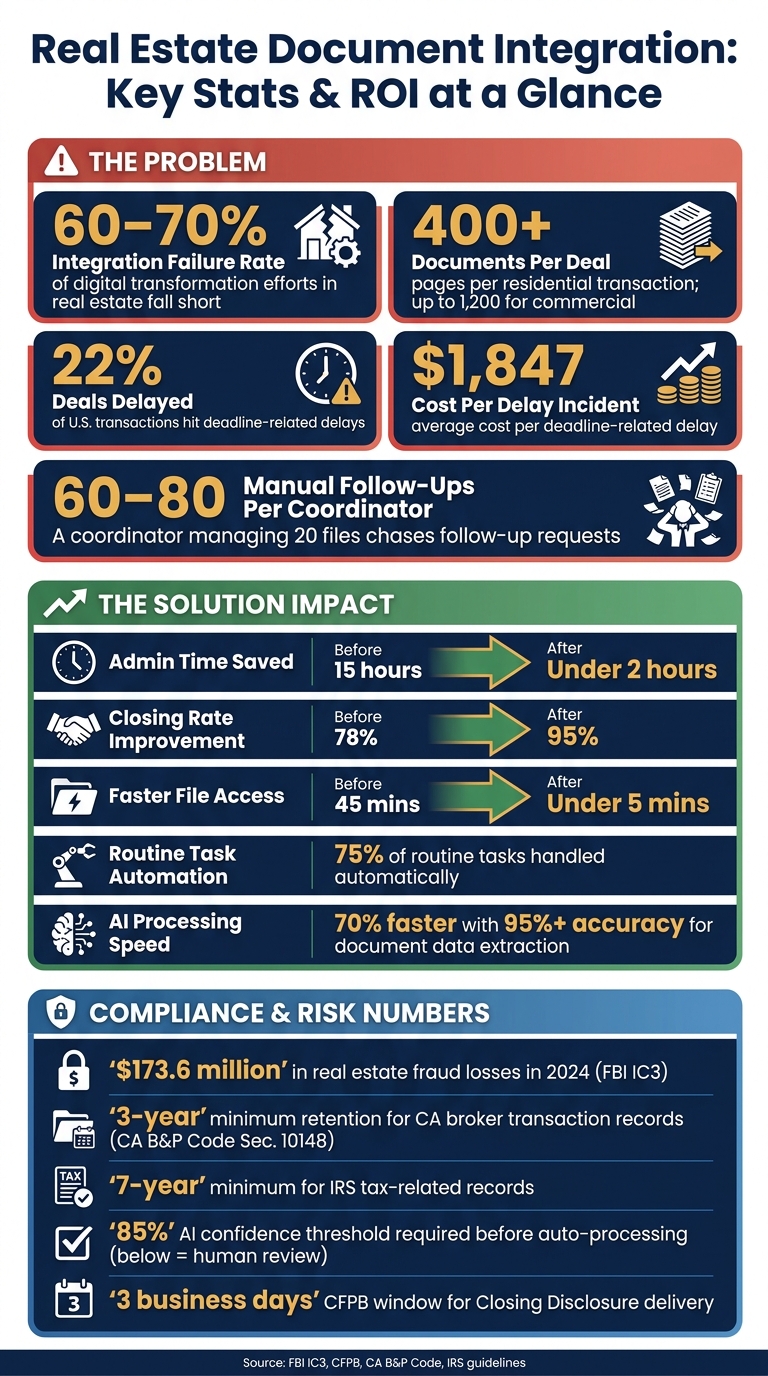
Real Estate Document Integration: Key Stats & ROI at a Glance
The Complete Dotloop & Command Workflow for Real Estate Agents (2025)
sbb-itb-8058745
Quick Comparison
| Area | What to do | What happens if you skip it |
|---|---|---|
| Workflow | Clean up handoffs and ownership first | More rework, missed deadlines, broken syncs |
| System ownership | Keep one system in charge of each data type | Conflicts, overwrites, duplicate records |
| Metadata | Use one naming format and fixed field labels | Hard search, bad mapping, manual entry |
| Automation | Automate repeatable tasks only | More mistakes at scale |
| AI use | Use it for scanned or messy files with human review | Bad data gets into records |
| Governance | Set access, retention, and audit controls | Audit trouble, data exposure, fraud risk |
| Enrichment | Link documents to verified property and transaction data | Weak search and poor matching |
If you want document integration to work, I’d keep it simple: fix the process, then connect the tools. Using a real estate API can help bridge these gaps during the connection phase.
Common Problems in Real Estate Document Workflows
Disconnected Systems Create Data Silos and Duplicate Work
A single residential transaction can produce more than 400 pages, and commercial deals can hit three times that amount. When those files are scattered across email inboxes, shared drives, and separate tools, the outcome is pretty predictable: duplicate entries, lost versions, and staff retyping data that already lives somewhere else.
The root problem is simple. Many CRMs are built to track leads and manage relationships, not handle documents. So teams end up leaning on outside file systems that run on their own, with no automatic sync. A loan amount, client name, or date entered in one place often has to be typed again in another, unless you integrate property data solutions to sync information automatically. That opens the door to human error.
Basic file storage can hold documents. But it doesn’t flag missing items, monitor deadlines, or send alerts.
Once documents and data are split across tools, each handoff turns into manual work.
Multi-Step Workflows Slow Teams Down and Invite Errors
Every handoff between the agent, buyer, lender, and title officer creates one more chance for something to slip. A coordinator handling 20 active files may be chasing 60 to 80 follow-up requests for missing HOA documents, disclosures, or inspection reports. At that pace, file naming can fall apart in a hurry. Documents end up saved as "Scan001.pdf" or "DocuSign_random.pdf," and staff have to click through pile after pile of files just to locate one inspection report.
Version control is another steady pain point. In deals with several parties involved, keeping track of the current purchase agreement or amendment can feel like a job by itself. Send an old disclosure to a lender, and the file can get stuck before clear-to-close. Miss the CFPB‘s three-business-day window for delivering the Closing Disclosure, and the closing must be delayed. There can also be legal compliance issues.
Manual workflows start to crack when too many handoffs rely on perfect timing.
Those same gaps don’t just slow deals down. They also make audit prep a lot messier.
Compliance, Retention, and Access Gaps Add Risk
Speed is only one part of it. Fragmented records also make compliance harder. In the U.S., real estate firms deal with layered retention rules that change by document type and jurisdiction. California’s Business & Professions Code Sec. 10148, for instance, requires brokers to keep listings, deposit receipts, and related transaction documents for three years. The IRS requires a seven-year minimum for tax-related records. Many firms still don’t have a steady way to enforce those rules across separate storage systems.
| Document Type | Minimum Retention | Notes |
|---|---|---|
| Purchase Agreements | 3–5 years (state-dependent) | |
| Closing Disclosures | 3–5 years | Track the CFPB 3-business-day delivery rule |
| Lease Agreements | Duration + 3 years | |
| Tax-Related Documents | 7 years | IRS audit support |
| Fair Housing Records | 3 years minimum | Federal compliance |
Access control is another weak spot. Without role-based access, inspectors may see financial records, and junior staff may overwrite attorney edits. The FBI’s IC3 reported $173.6 million in real estate-related fraud losses in 2024. In many cases, the damage gets worse when sensitive data is shared through unsecured email, which is exactly the kind of gap document access controls are meant to prevent.
"Most people only learn just enough to get documents submitted for compliance, but they miss the tools that can actually help them manage the entire transaction." – Deb Staley, Associate Broker, RE/MAX Realty Suburban
Build a Unified Integration Architecture Before You Automate
The fix is architecture, not more automation. Before you connect tools, decide who owns each system, how data moves, and what naming rules everyone follows. Start with ownership. Then pick the integration pattern that fits.
Make the DMS Your Single Source of Truth
Your DMS should be the system of record for every document. Keep the CRM and accounting platform focused on metadata and status updates, like closing_date or purchase_price.
Here’s the point: one system should own each data type. If a corporate tenant changes its legal name, one designated platform – usually the accounting suite or ERP – should act as the authority. Every other system should pull from that source. That stops tools from overwriting each other and creating a mess.
API-First, Connector-Led, or MCP-Orchestrated Routing: Choosing the Right Approach
The best integration model depends on your transaction volume, your technical team, and the number of systems involved. The safe move is to choose the simplest setup that still keeps validation, ownership, and retry logic in place.
| Integration Pattern | Best Use Case | Operational Control | Error Risk | Maintenance Effort |
|---|---|---|---|---|
| API-First (Custom Code) | Highly unique, proprietary workflows | High (full customization) | High (brittle connections) | High (requires developers) |
| Connector-Led (iPaaS) | Standard PropTech stacks (CRM, e-sign, storage) | Medium (template-based) | Low (built-in retry logic) | Low (no-code/low-code) |
| MCP-Orchestrated | Centralized routing for high-volume document events | High (centralized logic) | Very Low (validation layers) | Medium (managed middleware) |
For most teams, a connector-led iPaaS setup gives the best return. It can handle real estate-specific data normalization – like separating usable square footage from rentable square footage – without custom development. If your operation deals with high document volume, MCP-style orchestration adds event-driven logic to keep systems aligned.
Still, none of that helps if your field names and folder rules change from one workflow to the next.
Standardize Metadata, File Names, and Folder Logic
Once the routing layer is in place, standardize the data moving through it.
Use one upload-time naming format: [doc_type]_[property_address]_[party_name]_[date]. Stick with underscores and YYYY-MM-DD so files sort and sync in a steady way.
Use the same labels every time, such as purchase_price, closing_date, and property_zip, so APIs can map fields without manual re-entry.
Here’s what that looks like:
| Field Category | Standardized Label | Example Value |
|---|---|---|
| Currency | purchase_price |
450000 (numeric only) |
| Area | square_footage |
2500 (numeric only) |
| Dates | closing_date |
2025-02-28 (ISO for files) |
| Address | property_street_address |
123_main_st |
| Transaction ID | transaction_id |
TX-2025-01458-SALE-01 |
Then lock in folder order with numbered prefixes like 01_listing, 02_offer_contract, and 03_disclosures. That keeps subfolders in transaction-stage order, even when a file system sorts alphabetically.
Automate High-Value Workflows Without Losing Control
Once your architecture and naming rules are set, the next move is automation. The fastest gains usually show up in transaction file creation, document routing, and structured data processing. When a workflow is standardized, that’s your cue to automate the steps that slow people down the most.
Automate Transaction File Creation, Routing, and Linking
When an e-signature status changes to completed, your system can automatically create the transaction folder, prefill property, contact, and transaction fields, and generate a task checklist. That saves time right away and cuts the kind of small manual errors that pile up over time.
It also helps to carry the same transaction ID across the DMS, CRM, and e-signature tools so every file stays tied to one deal from start to finish. If you’ve ever had to hunt through three systems for the same file, you already know why this matters.
Routing should follow roles, not individual names. So instead of sending a document to one specific person, build logic like Broker Review → Legal Review → Client Review. That way, files keep moving even if someone is out of office.
Most transaction coordination work follows clear rules, which makes it a good fit for automation.
After routing is in place, add review and retention controls so faster processing doesn’t open compliance holes.
Add Review, Approval, and Retention Rules
Automation should keep the checkpoints that matter and strip out manual handoffs that don’t. A simple example: create a hold status for any transaction missing critical info so incomplete files don’t get lost in email threads.
You can also automate a 7-year archive rule for tax-related files. Then trigger archiving and post-close review as soon as closing happens.
For day-to-day use, stick with rules when files are predictable. Bring in AI only when documents show up unstructured, scanned, or missing pieces.
Rule-Based vs. AI-Assisted Document Processing: What to Use and When
Rule-based automation works best for structured, repeatable tasks. Think routing a rental application, checking that a price field is numeric, or applying a retention schedule. AI-assisted processing fits messier jobs, like sorting leases from disclosures, pulling rent amounts and term dates from scanned files, or flagging missing signatures across a batch.
A confidence threshold keeps this from going sideways. Set a minimum score – 85% is a workable threshold – and send anything below that to a human exception queue. Without that backstop, weak extractions can slip errors into your records.
| Approach | Operational Impact | Error Risk | Implementation Complexity |
|---|---|---|---|
| Rule-Based Automation | Reduces file-open time from 45 mins to under 5 mins; handles 75% of routine tasks | Low for predictable tasks; fails on unstructured data | Moderate; requires workflow mapping and middleware |
| AI-Assisted Processing | 70% faster processing; auto-extracts data with 95%+ accuracy | Variable; depends on confidence thresholds and model training | High; requires AI model integration and ongoing validation |
A simple way to split the work:
- Use rule-based automation for routing, validation, and retention.
- Use AI for scanned or unstructured documents.
- Send anything below an 85% confidence score to human review.
Governance: Security, Compliance, and Data Enrichment
Set Up Role-Based Access, Audit Trails, and Version Control
Once automation is running, the next thing to lock down is access and record integrity. Automation can save time, sure. But without guardrails, it can also spread mistakes FAST.
That’s why you need access controls, version history, and audit logs.
Match permissions to transaction roles, not job titles. A closing coordinator, broker, lender, and outside vendor don’t need the same level of access just because they sit in similar roles across deals. For external parties, view-only should be the default. Add file locking, version history, and audit logs so teams don’t overwrite one another’s work and so every change leaves a clear trail.
These same controls also help cut payment risk. Wire instructions should never move by email. Never send wire instructions by email. Use secure portals with role-based access and digital traceability for every edit instead. In 2024, real estate-related fraud resulted in $173.6 million in losses.
| Risk | DMS Control | Integration Control | Business Impact |
|---|---|---|---|
| Wire Fraud | Secure portals | Multi-factor authentication (MFA) | Prevents rerouting of closing funds |
| Outdated Contracts | File locking | Version history tracking | Eliminates errors in final signatures |
| Compliance Gaps | Auto-retention rules | Unified audit logs | Reduces risk of license revocation |
| Unauthorized Access | Role-based permissions | Domain-level restrictions | Protects sensitive client PII and financials |
California requires brokers to retain key transaction records for three years.
Enrich Document Records With Property and Contact Data
Once access and audit controls are set, the next step is making records more useful. A DMS shouldn’t rely on filenames alone. That’s like trying to run a library where every book is labeled "final-v2-updated."
Records become much easier to search and route when they’re linked to verified property and contact data. Connecting your DMS to BatchData adds verified property and contact data, address verification, phone verification, skip tracing, APIs, and bulk delivery. That gives teams more than plain document storage. They can search by property details, not just by filename, and tie each record to verified identity and property context. In practice, that makes the DMS the single source of truth instead of just a folder system.
| Integration Scope | Metadata Completeness | Search Quality | Routing Accuracy |
|---|---|---|---|
| Documents-Only | Basic (filename, date, upload source) | Limited to keywords in the text or filename | Manual review required |
| Documents + Data Enrichment | High (property history, owner info, verified addresses) | High (search by property attributes, tax ID, or verified owner) | High (automated matching and fraud detection) |
Conclusion: Best Practices That Make Integration Work
With these controls in place, integration works best when the workflow stays simple. Fix the workflow first. Set one source of truth. Standardize data. Automate the right steps. Then protect the process with governance and enrichment.
Handled in that order, integration stays secure, searchable, and reliable.
FAQs
How do I choose the right integration setup?
Start by mapping your data ecosystem. That means your internal systems, like CRMs and transaction platforms, along with outside providers such as BatchData. From there, set clear integration goals and decide which data needs real-time access and which can run on batch processing.
Next, pick the protocol that matches the task: REST, webhooks, or WebSockets. It also helps to use a layered architecture with an API gateway and microservices so your core systems stay decoupled, scalable, and stable.
What should I automate first in my document workflow?
Start with the tasks that eat up the most time and happen most often. That’s usually where you’ll get the fastest wins and the best ROI.
Put your attention on work that’s repetitive and follows clear rules, like lead management and document creation.
For example, you can automate lead capture so new inquiries get a faster response. You can also use templates for contracts, disclosures, and presentations to cut down on admin work.
A simple way to choose where to start: rate each task by impact and difficulty. That helps you spot the work that gives you the best return without a huge lift.
When should I use AI instead of rules?
Use rules for structured, well-defined tasks with clear logic and steady formatting. They’re a good fit for things like field standardization, validation, and applying frameworks like RESO. In these cases, the job is predictable, and the main goal is to prevent errors.
Use AI for unstructured or more complex tasks that call for interpretation. That includes classifying documents, pulling data from different contract layouts, or spotting anomalies and trends in fragmented data.