







































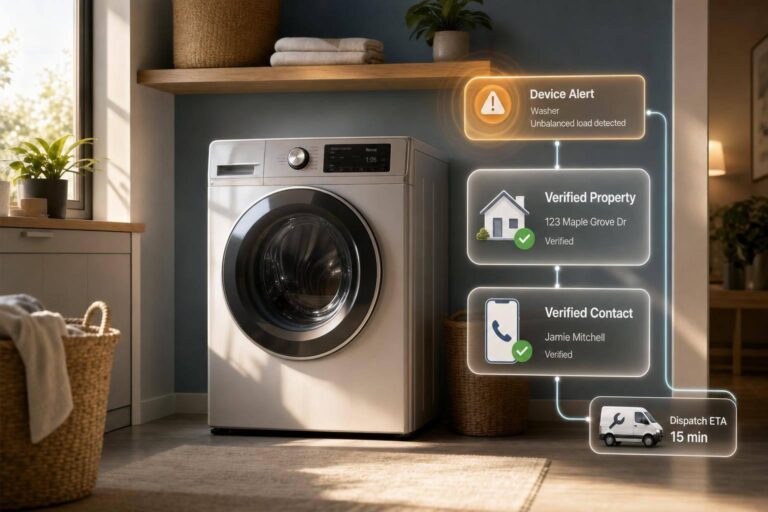
Most appliance alerts fail for one simple reason: the signal is not tied to the right property, unit, and contact fast enough.
I’d sum up the article like this: if you connect device telemetry to verified property records, owner or resident contacts, and dispatch systems in one API flow, you cut missed alerts, manual lookup, wrong-party calls, and slow work order creation. The model is simple: normalize the event, match it to a property, verify the contact, check compliance, then send the job to service.
A few points stand out right away:
- Missed alerts can turn a small issue into water damage, HVAC loss, or an after-hours repair.
- Bad routing often comes from missing unit data, stale contact records, or split systems.
- One phone number is not always one person, which is why contact-only matching can fail.
- More than 96% of investor-owned single-family homes are held by small operators, so contact data is often messy.
- BatchData gives access to 155+ million U.S. property records, which helps link alerts to the right address and owner record.
- The workflow should track three numbers: resolution time, emergency-to-scheduled call ratio, and cost per service call.
Here’s the article in plain English:
- Smart appliances send fault data, but that data alone does not help service teams.
- The alert needs a verified property ID, unit, address, and best contact.
- The API layer should return only the fields needed for dispatch so urgent cases move with less delay.
- Contact checks should include ranked phone numbers, email deliverability, DNC, and TCPA flags before outreach starts.
- Once the alert is enriched, it should go straight into the field service system as a work order.
- After repair, the result should write back to the same record so future triage is easier.
| Service issue | What fixes it |
|---|---|
| Missed or late alerts | Match device events to property and CRM data |
| Manual triage | Resolve property and contact in one API call |
| Wrong-party outreach | Verify identity beyond phone data alone |
| Slow dispatch | Send unit, owner, contact, and severity with the work order |
In short: I see this article as a case for one connected workflow that turns raw appliance signals into service actions teams can use right away.
How siloed appliance and property data breaks service operations
When appliance, property, and contact data live in separate systems, service work starts to fall apart at dispatch.
This shows up across multifamily buildings, single-family rentals, and HOA communities. Appliance events sit in one tool. Property records sit in another. Contact data lives somewhere else. And those systems often don’t talk to each other.
Once that link breaks, the same three problems show up again and again: missed alerts, bad routing, and delayed dispatch.
Missed alerts lead to water damage, HVAC outages, and after-hours calls
If an alert doesn’t land in the right workflow, it can sit there until someone spots it too late.
At that point, the cheap fix is gone. A small issue can turn into a leak, an HVAC outage, or an after-hours service call. What should have been a simple repair becomes emergency work because the alert got routed late.
Bad routing happens when events are not tied to the right property, unit, or contact
Even when an alert reaches a dispatcher, fast action depends on one thing: knowing exactly where to send the technician and who to contact.
That’s where things often get messy. Missing unit numbers, old contact records, and partial address data force teams into manual lookup. Without a verified link to the right property, dispatchers end up guessing at the unit and spending extra time confirming the contact.
As Ivo Draginov of BatchData puts it, many teams know the number but not who owns it.
This problem hits hard in the U.S. single-family rental market, where smaller operators often keep service contacts in spreadsheets or group texts. So when a technician needs the right person or needs to route a repair, that split data slows everything down.
Identity resolution makes it even harder. One phone number can belong to more than one person, whether it’s a shared household line or a reassigned number. So if dispatchers rely on contact data alone, they can end up calling the wrong person entirely.
Comparison table: service failures vs. API-enabled fixes
The same pattern shows up in three day-to-day service failures:
| Problem | What Causes It | API-Enabled Outcome |
|---|---|---|
| Missed or late alerts | Device data siloed from property CRMs | Unified records trigger automated service workflows |
| Manual triage delays | Unknown inbound contacts require manual lookup | Identity and property resolved in a single API call |
| Wrong-party contact | Shared lines or reassigned numbers | Best contact match with verified phone data |
| Slow dispatch | Missing unit details or stale contact records | Accurate routing tied directly to verified property linkage |
The fix is to normalize the event before dispatch.
sbb-itb-8058745
How smart property APIs connect appliance events, property records, and service systems
This workflow has three parts: normalize the alert, enrich it with property data, and send a work order into the service system. Each part removes a place where things can break.
Event normalization turns raw device signals into actionable service data
Appliance telemetry shows up in different formats, so the API maps each signal to property ID, unit number, device ID, fault code, and severity. That shared structure keeps downstream systems simple and makes each payload faster to parse.
It also helps keep latency low. Instead of sending a full property record every time, the API can return only the fields tied to that event. That matters when the issue is urgent, like an active leak or an HVAC outage. In those cases, a few seconds can be the difference between a repair that happens early and an emergency call.
Property and contact enrichment makes routing accurate at portfolio scale
Once the alert is normalized, the next job is routing it to the right place. That depends on property and contact enrichment.
Property search and address verification confirm that the alert matches the right property address. Then contact enrichment and batch skip tracing sort out who is responsible for that unit, whether that’s an individual owner, a property manager, or a corporate landlord. The response can also return ranked phone numbers and emails, along with reachability and deliverability signals.
BatchData’s Reverse Skip Trace API starts with a phone number or email already in the alert and resolves it into a verified person record linked to a specific property ID and property address in a single call. Compliance flags – DNC, TCPA, and litigator indicators – are embedded in the same enrichment response, so suppression can happen before any outreach begins. At that point, the workflow is set for dispatch.
Service system integration converts alerts into work orders and dispatch actions
An enriched alert includes property ID, verified contact data, ownership type, building context, and compliance clearance. That means the work order reaches dispatch with the right unit, owner, contact, and fault severity already attached. No manual lookup. No bouncing between systems.
The result is simple: the alert becomes a task the service team can act on.
That only works when every step is automated, from detection through dispatch.
The predictive appliance service workflow from signal to completed repair
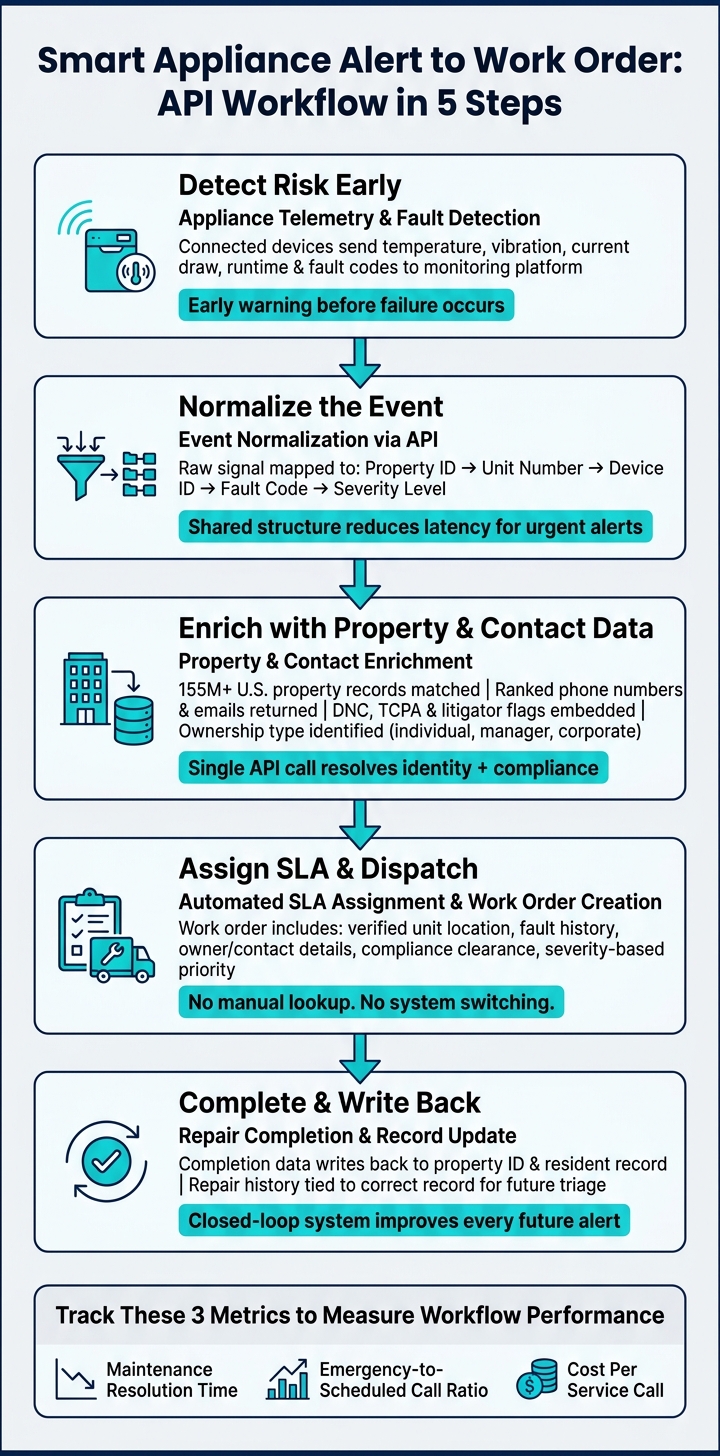
Smart Appliance Alert to Work Order: API Workflow in 5 Steps
Step 1: detect risk early from appliance telemetry and fault patterns
After the API clears the property match, telemetry stops being a dead-end alert and starts acting like a service trigger. Connected appliances send data like temperature, vibration, current draw, runtime, and fault codes into a monitoring platform. The system looks for patterns that tend to show up before a failure, not just signs of a breakdown that’s already happening. That early warning gives teams time to step in sooner and cut down on after-hours incidents.
Step 2: enrich the event, assign ownership, and set the right SLA
Once a risk signal passes a severity threshold, the alert moves into enrichment. At that point, the system ties the alert to the property record, identifies the owner of record, and pulls the best contact, address, and compliance status in one pass. BatchData provides instant access to over 155 million U.S. property records. Contact enrichment returns ranked phone numbers and emails with reachability signals, so dispatchers can see which contact is most likely to connect.
Then the SLA is assigned based on severity and building context. That means dispatch priorities are set automatically instead of being left to manual triage built on partial information.
With ownership and SLA in place, the alert moves straight into dispatch.
Step 3: dispatch, confirm completion, and feed outcomes back into the system
When the work order lands in field service software, the technician already has the unit location, fault history, verified contacts, and compliance flags. No manual address confirmation.
After the repair, completion data writes back to the same property ID and resident record. That keeps the repair history tied to the right record, which makes future triage much easier.
This loop only works when property IDs and contact records stay clean.
What teams need to make this model work
Reliable property coverage, verified contacts, and clean identifiers
This setup only works if the data underneath it is right.
For the alert-to-work-order flow to hold together, teams need standardized U.S. addresses, ZIP+4, county data, and matching property IDs across telemetry, CRM, and field service systems. If there isn’t one shared identifier, an alert from a water heater in Unit 4B can easily lose its trail before it reaches the right work order or the right person.
Contact data needs the same level of care. Ranked phone numbers with line type, carrier, and reachability signals help cut down failed outreach. Deliverability-checked email addresses add one more layer for service communication. That matters even more when you look at market structure: more than 96% of investor-owned single-family homes are held by small operators. At that scale, manual contact management gets hard to maintain across a portfolio.
Governance, compliance, and shared metrics across proptech and service teams
After an alert is matched, governance is what keeps that connection from breaking as the record moves into service workflows.
Data governance ties alerts, ownership, and contact suppression together across systems. Clean data alone won’t carry the process. Teams also need rules that preserve identity and suppression status as records move between telemetry platforms, CRMs, and field service software.
Embed DNC and TCPA flags in the service CRM so suppression happens before outreach.
The table below shows the main requirements and the problem each one helps prevent:
| Prerequisite | Result | Risk If Missing |
|---|---|---|
| Standardized U.S. Addresses, ZIP+4, County & Property IDs | Accurate unit-level routing and cross-system matching | Failed handoffs and alerts sent to the wrong unit |
| Verified Contact & Property/Owner Linkage | Direct communication with residents and owners, instant identification of the person behind an alert | High no-show rates, misrouted work orders, and billing errors |
| DNC & TCPA Compliance Flags | Compliance with federal calling and messaging laws | Legal liability, fines, and TCPA litigation |
To see if the model is doing its job, track a small set of shared metrics:
- Maintenance resolution time
- Emergency-to-scheduled call ratio
- Cost per service call
Those numbers show whether service is moving away from reactive calls and toward predictive repairs.
Conclusion: one API workflow cuts missed alerts, manual triage, and slow dispatch
With those pieces in place, the workflow can move from signal to service without manual cleanup. When the data foundation is clean, connected, and compliant – from the device signal to the verified contact to the completed work order – predictive appliance service works the way it’s supposed to.
FAQs
How do smart property APIs reduce missed appliance alerts?
Smart property APIs cut down on missed appliance alerts by pulling separate data streams into one automated workflow. They tie appliance event data to property records and verified contact details, so service teams get the context they need to respond fast.
BatchData helps make that happen with property and contact data enrichment. That gives dispatchers a clearer view of the right homeowner and the right property details, without the manual back-and-forth that often leads to missed alerts or slower service.
What data is needed to route an appliance alert correctly?
You need to match the incoming event to the right property and owner. With BatchData, you can use the phone number or email from the alert to find the property address, the owner’s identity, and contact details.
That gives your team key property context, including the situs address and owner-of-record details. You can also pull in compliance signals like Do Not Call and TCPA flags, so the service team knows how to contact the homeowner the right way.
How do compliance checks fit into predictive service workflows?
Compliance checks work like a gate before any call or text goes out. When signals such as DNC, TCPA, litigator, and deceased flags are fed into the workflow, the system can automatically block outreach before an agent makes contact.
That said, these signals support a customer’s own compliance process. They don’t take its place. Consent, state-specific calling rules, and internal suppression lists still stay with the customer.


