Skip tracing APIs make it faster and easier to find property owners and their contact details by pulling data from multiple sources like property records and phone directories. These tools are transforming real estate workflows by automating processes that used to take hours, enabling teams to manage thousands of leads efficiently.
Here’s why they matter:
- Speed: Locate property owners and verify contact details in milliseconds.
- Accuracy: APIs provide confidence scores, verify phone numbers, and flag outdated or restricted data.
- Scalability: Handle large volumes of leads with bulk processing and webhook integrations.
- Automation: Seamlessly integrate with CRMs and outreach tools to eliminate manual tasks.
For real estate professionals, this means less time spent on manual research and more time focusing on high-value leads. Solutions like BatchData offer advanced features like identifying LLC owners, real-time data updates, and flexible pricing, making them ideal for teams looking to streamline operations.
Skip tracing APIs are reshaping how real estate teams operate by automating and optimizing lead management.
How to Skip Trace Property Owners using BatchData with Python
sbb-itb-8058745
Core Features of Skip Tracing APIs
Skip tracing APIs streamline real estate workflows by delivering precise property details, enriched contact information, and scalable bulk processing. Together, these features create a seamless, automated pipeline for real estate professionals.
Property Search and Owner Identification
Skip tracing APIs process property identifiers – like a street address, Assessor’s Parcel Number (APN), or owner’s name – and return structured data. This includes details like the current owner, mailing address, ownership type, purchase history, assessed value, and key property characteristics.
One standout feature is the ability to uncover the individuals behind LLCs and trusts. Instead of stopping at a corporate name or registered agent, advanced APIs dig deeper to reveal the actual owners. This is particularly useful when targeting absentee investors or off-market sellers. Additional flags, such as indicators for vacant properties or recent ownership transfers, act as triggers for prospecting opportunities.
These detailed property insights lay the groundwork for contact enrichment and tailored outreach strategies.
Contact Enrichment and Verification
After identifying a property and its owner, the next step is retrieving actionable contact information. A strong enrichment API provides multiple phone numbers per owner, categorized as mobile or landline, along with email addresses. In some cases, it also includes details for co-owners or household members.
Top-tier services, like BatchData – Ivo Draginov, go further by appending metadata to contact points. This includes a confidence score, line status (active or disconnected), carrier information, and Do Not Call (DNC) registry flags. For U.S.-based outreach, these details are essential for improving campaign efficiency while staying compliant with TCPA regulations. For example, automated systems can prioritize high-confidence mobile numbers for calls or SMS campaigns while excluding flagged or restricted numbers.
Bulk Data Processing and Webhooks
For large-scale efforts, batch skip tracing features allow users to handle thousands – or even millions – of records in one go. With batch processing endpoints, enriched results, including verified phone numbers and emails, are typically delivered within hours. Pricing for these services ranges from $0.10–$0.30 per enriched record, with discounts available for higher volumes.
Webhooks further enhance automation by eliminating the need for manual checks. Instead of polling the API for job updates, users can set up a webhook URL. Once the enrichment process is complete, the API sends a payload to the URL, allowing systems like CRMs to automatically import and segment records. This can trigger immediate actions, like launching a mail or calling campaign. The same applies to real-time enrichment: when a new lead is added to the CRM, the webhook enriches the record instantly and moves it to the next step, all before a sales rep takes over.
How to Design Automated Skip Tracing Workflows
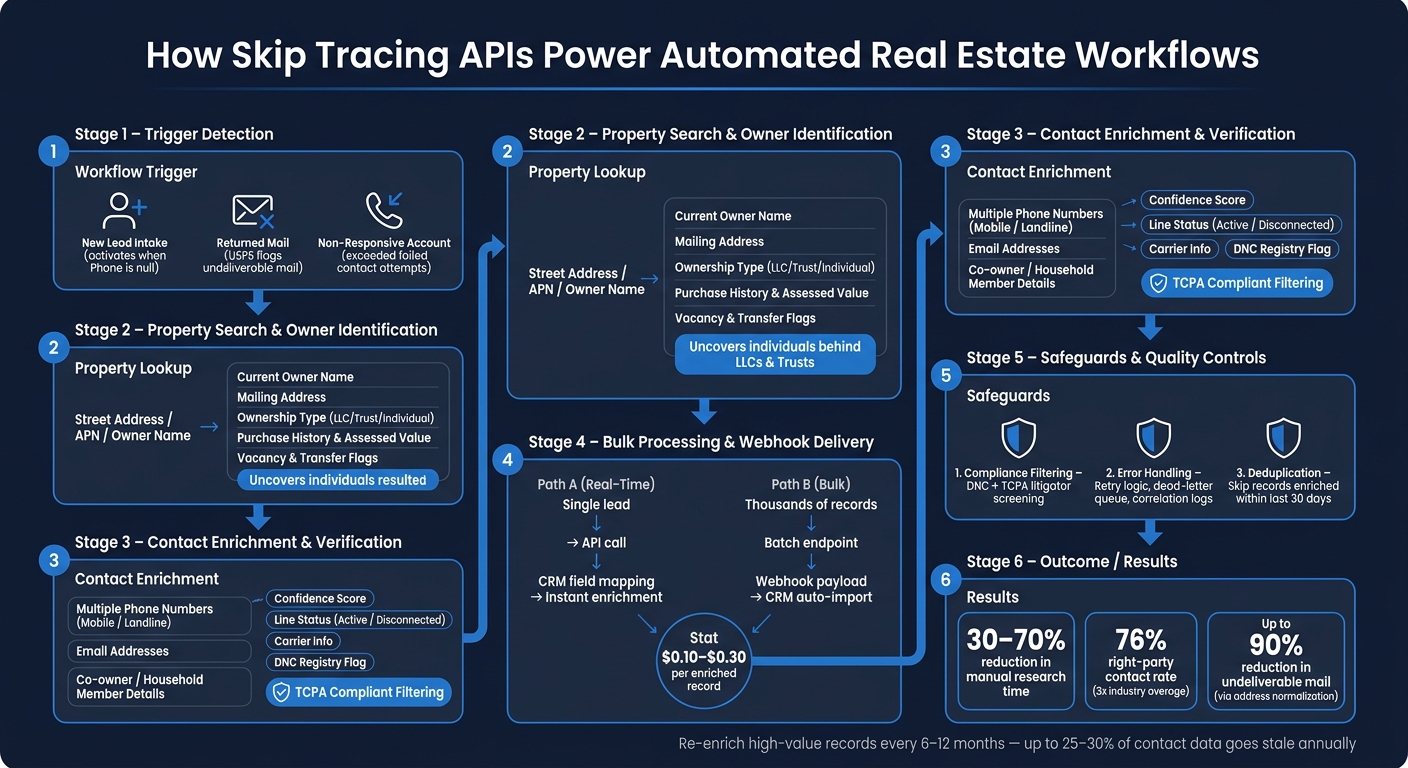
How Skip Tracing APIs Automate Real Estate Workflows
Let’s dive into how you can create automated workflows that make skip tracing more efficient, building on the API features we’ve already discussed.
Defining Workflow Triggers and Goals
Start by identifying what triggers each skip tracing workflow. A trigger is essentially a condition in your system that prompts an API call. In U.S. real estate, common triggers include:
- New lead intake: For instance, when a property record is created without a phone number or email.
- Returned mail: If USPS flags mail as undeliverable.
- Non-responsive accounts: When an account exceeds a certain number of failed contact attempts.
Each trigger should be tied to a specific data condition and a measurable goal. For example, a "new lead" trigger might activate when Status = 'New Lead' and Phone is null, aiming to reduce time-to-contact from 24 hours to under 2 hours. A "returned mail" trigger could move the record into a re-engagement pipeline with a goal of recovering a valid address and at least one phone number for over 80% of flagged records.
Linking these triggers to clear KPIs – like right-party contact (RPC) rates, cost per successful contact, or the percentage of records with verified phone numbers – helps ensure your workflow is both efficient and results-driven.
Once your triggers and goals are defined, the next step is integrating APIs into your existing systems.
Connecting APIs to Existing Systems
How you integrate depends on your workflow’s volume and speed requirements. Here are some common approaches:
- Real-time enrichment: For scenarios like lead intake, you can set up a direct API call from your CRM or backend system. This allows the system to send the owner’s name and address to a skip tracing API endpoint and map the JSON response into contact fields instantly.
- No-code tools: If your team has limited resources, platforms like Zapier or Make can help you connect skip tracing APIs across systems without needing custom code.
- Batch processing for large-scale operations: Submit bulk records to a batch processing endpoint, such as BatchData – Ivo Draginov, and receive the enriched results via webhook. High-volume teams can also use message queues like AWS SQS or Kafka, enabling asynchronous API calls while keeping the main application responsive.
With the integration in place, it’s critical to build safeguards to maintain reliability and compliance.
Building Safeguards for Reliable Automation
Automation is only as good as the safeguards you put in place. Here are three essential ones:
- Compliance filtering: For workflows targeting U.S. consumers, make sure phone numbers are automatically checked against the National Do Not Call (DNC) registry and screened for known TCPA litigators before being sent to a dialer or SMS campaign. Many APIs can handle these checks automatically. You can also set a confidence score threshold to ensure only high-quality leads make it into your CRM.
- Error handling: Use retry logic with exponential backoff for HTTP 429 or 5xx errors. Records that repeatedly fail should go to a dead-letter queue for manual review. Keep logs of API requests, including a correlation ID, timestamp, and response code. This makes troubleshooting issues like drops in match rates or latency spikes much easier.
- Deduplication: Avoid redundant API calls by checking whether a record has been enriched in the last 30 days. This simple rule can significantly reduce unnecessary API costs, especially for large portfolios.
How to Get More Out of Skip Tracing API Integrations
Technical Best Practices for Developers
To ensure a smooth integration, start by securing API keys using environment variables or a secrets manager. Always use separate credentials for development and production environments to prevent accidental changes to live data.
Next, map the API’s data fields – such as owner name, address, phone numbers, emails, and confidence scores – to your internal schema. Clearly document which fields are required and which are optional. This step minimizes errors and reduces the need for manual data cleanup.
For bulk jobs, take advantage of batch endpoints. Submit records in bulk, capture the job ID, and use webhooks to receive results asynchronously. If webhooks aren’t an option, implement polling at reasonable intervals instead of maintaining a synchronous connection. This approach supports scalable processing and avoids unnecessary resource use.
By following these practices, you’ll set a strong foundation for seamless integration and better data management.
Data Quality and Governance
One of the best ways to improve results is by normalizing addresses before sending them to the skip tracing API. Standardizing addresses to USPS conventions – using correct abbreviations, ZIP+4 codes, and consistent formatting – can reduce undeliverable mail by up to 90% while boosting match rates for downstream enrichment. If an API can’t match a record cleanly, you’ll end up paying for processing without getting any value in return.
It’s also important to validate each phone number’s type, status, and risk score. Storing this metadata allows for automatic filtering and helps you track data lineage. Be sure to record details like the source of the data, the enrichment timestamp, and the confidence score. Since up to 25–30% of contact data becomes outdated every year, consider re-enriching high-value records every 6–12 months to maintain accuracy.
For teams working on complex pipelines, tools like BatchData offer professional services to help design custom schemas, integration flows, and governance rules. This can be especially helpful if your workflow involves combining property data, contact enrichment, and phone verification across multiple systems.
Incorporating these data quality measures alongside cost-saving strategies will help ensure your workflow is both effective and efficient.
Cost and Performance Optimization
To control costs, pre-filter your records before sending them to the API. Skip records that were enriched within the last 90 days, remove invalid addresses, and exclude low-intent leads. Cache results with stable identifiers, like APN or property ID, paired with a timestamp to avoid redundant queries.
Focus premium enrichment efforts on high-priority leads, such as absentee owners, high-equity properties, or leads with a strong deal score for real estate investing. Use bulk endpoints for more affordable processing and asynchronous workflows to keep your system running smoothly.
Finally, track key metrics like match rates, verified-contact rates, job completion times, API error rates, and cost per usable lead. Break these metrics down by lead source, property type, or geography to spot areas where you can save money or improve performance. These insights will help you fine-tune your approach and maximize the value of your skip tracing efforts.
Conclusion: Using Skip Tracing APIs to Automate Your Workflows
Skip tracing APIs have reshaped the way real estate professionals, investors, and collections teams locate and act on contact data. What once required hours of manual research can now be completed in milliseconds, thanks to real-time, process-ready data. This combination of speed and reliability is what makes API-driven automation so effective.
The true benefits shine when the API is part of a well-integrated system. Tasks like property searches, owner identification, contact enrichment, phone verification, and bulk processing can seamlessly transform raw data into actionable leads – no manual intervention needed. Teams that implement these workflows efficiently can reach far more property owners in a day while cutting down manual research time by 30–70%. This means more time for follow-ups and decision-making, rather than being stuck in the weeds of data gathering.
However, automation success depends on keeping data quality top-notch. Processes like verification, deduplication, confidence-based routing, and regular re-enrichment are essential to ensure your pipeline remains accurate and compliant. Without these safeguards, automation risks amplifying errors instead of solving problems.
BatchData offers tools to support these end-to-end workflows, including APIs for property search, skip tracing, phone verification, and contact enrichment, as well as bulk data options and expert services for teams needing help with integration. With a 76% right-party contact rate – nearly three times the industry average – and real-time results, it’s designed for teams that operate at high speed and precision.
Building effective skip tracing workflows means creating a reliable system that delivers accurate information to the right people at the right time. Start small with a targeted automation, track your performance, and scale up gradually. By linking property searches, owner identification, enrichment, and quality controls into one streamlined process, you can create a workflow that consistently delivers results.
FAQs
What data should I send to a skip tracing API for the best match rate?
For optimal match rates, include standardized property identifiers, such as a USPS-standard property address (street, city, state, ZIP code) and/or the property owner’s name associated with the record. Ensure state codes are in uppercase and follow proper abbreviations. These details improve accuracy when locating contact profiles, providing verified phone numbers, email addresses, and the owner’s current mailing address.
How do webhooks make bulk skip tracing workflows fully automated?
Webhooks make automated skip tracing seamless by facilitating real-time communication between systems. When you set up a webhook URL with the BatchData API, your system gets instant updates whenever new lead enrichment data – such as phone numbers, emails, or mailing addresses – is processed. This removes the need for manual checks, ensuring enriched lead records are ready for outreach right away. The result? An efficient, event-driven workflow that runs entirely on its own.
How can I use confidence scores and DNC flags to stay TCPA-compliant?
BatchData’s API makes it easier to manage your contacts while staying compliant with TCPA regulations. You can leverage confidence scores to prioritize reliable contacts and use DNC flags to automatically filter out phone numbers listed on the National DNC registry or litigator lists. This approach simplifies your contact management process and reduces compliance risks.