Skip tracing is all about finding accurate contact details for property sellers. The challenge? Outdated or incorrect data that wastes your time. Advanced filters and search tools solve this problem, helping you focus on high-quality leads. Here’s how they work:
- Filters: Target specific property traits (e.g., tax delinquency, mortgage balances) or owner details (e.g., absentee owners, LLC decision-makers).
- Compliance Tools: Automatically check leads against the Do Not Call (DNC) registry and flag potential legal risks.
- Bulk Processing: Upload large datasets, enrich them with updated contact info, and save hours of manual work.
- Data Accuracy: Platforms use multiple sources and daily updates to achieve up to a 76% success rate for contacting the right person.
These tools streamline your search, save time, and reduce wasted effort. Whether you’re a real estate investor or agent, they help you connect with motivated property owners effectively.
You’re Wasting Money on Skip Tracing. There’s a Better Way!
sbb-itb-8058745
Skip Tracing Filter Basics
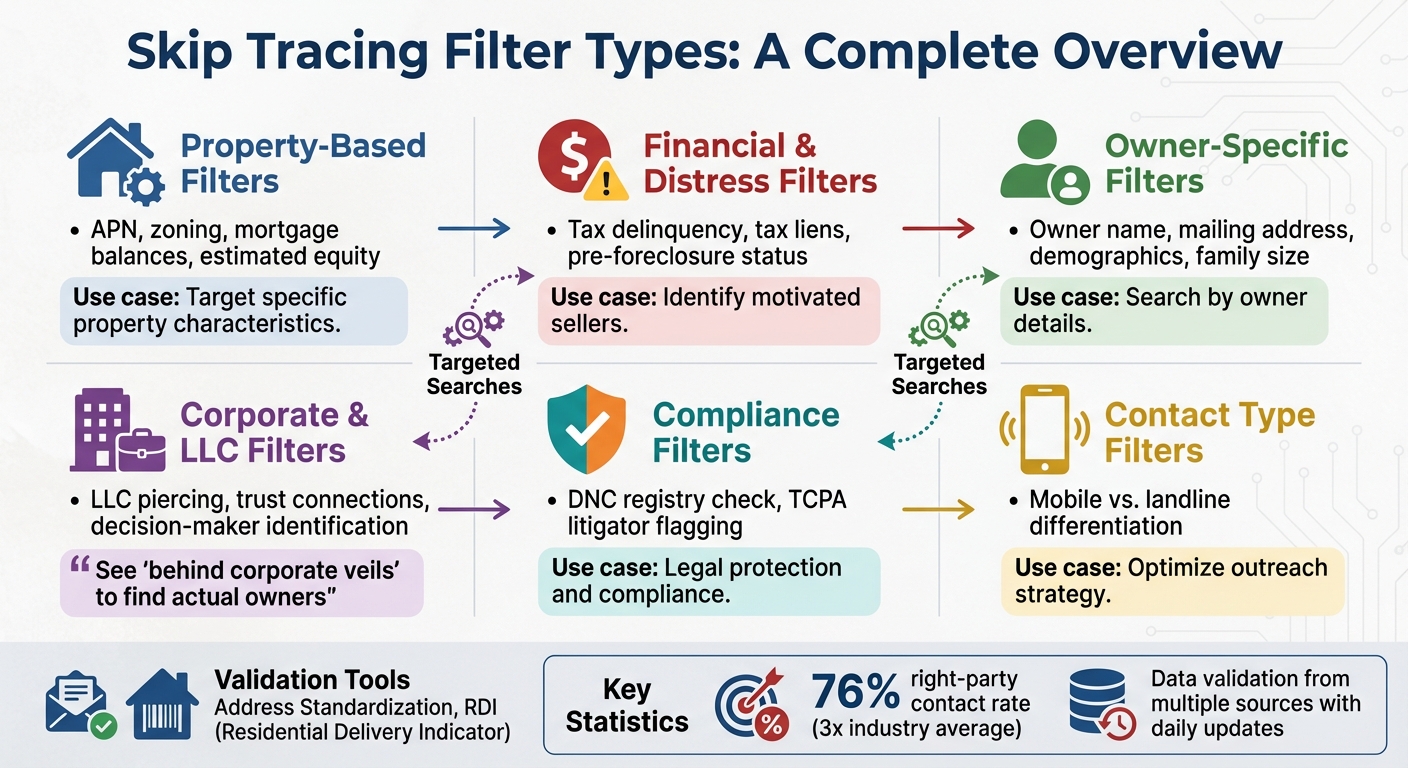
Skip Tracing Filter Types and Features Comparison Guide
Skip tracing filters take massive property datasets and refine them into targeted lead lists. Instead of manually digging through endless records, these filters allow you to set specific criteria that pinpoint properties and owners that align with your investment goals. In short, filters transform hours of tedious research into just minutes of focused results. Let’s break down the different filter categories that make property searches more effective.
Common Filter Types
Skip tracing platforms offer a variety of filters, each designed to focus on specific aspects of property ownership. Here’s a quick overview of the most common types:
- Property-based filters: These zero in on physical and financial details like Assessor’s Parcel Number (APN), zoning information, mortgage balances, and estimated equity.
- Financial and distress filters: Perfect for identifying motivated sellers, these filters flag indicators like tax delinquency, tax liens, or pre-foreclosure status.
- Owner-specific filters: These help you search by owner details, such as name, mailing address, or demographic information like family size.
For business entities, corporate and LLC filters uncover the real decision-makers behind companies. As BatchData explains:
Our technology is designed to see ‘behind corporate veils’ by connecting LLCs and trusts to the actual individuals who own them.
Other tools include compliance filters, which cross-check results against the National Do Not Call (DNC) registry and flag potential TCPA litigators, and contact type filters, which differentiate between mobile and landline numbers.
How Filters Help Target Searches
These filters work together to streamline your property searches, saving time and effort by focusing only on leads that meet your criteria. For example, combining mortgage balance filters with tax delinquency indicators quickly generates a list of distressed properties with high equity. Or, searching for mailing addresses that differ from property addresses can reveal out-of-state landlords who may be ready to sell.
To ensure accuracy, data validation tools like Address Standardization and Residential Delivery Indicator (RDI) confirm USPS-compliant addresses and distinguish between business and residential properties. Platforms that use multi-source validation and confidence scoring can achieve right-party contact rates of about 76%, nearly three times the industry average. These precise filters form the backbone of advanced skip tracing tools, making the entire process faster and more reliable.
Advanced Search Features
Once you’ve mastered basic filters, advanced search features take your lead identification to the next level. These tools allow you to combine and fine-tune your filters, creating highly targeted searches that save time and improve accuracy. Let’s break down how these features work.
Combining Multiple Filters
Combining filters is key to narrowing down large datasets into a manageable list of high-potential leads. Start with specific filters like property type (e.g., single-family homes), year built (e.g., before 1995), and ownership duration (e.g., 5+ years). Then, layer on quick filters such as "Absentee Owner" or "Tax Distressed" to pinpoint motivated sellers who meet your criteria.
This approach not only saves time but also ensures you’re targeting the right leads. For example, pairing location filters with financial distress indicators – like tax liens or pre-foreclosure status – can quickly identify property owners facing urgent financial challenges. Tools like custom boundary drawing can further refine your results by excluding irrelevant areas, such as rivers or railroad tracks, that might otherwise skew your data. Once you’ve found a winning combination of filters, save them as custom presets to streamline future searches across different markets.
While combining filters is powerful, tweaking your search settings can make your results even more precise.
Custom Search Settings
Custom settings allow you to fine-tune how your search processes and prioritizes data. For instance, compliance scrubbing automatically checks your leads against the National Do Not Call (DNC) registry and flags known TCPA litigators using Litigator Scrub features. This proactive step helps shield you from potential legal troubles before you even make contact.
For properties held by LLCs or trusts, entity unmasking links corporate records to the actual decision-makers, giving you direct access to the individuals behind the ownership rather than generic business addresses.
You can also refine your outreach strategy by prioritizing contact types. For example, separate mobile numbers from landlines to decide whether SMS campaigns or direct mail would be more effective. Use phone number confidence scores to focus on leads most likely to connect you with the right person. Additionally, address validation tools like the Residential Delivery Indicator (RDI) and Delivery Point Validation (DPV) ensure you’re targeting accurate, mailable addresses that meet USPS standards. This reduces wasted marketing efforts and keeps your campaigns cost-effective.
Using Bulk Skip Tracing Tools
When you’re managing hundreds – or even thousands – of property records, handling them one by one just isn’t realistic. This is where bulk skip tracing tools come in handy. These tools allow you to upload entire datasets at once, enriching all your records in a single go. What could take days of manual effort is reduced to just minutes, giving you more time to focus on outreach and strategy rather than tedious data entry. Below, we’ll walk through how this process works and the benefits it offers.
How to Process Bulk Skip Tracing Requests
To get started, you’ll need to prepare your data in a CSV file, ensuring it includes key fields like owner names, street addresses, cities, states, and zip codes. Once your file is ready, upload it to the platform and map your CSV columns to the system’s field names. For instance, fields like "Mailing City" or "Parcel Full Address" in your file should align with the platform’s required inputs. The system will then cross-reference your data against multiple sources to retrieve phone numbers, email addresses, and updated mailing details.
Some advanced platforms go a step further by automating LLC piercing, which connects corporate entities to the individuals behind them. They also standardize addresses into USPS-compliant formats, ensuring your mailing lists meet postal delivery standards. Compliance checks are often built into the process, so you don’t have to worry about manual oversight. For example, processing a small batch of around 60 records typically takes just 1 to 2 minutes. High-performance APIs can handle even larger datasets in milliseconds, making them ideal for platforms managing data at scale.
"Our data undergoes continuous validation from over a dozen sources to ensure top-tier right-party contact rates, which are currently nearly three times higher than the industry average." – BatchData
With accurate data mapping and fast enrichment, the benefits of bulk processing become immediately clear.
Time Savings with Bulk Processing
The time savings from bulk skip tracing are hard to ignore. Instead of painstakingly researching each property owner, you can upload an entire list and get back enriched data, including up to six phone numbers per contact. BatchData reports a 76% right-party contact rate – roughly three times the industry average – which means fewer wasted calls and more productive conversations with property owners. Plus, daily data updates ensure your contact information stays fresh, cutting down on time spent chasing outdated leads.
Integration options make these time savings even greater. API connections allow your enriched data to flow directly into your CRM or power dialer, automating your lead generation workflow without any need for manual file transfers. For real estate investors running cold calling or texting campaigns, this means your marketing lists are ready to go as soon as processing is complete. BatchData also keeps things simple with a pay-as-you-go pricing model, charging only for successful matches. For high-volume users, subscription tiers provide better per-record rates, making it a flexible option for businesses of all sizes.
Compliance and Data Accuracy
When it comes to skip tracing, having reliable contact data is non-negotiable. But just as important is ensuring that this data is collected and used in line with legal standards. Reaching out to property owners without adhering to compliance laws can lead to serious consequences. For instance, a single call to a number listed on the Do Not Call (DNC) registry or to someone known for filing TCPA lawsuits could result in hefty fines, legal issues, and a tarnished reputation. On top of that, outdated or inaccurate data can drain your marketing budget by targeting disconnected numbers or incorrect addresses. To tackle these challenges, modern skip tracing platforms now integrate compliance safeguards and data verification tools, ensuring your outreach efforts are both lawful and effective.
Compliance Tools and Features
Skip tracing platforms have stepped up their game by automating tasks like DNC and litigator scrubbing. These tools check your contact lists against the National Do Not Call registry, state-specific DNC lists, and databases of individuals with a history of filing TCPA lawsuits over unsolicited calls or texts. This automation ensures that your outreach complies with both federal and state regulations, minimizing the risk of legal trouble.
To further enhance data reliability, address validation features – powered by systems like CASS, DPV, and RDI – standardize addresses to match USPS formats. This reduces the chance of mail being returned and boosts the overall performance of your campaigns. Together, these tools not only protect you legally but also contribute to better data accuracy.
How Platforms Verify Data Quality
Beyond compliance, top skip tracing platforms focus heavily on data accuracy through continuous validation. They rely on real-time verification methods, pulling from multiple sources to ensure contact details are up-to-date. Some platforms even leverage feedback loops from thousands of active users – over 20,000 in certain cases – to refine and validate their data constantly. For example, BatchData boasts a 76% right-party contact rate, which is about three times the industry standard. This is achieved through daily data updates and self-enriching engines that clean records in real time. These processes are key to maintaining high contact success rates.
Additionally, platforms use phone confidence scores to help prioritize which numbers are most likely to connect. Some even offer LLC piercing technology, allowing users to identify the decision-makers behind corporate entities instead of getting stuck with generic contact information. By combining automated compliance checks, real-time updates, and advanced validation techniques, these platforms deliver skip tracing results that are both legally sound and highly actionable.
Managing and Exporting Skip Tracing Data
Keep your skip tracing results organized and ready to use for marketing campaigns or CRM systems. Most skip tracing platforms automatically save your data in centralized sections like "All Files" or "My Lists." This setup makes it easy to revisit previous searches without running the same query again. Combined with advanced filtering and bulk processing, this approach ensures a smooth and efficient workflow.
Saving and Accessing Past Searches
Many platforms include tools like Workspaces to help you manage your data more effectively. Workspaces allow you to create separate lists, handle records independently, and run campaigns without mixing data between users. This feature is especially helpful for teams managing multiple projects. It also ensures that the accuracy achieved through real-time data enrichment is preserved. Even if you hit your plan’s storage limit, past search results remain accessible. However, adding new data might require clearing space or upgrading your plan. If you’re switching platforms or undergoing a system migration, you may need to contact support to retrieve older data, usually within a limited timeframe.
Export Formats and Options
Exporting enriched data is key to integrating it with your existing tools. Most platforms use CSV as the standard export format, which works seamlessly with CRMs, marketing platforms, and dialers. Some systems even allow direct data transfers to your CRM, skipping the need for manual downloads. Be sure to check whether skip-traced records count toward your monthly export limit to avoid running into restrictions. For real-time integration, API options are increasingly popular. For instance, BatchData’s API can deliver skip tracing results in milliseconds, ensuring your CRM always has up-to-date contact information.
Key Takeaways
Skip tracing tools with advanced filters and search options are transforming how real estate professionals connect with prospects. Some platforms boast a 76% right-party contact rate – about three times higher than the industry average. This means you’re reaching real decision-makers instead of outdated numbers or generic registered agents.
These platforms don’t just stop at basic filtering. They verify data across multiple sources for accuracy. For example, BatchData cross-references information from over a dozen leading providers, ensuring contact details are up-to-date. Features like LLC and trust piercing allow you to uncover the individuals behind corporate entities, giving you direct access to key decision-makers.
Efficiency is another key benefit. Bulk processing tools reduce manual work, speeding up data delivery, while API integrations keep your CRM updated automatically with enriched data. Built-in compliance tools, like DNC and Litigator Scrubs, help you avoid TCPA violations and filter out unreachable contacts.
For direct mail campaigns, address validation tools such as Delivery Point Validation (DPV) and CASS certification ensure that your mail reaches deliverable locations that meet USPS standards. Combined with features like phone number confidence scores and metadata enrichment, these tools help you focus on high-value leads, making the most of your marketing budget.
The result? Verified, actionable data that drives real conversations. With pay-as-you-go pricing starting at $0.07 per match for bulk requests, you only pay for successful results – no hidden fees or complicated contracts to worry about. From advanced filtering to automated compliance, every feature works together to streamline your outreach and improve your results.