






































A missed renewal or inspection can stall a property transaction, delay construction, or leave an entire portfolio exposed while the team assumes everything is current. A permit tracking system prevents that blind spot by combining applicant workflow management with a structured, queryable compliance database.
Modern systems make permit status, ownership, deadlines, documents, inspections, and agency handoffs visible in one place. They also create a second layer of value: standardized permit data can support property research, underwriting, portfolio monitoring, insurance decisions, and market intelligence.
| Core question | Practical answer |
|---|---|
| What does it track? | Applications, reviews, approvals, inspections, renewals, expirations, documents, and enforcement events |
| Where does data come from? | Jurisdiction portals, agency systems, APIs, PDFs, and public-record requests |
| What makes data useful? | Consistent status, dates, addresses, values, contractor fields, coverage, freshness, and entity matching |
| Who uses it? | Applicants, contractors, agencies, lenders, insurers, investors, marketers, and proptech platforms |
A permit record becomes valuable when a team can trust both its current workflow state and its historical context. That starts with understanding how the system is built.
What Is a Permit Tracking System and Why It Matters Now
A permit tracking system is software that manages permit workflows and stores the related compliance history in a searchable database. It replaces scattered emails, spreadsheets, phone notes, and jurisdiction portals with a shared record of what has happened, what must happen next, and which deadline could affect a project.
Consider a company managing several properties. One permit is awaiting plan review, another needs an inspection, and a third is approaching expiration. A spreadsheet may show three rows marked “in progress,” but that label doesn't tell the project manager who owns the next action, whether a dependency is blocking approval, or whether the permit has already drifted from its expected status. If a transaction depends on a final inspection, the missing detail can become a deal problem.
The distinction matters because permit tracking serves two different jobs:
- Applicant workflow: Help contractors, owners, and agencies submit, review, inspect, approve, renew, and close permits.
- Market intelligence: Convert fragmented public records into standardized signals about property improvements, construction activity, ownership risk, and project progress.
Digital features can materially change processing efficiency. The World Bank's Doing Business 2020 permitting data found that permitting averaged 168 days where no digital features were available, compared with 114 days where more than five digital features were used, a 32% reduction. The same dataset found that only 27% of economies used e-submissions or cloud-based permitting platforms, with adoption at 48% in OECD high-income economies and 47% in the Middle East and North Africa.
Practical rule: A dashboard that shows status but cannot explain the next action, deadline, or source record is only a partial tracking system.
For teams handling complex submissions, specialist support can complement software. A contractor or owner navigating jurisdiction-specific requirements may also benefit from resources on expediting building permits with Aureli Construction, particularly when a delayed approval affects the construction schedule.
The strongest systems therefore combine workflow visibility with data discipline. They capture the original application, preserve every meaningful event, and make the resulting record useful beyond the applicant's immediate task.
How a Permit Tracking System Works Under the Hood
A permit tracking system begins with an application record and ends with a queryable history of decisions, inspections, documents, and compliance events.
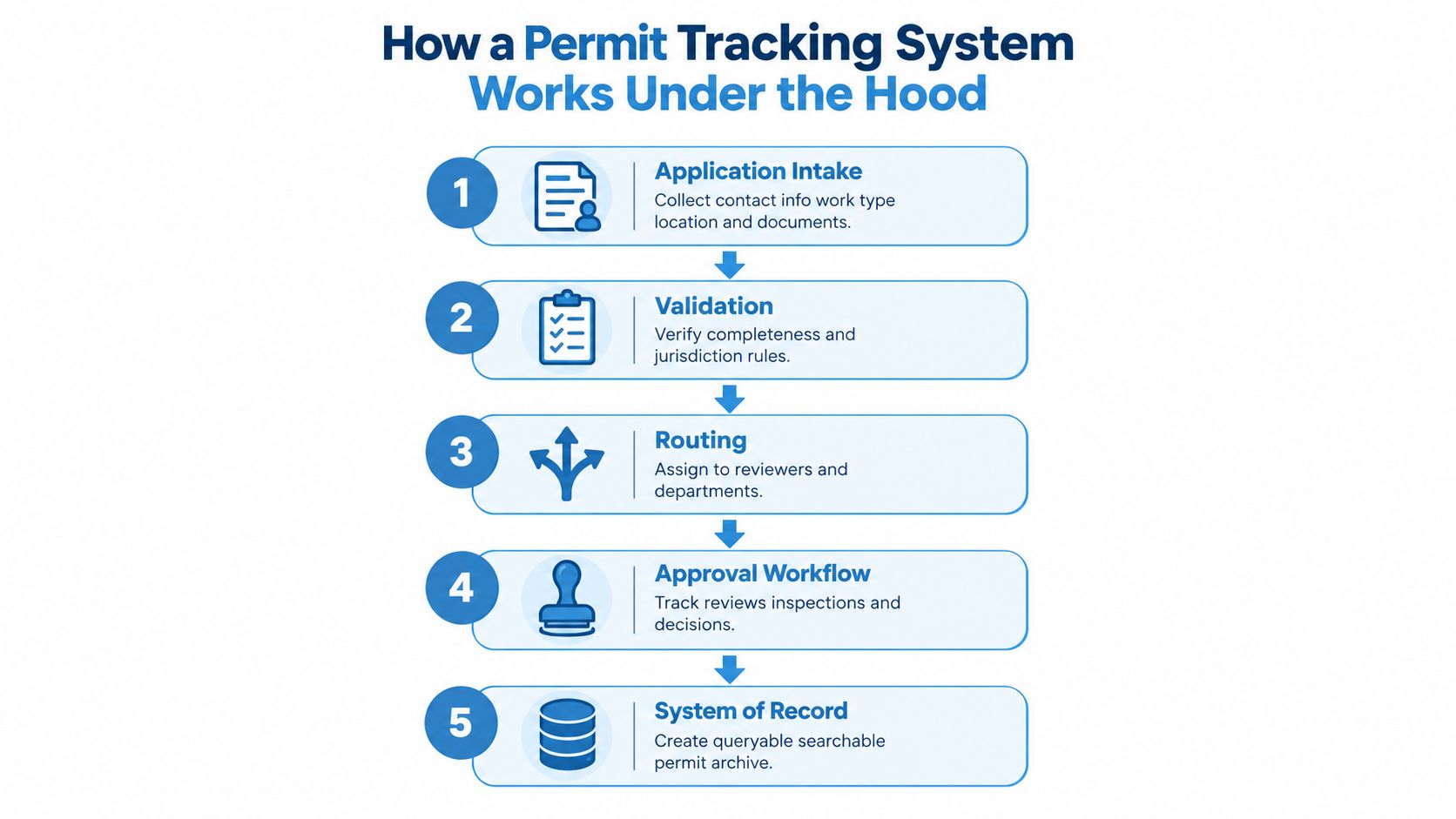
Step one captures the identity
A building-permit workflow usually starts with the applicant's contact information, work type, and work location. The system then assigns an application number, which staff use to follow the record through later stages, as described in Infor's building-permit workflow documentation.
That identifier is more than a reference number. It becomes the key that connects uploaded plans, reviewer comments, inspection outcomes, fee events, approval decisions, and later renewals. Without a stable identifier, teams create duplicate records or lose the relationship between a permit and its associated property or facility.
Validation and routing turn paperwork into workflow
The system checks whether required information and documents are present, then applies jurisdiction rules. A complete application can move to the correct reviewer or department, while an incomplete one can return to the applicant with a clear reason.
Routing is where a digital system improves coordination. Different departments may own plan review, environmental review, fire review, zoning, or inspection. The record needs to show the active step, the responsible party, the expected action, and any dependency that prevents progress.
Federal permitting dashboards illustrate this principle by making distributed infrastructure reviews visible across agencies. The Federal Permitting Dashboard overview describes a centralized view that exposes workflow states, handoffs, deadlines, and authorization milestones. The operational benefit is straightforward: teams can see where a delay sits instead of asking several departments for separate updates.
Approval events create the system of record
A true system doesn't stop at “approved.” It links facility or property identity to permit issuance, inspection, compliance, and enforcement events. The U.S. EPA's Permit Compliance System demonstrates this relational approach by monitoring over 130,000 facilities and storing approximately 8 million records across operational files covering facilities, effluent, compliance, inspections, enforcement, and permit events, as documented by OpenGov's permitting and licensing overview.
This design lets agencies correlate a violation with a facility's history. It also exposes a legacy integration challenge, because structured retrieval can coexist with a complex hierarchical data model. Modern APIs and webhooks make it easier to exchange normalized events with CRM, property, construction, and reporting systems.
A permit can also be tied to the resource affected by the permitting activity, not merely to acceptance or renewal. The EPA Permit Tracking System manual explicitly describes tracking wetland resource impacts connected to permits. That distinction matters for environmental oversight, asset risk, and downstream analysis.
For teams monitoring changes across records, a complementary explanation of change detection helps clarify why a new inspection, status change, or permit event should be treated as a data update rather than an isolated notification.
What Core Features and Data Should Every System Capture
A spreadsheet stores values. A permit tracking system stores state, responsibility, timing, evidence, and relationships.
The first test is whether every permit row answers three operational questions:
- What is the official state?
- Who owns the next action?
- What date could affect the project?
Structured permit-tracking guidance recommends recording the expiration rule, verified expiration date, related dependency dates, and renewal owner so the system can trigger action before validity lapses. The construction permit tracking register guidance provides this field-level approach.
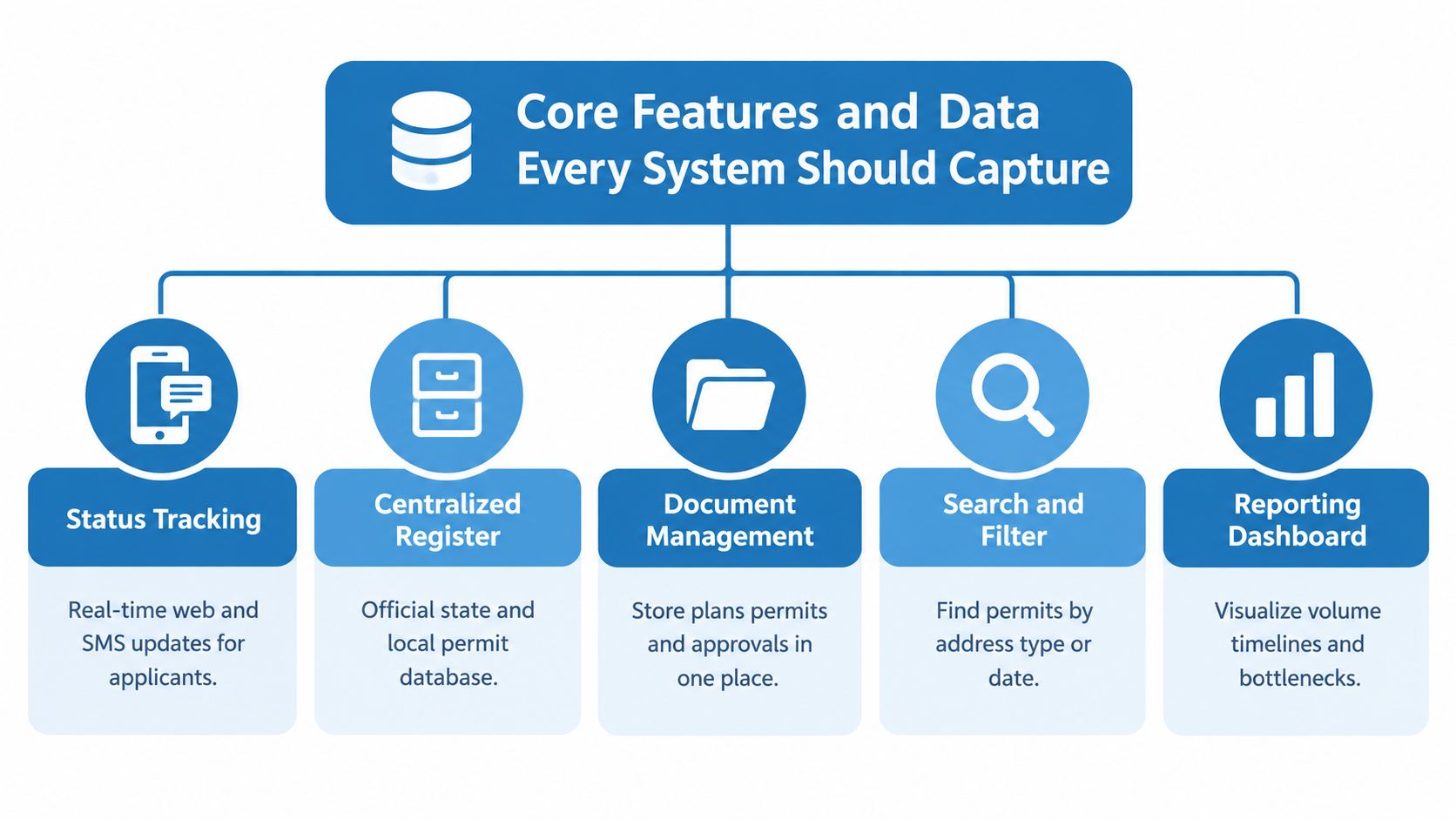
Status tracking needs more than a progress bar
About 80% of surveyed e-permitting systems allowed applicants to track application status, rising to 89% in developing countries, according to the World Bank e-permitting study. Most used a web interface, and more than one-third also supported SMS notifications.
Status visibility becomes useful when it includes event timestamps, reviewer notes, missing documents, inspection results, and the next responsible actor. A label such as “under review” isn't enough if nobody knows whether the file is waiting for zoning, engineering, payment, or an applicant response.
Registers and documents preserve accountability
A centralized register should connect the permit to:
- Property or facility identity: Address, parcel or facility identifier, jurisdiction, and related assets.
- Application details: Application number, permit type, work description, applicant, contractor, and submission date.
- Lifecycle events: Submission, review, correction request, approval, issuance, inspection, suspension, renewal, expiration, and closure.
- Ownership fields: Current owner of the next action, renewal owner, reviewer, and escalation contact.
- Evidence: Plans, approvals, correspondence, inspection reports, notices, and enforcement documents.
Document storage isn't a filing convenience. It gives the team evidence for why a permit reached its current state and supports audits when records conflict.
Search and dashboards expose portfolio risk
Search should work across address, permit type, status, date, contractor, project, and jurisdiction. Filters let an operator isolate permits nearing expiration, waiting for inspection, or lacking a verified update.
Dashboards then turn individual records into operational signals. They can show application volume, review timelines, bottlenecks, overdue actions, and unresolved dependencies. A system that cannot filter and aggregate its records will struggle to support multi-site oversight, even if its individual permit pages look polished.
How Data Sources, Workflows, and Integrations Power Accuracy
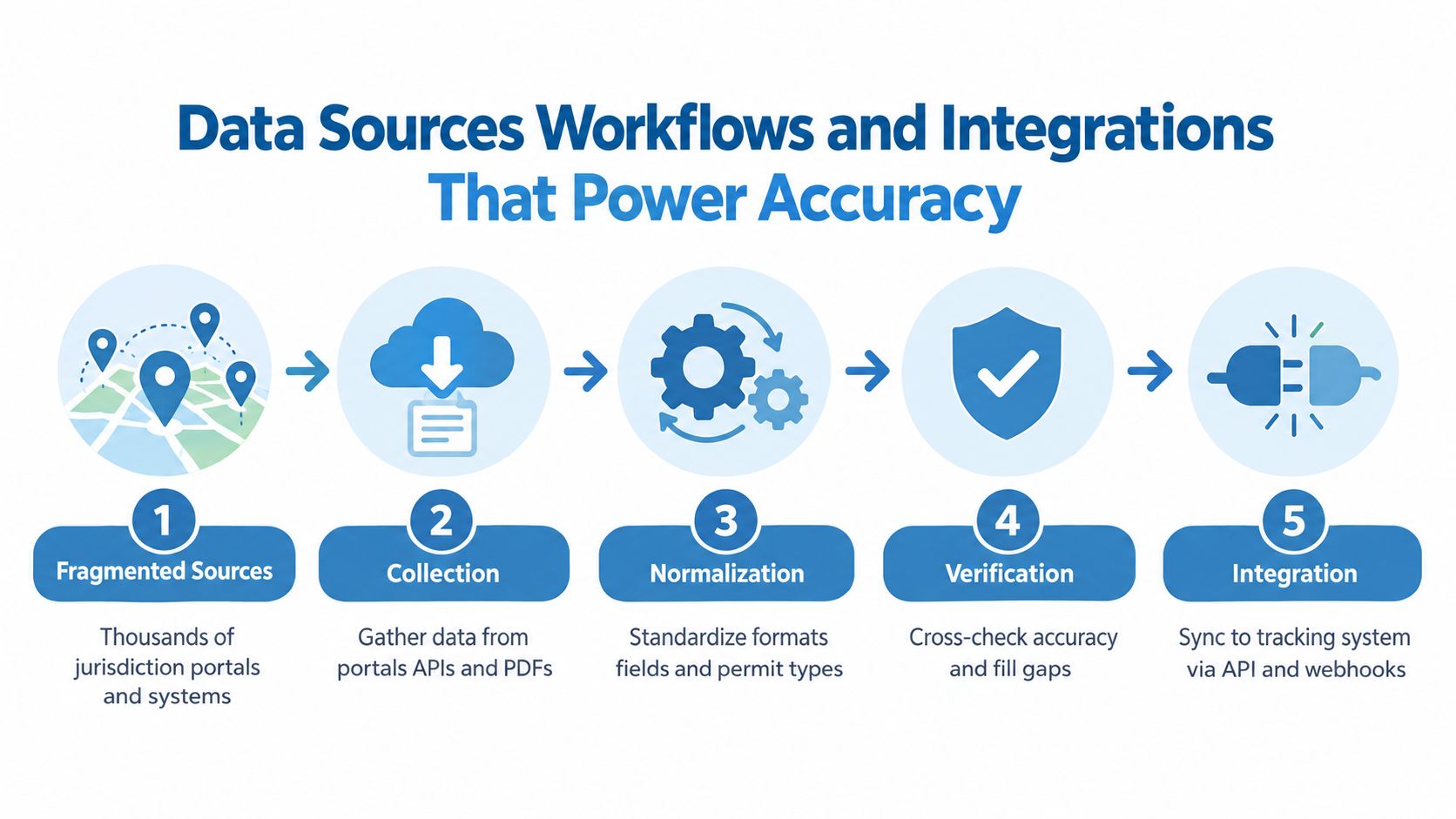
Permit data quality depends more on collection and normalization than on the visual design of the dashboard.
Jurisdictions publish records through different portals, schemas, update schedules, file formats, and naming conventions. Some information comes from online systems, while other records require offline public-record requests. Before the data can support analysis, teams may need to deduplicate records, geocode addresses, standardize fields, and link permit entities to properties, facilities, contractors, and owners.
Collection starts with source reality
A permit may appear in a municipal portal, an agency database, a PDF index, or a public-record response. Each source can use different labels for the same event. One jurisdiction may call a record “issued,” while another distinguishes “approved,” “ready for issuance,” and “finaled.”
That makes coverage a core product attribute. A system covering only a few convenient portals may be excellent for local workflow management but weak for national market intelligence. The buyer needs to know which jurisdictions, permit classes, date ranges, and fields are available.
Normalization makes records comparable
Normalization converts inconsistent source records into a common model. At minimum, teams should define consistent representations for:
- Status: Submitted, under review, approved, issued, inspection required, expired, closed, or equivalent source states.
- Dates: Application, approval, issuance, inspection, expiration, and last verified dates.
- Location: Standardized address, coordinates, parcel relationship, and jurisdiction.
- Value: Job or improvement value where the source provides it.
- Participants: Applicant, architect, contractor, owner, reviewer, and agency.
- Relationships: Property, facility, project, permit, inspection, and enforcement event.
Normalization doesn't mean erasing jurisdiction-specific detail. It means preserving the original value while mapping it to a shared analytical vocabulary.
Verification and integration determine usability
Verification should identify duplicate applications, stale records, conflicting addresses, missing contractors, and status changes that lack supporting events. The tracking layer then exposes the cleaned result through dashboards, APIs, bulk files, or webhooks.
For teams working with property intelligence, building permit search data shows why permit records are often more useful when connected to broader property context. A permit can indicate work at an address, but ownership, valuation, lien, mortgage, and property characteristics help explain what that work may mean.
When reviewing construction records, teams can also use a practical guide to permit record red flags for contractors to identify missing approvals, inconsistent project details, or unresolved inspection concerns. The broader lesson is simple: freshness and completeness should be evaluated alongside workflow speed.
Where Does Permit Tracking Create Value Across Industries
Permit data creates different value depending on who consumes it. A contractor needs the next action. A lender needs evidence of improvements and unresolved risk. An investor may care about recent activity at a target property or signals of development intent.
| Industry | Primary goal | Key permit signals used | Business outcome |
|---|---|---|---|
| Proptech and real estate platforms | Monitor properties and projects | Permit type, status, dates, location, value, contractor, inspection state | Better portfolio visibility and property intelligence |
| Mortgage lending and servicing | Support underwriting and asset oversight | Improvement activity, open permits, inspection events, address links, compliance history | More informed due diligence and servicing decisions |
| Insurance | Assess property and construction exposure | Work type, permit status, inspection outcomes, environmental or structural signals | Stronger property risk assessment |
| Real estate investment | Find activity and evaluate project progress | New applications, issued permits, renovation type, contractor, value, location | More targeted acquisition and development research |
| Home-services marketing | Identify likely demand | Recent work type, address, contractor, permit timing, property attributes | More relevant audience and lead targeting |
Proptech needs a clean property relationship
A property platform shouldn't merely display a permit number. It should connect the permit to the correct address, parcel, property record, project, and related improvements. This is particularly important for renovation categories where the permit describes a material change to the asset.
For example, an analyst researching accessory dwelling units needs both the permit signal and the physical context of the proposed improvement. A resource covering ADU types and design can help explain the underlying project category, while standardized permit fields help identify where that type of work appears in the market.
Lenders and insurers need unresolved conditions
An issued permit can be useful, but an open inspection dependency may matter more. Lenders and insurers should distinguish between a record that indicates authorized work and one that shows completed, inspected, and closed work.
That distinction supports more disciplined review. It prevents a team from treating every permit as proof that construction finished or that the property carries no remaining compliance issue.
Investors and marketers use permits as intent signals
A recent application can indicate planned work, but it doesn't guarantee completion, ownership intent, or investment quality. Investors should combine permit timing and type with property, ownership, valuation, and market signals.
Marketers face a similar constraint. A roofing or solar permit may identify relevant activity, but the permit should be treated as a targeting signal with a defined date and confidence level, not as unquestionable proof of current consumer demand.
The best cross-industry systems preserve the source record and expose the uncertainty. They help users act on a signal without confusing that signal with a conclusion.
How Should You Implement, Measure, and Choose the Right Vendor
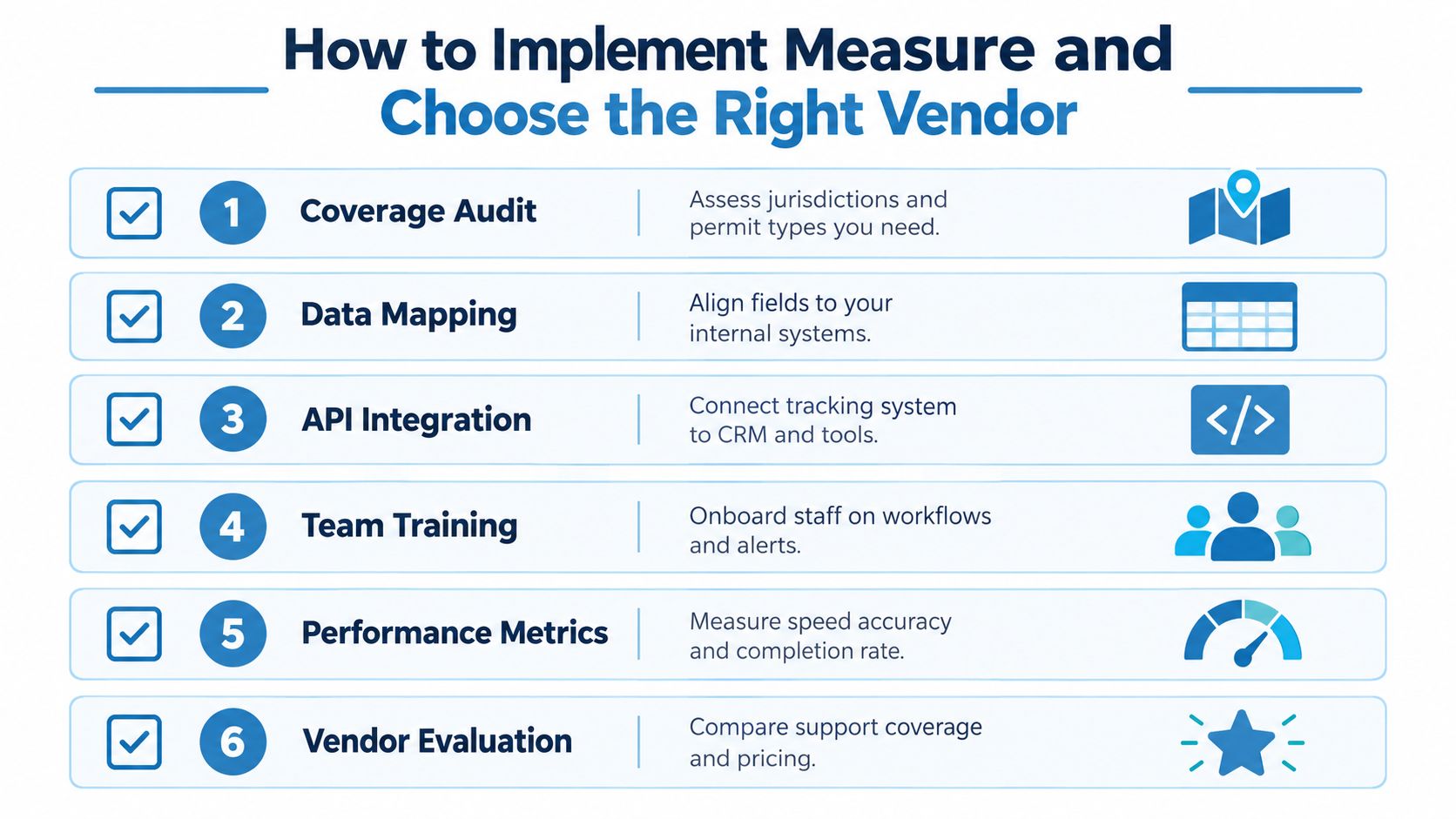
Implementation should begin with a coverage audit, not a software demo.
List the jurisdictions, permit types, properties, facilities, and internal systems your team manages. Then compare that requirement against the vendor's source coverage, update cadence, historical availability, field completeness, and handling of corrections or duplicates.
A practical rollout sequence
- Audit coverage: Identify target markets, permit categories, and required historical depth.
- Map the data: Align external fields with internal property, project, CRM, underwriting, or servicing records.
- Connect systems: Use APIs, bulk delivery, or webhooks to move permit events into operational tools.
- Configure ownership: Assign action owners, escalation rules, dependency dates, and renewal responsibility.
- Train the team: Teach staff how to interpret source status, verify records, and document exceptions.
- Measure performance: Track workflow speed, data accuracy, completion, and time-to-insight.
Measure operational and data outcomes separately
A workflow team may monitor review time, overdue actions, inspection completion, and renewal performance. A market-intelligence team needs different measures, including coverage, freshness, match accuracy, duplicate rate, and the time required to turn a new record into a usable property signal.
Don't combine these into one vague “success” metric. A system can accelerate internal handling while still missing key jurisdictions. Conversely, a broad dataset can support market research while lacking the task ownership needed for active permit management.
Use vendor questions that expose weak coverage
Ask vendors to demonstrate:
- Jurisdictional depth: Which cities, counties, and agencies are included?
- Field-level availability: Are status, dates, value, address, contractor, applicant, and inspection fields present?
- Update behavior: How often are records refreshed, and how are corrections represented?
- Identity matching: How are duplicate permits, changed addresses, parcels, and entities linked?
- Integration quality: Are documentation, authentication, rate limits, webhooks, and bulk delivery clear?
- Portfolio controls: Can the system monitor multiple sites and permit types without status drift?
- Renewal alerts: Can it support alerts up to 120 days in advance, a checkpoint used in current permit-management positioning?
- Security and support: Are permissions, audit trails, incident processes, onboarding, and escalation documented?
A vendor that cannot explain its source dates and matching logic is asking you to trust the dashboard instead of the data. For multi-site operators, that is an avoidable risk.
How Can Compliance and Security Make Tracking Reliable
Reliable permit tracking requires data governance, permissioning, audit trails, and secure integration, not just a current status field.
Normalized keys let teams connect a facility or property to permits, inspections, enforcement actions, and historical changes. That queryable history improves compliance monitoring because staff can investigate the relationship between an event and the asset rather than reconstructing it from disconnected files.
Access controls should limit who can edit official state, upload documents, approve changes, or export sensitive records. Audit logs should preserve the actor, timestamp, changed field, previous value, and reason for the change. API access should use documented authentication, scoped permissions, monitoring, and controlled data movement.
Teams should also separate workflow completeness from market-data completeness. Workflow users may prioritize a clear next action and fast escalation. Analysts may care more about jurisdictional coverage, daily or otherwise documented refresh behavior, consistent fields, and reliable property matching. A system should state which of those jobs it supports.
For a broader framework on responsible handling of property and permit information, review data compliance principles. The practical test is whether your organization can answer where a record came from, when it was last verified, who changed it, and how it connects to the affected asset.
Start with a controlled pilot in your highest-value markets. Validate coverage, compare source records with normalized outputs, connect the events to portfolio monitoring, and test renewal and inspection escalation before expanding across jurisdictions.
BatchData provides property and permit data through low-latency APIs and bulk delivery, with permit records that can include descriptions, numbers, types, locations, dates, applicants, architects, contractors, and inspection details. Visit BatchData to evaluate permit coverage for your target markets and connect those signals to property intelligence and portfolio workflows.