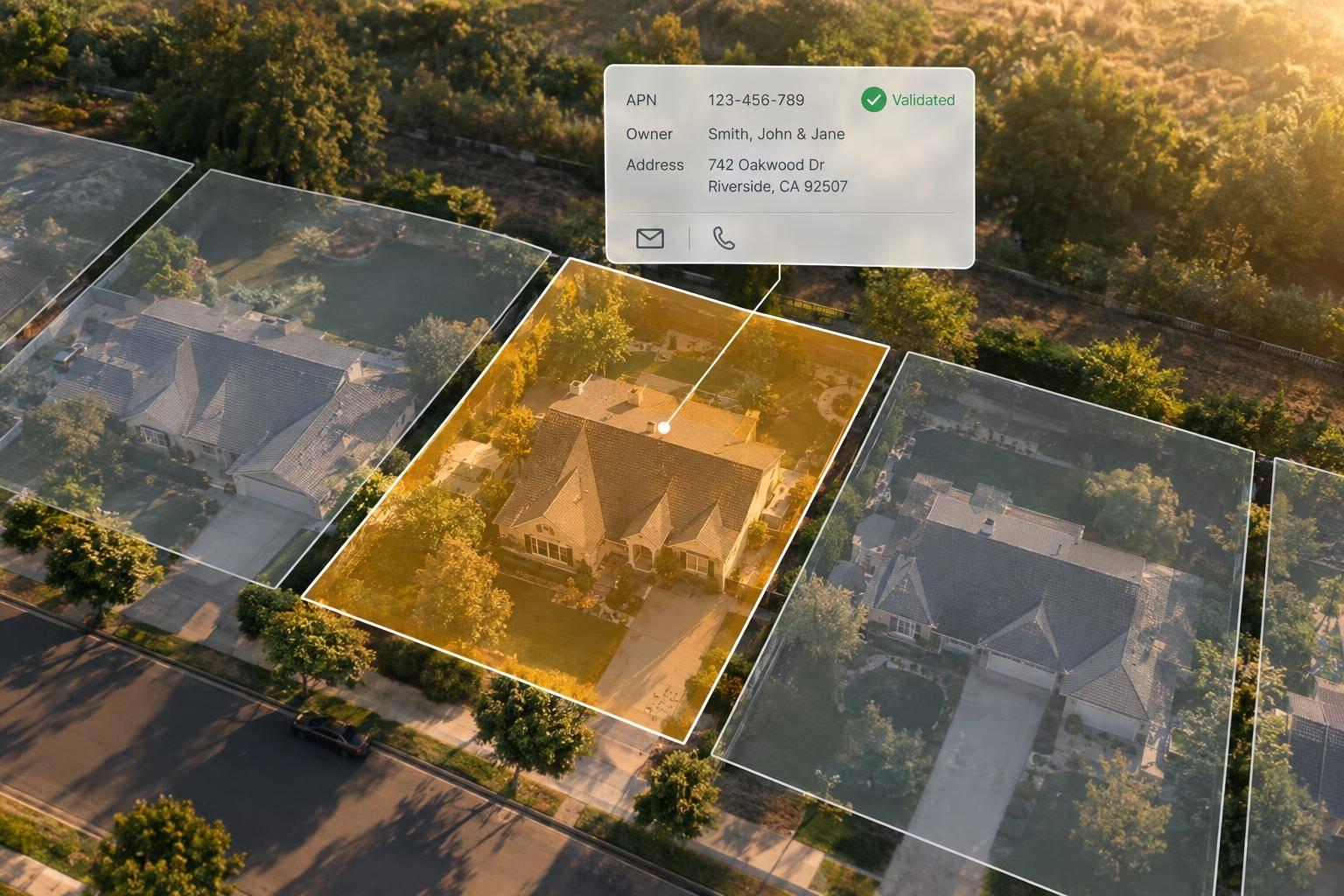
I link parcel boundaries to owner records using state, county, and APN - not an address alone. When that match fails, I check the property address and review conflicts before enriching property records with owner details or contacts.
My process has four steps:
- Prepare: Keep APNs as text, separate property and mailing addresses, and save source dates.
- Match: Join parcel and owner records, preserve co-owners, and review unclear links.
- Validate: Track six match and contact measures, and check outreach rules before use.
- Deliver: Export linked records with review results, source dates, and screening status. Keep prior ownership records when updates arrive.
BatchData lists 169 million+ parcel boundaries and owner data for 131 million+ properties. Those counts describe separate datasets - not a guaranteed match rate.
The limits matter: boundaries are not legal surveys, and <u>an owner match or contact field does not grant permission to contact someone</u>.
Parcel-to-Owner Matching: A Four-Step Workflow
Step 1: Prepare Parcel and Ownership Records
Collect Match Fields and Source Dates
Keep the parcel boundary reference, APN, county, state, and situs address from your BatchData parcel boundaries input. For ownership records, retain the owner’s full name, mailing address, and any available ownership type or entity fields. Store parcel and owner IDs separately so a single parcel can link to multiple owners. Use county, state, and APN as the match key for the APN join.
Keep situs and mailing addresses separate so they don’t get mixed up during the later owner and contact append. Situs identifies the property’s physical location. The mailing address tells you where the owner receives correspondence. Preserve the original addresses in separate field groups.
Use
situs_address_*andowner_mailing_address_*.
Record parcel_source, ownership_source, parcel_as_of_date, ownership_as_of_date, and retrieved_at. retrieved_at records the download time - not when the record changed. Keep source dates separate so a recent download doesn’t make an older record look current.
Standardize APNs and Addresses
Store APNs as text, never numbers, so leading zeros stay intact. Leave apn_raw unchanged, and create apn_normalized using documented county-specific rules. Keep punctuation unless the county format removes it. Include county and state in the match key because APNs can repeat across jurisdictions. The APN real estate data guide explains how APNs identify properties.
Split each preserved address into street number, directional, street name, street type, unit, city, state, ZIP Code, and ZIP+4. Store ZIP Codes as text and keep unit values intact. Use consistent spacing and USPS abbreviations.
Flag missing APNs, duplicate county/state/APN keys, conflicting county or state values, and unparsed units for review. Keep these fields available for auditing the later owner and contact append from property owner data.
Step 2: Match Parcels to Ownership Records
Match by County, State, and APN First
Match records in this order:
- Start with an exact APN join: Use
state + county + apn_normalized. - Use addresses as a fallback: For missing or unresolved APNs, match normalized situs addresses, including unit numbers when available. Check these matches against county, property type, legal description, or geographic metadata.
- Review conflicts manually: Check unclear matches and any that conflict with parcel shape or location. An address match must not override a conflicting APN without review.
Store match_method, match_confidence, and review_status for every relationship.
Review Unclear Parcel Relationships
Send only unresolved or conflicting joins to an exception queue. Check reformatted APNs against documented county-specific numbering rules, and investigate reassigned APNs and parcel splits or mergers.
For condominiums, distinguish unit-level APNs from parent and common-area parcels. Keep multi-unit identifiers intact. For vacant land, rely on the APN, legal description, subdivision, and geographic evidence. Never fill a missing situs address with the owner’s mailing address.
Preserve multiple owners and multi-parcel holdings in a parcel-owner link table. Remove duplicate relationships using a key such as:
parcel_id + owner_id + ownership_role + source_date
Keep legitimate co-owners and separate links to each parcel. Name similarity alone is not enough to merge owners.
Append Owner Details and Available Contacts
Append ownership and contact fields only after the parcel relationship passes review. Add owner names, ownership roles where available, and mailing addresses from property owner data to the validated parcel-owner link - not the parcel boundary itself. Keep situs_address separate from owner_mailing_address, and never substitute one for the other.
Add available phone numbers and email addresses only where permitted. An enriched contact is not automatically the record owner or signer. Flag trusts, estates, and corporate owners for review. Label representatives, trustees, executors, and other associated contacts separately.
Retain assessor_owner_name and assessor_mailing_address alongside enriched values, with source, confidence, and verification timestamps. Keep contact enrichment separate from geometry and assessor attributes so contact updates cannot overwrite parcel facts.
Before using appended contacts for calls or texts, screen numbers against the National Do Not Call Registry, maintain an internal suppression list, and apply channel-specific consent and opt-out controls. Contact availability alone does not authorize outreach. Record the screening date, consent basis, opt-out status, and legal review outcome.
Step 3: Validate Matches and Check Outreach Rules
Measure Match Results and Review Errors
After the join, measure match quality and separate clean records from those that need review.
Report six core measures: APN match rate, address fallback rate, unmatched parcels, owner conflicts, duplicate relationships, and contact append rate.
For parcel-level rates, divide distinct affected parcels by input parcels. For contact append rate, divide matched ownership records with at least one usable contact field by matched ownership records submitted for append. Include counts, percentages, and denominators, and count duplicate relationships separately.
Give each record one final disposition.
| Validation result | Typical condition | Required action |
|---|---|---|
| Exact match | County, state, and normalized APN agree | Accept provisionally; retain source dates and match key. |
| Address fallback | APN is unavailable or fails, but normalized address and jurisdiction agree | Keep as lower-confidence; document fallback logic. |
| Manual-review record | Owner conflicts, duplicate relationships, parcel change, or ambiguous address | Hold from outreach; compare with current assessor or recorder records. |
| Rejected record | Missing identifiers, contradictory jurisdiction, invalid geometry, or no defensible match | Exclude and log the rejection reason. |
Use these dispositions to route records to export, review, or rejection.
Check missing or malformed APNs, jurisdiction mismatches, unclear addresses, duplicate parcel identifiers, invalid geometry, incomplete owner names, and stale source dates against current assessor or recorder records. Log the comparison date and resolution.
Use parcel geometry only to check whether the join matches the mapped parcel. Check appended contacts for name-to-contact consistency and duplicates.
Apply DNC Screening and Outreach Controls
After validation, apply outreach controls before any call, text, or campaign use. Block validated owner-contact records until outreach authorization is documented.
Covered telemarketers must check and update calling lists against the National Do Not Call Registry at least every 31 days and maintain an entity-specific DNC list. Honor direct opt-outs regardless of Registry status. Keep screening dates, results, list versions, suppression status, and opt-out history.
Before outreach, review applicable FTC, FCC, state, consent, calling-time, autodialer, prerecorded-message, and privacy requirements. Residential telemarketing calls generally must occur between 8 a.m. and 9 p.m. in the recipient’s local time, subject to applicable exceptions and stricter state rules.
Consent requirements depend on the number, purpose, and calling method. Store consent evidence, permitted channel, campaign scope, and approval separately.
Step 4: Deliver and Maintain the Dataset
Once validation and outreach screening are complete, package the accurate datasets for delivery and future updates. Include standardized identifiers, a county-state APN join, approved address fallbacks, source dates, and batch IDs.
Define Output Fields and Delivery Formats
Include parcel ID, original and normalized APN, county, state, geometry reference, situs address, owner name, and mailing address from property owner data. Keep enriched phone and email fields separate. For each relationship, record the match method, confidence, source dates, and review status. Export linked parcel-owner-contact records to preserve one-to-many relationships.
Use CSV for review, GeoJSON for maps, and a real estate API or structured feed for recurring delivery. Include a data dictionary, relationship keys, match-method definitions, and an exceptions file. Keep relationship keys consistent across updates so parcel, owner, and contact records stay aligned.
Check the Dataset and Schedule Updates
After export, lock field types and assign a file version before the next update. Before release, check column names and types, preserve APN leading zeros, verify geometry references, and flag duplicate parcel-owner pairs. Set unresolved records aside.
Retain raw and normalized values, source and retrieval dates, effective dates when available, and batch identifiers. Version ownership changes rather than overwriting prior records.
Time updates to source refresh cycles and reprocess changed records. Update contacts separately from ownership, and renew applicable DNC screening and internal suppression checks before authorized outreach. Include screening and authorization status in the delivered records. Enrichment does not prove ownership, survey accuracy, title status, or permission to contact.
FAQs
How do I verify ownership when source records disagree?
Standardize APNs and addresses before linking parcel boundaries to ownership records. Then check owner names, length of ownership, and sales history against official county assessor records, the primary source for ownership details. Flag matches with low confidence or conflicting details for manual review.
When adding owner and contact information, check contacts against federal Do Not Call lists. Parcel boundaries are assessor-derived reference data, not a legal survey.
How do I preserve owner links after a parcel split?
Update your records with the county’s new Assessor’s Parcel Numbers (APNs). A parcel split can replace the previous APN. Send each updated APN and its county information to BatchData’s Property Lookup API to link each new parcel to the correct owner information.
Parcel boundaries come from assessor records, not a legal survey.
When should I recheck outreach authorization?
Recheck outreach permission and phone number registry status before every campaign. Do Not Call (DNC) and TCPA status can change.
When BatchData adds contact information to your records, each phone number comes with DNC and TCPA flags. Use these flags to help check compliance, and update your lists to reflect the latest opt-out requests.