Want to streamline your mortgage platform? Start with real estate APIs. These APIs provide access to essential real estate details – like property characteristics, ownership records, tax data, and financial history – through structured, automated responses. By 2026, integrating these APIs has become a key move for mortgage platforms to improve efficiency, reduce costs, and enhance accuracy.
Key Takeaways:
- What It Does: Automates access to over 700 property attributes for 155+ million U.S. properties.
- Why It Matters: Cuts underwriting labor costs by 50%, updates data within 24–48 hours, and boosts contact accuracy to 76%.
- Technical Needs: RESTful JSON APIs, compliance understanding (DNC, TCPA), and robust security measures.
- Core Use Cases:
- Pre-Qualification: Instant loan eligibility checks using property and lien data.
- Underwriting: Validates ownership, financial history, and risk factors.
- Portfolio Monitoring: Tracks liens, ownership changes, and foreclosure risks.
How It Works: Build a layered architecture where APIs feed clean, normalized data into your platform. Use synchronous calls for real-time tasks (e.g., pre-qualification) and asynchronous workflows for batch operations (e.g., portfolio scans).
Why Now? Property data APIs aren’t just tools – they’re reshaping mortgage workflows. From pre-qualification to servicing, they save time, reduce errors, and ensure compliance. Ready to integrate? Start with a single workflow and scale from there.
Matching Mortgage Workflows to Property Data Needs
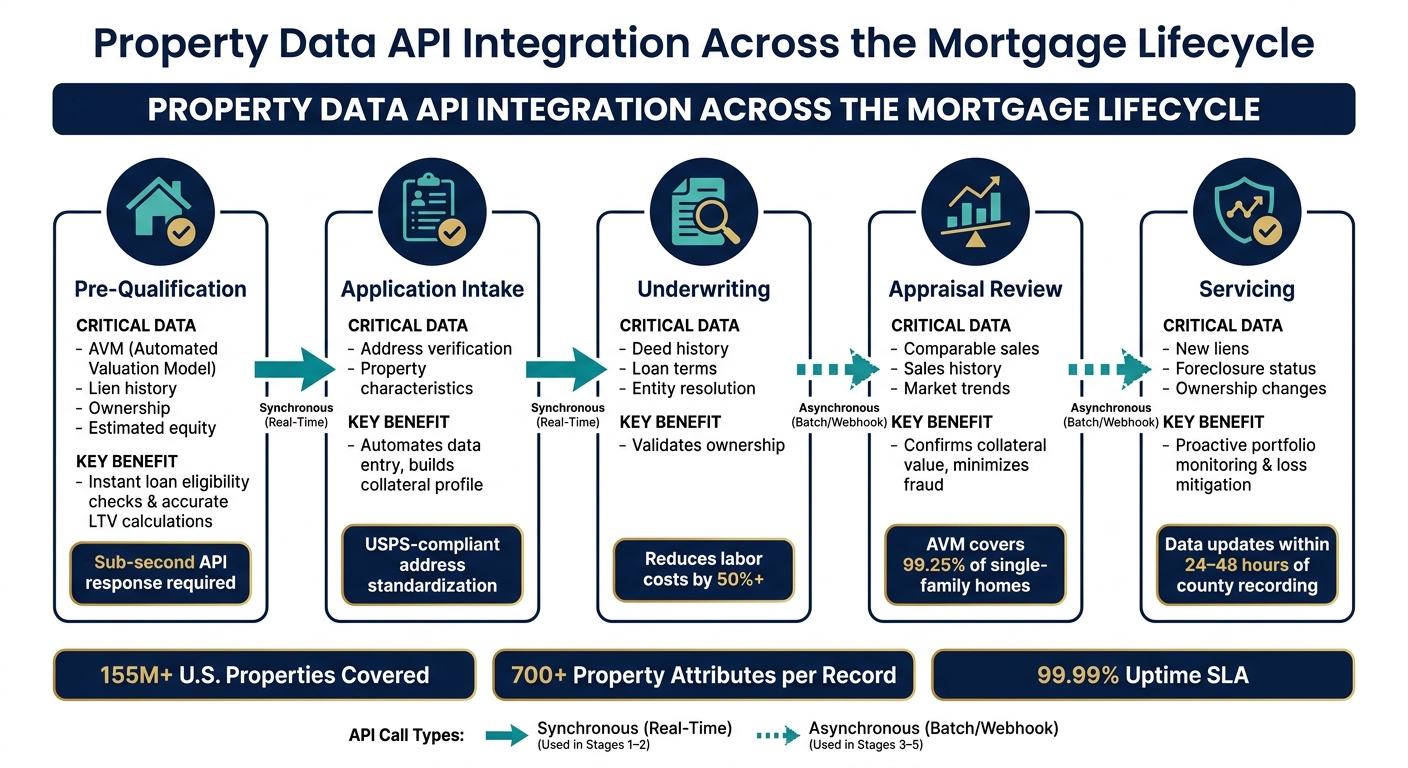
Property Data API Integration: 5-Stage Mortgage Workflow
Key Stages of the Mortgage Lifecycle
Mortgages follow a clear five-stage process, and the speed and accuracy of data delivery at each stage can make or break the efficiency of a platform. Here’s a breakdown of these stages and the critical data elements involved:
| Mortgage Stage | Critical Data Elements | Why It Matters |
|---|---|---|
| Pre-Qualification | AVM, lien history, ownership, estimated equity | Allows instant loan eligibility checks and accurate LTV calculations |
| Application Intake | Address verification, property characteristics | Automates data entry and builds a collateral profile |
| Underwriting | Deed history, loan terms, entity resolution | Validates ownership and reduces labor costs by over 50% |
| Appraisal Review | Comparable sales, sales history, market trends | Confirms collateral value and minimizes fraud risks |
| Servicing | New liens, foreclosure status, ownership changes | Supports proactive portfolio monitoring and loss mitigation |
Each stage has its own requirements: for example, pre-qualification demands near-instant responses, while servicing relies on batch updates and event-driven alerts rather than real-time data.
Next, let’s explore the specific data elements that these APIs deliver and how they fit into each stage of the workflow.
Data Elements Supplied by Property Data APIs
Modern property data APIs provide two main types of records:
- Assessor data: This includes a property’s physical traits, tax valuation, and lot details – essentially describing what the property is.
- Recorder data: Focused on the property’s financial history, this data covers ownership records, financing details, and any liens attached.
For underwriters, having access to a 20+ year transaction history of deeds and mortgages is invaluable. It helps them quickly identify red flags like prior short sales, distressed transfers, or unusual ownership changes without needing manual research. Similarly, during appraisal review, APIs that provide comparable sales data ensure that appraisers’ valuations align with recent market activity.
Another often-overlooked but crucial feature is compliance flags. Leading APIs include DNC status, litigator flags, and TCPA indicators directly in their JSON responses. This eliminates the need for additional data scrubbing before loan officers reach out to potential borrowers.
How to Run a Data Mapping Exercise
With the workflow stages and necessary data elements defined, the next step is aligning these elements with the right sources through a data mapping exercise.
Start by auditing all your data sources – typically three to five, each with its own update schedules and formats. Then, map each source to a specific stage in the mortgage process and assign a latency requirement. Tasks like address autofill or pre-qualification need sub-second API responses, while broader tasks like portfolio risk modeling or machine learning training work better with bulk formats like CSV, Parquet, or Snowflake data shares.
"We want to supplement your work and make you superhuman so you can do things in seconds not hours. That’s where BatchData comes in. What used to take 30 minutes now takes 30 seconds." – Chris Finck, Director of Product Management, BatchData
To make the process more reliable, focus on two key steps:
- Standardize address formats during data ingestion to avoid duplicate records.
- Verify fill rates for critical fields – like prior sale dates and owner names in your target markets – before committing to a data provider.
These steps ensure that your workflows operate smoothly and that the data you rely on meets your platform’s specific needs.
sbb-itb-8058745
Designing the Integration Architecture
A Reference Architecture for Integration
After completing the data mapping process, it’s crucial to establish a solid integration architecture to incorporate property data into mortgage workflows without interruptions. The goal is to keep BatchData separate from core mortgage systems, ensuring that vendor updates or API changes don’t disrupt operations. A four-layer model offers a clean and reliable solution.
Here’s how it works: front-end apps – like loan officer portals, borrower-facing forms, and broker interfaces – should never interact directly with BatchData. Instead, they connect to an API gateway or Backend-for-Frontend (BFF) layer. This layer handles critical tasks like authentication (OAuth 2.0/JWT), request validation, rate limiting, and TLS termination. Behind this, the integration service layer comes into play. This layer consists of domain-specific microservices, such as property-service, lien-service, [contact-enrichment-service](https://batchdata.io/blog/batch-skip-tracing/how-to-skip-trace-property-owners), and compliance-service. These services call BatchData’s REST endpoints, normalize the JSON responses into your internal data model, and log all interactions for auditing purposes. Finally, core mortgage systems – such as the loan origination system (LOS), CRM, pricing engine, and servicing platform – consume this clean, normalized, and versioned data, never interacting with BatchData directly.
An additional async/event layer, such as Kafka or RabbitMQ, complements this setup. It handles webhook events from BatchData, like new lien filings or listing status updates, and triggers background workflows without blocking user-facing tasks. This layered architecture simplifies integration with BatchData while ensuring all internal teams can access consistent, standardized data.
Key Design Decisions to Make Early
Two important choices – synchronous vs. asynchronous calls and caching strategy – will shape your integration architecture from the outset.
- Synchronous calls are best for time-sensitive tasks, such as pre-qualification screens, real-time TCPA compliance checks before loan officers make calls, or address validation during intake.
- Asynchronous processing works well for tasks that can run in the background, like nightly lien re-evaluations, batch portfolio scans, or drip campaign enrichment. Misjudging this split can lead to slower response times and higher API costs.
When it comes to caching, not all data should be treated equally. Static property details – like year built, lot size, or building type – can be cached for 30–90 days since they rarely change. Semi-dynamic data, such as tax assessments or lien balances, should have a shorter cache window of 1–7 days, with webhook events from BatchData triggering cache invalidation. Compliance-related data, like DNC status or TCPA indicators, require even stricter caching rules. Their time-to-live (TTL) should be measured in minutes or hours, and these assumptions should be clearly documented for auditors.
By making these decisions early, mortgage platforms can stay responsive and scalable as property data becomes integral to key operations. A "Property Intelligence" abstraction layer is a smart addition here. This layer provides domain-specific endpoints like GET /properties/{id} or POST /leads/{id}/enrich-contact, rather than exposing BatchData’s raw endpoints. A BatchDataAdapter behind this abstraction ensures that all vendor-specific mapping logic is centralized in one place. If your data strategy changes, you only need to update the adapter – not every service that consumes the data.
With these foundational choices in place, the next step is organizing API calls effectively.
How to Organize API Endpoint Calls
To streamline your BatchData integration, structure API calls around the core functional domains of your mortgage workflows: property lookup, lien history, contact enrichment, and compliance checks.
Start each workflow by validating addresses using USPS-compliant standards. This ensures accurate caching and improves match rates. Once the address is verified, make parallel requests to property, lien, and contact endpoints to minimize response times.
For compliance checks, ensure these calls are tightly integrated with the systems responsible for outbound communication, such as your dialer, SMS platform, or email tool. Compliance responses must act as a hard stop – if BatchData doesn’t return a safe-to-contact indicator, the action should not proceed. Log every compliance payload, as these logs serve as critical evidence during regulatory reviews.
For servicing and portfolio monitoring tasks, avoid polling altogether. Instead, rely on BatchData’s webhook events, which should feed into your message queue. A dedicated portfolio-monitor service can then evaluate these events against business rules and update your servicing system with the necessary flags.
Building Core Workflows with BatchData
Once your integration architecture is in place, it’s time to put BatchData to work in the workflows that matter most. The biggest gains typically come in three areas: pre-qualification and lead enrichment, underwriting and risk assessment, and ongoing portfolio monitoring.
Automating Pre-Qualification and Lead Enrichment
One of the fastest ways to see results is by salvaging leads that might otherwise go cold. For instance, when a borrower abandons a form or submits only partial information, the platform captures an address fragment. Here’s where automation steps in: normalize the address to USPS standards, query BatchData’s property endpoint for parcel details, ownership indicators, and equity data, and then use the contact enrichment endpoint to pull verified mobile numbers and email addresses. All of this happens in under a second.
This process achieves a 76% right-party contact accuracy – three times the industry average. This means loan officers connect with actual homeowners, not dead ends. High-equity leads with strong loan-to-value (LTV) signals and verified contact details can be routed directly to a priority sales queue, while low-confidence matches are flagged for manual follow-up. This tiered routing system ensures efficient outreach and keeps conversion rates high.
"What used to take 30 minutes now takes 30 seconds. BatchData makes our platform superhuman." – Chris Finck, Director of Product Management
For user-facing workflows, keep enrichment calls asynchronous. A form submission should not wait for downstream API results. Instead, fire the enrichment request to your contact-enrichment-service after the record is saved, then update the CRM once the data is returned.
These automated enrichment workflows also set the stage for more accurate underwriting.
Supporting Underwriting and Risk Assessment
BatchData goes beyond basic property lookups by identifying discrepancies between borrower disclosures and public records. For example, if a borrower claims no junior liens but the data reveals an active HELOC, that’s a clear red flag requiring manual review before approval. Detecting these inconsistencies in seconds instead of days is where the platform proves its worth.
Here’s how this workflow typically unfolds:
- Verify ownership and chain of title using deed history.
- Retrieve all recorded liens, second mortgages, and HELOCs to calculate the true debt burden.
- Use the AVM (Automated Valuation Model) endpoint – covering 99.25% of single-family homes and 99.02% of condos and townhouses – to validate the collateral value against the borrower’s stated purchase price.
- Flag distress signals like Notices of Default (NOD), lis pendens, or active foreclosure proceedings.
Each step corresponds to specific fields in the JSON response, allowing your lien-service and property-service microservices to handle them independently. Clean records can move through automated processing, while exceptions – such as unusual lien patterns or ambiguous ownership – are escalated to analysts. Research from McKinsey shows that automating these steps can reduce manual document handling by over 50%, enabling underwriting teams to scale without sacrificing control.
Tracking Portfolio Changes and Servicing Risks
After loans are originated, ongoing monitoring helps manage risks as they evolve. A borrower current six months ago might now have a tax lien, or the property might be listed for sale – both critical signals for servicing teams. BatchData updates newly recorded documents daily, with transaction data available within 24–48 hours of county recording. This gives servicers a significant edge over platforms that refresh data less frequently.
The best monitoring systems combine real-time alerts with scheduled scans. For high-priority events like new liens, ownership transfers, or foreclosure filings, use BatchData’s webhook events to feed directly into your message queue (e.g., Kafka or RabbitMQ). Your portfolio-monitor service evaluates these events against business rules and flags them in the servicing system. For broader portfolio health checks, schedule nightly or weekly batch scans using BatchData’s Bulk Data Delivery via Amazon S3 or SFTP. These scans can identify trends like AVM value drops in specific ZIP codes or concentrated tax delinquency signals, which can then be flagged in your risk dashboard.
Here’s a table mapping key events to servicing actions:
| Event Type | Detection Method | Servicing Action |
|---|---|---|
| New tax lien or HOA lien | Webhook (near real-time) | Trigger hardship outreach workflow |
| Property listed for sale | Webhook or daily batch | Initiate retention or payoff analysis |
| Ownership transfer | Daily batch scan | Flag for title review and borrower check |
| AVM value decline (>10%) | Weekly batch + AVM endpoint | Stress-test LTV; escalate high-risk loans |
| Contact data change | Batch enrichment refresh | Update CRM; re-verify TCPA compliance |
The key is to treat property data as workflow input, not just a static reference. Every event from BatchData should trigger a specific action tied to business rules. Without this, the data risks being underutilized, and the integration won’t deliver its full potential.
Compliance, Security, and AI Readiness in Your Integration
When finalizing your integration architecture, it’s crucial to account for compliance, security, and AI-readiness. These elements act as the backbone of a dependable and forward-thinking solution.
Meeting Compliance Requirements in Mortgage Operations
Mortgage platforms operate under strict legal frameworks, especially when it comes to contacting potential borrowers. BatchData mitigates these risks by embedding compliance checks directly into its API responses. Each contact record includes flags for the DNC Registry, litigators, and disconnected numbers. This means your contact-enrichment service receives a safe_to_call indicator with every phone number, allowing you to automatically filter out non-compliant records.
Additionally, BatchData supports entity resolution, a feature that identifies the true owner behind entities like LLCs or trusts. This is particularly useful for meeting Know Your Customer (KYC) obligations.
"Shield yourself and your clients from unreliable phone records with data that’s scrubbed for disconnected numbers, known litigators, and the National Do Not Call Registry." – BatchData
Integrating compliance at the data layer is just the first step. Securing your API is the next critical measure.
Securing the API Integration
Security forms a cornerstone of any robust integration. To protect sensitive borrower and property data, ensure all API calls use TLS 1.2 or higher. Store your BatchData API key in a secure secrets manager and rotate keys regularly – hardcoding credentials is a major security risk. Implement role-based access controls (RBAC) to limit access. For instance, restrict your contact-related services from accessing property or financial data, reducing the potential impact of a breach.
For bulk data transfers via Amazon S3 or SFTP, enforce strict bucket policies and use IP allowlisting to restrict access to trusted networks. With BatchData’s 99.99% uptime SLA, you can confidently build a secure, production-ready integration around a reliable data source.
Once compliance and security are in place, the next step is preparing your platform for AI-driven capabilities.
Using BatchData with AI Tools and Model Context Protocol
AI features like automated underwriting assistants and intelligent document review are becoming essential in mortgage platforms. To support these tools, data accuracy is non-negotiable. BatchData’s Model Context Protocol (MCP) server acts as an AI-native gateway, seamlessly connecting large language models (LLMs) to live property records. This eliminates the need for manual data exports or custom mapping.
The MCP server translates plain-language prompts into structured API calls, giving AI tools access to BatchData’s extensive database of over 155 million U.S. property records and 700+ attributes. For example, an AI underwriting assistant can instantly query lien histories, perform automated valuation model (AVM) checks, or retrieve ownership details – all in real time. By using MCP, integration timelines shrink from weeks to minutes.
To ensure security throughout the AI workflow, all MCP server communications are encrypted and authenticated, keeping borrower and property data safe while enabling advanced AI functionalities.
Conclusion: Getting the Most Out of Property Data in Mortgage Platforms
By following the integration strategies discussed, incorporating a property data API into your mortgage platform can redefine how your business operates. With access to a single, low-latency API, you can replace disjointed systems with real-time, actionable insights that enhance every phase of the mortgage process.
Platforms utilizing property data APIs see tangible improvements in efficiency and risk management. For instance, BatchData provides access to over 155 million U.S. properties, each with more than 700 attributes, all supported by a 99.99% uptime SLA. This ensures your platform can handle demanding workloads without interruptions.
With accurate AVM and lien data, pre-qualification becomes almost instantaneous, while portfolio monitoring evolves into a proactive process. Automated alerts notify you of events like new tax liens or ownership changes within 24–48 hours of county recording. These enhancements not only speed up lead conversion but also allow for better risk management at every stage of the mortgage lifecycle. Additionally, compliance checks are seamlessly integrated into the data layer, enabling AI-driven underwriting tools to function accurately and efficiently, keeping your platform aligned with operational and regulatory goals.
Start small – focus on one impactful workflow to prove value – then expand as the benefits multiply.
FAQs
Which mortgage workflow should I integrate first to prove ROI?
To demonstrate ROI effectively, focus on integrating property APIs into the Pre-Qualification and Lead Conversion stages. This allows for automated identity resolution and faster re-engagement with prospects, cutting down on manual tasks and improving conversion rates. These enhancements make this workflow a top priority for achieving measurable outcomes.
How should I handle caching and data freshness for property, lien, and compliance data?
To maintain a balance between real-time access and efficiency, consider using BatchData’s low-latency REST API for live updates. For frequent queries, such as retrieving zip codes, short-term caching (around 15–30 minutes) can help reduce redundant requests. When dealing with bulk data, BatchData’s cloud delivery options are ideal for minimizing API calls and improving workflow.
Additionally, automated compliance tools like DNC and litigator scrubbing ensure your data remains accurate and legally compliant without compromising freshness. Stay on top of platform updates to ensure you’re always operating at peak performance.
What’s the safest architecture pattern to integrate the API without exposing it to the front end?
Using a server-side backend API layer is the smartest way to keep your API keys, authentication details, and sensitive logic protected. This setup acts as a secure bridge between your front end and the property data API.
Here’s how to do it:
- Create a secure backend service: This service will take care of handling all API calls, ensuring the front end doesn’t directly interact with sensitive data.
- Route front-end requests through backend endpoints: Instead of exposing API calls in the front end, let the backend handle them and return only the necessary data.
- Implement security best practices: Protect your setup with HTTPS, OAuth 2.0 for secure authentication, and input validation to safeguard against malicious requests.
By following these steps, you can ensure that your application stays safe while maintaining smooth functionality.