Real estate agents waste hours researching incomplete lead data. A phone number might be disconnected, or an address might lack owner details. This slows down outreach and reduces deal closures. 78% of buyers and sellers pick the first agent to respond, but manual research can delay responses by 30 minutes per lead.
Solution: Automating lead enrichment with GoHighLevel and BatchData. This integration instantly adds verified property and contact details to your CRM – like owner names, square footage, equity estimates, and phone numbers. It eliminates manual research, improves accuracy, and helps prioritize high-quality leads. BatchData also ensures compliance by scrubbing against Federal DNC lists.
Key Benefits:
- Faster lead response: What took 30 minutes now takes 30 seconds.
- Accurate data: 99.9% accuracy with details from 155M+ properties.
- Improved conversions: Focus on high-equity sellers and motivated leads.
- Compliance built-in: Avoid legal risks with DNC and litigator checks.
This guide explains how to integrate GoHighLevel with BatchData, set up workflows, and map enriched data into your CRM for better lead management.
Prerequisites and Setup Requirements
Before diving into integration, it’s crucial to have the right accounts and permissions in place. This preparation ensures everything runs smoothly as you proceed with the setup.
Required Accounts and Access
To get started, you’ll need three key components:
- A GoHighLevel account: This is where you’ll create automation workflows and store the enriched data.
- A BatchData account: This account provides API access and operates on a pay-as-you-go basis, meaning you only pay for the data you use – no subscription required.
- Administrative permissions in GoHighLevel: These permissions allow you to create custom fields, configure Custom Objects for property modeling, and build workflows that can trigger external API calls.
Administrative access is non-negotiable. You’ll need it to set up custom fields for the data provided by BatchData, including property details like square footage and bedroom count, ownership information, verified contact details, and financial metrics like estimated equity and loan-to-value (LTV) ratios. Without admin rights, you won’t be able to map this data into your CRM or link properties with contacts using GoHighLevel’s Custom Objects. This setup is the backbone of delivering real-time property insights that enhance lead quality and streamline workflows.
How the BatchData API Key Works
Once your accounts are ready, the next step is connecting them securely using your BatchData API key. This key acts as the bridge between your GoHighLevel workflows and BatchData’s massive database, which includes over 1 billion data points across 155 million properties.
When a new lead enters your CRM, the API key enables GoHighLevel to send a real-time request to BatchData’s endpoints. In return, BatchData provides enriched details – like skip tracing results, entity resolution for LLC-owned properties, or equity estimates – directly into the lead’s profile. This instant data exchange eliminates the delays often associated with bulk data uploads.
The API key also comes with built-in compliance tools, such as Litigator and Federal DNC scrubbing, which help you avoid legal risks during outreach. You’ll generate the key from your BatchData account dashboard and configure it within GoHighLevel’s HTTP request nodes to get the data flowing seamlessly.
sbb-itb-8058745
How to Connect GoHighLevel with BatchData
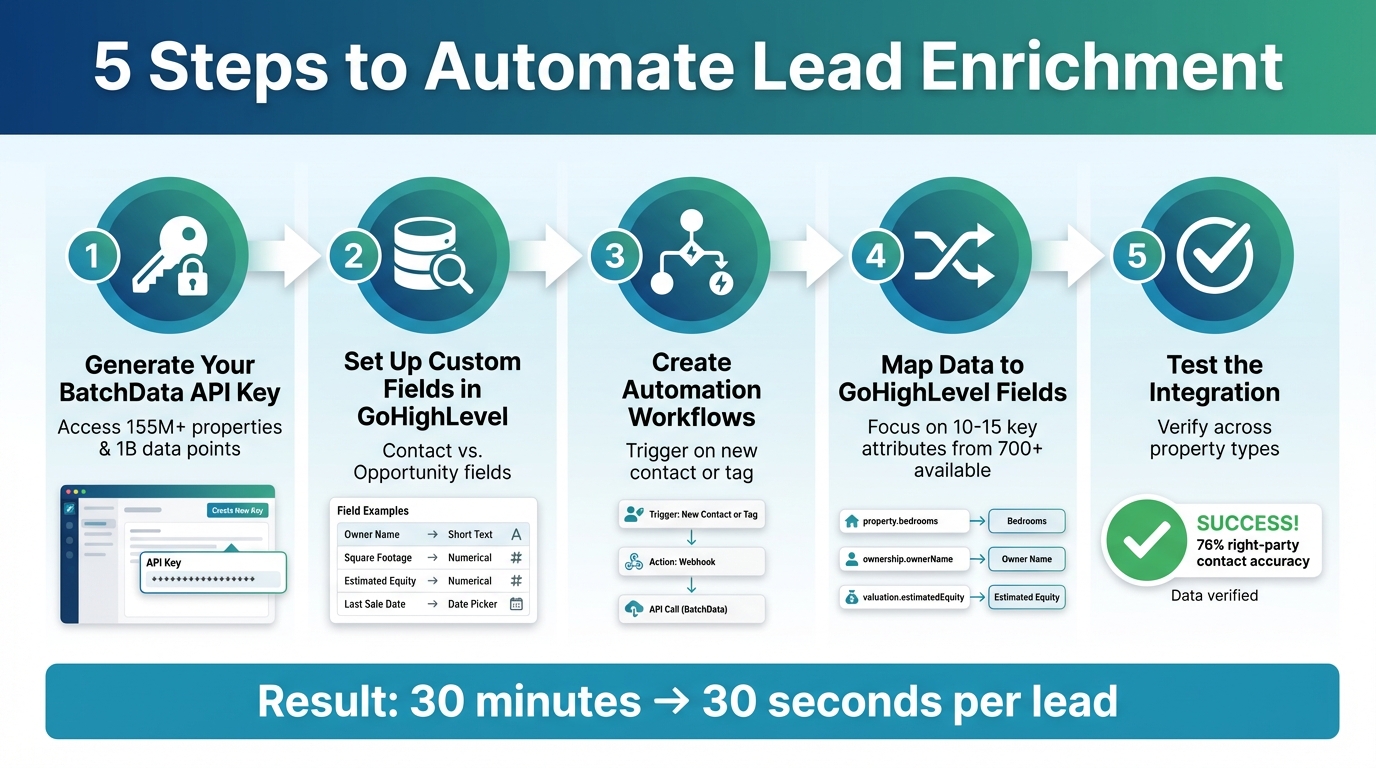
5-Step GoHighLevel BatchData Integration Process for Real Estate Lead Enrichment
Integrating GoHighLevel with BatchData is a simple five-step process that turns your CRM into an automated lead enrichment powerhouse. Once set up, every new lead in your system gets enriched with detailed property and contact information from BatchData’s massive database, which includes over 155 million properties and 1 billion data points. Here’s how to make it happen:
Step 1: Generate Your BatchData API Key
Start by logging into your BatchData dashboard. Head over to the API section and create your authentication key. This key is your secure pass for accessing BatchData’s API. Use it in the Authorization header when setting up HTTP request nodes in GoHighLevel’s workflow builder. BatchData offers endpoints for property search, contact enrichment, and phone verification, all operating on a pay-as-you-go model.
Step 2: Set Up Custom Fields in GoHighLevel
In your GoHighLevel sub-account, go to Settings > Custom Fields, and click Add Field to create storage spaces for the enriched data. Decide if the fields should be Contact fields (for permanent lead details like owner name or property address) or Opportunity fields (for deal-specific data like estimated equity or days on market). Assign the right field types – for instance:
- Short Text for owner names or addresses
- Numerical for square footage or year built
- Date Picker for dates like the last sale date
To keep things organized, create a folder named "BatchData Enrichment" for all imported data. Just remember, once you set a field as either a contact or opportunity type, it can’t be changed.
| Recommended GHL Custom Field | BatchData Attribute Category | Suggested GHL Field Type |
|---|---|---|
| Total Market Value | Valuation & Equity | Numerical / Text |
| Year Built | Core Property | Numerical / Text |
| Square Footage | Core Property | Numerical |
| Owner Name | Ownership Info | Short Text |
| Absentee Status | Ownership Info | Radio Select / Text |
| Days on Market | Listings Data | Numerical |
| Last Sale Date | Ownership Info | Date Picker |
| Estimated Equity | Valuation & Equity | Numerical / Text |
Step 3: Create Workflows for Automatic Data Enrichment
In GoHighLevel, build a workflow that triggers when a new contact is added or when a specific tag is applied. Use a Webhook or Custom API Action node to send a POST request to BatchData’s property search endpoint. Include the lead’s property address as a parameter in the request body. This ensures every new lead is enriched without manual effort. You can also add conditional branches to sort leads based on the enriched data – for example, prioritizing properties with high equity for follow-up.
Step 4: Map Data to GoHighLevel Fields
Next, add Update Contact or Update Opportunity actions to your workflow to map the returned data to the custom fields you created in Step 2. For example:
- Map
property.bedroomsto a "Bedrooms" field - Map
ownership.ownerNameto "Owner Name" - Map
valuation.estimatedEquityto "Estimated Equity"
While BatchData provides over 700 attributes per property, focus on the 10–15 most relevant data points for your business. Including contactability scores and carrier information can help your sales team prioritize leads more effectively. With a 76% right-party contact accuracy, your team can connect with the correct property owner three times more often than the industry average.
Step 5: Test the Integration
Finally, test the setup by creating a test contact in GoHighLevel using a real property address. Check the workflow execution log to ensure the API request is working and that the data is populating correctly in the custom fields. If something isn’t right, double-check your API key formatting and ensure the custom field names match your mapping. Test with different property types – like single-family homes, condos, and multi-family units – to confirm your integration works across various scenarios. Once everything checks out, activate the workflow for all incoming leads.
Benefits of Enriched Lead Data
BatchData’s enriched data offers a game-changing approach to lead management, building on the integration steps to deliver powerful results.
Better Lead Quality and Targeting
With enriched property and contact data, identifying and prioritizing leads becomes much more precise. BatchData gives access to over 700 property attributes – like property age, lot size, construction details, tax records, and sales history. This allows you to segment leads effectively and zero in on motivated sellers, backed by a verified right-party contact accuracy of 76%, which is roughly three times higher than the industry average. Instead of wasting time on broad cold-calling, you can focus on high-equity properties and financial distress indicators that point to motivated sellers. Entity resolution also helps identify the true individual owners behind corporate structures, such as LLCs, ensuring your outreach targets the right decision-makers. Additionally, automated checks against Federal DNC lists and litigator databases minimize legal risks while speeding up operations. Detailed property portfolios further open doors to identifying larger investment opportunities.
Faster Real Estate Operations
Automation significantly cuts down lead processing time by instantly linking property records to clients and vendors through GoHighLevel’s custom objects. Agents can quickly filter and surface listings, streamlining daily tasks and reducing delays. Real-time phone validation ensures your team only contacts active numbers, while automated mailing list cleansing removes duplicates and invalid addresses. This makes your marketing efforts both efficient and impactful.
Practical Applications for Enriched Data
Enriched data enables highly targeted strategies that directly boost revenue. For example, you can use financial distress indicators to create focused lists of motivated sellers instead of relying on generic outreach. Access to active, sold, and expired listing data allows for real-time value estimates and comparable analyses. BatchData’s Smart Search feature can automatically generate lead lists based on specific buyer or seller criteria, simplifying your prospecting process. You can also segment leads by ownership status – distinguishing between corporate and individual owners or local and out-of-state landlords – to craft messaging that resonates better. Validated geocodes tied to property records further enhance routing for mapping services, making operations smoother and more efficient. These practical applications highlight how enriched data can transform real estate workflows into more precise and profitable ventures.
Troubleshooting and Tips
Common Problems and Solutions
If you’re running into issues connecting GoHighLevel with BatchData, authentication failures are often the culprit. Double-check that you’ve entered your BatchData API key correctly in your workflow. To keep your credentials secure, it’s a good idea to use environment variables instead of hardcoding them.
Another common issue is excessive API calls triggering rate limits. BatchData’s API has usage caps, so try adding delays between calls or use batch processing for multiple properties. For property data you frequently access, consider caching the results. This not only helps you stay within API limits but also cuts down on redundant calls, saving time and money.
Data mapping mismatches can also cause headaches. With over 1,000 data points available per property record, it’s easy for BatchData’s output to misalign with your GoHighLevel custom fields. To avoid this, test your setup with static data to identify mapping issues. Additionally, workflow triggers in GoHighLevel might fail if custom fields aren’t mapped correctly, so take the time to test how contacts and custom objects like properties are linked.
Lastly, temporary network errors might interrupt API calls. To handle these, implement retry logic and set up alerts to track and resolve transient issues quickly.
By addressing these challenges proactively, you can ensure smooth data enrichment as your operations grow.
Tips for Reliable Data Enrichment
Before diving in headfirst, start with a pilot test in a small geographic area or focus on a specific property type. This allows you to fine-tune your triggers and mapping without putting your entire lead pipeline at risk. In GoHighLevel, set up custom objects to store enriched property details – like location, price, and square footage – and link them to contacts for a more organized data flow.
Keep an eye on your API usage to manage costs effectively. Set up clear workflow triggers, such as webhooks that activate when a new lead enters your CRM, to ensure enrichment happens only when necessary and avoids duplicate calls.
Finally, always validate enriched data before updating your GoHighLevel fields. Adding a data validation step ensures property and owner information is accurate and properly formatted. This prevents your CRM from getting cluttered with incomplete or incorrect lead records.
Conclusion
Integrating GoHighLevel with BatchData transforms how real estate professionals approach lead enrichment. Tasks that once required 30 minutes of manual research can now be completed in just 30 seconds through automated workflows. This partnership grants access to over 1 billion data points spanning 155 million properties, including details like equity calculations, ownership history, and verified contact information with a 76% right-party accuracy rate – nearly three times the industry standard. By automating lead scoring and prioritization based on financial indicators such as LTV ratios and pre-foreclosure status, agents can focus their efforts on the most promising leads.
This integration not only streamlines your operations but also supports business growth without adding to your workload. Whether you’re targeting new markets or tracking distressed properties across multiple zip codes, the GoHighLevel–BatchData system takes care of the heavy lifting. Plus, with built-in DNC and litigator scrubbing, your outreach efforts remain compliant and legally secure as your business expands.
FAQs
What data can BatchData add to my GoHighLevel leads?
BatchData integrates seamlessly with GoHighLevel to enhance your leads by appending detailed property information. This includes square footage, year built, valuation, tax records, sales history, and ownership details. On top of that, it provides verified contact information, such as phone numbers and email addresses, with an impressive 76% accuracy rate. By using this integration, you can improve the quality of your leads and simplify workflows, making it easier to make informed decisions.
How do I avoid duplicate enrichments and extra API costs?
To avoid duplicating enrichments and racking up unnecessary API costs, implement a system to track which leads have already been enriched. You can do this by adding a flag or timestamp in your CRM or database. Before initiating an API call, check this status to prevent making redundant requests.
You should also set up workflows that focus only on enriching new or updated leads. This approach keeps your API usage efficient and helps control expenses, all while simplifying your processes.
How does DNC and litigator scrubbing work in this setup?
DNC (Do Not Contact) and litigator scrubbing are automated processes designed to keep your contact data clean and compliant. These tools work by verifying and updating information in your CRM, flagging or removing contacts that appear on DNC lists or pose litigation risks.
The benefits? They help ensure compliance with regulations, reduce potential legal risks, and maintain accurate, up-to-date contact records – all without the need for manual intervention.