Real-time CRM enrichment transforms basic lead records into detailed profiles in seconds, automating tasks like retrieving property details, owner information, and verified contact data. With tools like BatchData, you can instantly evaluate leads, prioritize high-value prospects, and improve deal-closing efficiency.
Key takeaways:
- BatchData API taps into 155M+ property records and 360M+ owner contacts, offering 700+ property attributes.
- Integration enables real-time lead enrichment with sub-second API response times.
- Supports CRMs like Salesforce and HubSpot, using triggers and webhooks for seamless data updates.
- Enriched data improves lead scoring, segmentation, and personalized marketing.
- Ensures compliance with DNC and TCPA regulations, with daily refreshed data.
This guide walks you through integrating BatchData into your CRM, from setting up API triggers to mapping enriched data fields and leveraging insights for business growth.
Planning Your CRM Integration
Supported CRMs and Features
BatchData’s RESTful JSON API works seamlessly with any CRM that supports outbound HTTP requests. The platform is particularly well-suited for Salesforce and HubSpot, which are designed to handle real-time enrichment workflows. Both CRMs offer excellent webhook capabilities and workflow builders, enabling API calls to be triggered as soon as a new lead is added to your system.
To integrate, your CRM must support custom workflows or outgoing webhooks. For Salesforce, tools like Process Builder or Flow enable HTTP callouts. In HubSpot, the Workflows tool provides an "HTTP Request" action that can handle this. If your CRM has a developer-friendly API and the ability to send HTTP requests, you’re all set to start the integration process. Developers typically complete the setup in under 30 minutes.
Once your CRM is technically ready, the next step is identifying the specific data points you want to enrich.
Defining Required and Target Fields
Before diving into the integration process, it’s crucial to decide which fields will serve as triggers (e.g., property address and ZIP code) and which CRM fields will store the enriched data returned by BatchData. At the very least, your CRM should capture a property address and ZIP code – these are the essential inputs BatchData uses to locate records and provide enriched data.
For outputs, you’ll need to create custom fields in your CRM to store the data BatchData supplies. Common fields include:
- Property type
- Square footage
- Owner name
- Verified phone numbers and email addresses
- Market value (AVM)
- Estimated equity
- Loan-to-value ratio
BatchData gives you access to over 700 property attributes, so focus on the fields that will have the most impact on your lead scoring and marketing efforts. Additionally, ensure compliance by mapping fields like DNC status and litigator flags to safeguard your team from potential TCPA violations during outreach.
Once your fields are mapped, confirm that your CRM can handle BatchData’s standardized formats.
Aligning Data Formats and Field Mappings
BatchData’s data adheres to U.S. standards, including USPS address formats, MM/DD/YYYY dates, and USD currency. To ensure smooth integration, configure your CRM fields to accept these formats:
- Addresses: Use USPS-standard formats, including two-letter state codes.
- Numeric values: Set fields for market value, square footage, and acreage to accept decimals or integers, not text.
- ZIP codes and FIPS codes: Ensure fields preserve leading zeros for 5-digit FIPS codes and ZIP+4 codes.
- Dates: Use the MM/DD/YYYY format.
- Currency: Values like market value will appear in USD (e.g., $250,000.00).
BatchData also provides reachability scores and confidence scores for contact data. Map these to numeric fields in your CRM to enable automated lead prioritization. Properly aligning your CRM fields with BatchData’s standardized formats will ensure a smooth data flow and maximize the value of your integration.
Configuring BatchData Access

Securing API Keys and Credentials
To get started with BatchData, you’ll need an API key. You can sign up for one at app.batchdata.com. If you’re already a user, you can access the API documentation with your existing credentials.
Avoid hardcoding your API key in your application or sharing it in public repositories. Instead, store it securely using environment variables or dedicated secret management tools. This practice keeps sensitive information separate from your codebase and reduces the risk of unauthorized access. To further safeguard your API key, implement measures like encryption, strict access permissions, and robust authentication protocols. Before rolling out your integration in a live CRM environment, test it thoroughly in a sandbox setup. This allows you to confirm that request structures function correctly without impacting your production data.
Once your API key is securely configured, take some time to explore BatchData’s performance features to understand the full potential of your integration.
Understanding BatchData’s Capabilities
BatchData’s RESTful JSON API is designed for speed and reliability, offering sub-second response times and a 99.99% uptime SLA. When it comes to contact enrichment, BatchData achieves a 76% right-party contact accuracy rate – about three times higher than the industry standard – thanks to its multi-source validation process.
The API supports both real-time single record lookups and bulk batch processing for larger datasets. Its standout features include USPS-standardized address validation with Delivery Point Validation (DPV), geocoding for precise latitude and longitude coordinates, and phone validation that scrubs out disconnected numbers, litigators, and entries on Do Not Call (DNC) lists. To ensure the highest level of data accuracy, phone and address datasets are refreshed daily. Before implementing the API fully, you can test your integration using the interactive tools on the BatchData website. These tools help you validate your integration and examine the JSON response structure.
Configuring API Request Parameters
Once you’re familiar with BatchData’s features, you can begin configuring your API requests to optimize data enrichment. The API requires minimal input – usually just a property address or owner name. Make sure to use standardized USPS addresses with two-letter state codes, proper abbreviations, and uppercase formatting, as the API automatically validates delivery points.
To ensure smooth operation, set your integration to respect the rate limit of 300 requests per minute with burst capacity. It’s also a good idea to add alerts for delays exceeding 15 minutes. For compliance, include parameters for real-time checks against the National DNC Registry and litigator flagging to meet TCPA and CCPA requirements. The API also provides phone number confidence and reachability scores, which can help you prioritize outreach efforts. With BatchData’s developer-friendly documentation and code examples, most developers can complete the initial API integration in under 30 minutes.
Mastering HubSpot API: Pt. 1 Platform Integration with Custom Coded Actions. Operations Hub

sbb-itb-8058745
Building the Real-Time CRM Enrichment Flow
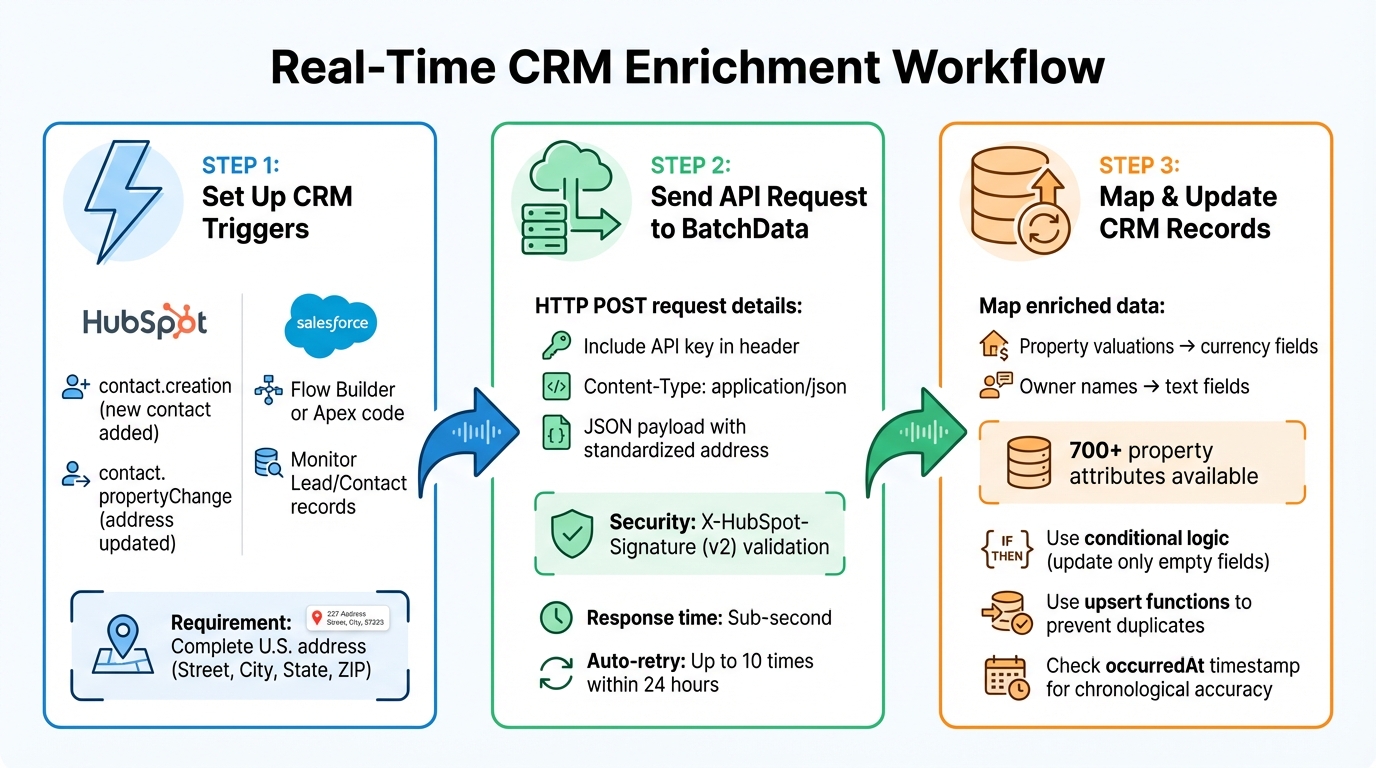
Real-Time CRM Enrichment Integration Workflow with BatchData
This section outlines how to automate CRM enrichment using BatchData, following the earlier steps of planning and configuration.
Setting Up CRM Triggers
The first step is configuring your CRM to detect new leads with a complete U.S. address. For example, in HubSpot, you can use the Webhooks API or Custom Workflow Actions to set up triggers. Common event types include:
contact.creation: Fires when a new contact record is added.contact.propertyChange: Fires when specific properties, like a street address, are updated.
HubSpot’s workflow editor simplifies this process by allowing you to set input fields without coding.
In Salesforce, triggers can be configured using Flow Builder or Apex code to monitor new Lead or Contact records. Ensure these triggers activate only when address fields – Street, City, State, and ZIP Code – are fully populated.
Once the triggers are in place, you’ll need to configure them to send API requests to BatchData.
Sending API Requests to BatchData
After activating the triggers, set up your system to send an HTTP POST request to BatchData’s endpoint. This request should include the property address in the JSON payload. Make sure to:
- Include your API key in the request header for authentication.
- Specify
Content-Type: application/json.
For HubSpot, validate incoming requests with the X-HubSpot-Signature (v2) for added security.
The JSON payload should contain the standardized U.S. address from your CRM record, typically including the street address, city, state, and ZIP Code. BatchData’s integration supports asynchronous handling through HubSpot’s "Blocking" or "Async" modes. If a webhook notification fails or times out, HubSpot automatically retries up to 10 times within 24 hours.
Once BatchData responds with enriched property details, the next step is to update your CRM records.
Mapping and Updating CRM Records
When BatchData returns the enriched property data – such as detailed property information – you’ll need to map these fields back to your CRM. Ensure proper alignment between BatchData’s data types and your CRM’s field types. For instance:
- Property valuations should map to numerical or currency fields.
- Owner names should map to text or string fields.
To avoid overwriting existing data unnecessarily, implement conditional logic so only empty fields are updated. Use your CRM’s upsert functions – like HubSpot’s idProperty or Salesforce’s external ID – to ensure updates occur without creating duplicate records.
Since HubSpot doesn’t guarantee notifications will arrive in chronological order, use the occurredAt timestamp in the payload to prevent older responses from overwriting more recent CRM updates. For enriching contacts with multiple phone numbers or email addresses, configure CRM fields as "Multiple select" or create custom fields to preserve all data.
This structured approach ensures your CRM remains accurate and up-to-date, leveraging BatchData’s insights effectively.
Using Enriched Data for Business Growth
When you have real-time CRM enrichment in place, the next step is making that data work for you. Enriched fields like property valuations and equity estimates can transform how you prioritize leads and personalize your outreach, ultimately driving business growth.
Improving Lead Scoring and Segmentation
Enriched property data gives you the tools to create automated lead scoring systems that pinpoint high-value opportunities as soon as they hit your CRM. Instead of treating all leads the same, you can assign scores based on specific real estate indicators. For example, properties with over 50% equity might get 10 points, while those in pre-foreclosure could score 20 points. Other factors like high loan-to-value ratios, absentee ownership, or long-term ownership often signal motivated sellers who are ready for immediate outreach.
This approach solves a common issue: 37% of CRM users report losing revenue due to poor-quality data. By tapping into tools like BatchData’s Automated Valuation Models (AVM) and rental estimates, your team can focus on leads with the highest ROI potential without wasting time on manual research. Automated scoring routes top leads to experienced agents based on property value or proximity, enabling follow-ups in under 60 seconds.
You can also segment leads more effectively by differentiating between corporate and individual ownership, tailoring marketing strategies accordingly. Tracking property improvements – like solar panel installations or pool permits – and monitoring listing status changes (Active, Pending, Sold) can help you understand where each lead is in the property lifecycle. With 45% of CRM users prioritizing intent data and lead scoring more now than five years ago, real-time enrichment ensures you’re always working with the most current information.
But lead scoring is just the beginning. These insights also open the door to highly targeted marketing efforts.
Powering Personalized Marketing
Enriched data makes personalized marketing campaigns more impactful. You can segment your database by property value, building specs (like the number of bedrooms or square footage), and financial indicators such as estimated equity. This allows you to craft messages that truly connect. For instance, homeowners with high equity might be targeted with refinancing offers, while absentee owners could receive direct mail about property management services.
Automated email sequences can be triggered by life events or intent signals. Leads with pre-foreclosure notices or auction dates might get tailored outreach focused on solutions for distressed assets, while less urgent leads can enter nurturing campaigns centered on education. For luxury real estate, wealth intelligence like net worth and liquidity data can help you personalize campaigns, while executive insights such as career history can guide B2B property deals.
The results speak for themselves: companies that enrich their CRM data see a 44% increase in Sales Qualified Leads compared to those that don’t. By using BatchData’s API for waterfall enrichment, you can boost your contact data coverage from the typical 60% to an impressive 85–95%, ensuring your marketing reaches the right audience. Plus, sales teams save around 20 hours per month by eliminating manual data entry, giving them more time to build relationships.
Maintaining and Updating Data
Keeping your data up-to-date is just as important as enriching it. On average, 30% of B2B contact data becomes outdated each year. BatchData addresses this by refreshing property and contact profiles daily. To stay ahead, set up quarterly re-enrichment workflows to update your entire database, as property ownership and contact details are constantly changing.
BatchData’s real-time API allows instant lookups for new leads, while bulk data delivery through S3, Snowflake, or flat files can backfill your existing records. Address cleansing ensures your outreach meets USPS standards and validates delivery accuracy. You can also track engagement scores for phone numbers and emails to quickly identify records that need attention.
BatchData goes a step further by scrubbing against Do Not Call and litigator lists updated every 24 hours. Their contact data achieves 99.9% accuracy through multi-source validation and boasts a 76% right-party contact accuracy – three times the industry standard. Automating re-enrichment triggers whenever a lead’s status changes ensures your CRM remains a dependable tool for growth.
Conclusion
Real-time CRM enrichment with BatchData transforms how businesses handle lead qualification and outreach. By automating lead enrichment in just seconds, this integration provides access to detailed property data, streamlining your workflow.
BatchData boasts an impressive 76% right-party accuracy, helping you connect directly with decision-makers. With 100% uptime and lightning-fast API response times, your team always has access to reliable, up-to-date data for immediate follow-ups.
With webhooks triggering BatchData API calls, your sales team can instantly receive enriched records, complete with lead scores based on critical property metrics. This automation enables precise segmentation and personalized marketing campaigns, tailored to meet homeowners’ specific needs – whether it’s identifying high-equity candidates for refinancing or absentee owners who might benefit from property management services.
Additionally, the integration ensures your outreach efforts remain compliant with regulations, safeguarding your business.
BatchData’s pay-as-you-go pricing model makes it accessible for businesses of all sizes. Whether you’re part of a small real estate team or a large PropTech platform, real-time CRM enrichment turns your database into a powerful tool – helping you connect with motivated sellers more quickly and accurately than ever. This efficiency gives your business a clear edge in a competitive market.
FAQs
How does real-time CRM enrichment enhance lead scoring and segmentation?
Real-time CRM enrichment delivers precise, current property and ownership details – like property value, square footage, year built, and ownership status. This means your CRM can assign more accurate lead scores, helping you focus on high-value or investment-ready prospects.
With this enriched data, leads can be automatically sorted into categories such as hot, qualified, or low-priority. This streamlined segmentation makes targeting more efficient, improves lead routing, and allows for highly tailored marketing campaigns. The result? Saved time and better conversion rates.
How can I integrate BatchData with my CRM to enrich lead data in real-time?
To connect BatchData with your CRM for real-time lead enrichment, here’s what you need to do:
- Set up a webhook in your CRM: Whether you’re using Salesforce, HubSpot, or another platform, configure a webhook to trigger when a new lead is created or an address is added. This webhook should send the lead’s unique ID and property address to your designated endpoint.
- Call the BatchData API: Use the address details from the webhook to request property and owner information through the BatchData API. The API delivers key data points, such as owner profiles, contact details, property value, and tax history.
- Map the data to CRM fields: Take the API response and align it with the corresponding fields in your CRM, like owner name, phone number, or property value. This ensures the lead record is updated automatically.
By automating this process, you eliminate tedious manual data entry and ensure your CRM is always populated with accurate, actionable data. This means better lead scoring, smarter routing, and more personalized marketing efforts.
How does BatchData help ensure compliance with DNC and TCPA regulations?
BatchData makes navigating Do Not Call (DNC) and Telephone Consumer Protection Act (TCPA) regulations easier by integrating consent and DNC checks directly into your data processes. When a new lead enters the system, BatchData’s real-time phone validation instantly checks the number against up-to-date DNC registries and litigator lists. It also filters out disconnected or restricted numbers, ensuring only valid contacts remain before any outreach begins. Each record is clearly marked to show whether the number is safe to call, giving CRM users immediate insight.
To meet FCC rules requiring opt-out requests to be honored within 10 business days, BatchData seamlessly integrates consent, opt-out, and contact preferences across platforms. With real-time updates synced to your CRM via API or webhook, the system ensures consumer preferences are always respected. This approach reduces the risk of non-compliance and expensive penalties while supporting efficient and respectful communication efforts.