If you want a clean pricing comparison, public pricing is the first filter. In this six-vendor review, only BatchData gives enough public detail to model costs with any confidence, starting at $3,000/month for 100,000 matched records. The other five – Estated, HouseCanary, RentCast, CoreLogic, and Mashvisor – keep pricing behind a sales process, which makes side-by-side cost planning harder.
Here’s the short version:
- You’re comparing six vendors: BatchData, Estated, HouseCanary, RentCast, CoreLogic, and Mashvisor
- The main pricing models are per-call, per-record tiers, subscription bundles, endpoint pricing, and enterprise contracts
- The biggest cost question is simple: Do you pay for every request, or only for matched results?
- BatchData’s public rates run from $0.03 to $0.01 per matched record, based on tier
- BatchData also says zero-result lookups are not billed on matched-record endpoints
- Public pricing is not posted for Estated, HouseCanary, RentCast, CoreLogic, or Mashvisor
- At scale – especially 100,000+ records per month – billing logic can matter more than the sticker price
If I boil the article down to one point, it’s this: a vendor that looks cheap at first can cost more later if it bills for empty searches, hides overage terms, or locks pricing behind a quote.
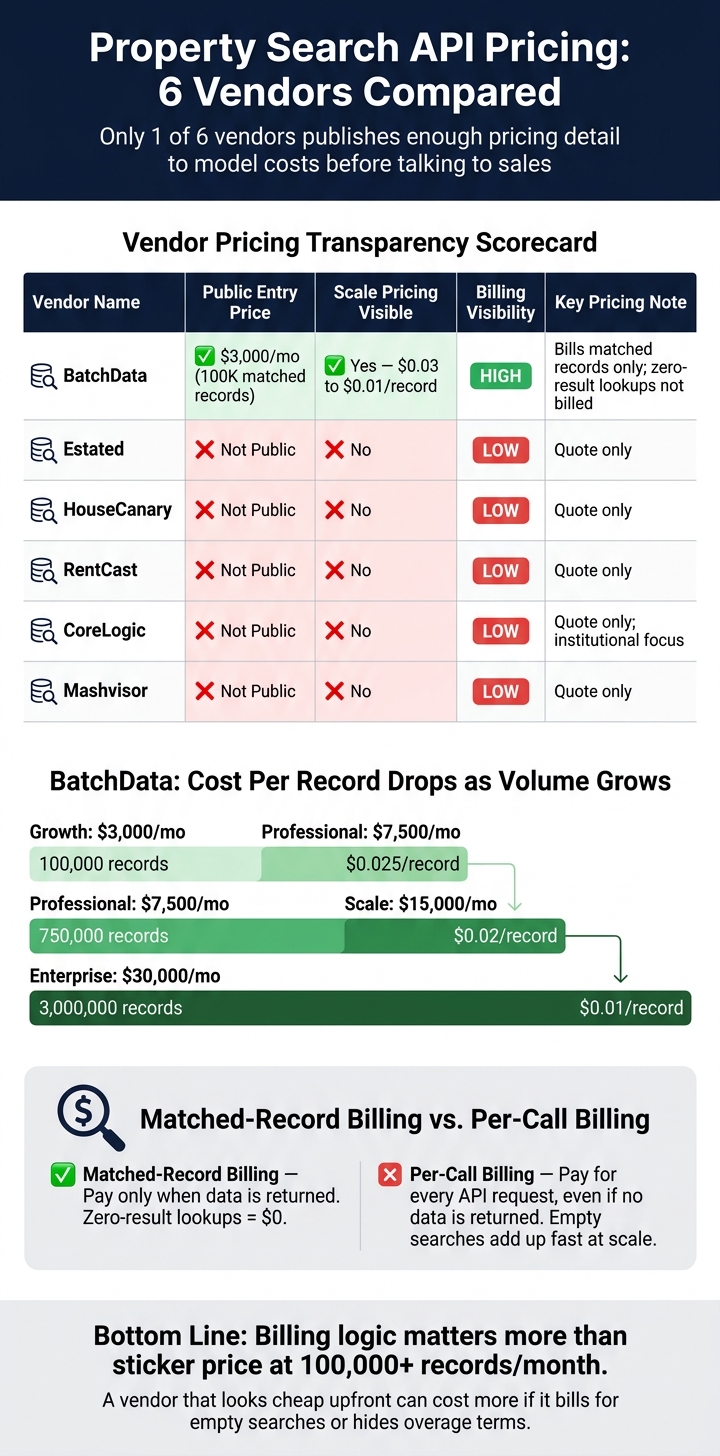
Property Search API Pricing: 6 Vendors Compared at a Glance
Quick Comparison
| Vendor | Public entry price | Public scale pricing | Billing visibility | Main pricing note |
|---|---|---|---|---|
| BatchData | $3,000/month | Yes | High | Bills on matched records, not empty results |
| Estated | Not public | No | Low | Quote only |
| HouseCanary | Not public | No | Low | Quote only |
| RentCast | Not public | No | Low | Quote only |
| CoreLogic | Not public | No | Low | Quote only |
| Mashvisor | Not public | No | Low | Quote only |
For me, that makes the article less about who has the lowest posted price and more about who gives you enough pricing detail to plan spend before you talk to sales.
1. BatchData
BatchData gives teams one integration for property search, ownership, mortgage, valuation, and listing data. That means one API and one contract instead of stitching together several vendors.
Entry Pricing
The entry point is the Growth plan at $3,000/month. It includes up to 100,000 matched records. If a team wants to test demand before locking into a monthly plan, BatchData also has a pay-as-you-go option for setting a baseline volume.
One thing that stands out: compliance signals come with every response at no added cost. That includes DNC registry flags, TCPA flags, and litigator/deceased indicators.
Usage Cost at Scale
As usage goes up, the per-record cost goes down. It starts at $0.03 on Growth and drops to $0.01 on Enterprise.
| Plan | Monthly Cost | Included Matched Records | Per-Record Rate |
|---|---|---|---|
| Growth | $3,000 | 100,000 | $0.03 |
| Professional | $7,500 | 300,000 | $0.025 |
| Scale | $15,000 | 750,000 | $0.02 |
| Enterprise | $30,000 | 3,000,000 | $0.01 |
For endpoints like Reverse Skip Trace, billing is based on matched records returned, not on the number of API calls sent. So if a lookup comes back empty, it isn’t billed.
Rate Limits & Overage Rules
There isn’t a penalty tier for overages. If you go past your monthly allotment, the extra records are charged at your plan’s base per-record rate.
The Reverse Skip Trace endpoint accepts up to 100 inputs in a single API call. BatchData also supports both synchronous and asynchronous endpoints, which helps teams handle different throughput needs without changing vendors.
Bulk Access & Contract Terms
For bulk delivery, BatchData can send custom extracts over SFTP in CSV, JSON, or Parquet formats. It also offers managed match-and-append services for teams that don’t have in-house developer support.
If you’re building a product and want the data to appear under your own name, BatchData also supports white-label delivery options for embedded use cases.
2. Estated
Estated does not publish public pricing.
That means the entry cost, per-call billing, rate limits, overage rules, and bulk-access terms are only available through a custom quote. So if you’re trying to compare options side by side, pricing visibility stays limited to quote-only terms. This lack of transparency is common when evaluating real estate API data providers.
3. HouseCanary
HouseCanary shares very little public pricing detail, so this comparison sticks to what isn’t posted. That means the focus here is simple: entry cost, scale pricing, usage limits, and contract terms.
Entry Pricing
There are no public entry tiers listed. Trial terms and onboarding costs are also not disclosed.
Usage Cost at Scale
HouseCanary does not publish per-call pricing, volume discounts, bundled tiers, or overage charges. Because of that, scale costs can’t be estimated.
Rate Limits & Overage Rules
Rate limits and overage policies are not specified.
Bulk Access & Contract Terms
Bulk access, minimum spend, and annual contract terms are not documented.
4. RentCast
Like HouseCanary, RentCast does not publish verified pricing or contract terms. That means the entry cost, per-call pricing, rate limits, and real estate API bulk-access options can’t be verified.
5. CoreLogic
CoreLogic keeps pricing behind the sales process, so the main things to compare are contract terms, usage rules, and what costs look like as volume grows.
Entry Pricing
CoreLogic does not publish API pricing. Pricing is quote-based.
Usage Cost at Scale
Public details on per-call fees, minimum commitments, volume discounts, and scale pricing are not available.
Rate Limits & Overage Rules
Rate limits and overage charges are not publicly documented. Ask whether extra usage is billed per record or pushed into a higher tier.
Bulk Access & Contract Terms
If you’re buying at the enterprise level, confirm:
- compliance terms
- refresh cadence
- delivery format
- minimum spend
6. Mashvisor
Mashvisor does not publish API pricing details.
Public information on per-call pricing, monthly caps, overage charges, rate limits, bulk access, and contract terms is not disclosed. So if you’re trying to build a cost model from public sources, Mashvisor pricing is unavailable.
Because Mashvisor does not share pricing publicly, the next section looks at cost drivers that can be compared directly.
Pricing Breakdown by Cost Driver
Four things shape the actual cost of a property search API: entry price, effective cost at volume, overage policy, and contract terms. Looking at just one can give you the wrong picture.
The big pricing split usually shows up once usage starts to grow.
At around 1,000 monthly calls, the difference between vendors already matters. And at that level, only vendors with public pricing can be modeled with any confidence. If pricing is quote-only, you’re stuck guessing.
At 100,000+ monthly records, the billing model starts to matter more than anything else. Vendors that charge per matched record don’t bill for zero-result queries. Per-call vendors do. That sounds small at first, but at scale it adds up fast. The same goes for whatever the base plan leaves out. Zero-result billing is the clearest example of a cost that can snowball.
If you want the fastest apples-to-apples view, start with property data API questions each vendor shares in public. This table puts the six vendors side by side by pricing model, public entry price, and contract visibility:
| Vendor | Pricing Model | Public Entry Price | Scale Cost Visibility | Contract Terms |
|---|---|---|---|---|
| BatchData | Per matched record / Tiered | $3,000/mo (100,000 matched records) | Public; $0.03–$0.01/record across tiers | Overages billed at plan rate; SFTP bulk delivery available |
| Estated | Tiered / Bulk | Not public | Not public | Quote only |
| HouseCanary | Tiered / Custom | Not public | Not public | Quote only |
| RentCast | Per-call / Tiered | Not public (verified) | Not public (verified) | Quote only |
| CoreLogic | Sales-led / Custom | Not public | Not public | Quote only; institutional focus |
| Mashvisor | Per-call / Tiered | Not public | Not public | Quote only |
Those pricing gaps turn into direct tradeoffs in day-to-day buying. A vendor may look cheap at the start, then get expensive once volume climbs. Another may seem pricey up front but end up costing less if you run lots of searches that return no match. That’s why the billing method, not just the sticker price, deserves a close look.
Pros and Cons by Vendor
Pricing usually gets tricky at scale, at renewal, or in odd edge cases, not on the signup page. This section zeroes in on the main budget tradeoffs in BatchData’s pricing model and turns them into one quick reference.
| Vendor | Main Pricing Advantages | Main Pricing Drawbacks | Best-Fit Buyer Profile | Caution Flags |
|---|---|---|---|---|
| BatchData | Pay-for-success billing: only matched records are billed; overages stay at the plan’s base per-record rate instead of moving to a penalty tier; DNC and TCPA flags are included in the standard response; pay-as-you-go is available | High starting monthly fee | Mid-to-high-volume proptech and institutional buyers | High monthly minimum may be a poor fit for low-volume users; not for FCRA-regulated credit, insurance, or housing decisions |
The core tradeoff for this property API is simple: matched-record billing cuts waste, but the monthly floor works best when your volume is steady.
Conclusion
Across these six vendors, price isn’t just about the headline number. It comes down to how billing works, what happens when you go over your limit, and how the data gets delivered.
Use pay-as-you-go if traffic is light or hard to predict. Go with fixed-tier billing when usage is steady enough that you can forecast monthly spend with some confidence. If you’re at a startup and need tighter control over costs, tiered monthly plans with fixed allotments and clear overage rates can help keep spending more even as usage grows.
Tiered monthly plans usually make more sense once demand settles into a pattern. Matched-record billing also helps because you don’t pay for empty lookups, and that can cut costs in a big way at high query volume. For enterprise teams doing large-scale analysis, bulk delivery options like SFTP in CSV, JSON, or Parquet – plus managed match-and-append services – are often a better fit for millions of records than one-by-one real-time API calls.
Those three factors shape whether a vendor still makes financial sense as volume climbs. Choose based on billing logic, overage rules, and delivery method – not sticker price alone.
FAQs
How should I estimate total API costs at scale?
Start with BatchData’s count and aggregate metrics endpoints to size your market or test matching logic before you commit to a full data pull.
That gives you a simple way to sanity-check demand first. If your match rate looks off, or the audience is smaller than expected, you can catch it early instead of paying for a big export you may not need.
For day-to-day operations, be careful with per-call billing. It can get hard to predict fast.
A better path is usually usage-based pricing with monthly volume tiers, such as Growth, Professional, Scale, or Enterprise. As volume goes up, your per-record cost can go down, and overage costs stay easier to forecast.
What billing model is best for unpredictable search volume?
For unpredictable search volume, metered, usage-based billing is usually the best fit. You pay per matched record returned, so lookups with no results aren’t billed.
BatchData charges based on the number of matched person identities delivered and offers pay-as-you-go options. That gives you room to test demand before moving to a higher tier.
What contract terms should I confirm before signing?
Confirm that your plan matches your expected usage and how overages are billed. With BatchData, records above your monthly allotment are billed at the plan’s per-record rate, not a penalty tier.
Also check whether you need real-time API access or bulk delivery, and make sure the agreement covers any required compliance standards for regulated use cases.