
Geocoding moved from a niche mapping task to core business infrastructure, with global address-to-lat-long conversions rising from approximately 12 million queries in 2010 to over 4.2 billion in 2025, alongside a 350% increase in API-based requests between 2020 and 2025.
If you need to know how to get lat long from address, the mechanics are simple. The hard part is choosing a method that won't break when volume rises, addresses get messy, or an underwriting model depends on exact property placement.
Here's the short version:
- One address: Use a desktop map lookup or a geocoding API.
- Thousands of addresses: Use batch processing with normalized inputs and retry logic.
- High-stakes use cases: Prioritize validated geocoding over cheap best-guess results.
- Real estate and finance: Store coordinates with enough precision to support parcel, boundary, and risk workflows.
SEO Title: How to Get Lat Long from Address With APIs and Tools
Meta Description: Learn how to get lat long from address using maps, APIs, and batch geocoding workflows with practical guidance on accuracy, scale, and trade-offs.
Meta Keywords: how to get lat long from address, geocoding, address to latitude longitude, batch geocoding, geocoding API, real estate geocoding, CASS geocoding, address coordinates
Why Is Converting Addresses to Coordinates So Critical?
Converting a street address into latitude and longitude is called geocoding, and it's the foundation for accurate digital mapping, property analysis, and location-based decisioning via geocode.maps.co's definition of forward geocoding.
The scale tells you why this matters. The global volume of address-to-lat-long conversions rose from approximately 12 million queries in 2010 to over 4.2 billion in 2025, with a 350% increase in API-based geocoding requests between 2020 and 2025, driven by real estate portals, mortgage originators, and insurance underwriting teams. That isn't background infrastructure anymore. That's operational core.
In real estate and finance, a geocode isn't just a map pin. It feeds AVMs, boundary verification, routing, serviceability checks, lien review, and portfolio monitoring. If the coordinate is wrong, the downstream model is wrong too. A point dropped on the wrong road segment can distort valuation inputs, flood exposure analysis, or assignment to the wrong servicing territory.
What businesses are actually buying
Many believe they're buying coordinates. They aren't. They're buying:
- Location certainty: Can this address be tied to a real physical place?
- Operational speed: Can the result return fast enough for apps, lead routing, or underwriting screens?
- Scalability: Can the workflow handle one record, one thousand, or a nightly portfolio refresh?
- Auditability: Can someone explain where the coordinate came from and why it should be trusted?
Practical rule: In low-stakes consumer use, approximate coordinates are often acceptable. In lending, insurance, and property analytics, approximation becomes liability.
The methods split into a few clear buckets:
| Use case | Best-fit method | Main trade-off |
|---|---|---|
| One-off lookup | Desktop map or single API call | Fast, but manual methods can lose precision |
| Analyst workflow | Spreadsheet add-on | Easy to start, weak for production controls |
| Product integration | Geocoding API | Good balance of speed and automation |
| Enterprise portfolio processing | Managed batch pipeline | More setup, but better control at scale |
Location data also spills into adjacent operations. If you work around delivery zones, mobile assets, or service territory enforcement, geocoding is the first step before geofencing even starts. For a practical field operations perspective, this guide for HGV fleet managers is worth reading.
How Do You Geocode a Single Address Instantly?
The fastest way to get lat long from a single address is to look it up on a desktop map and copy the coordinates, or send the address to a geocoding API.
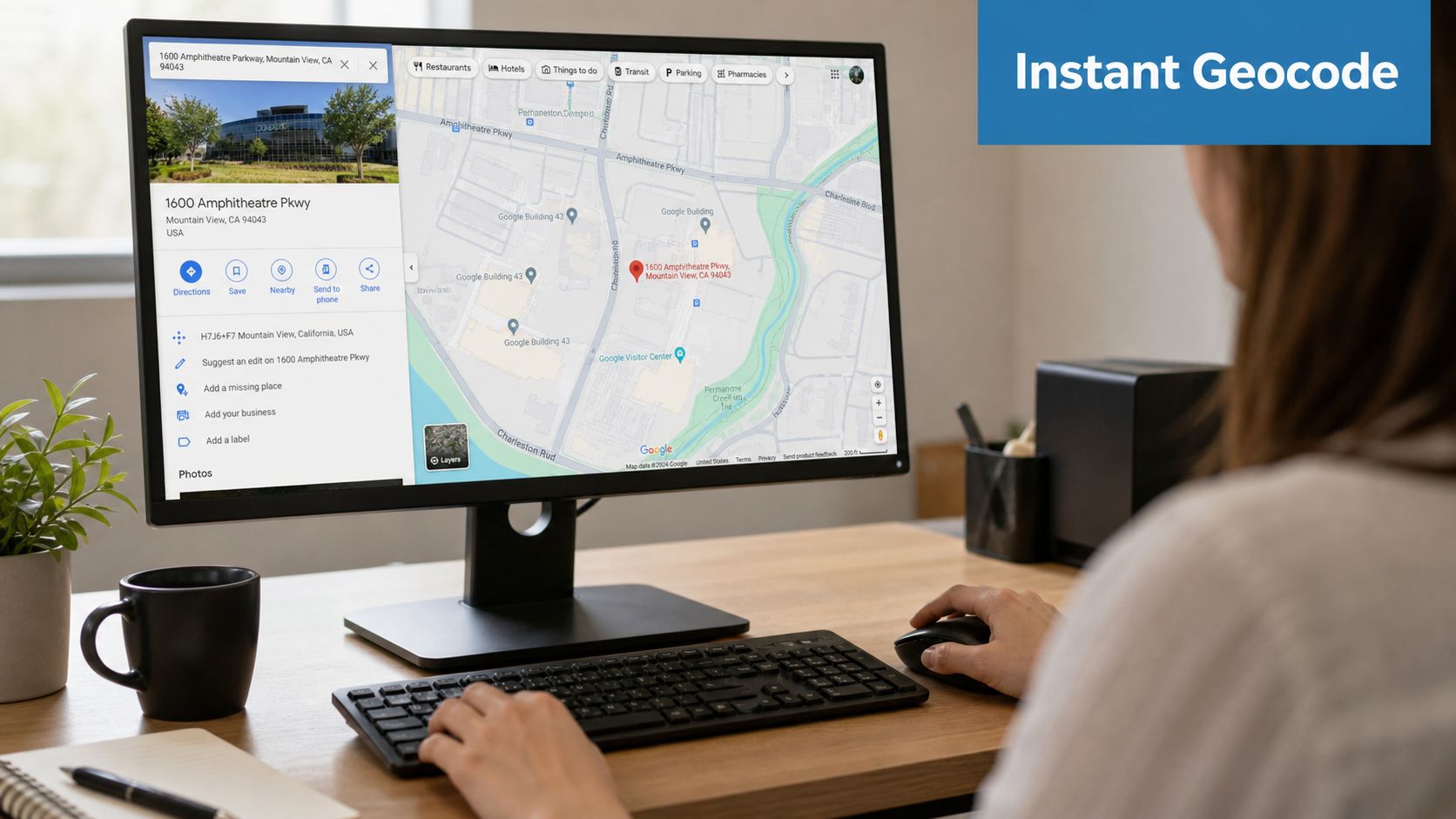
For one address, manual lookup is fine. For anything beyond occasional use, it becomes error-prone fast.
The quickest manual method
Use Google Maps on desktop, search the address, then right-click the map pin to extract the coordinate pair directly. That's the technical best practice because mobile app methods often truncate decimal precision to five digits, introducing up to 11-meter positional errors in dense urban areas, and programmatic geocoding via APIs achieves success rates of 98–99% for complete US addresses based on this geocoding workflow discussion.
That detail matters more than people expect. If you're checking a storefront, 11 meters may not matter. If you're matching a parcel, validating frontage, or placing a property against hazard layers, it absolutely does.
A clean manual workflow looks like this:
- Search the full address on desktop, not mobile.
- Confirm the returned pin matches the intended property.
- Right-click the pin and copy the decimal latitude/longitude.
- Store the result carefully so precision isn't lost in copy-paste.
The API method is barely harder
If you're comfortable with basic HTTP requests, a geocoding API is the better habit. It gives you a structured response and makes it easy to automate later.
A simple curl pattern looks like this:
curl "https://example-geocoder.com/geocode?address=1600+Pennsylvania+Ave+NW+Washington+DC"
The exact endpoint, authentication, and response format depend on the provider, but the pattern stays the same: send address text, receive coordinates plus match metadata.
Common failure points show up immediately:
- Bad API key setup: Requests fail before geocoding even starts.
- Lite or restricted map mode: Some configurations won't return coordinates at all.
- Partial addresses: Missing city or state often leads to weak matches or wrong matches.
- Blind trust in the first result: You still need to inspect confidence and returned components.
This walkthrough helps if you want to see a visual workflow before writing any code:
A single geocoded point is only as reliable as the input string and the provider's address validation.
When single lookup stops being enough
Manual lookup breaks as soon as the work becomes repetitive. Analysts paste results into spreadsheets. Operations teams lose precision in exports. Product teams realize they need confidence scores, structured responses, and retry logic.
At that point, stop treating geocoding like a map trick. Treat it like data processing.
What Is the Best Geocoding Method for My Needs?
The best geocoding method depends on your volume, tolerance for bad matches, implementation resources, and whether a wrong coordinate has financial consequences.
The market splits into four practical tiers. Free tools are useful for testing. Spreadsheet add-ons help analysts move quickly. APIs fit product and data engineering teams. Full data platforms fit organizations that care about throughput, quality controls, and integration into larger property workflows.
The biggest mistake is choosing based on surface price alone. Free tools can cost more in analyst time, bad matches, and terms-of-service limitations than a paid API ever will.
Geocoding methods compared
Free geocoding services like Nominatim and Bing do exist, but they impose strict query limits and Terms of Service. For scalable applications, commercial services are standard because they verify addresses against real-world data first, instead of relying on a best-guess approximation as discussed in this Stack Overflow thread on geocoding alternatives.
| Method | Typical Cost | Accuracy | Best For |
|---|---|---|---|
| Free online tools | Low direct cost, but high operational friction | Varies, often weaker on messy inputs | One-off checks, testing, personal use |
| Spreadsheet add-ons | Low to moderate | Good for complete addresses, weaker on incomplete rows | Analysts working in CSV or Google Sheets |
| Developer APIs | Usage-based | Strong when input quality is high and validation is included | Apps, data pipelines, recurring workflows |
| Full geospatial or property data platforms | Higher platform cost, broader value | Strongest for enterprise workflows with validation and enrichment | Real estate, lending, insurance, large-scale operations |
How to choose without wasting time
Ask four questions before you pick a tool:
- How many addresses are you processing? A handful per week doesn't justify engineering effort. Daily batch jobs do.
- What's the cost of a wrong match? If a mistaken point affects lending, claims, pricing, or compliance, don't use the cheapest option.
- Who owns the workflow? Analysts prefer spreadsheets. Engineers prefer APIs. Enterprise teams often need both.
- Do you need only coordinates, or also validation? Many teams really need address cleaning, confidence scoring, and match review.
A startup with a lightweight property search page can start with an API. A mortgage underwriting team usually needs stronger controls. An insurer mapping property exposure across a book of business needs batch throughput, deduplication, and clear handling of low-confidence matches.
For teams evaluating provider classes in more depth, this review of best geospatial APIs for real estate data is a useful comparison point.
What usually works in practice
For most professional use cases:
- Manual lookup is fine for occasional verification.
- Spreadsheet workflows are acceptable for analyst-led projects and internal research.
- APIs are the standard default for software products.
- Managed platforms make sense when geocoding is only one step in a larger property data pipeline.
If the coordinate influences money movement, regulatory decisions, or portfolio-level risk, choose the method that gives you traceability, not just speed.
How Do You Handle Batch Geocoding for Thousands of Addresses?
Batch geocoding works best when you treat it as a data pipeline, not a series of repeated lookups.
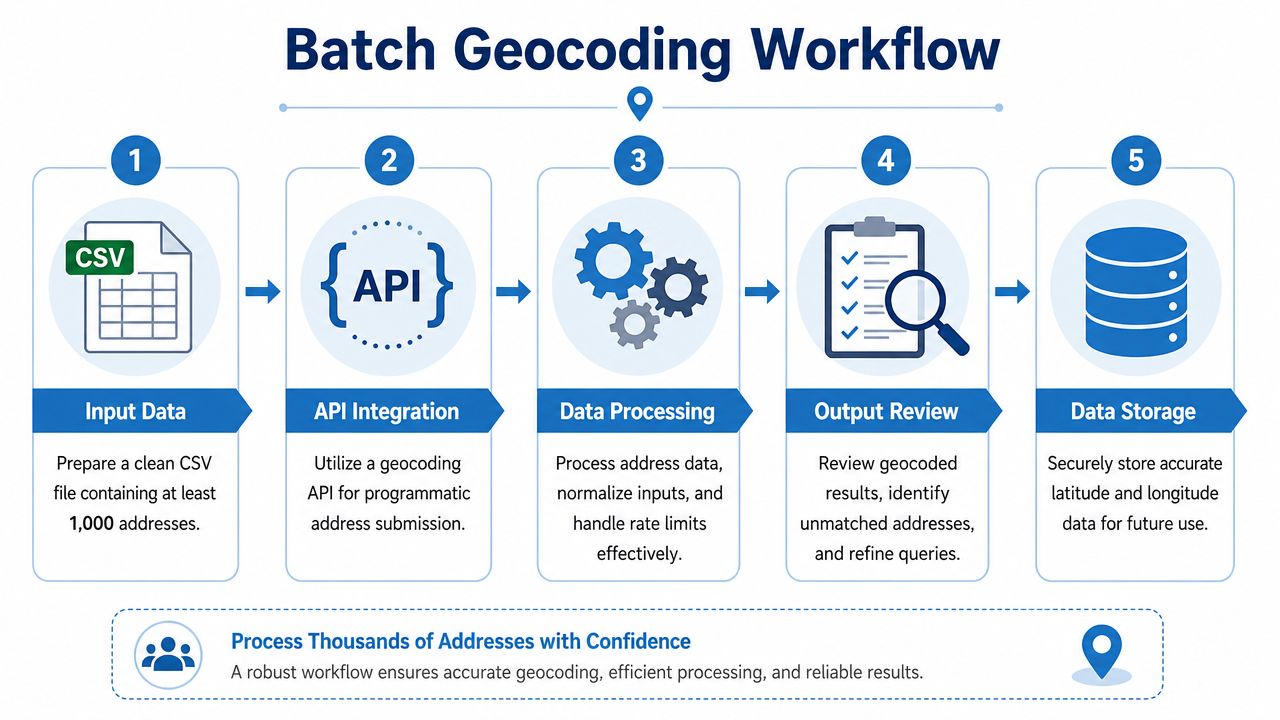
The geocoder is only one part of the job. Most failures come from weak inputs, inconsistent formatting, duplicate records, and no recovery plan for rejects.
For bulk conversion, success rates for US addresses typically exceed 95% when city, state, and street names are fully specified, but accuracy drops to around 70% for incomplete addresses. Coordinates must be recorded in decimal degrees with at least six digits to ensure sub-meter precision for real estate applications as shown in this bulk geocoding walkthrough.
Start with address normalization
Before calling any API, clean the input.
That means standardizing abbreviations, consolidating unit information, removing obvious noise, and making sure each record has a consistent address string. If your CSV stores street, city, state, and ZIP in separate columns, create a canonical field for geocoding and preserve the source columns for audit.
Use a pre-processing checklist:
- Normalize street suffixes: Convert inconsistent forms like "St" and "Street" into one standard.
- Preserve unit data carefully: Apartment and suite fields can affect match quality.
- Remove non-address text: Notes in the address field poison match rates.
- Deduplicate first: Don't pay to geocode the same location repeatedly.
- Keep original values: You need them when auditing mismatches.
Build around rate limits and retries
Production batch jobs need throttling, retries, and a dead-letter queue for failures. If you just loop through rows and fire requests as fast as possible, you'll hit provider limits or lose records on transient errors.
A standard flow usually looks like this:
- Read source CSV.
- Normalize and validate address fields.
- Group requests into batches where supported.
- Pause or throttle based on provider limits.
- Store results, confidence indicators, and raw response metadata.
- Reprocess low-confidence or failed rows with alternative logic.
Here's a simple Python pattern:
import csv
import requests
import time

INPUT_FILE = "addresses.csv"
OUTPUT_FILE = "geocoded_addresses.csv"
API_URL = "https://example-geocoder.com/batch"

def normalize(row):
    parts = [row["street"].strip(), row["city"].strip(), row["state"].strip(), row["zip"].strip()]
    return ", ".join([p for p in parts if p])

with open(INPUT_FILE, newline="", encoding="utf-8") as infile, \
     open(OUTPUT_FILE, "w", newline="", encoding="utf-8") as outfile:

    reader = csv.DictReader(infile)
    fieldnames = reader.fieldnames + ["latitude", "longitude", "status"]
    writer = csv.DictWriter(outfile, fieldnames=fieldnames)
    writer.writeheader()

    for row in reader:
        address = normalize(row)
        try:
            response = requests.get(API_URL, params={"address": address}, timeout=20)
            data = response.json()

            row["latitude"] = data.get("lat")
            row["longitude"] = data.get("lon")
            row["status"] = data.get("status", "ok")
        except Exception:
            row["latitude"] = ""
            row["longitude"] = ""
            row["status"] = "retry"

        writer.writerow(row)
        time.sleep(0.1)
The code isn't the point. The workflow is.
Operational advice: Batch geocoding is mostly a data quality problem with an API attached to it.
Teams processing very large property datasets should also think about storage format, incremental refreshes, and re-geocoding policies when source records change. This deep dive on batch geocoding one million real estate records is useful if you're moving beyond small CSV jobs.
Review output like an auditor
Don't stop at "got coordinates."
Review:
- Unmatched rows
- Duplicate coordinates across supposedly distinct properties
- Low-confidence or ambiguous results
- Precision loss in exports or BI tools
- Outliers that land far outside expected geography
That review step catches the expensive mistakes.
How Can You Maximize Geocoding Accuracy and Handle Edge Cases?
High geocoding accuracy comes from validation standards, match review, and explicit handling of messy real-world addresses.
Enterprise-grade geocoding platforms report 99.8% accuracy for U.S. addresses by integrating CASS™ validation, which was standardized in 1992 and requires vendors to achieve at least 95% address matching accuracy. Prior to 2010, only 37% of commercial services offered this level of compliance. That gap explains why older geocoding stacks produced so many bad placements.
CASS matters because it validates against standardized postal records rather than only pattern-matching whatever text the user typed. In practical terms, that's the difference between a verified location and a plausible guess.
Use validated inputs whenever possible
If your provider supports postal validation before geocoding, use it. A validated address gives the geocoder a much cleaner target. That matters most in real estate, mortgage, and insurance workflows where a point might drive a property boundary check or trigger a risk rule.
Look for these signals in returned results:
- Validated or standardized address fields
- Match confidence or relevance score
- Returned geometry type, such as rooftop versus interpolated street position
- Multiple candidates, which signals ambiguity
Handle the ugly records separately
Some address types require special treatment.
| Edge case | What goes wrong | Practical handling |
|---|---|---|
| PO Boxes | No true physical property point | Flag separately and don't treat as parcel location |
| Rural street-only addresses | Missing postal components reduce confidence | Use a provider with stronger fuzzy matching and review results |
| Anonymized addresses | Missing state or ZIP hurts relevance | Use partial-match workflows and confidence scoring |
| Ambiguous urban addresses | Multiple close matches appear | Require human review or secondary validation |
Two neglected cases deserve extra attention.
First, street-only or no-postal-code records. Some tools explicitly want postal codes for reliable matching. Public datasets in rural areas can be incomplete, and free tools often struggle there. OpenStreetMap's Nominatim API is noted as supporting fuzzy street-only matching with 85% accuracy for rural addresses in a 2025 trend reference, but that still calls for review on important records from this discussion of address conversion constraints.
Second, privacy-limited addresses. When organizations remove state or ZIP for GDPR or CCPA reasons, standard geocoders often return weak results. HERE's partial-address matching with confidence scoring is useful for those workflows, while many free tools fall short as described in this overview of geocoding partial addresses.
If the returned coordinate could influence a credit decision, policy decision, or purchase price, low-confidence matches should be routed for review, not silently accepted.
Reverse workflows matter too. If your system later needs to turn coordinates back into human-readable locations for customer support, compliance review, or service assignment, this overview of reverse geocoding use cases across industries helps frame where that fits.
What Are the Best Practices for Integrating Geocoding?
A reliable geocoding integration caches safe results, validates inputs before requests, stores high-precision coordinates properly, and plans for provider failure.
Most bad implementations fail in ordinary ways. Teams geocode the same address repeatedly, store the result as a rounded text field, ignore low-confidence responses, and discover too late that location data has privacy implications.
The integration checklist that actually matters
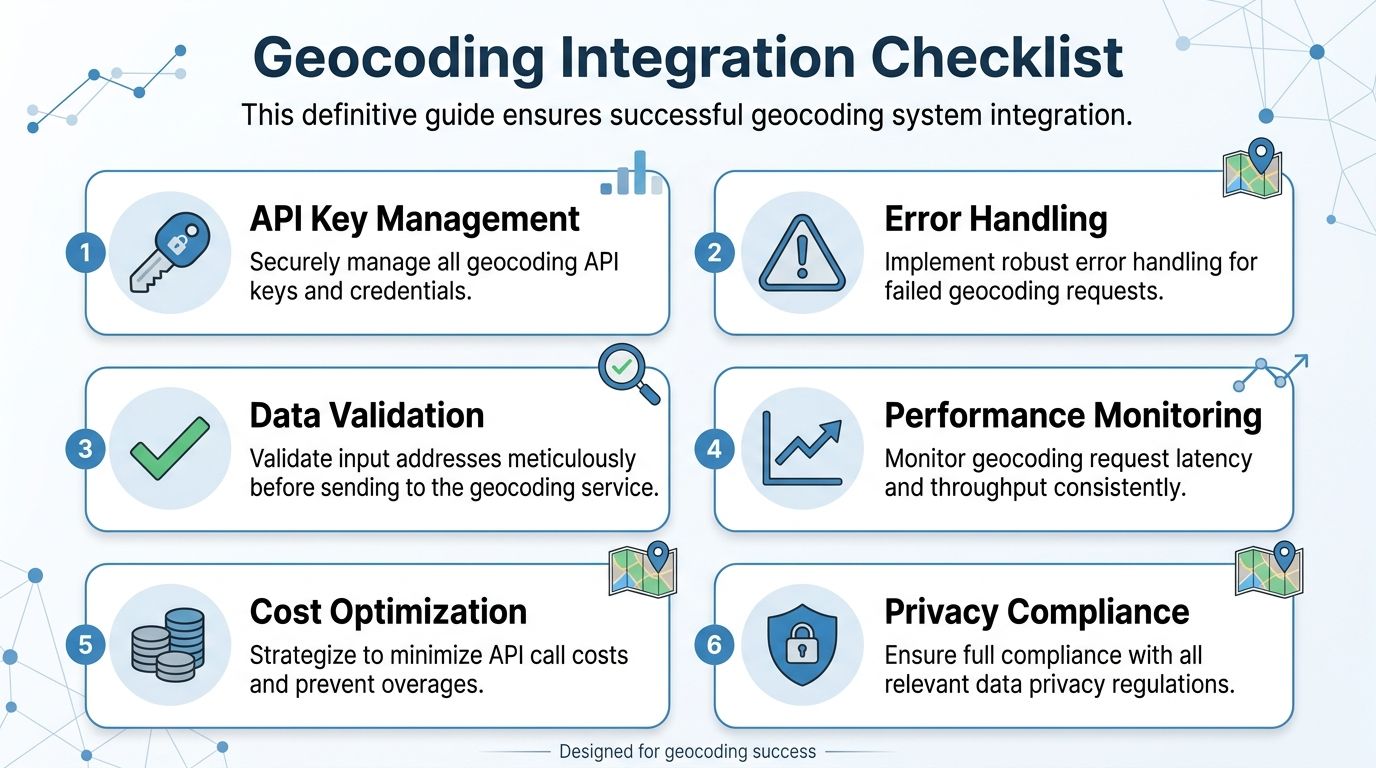
Build around these rules:
- Cache repeat lookups: If the same normalized address appears again, reuse the prior approved result when your provider terms allow it.
- Store lat and long as separate fields: Keep them in precise numeric formats, not loosely formatted strings.
- Keep source and output together: Save the original address, normalized address, coordinates, and match metadata in one auditable record.
- Add a fallback provider: For mission-critical systems, don't let one provider outage stop address processing.
- Monitor rejects and drift: Low-confidence spikes usually indicate upstream data problems, not random API behavior.
- Treat location as regulated data: If addresses or coordinates tie to individuals, legal review and retention rules matter.
What experienced teams do differently
They separate concerns.
The application layer handles user input and display. A service layer handles geocoding requests, retries, and provider-specific logic. The data layer stores normalized addresses, approved coordinates, timestamps, and status flags. That design prevents ad hoc calls from showing up all over the codebase.
They also define escalation paths. Some records can accept approximate placement. Others need rooftop-level confidence or manual review. Without that policy, staff treat every point as equally trustworthy, which isn't how geocoding works.
Non-negotiable: Precision, validation, and traceability should be designed in at the start. Retrofitting them later is expensive.
The right standard depends on the business impact of being wrong. A lightweight consumer map can tolerate approximation. A lender, insurer, or property intelligence platform usually can't.
If your team needs property-scale location data without stitching together multiple vendors, BatchData is built for that reality. It delivers 155M+ U.S. property records, low-latency APIs, bulk delivery options, and the surrounding data real estate and finance teams use, including ownership, valuations, lien details, listings, permits, and portfolio monitoring inputs. For organizations turning address data into underwriting, acquisition, or risk decisions, that kind of integrated infrastructure reduces the operational drag around geocoding and everything that comes after it.