



SEO Title: How to Verify Email Addresses for Data Teams
Meta Description: Learn how to verify email addresses with safe workflows for real-time checks, bulk cleaning, status handling, and ongoing monitoring.
Meta Keywords: how to verify email addresses, email verification, bulk email verification, real-time email verification, email deliverability, sender reputation, data quality, catch-all email
Email verification isn't a simple yes or no decision. It's a data quality and risk control that protects sender reputation, reduces hard bounces, and keeps bad records out of your CRM before they spread into marketing, product, and support workflows.
Many organizations treat verification like a form check. That's too shallow. A modern workflow has two jobs: block bad addresses at capture and clean old records in batch before they hurt deliverability. It also has to acknowledge an uncomfortable truth: verification is probabilistic, not certain.
| Workflow | Where it fits | Main benefit |
|---|---|---|
| Real-time API | Signup forms, onboarding, lead capture | Stops bad data before it enters your systems |
| Bulk verification | CRM cleanups, imports, pre-campaign scrubs | Removes stale and risky records at scale |
| Confirmation email | Account activation, double opt-in flows | Verifies user access to the inbox with low technical risk |
That shift in mindset matters if you're deciding how to verify email addresses in production rather than in theory.
Introduction
How to verify email addresses well starts with dropping the idea that “valid” means certain. Major help documentation acknowledges that it's not possible to tell for certain that an email address is valid, and format validation alone is often inaccurate, as noted in Handshake's explanation of verification limitations.
That uncertainty changes how teams should design verification. The question isn't “is this email good?” It's “what level of risk are we willing to accept at this point in the workflow?” Product teams care because bad addresses break onboarding and account recovery. Marketing teams care because invalid or risky records drive hard bounces and reputation damage. Data teams care because poor contact data contaminates downstream systems fast.
A useful operating model is simple:
- Use real-time checks when the user enters an email.
- Use batch verification on old lists, imported data, and pre-send audiences.
- Treat results as decisions rather than labels. Some statuses should pass, some should block, and some should be quarantined.
Practical rule: Verification is most effective when it sits at ingestion and before send. If you only do one, bad records still leak through.
Why Valid Is Not a Simple Yes or No
A deliverable-looking address can still be a bad record. In practice, email verification is a risk decision based on several signals, each with its own error rate.
An address can pass a format check and still fail at the point that matters: delivery. The domain may not exist. The domain may exist but have no working mail setup. The mailbox may be disabled, protected behind catch-all behavior, or configured to give ambiguous server responses. For marketing and product teams, that means "valid" is not a clean yes-or-no field. It is a confidence level that should drive different actions in different workflows.

What modern verification tests
Current verification tools usually combine several checks in one pass: syntax, DNS and MX records, SMTP behavior, catch-all detection, and flags for disposable or role-based addresses. Hunter describes this as a mix of format checks, domain checks, server response analysis, and database signals in its overview of how email verification works.
The important point is operational, not academic. A "valid" result usually means likely deliverable under current conditions, not guaranteed delivery. Mail systems change, mailbox providers hide mailbox existence, and some domains are configured to accept mail broadly and sort it later. Good teams treat verification output as probabilistic input to a policy, not as proof.
A common operational trade-off is depth versus sender risk
More aggressive verification can raise confidence, but it can also create reputation exposure. Some mailbox-level probing methods look suspicious when repeated at scale.
Twilio warns that the SMTP handshake is a "broken" verification method and says repeated use can make mailbox providers think the sender is malicious. Twilio recommends confirmation emails plus validation APIs instead, as explained in Twilio's guide to the best and worst ways to verify email addresses.
That creates a practical decision framework:
- Passive checks are safer for sender reputation, but they leave more uncertainty.
- Mailbox probing can improve confidence in some cases, but repeated probing can create deliverability risk.
- Confirmation emails provide stronger evidence that a person can access the inbox, but they add friction and reduce conversion.
| Workflow | Speed | Accuracy style | Reputation risk | Best fit |
|---|---|---|---|---|
| Validation API | Fast | Multi-signal estimate | Lower if used responsibly | Forms, onboarding, lead capture |
| SMTP-heavy probing | Variable | Mailbox-level inference | Higher if repeated at scale | Limited, controlled use |
| Confirmation email | Slower | User-proven inbox access | Lower | Account creation, high-trust flows |
One rule holds up well across teams: use verification to separate safe to accept, safe to send, and needs review. Those are different business decisions. Treating them as the same decision is how bad records reach the CRM, bounce in campaigns, and erode sender reputation over time.
How to Choose Your Verification Method
Choose the method based on where the bad data enters your system. If the problem starts on forms, use real-time verification. If the problem lives in legacy data, imports, or purchased lists, use batch processing. If you're relying on manual checks, you're already behind.
Email verification methods compared
| Method | Primary Use Case | Speed | Best For |
|---|---|---|---|
| Real-time API | Form submissions and app onboarding | Immediate | Preventing bad data at capture |
| Bulk verification | Existing CRM or campaign lists | Slower than inline checks, but scalable | Cleaning large datasets before send |
| Manual checking | One-off investigation | Slow | Rare exceptions, not operations |
Use real-time verification when data enters the system
A practical workflow should run in a layered sequence: syntax/format first, then domain existence and MX-record validation, then mailbox-level testing before any send. That sequence is recommended because a correctly formatted address can still fail if the domain doesn’t exist or can’t receive mail, as described in ListKit’s walkthrough of email validation steps.
At the product layer, this usually means:
- A user types an email into a form.
- Your app runs a fast format check locally.
- Your backend or trusted service calls a verification API.
- The app decides whether to accept, warn, or block.
A simple conceptual flow looks like this:
async function verifyEmail(email) {
  const response = await fetch('/api/verify-email', {
    method: 'POST',
    headers: { 'Content-Type': 'application/json' },
    body: JSON.stringify({ email })
  });

  const result = await response.json();

  if (result.status === 'undeliverable') {
    return { allowSubmit: false, message: 'Please enter a valid email address.' };
  }

  if (result.status === 'risky') {
    return { allowSubmit: true, message: 'Please confirm this address before continuing.' };
  }

  return { allowSubmit: true, message: '' };
}
The important part isn’t the code. It’s the business rule layer after the technical response.
- Block obvious failures like bad syntax or dead domains.
- Warn on uncertain cases like catch-all or disposable signals.
- Allow trusted low-risk records to move forward without friction.
Use batch verification when the source is already polluted
If you’re importing leads, cleaning a CRM, or preparing for a major campaign, batch is the right tool. It lets you apply the same logic to the whole dataset instead of discovering failures after send.
Manual checking still has a place, but only for support escalations, VIP contacts, or edge cases. It doesn’t scale, it isn’t consistent, and it won’t protect a live acquisition funnel.
How to Implement Real-Time Verification
Real-time verification should run at the point of capture and return a decision your product can act on immediately. The goal is to stop bad records before they enter the CRM, not after they bounce.
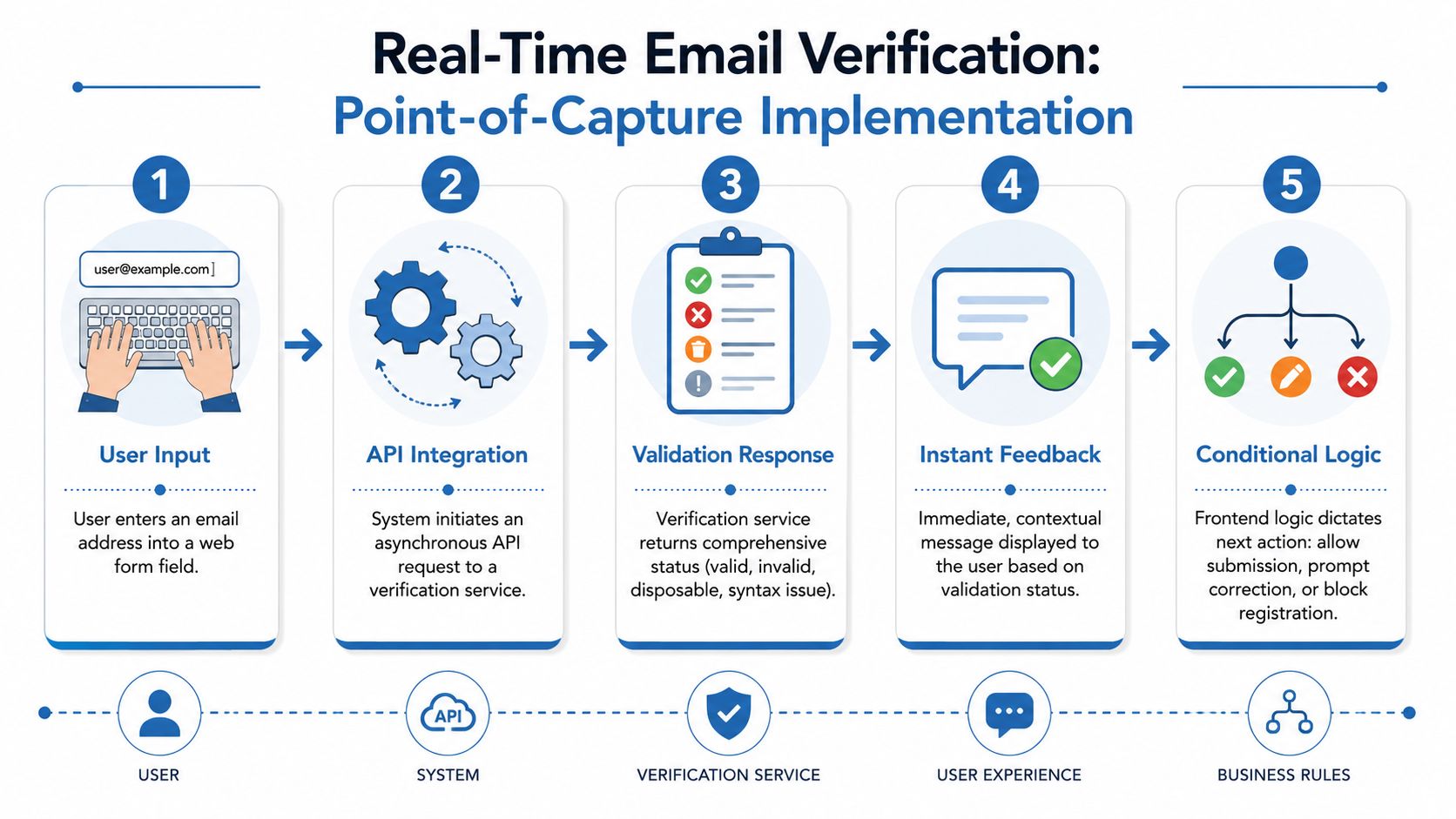
A practical implementation pattern
The cleanest setup is:
- Frontend check for obvious formatting mistakes
- Backend API call for trusted verification
- Immediate UI response based on status
- Stored status fields in your user or lead record
That last point matters. Don’t just verify and forget. Persist the verification result so marketing, ops, and analytics teams can segment on it later.
A conceptual request from the application layer might look like this:
async function submitEmailForVerification(email) {
  const res = await fetch('https://api.batchdata.com/verify/email', {
    method: 'POST',
    headers: { 'Content-Type': 'application/json' },
    body: JSON.stringify({ email })
  });

  return res.json();
}
The endpoint above is illustrative. In production, teams usually proxy through their own backend so they can log requests, control retries, and keep credentials off the client.
What the user should experience
Users shouldn’t see a technical verdict. They should see a helpful next step.
Good examples:
- Typo likely. Prompt for correction.
- Address can’t receive mail. Block submission.
- Risky but possible. Allow submission, then require confirmation.
- Looks deliverable. Proceed normally.
For teams building property, lending, or lead-gen workflows, this pattern improves data capture quality without waiting for campaign performance to reveal problems. A related implementation view appears in this overview of how APIs simplify email verification for real estate workflows.
Here’s the architecture in visual form:
Operational advice: Store both the raw result and the business decision. “Catch-all” and “allowed_with_warning” are not the same thing.
How to Set Up a Bulk Verification Workflow
Bulk verification is the right workflow when the data already exists and you need to clean it safely before use. That includes CRM exports, third-party imports, pre-campaign lists, and old user tables that have been decaying unnoticed.
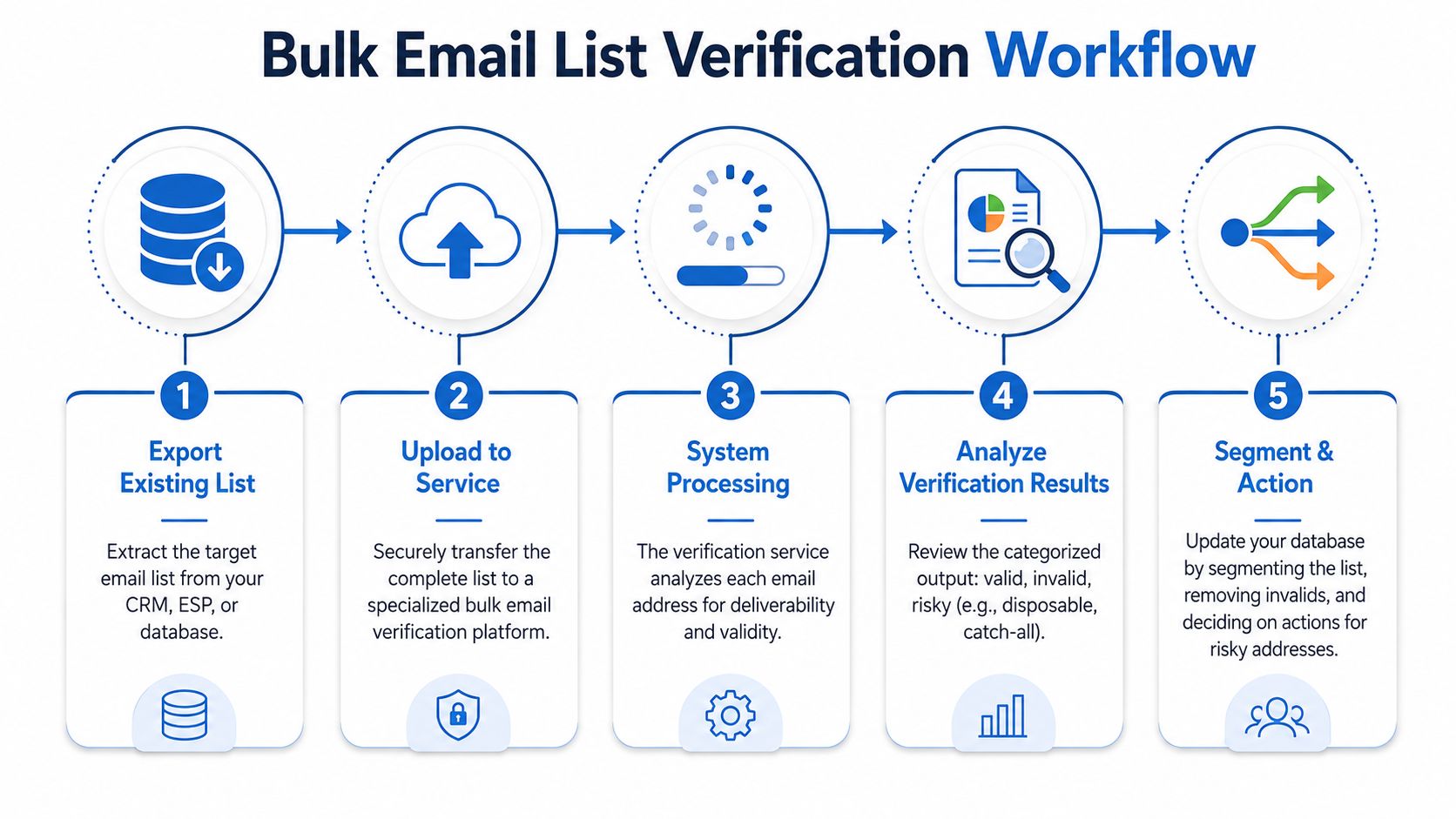
The batch workflow that works in practice
Run batch jobs as a controlled data pipeline:
- Export the target records from your CRM, warehouse, or operational database.
- Normalize the fields so you aren’t sending malformed duplicates or null-heavy rows.
- Upload for processing through the vendor UI, API, or cloud storage handoff.
- Review the result set with status columns preserved.
- Write the output back into the source system for suppression and segmentation.
Data engineering discipline is paramount. Keep an immutable source export, a processed output, and a final action file. That gives you an audit trail when sales or marketing asks why a record was suppressed.
For teams moving large files and keeping systems in sync, this explanation of how APIs enable bulk data syncing is aligned with the way these pipelines are usually operationalized.
What you’re trying to catch
AtData explicitly lists invalid mailboxes, invalid or expired domains, spam traps, and syntax errors as the main issues verification tools are designed to catch in its guide to checking whether an email is valid.
Those categories map cleanly to action:
| Result type | What it means operationally | What to do |
|---|---|---|
| Invalid mailbox | The inbox is not likely to accept mail | Suppress |
| Expired or invalid domain | The domain can't receive mail reliably | Suppress |
| Spam trap risk | Sending may harm reputation | Quarantine and investigate source |
| Syntax error | The address is malformed | Reject or repair if confidently correctable |
Where teams make mistakes
The biggest failure in batch projects isn't technical. It's governance.
- They overwrite the source field instead of appending verification columns.
- They don't segment risky statuses separately from hard failures.
- They run one cleanup and treat the problem as solved.
If you're managing owner contacts, borrower leads, or partner-imported audiences, batch verification should be a repeatable operating process. Not a rescue mission right before launch.
What Do Verification Status Codes Actually Mean
A verification status is a risk label, not a verdict. Teams get into trouble when they treat every non-failure as safe to mail. The practical question is simpler: which records are safe for normal sending, which need containment, and which should never reach a campaign.
Vendors produce status codes because email verification is probabilistic. One address may pass syntax and domain checks but still remain uncertain at the mailbox level. Another may look technically reachable while carrying higher complaint, trap, or engagement risk. That is why the same record can be "deliverable" in a narrow technical sense and still be a poor choice for a high-value send.
How to read the common statuses
| Status | Plain-English meaning | Common cause | Recommended action |
|---|---|---|---|
| Deliverable | The address is likely able to receive mail | Core checks passed with good confidence | Send under normal policy |
| Undeliverable | The address is unlikely to accept mail | Syntax issue, dead domain, or failed mailbox validation | Suppress |
| Risky | The address may accept mail, but the downside is higher | Catch-all domain, disposable inbox, role address, or mixed signals | Segment, limit volume, or require confirmation |
| Unknown | The verifier could not reach a reliable conclusion | Temporary server blocks, timeouts, or limited response data | Retry later or hold out of priority sends |
Those labels should map directly to policy. If marketing, product, and ops interpret them differently, verification is still unfinished.
Why "risky" and "unknown" matter more than teams expect
Undeliverable records are easy. Suppress them and move on.
The harder decisions sit in the middle. Catch-all domains often accept messages at the server level even when the named mailbox is inactive or unmonitored. Disposable inboxes may receive a message and still be worthless for lifecycle messaging. Role accounts such as info@ or support@ can be legitimate, but they often perform differently from person-level addresses and can raise complaint risk in acquisition campaigns.
Unknown status needs the same discipline. It does not mean safe. It means the system lacked enough signal to make a high-confidence call, which is a data quality problem and a sending risk if you ignore it.
A practical send policy by status
Use rules that protect reputation without throwing away too much recoverable demand:
- Deliverable enters standard sending pools.
- Undeliverable is suppressed across CRM, MAP, and outbound tools.
- Risky moves to a quarantine segment, a lower-volume test cohort, or a double opt-in path.
- Unknown stays out of large sends until rechecked or confirmed through another workflow.
That policy gives teams a controlled response instead of a binary yes or no. It also creates a paper trail for why a record was mailed, held, or suppressed.
Store the result as operational data
Do not leave statuses inside a CSV export or a vendor dashboard. Write them back into your systems as fields your teams can use:
- verification_status
- verification_reason
- verification_checked_at
- send_policy
- suppression_flag
I recommend treating these fields as part of the customer record, not as temporary enrichment. Once the status is in the warehouse and downstream tools, marketing can segment on confidence, product can tighten signup controls, and compliance can review suppression logic without asking someone to rerun a file.
How to Measure and Monitor Email Data Quality
Email verification should run as an ongoing control, not a one-time cleanup. Lists deteriorate, forms attract bad input, and previously safe addresses become risky over time.
Deliverability guidance recommends scheduled scrubs every three to six months, while active databases may justify monthly batch checks and extra runs before large campaigns. Common benchmark targets are bounce rate at or below 2%, spam complaints below 0.1% to 0.3%, and invalid-rate suppression on new signups under 1% month over month, according to AtData's email verification best practices.
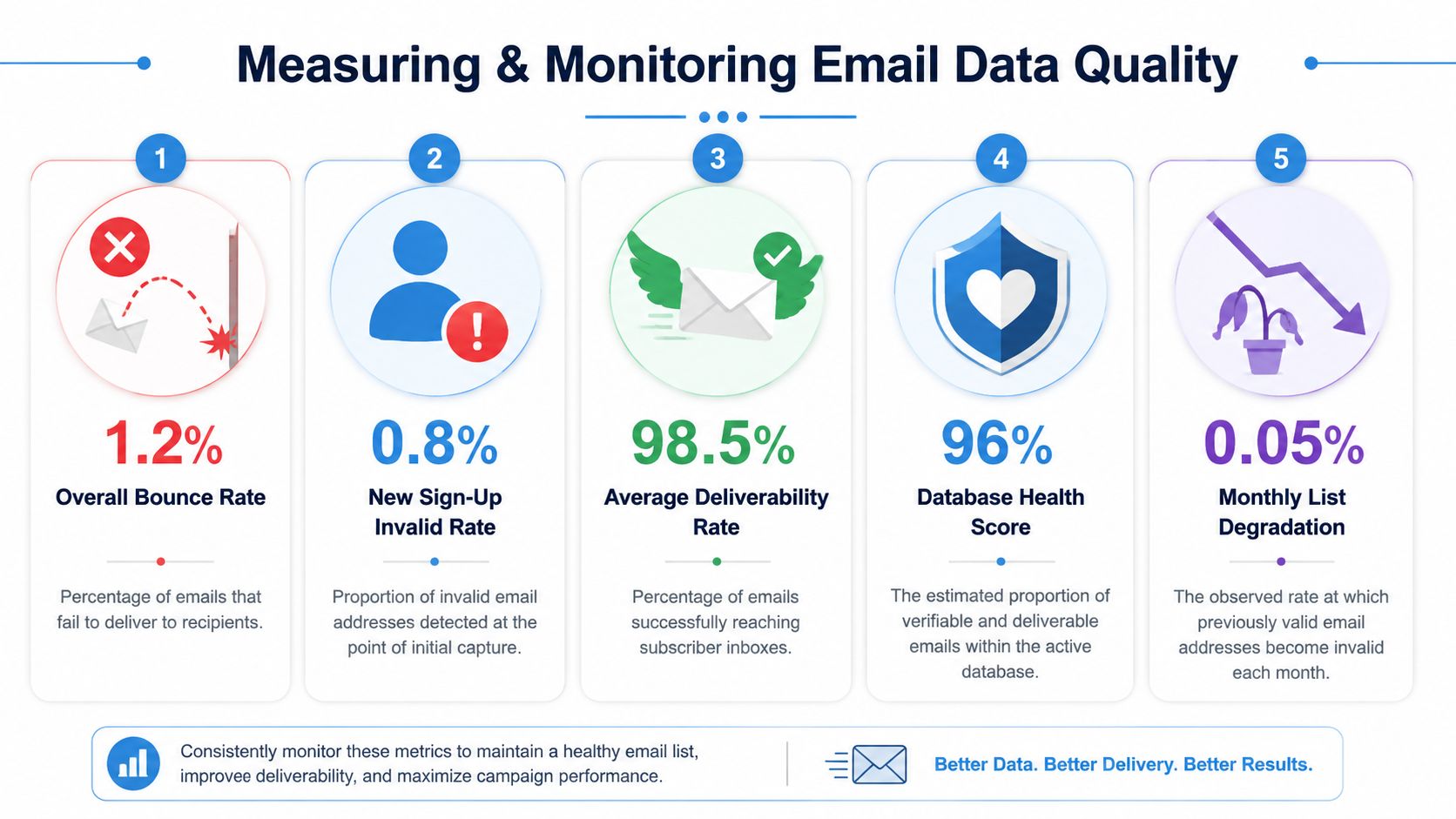
The metrics that actually matter
Track a small set of metrics consistently:
- Bounce rate. If it rises above the accepted threshold, audit the audience source and recent imports.
- Spam complaint rate. A complaint spike often means poor targeting, weak consent, or risky records.
- Invalid signup suppression rate. This tells you whether your point-of-capture controls are working.
- Risky segment volume. If catch-all or unknown statuses are growing, adjust intake and segmentation rules.
- Verification recency. Old verification results are less trustworthy than fresh ones.
A workable operating cadence
The practical model is straightforward:
| Control | Cadence | Owner |
|---|---|---|
| Real-time form verification | Continuous | Product and engineering |
| Bulk scrub of legacy lists | Scheduled | Marketing ops or data team |
| Pre-campaign verification run | Before major sends | Marketing ops |
| Threshold review | Ongoing | Deliverability owner |
For teams that want to connect contact hygiene to broader governance, this data quality deep dive is a useful companion read.
One tool option in this space is BatchData, which offers Email Addresses DNC & Litigator verification as part of its contact-data verification capabilities. That kind of output is most useful when it's tied back to suppression logic and source-level monitoring rather than treated as a standalone check.
Monitoring rule: If your bounce rate, complaint rate, or invalid intake rate moves past your threshold, don't just clean the list. Trace the source that introduced the risk.
If you need a system for verifying contact data across real estate, lending, or high-volume outreach workflows, BatchData provides property data, owner contact enrichment, and verification-related capabilities that can plug into both API-driven and bulk data operations.