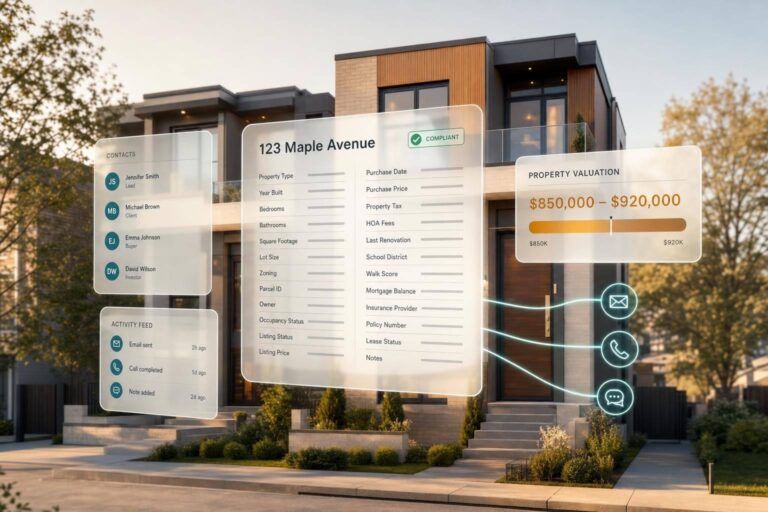
Real estate CRM in 2026 is simple at its core: the property record now comes first. With investors making up 32% of U.S. home purchases in Q1 2026 and 96% of 16 million investor-owned single-family homes held by small owners with 10 homes or fewer, I’d build the CRM around the address, then connect owners, contacts, pricing, compliance, and buyer demand to that record.
If I were planning a custom CRM today, I’d focus on five things right away:
- Property-first data model: start with the address, parcel, and ownership record
- Richer enrichment: connect each record to 24+ property fields, owner identity data, and contact details
- User-set valuations: store a price range, not just one number, and use your own comp rules
- Inline compliance: place DNC, TCPA, litigator, and deceased flags inside the CRM before outreach starts
- Cross-channel routing at scale: use reachability, line type, and buyer history to guide calls, texts, emails, mail, and dispositions
What changed is straightforward. Older CRM setups were mostly contact lists with outside tools bolted on. In 2026, I see more teams using CRM builds tied to 155 million+ U.S. property records, with reverse lookup, valuation logic, suppression, and investor matching all tied to the same workflow.
A few points stand out:
- Inbound identity resolution now matters as much as outbound lead lists
- Small-owner portfolios make contact-only systems less useful
- About 40% of investor sales go to other investors, so buyer-match data belongs in the CRM
- Multi-market teams need rule-based logic that works across neighborhoods, school zones, and city lines
The main takeaway: if your CRM cannot link property data, owner data, price logic, and compliance in one place, it will slow your team down. This article breaks down how I’d think about enrichment, valuation, compliance, outreach, and scale without turning the CRM into a messy stack of disconnected tools.
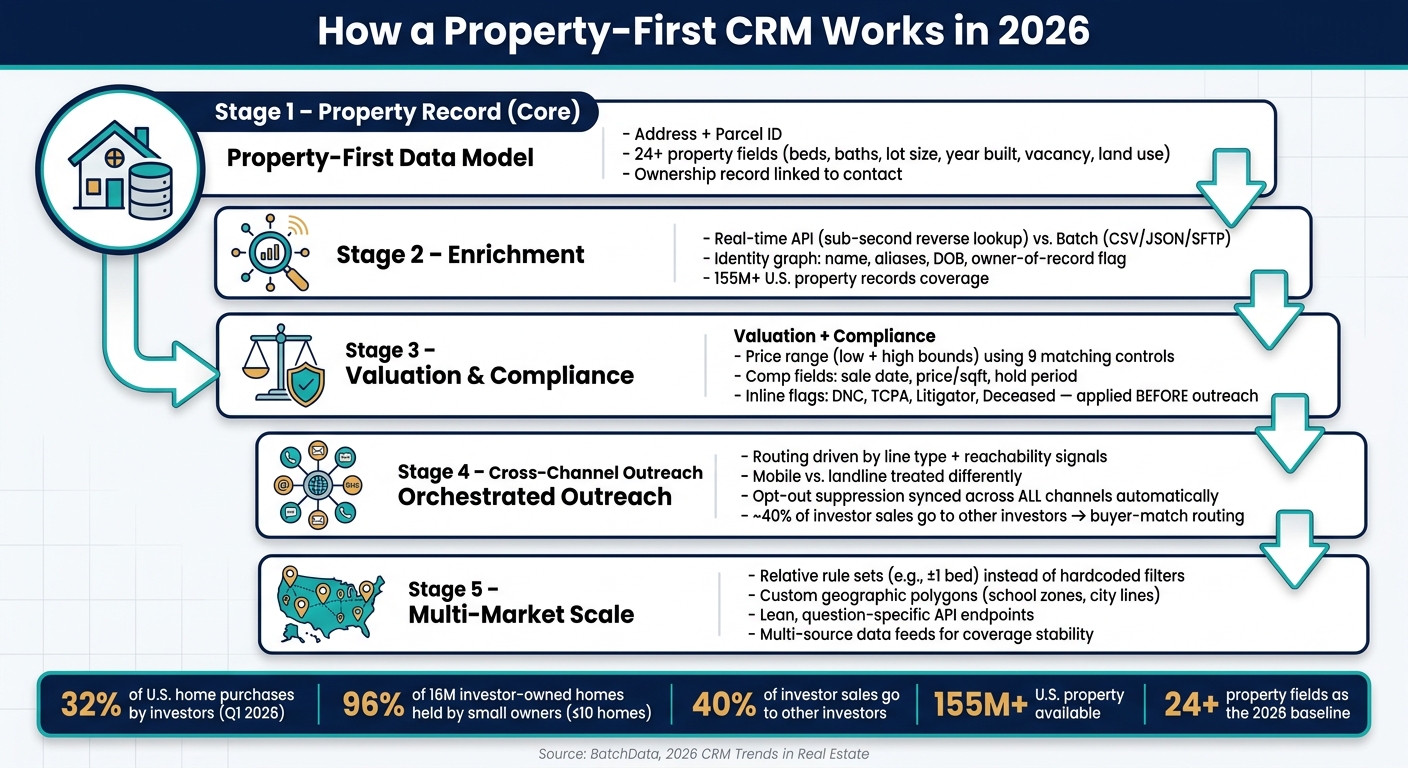
How a Property-First CRM Works in 2026: From Record to Scale
Property and Contact Data Enrichment as the CRM Core
A custom CRM is only as good as the data you feed it. In 2026, the teams moving ahead aren’t just piling up more records. They’re building on richer, more connected data models, where each property record includes the context needed to qualify, route, and contact the right person without extra digging.
What Data Fields Custom CRM Records Need in 2026
The baseline is higher now. A modern CRM record needs more than a phone number and a street address if it’s going to support solid qualification and routing.
On the property side, that includes parcel ID, year built, bedroom and bathroom count, living area, lot size, stories, pool status, vacancy status, and land use classification. Financial fields matter just as much: last sale price, price per square foot, hold period, and an estimated value range with low and high bounds. In practice, these 24+ attributes are now the minimum baseline for qualification and routing.
On the contact side, the shift is toward reverse enrichment. That means starting with an inbound phone number or email and resolving it into a full identity profile, including name, aliases, date of birth, and an owner-of-record flag tied to the currently owned property. As Charles Parra, Chief Data Officer at BatchData, puts it:
"Holding an identity graph and a property graph in the same system, and walking cleanly from one to the other, is [the real engineering]."
Each contact record also needs compliance signals built in, including DNC (National Registry) flags, TCPA flags, litigator indicators, and deceased indicators. That way, suppression can happen automatically before a record ever reaches a dialer or email queue.
The table below shows the field set that 2026 custom CRM builds are expected to carry:
| Category | Essential Data Fields |
|---|---|
| Property Core | Parcel ID, Year Built, Stories, Pool, Vacancy Status, Land Use |
| Size & Layout | Bedrooms, Bathrooms, Living Area, Lot Size (Acres/SqFt) |
| Financials | Last Sale Price, Price Per SqFt, Hold Period, Estimated Value Range |
| Identity | Full Name, Aliases, DOB, Owner-of-Record Flag |
| Contact | Phone (Line Type, Carrier, Reachability), Email (Deliverability Status) |
| Compliance | DNC Flag, TCPA Flag, Litigator Indicator, Deceased Indicator |
| Investor Context | Portfolio Size, Cash Buyer Status, 12-Month Purchase Volume, Typical Hold Time |
For teams working the disposition side, investor context fields matter just as much. Portfolio size, cash purchase history, and 12-month purchase volume help the CRM send properties to the buyers most likely to act. That matters because roughly 40% of investor sales go to other investors.
APIs and Batch Enrichment in Daily CRM Workflows
The best enrichment method depends on the moment.
Real-time API enrichment fits inbound workflows. An unknown phone number or email can trigger a reverse lookup, and the CRM can connect that contact to the currently owned property, including situs and mailing addresses, before the conversation is over. Ivo Draginov, President, BatchData, explains the shift this way:
"A huge share of our customers now start from the opposite end. They have the number. What they don’t have is any idea who’s attached to it, or whether that person owns anything worth talking about."
Batch enrichment handles the other side of the job: scheduled refreshes that update property and valuation data across an existing portfolio as new sales come in. It usually takes less work to set up, often through CSV, JSON, or SFTP file delivery, and it fits list cleaning and portfolio revaluation well.
| Feature | API-Based Enrichment (Real-Time) | Batch Enrichment (Bulk/Scheduled) |
|---|---|---|
| Best Use Case | Inbound calls, lead forms, and AI agents | Portfolio revaluation and list cleaning |
| Speed | Sub-second (synchronous) | Minutes to hours (asynchronous) |
| Implementation Effort | Higher, because it requires developer integration | Lower, often through CSV, JSON, or SFTP uploads |
| Accuracy | Highest at the point of request | High, depending on refresh frequency |
| Per-Record Cost | Typically higher, because delivery is real time | Typically lower, because of volume-based handling |
The difference between an enriched and a non-enriched record is pretty stark. A non-enriched lead may have one unverified phone number and an address. An enriched record includes ranked contact options with reachability signals, 24+ property attributes, and inline compliance flags, which makes qualification and routing much faster.
sbb-itb-8058745
Valuation Inputs and Compliance Tracking Inside the Core Workflow
Once enrichment pins down the property and owner, that same record should handle both pricing and suppression.
Valuation and Risk Signals at the Property Level
Fixed point estimates can be too rigid. Custom systems let teams set their own matching rules, including distance, custom market boundaries, and property-comparison bands. In practice, that means valuation should run on rules the team controls, with filters for distance, geography, and comparable-property criteria.
Comparable-sale records should include sale date, price per square foot, hold period, listing status, owner history, and vacancy status. Price per square foot and hold period matter a lot here because they help normalize comparisons across markets. And instead of forcing everything into one number, modern CRM records usually store a value range with low and high bounds.
For acquisition teams, the property record can also hold risk context like lien and violation flags. It can also show investor activity signals, such as portfolio size, typical hold time, and 12-month purchase volume.
Before anyone calls, texts, or emails, those same records also need compliance flags in place.
Compliance-First Design for Outreach and Recordkeeping
Attach DNC, TCPA, litigator, and deceased flags directly to the record so suppression happens before the dialer or email queue. The CRM should keep suppression lists as the system of record and apply state calling-hour rules.
Data from enrichment APIs is not used to determine housing, credit, or insurance eligibility. Custom CRM builds should clearly mark those restricted fields in the data model.
Record-level suppression helps keep outreach aligned across states and channels as teams grow. That same record-level control keeps messaging aligned across call, SMS, email, and direct mail.
With valuation and compliance tied to the core record, the next step is coordinating outreach across channels and markets.
Cross-Channel Automation and Multi-Market Scale in 2026 CRM Builds
With compliance and valuation built into the core record, the next step is using that property record to power every channel and every market. At that point, the record isn’t just a place to store data. It also needs to decide what happens next.
How Cross-Channel Outreach Is Orchestrated
In 2026 custom CRM builds, outreach across email, SMS, voice, and direct mail is driven by the contact record tied to the property. When a record clears suppression checks, the CRM sends the next action based on deliverability and line-type signals. Mobile numbers and landlines are treated differently, which helps keep outreach in line with compliance rules. And once a record is suppressed, that status should carry across every channel on its own.
That matters more than it may seem at first glance. If one part of the system honors an opt-out and another doesn’t, things can go sideways fast.
Reverse skip tracing adds another layer here. It turns inbound calls into identified contacts and linked property records before handoff. So instead of an agent guessing who called, the system can connect the dots right away.
The table below shows where the biggest operational gaps tend to show up between manual and automated cross-channel workflows:
| Workflow Element | Manual/Single-Channel | 2026 Custom CRM |
|---|---|---|
| Inbound ID | Manual lookup or unknown caller | Instant reverse skip trace to property record |
| Suppression | Secondary scrub, often post-complaint | Inline suppression at enrichment |
| Channel Routing | Agent decides per contact | Automated by line type and reachability signal |
| Task Execution | Human follow-up | Automated next-step assignment |
| Opt-Out | Per-campaign list edits | Inline suppression in the CRM |
Once routing is automated, scale comes down to how well the data model handles differences from one market to the next.
Architecture Choices for Multi-Market CRM Growth
Scaling a custom CRM from one market to ten is mostly an architecture problem. In plain terms, the system has to bend without breaking.
A common failure point is hardcoded rules, like fixed bed-count filters, instead of relative rule sets. Scaled CRM builds swap those out for relative rule sets, so one ruleset can adjust across neighborhoods, property types, and market boundaries without manual rework.
On the data side, multi-market CRMs should pull from more than one source, not a single upstream feed. That helps coverage stay steady if one source falls behind. BatchData’s property datasets gives access to more than 155 million U.S. property records, which is enough volume to keep enrichment steady across states. But that setup only holds up if the data model and quality benchmarks are defined first.
| Design Decision | Single-Market Setup | Modular Multi-Market CRM |
|---|---|---|
| Matching Logic | Fixed absolute values | Relative ranges (e.g., ±1 bed) |
| API Payload Design | Large, monolithic responses | Lean, question-specific endpoints |
| Compliance Handling | Manual scrub or second pass | Inline DNC/TCPA/litigator signals |
| Valuation | Static AVM or manual lookup | Explainable rule-based models |
| Geographic Boundaries | Simple radius | Custom polygons for school districts or city lines |
Lean endpoints also help channel tools avoid pulling data they don’t need. That’s a big deal at scale. If every tool asks for everything, the whole setup gets bloated in a hurry. The base layer has to come first. Then the channel logic can sit on top of it.
How to Plan a Custom CRM Build in 2026
Define the Data Model, Workflows, and Quality Benchmarks First
Once enrichment, valuation, and outreach are set, the build starts with the data model, often powered by a real estate API. This is the working blueprint. It turns big-picture CRM trends into clear build choices.
Lock the data model before development begins. Each CRM object – properties, owners, contacts, deals, communications, valuation inputs, and compliance records – should tie back to a business result. If a field or object doesn’t support how the team buys, sells, prices, or stays compliant, it probably doesn’t belong there.
At the property level, define nine matching controls up front: distance, market boundaries, beds, baths, living area, year built, lot size, stories, and subdivision. These controls make valuation logic easier to explain and defend. They aren’t side notes. They’re core build decisions.
Contact objects need clear rules too. Fields for line type, carrier, and reachability status should be required, not optional, because they have a direct effect on dialer output and support compliance-first calling and messaging. And since one phone number can connect to more than one household member, the system should rank matches instead of just returning the first result.
For teams working across more than one market, timing matters just as much as match logic. Valuations should update when new sales close in that market, not on a fixed quarterly cycle. That cadence needs to be set before the build starts, not patched in after go-live.
That’s the difference between a CRM that looks good in a demo and one a team can use every day.
Conclusion: The 2026 CRM Stack Is Property-Centric, Compliance-Aware, and Built to Scale
The flow is simple: property record → enrichment → valuation and compliance → orchestration → scale. The safest builds treat the data model, data-quality benchmarks, and compliance logic as top-level decisions, not back-end cleanup.
The table below shows how common business goals map to the CRM modules and data objects needed to support them:
| Business Outcome | Required CRM Module | Key Data Objects |
|---|---|---|
| Improved Conversion | Inbound Identity Resolution | Phone/Email, Name, Linked Property ID |
| Defensible Pricing | Custom Valuation Engine | Subject Property, 24 Comp Attributes, 9 Matching Controls |
| Faster Dispositions | Investor Buy Box Matching | Portfolio History, Cash Purchase Flags, Hold Times |
| Risk Mitigation | Inline Compliance Scrubbing | TCPA/DNC Flags, Litigator Indicators, Deceased Status |
| Multi-Market Scale | Relative Rule Configurations | Market-Specific Polygons, Relative Attribute Ranges |
FAQs
Why is a property-first CRM better than a contact-first CRM?
A property-first CRM works better because it puts the property at the center of the work.
That matters in real estate because the property is the one thing that stays put. Contact lists, on the other hand, can change, go stale, or vanish.
When the address is the primary key, you can tie ownership, valuation, and transaction history to one record. That gives you a cleaner way to automate workflows and keep data tied to the asset itself, no matter who’s handling the account.
What data should a real estate CRM store in 2026?
In 2026, a real estate CRM should store structured property, contact, and compliance data to support valuation and outreach.
That means keeping three core data groups in one place:
- Property data: size, layout, age, sale history, value estimates, lot details, and ownership context
- Contact data: identity records, ranked phone and email aliases, and property links
- Compliance and investor data: Do Not Call, TCPA, litigator, deceased indicators, portfolio history, cash purchase volume, and recent activity
Put simply, the CRM shouldn’t just act like a digital address book. It should give your team the facts needed to price deals, reach the right person, and avoid calling the wrong one.
How does a custom CRM support compliance across channels?
A custom CRM can support cross-channel compliance by pulling real-time data signals straight into the outreach workflow. With tools like the BatchData Reverse Skip Trace API, teams can add DNC and TCPA flags, along with litigator and deceased indicators, directly to contact records.
That matters because teams can apply suppression rules before a call or email goes out, not after a complaint lands in the inbox. In plain terms, the system helps catch issues early.
These signals also support a customer’s internal compliance process and help keep outreach in line with regulatory standards.