



More property data doesn't automatically produce better decisions. Poor chart selection, unclear confidence signals, overloaded dashboards, and slow queries can hide underwriting risk even when the underlying records are accurate. Effective visualization best practices connect the analytical task to the chart, the audience to the right level of detail, and every displayed metric to a traceable definition.
This playbook focuses on ten production decisions for frequently updated property datasets:
- Visual hierarchy: Put valuation, ownership, equity, and lien signals where users look first.
- Color: Encode risk, opportunity, and ordered values without making color the only signal.
- Data-ink ratio: Remove decoration that competes with the evidence.
- Responsive layout: Preserve critical property information across desktop, tablet, and mobile.
- Chart selection: Match the visual form to the question, such as trend, comparison, distribution, or location.
- Labeling: Make metric definitions, units, dates, and legends consistent.
- Interaction: Move users from portfolio summaries to individual properties through purposeful drilldowns.
- Annotation: Explain anomalies, market events, and source updates.
- Confidence: Show uncertainty, freshness, and verification status in the visual itself.
- Performance: Design queries, payloads, loading states, and rendering for production-scale use.
The same discipline that improves a property dashboard also strengthens mastering analytics for websites, because users need to understand what a visual means before they can act on it.
1. How should you establish visual hierarchy for multi-attribute property data?
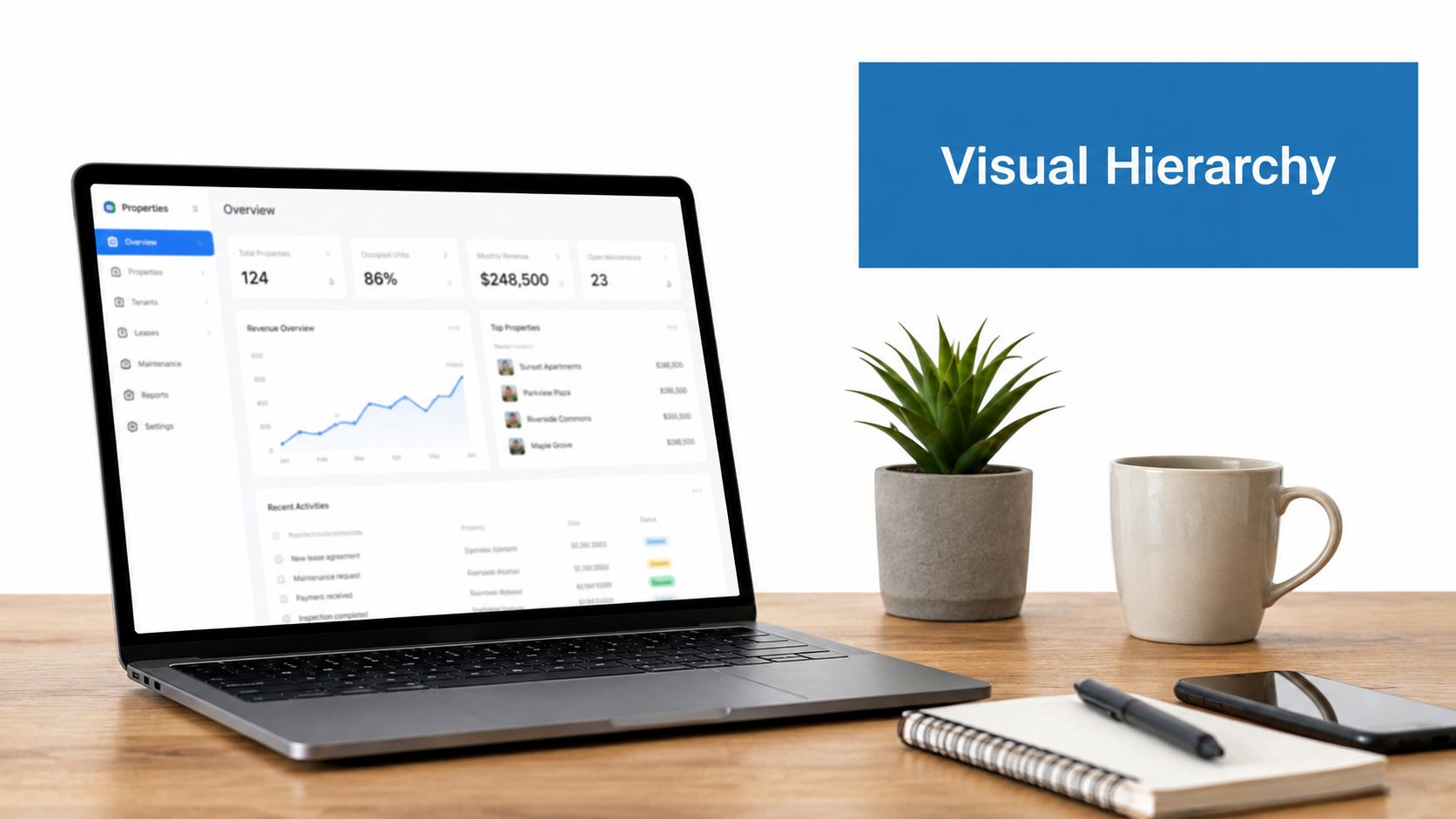
Put the metric that drives the next decision first. A property record may contain core characteristics, ownership history, valuation, equity, mortgages, liens, permits, listings, and contact signals. Showing all of those fields with equal visual weight forces an underwriter, investor, or marketer to perform the prioritization that the interface should have done.
A strong property view makes the first screen answer a specific operational question. For an underwriter, that may mean surfacing valuation, lien position, delinquency status, and ownership complexity. For an investor, valuation trend, equity position, ownership transfer activity, and comparable-market context may deserve priority. For a marketing team, verified owner contact status and propensity signals may matter more than secondary property characteristics.
Rank information by action
Use layout, whitespace, alignment, and typography to establish a clear order:
- Primary zone: Display the decision metric, such as current valuation, equity position, or risk status.
- Evidence zone: Place ownership dates, lien details, valuation history, and source freshness nearby.
- Secondary zone: Move less urgent characteristics into expandable panels or drilldowns.
- Role-specific zone: Reorder fields for underwriters, investors, servicers, and marketers rather than forcing one universal dashboard.
Role-based views don't require different underlying data. They require a controlled presentation layer that filters and reorders attributes according to the user's task. Test the first visual element against the next action. If the user needs to assess acquisition risk, a decorative property photo shouldn't outrank the lien signal that determines whether investigation continues.
2. How should color encode property risk and opportunity?
Use color to express meaning, not to decorate categories. A categorical palette distinguishes property types or ownership classes. A semantic palette tells the user whether a value indicates risk, stability, urgency, or opportunity. Those are different jobs, and combining them carelessly makes a dashboard difficult to interpret.
Color needs to match the data type. For categorical data, keep the palette to six colors or fewer where possible, with 12 as the maximum number of distinct colors, according to the University of California, Berkeley guidance on visualization design. Sequential data needs a progression from lighter to darker shades, while diverging data needs a meaningful midpoint rather than an arbitrary two-color split.
Make meaning independent of hue
For an investment map, a sequential scale can show increasing equity or opportunity intensity. For an underwriting view, a diverging scale can show values below and above a defined risk threshold. For a property card, an icon, label, or pattern should reinforce a red risk state or green verified state.
The University of Cambridge graphics guidance states that color shouldn't be used for ordinal data. Ordered values need luminance or grayscale progression so users perceive rank rather than unrelated categories. Bright colors can also create optical effects that distort apparent area, so test maps and heatmaps at reduced size and in printed or low-fidelity formats.
Practical rule: Define the threshold before choosing the color. If a lien amount, equity band, or contact-confidence boundary changes the decision, the visual transition must occur at that boundary.
Validate contrast and test with color-vision simulators. Pair color with text, shape, iconography, or position, especially in risk and due diligence workflows where missing one signal can change the next action.
3. How can you improve the data-ink ratio in property dashboards?
Every visual element should help users compare, locate, or interpret data. Remove backgrounds, unnecessary borders, decorative gradients, three-dimensional effects, redundant legends, and labels that repeat information already visible in the interface. The objective isn't minimalism for its own sake. It's to reserve visual attention for valuation movement, lien exposure, ownership change, and other decision-relevant signals.
A valuation trend chart usually needs a clear title, time scale, value scale, one or more lines, and enough context to identify the source and update period. A portfolio comparison may need bars and direct labels, but it doesn't need a shadow behind every bar or a separate legend when the series can be labeled directly.
Audit what survives outside the dashboard
Interactive tooltips can provide precision without covering the chart with numbers. That works well on screen, but an exported PDF, image, or printed report won't retain hover states. Export formats therefore need a deliberate fallback, such as direct labels, a concise note, or an accompanying data table.
Apply a simple squint test. If the dominant pattern disappears when surrounding detail loses focus, the chart probably gives too much space to non-data elements. Then inspect each component:
- Gridlines: Keep only those that materially improve value reading.
- Legends: Replace them with direct labels where the layout allows.
- Color gradients: Remove them unless they encode a real quantitative progression.
- Decorative styling: Delete anything that doesn't support comparison or navigation.
The IBM review of visualization history describes a long evolution from tables and maps to statistical graphics. Modern tooling makes decoration easy, but the underlying job remains the same, make the relationship in the data easier to see.
4. How should responsive layouts support property work across devices?
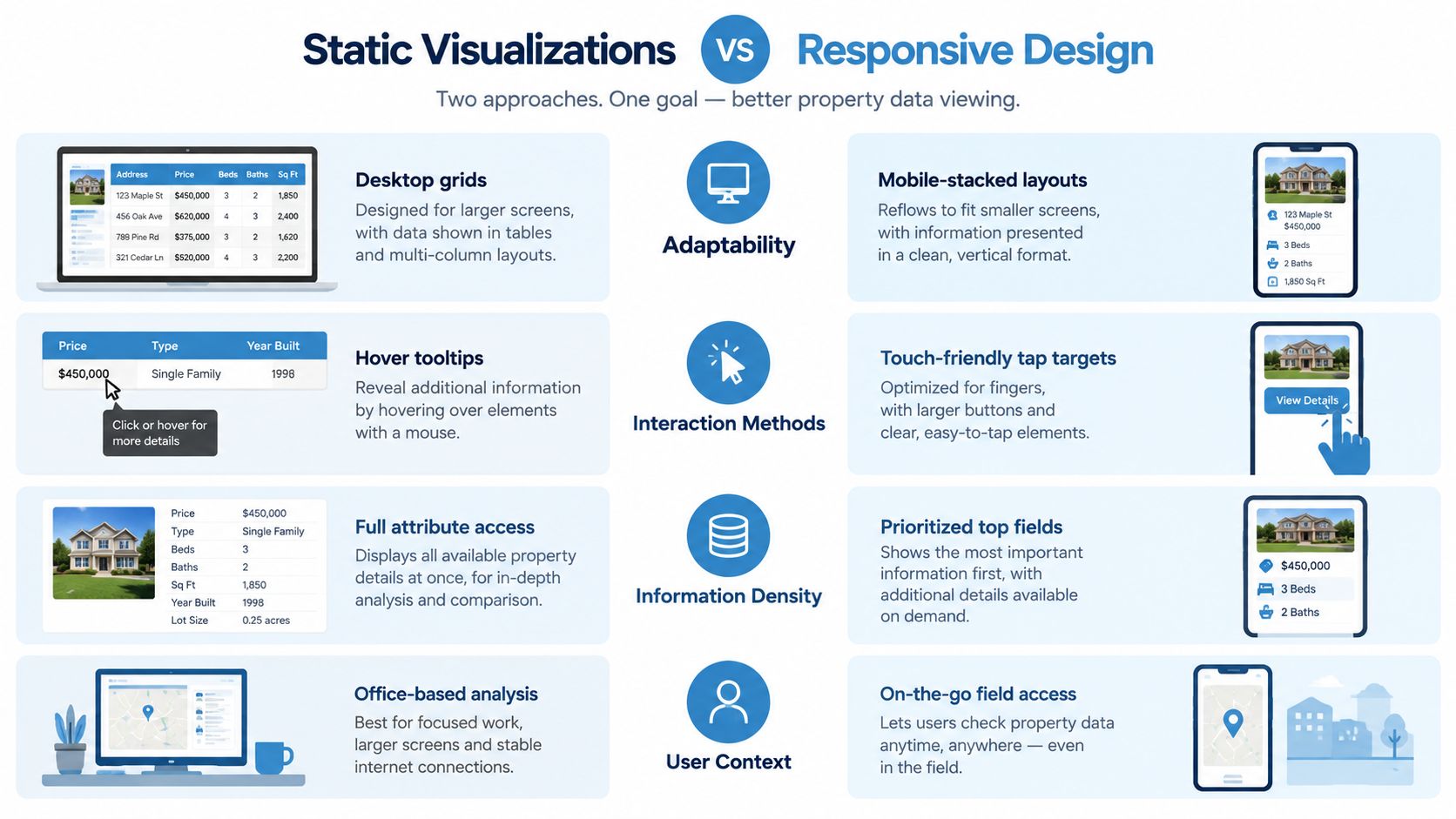
Responsive visualization means changing structure without changing the decision logic. A field agent may need owner contact and property status immediately on a phone. An underwriter may need a denser risk view on a tablet. An investment analyst may need multiple comparisons on a desktop. The interface should adapt the amount and arrangement of information, not hide the meaning of the data.
Use stacked cards on narrow screens and aligned grids on wider screens. Keep the primary metric visible without horizontal scrolling. Move mortgage details, ownership history, permits, and comparable sales into progressive disclosure when the viewport can't support them comfortably.
Design for constrained interaction
A responsive property view needs more than CSS breakpoints:
- Touch targets: Make map pins, filters, tabs, and drilldown controls easy to activate without precision tapping.
- Logical order: Preserve a sensible reading and tab sequence when cards reflow.
- Lazy loading: Load valuation, ownership, or risk summaries before secondary attributes.
- Semantic markup: Ensure screen readers receive meaningful headings, labels, and relationships.
- Device testing: Test on physical phones and tablets, not only browser emulators.
Maps deserve special treatment. A dense desktop cluster may need to become a summary card or a simplified regional view on mobile. Don't merely shrink the desktop map until labels overlap. Change the level of aggregation, then let the user request detail.
The BatchData guide to visualizing property performance data is a useful reference when deciding how property trends, comparisons, and mobile-friendly views should work together. A responsive layout succeeds when a user can identify the property, understand its current state, and take the next action without zooming, hunting, or losing context.
5. Which chart type fits the property data and the user task?
Choose the chart from the question, not from the available component library. Property workflows combine time series, categorical comparisons, distributions, hierarchies, and spatial relationships. Each structure needs a visual form that makes the relevant comparison easy.
William Cleveland and Robert McGill's ranking of quantitative encodings places position along a common scale first for accurate comparison, followed by position on non-aligned scales, length, angle or slope, area, volume or curvature, and color intensity or shading. That hierarchy explains why aligned dot plots and bars usually outperform bubbles or pies when an analyst needs precise comparison. The same source notes that pre-attentive features can be detected in roughly 200 milliseconds, which is why a restrained highlight can direct attention before a user consciously searches the view. See the summary of visual perception and quantitative encoding for the underlying ranking.
Match chart to analytical intent
- Trend: Use a line chart for valuation history, equity movement, or delinquency over time.
- Comparison: Use aligned bars or dots for property segments, risk groups, or portfolio cohorts.
- Distribution: Use a histogram or another distribution view for valuations, equity, or days-to-event.
- Hierarchy: Use a tree or nested structure for ownership entities, lien relationships, or portfolio composition.
- Location: Use a proportional symbol map, hexbin view, or choropleth when geography is central to the decision.
A pie chart may show a simple part-to-whole relationship, but it becomes difficult to compare slices as categories multiply. A map can reveal concentration, but it can also hide low-density areas when aggregation and geography aren't explained. Add a text alternative and a concise description for users working from exports or assistive technology.
6. How do consistent labels and legends prevent property data errors?
A label must tell users what the metric means, not merely what the database calls it. “Valuation” could refer to an automated valuation model, a tax assessment, or another estimate. “Owner” could mean a person, trust, limited liability company, or recorded entity. Without definitions, two dashboards can display plausible but incompatible numbers.
Use one canonical name for each field, metric, unit, period, and status. A data dictionary should connect the visualization label to its definition, source, calculation, and refresh behavior. The same terminology should appear in the dashboard, API response, export, report, and documentation.
Make labels self-explanatory
Government guidance reinforces this discipline. The U.S. Census Bureau visualization guidance advises that titles clearly state the variables shown and the period covered. Apply that rule to property charts:
- Title: State the metric, population, geography, and period.
- Axis: Include units and distinguish counts, rates, currency, and index values.
- Legend: Explain every series and use the same order across views.
- Tooltip: Show definition, source, update date, and relevant caveats.
- Glossary: Expand abbreviations such as SFR, MFR, AVM, and lien priority.
Don't rename “Days to Foreclosure” as “Pre-Foreclosure Days” in another product surface unless the definitions are identical. If a definition changes, version the schema and provide a migration note for API consumers. Non-expert testing is valuable here. If users need an analyst to explain a label before they can act, the label has failed.
7. How should interaction support drilldown into property records?
A portfolio summary earns interactivity when a user can identify a segment, inspect the properties inside it, and open the evidence required for a decision. Filtering, sorting, hover details, and drilldown should each produce a meaningful change in understanding. A production dashboard also needs an API contract that preserves active filters, result counts, record status, and source freshness as the user moves between views.
A practical investigation moves from aggregate to list to detail. An investor might select a positive-equity segment, inspect matching properties, then open ownership or contact evidence. An insurer might select a risk cell on a regional map, review the underlying properties, and open the underwriting record. A servicer might filter by delinquency status, inspect account history, and review lien or recording context.
Define the interaction contract
Keep active filters visible throughout the investigation. The API should support server-side aggregation, pagination, or cursor-based retrieval before the interface renders a large result set. Loading states should explain that results are being retrieved, while empty states should distinguish “no matching properties” from “data unavailable.” Reset controls and breadcrumbs give users a reliable route back from a detailed record.
Build safeguards into every drilldown:
- Empty drilldowns: Verify that each aggregate segment opens an appropriate detail state.
- Hidden filters: Show active constraints and how they changed the result.
- Uninformative tooltips: Include the value, unit, definition, and relevant context.
- Unbounded queries: Aggregate or paginate large property sets at the API layer.
- Inconsistent gestures: Keep desktop sorting and mobile touch patterns predictable.
- Unclear record state: Show whether a property is current, historical, pending, or unavailable.
Accessibility applies to interaction as well as color and alternative text. A 2023 Wiley Computer Graphics Forum comparative analysis of mainstream visualization tools found limited support for alternative text, data tables, and keyboard navigation across many popular tools. The analysis of accessible visualization interaction identifies structured navigation and conversational interaction as promising approaches for chart exploration.
8. How can annotations explain property anomalies and market signals?
An annotation turns an unexplained change into an investigable event. A valuation dip might reflect market movement, a local incident, a gap in comparable sales, or a source update. The chart shows the change, but not which explanation warrants review.
Tie annotations to the events and update signals already available through the data pipeline. A mortgage dashboard can mark a policy change or delinquency shift. An investment view can identify a recorded notice, scheduled auction, or local supply change. An insurance view can connect a valuation outlier with a permit update or limited comparable coverage. Store the event type, timestamp, source, and affected property IDs so the same annotation remains traceable across API responses, charts, and exports.
Keep context specific and traceable
A useful annotation answers three questions in place: What happened? Name the event precisely. When did it happen? Show the event date or source-update date. Why does it matter? State the possible effect on valuation, underwriting, portfolio review, or the next action.
Make the callout actionable. Link a county assessment change to its record or source description when available. For an outlier, show the rule that triggered it, such as an unusual deviation from comparable properties. Mark historical events clearly, and hide them from the active view only when they no longer affect the current decision.
Keep the chart readable. Use one or two high-value callouts, then place supporting evidence in a detail panel or annotation toggle. The survey data visualization guidance from The Bricks emphasizes uncertainty, sample context, and audience interpretation. Those principles matter in property analysis, where a visible movement can be mistaken for a proven cause.
9. How should visualizations show accuracy and confidence?
A visual decision is only as reliable as the evidence attached to it. Property datasets combine phone numbers, owner matches, valuations, lien records, and market signals, each with different levels of freshness and support. Place the confidence state beside the value it qualifies, not in a distant footnote that users may miss.
Use confidence bands, verification badges, opacity, freshness indicators, or explicit status labels. Define the meaning of each encoding in the legend, tooltip, and API response so the same state survives across dashboards, drilldowns, and exports. A valuation range can show uncertainty around an estimate. A contact record can distinguish verified, inferred, and stale information. A lien field can show a pending or delayed source state instead of presenting an incomplete record as final.
Design the indicator around the next workflow decision. A Verified contact should show its verification state and supporting evidence. An Inferred contact should explain the inference and prompt a higher review threshold. For an Uncertain valuation, display a range or interval rather than a falsely precise point. A Stale recording should show its last update and explain the consequence for due diligence. An Incomplete record should let users exclude, review, or export the affected properties.
Confidence also needs an accessibility path. An audit of 76 high-traffic COVID-19 visualizations found that only 16% were rated very or extremely accessible, while 15% exposed specific data points to screen readers, 5% conveyed trends or patterns, and 43% offered accessible tabular alternatives, according to the Stanford data accessibility audit. Property analysts need the same evidence in text and tables, because a user who cannot inspect the basis of a visual claim cannot assess its reliability.
Document how confidence is calculated in the product and API. Underwriters, acquisition teams, and outreach operators need to know whether a score reflects cross-source matching, freshness, statistical inference, or another rule. The BatchData explanation of confidence scoring provides a useful model for connecting a confidence concept to an operational workflow. Include the score and its definition in exports, not only on screen, so downstream teams can apply their own review rules.
10. How do you maintain visualization performance at scale?
A visualization that cannot respond quickly cannot support a property decision. Slow maps delay due diligence, filters that appear broken undermine trust, and dashboards that render every attribute obscure the current underwriting question. Design the data path around the active view, then make loading and failure states explicit.
Aggregate before rendering. Cluster map points until the user reaches a smaller geographic area, and use bounding-box queries for geospatial views. Paginate or virtualize long property lists. Request sparse fieldsets rather than every available attribute when the screen needs only valuation, status, and location. This reduces transfer, parsing, and browser work without removing data from the underlying API.
Use progressive delivery for expensive views. Show portfolio-level metrics while historical series and secondary charts load. Skeleton cards reserve space and prevent layout shifts. For a large export, queue a background job and provide status and retrieval details instead of holding the browser open.
Performance monitoring should follow the complete request path:
- Query time: Identify slow filters, joins, aggregations, and geospatial requests.
- Payload size: Track returned fields, compression, and partial-response behavior.
- Render time: Measure maps, charts, and lists separately.
- Failure state: Distinguish no data, delayed data, authorization issues, and server errors.
- Device behavior: Test mobile hardware and low-bandwidth connections alongside office desktops.
Cache stable reference data, debounce rapid filter changes, and use cursor-based pagination for large result sets. Set thresholds for acceptable response and render times, then test them against realistic property volumes and update frequency. A fast first view still fails if every filter triggers a full dataset reload.
Document rate limits, pagination, partial responses, and loading states for teams integrating the visualization layer. The BatchData guidance on automated dashboards for real estate analytics links dashboard automation with reliable data delivery. Automation still requires validation of each update, aggregation, and displayed state.
10-Point Visualization Best Practices Comparison
| Title | 🔄 Implementation complexity | ⚡ Resource requirements | ⭐ Expected outcomes | 📊 Ideal use cases | 💡 Key advantages / tips |
|---|---|---|---|---|---|
| Establish Clear Visual Hierarchy for Multi-Attribute Property Data | High, role-based hierarchies and progressive disclosure per persona | Medium–High, design system, frontend dev, attribute metadata | ⭐⭐⭐⭐, faster decisions, fewer errors | Underwriting, portfolio monitoring, investor dashboards, marketing lead gen | Prioritize by user role; use progressive disclosure; test with personas |
| Use Color to Encode Risk and Opportunity Signals, Not Just Categories | Medium, color-mapping, accessibility & localization checks | Medium, design tokens, CVD testing, legend maintenance | ⭐⭐⭐⭐, instant triage, reduced reading time | Risk dashboards, investor screening, underwriting, portfolio heatmaps | Validate WCAG, pair color with patterns/icons, document mappings |
| Minimize Data-Ink Ratio by Eliminating Non-Essential Chart Elements | Low–Medium, audit and simplify existing visuals | Low, design/time investment; modest dev changes | ⭐⭐⭐⭐, faster scanning, smaller payloads, clearer prints | Dashboard design, API visualizations, portfolio reports | Use the "squint test"; replace overlaid numbers with tooltips; justify each element |
| Implement Responsive Layouts to Support Desktop, Tablet, and Mobile Property Viewing | Medium–High, multiple breakpoints and touch interactions | Medium–High, frontend engineering, device QA, assets | ⭐⭐⭐⭐, consistent access across devices, higher mobile conversion | Mobile search, field agent apps, investor due diligence | Test on real devices; lazy-load heavy attributes; prioritize top fields per breakpoint |
| Use Appropriate Chart Types to Match Data Structure and User Task | Medium, requires statistical/visual literacy and design rules | Medium, charting libraries, data transformation, training | ⭐⭐⭐⭐⭐, clearer insights, fewer misinterpretations | Portfolio analytics, trend analysis, risk dashboards, market research | Start with the user's question; test comprehension; provide non-visual fallbacks |
| Apply Consistent Labeling and Legends Across All Property Data Visualizations | Medium, taxonomy, governance, and migration planning | Medium, documentation, schema versioning, mapping work | ⭐⭐⭐⭐, fewer support tickets, consistent integrations | Design systems, API docs, exports, report templates | Build a data dictionary; use glossary tooltips; version your schema |
| Incorporate Interactivity to Enable Drill-Down and Detailed Property Investigation | High, drill flows, linked brushing, search-within-visualization | High, backend filtering performance, frontend rendering, QA | ⭐⭐⭐⭐⭐, stronger exploration, higher engagement, self-service | Portfolio exploration, property search, deal-sourcing, underwriting | Limit drill depth (2–3 levels); show load state feedback; include reset/breadcrumbs |
| Use Annotations and Context to Explain Data Anomalies and Market Signals | Low–Medium, editorial rules and event detection | Low–Medium, content maintenance, linking to sources | ⭐⭐⭐⭐, reduces misinterpretation, increases credibility | Time-series valuation, market dashboards, compliance reporting | Use 1–2 callouts per chart or toggleable annotations; link to sources and dates |
| Validate Data Accuracy and Confidence Metrics Visually to Support Trust and Due Diligence | Medium, compute confidence scores and visual encodings | Medium–High, data pipelines, storage, API surface changes | ⭐⭐⭐⭐, builds trust, enables smarter filtering and actions | Contact enrichment, AVM displays, underwriting, data-quality dashboards | Define thresholds with stakeholders; explain calculations; include confidence in exports |
| Optimize Performance and Loading States to Maintain Responsiveness at Scale | High, caching, pagination, virtualization, telemetry | High, infra, engineering effort, monitoring and testing | ⭐⭐⭐⭐, improved perceived/actual responsiveness, reduced load | Interactive maps, large property search, batch exports, mobile apps | Use progressive loading, skeleton UIs, sparse fieldsets, set SLAs and monitor performance |
Turn visualization standards into a reliable data workflow
Reliable property visualization starts before chart construction. Define the decision first. Is the user underwriting a property, monitoring a portfolio, finding owners to contact, comparing market segments, or investigating a due diligence exception? The answer determines which fields matter, which aggregation is defensible, and how much precision the interface should expose.
A practical implementation sequence looks like this:
- Define the decision and audience. Separate underwriter, investor, servicer, analyst, and marketer workflows.
- Select the aggregation. Decide whether the view should show a property, segment, geography, time period, or portfolio.
- Choose the chart task. Use position and length for comparison, lines for trends, distributions for spread, and maps for spatial relationships.
- Expose necessary fields only. Keep the first view focused, then provide evidence through controlled detail.
- Encode uncertainty and context. Show confidence, freshness, intervals, source updates, and relevant event markers.
- Add purposeful drilldowns. Move from summary to list to detail without losing filters or decision context.
- Test accessibility and responsive states. Check keyboard navigation, screen-reader descriptions, tabular alternatives, contrast, touch behavior, and narrow layouts.
- Validate production behavior. Compare displayed results with source records, inspect query performance, and test exports.
Governance becomes more important as teams embed analytics in products and add AI-generated summaries. Recent discussion of AI-powered dashboards, embedded BI, access controls, lineage, quality checks, and trust frameworks points to a practical gap in many visualization programs. A readable chart can still be wrong for the workflow if two dashboards use different metric definitions or an AI-generated insight cannot be traced to its source. A certified semantic layer should ensure that valuation, equity, ownership, lien, and contact metrics compute consistently across reports, APIs, embedded views, and model-assisted analysis. The overview of data visualization UX and governance trends is useful context for this shift.
BatchData can support this workflow with 155M+ U.S. property records, 1,000+ attributes, low-latency APIs, and bulk delivery through S3, Snowflake, or flat files. Those capabilities can supply property characteristics, ownership history, AVMs and equity, mortgage and lien details, listings, permits, pre-foreclosure activity, verified owner contacts, and confidence signals. The visualization layer still owns the interpretation. It must choose honest scales, disclose limitations, preserve access controls, and prevent a polished interface from overstating weak evidence.
Run a final review against the actual production experience. Remove decorative elements that compete with data. Verify labels, units, definitions, and source dates. Test whether risk and opportunity remain understandable without color. Inspect the mobile layout, keyboard path, screen-reader output, exports, empty states, and loading states. Then measure the slowest query and rendering path, because the visual decision isn't complete until users can reach it, understand it, and verify it.
BatchData provides property records, valuations, ownership and lien data, verified owner contacts, confidence scores, and delivery options for teams building underwriting, portfolio monitoring, marketing, and due diligence workflows. Visit BatchData to evaluate a data foundation that can feed accessible, traceable, and production-ready property visualizations.