Want to understand your property portfolio’s performance at a glance? Data visualization transforms raw numbers into clear, actionable insights. Here’s how you can make it work:
- Start with clear goals: Define what you want to analyze – acquisitions, rent optimization, or portfolio benchmarking.
- Focus on key metrics: Metrics like NOI, occupancy rate, and rent per square foot should be standardized for consistency.
- Clean and enrich your data: Remove duplicates, fix formatting issues, and fill gaps using tools like BatchData.
- Choose the right visuals: Use line charts for trends, bar charts for comparisons, and scatter plots for pricing gaps.
- Build an interactive dashboard: Tools like Power BI or Tableau can streamline your analysis with real-time updates and filters.
The takeaway? A well-designed dashboard helps you identify underperforming properties, spot cost spikes, and make smarter investment decisions – all in less time.
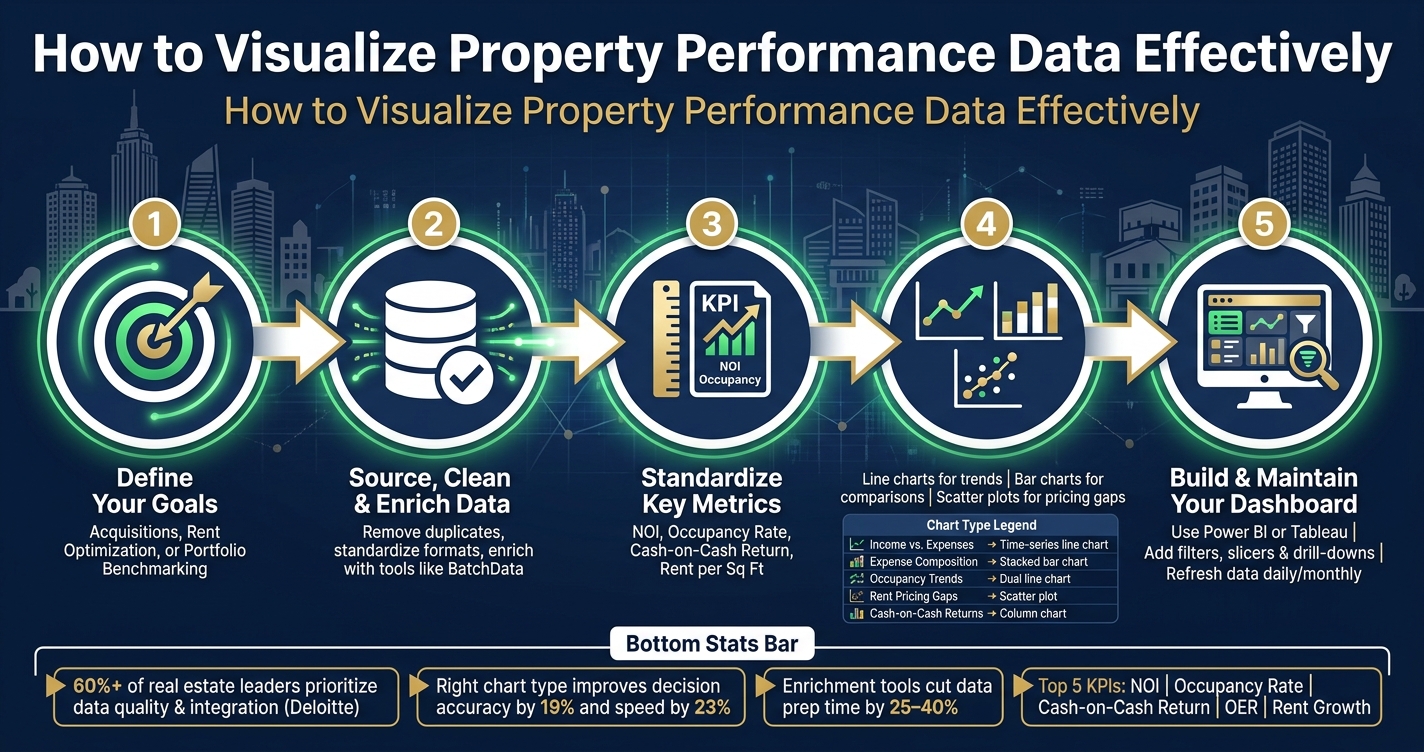
How to Visualize Property Performance Data: 5-Step Process
Real Estate Analytics: A Complete Power BI Dashboard
Set Clear Objectives and Data Requirements
Before diving into your visualization, it’s essential to pinpoint the question you want to answer. A dashboard built on a vague "let’s see what the data shows" mindset can quickly become cluttered and ineffective. The best property performance visualizations begin with a well-defined investment goal. This clarity is key when outlining specific use cases.
Define Your Property Performance Use Cases
Different objectives call for different data and levels of detail. Here’s a quick look at three common U.S. real estate use cases, their goals, and the metrics that matter most:
| Use Case | Primary Goal | Key Metrics | Data Granularity |
|---|---|---|---|
| Acquisition Underwriting | Assess deal viability before purchase | Cap rate, AVM, lien status, equity | Property-level, neighborhood trends |
| Rent Optimization | Maximize yield across units or submarkets | Occupancy rate, rent growth, churn probability | Unit-level, submarket trends (6–18 months) |
| Asset Benchmarking | Identify top and bottom performers in a portfolio | NOI, operating costs, revenue per sq ft | Portfolio-wide, ZIP code, asset type |
Understanding these distinctions helps you zero in on the right metrics. For example, rent optimization requires a time frame of 6 to 18 months – long enough to spot trends in submarkets but short enough to act on opportunities. On the other hand, acquisition underwriting demands property-level detail; relying on national trends for a specific block in a Midwest city could lead to costly errors. Clearly defined use cases like these pave the way for standardizing metrics, a critical step for effective benchmarking, and lay the groundwork for creating actionable dashboards.
Choose and Standardize Key Metrics
Once you’ve nailed down your use case, the next step is to select a focused set of KPIs and ensure their definitions are consistent. Without standardized KPI definitions, comparisons across assets can become meaningless. For instance, make sure to define key metrics like:
- NOI (Net Operating Income): Measured in USD.
- Cash-on-Cash Return: Annual pre-tax cash flow divided by total cash invested.
- Occupancy Rate: Percentage of occupied units.
- Rent per Sq Ft: Monthly rental income divided by total rentable square footage.
Standardizing these definitions upfront – before building any charts – turns your dashboard from a collection of numbers into a tool that drives real decisions.
Source, Clean, and Enrich Your Data
Once you’ve defined your KPIs, the next step is making sure the data you’re using is accurate and consistent. Even the most visually appealing dashboard is useless if the underlying data is incomplete or disorganized.
Identify Key Data Sources
Property performance data is often scattered across multiple systems. For example:
- Operational data like rent rolls, vacancy rates, and maintenance costs typically come from your Property Management System (PMS) or accounting software.
- Financial records such as mortgage balances, liens, and estimated equity are usually sourced from financial institutions or enrichment APIs.
- Market data, including comparable sales and neighborhood trends, is often pulled from MLS feeds or market analytics platforms.
Here’s a quick breakdown of the four main data categories you’ll need for a comprehensive performance dashboard:
| Data Category | Essential Data Points | Primary Source |
|---|---|---|
| Property Details | Sq ft, bed/bath, lot size, year built, permits, zoning | Public Records / BatchData |
| Financial Records | Mortgage balances, liens, equity, pre-foreclosure status | Financial Institutions / Enrichment APIs |
| Operational Data | Rent rolls, maintenance costs, vacancy rates | PMS / Accounting Software |
| Market Data | Comparable sales, MLS history, neighborhood trends | MLS / Market Analytics Tools |
Since these systems are rarely integrated, consolidating and synchronizing the data is essential. After identifying your sources, the next step is cleaning and standardizing the information to ensure it’s reliable.
Clean and Standardize Your Data
Raw data from multiple sources often comes with issues – duplicates, inconsistent formats, and missing information. Cleaning this data is a critical step in making it usable. A typical cleaning process involves five stages: ingestion → cleaning → feature engineering → modeling → validation. For property performance, the cleaning stage usually requires the most effort.
Start by removing duplicate property records and standardizing variations (e.g., "123 Main St" vs. "123 Main Street"). Align property IDs across systems and ensure consistent formats for currency (USD), measurements (square feet), and dates (MM/DD/YYYY). Small inconsistencies like these can disrupt portfolio-wide benchmarks and cause aggregation errors.
Once the data is cleaned, you can calculate useful metrics like loan-to-value ratios. These derived fields provide additional context for your visualizations without needing extra raw data sources.
Clean, standardized data is the bedrock for enriching your insights further.
Enrich Data with BatchData
After cleaning your data, enrichment adds another layer of detail to the KPIs you’ve already established. Tools like BatchData help fill in the blanks by supplying property-level details, financial records, and market context that internal systems often miss. Their Automated Valuation Model (AVM) provides monthly property value updates for over 128 million properties, ensuring your cap rate and equity calculations remain current without manual updates.
For larger portfolios, BatchData’s Bulk Data Delivery is designed for large-scale analysis and machine learning model training. If you need real-time data for underwriting or customer-facing tools, their Real Estate API delivers enriched information on demand. With coverage that spans 99.25% of Single Family Residential properties and 99.02% of Condos and Townhouses, it’s a robust resource.
As Chris Finck, Director of Product Management, explains:
"What used to take 30 minutes now takes 30 seconds. BatchData makes our platform superhuman."
This kind of speed is invaluable when you’re working with hundreds or even thousands of records while preparing to build a dashboard.
Create Visualizations for Core Performance Metrics
Before you can visualize, you need a reliable source of comprehensive property data. Once your data is cleaned and enriched, the next step is choosing the right type of chart for each metric. The goal of every visualization should be to answer a specific question, not just display raw numbers. Here’s how you can approach visualizing key performance metrics effectively.
Visualize Income and Expenses
When it comes to income and expenses, two chart types can help you capture the most important trends. A time-series line chart is ideal for tracking monthly rental income against operating expenses over a 12-month period. This approach highlights seasonal trends and any unexpected spikes in costs. To complement this, a stacked bar chart can break down the components of those expenses – such as maintenance, utilities, management fees, and insurance – giving insight into the composition of your costs, not just the totals.
A useful benchmark to include in these visuals is the Operating Expense Ratio (OER). For multifamily properties, a healthy OER typically ranges between 35% and 45%. If your stacked bar chart consistently shows expenses exceeding this range, it signals a problem that needs attention. Adding a "Budget vs. Actual" overlay to the same chart can further pinpoint where your financial plan is going off track.
Visualize Occupancy and Rent Trends
Occupancy metrics require more than a simple line graph. A dual line chart that compares economic occupancy (revenue-producing units) to physical occupancy (units filled) can reveal discrepancies. For example, a property with 97% physical occupancy but only 91% economic occupancy may have issues with pricing or collections that a single metric alone wouldn’t uncover.
For rent pricing analysis, a scatter plot that compares rent per square foot to occupancy rate by unit type is especially useful. If two-bedroom units have high occupancy but below-market rents per square foot, this visualization can help you identify opportunities to adjust pricing during lease renewals. Additionally, if the Loss to Lease – the gap between market rent and in-place rent – exceeds 3–5%, this scatter plot will make it clear.
Visualize Cash Returns and Investment Performance
To provide clarity on cash returns and investment performance, investor reports should include visuals that highlight key comparisons. A column chart works well for showing cash-on-cash returns across properties. This allows you to quickly identify which assets are underperforming in terms of annual pre-tax cash flow relative to the total cash invested.
A line chart is another essential tool, particularly for tracking cumulative cash distributions versus invested equity over time. This visual helps illustrate when a property has fully returned its original capital investment and starts generating pure profit.
| Metric | Visualization Type | Key Question Answered |
|---|---|---|
| Income vs. Expenses | Time-series line chart | Are costs outpacing revenue? |
| Expense Composition | Stacked bar chart | What’s driving operating costs? |
| Occupancy Trends | Dual line chart (economic vs. physical) | Is revenue matching occupancy? |
| Rent Pricing Gaps | Scatter plot (rent/sq ft vs. occupancy) | Are specific unit types mispriced? |
| Cash-on-Cash Returns | Column chart | Which properties are underperforming? |
| Cumulative Distributions vs. Equity | Line chart | When does invested capital pay back? |
Lastly, ensure that the data refresh rates for your visualizations align with the nature of the metrics. For example, financial data related to cash returns should be updated monthly after the books close, while leasing and occupancy data benefit from daily updates. Failure to sync refresh rates with metric types is a common reason dashboards lose credibility with users.
Build a Property Performance Dashboard
Once your visualizations are polished, the next step is assembling a dashboard that combines real-time data with actionable insights.
Select Tools and Connect Data Sources
Choosing the right tool depends on the size of your portfolio and how often your data updates. For smaller portfolios with basic reporting needs, Excel can work well. However, it struggles with handling large datasets or real-time updates. For more dynamic, larger portfolios, BI tools like Power BI and Tableau are better options. These tools support live API connections, scheduled data refreshes, and advanced filtering, making them ideal for more complex needs.
When it comes to connecting your data, you have two main approaches:
- Real-time updates via API: If you’re using a service like BatchData to enrich property records, APIs allow you to pull data instantly for metrics like occupancy and leasing performance.
- Bulk data delivery: For portfolios with thousands of properties, services like Amazon S3 or FTP are more efficient. BatchData updates its property data daily, so your dashboard stays current without manual input.
"Power BI offers dynamic visuals, drill-through options, and interactive filtering that enhance decision-making." – PK, Founder, PK-AnExcelExpert.com
If you’re using Excel, keep your data well-organized in separate layers before importing it into your BI tool for better clarity and functionality.
Organize the Dashboard Layout
A well-structured layout helps users navigate data efficiently. Instead of overloading a single page, divide the dashboard into three logical zones:
- Interactive Slicers (Top Zone): Add filters for property type, region, and timeframe so users can quickly narrow down the data.
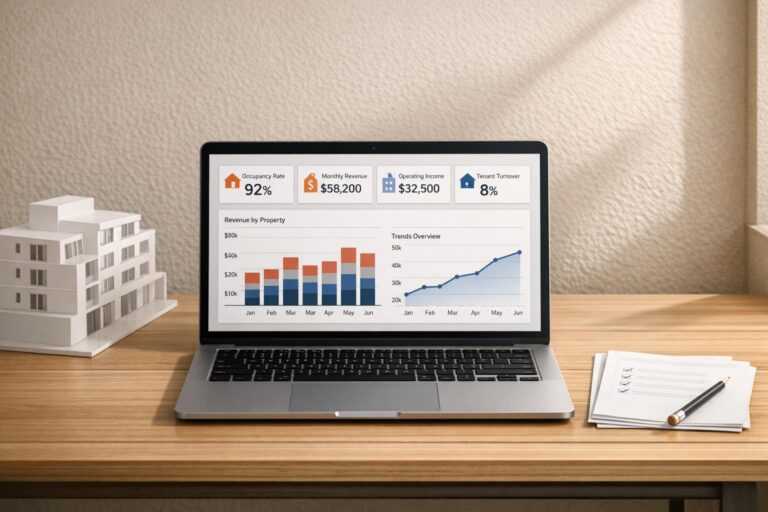
- Summary Zone (Middle): Highlight four to five key metrics like Occupancy Rate, Net Operating Income (NOI), and Rent Collection Efficiency using KPI cards.
- Detail Zone (Bottom): Include charts and tables for deeper dives, such as comparing Actual vs. Target performance by property.
For better organization, consider breaking the dashboard into dedicated pages. Here’s an example of how you might structure it:
| Dashboard Page | Primary Purpose | Key Visual Elements |
|---|---|---|
| Overview / Summary | High-level portfolio snapshot | KPI cards, status slicers, and summary tables |
| Property / Regional Analysis | Geographic and asset performance | Map visuals, bar charts by property type |
| Monthly Trends | Time-based growth tracking | Combo charts (Actual vs. Target vs. Previous Year) |
| KPI Definitions | Transparency for calculations | Drill-through tables with formulas and calculation logic |
Use color-coded indicators consistently across the dashboard. For example, green upward arrows (▲) can signify favorable metrics like Occupancy Rate, while red downward arrows (▼) indicate areas needing improvement, such as Maintenance Cost per Property. This visual consistency helps users quickly spot trends and potential issues.
Add Filters and Interactive Features
With the layout established, it’s time to make the dashboard interactive. Filters are essential for turning static reports into dynamic tools. Add slicers for property type, region, and timeframe to let users focus on specific segments, like multifamily properties in a particular region during a specific quarter.
Drill-down features add another layer of interactivity. These allow users to move from a high-level view of the portfolio to detailed insights at the property level. For instance, while the dashboard might show that overall NOI is on target, drilling down could reveal underperformance in one specific asset. Including secondary pages for KPI definitions also builds trust by providing transparency into how metrics are calculated.
Conclusion
Creating effective visualizations follows a straightforward process: define your question, prepare the data, choose the right chart, and build a dashboard that drives action. The foundation of this process is reliable, well-integrated data. According to Deloitte, over 60% of real estate leaders rank improving data quality and integration as a top priority for technology investments. Without solid input, even the best visualization efforts will fall short.
Standardized metrics and appropriate chart selection are key to success. Research shows that aligning the right chart type with your data – like line charts for tracking rent trends, bar charts for comparing NOI, or scatter plots for analyzing risk-return relationships – can improve decision accuracy by 19% and speed by 23%. Simplicity is essential. A streamlined dashboard featuring five key metrics, such as NOI, occupancy rate, cash-on-cash return, operating expense ratio, and rent growth, will always outshine one overloaded with excessive data points.
When data gaps exist, such as incomplete property records or missing ownership details, enrichment tools can make a big difference. For example, BatchData simplifies data cleanup and enhances the quality of records feeding into dashboards. Organizations that use external enrichment and standardized schemas save significant time, cutting data preparation by 25–40%. This allows analysts to spend more time interpreting data and less time wrestling with it.
Maintaining your dashboard is just as important as setting it up. Regular updates and validation ensure it continues to perform well. Keep your objectives clear, refresh data consistently, and adapt visualizations as reporting needs evolve. The most effective dashboards are those that help answer specific, actionable questions – like identifying underperforming properties, spotting rising expenses, or highlighting assets that need attention – and enable users to take meaningful action based on those insights.
FAQs
Which KPIs should I track first for my portfolio?
To get a clear picture of your portfolio’s performance, concentrate on a few essential financial and operational metrics. Begin with Net Operating Income (NOI) to gauge profitability, Cash-on-Cash Return to evaluate yield, and Debt Service Coverage Ratio (DSCR) to ensure adequate debt coverage. On the operational side, keep an eye on occupancy rates, maintenance costs per unit, and rent collection rates. Tools like BatchData can assist by providing enriched datasets, such as equity estimates and ownership details, to aid in more informed decision-making.
How often should my dashboard data refresh?
The frequency of data refreshes should align with how critical and dynamic each metric is. For example, financial metrics like rental income typically require nightly updates to stay accurate. On the other hand, details such as lead status or property availability are better suited for real-time updates to reflect changes instantly. BatchData – Ivo Draginov offers automated pipelines that ensure your reports stay up-to-date. Adjusting refresh intervals for each metric helps maintain precision without overwhelming users with constant alerts.
What should I do when key property data is missing?
If you’re dealing with missing key property data, the first step is to pinpoint the gaps. Tools like conditional formatting or automated audits can help you identify inconsistencies or missing fields quickly. Once you’ve located the issues, focus on cleaning and standardizing your records to maintain consistency across your dataset.
To fill in the blanks, consider using professional enrichment services. These services can provide verified information, such as updated ownership details or tax records, ensuring your data is both complete and reliable. High-quality data is essential for accurate analysis, and platforms like BatchData offer dependable solutions to simplify and streamline this process.