If I had to cut this down to one takeaway, it’s this: pick for control and event data first, not resident app polish. For most proptech teams, SmartThings is the clearest cloud-first option, Home Assistant is the strongest local-first option, and Alexa, Google Home, and HomeKit work better as resident-facing layers than as the main system for portfolio control.
Here’s the short version of what this comparison covers across 6 platforms and 6 key criteria:
- Platforms: SmartThings, Home Assistant, Amazon Alexa, Google Home / Nest, Apple HomeKit, and Hubitat Maker API
- Criteria: API access, webhooks, event detail, rate limits, polling, and multi-property account structure
- Main tradeoff: local control vs. cloud access
- Best cloud pick for many properties: SmartThings
- Best local pick for on-site control and low delay: Home Assistant
- Best for resident voice control: Alexa
- Best for Apple-first units: HomeKit
- Best for local hub-based automation: Hubitat
- Big warning: Matter support helps with basic device control, but features like guest PINs, audit logs, and schedules still often stay inside the device brand’s own app
In other words, if you manage hundreds of units, the hard part isn’t turning a lock on or off. The hard part is whether your team can track leak alerts at 2:00 a.m., manage staff access across buildings, and connect device data to systems using a real estate API like Yardi Voyager or Entrata without building a pile of custom work.
Smart Home Guide 2026 – What to Buy, Platform Updates, and More!
Quick Comparison
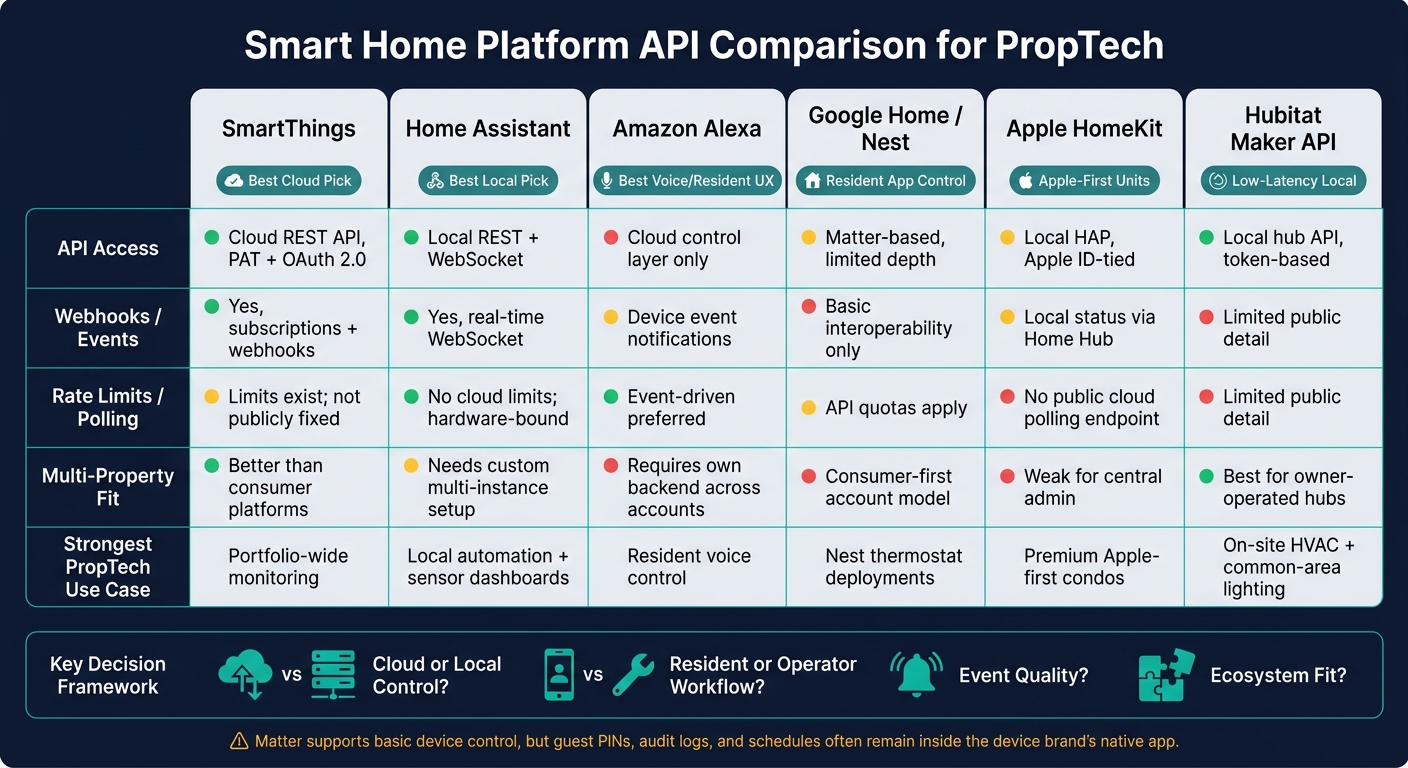
Smart Home Platform API Comparison for PropTech: 6 Platforms at a Glance
| Platform | API Access | Webhooks / Events | Rate Limits / Polling | Multi-Property Fit | Best Use |
|---|---|---|---|---|---|
| SmartThings | Cloud REST API with PAT and OAuth 2.0 | Yes, via subscriptions and webhooks | Limits exist; public fixed limit not listed; event-driven setup is better than polling | Better than most consumer-first platforms, but device support can vary | Cloud-based portfolio monitoring |
| Home Assistant | Local REST + WebSocket APIs | Yes, real-time local events via WebSocket | No outside cloud limits; host hardware is the main limit | No built-in portfolio layer; needs custom setup | Local automation and sensor-heavy workflows |
| Amazon Alexa | Cloud control layer, not direct local device control | Supported device event notifications | Event-first approach works better than polling | Needs your own backend across accounts | Resident voice and app control |
| Google Home / Nest | Limited third-party depth, leans on Matter | Basic interoperability, less event depth for managers | Quotas and account friction can slow centralized use | Consumer-first account model | Resident control in Nest-heavy units |
| Apple HomeKit | Local HAP with Apple-centric identity model | Local status tied to Home Hub for remote access | No public cloud polling endpoint | Weak for central admin across many units | Apple-first resident experience |
| Hubitat Maker API | Local hub API with token-based access | Public detail is limited | Public detail is limited | Works best for owner-run hub setups | Low-delay local building control |
My read: if your top goal is portfolio visibility, start with SmartThings. If your top goal is local control, low delay, and no cloud dependence, start with Home Assistant. If your top goal is resident UX, look at Alexa, Google Home, or HomeKit based on tenant device habits.
That’s the lens I’d use for the full comparison below: who controls the system, where the data lives, how events arrive, and how much work your team has to do to run it at scale.
1. SmartThings
API Access Model
SmartThings is the cloud-first starting point in this comparison. It uses a REST-based API with Personal Access Tokens (PAT) for private scripts and testing, or OAuth 2.0 for consumer-facing integrations. Access is controlled through granular scopes, which decide what an integration can read and what it can change.
SmartThings can also work as a Matter controller in mixed-ecosystem properties. But there’s a catch: device support isn’t always consistent. Features like guest-code management, detailed audit logs, and schedules may not show up in SmartThings, and they can still rely on the device maker’s own app.
Event Delivery
SmartThings sends events through subscriptions and webhooks. Support still depends on the manufacturer, so guest codes, audit logs, and schedules may not be available across every device.
"Matter is a good direction for mixed-platform homes and future-proofing, but property managers should pilot exact models before standardizing." – SLockHub
Rate Limits and Polling
SmartThings does enforce API rate limits, but Samsung doesn’t publish a fixed public limit. For portfolio monitoring, event-driven setups usually make more sense than frequent polling.
Account Structure and PropTech Fit
For portfolios, the owner can manage the hub, repeaters, and device onboarding. The bigger issue is practical: does hub control, battery visits, device removal, and access to audit logs match the way your team works?
That makes SmartThings a solid cloud-first baseline when you compare it with local-first platforms next.
2. Home Assistant
Home Assistant moves control away from a vendor cloud and into the property’s own setup.
API Access Model
Home Assistant offers a local REST API and WebSocket API. Both run over the property’s internal network, so requests don’t need to pass through a vendor cloud.
Developers use long-lived access tokens to authenticate. From there, they can read device state, trigger services, and subscribe to events straight from the local instance. For proptech teams, Home Assistant makes the most sense when the property team manages the local instance and wants direct device access without a vendor cloud in the middle.
Event Delivery
This local-first setup also changes how events move through the system. Local control cuts delay and keeps device state inside the property network.
State changes flow through the WebSocket API in real time, and automations trigger without the extra trip through a cloud relay. In plain terms, things happen faster because the signal doesn’t have to leave the building and come back.
Rate Limits and Polling
Home Assistant has no external rate limits because traffic stays on the local network.
The main limit is the local instance itself. If you poll many devices too often, you can put strain on the host hardware. That’s why event-driven subscriptions are usually the better choice for deployments with a high device count.
Account Structure and PropTech Fit
Each property runs its own Home Assistant instance, and there’s no native multi-property account layer.
That creates extra work for tenant separation and portfolio-level aggregation. Teams usually need custom architecture, such as separate instances for each unit or building, plus a centralized data layer on top. So while Home Assistant gives you direct control, it works best when the property can own and manage the full stack end to end.
3. Amazon Alexa Smart Home
Amazon Alexa runs on a cloud-to-cloud control model. That makes it easy to put in front of residents, especially for voice commands and app-based control. But there’s a tradeoff: device control depends on Amazon’s cloud and an internet connection. So while Alexa works well for day-to-day resident interaction, it isn’t built for direct local device control.
API Access Model
Alexa is a cloud control layer, not a direct path into devices. In practice, that makes it a good fit for resident voice control and mobile app use. The downside shows up when the network drops. At that point, teams have less control over local device behavior.
Event Delivery
Alexa can send event notifications for supported device types. In proptech deployments, that can include water leak detection alerts and energy or utility consumption analytics. For proptech teams, that makes Alexa better as a notification layer than as the source of truth.
Rate Limits and Polling
The better setup here is event-driven updates. In that model, Alexa works as a notification and control layer, not the main record of device state.
Account Structure and PropTech Fit
Alexa is a strong fit for resident voice control. But teams that manage many properties usually need their own backend to pull data together across accounts. That makes Alexa stronger at the resident edge than at the portfolio layer. For teams that need on-site control, the next platforms move closer to that setup.
4. Google Home / Nest
Google Home follows the same resident-first pattern. Where it starts to fall short is day-to-day depth for operators. It works well for resident-facing control, but it’s much less useful for portfolio management.
API Access Model
Google Home leans heavily on Matter-based interoperability for third-party access instead of offering a broad device API. Matter helps keep core device functions working across brands, which is good for basic setup and use. But the more advanced features property teams care about, like guest codes, audit logs, and schedules, often still stay locked inside the native app.
That matters because interoperability helps with device adoption, but it doesn’t fix access control or auditability.
Event Delivery and Polling
Google Home supports basic interoperability, not the deeper event data proptech workflows need. In plain English, it can help residents control devices, but it doesn’t act like a portfolio monitoring layer.
So while Google Home can serve as a clean resident interface, it doesn’t give operators the centralized visibility they usually want.
Account Structure and PropTech Fit
The account model is built for consumers first, and that shows in areas like admin recovery and deletion workflows. In managed portfolios, property teams usually need manager-controlled credentials and audit logs far more than they need ecosystem branding.
That makes Google Home a better fit as an interface layer, not the control plane.
5. Apple HomeKit
Like Google Home, HomeKit is resident-first. The main difference is that it leans more heavily on Apple identity and local hub hardware.
HomeKit is built for an Apple-first setup, so it can work well for resident-facing experiences. But for property operators, it’s a tighter box. The tradeoff shows up early: HomeKit is workable inside resident units, but it’s weak for staff access, central admin, and portfolio monitoring.
API Access Model
HomeKit uses HAP to connect devices with Apple Home. But because the system is tied to Apple IDs, centralized fleet management is harder for proptech teams.
Remote Access and Status Updates
Remote access and status updates depend on a local Home Hub, such as a HomePod or Apple TV. Without that hub, remote monitoring stops.
HomeKit also tends to leave out details that matter in proptech, including:
- Guest-code management
- Audit logs
- Deletion workflows
Local Operation and Polling
HomeKit keeps device communication on the local network. That means lower latency and better offline reliability. Matter-over-Thread devices continue to work offline.
There’s also no public cloud polling endpoint. In practice, the limit comes down to hub and network capacity.
Account Structure and PropTech Fit
Because HomeKit is tied to individual Apple IDs, it creates friction in managed properties that need service access or central administration. That makes it a better fit for premium, Apple-first units than for a fleet management layer.
If a property uses HomeKit, it should also have a hardware fallback, such as a keypad or physical key, for staff and guests who don’t use Apple devices.
That sets up the next platform, which leans more toward operator-led local control than consumer identity.
6. Hubitat Maker API
Hubitat sits in that middle ground between consumer smart home gear and hands-on local control. The Hubitat Maker API is a built-in app on the Hubitat Elevation hub, and you need to enable it before the hub shares any device data. Each hub has its own access_token, and device-level permissions decide whether an integration can read from or write to a device.
That setup makes Hubitat a solid option for on-site automation. The tradeoff is simple: the public integration detail is a bit thin.
Event Delivery
The source does not specify webhook behavior or event payload structure.
Rate Limits and Polling
The source does not specify rate limits or polling guidance.
Account Structure and PropTech Fit
For proptech teams, the main decision comes down to control. If the goal is local hub control with a more manual integration surface, Hubitat can make sense.
It tends to fit owner-operated properties that care about range, battery life, and fleet control. But there’s a catch: managing the hubs adds day-to-day overhead.
Pros and Cons by Integration Scenario
The platform-by-platform API gaps above lead to some pretty clear winners, depending on the workflow.
Resident-Facing Voice and App Control
For resident-facing control, ease of use matters more than raw depth. Alexa is usually the easiest fit. It has strong voice control, and most residents already know how to use it. Google Home is a good match for Nest-heavy units.
HomeKit stands out in premium, Apple-first properties. It offers Home Key support through iPhone and Apple Watch, which can feel like a big step up for residents. The catch is hardware: it needs a HomePod or Apple TV in each unit for remote access. And if a large share of residents use Android, HomeKit loses a lot of its appeal fast.
SmartThings and Hubitat are better on the operations side than in the resident experience.
Those platforms lean toward resident interaction. The next use cases lean more toward operator control.
Centralized Monitoring Across Many Properties
When you’re trying to monitor a lot of properties from one place, SmartThings is the best fit among cloud options. Home Assistant can scale too, but only if each site runs its own instance and you add a separate remote-management layer.
Google Home works well in Nest-first units, but it gets harder at portfolio scale. Per-user authorization and API quotas make centralized management a pain. Home Assistant has a similar issue in a different form: centralized monitoring means one local instance per site, plus extra infrastructure on top.
Put simply, SmartThings is the most practical cloud-based portfolio layer. Home Assistant is the strongest local layer, but it asks for more setup and more moving parts.
Local Building Automation and Low-Latency Control
When the workflow depends on speed and on-site reliability, local platforms win. Hubitat and Home Assistant are the strongest choices here because they avoid cloud delay and cloud outages.
Hubitat is the best fit for LAN-native control. Home Assistant is better for high-frequency sensor workloads. That gap matters most when delay or cloud failure creates real operational risk, like leak shutoff or HVAC control.
Neither one is plug-and-play. Both need hands-on setup, and Hubitat adds hub-management overhead as you scale.
Maintenance Alerts and Device Health Workflows
Alerting is a different kind of test. Here, event quality matters more than app polish.
Home Assistant’s Event Bus gives you granular, real-time state changes without polling overhead. That makes it a strong fit for alert pipelines that trigger service dispatch. SmartThings webhook payloads can support basic maintenance workflows, though cloud delay can slow down time-sensitive actions.
Alexa and HomeKit are weak for manager-facing diagnostics. Alexa’s Proactive State Updates are built more for consumer use, and HomeKit doesn’t offer a centralized cloud API for checking device health across units.
The best option is the one that gives service teams reliable, structured events they can push into dispatch workflows.
Platform Pros and Cons Table
| Platform | Main Advantages | Main Drawbacks | Strongest PropTech Use Case |
|---|---|---|---|
| SmartThings | Broad device compatibility; mature cloud API | Cloud dependency; complex account migration | Portfolio-wide monitoring and maintenance alerts |
| Home Assistant | No rate limits; local data stays on-site; customizable webhooks | High technical overhead; fleet management requires VPN or Nabu Casa | Local building automation and custom sensor dashboards |
| Amazon Alexa | Strong voice control; high resident familiarity | Per-resident account silos; limited backend data access for managers | Resident voice control |
| Google Home / Nest | Pub/Sub event delivery; strong Nest thermostat integration | API quotas and per-user authorization complicate centralized management | Resident app control and Nest thermostat deployments |
| Apple HomeKit | Home Key support; strong privacy; premium resident UX | Requires Apple hub in every unit; no central management API | Premium Apple-first condos and luxury rentals |
| Hubitat | Local Maker API; very low latency; no cloud outages | Limited remote management out of the box; hub overhead at scale | On-site HVAC and common-area lighting |
Conclusion
There’s no one-size-fits-all winner in proptech. The best platform depends on the workflow you need to support, the kind of events you rely on, and whether the platform’s account setup lines up with how properties actually run.
That brings the choice down to four practical questions: cloud or local control, resident or operator workflow, event quality, and ecosystem fit.
Best Fit by Integration Goal
If your main goal is centralized monitoring, SmartThings stands out as the top cloud-first pick, while Home Assistant is the top local option. If you need resident-facing control, Alexa and Google Home work well for general consumer UX, and HomeKit makes sense for Apple-first units. For low-latency, on-site automation, Hubitat and Home Assistant are the strongest picks.
For maintenance alerts, focus on platforms that send structured events your backend can route into work orders without extra friction.
Final Selection Criteria
Even with those use-case leaders, the final call still comes down to three filters.
First, event model quality: does the platform send structured, reliable events, or will your backend need to poll all the time? Second, account structure fit: can you handle resident, staff, guest, and contractor access across multiple properties without wrestling with the platform’s ownership model? Third, integration stack fit: if you already use Yardi, RealPage, or Entrata, pick hardware and software that connect cleanly to that stack.
Pilot the exact hardware models before you standardize anything, and keep a physical fallback for core access functions.
FAQs
Which platform is best for multi-property control?
The best platform for multi-property control comes down to how you run your portfolio, not just which ecosystem looks better on paper.
For rentals, HMOs, or serviced accommodations that need multi-user access, timed codes, and clear day-to-day workflows, TTLock is often the more flexible fit. If you need centralized property management with deep Yardi accounting integration, the Yardi IoT Suite is built for portfolio-wide device management.
When should I choose local control over cloud APIs?
Choose local control when reliability and hub management matter most. It works well for multi-door properties or buildings with thick walls, where sub-GHz signals often cover more ground than crowded 2.4 GHz networks.
It also makes more sense when the property owner wants direct control over the hub, repeaters, device inclusion, and support workflows. Cloud APIs fit better when you need cross-platform flexibility, remote management, and user-facing features across a large set of properties.
Can Matter replace native lock and access features?
No. Matter gives you more cross-platform flexibility for basic smart home control, but it doesn’t fully replace native lock and access features.
A lot of core proptech workflows still rely on the lock maker’s own app or cloud platform. That often includes guest code management, audit logs, recurring schedules, and admin recovery. So before you standardize on a device, check support at the model level. Two locks from the same brand can look similar on paper and still handle these features very differently.