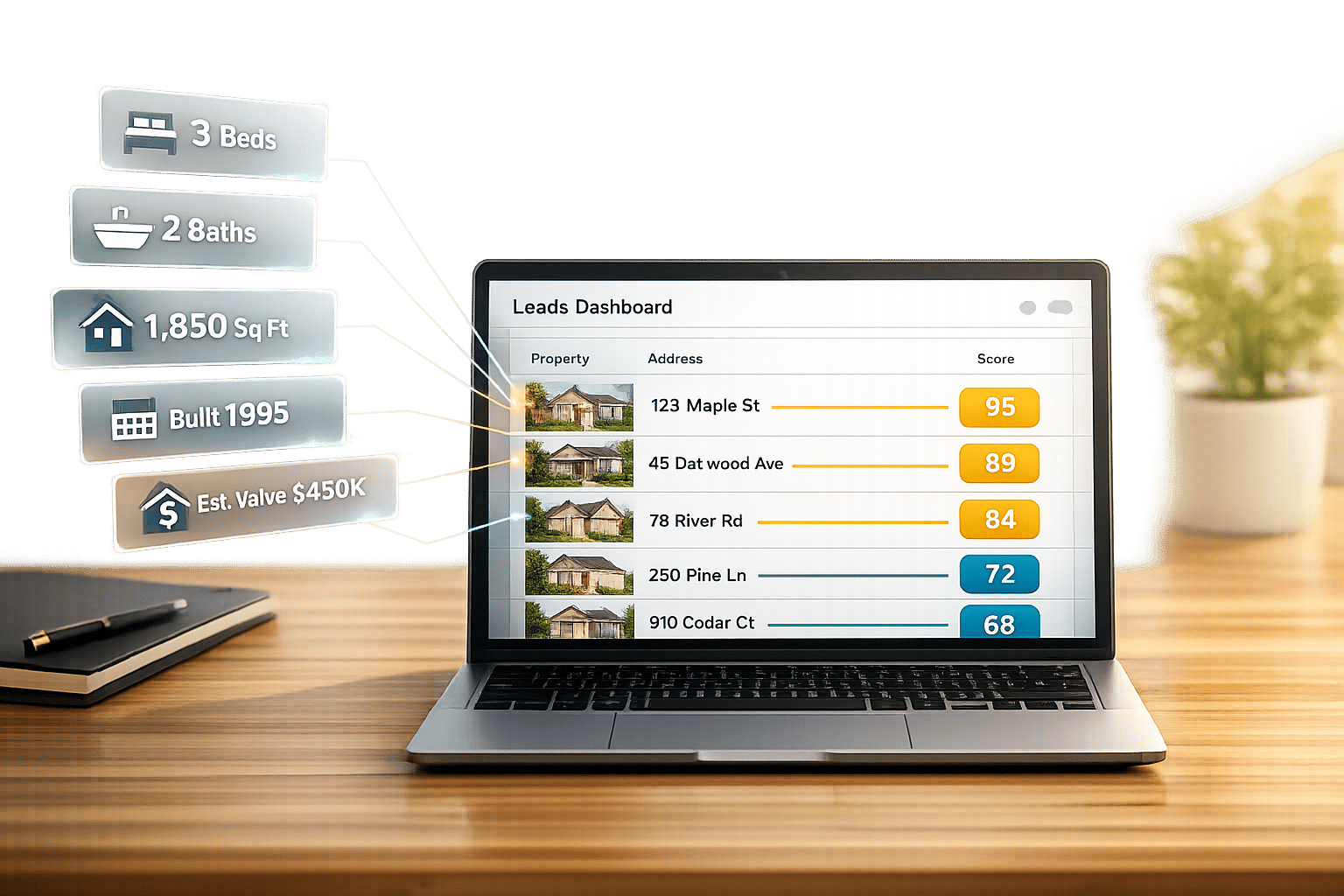
If property search is off by one unit, one parcel, or one status field, teams lose time and money. I’d sum up the article like this: custom APIs improve search accuracy when they clean source data, standardize fields, add the missing context, and rank results based on the job the user needs to do.
In plain terms, I see four things driving better search results:
- Better data in: complete records, newer updates, and normalized fields cut bad matches
- Better search rules: hard filters for beds, baths, price, zoning, and location trim noise before ranking starts
- Better context: AVMs, ownership flags, school zones, hazard data, and contact info help the system return results that fit the search
- Better fit for the use case: an investor, lender, and home services team should not search the same index the same way
That matters because property search accuracy is not just about finding a result. It’s about finding the right parcel, right owner data, right status, and right property type on the first try. In U.S. real estate, even small record errors can lead to stale listings, wrong comps, missed leads, and more manual cleanup.
Here’s the short version of what I’d take away:
- Missing fields can hurt filters right away
- Older status and price data can push false matches into results
- Address and parcel normalization cut duplicate and wrong-record issues
- Enrichment improves ranking by adding data that raw listing feeds do not have
- Use-case-specific datasets reduce index noise and help ranking stay more stable
- The best way to test gains is with precision@10, recall, success@1, success@3, coverage, data age, and p95 latency
Quick comparison
| Area | Baseline search setup | Custom API setup |
|---|---|---|
| Data quality | Mixed formats, missing fields, older records | Standardized fields, better coverage, newer updates |
| Filters | Basic search controls | Hard filters tied to normalized property fields |
| Ranking | Generic sort logic | Ranking based on distance, value, status changes, and use case |
| Enrichment | Limited listing data | AVMs, ownership, hazard, school, and contact data |
| Dataset scope | Broad index for many jobs | Narrower index built for one workflow |
| Main result | More noise and more manual review | Better top results and fewer off-target records |
So if I had to put the article into one line, it would be this: custom APIs make property search more accurate because they improve the data, the filters, the ranking, and the comprehensive datasets at the same time.
Why Data Quality Has the Biggest Effect on Search Accuracy
Data quality has a bigger effect on search accuracy than ranking tweaks because bad records create bad matches. If a record is incomplete, old, or inconsistent, the search engine starts from the wrong input. And when the input is wrong, the output usually is too. Teams that clean up the data layer first keep reporting the same pattern: fewer mismatches and more user trust.
How Completeness, Freshness, and Normalization Reduce Wrong Matches
Missing fields create direct, measurable errors. If beds or baths are missing, search systems often read those blanks as zero. That means a filter for “3+ bedrooms” can end up showing 2-bed listings or homes with no bedroom data at all, which hurts precision right away. Missing or incomplete status fields cause another problem: stale listings. A property may still look active in the interface even though it has already sold or gone under contract.
Freshness matters just as much. In fast-moving U.S. markets, listing status and price can shift within hours. If updates only run in daily batches, false positives go up fast. You show properties as available when they’re already under contract. On the flip side, if new listings come in late, recall drops for investors who compete on speed.
Normalization is what turns filtering into something predictable. Without it, a search like “2–3 bed, 1–2 bath, 1,000–1,500 sq ft” gets fuzzy in all the wrong ways. Proper normalization includes:
- Converting mixed room-count formats into separate numeric fields
- Mapping “studio” to a zero-bedroom value
- Standardizing square footage and lot size into the same units, such as square feet and acres
- Structuring ownership records for individuals, LLCs, trusts, and corporations into set fields
It also means mapping local zoning labels into one shared taxonomy, so a search for single-family properties doesn’t pull mixed-use parcels from counties that label those records in a different way. With a clean schema, ranking models learn steady weights instead of bouncing around noisy values.
How Enrichment Adds Context That Basic Records Miss
Core listing fields tell you what a property is. Enrichment helps decide which properties should show up as relevant. That’s a big difference.
For example, automated valuation models (AVMs) and rental-market data let investors filter by estimated gross yield or discount to market value. You simply can’t run those queries with raw MLS fields alone. Comparable sales with normalized sale dates help acquisition analysts triage leads without doing separate comp pulls every time, which cuts research time per deal. School zone data also shifts relevance for family buyers, since many of them search inside specific school boundaries.
Where BatchData Fits in the Accuracy Stack

This is where API-driven enrichment has the most impact. BatchData supports the three main accuracy levers – completeness, freshness, and normalization – through property search APIs, property and contact enrichment, bulk data delivery, skip tracing, and phone verification. These tools help teams keep records current, fill missing fields, and cut down duplicate entries.
Once the data is clean, custom filters and ranking rules can work with it in a much more steady way.
How Custom API Design Improves Precision and Recall
Once your data is clean and standardized, the next thing that shapes search quality is the API itself. It controls how users search, how results are ranked, and which fields come back in the response. That matters because precision is the share of returned properties that match the query, while recall is the share of relevant properties the system brings to the surface. A custom API can improve both by giving you tighter control over filters, ranking, and returned fields.
How Structured Filters Improve Precision
Precision drops when search returns properties that don’t fit what the user asked for. The fix is pretty simple: expose standardized fields as precise property search filters. That usually means price, property type, beds, baths, size, location, and zoning.
When those filters run at query time, the result set gets smaller before ranking even starts. So if a buyer wants a single-family home in one school district, the system can remove off-target listings right away instead of trying to sort them later. That leads to cleaner results and less noise. Zoning filters are a big deal here, especially for investor and developer workflows.
How Custom Ranking and Query Logic Improve Recall
Recall tends to suffer when relevant properties are technically in the index but get pushed too far down by plain sorting. A custom ranking layer helps bring those properties back into view. Common signals include distance, days on market, price changes, and valuation.
Query logic matters too. AND logic works for must-have criteria. OR logic helps widen the pool. Weighted fields let you handle softer preferences without turning them into hard cutoffs. For example, a family-home search might give more weight to school district and lot size while still showing nearby properties that aren’t an exact match but still make sense. Geospatial queries help with this as well, because they can surface nearby properties that text matching simply misses.
The table below shows which API features affect precision, recall, or both.
API Capability and Accuracy Impact: Comparison Table
| API Capability | Impact on Precision | Impact on Recall | Typical Implementation Detail |
|---|---|---|---|
| Faceted filters (price, beds, baths, sq ft) | High – narrows result set before ranking | Neutral – does not hide valid matches when thresholds are set correctly | Enforced as required filters with range support |
| Address normalization | Moderate – reduces duplicate and mismatched records | Moderate – prevents false negatives from variant address formats | USPS/CASS standardization to one canonical record |
| AVM integration | Low direct effect | Moderate – adds valuation context that can improve relevance | Valuation-based ranking |
| Zoning filters | High for use-case-specific searches | Low direct effect | Standardized zoning taxonomy mapped across county-level records |
| Geospatial queries | Low direct effect | High – captures nearby properties outside strict text-match boundaries | Radius, polygon, or drive-time indexing |
Why Custom Datasets Perform Better for Specific Search Use Cases
Once precision and recall improve at the API layer, the next lift usually comes from trimming the dataset to the fields and property types the workflow actually needs. A general index is built to support many search jobs. A custom dataset is built to do one job well. That’s why custom datasets help custom APIs stay useful inside a specific workflow.
How Use-Case-Specific Enrichment Improves Search Fit
Accuracy means different things to different teams. Investor teams often care about finding the right properties based on signals like equity, ownership type, and vacancy risk. Underwriting teams care about estimating value, hazard exposure, and condition-related risk with fewer misses. Home services teams care about finding homeowners they can reach whose properties fit a target profile, such as roof age, HVAC type, pool presence, and verified contact data.
The same property record might work fine for one workflow and fall short for another. BatchData puts it simply: enrichment fills gaps and corrects inaccuracies. When you add only the fields tied to a specific decision, like absentee ownership flags for investors, the search system can rank results based on what matters for that workflow. That leads to better precision and, in some cases, better recall.
How Custom Datasets Reduce Noise in the Search Index
Cutting the dataset by geography, property class, and field set can improve ranking quality. Say an underwriting team only works on single-family homes in one or a few metro areas. That team doesn’t gain anything from rural acreage, multifamily assets, or condo records sitting in the index. Those records add noise, dilute ranking signals, and increase payload size with fields the app never touches. The result is a cleaner search index and a steadier ranking signal.
Enrichment Type and Search Outcome: Mapping Table
The table below shows how different enrichment types tie to the search outcomes they improve.
| Enrichment Type | API Data Elements | Improved Search Use Case | Accuracy Metric Affected |
|---|---|---|---|
| Ownership & equity signals | Absentee ownership flag, estimated equity, mortgage/lien status, ownership tenure | Off-market acquisition targeting | Precision – fewer off-target properties in investor lead lists |
| AVM & transaction data | Automated valuation, workflow-specific risk scoring | Underwriting fit and investment risk assessment | Valuation precision; reduction in AVM estimate error |
| Hazard & condition data | Flood zone, wildfire risk, parcel-level hazard scores, building condition proxies | Risk team underwriting and portfolio review | False-positive rate on risk flags |
| Home attribute data | Roof age, home age, HVAC type, pool presence, property size | Home services and local marketing targeting | Match rate between service eligibility and returned records |
| Contact enrichment | Verified phone, mailing address, homeowner vs. tenant classification | Homeowner outreach and direct marketing | Phone-contact match rate; outreach response rate |
| School & neighborhood data | School district, attendance zones, commute access, nearby amenities | Family-home buyer search | Recall – surfaces relevant homes ranked by lifestyle fit |
How to Measure Accuracy Gains and Apply the Findings
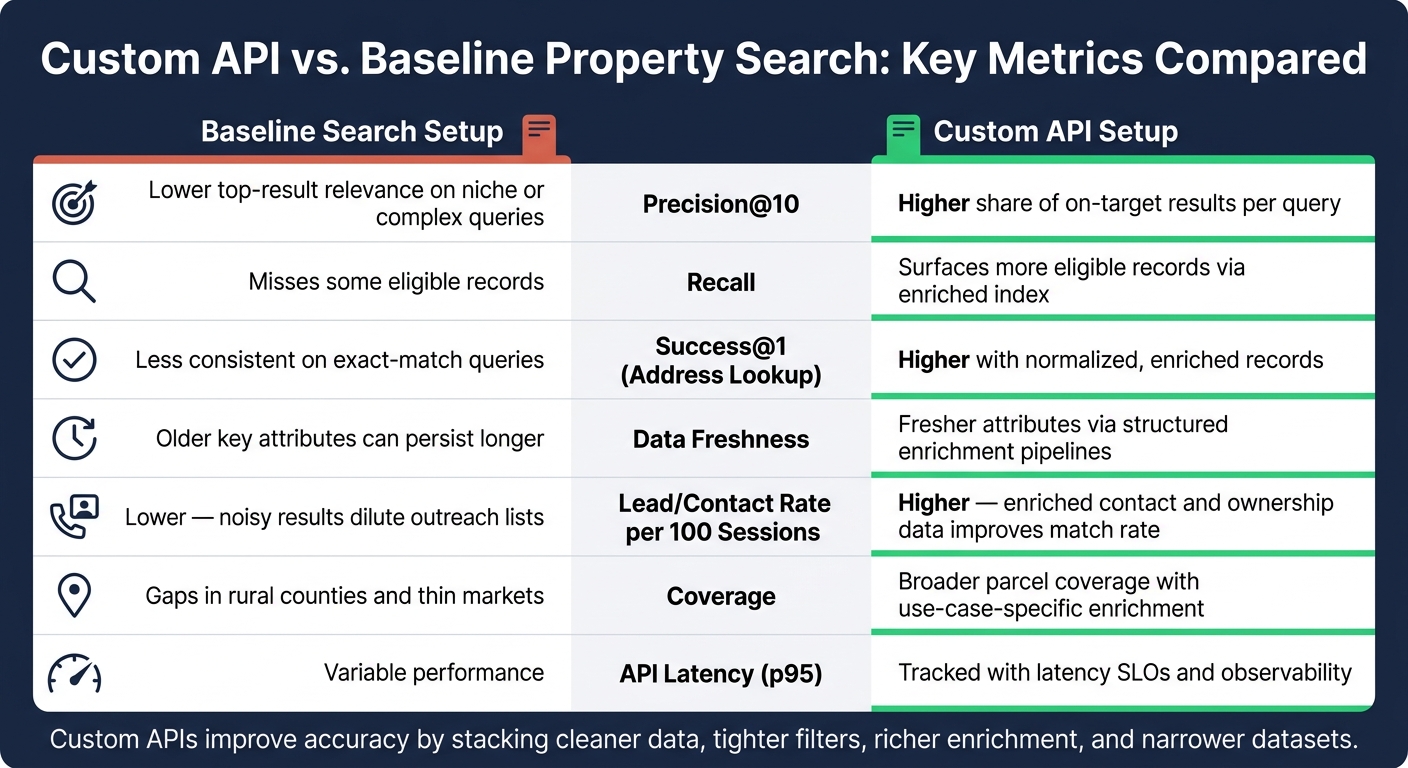
Custom API vs. Baseline Property Search: Key Metrics Compared
Metrics That Show Real Search Improvement
If you want to prove search got better, you need metrics that show it in plain terms.
Start with precision@10 and recall. Then add success@1 and success@3. Those tell you whether the right property shows up in the first result or at least within the top three. For address lookups, use a simple 0–2 relevance scale so scoring stays consistent across the team.
Relevance is only part of the picture, though. You should also track:
- Data freshness: the median age of fields like sale date, owner name, assessed value, and contact data
- Manual correction/query reformulation rate: how often users search again, edit a query, or override a result
- Geographic coverage: the share of target parcels that have usable enriched records
- Lead/contact rate per 100 sessions: a business metric that connects search quality to revenue
These metrics line up with the main levers in the article: completeness, freshness, normalization, enrichment, and ranking. That part matters. If you changed normalized and enriched fields in the pipeline, your test should measure those same fields, not some side version of the system.
Using Before-and-After Testing to Validate Results
Once the metrics are set, the next step is validation. If you want to show that a custom API caused the lift – and not market seasonality or traffic swings – use an A/B test along with an offline relevance evaluation.
In the A/B test, send a randomized share of sessions to the custom API and keep the rest on the baseline. Pick your main metrics before the test begins, such as precision@10, CTR on page one, and lead/contact rate per 100 sessions. Then run the test long enough to cover weekday/weekend differences and market changes, and to reach statistical significance.
At the same time, keep a frozen evaluation set of representative queries. That set should include address lookups, comp searches, and investment filters, all with expert labels. Score both systems offline against that same set, then compare the results side by side. It’s a simple idea, but it keeps the comparison honest.
A metro-versus-rural split is especially useful for U.S. teams. Look at precision@10, recall, top-result relevance, coverage, and data freshness for major metros and for rural counties or ZIP codes separately. That helps you see whether enrichment lifts results across the board or mainly helps dense markets while thin markets still lag.
You should also watch system health right next to relevance. Track API latency distributions (p50, p90, p95), error rates, and uptime. A custom API might improve precision@10, but if it also causes timeout errors in batch enrichment workflows, that’s a different problem altogether.
Conclusion: Key Takeaways for Property Search Teams
Better accuracy usually comes from four things working together: cleaner data, tighter API logic, richer enrichment, and narrower datasets. One layer helps the next, so gains tend to stack rather than happen in isolation.
The table below condenses the comparison.
| Metric | Baseline | Custom API | Typical Effect |
|---|---|---|---|
| Precision@10 | Lower top-result relevance on niche or complex queries | Higher share of on-target results per query | Fewer irrelevant properties in the top 10 |
| Recall | Misses some eligible records | Surfaces more eligible records via enriched index | More complete result sets for comp and investment searches |
| Success@1 (address lookup) | Less consistent on exact-match queries | Higher with normalized, enriched records | Fewer failed or mismatched address lookups |
| Freshness | Older key attributes can persist longer | Fresher attributes via structured enrichment pipelines | Reduced manual correction rate |
| Lead/contact rate per 100 sessions | Lower because noisy results dilute outreach lists | Higher because enriched contact and ownership data improves match rate | More valid phone numbers or emails and more qualified leads |
| Coverage | Gaps can remain in rural counties and thin markets | Broader parcel coverage with use-case-specific enrichment | Fewer empty or incomplete results outside major metros |
| API latency (p95) | Variable performance depending on implementation | Tracked with latency SLOs and observability | More predictable response times across workflows |
FAQs
How do custom APIs reduce bad property matches?
Custom APIs cut bad property matches by using entity resolution to link records from different sources into one accurate property profile. Standard identifiers, such as Assessor Parcel Numbers and USPS-validated addresses, also help cut duplicates and improve match confidence.
They also use automated cross-checks and anomaly detection to flag data that doesn’t add up – like unrealistic pricing or wrong square footage – before it shows up in search results.
Which data fields matter most for search accuracy?
For accurate property search, start with the core details: the full property address, current price in U.S. dollars, bedroom and bathroom counts, square footage, lot size, property type, and year built.
That gets you the basics. But good search data also leans on standardized identifiers, like Assessor Parcel Numbers and USPS-formatted addresses. Add enriched details such as ownership history, mortgage and lien status, and verified contact information, and you get a much clearer picture of the property.
How can I measure if a custom property search API is working?
Measure it by tracking performance, data quality, and reliability.
Look at response times first. A good target is under 200 milliseconds. Then check fill rates for key fields like owner names and property details. On top of that, review audit reports for error rates and cross-validation results.
For contact data, keep an eye on:
- Match rates
- Right Party Contact accuracy
- Uptime consistency
- Daily data refreshes