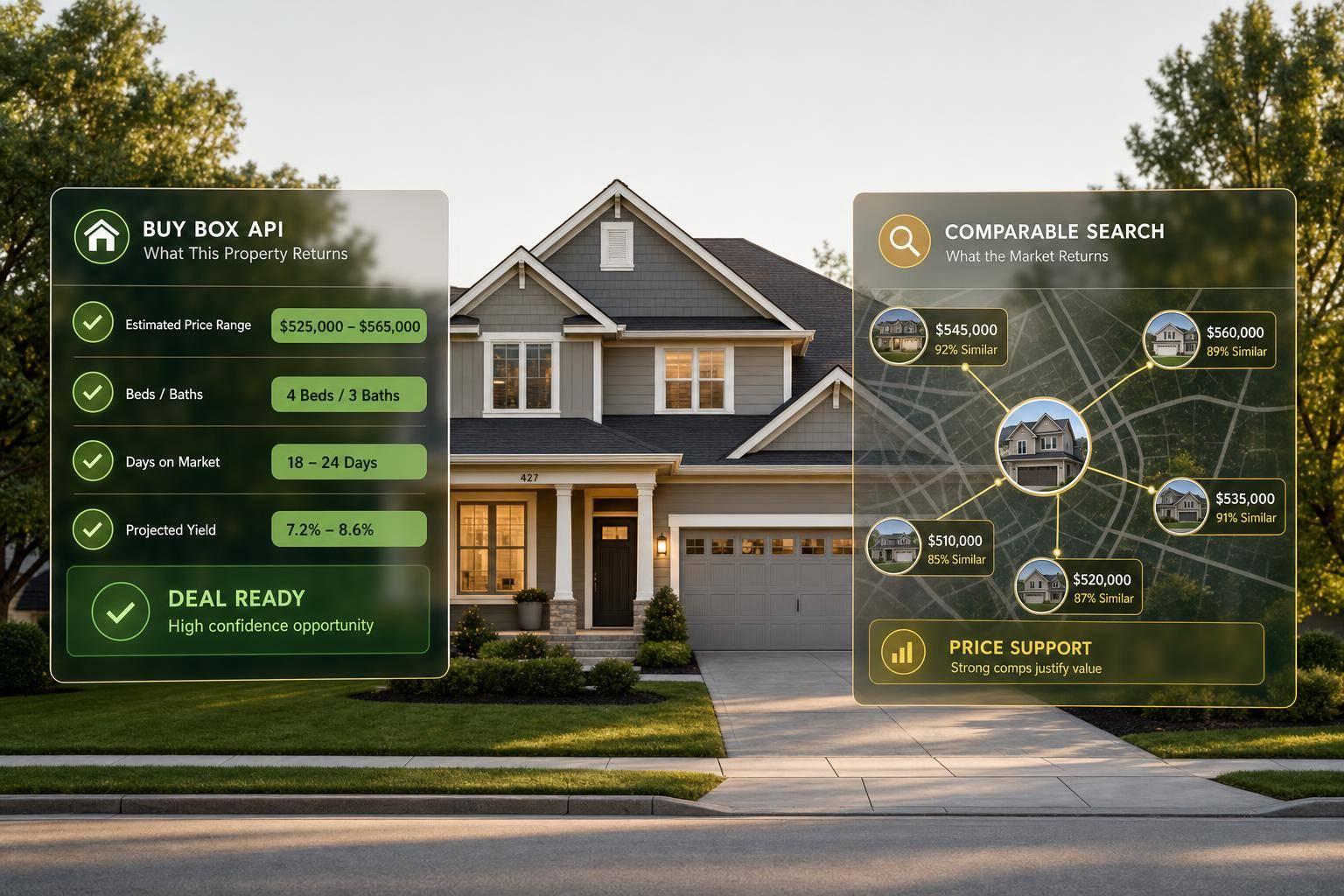
Here’s the short answer: a Buy Box API gives me a list of properties that match my buying rules, while a comparable property search gives me sales data for one property so I can estimate value.
If I’m trying to find deals across a market, I use Buy Box results. If I’m trying to price one deal, I use comps. That’s the split.
As part of our guide to real estate APIs, this article covers:
- Main input for each method
- Output type each one returns
- Fields I can expect in each response
- Best use case for sourcing vs. pricing
- How teams use both together in one workflow
A few points stand out right away:
- Buy Box output is built for lead generation and screening
- Comparable search output is built for underwriting and valuation
- Comp searches often return 3 to 5 sold properties
- In many urban markets, comp searches work best within 0.25 to 0.5 miles
- In hot markets, a 30 to 60 day lookback can help keep comp data current
Quick Comparison
| Criteria | Buy Box API | Comparable Property Search |
|---|---|---|
| Starting point | Investment filters | One subject property |
| Returns | Matching property list | Ranked comp set |
| Common fields | Owner data, equity, occupancy, distress flags | Sale price, sale date, PPSF, distance, similarity data |
| Main job | Sourcing and screening | Pricing and underwriting |
| Best for | Building lead lists | Estimating market value |
In other words, one helps me find deals, and the other helps me support a price.
Buy Box API vs Comparable Property Search: Key Differences at a Glance
What a Buy Box API Returns
In U.S. real estate, a buy box is a set of acquisition filters: location, property type, size, age, equity, ownership, distress, and price. Plug those filters into a Buy Box API, and the API returns a property match list for sourcing and screening. Those inputs matter because they turn a broad search into a ranked acquisition list.
The Returned Output: A Filtered Property Match List
The response is usually a paginated property match list. Each record often includes the address, APN, latitude/longitude, beds, baths, square footage, year built, lot size, property type, sale history, assessed value, and AVM data. Metadata also tends to include total matches and pagination details.
Returned Fields That Support Acquisition and Lead Lists
For sourcing, the most useful fields are motivated-seller signals. Absentee-owner indicators show that the owner does not live at the property. High-equity flags point to owners who may have room to negotiate. Tax delinquency, pre-foreclosure, and vacancy signals can help surface distressed or inactive properties.
| Field Category | Practical Use |
|---|---|
| Absentee-owner indicator | Target non-resident owners for direct outreach |
| Equity band | Filter for owners with room to negotiate |
| Tax delinquency, pre-foreclosure | Identify financially motivated sellers |
| Vacancy signal | Flag properties likely sitting idle |
| Owner type (LLC, Trust, Individual) | Segment lists for different outreach strategies |
| ZIP/city match count | Plan territories and allocate marketing spend |
These fields power direct-mail lists, skip tracing, and CRM queues. In plain English, this is the output investors use for outreach, not valuation.
Next, compare that sourcing output with a comparable property search, which returns comps, sale records, and similarity data for one subject property.
What a Comparable Property Search Returns
A comparable property search starts with a subject property - its address, ID, or coordinates - and returns a ranked set of comps for valuation and underwriting. Each record usually includes the property details and sale data used to rank those comps.
The Returned Output: Comp Properties, Sale Records, and Similarity Data
Each record in the response stands for one comparable property. Standard fields usually include address, city, state, ZIP code, sale price (USD), sale date, square footage, lot size, bed and bath count, year built, property type, and distance in miles from the subject property.
Some real estate API endpoints also return listing status - active, pending, sold, or off-market - plus original versus final sale price, price reduction history, and hold time before resale. For valuation work, sold comps matter most.
Returned Fields That Support Underwriting and Valuation
Some responses go beyond the core comp records and add pricing and market context. Price per square foot (PPSF) is often returned for each comp and gives you a starting point before making adjustments for condition, layout, or other property traits. Fannie Mae requires at least three closed comparables in a standard appraisal's sales comparison section, so a ranked comp set fits neatly into that process.
Advanced responses may also include:
- AVM ranges with low and high bounds, plus confidence scores
- Similarity rankings based on distance, age, and size
- Rent comps for buy-and-hold underwriting
Raw sale price alone can be misleading. Condition differences by themselves can lead to a 15% to 30% price gap between comps. That's why similarity scores and adjustment data tend to be more useful than looking at sale prices on their own.
Some responses also include median sale price trends, days on market (DOM), and neighborhood price-per-square-foot benchmarks. That extra market context helps you judge whether a comp set makes sense - or if it looks off at first glance.
That output difference becomes clearer in the side-by-side comparison next.
Buy Box API vs Comparable Property Search: Output Comparison
The core difference comes down to what each method gives you back.
A Buy Box API returns acquisition candidates. A comparable property search returns valuation evidence. One gives you properties to look at. The other gives you sales to support a price.
Input, Output, and Workflow: How the Two Methods Differ
A Buy Box API starts with investment criteria. That usually means filters like price range, bed and bath count, equity position, or distress status, all applied across a set geography. The result is a filtered list of properties that an acquisitions team can screen for deals.
A comparable search works the other way. It starts with one subject property, using an address or APN as the anchor, then searches outward. The result is a ranked set of similar properties used for valuation.
Here’s the difference at a glance:
| Feature | Buy Box API | Comparable Property Search |
|---|---|---|
| Main input | Investment criteria (price, beds, ROI, location) | Subject property address or APN |
| Primary output | Filtered property list | Comparable set (3–5 similar sold properties) |
| Typical fields returned | Owner name, contact info, equity, occupancy status, distress flags | Sale price, sale date, PPSF, distance from subject, similarity attributes |
| Best-fit workflows | Sourcing, screening, lead generation | Underwriting, pricing, valuation |
That difference in output shapes how each team uses the data day to day.
How to Read the Difference in Practice
For an acquisitions team, Buy Box output acts as the top-of-funnel engine. It shows which properties in a target market are worth a second look.
For an analyst, comparable output is the bottom-of-funnel tool. It supports the number that ends up in the underwriting model. Put simply, Buy Box endpoints fit lead-list workflows, while comparable endpoints fit valuation workflows.
Buy Box outputs also support off-market lead funnels because they include ownership data and distress signals. That’s why Buy Box output drives sourcing and lead generation, while comparable output drives underwriting and valuation.
When to Use Each Output and Key Takeaways
Use Buy Box Results for Sourcing, Screening, and Lead Generation
Once the difference between the two outputs is clear, the next step is simple: match each one to the right job.
Use Buy Box output when you need a filtered list of properties for market-wide sourcing. It shows properties that fit your investment criteria. It does not give you a value for one specific property.
That’s why Buy Box output works best for:
- high-volume screening
- outbound outreach
- building lead lists for acquisitions or territory-based campaigns
Use Comparable Results for Underwriting, Pricing, and Valuation
After a property makes it through screening, comparables help you figure out what it’s worth.
Use comparable results when you need sale-backed support for pricing and valuation. That includes recent sold prices, price per square foot, sale dates, similarity rankings, and value estimates with high and low bounds.
A common workflow is to use Buy Box filters to surface 100 candidates, then run comp analysis on the top 10% that pass the first screen. For better comp accuracy, shorten the lookback window to 30–60 days in hot markets and keep the search radius within 0.25 to 0.5 miles for urban properties.
Key Points to Remember
These two outputs support different parts of the same investment process.
Here’s the plain-English version: a Buy Box search returns properties that match your rules, while a comparable search returns the sales evidence used to support a value estimate.
Use Buy Box output to find deals. Use comp output to price them. If you mix them up - like trying to price a deal from a Buy Box match list - you leave holes that tend to show up later in underwriting or at the closing table.
FAQs
Can I use both in one workflow?
Yes. You can use both in a single workflow, often through the same underlying property data connection.
A common setup is to use a Buy Box API to screen for properties that fit your investment criteria, then run a comparable property search on the best leads to check pricing and market position before you move ahead.
That gives you one pipeline for both sourcing and underwriting, instead of bouncing between separate tools.
What inputs do I need for each search?
For a Buy Box API, you define the rules behind your investment plan. That usually means things like location, property type, and your target numbers, such as rental yield or valuation range.
For a comparable property search, you begin with the subject property's core details, including address, size, age, and bed/bath count. From there, you set the search limits: radius, boundary, proximity, timing, and similarity filters.
How do I know which one to use first?
Use a buy box API first when you need deal sourcing or lead gen results: nearby properties that fit your investment target and are ready for action.
Use a comparable property search first when you need underwriting or valuation results: similar nearby properties, sale history, pricing metrics, and similarity-based confidence for your adjustments.
Here’s the simple rule:
- If the question is “Which leads match my criteria?”, start with buy box.
- If the question is “What is this worth and why?”, start with comps.