



Most real estate data platforms don't fail because the data is bad, they fail because the team never gets trained well enough to use it, support never closes the loop, and adoption stalls before the first workflow sticks. That's the part vendors underprice and buyers underestimate. Training and support are what turn an API into an operating system for underwriting, marketing, portfolio monitoring, and data enrichment.
The business case is hard to ignore. Companies with well-structured training programs report 218% higher income per employee, and organizations that provide the training employees need are 17% more productive and 21% more profitable overall, according to a widely cited benchmark on employee development from Lorman's training statistics roundup. The same research says 59% of employees believe training improves performance, and 45% are more likely to stay if they receive it. In a proptech stack, that shows up as faster API adoption, fewer integration mistakes, and less churn in the people who have to keep the system running.
- Adoption: people use the platform instead of avoiding it.
- Retention: teams stay longer when training is real, not symbolic.
- Output: better training translates into cleaner work and better decisions.
- Support quality: the vendor response model becomes part of the product.
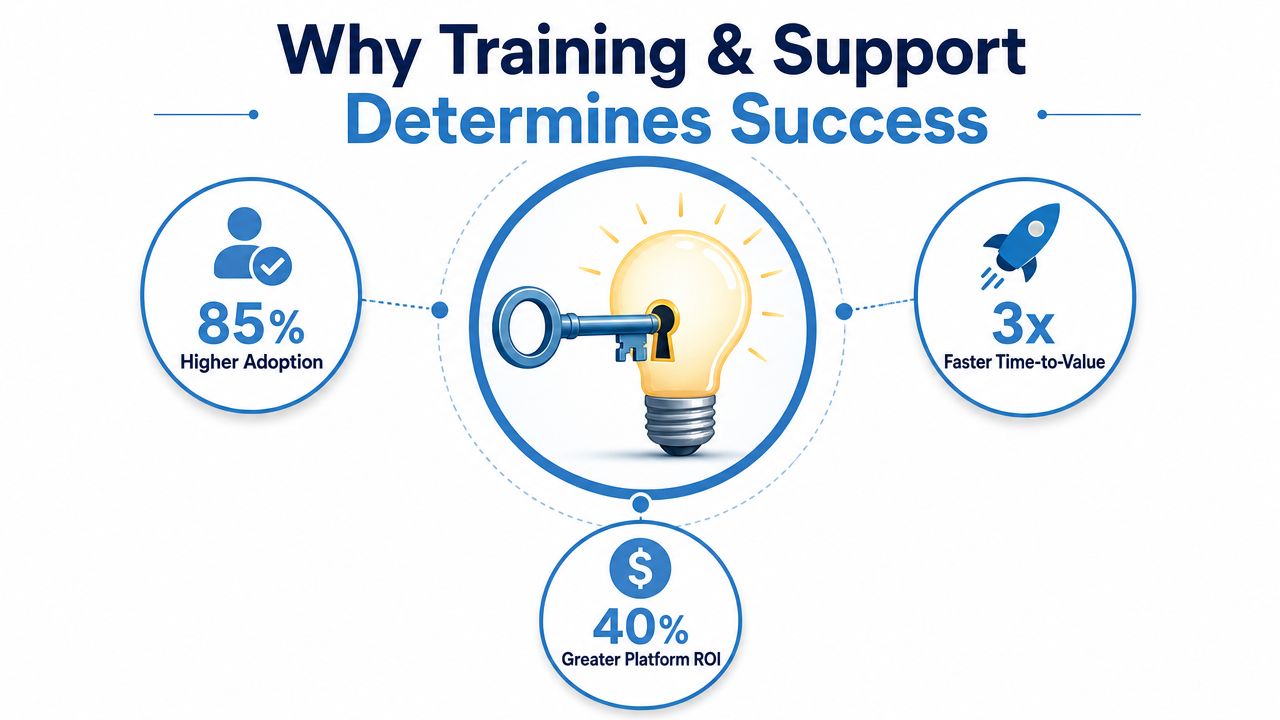
The platforms that win treat enablement as infrastructure, not onboarding theater. For a practical field guide on how this looks in a real estate context, the Ashby and Graff training guide is a useful reference point because it treats training as a working system, not a slide deck.
Why Training and Support Determines Platform Success
Teams usually start by comparing record counts, API latency, attribute depth, and delivery format. Those checks matter, but they do not decide whether the platform will hold up in production. Real value appears when the people using the data know how to map it to a workflow, validate it in context, and ask for help before a bad assumption hits a live system.
The hidden cost is not the contract, it's the stall
Weak onboarding creates a long tail of operational waste. Analysts rerun the same checks, developers guess at schema logic, and business users stop trusting the output enough to use it. The failure is rarely dramatic. It usually comes from a chain of small misses, unclear naming, vague ownership, no live walkthrough, and support that answers after the team has already lost a week.
Strong training programs change that pattern. As noted earlier, formal training is tied to better productivity and profitability, and it also affects retention. In practical terms, that means training pays off twice, first through faster adoption, then through lower replacement and rework costs.
Practical rule: if a vendor cannot explain how a new user gets from first login to first successful production query, the support model is probably weaker than the sales deck suggests.
BatchData's enterprise property enrichment API trial signup developer guide reflects the kind of rollout discipline that separates a working program from a rushed handoff. The point is not to hand over access and hope for the best. It is to make sure the first production workflow is stable before the vendor steps back.
What a real platform rollout needs
A serious training and support model gives each stakeholder a different path. Engineers need code samples, schema guidance, and clear escalation rules. Non-technical teams need plain-language workflows, examples, and guardrails. Leadership needs proof that learning transferred into the business process, not just a completion certificate.
That is why strong enablement is part of the operating layer, not a nice extra. It decides whether a platform becomes a daily tool or a shelfware risk. For teams buying in regulated or high-volume environments, that trade-off matters more than a minor feature difference. The Ashby and Graff training guide makes the same point from a different angle, training only works when it is treated as a working system, not a slide deck.
How White-Glove Onboarding Flows Work
White-glove onboarding starts before the first API call and ends after the first production workflow is stable. In a serious real estate data rollout, the vendor doesn't just hand over credentials. It helps map the data, validates assumptions, and stays involved until the team can prove the integration works in the production environment.
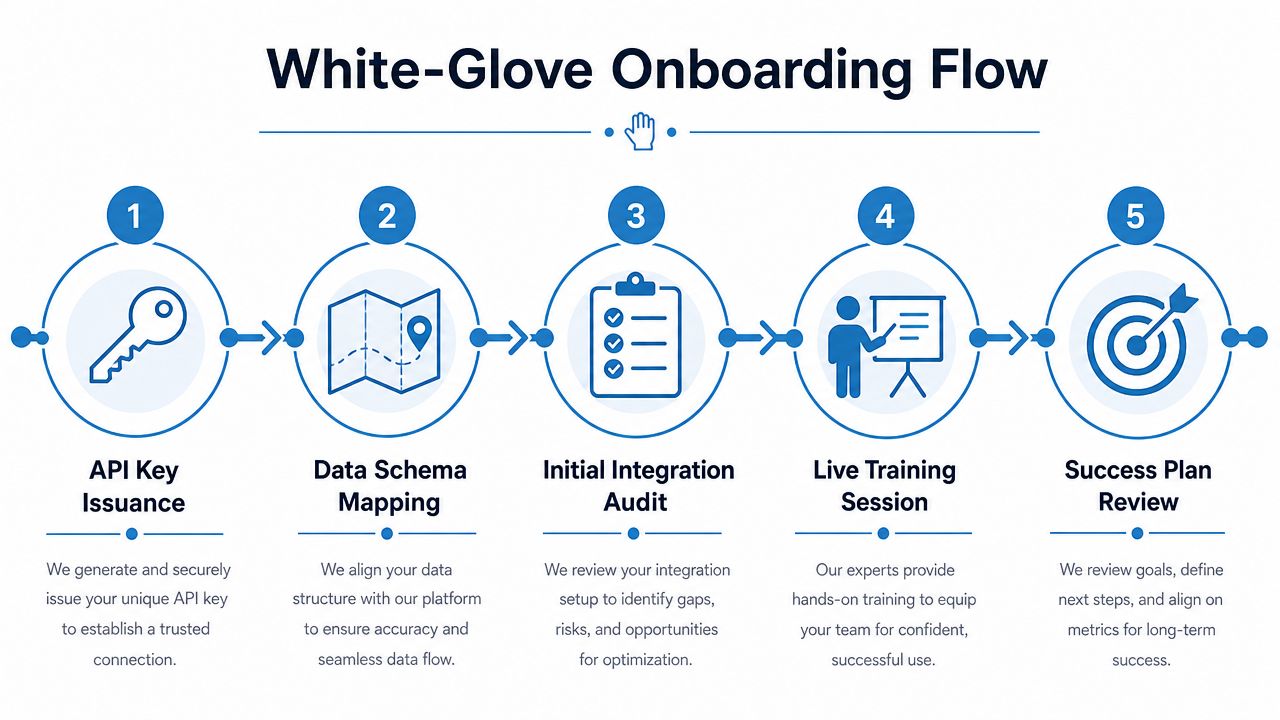
The flow that actually works
A clean onboarding sequence usually follows this order.
- API key issuance. Credentials get issued with the correct scope, owner, and access assumptions.
- Data schema mapping. The vendor and customer align field names, object relationships, and downstream dependencies.
- Initial integration audit. The first test calls confirm authentication, payload shape, and error handling.
- Live training session. The team sees the workflow end to end, including how to validate and troubleshoot it.
- Success plan review. Both sides agree on milestones, open issues, and the next checkpoint.
That sounds basic, but it's where most vendors cut corners. Self-serve signup often stops at credential delivery and a documentation link. White-glove onboarding adds a working session with a solution engineer, which matters when the account has legacy systems, custom matching requirements, or nonstandard enrichment workflows.
The BatchData model is a good reference for this kind of rollout because it combines enterprise onboarding with turnkey services like contact enrichment and skip tracing, which have to be configured correctly from day one. If you want to see how that setup is framed in practice, the enterprise property enrichment API trial signup developer guide is a useful implementation example.
Why dedicated human support matters
The value of a dedicated solution engineer isn't just speed. It's judgment. Someone has to decide whether the team's issue is a mapping problem, a permissions problem, or a misunderstanding of the endpoint behavior. A generic help desk rarely catches that nuance.
For enterprise integrations, that difference is huge. A good onboarding flow reduces ambiguity before the customer builds bad habits into the pipeline. That's why the best vendors don't just “support” implementation, they actively shape it.
Choosing the Right Training Format for Your Team
The right format depends on who's learning, how technical they are, and how fast they need to move. A developer team may only need documentation and code examples. An underwriting or marketing team usually needs live explanation, process context, and examples that show how the data fits the job.
Match the format to the user
| Training Format Decision Matrix | Best For | Time to Value | BatchData Example |
|---|---|---|---|
| Self-serve documentation | Developers who already know the API pattern and just need implementation detail | Fastest when the schema is clear | Transparent docs and code examples for direct implementation |
| Instructor-led sessions | Non-technical stakeholders, cross-functional teams, and enterprise rollouts | Faster than trial-and-error because questions get answered live | Live enablement for teams that need workflow context, not just endpoints |
| Code samples | Engineering teams building integrations or testing payloads | Fast when the examples mirror real use cases | Sample requests and response patterns that reduce guesswork |
| API sandbox | Teams validating data logic before production | Moderate, because it still requires internal testing | Trial-style experimentation before broader deployment |
The trade-off is simple. Docs scale better, live sessions reduce confusion faster, and code samples close the gap between theory and implementation. If the team is small and technical, self-serve material can work well. If the account touches multiple functions, live training usually prevents the hidden coordination failures that kill momentum.
BatchData's transparent documentation and code examples fit developer-first teams that want to move quickly without waiting for a meeting. But live instruction still matters for people who need to understand what the data means in context. A lender, underwriter, or marketing lead doesn't benefit from raw syntax if they can't connect it to a workflow.
Operational test: if a training format doesn't help someone make a better decision in the first week, it's probably too generic for enterprise use.
The best vendors don't force one training motion on every buyer. They choose the right mix and make the handoff obvious.
Measuring Support Quality with Real Metrics
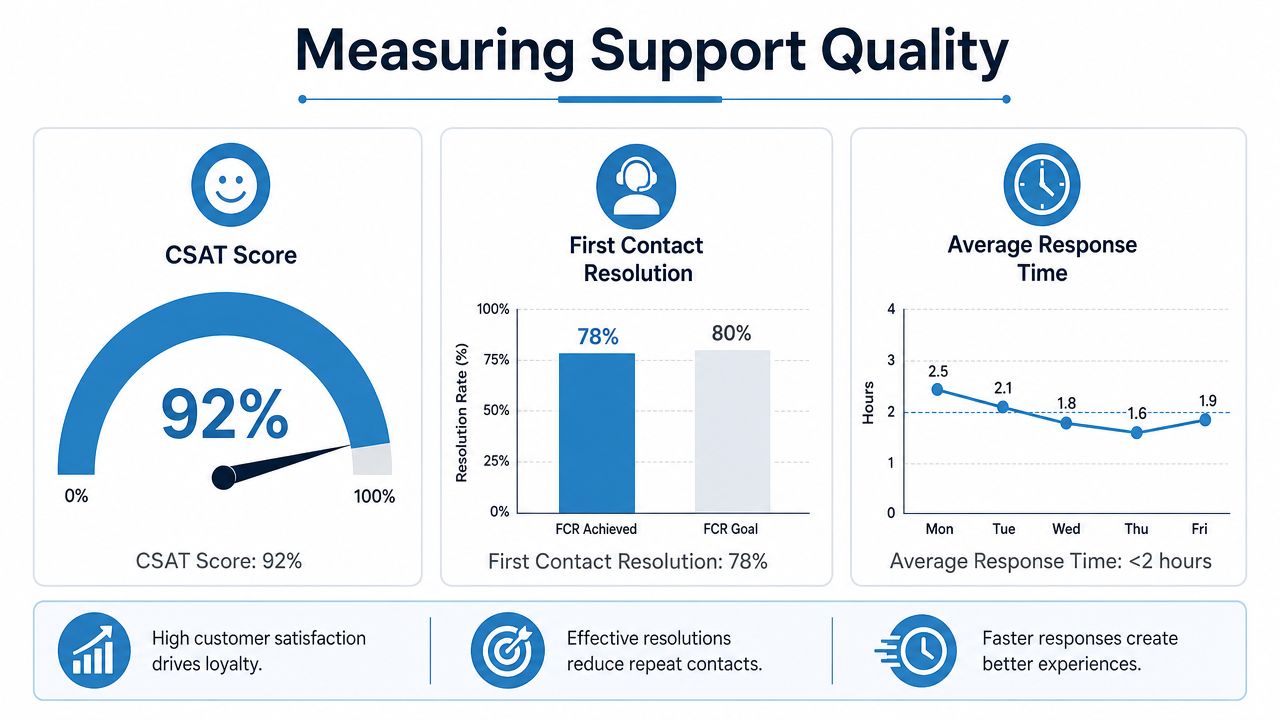
Support quality should be measured by whether it changes operational output, not by whether someone was polite on the phone. In training and support for data platforms, the useful metrics are CSAT, First Contact Resolution (FCR), Customer Effort Score (CES), and Average Handle Time (AHT). Those are the measures that tell you whether support reduced friction or just created a different queue.
What to baseline before training starts
The most useful measurement model starts with a before-and-after comparison. Expert guidance recommends capturing pre-training and post-training scores, attendance, learner surveys, and on-the-job indicators like productivity, error rates, and skills-gap coverage, then reviewing them on a quarterly cadence, not as a one-time survey event, according to InStride's training effectiveness guidance. The point is to see whether learning moved into work output.
For support teams, the technical support benchmark extends beyond satisfaction. Best practice is to record baseline values for CSAT, FCR, CES, and AHT before rollout, then compare them after training. That lets you see whether agents are solving problems on the first contact and whether handle time is falling because the team now understands the platform better, as outlined in TechClass's support training measurement guide.
What the numbers actually tell you
- CSAT tells you whether the customer felt helped.
- FCR tells you whether the issue was solved without extra churn.
- CES tells you how hard the process felt to the customer.
- AHT tells you whether support is getting more efficient.
The mistake most buyers make is assuming faster replies equal better support. They don't. A fast answer that fails to resolve the issue just creates more tickets later. FCR and AHT are the strongest signals that training reduced rework and helped the support team diagnose problems correctly the first time.
If you want a concrete example of what good documentation looks like in practice, the BatchData documentation examples show the kind of clarity that shortens escalation cycles because users can answer more questions before opening a ticket.
Preventing Skill Decay After Onboarding
Skills decay when onboarding ends and reinforcement never starts. That's the core failure mode in most platform rollouts. People leave the training session confident, then return to inbox pressure, project deadlines, and old habits.
Transfer support has to be designed, not hoped for
Wilson Learning's review of 32 studies found that using learning-transfer methods together can improve performance outcomes by as much as 186% versus training alone, while most individual methods produced about a 20% improvement on their own, according to Wilson Learning's transfer research. The important part is the mechanism. Training works best when three buckets line up, learner readiness, learning transfer design, and organizational alignment.
That maps cleanly to real estate data adoption.
- Learner readiness: the user knows why the platform matters and what good looks like.
- Learning transfer design: the training includes practice, role modeling, and application support.
- Organizational alignment: managers, peers, and workflows reinforce the new behavior.
A CSU research paper on follow-up training support identifies five concrete mechanisms that help skills transfer, action plans, performance assessment, peer meetings, supervisory consultations, and technical support, according to the CSU follow-up support study. Those are not soft suggestions. They are the operating rhythm that prevents drift.
How that looks in a data platform environment
In a real rollout, action plans should be tied to specific use cases like portfolio monitoring, lead enrichment, or model training. Peer meetings work because they surface edge cases faster than a ticket queue. Supervisory consultations matter because managers can tell whether the team is using the platform or just saying they are.
Technical support closes the loop when the workflow changes. If the schema changes, the use case changes, or a downstream team starts using the data in a new way, the vendor needs to stay close enough to keep the new habit intact. That's the difference between onboarding and enablement. One gets people started. The other keeps the behavior alive.
Evaluating Vendors on Training and Support
Vendor scorecards that overweight data coverage and API performance miss the part that determines adoption. If training and support are weak, the “better” data platform still loses because the team can't use it consistently. That's why enablement needs to sit beside coverage in the evaluation, not below it.
A practical vendor scorecard
| Evaluation Area | What Strong Looks Like | What Weak Looks Like | What to Ask |
|---|---|---|---|
| Onboarding depth | Live setup help, schema mapping, and clear success milestones | Login handoff with a help article | Who owns first production readiness? |
| Documentation quality | Examples that match real use cases and error states | Generic API notes with no workflow context | Can a non-expert get to first value from docs alone? |
| SLA guarantees | Clear escalation routes and named support coverage | Vague promises and shared inboxes | What happens when integration breaks after hours? |
| Ongoing enablement | Quarterly reviews, follow-up training, and usage checks | One-time kickoff call | How do you keep customers current when use cases change? |
The sales call should expose whether support is real or theatrical. Ask who answers the ticket, who escalates it, and whether the same people who sold the system are also accountable for onboarding success. If the vendor outsources the hard part to a community forum or a generic help desk, that usually shows up later as slow resolution and repeated explanations.
Training and support deserve the same scrutiny as data freshness and coverage. The real estate data provider selection guide is a good companion piece if you're building a broader RFP rubric, because the buyer questions have to cover both product fit and service depth.
Vendor test: if the support model can't describe its escalation path in plain English, it's probably not built for enterprise use.
Your Onboarding Checklist and Escalation Playbook
A good onboarding checklist reduces confusion before the first ticket ever gets filed. A good escalation playbook keeps the vendor accountable when the workflow breaks. Together, they turn training and support into a repeatable operating process instead of a vague promise.
Copy this checklist into your internal plan
- Pre-onboarding preparation. Confirm the use case, owner, downstream system, and success criteria.
- API key setup. Assign credentials to the right team, with clear access control and backup ownership.
- Data validation. Compare sample outputs against known records before expanding usage.
- First production query. Run the first live workflow with a defined reviewer and a rollback path.
- 30-day review milestone. Check whether the team is using the platform as intended and whether support gaps remain.
The escalation playbook should be just as clear. Tier-1 support handles routine issues and access problems. Solution engineers handle schema, workflow, and integration complexity. Account leadership steps in when the issue touches scope, timelines, or a broken implementation pattern.
Set response expectations by severity
- Severity 1: production workflow is blocked, escalate immediately to solution engineering and account ownership.
- Severity 2: work is possible but degraded, route through support and track until closure.
- Severity 3: documentation or usability issue, file it, classify it, and fold it into the next enablement review.
Quarterly business reviews should not be a slide parade. They should answer three questions, what changed in the workflow, where did support help, and what skills are starting to decay. That keeps training aligned with evolving use cases like portfolio monitoring, ML model training, or richer enrichment workflows.
When the vendor can't support that cadence, the relationship usually degrades into reactive ticketing. When it can, the platform becomes easier to trust, easier to expand, and much harder to replace.
If you're evaluating a real estate data platform and training and support matter as much as coverage, BatchData is built around that reality with white-glove onboarding, developer-friendly documentation, and ongoing help for enterprise workflows. Explore BatchData to see how the platform handles onboarding, support, and production use cases with less friction and more accountability.