Real estate APIs make it simple to access detailed property data like addresses, pricing, square footage, and ownership information, all delivered in JSON format for easy integration. These APIs are essential for applications such as property listing websites or investment tools, offering data on property characteristics, valuations, market trends, and owner contact details.
Good API documentation ensures developers can integrate these tools quickly by providing clear guides on authentication, request parameters, and error handling. Essential elements include:
- Authentication: Clear steps for API key usage or OAuth2, with examples for both sandbox and production environments.
- Request Parameters: Detailed tables explaining query options like price ranges, ZIP codes, and property types.
- Error Codes: Specific HTTP status codes with examples to simplify troubleshooting.
- Response Examples: Realistic JSON outputs showing property details, valuations, and owner information.
With providers like ATTOM and BatchData, developers gain access to millions of U.S. properties and robust data fields. Features like property search, valuation estimates, and owner data retrieval are supported by thorough documentation, making integration straightforward and efficient.
For developers, the key to success lies in leveraging well-documented APIs that provide clear instructions, realistic examples, and detailed schemas to avoid guesswork.
How to Get Property Records with RentCast API | Python Tutorial

What Real Estate API Documentation Should Include
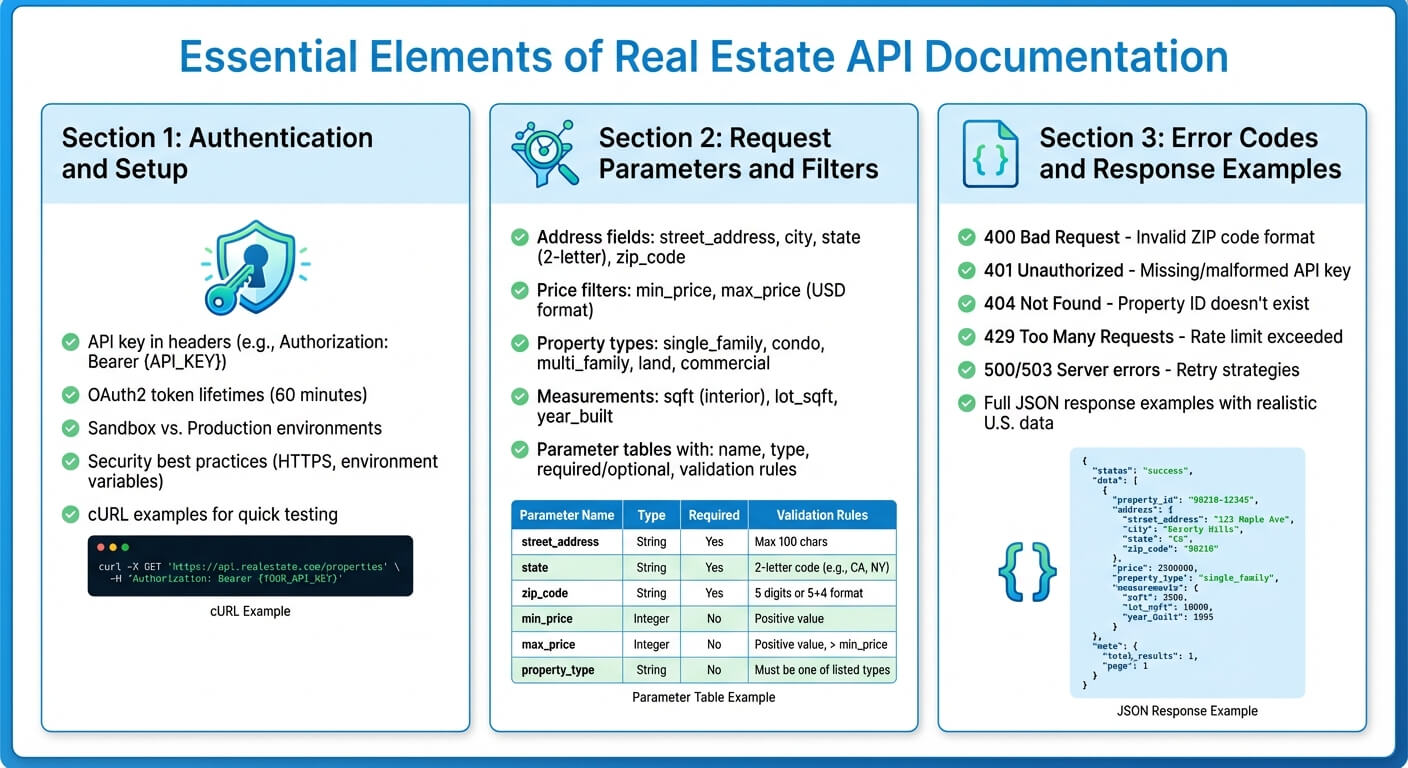
Essential Elements of Real Estate API Documentation
Good real estate API documentation should focus on three main areas: authentication and setup, request parameters and filters, and error codes with response examples. These sections provide developers with the tools they need to integrate property, valuation, and owner data into their applications without wasting time on guesswork or filing unnecessary support tickets. Let’s break down each of these components.
Authentication and Setup
Begin with a clear, step-by-step guide for obtaining and using API credentials. For APIs using key-based authentication, explain how to include the API key in headers, such as "Authorization: Bearer {API_KEY}" or "apikey", and ensure the "accept: application/json" header is used. A cURL example is essential here so developers can quickly test their setup.
For OAuth2, outline token lifetimes (e.g., 60 minutes), how to use refresh tokens, and the required scopes like "property.read" or "owner.read" for accessing sensitive data. Make sure to differentiate between sandbox and production environments. Include base URLs for both, noting that the sandbox uses mocked U.S. property listings with limited coverage, while production provides live data with stricter rate limits and compliance rules.
Security is non-negotiable. Recommend best practices like storing API keys in environment variables, using HTTPS, and safeguarding personally identifiable information (PII). This is especially important for APIs like BatchData’s skip tracing or contact enrichment services.
Request Parameters and Filters
After authentication, the next critical aspect is detailed parameter documentation to ensure developers can make precise queries. Use a parameters table to define each query parameter, including its name, location (query/path/body), data type, whether it’s required, and any validation rules specific to U.S. conventions.
For address-based searches, break down the structure into fields like "street_address", "city", "state" (2-letter USPS code), and "zip_code". For example:
"street_address": "1600 Pennsylvania Ave NW""zip_code": "20500"
Clarify accepted ZIP Code formats (either 5-digit or ZIP+4) and include examples for handling invalid inputs.
When documenting price filters, use U.S. currency standards. For instance, "min_price=250000" and "max_price=750000" (in USD). Specify whether commas or dollar signs are allowed in the query string. For property types, provide a list of accepted values like "single_family", "condo", "multi_family", "land", and "commercial". Show how to combine filters, like searching for single-family homes priced between $300,000 and $600,000 in a specific ZIP Code.
Be specific about measurement units for advanced filters. For example:
- Use
"sqft"for interior living area (square feet) - Use
"lot_sqft"for lot size - Use
"year_built"as an integer (e.g., 1985)
Error Codes and Response Examples
Error codes are a critical part of API documentation. Include a list of HTTP status codes, their causes, and examples tied to specific endpoints. For instance:
- A 400 Bad Request might occur if
"zip_code"is invalid. Example response:{ "code": "INVALID_ZIP", "message": "ZIP Code must be 5 digits or ZIP+4 (NNNNN-NNNN) for U.S. addresses." } - A 401 Unauthorized error could happen with a missing or malformed API key. Provide examples and instructions to fix the issue.
- A 404 Not Found might occur if a property ID doesn’t exist in a given U.S. county or if no listings match a ZIP Code search.
Since real estate APIs often enforce rate limits due to high traffic, include details about 429 Too Many Requests errors. Show how headers like "X-RateLimit-Reset" can help developers implement backoff strategies. For server-side issues, provide examples for 500 or 503 errors and recommend retry strategies for temporary problems.
Response examples should be in full JSON format and include realistic values. For example, a property listing might look like this:
{ "address": { "street_address": "123 Main St", "city": "Anytown", "state": "CA", "zip_code": "90210" }, "list_price": 450000, "estimated_value": 460000, "beds": 3, "baths": 2, "sqft": 1500, "lot_sqft": 5000, "year_built": 1980, "property_type": "single_family" } For owner or contact data, demonstrate how PII is structured. For instance:
{ "owner_name": "Smith, John", "mailing_address": { "street_address": "456 Elm St", "city": "Somewhere", "state": "TX", "zip_code": "75001" }, "phone_numbers": [ { "number": "555-123-4567", "type": "mobile", "verified": true } ] } Well-documented errors and response examples not only make troubleshooting easier but also reduce the need for support, saving time for both developers and API providers.
Real Estate API Endpoint Examples
Real estate APIs are structured into various endpoints, each designed to handle specific tasks. Below, we’ll explore how property, valuation, and owner endpoints simplify access to real estate data.
Property Search Endpoints
These endpoints are essential for locating properties, whether for listings or market research. They often follow REST conventions like /properties/search, /properties/address, or /properties/nearby. Users can query these endpoints with a complete U.S. postal address or geographic coordinates. For instance, ATTOM’s Property Snapshot endpoint allows queries based on latitude, longitude, and a radius. Here’s an example:
https://api.gateway.attomdata.com/propertyapi/v1.0.0/property/snapshot?latitude=39.7047&longitude=-105.0814&radius=2 For address-based searches, a typical request might look like this:
GET /property/detail?address1=4529%20Winona%20Court&address2=Denver,%20CO Authentication is handled via an API key in the header, such as "apikey: YOUR_KEY". Responses include details like property type, subtype, year built, number of bedrooms and bathrooms, and building size in square feet. To refine searches, developers can use parameters like minLotSize2=12000&maxLotSize2=20000 for lot size or minBeds=2&maxBeds=4 for bedroom range.
BatchData‘s Property Search API further enhances functionality by combining property details, owner data, market trends, and analytics in a single call. With access to over 155 million properties and more than 800 attributes per property, it delivers extensive insights in just milliseconds.
Valuation and Market Data Endpoints
Valuation endpoints such as /valuations or /avm (automated valuation model) are designed to provide property value estimates. These endpoints typically accept identifiers like property_id or a full address. The response includes fields like current_value_usd, a value_range_usd object (showing low and high estimates), and a last_updated timestamp in ISO 8601 format. All monetary values are presented in U.S. dollars, using standard formatting (commas for thousands, dots for decimals).
For rental properties, endpoints like RentCast’s rent estimate API provide similar structures. A request might look like this:
GET /rent-estimate?street_address=456+Elm+St&city=Austin&state=TX&zip_code=78701&bedrooms=2&bathrooms=2 The response includes fields such as estimated_rent_usd, rent_range_usd.low, rent_range_usd.high, and a confidence_score (ranging from 0 to 100). Additionally, these endpoints often return neighborhood-level data like median_rent_usd, vacancy_rate, and cap_rate, which are helpful for investment analysis.
To ensure reliability, valuation endpoints include quality metrics like confidence_score, model_quality_grade (graded A–D), and either standard_deviation_usd or margin_of_error_usd. Broader market-level metrics such as median_sale_price_usd, year_over_year_price_change_pct, median_days_on_market, and inventory_count offer additional context for property valuations.
Owner and Contact Data Endpoints
Owner data endpoints, such as /owners/by-property, /owners/search, or /skip-trace, allow developers to retrieve owner information using property_id, address, or other identifiers. ATTOM’s /property/detailowner and /property/detailmortgageowner endpoints, for example, use parameters like attomId=184196315 or absenteeowner=occupied to return owner status, FIPS/APN codes, and privacy-compliant owner details.
BatchData offers access to an extensive database of over 221 million homeowners, 350 million phone numbers, and 260 million email addresses. Responses include compliance details such as phone_type (mobile or landline), do_not_call status, and consent_status, ensuring adherence to regulations like the Telephone Consumer Protection Act (TCPA).
Developers can filter out contacts that cannot be legally reached by using parameters like ?exclude_do_not_call=true. BatchData reports a 76% accuracy rate in reaching owners by integrating contact enrichment and skip tracing services, which enhance property records in real time. By combining owner and contact data with property details and market analytics, these endpoints enable seamless workflows – from property discovery to valuation and compliant outreach – delivering comprehensive real estate insights.
sbb-itb-8058745
How to Write Better API Documentation
Quickstart Guides and Code Examples
A good Quickstart guide should help developers make a working API call in under five minutes. Think of it as a simple checklist: sign up, grab an API key, run a curl command, and get a response. Make sure to show how to handle authentication (like using Authorization: Bearer YOUR_API_KEY) and include a test endpoint with realistic U.S. data that reliably returns results.
For every endpoint, include both curl and Python examples. Curl is perfect for quick terminal testing, while Python is widely used for backend development and data processing, especially in real estate workflows. Use realistic U.S. data in your examples – complete addresses, cities, states, ZIP codes, and prices formatted in USD (e.g., $425,000.00). ATTOM sets a great example by offering code samples in Python, PHP, Ruby, and JavaScript, all showing developers exactly where to insert their API keys and how to handle JSON responses. This level of clarity can make integrations smoother and cut down on support requests.
Once developers successfully make their first API call, interactive tools can make further testing and exploration even easier.
Interactive Testing Tools
Embedding a tool like Swagger UI can simplify the testing process. Developers can authenticate just once and then test endpoints with pre-filled, realistic U.S. example data. For instance, formatted JSON responses can highlight key real estate details like addresses, the number of bedrooms and bathrooms, square footage, and property valuations in USD.
Additionally, ATTOM APIs are available through Postman collections, which allow for hands-on exploration and testing. Don’t forget to include security reminders – developers should never share their API keys or use production credentials in client-side code.
Data Schemas and Field Documentation
While quickstart guides and examples are great for getting started, detailed schemas are essential for understanding complex data. Real estate APIs often expose hundreds of fields for a single property. For instance, ATTOM’s API includes nearly 400 fields. Without clear documentation, developers may resort to guesswork, leading to errors. To avoid this, provide a field table for each core object (like Property, Valuation, Owner, and Contact). Each table should include:
- Field name
- Data type
- Example value
- Description
- Whether the field can be null
Be specific about U.S. data formats. Use USD for currency with two decimal points (e.g., 275000.00), ISO format for dates (YYYY-MM-DD), and imperial units for square footage (e.g., sq_ft). ATTOM’s parameter tables, for example, break down field names, types (single value or range), and descriptions, along with sample query strings like minBeds=2&maxBeds=4. Also, clarify domain-specific terms, such as the difference between an APN/parcel ID and a property_id. This level of detail ensures developers can use your API effectively and avoid unnecessary bugs.
With BatchData offering access to over 155 million properties and 800+ attributes, comprehensive schema documentation becomes even more critical. When developers can retrieve property details, owner data, market insights, and analytics in a single call, clear and detailed field documentation empowers them to make the most of this information without confusion or extra support.
Summary
Key Documentation Requirements
Start by clearly outlining API authentication steps. Developers need precise instructions on how to pass an API key in request headers, what errors occur if credentials are missing or invalid, and how to handle token expiration. ATTOM sets a great example by demonstrating the inclusion of apikey and accept: application/json headers, paired with working code samples in multiple programming languages.
For U.S. data formats, clarity is essential. Currency should always be shown as USD with dollar signs and two decimal places (e.g., $325,000.00). Dates must use unambiguous formats like YYYY-MM-DD or 12/12/2025. Measurements should follow imperial units – square footage for building size, acres or square feet for lot dimensions, and miles for radius searches. ATTOM’s documentation provides detailed parameter tables that illustrate these formats in practical use.
When dealing with complex property data, detailed schema documentation is a must. Field tables should include the field name, data type, example values, descriptions, and whether the field can be null. Without this level of detail, integration issues become inevitable. These principles form the backbone of effective developer resources.
BatchData‘s Developer Resources

Building on these best practices, BatchData‘s APIs are designed to streamline integration and significantly cut deployment time. The platform offers access to over 155 million properties and 800+ attributes through a single API source. Its documentation is thorough, covering property search endpoints, data enrichment services, skip tracing, phone verification, and bulk data delivery. It also includes clear guides for authentication and provides examples formatted for U.S. standards.
The property search API delivers property details, owner information, market data, and analytics in milliseconds. The documentation includes realistic examples of request parameters like addresses, cities, states, and ZIP codes. For enrichment services, the guides feature practical use cases with U.S. addresses, showing responses that include owner names, formatted phone numbers, and property values in USD. Additionally, BatchData’s pay-as-you-go pricing model eliminates the need for subscriptions or monthly fees, making it flexible for startups and scalable for enterprises. A dedicated success team ensures smooth onboarding and ongoing support.
FAQs
What makes real estate API documentation effective?
Effective real estate API documentation should cover the essentials: clear endpoint descriptions, detailed request and response examples, and easy-to-follow authentication instructions. It’s also important to include information about data formats, explain how to handle errors, clarify rate limits, and provide details on versioning.
To make it user-friendly, the documentation should be written with developers in mind. This means offering concise explanations and step-by-step integration guides. The goal? To help users implement the API into their real estate projects efficiently, cutting down on confusion and potential mistakes.
What steps can developers take to securely integrate real estate APIs?
To ensure the secure integration of real estate APIs, developers should stick to key best practices. This includes using authentication protocols like API keys or OAuth to verify access, encrypting data during transmission with HTTPS, and routinely rotating credentials to reduce potential risks. Additionally, implementing strict access controls is essential to prevent unauthorized usage, alongside adhering to secure coding standards.
BatchData takes security seriously by providing enterprise-level features such as real-time data validation and dependable, trusted data sources, making API integration both seamless and secure.
What are some common mistakes developers make when working with real estate APIs?
When working with real estate APIs, developers often run into a handful of recurring issues. Among the most common are incorrectly formatted API requests, missing or invalid authentication credentials, and incomplete or inaccurate data parameters in queries.
Other challenges include hitting API rate limits, which can lead to temporary access blocks, and misunderstanding the format or content of the response data. To steer clear of these pitfalls, it’s crucial to thoroughly review the API documentation, ensure your requests align with the required standards, and implement robust error-handling mechanisms in your code.