
Real estate data can be messy, with inconsistent labels across systems like MLSs, broker platforms, and websites. A data dictionary solves this by standardizing terms, formats, and values, making data easier to manage, share, and use.
Here’s what you need to know:
- What is a Data Dictionary? It’s a tool that defines data points (fields), groups them into categories (resources), and provides predefined choices (lookups). For example, "ListPrice" is consistently defined across systems.
- Why Use It? It reduces errors, lowers costs, and ensures systems like MLSs and consumer platforms can communicate effectively.
- How to Create One:
- Identify key data elements (e.g., "ListPrice", "PropertyAddress").
- Organize them into resources like Property, Member, Office, and Media.
- Define field types (e.g., number, text) and validation rules to prevent errors.
- Use tools like BatchData to implement and automate data management.
- Regularly update the dictionary to align with changing industry standards.
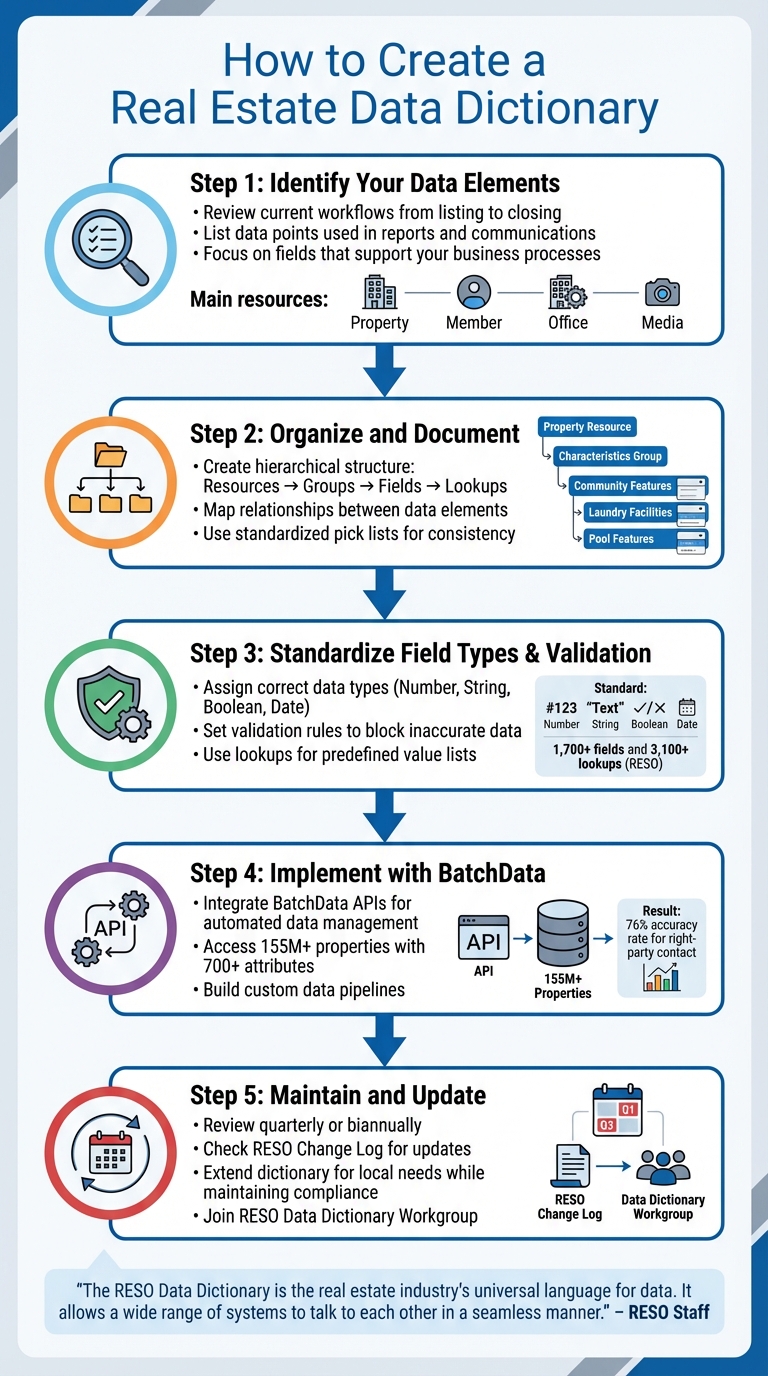
5-Step Process to Create a Real Estate Data Dictionary
The RESO Data Dictionary – A short video brought to you by Realtyna
Step 1: Identify Your Real Estate Data Elements
To build a solid data dictionary, the first step is to take stock of your current workflows – from creating listings to closing deals. Break down each stage of your process and list the data points involved in generating reports or communications. This inventory will give you a clear picture of the real estate property data that keeps your business moving. Essentially, this step helps you pinpoint the common data fields you rely on in real estate operations.
If you’re looking for a detailed framework, the RESO Data Dictionary is a great reference. However, you don’t need to include every field it offers – just focus on the ones that directly support your business processes.
Common Real Estate Data Fields
Once you’ve outlined your data elements, group them into their respective categories. Real estate data generally falls into four main resources: Property, Member, Office, and Media.
- Property: This resource includes fields like ListPrice (the asking price in dollars), StandardStatus (e.g., Active, Pending, or Closed), and PropertyAddress (the full street address). It also covers physical details, such as Community Features (e.g., gated entry or clubhouse access) and Laundry Facilities (e.g., “In Garage” or “Common Area”).
- Member: Tracks agent-specific details, such as MemberFirstName and MemberEmail.
- Office: Captures brokerage information like OfficeName and OfficePhone.
- Media: Organizes digital assets by storing data like MediaURL (file location) and MediaCategory (e.g., photographs, videos, or virtual tours).
Industry Standards for Data Elements
The Real Estate Standards Organization (RESO) manages the industry’s standardized data language through its Data Dictionary. This system organizes information in a hierarchical structure: Resources at the top, Fields as individual data points, and Lookups as predefined values for those fields. For example, a Fencing field might include options like "Chain Link", "Vinyl", "Wood", or "Wrought Iron."
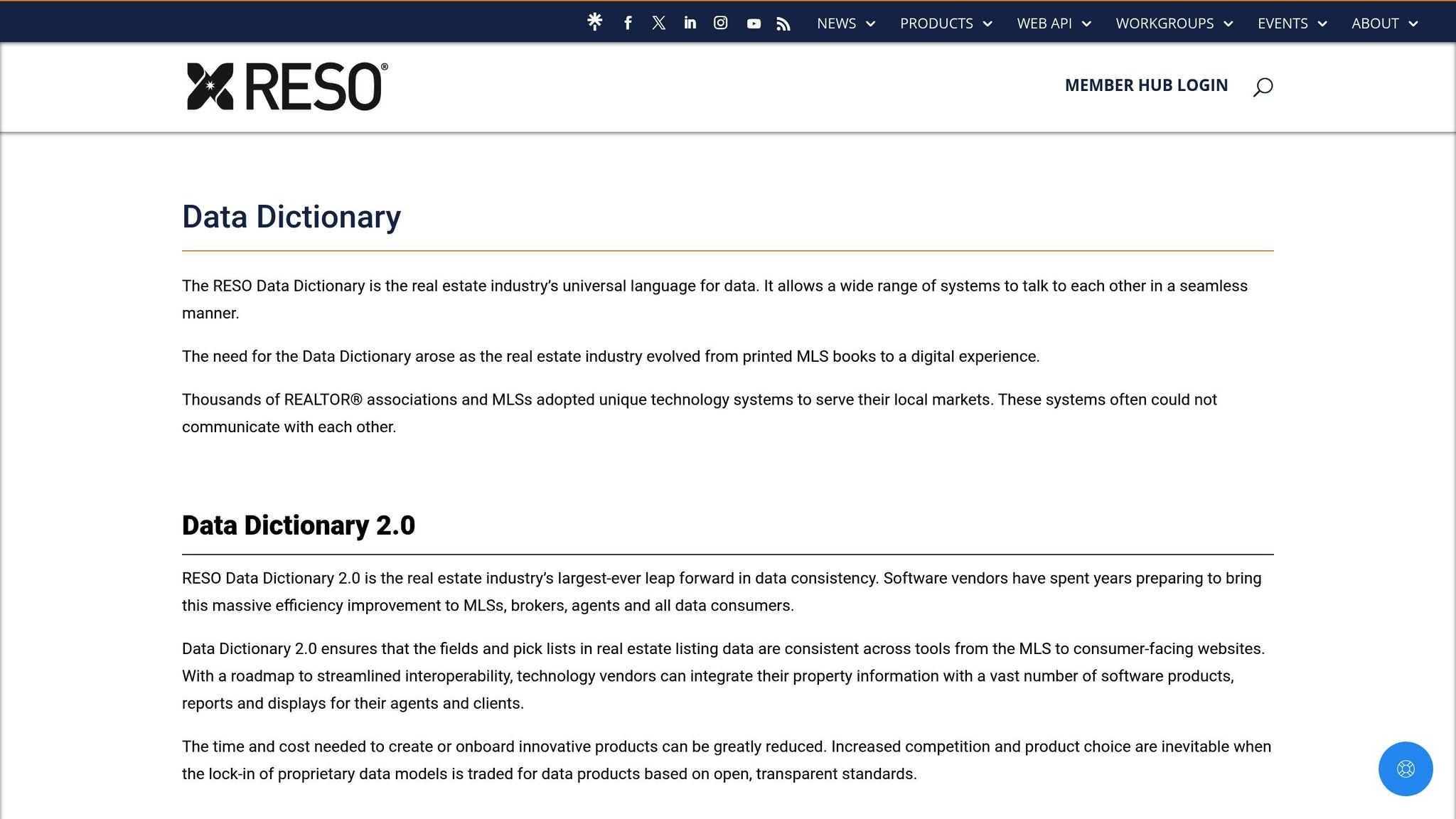
"Data Dictionary 2.0 ensures that the fields and pick lists in real estate listing data are consistent across tools from the MLS to consumer-facing websites." – RESO Staff
With over 800 organizations contributing, these standards remain closely aligned with the needs of the real estate industry. The RESO Data Dictionary Wiki provides a full catalog of resources and fields, available both online and as a downloadable spreadsheet. When choosing technology partners, prioritize RESO Certified systems – they ensure your data fields meet industry standards and integrate seamlessly across platforms.
Step 2: Organize and Document Your Data Structures
Once you’ve identified your data elements, the next step is to organize them in a way that mirrors the flow of real estate transactions. A logical, hierarchical structure is key to maintaining data integrity across systems with a unified property and contact API. The RESO Data Dictionary provides a four-level framework: Resources (e.g., Property, Member, Office, Media) sit at the top, followed by Groups (clusters like "Characteristics Group"), then Fields (specific data points such as ListPrice), and finally Lookups (predefined values like "Vinyl" or "Wood" for fencing options). This structure is designed to be both logical and flexible. Tailor it to your business by selecting the resources and groups that best fit your workflows. This foundation will guide the standardization of field types and validation rules in the next steps.
Map Relationships Between Data Elements
Take the Property Resource as an example. You might create a "Characteristics Group" to house fields like Community Features, Laundry Facilities, and Pool Features, all of which describe a property’s physical traits. This kind of grouping makes it easier for agents to find related information without wading through an overwhelming list of fields. You can see a practical example of this structure on the RESO Wiki at ddwiki.reso.org, where the left-side navigation pane illustrates how hierarchical data organization works.
For instance, if you’re documenting a Fencing field, users should be able to instantly view all available lookup values – such as "Chain Link", "Vinyl", "Wood", or "Wrought Iron" – and also trace back to see which field these values belong to. This two-way navigation is especially useful when multiple team members are accessing and working with the same data, ensuring clarity and consistency across the board.
Use Lookup Values and Field Definitions
Standardized pick lists are a great way to avoid data entry inconsistencies. For example, instead of allowing agents to enter variations like "single family home", "SFR", or "single-family residence" into a PropertyType field, provide a dropdown menu with clear options such as "Single Family Residence", "Multi-Family", or "Condominium". This approach ensures uniformity in data entry throughout your system.
To document these structures, use a spreadsheet where each row specifies a field’s name, its parent group, acceptable data types (e.g., text, number, date), and any associated lookups. While adhering to RESO standards is crucial for interoperability, you can also include "local fields" to reflect unique market characteristics. Just make sure these local fields are managed with the same level of standardization to maintain consistency. This groundwork will prepare your system for the standardized field types and validation rules outlined in the next step.
Step 3: Standardize Field Types and Validation Rules
Once your data is structured hierarchically, the next step is to standardize field types and set validation rules. This process involves assigning each field the correct data type and creating rules that block inaccurate or inconsistent data from entering your system. The RESO standard outlines over 1,700 fields and 3,100 lookups to ensure smooth compatibility across real estate systems and APIs. By building on the organized data structures from Step 2, this step ensures that every field is well-defined and validated.
Define Field Types and Formats
Each field in your data dictionary needs a specific type. For instance:
- Number: Use this for values like square footage or list price.
- String: Ideal for text entries, such as property descriptions.
- Boolean: Perfect for yes/no fields, often marked with a "YN" suffix (e.g.,
PoolPrivateYN). - Date: Used for milestones like closing dates.
For financial fields like ListPrice, define them as numeric with a set decimal precision in your metadata. This will help avoid rounding issues during data exchanges. Measurements should be split into two fields: one for the numeric value (e.g., BuildingAreaTotal) and another for the unit type (e.g., BuildingAreaUnits), with options like "Square Feet", "Square Meters", or "Acres".
For phone numbers, format North American entries as ###-###-#### and use a plus sign (+) for international numbers. Date fields should reflect the actual event date (formatted as YYYY-MM-DD), not the timestamp of when the data was entered.
Set Validation Rules for Data
Validation rules are essential for maintaining data quality. For example, numeric fields like ListPrice should only accept positive values – negative sale prices are not valid. For fields with fixed options, use lookups (also called enumerations or picklists) to restrict entries to a predefined list. Instead of allowing agents to input variations like "vinyl fence", "Vinyl", or "vinyl fencing" in a Fencing field, provide a dropdown menu with standardized choices like "Chain Link", "Vinyl", "Wood", or "Wrought Iron".
For fields that require multiple selections, such as Appliances, use a multi-select list. This allows users to choose several items (e.g., "Dishwasher", "Refrigerator", "Oven") from a standardized set. This approach not only ensures uniformity but also captures detailed property information. Additionally, validation should confirm that the actual data matches the metadata definitions, including data types, string lengths, and decimal precision. Once field types are defined, these validation rules will help maintain data consistency and accuracy across the system.
Step 4: Implement Data Dictionaries with BatchData Solutions

Once you’ve set up your field types and validation rules, the next move is bringing your data dictionary to life. By using standardized field definitions, BatchData seamlessly integrates these into your daily workflows. With tools that tap into a database of over 155 million properties and more than 700 attributes across the country, BatchData transforms your data dictionary from a static document into an active system. This approach reduces manual data entry, cuts down on errors, and ensures every data point is consistently defined and validated throughout your operations.
Integrate BatchData APIs for Streamlined Data Management
BatchData’s Property Data API simplifies attribute mapping through a user-friendly API endpoint. Instead of manually inputting details, the API can auto-fill key property fields like tax history, construction details, lot size, and property age. It even includes built-in tools for address and phone verification, helping to eliminate duplicate or invalid entries right at the source. This results in a 76% accuracy rate for right-party contact during skip tracing property owners. The API’s entity resolution feature also standardizes ownership data, linking properties to their actual owners – even in cases of complex ownership structures.
"What used to take 30 minutes now takes 30 seconds. BatchData makes our platform superhuman." – Chris Finck, Director of Product Management
Build Custom Data Pipelines with Tailored Datasets
Beyond API integration, BatchData offers professional services to craft custom datasets that align perfectly with your data dictionary. Tools like Smart Search and Deal Analyzer allow you to generate lead lists based on specific criteria, such as distress indicators or equity levels, and automatically populate your system with validated data. Additional features like integrated phone validation ensure your data stays clean, helping to prevent errors and maintain quality. By incorporating these workflows into your processes, you can keep your data dictionary accurate and avoid the pitfalls of "dirty data."
Step 5: Maintain and Update Your Data Dictionary
Once you’ve implemented standardized data definitions with BatchData’s tools, the work doesn’t stop there. A data dictionary is a living document – it needs to grow and adapt over time. Real estate markets evolve, regulations shift, and new property attributes emerge. For example, the RESO Data Dictionary regularly adds new fields throughout the year and undergoes annual ratification. To stay on top of these changes, it’s essential to routinely check the Change Log Summary and Deprecated Fields and Lookups sections in the RESO Data Dictionary Wiki for updates.
Regular Updates and Validation
Plan to review your data dictionary on a quarterly or biannual basis to ensure it aligns with the latest industry standards. For instance, in February 2026, ALTA and NSPS rolled out new minimum standards, which included an optional "Table A" item to summarize conditions like potential encroachments or third-party use of property without recorded easements. This highlights the importance of keeping your dictionary flexible enough to handle regulatory changes.
Validation is just as critical. Use your established rules to confirm updates maintain data accuracy. The Lookup Resource simplifies this process by managing predefined lists of acceptable values and offering alternative mappings for deprecated elements. This ensures consistency across both standard and local data elements. If a data element is widely used across markets, consider submitting a request to dd@reso.org to add it to the global standard, avoiding unnecessary duplication of local fields. Regular reviews like these help you adapt your dictionary to both global standards and local requirements.
Extend Dictionaries for Local Needs
Not all fields in a standard data dictionary are relevant to every business. Modern systems allow you to omit fields that don’t apply to your operations. On the flip side, when local conditions or regulations demand unique fields – like "MilesToVolcano" for properties in Hawaii – you can extend your dictionary without breaking compliance.
"Extensibility with the Data Dictionary means data providers can create new local fields to address specific needs that are not currently covered by the Data Dictionary and still be in compliance with the standard."
– Sam DeBord, CEO, RESO
To maintain compatibility, map your custom Display Names to the standard backend names. This lets you stay responsive to local market trends while preserving interoperability. Additionally, joining the RESO Data Dictionary Workgroup can keep you informed about upcoming changes and give you a voice in shaping future standards.
Conclusion: How Data Dictionaries Support Real Estate Success
Data dictionaries play a key role in streamlining real estate operations by standardizing data structures and validation rules. They ensure smooth communication between MLSs, brokerages, and tech platforms, cutting down on delays and errors. This allows for quicker integration of new tools and more informed decision-making based on dependable data sources.
By replacing manual processes and outdated spreadsheets, standardized data structures enable automated workflows that can handle millions of property requests. This level of scalability would be nearly impossible to achieve manually. The result? Faster underwriting timelines, precision targeting using attributes like roof age or equity levels, and improved conversion rates and ROI.
"The RESO Data Dictionary is the real estate industry’s universal language for data. It allows a wide range of systems to talk to each other in a seamless manner." – RESO Staff
Advanced tools, such as those offered by BatchData, take these efficiencies even further. With features like property and contact data enrichment, skip tracing, and API-driven property search, BatchData integrates seamlessly with standardized data dictionaries. Whether you’re building custom data pipelines or enhancing existing datasets, their flexible pricing models – pay-as-you-go or tailored data solutions – can adapt to your specific business needs.
This structured approach, blending data standardization with BatchData’s advanced solutions, ensures your real estate operations remain efficient, scalable, and free of costly errors.
FAQs
How do I choose which fields to standardize first?
When organizing your data, start by focusing on the most crucial fields for your operations – think addresses, owner names, and property details. These are the backbone of accurate data management and integration. Align your fields with established standards, such as the RESO Data Dictionary, to maintain uniformity and streamline processes. Pay special attention to fields that are frequently used or prone to errors, as improving these areas can significantly boost accuracy and efficiency.
How do I handle local fields without breaking RESO compliance?
To handle local fields while adhering to RESO standards, take advantage of the RESO Data Dictionary’s extensibility and omissibility options. With extensibility, you can introduce custom fields tailored to your region or organization without interfering with core RESO fields. Omissibility, on the other hand, allows you to leave out fields that aren’t relevant. Be sure to thoroughly document any custom fields to maintain compliance and ensure smooth integration with RESO guidelines.
What’s the fastest way to enforce validation across all my systems?
To streamline validation across systems, consider adopting standardized practices like those outlined in the RESO Data Dictionary. This approach helps maintain consistent formatting and rules for data fields. Pair this with automation tools, such as APIs, to conduct real-time checks for accuracy and completeness. These methods not only cut down on manual errors but also ensure a smooth and consistent validation process across platforms.