
A phone number is not usable just because it looks valid. In skip tracing, I’d only treat a number as worth calling after it passes checks for format, routing, owner match, line type, live status, DNC status, and spam risk.
Here’s the short version:
- I start with syntax and E.164 formatting
- Then I check carrier and routing
- Next, I review CNAM and line type
- After that, I check live status
- Before outreach, I screen for DNC and spam labels
- Last, I use enrichment and batch review to rank the file
That order matters because a 10-digit match alone does not show whether the line is active, tied to the right property owner, or safe to call. And the stakes are high: TCPA risk can run from $500 to $1,500 per call, while phone data can decay by 15% to 20% per year.
Phone Validator : Advanced Line Type Service | Searchbug Tutorial
sbb-itb-8058745
Quick Comparison
| Method | What I use it for | Main limit |
|---|---|---|
| BatchData integrated verification | Run several checks in one pass | Doesn’t replace consent |
| Syntax / E.164 validation | Clean and standardize numbers | Doesn’t show live status |
| Carrier lookup | Confirm routing and carrier data | Doesn’t prove identity |
| CNAM review | Check name signal on the line | Can be old or incomplete |
| Line type classification | Pick SMS, voice, or review path | Doesn’t show if line is active |
| Live status checks | Remove disconnected numbers | Doesn’t confirm owner |
| DNC screening | Block restricted numbers | Doesn’t show reachability |
| Spam label monitoring | Avoid answer-rate drops | Doesn’t clear compliance |
| Multi-signal enrichment | Improve owner-match confidence | Doesn’t show intent |
| Batch file review | Clean and score the whole file | Can miss row-level context |
If I had to sum up the article in one line, it would be this: validate, screen, enrich, and re-check before every campaign.
What Phone Validation Should Confirm Before Outreach
Phone validation isn’t one pass/fail test. It’s a chain of checks, and each one answers a different question. Before outreach starts, a number should pass five core checks: format, carrier plausibility, ownership likelihood, line type, and activity status. Miss just one, and the problem usually shows up later as wasted dials or calls to the wrong person.
The methods below follow that sequence, starting with basic cleanup and moving toward batch-level review.
Correct U.S. Number Format and Normalization
A valid U.S. phone number follows the North American Numbering Plan (NANP): 10 digits split into area code, central office code, and line number. It should also be normalized to E.164 format, which means +1 plus the 10-digit number, using numbers only.
Start here. Normalize to E.164 first, then flag bad lengths, letters, or all-zero patterns before running carrier lookup. If the number isn’t clean at the start, every check after that gets messier.
Carrier and Routing Plausibility
A number can look fine and still fail in practice. Some numbers are unroutable, unassigned, or recycled even though the format looks correct.
Carrier lookup checks numbering-plan and routing databases to confirm that the number is assigned to a real U.S. carrier and sits inside valid NANP routing ranges. If a record comes back with weak confidence, drop it before dialing. Invalid or unallocated numbers should never make it into outreach.
Contact and Ownership Match Confidence
A properly formatted, routable number still doesn’t prove you have the right person. Ownership confidence is a score, not certainty.
That score comes from overlapping signals, such as CNAM data, enrichment records that link the number to a name and address, and how recently those links were confirmed. For example, if CNAM returns a name that matches the target name and address, and enrichment data ties that number to the same address within the last 12 months, that record has high match confidence.
Still, numbers get shared, ported, and reused. That’s why it’s smart to cross-check at least two separate signals before you treat a number as right-party contact.
Line Type and Outreach Suitability
Mobile, landline, VoIP, and business lines serve different purposes. They are not interchangeable.
Line type affects both channel fit and compliance risk. In plain terms, it tells you how the number should be used:
- SMS for mobile numbers, with documented consent
- Voice for landlines
- Manual review for VoIP or business numbers when the end user isn’t clear
That extra review step can save a lot of trouble later.
Activity, Compliance, and Reputation Checks
Even after all of the checks above, a number can still create problems.
Live status signals show whether a line is currently in service or has been disconnected and possibly reassigned. DNC screening is non-negotiable for any cold outreach. Carriers now surface spam labels directly in caller ID. So even an active number may need to be held back if it shows DNC issues or spam risk.
If that happens, send it to manual review before dialing.
| Validation Check | What It Confirms | Risk If Skipped |
|---|---|---|
| Format & Normalization | Valid 10-digit U.S. number in E.164 | Dialer errors, failed API calls |
| Carrier & Routing | Number assigned to a real U.S. carrier | Wasted dials on unroutable numbers |
| Ownership Match | Number likely tied to the target party | Wrong-party contact, misdirected outreach |
| Line Type | Mobile, landline, VoIP, or business | Channel mismatches, compliance risk |
| Activity & Compliance | Number is live, DNC-clear, and reputation-safe | Carrier blocking, manual review failures |
The methods below show how to verify each signal in practice.
1. BatchData Integrated Phone Verification
For teams that want a single pass across several checks, BatchData pulls the main signals into one response. It combines carrier, line type, CNAM, live-status, and compliance signals in one phone-verification result, which makes it a strong first validation pass for U.S. skip tracing workflows.
A confidence score, paired with a matching CNAM or registered name, gives skip tracers a firmer basis for right-party contact than format checks alone.
BatchData can also screen DNC matches and flag mobile numbers that need prior express consent.
It also supports bulk processing. Teams can upload large CSV files and get enriched output with validity status, carrier, line type, CNAM, and compliance flags for each number. That makes it useful for campaign cleanup and for day-to-day lead intake.
The same setup works at the point of lead capture through the API. For example, a real estate CRM can call the API each time a new seller lead is added, then flag disconnected numbers or DNC matches before an agent places a call.
2. Syntax and E.164 Format Validation
Syntax validation is the first and lowest-cost check in a skip tracing workflow. It tells you whether a phone number is shaped correctly before you spend money on carrier lookups, CNAM queries, or live-status signals. Put simply: it’s your first filter before paid lookups.
When a number passes, normalize it to E.164 before doing anything else. For example, (602) 555-1234 becomes +16025551234. That step matters more than it may seem. The same phone number can show up in several formats across merged files, and messy formatting can lead to failed API calls or partial lookup results. Once the number is normalized, carrier lookup can check whether it routes to a real U.S. network.
Syntax checks format, not whether the number is active. A disconnected line can still pass. So can a reassigned number. So can a number flagged as spam. That’s why this step is mainly about cost control, not certainty. After a number clears format validation, the next thing to ask is simple: does it route cleanly?
For large contact files, run batch normalization before any paid lookups. This cuts down the volume sent to higher-cost APIs and keeps waste in check. A two-tier setup works well:
- A fast regex pass removes entries with non-numeric characters, wrong lengths, and placeholders like
000-000-0000 - A second pass with a library such as Google’s
libphonenumbercatches edge cases the regex misses
It also helps to track invalid rates by source. That gives you a quick read on upstream data quality. And if you store numbers in E.164 format inside the CRM or dialer, downstream systems can use the same value without extra cleanup.
Clean syntax is the starting point for carrier lookup, CNAM, and line-type checks.
3. Carrier Lookup
After a number passes syntax validation, the next step is carrier lookup. This tells you whether the number routes to a current U.S. carrier and appears routable. LNP data matters here because format by itself does not prove routability.
In most cases, the result includes:
- The current carrier name
- Porting status
- Basic routing indicators
If the carrier result comes back clean, move to CNAM to confirm identity. Think of carrier data as the first pass. It shows where the number is likely going, but it doesn’t confirm who is behind it.
Set aside foreign carriers, VoIP resellers, and unroutable results for review. A clean carrier result is still just the base signal, and CNAM should confirm the likely owner.
For high-priority files, run batch skip tracing for carrier lookups. Use the carrier output as the baseline before CNAM review.
4. CNAM Review
After carrier lookup, CNAM adds one more signal: the name a phone number appears to be tied to. It gives you a short caller ID label, and that label is often cut off or generic.
Treat CNAM as a confidence check, not proof that someone owns the number. If the name lines up with your target, that number should move higher on your DIY skip tracing priority list. If it doesn’t match, you’ll usually need more verification.
There’s a catch, though. CNAM data is often incomplete, and updates can lag by 24–72 hours or more. That means names can be old, inconsistent, or different from one carrier to another.
Use CNAM to sort likely matches before line type helps you decide whether the number makes sense for SMS, voice, or manual review.
5. Line Type Classification
Once CNAM narrows down who a number may belong to, line type tells you how to reach it.
This step matters because each line type calls for a different approach, especially when cold calling skip trace numbers. Mobile numbers carry the highest TCPA risk for autodialed calls and texts. Landlines should go to voice only. Sending SMS to them burns budget and can hurt deliverability. VoIP needs extra care because some of those lines should be treated like mobile. Business lines often put you in front of a gatekeeper, so the script should change too.
Here’s the simple routing logic:
- Mobile: send to consented SMS or voice queues
- Landline: send to voice only
- VoIP or Business: send to review
Don’t throw out VoIP numbers by default. Put them behind confirmed mobile and landline numbers, but keep them in play. In fields like real estate and professional services, VoIP lines can still connect you to real people.
You’ll also want to refresh line type data before each campaign. Number portability can change how a number should be handled, and a record that looked fine last month may need a different route today.
Use the table below to match each line type with the right outreach action.
| Line Type | Best Contact Method | TCPA Risk | Recommended Action |
|---|---|---|---|
| Mobile | Text, voice call | High – strict dialer and text rules | Route to consented SMS or manual voice queue |
| Landline | Voice call only | Moderate – DNC focus | Route to voice campaign only |
| VoIP | Voice, text with caution | Variable – treat with mobile-level caution | Deprioritize; route to review list |
| Business | Voice call | Lower – B2B rules apply | Use gatekeeper script; verify named contact |
Next, live-status checks confirm whether the line is still reachable.
6. Live Status and Connectivity Checks
Line type tells you how to reach a number. Live status tells you if you can reach it at all.
That’s the next filter after line type. Once you know the route, you need to know whether the line is still live.
A number can pass format and carrier checks and still be disconnected, suspended, or unreachable. Live status checks close that gap. They use network status signals to confirm whether the number is active and whether it can be reached right now. That difference matters. Active means the number is assigned on the network. Reachable means the handset is connected and able to receive a call or message at the moment.
For skip tracing files, this is where you cut dead numbers from the list. In a U.S. real estate skip tracing campaign, live status checks can surface disconnected or inactive numbers fast, even in a large file. Removing those records before the campaign starts cuts wasted dials and list fatigue. It also keeps agents focused on numbers that still have a shot at producing contact.
Use live status as a pre-dial and pre-campaign filter. Batch APIs or scheduled bulk checks can process large files and return active status, carrier-at-check, and reachability flags for each row. Run these checks when numbers first enter the database and again before each outreach cycle. In the U.S., phone numbers change hands often, and a number that was active 60 days ago may be disconnected today.
After reachability comes compliance screening.
| Signal Type | What It Confirms | Action |
|---|---|---|
| Active status | Number is assigned on the carrier network | Filter out unassigned or recycled numbers |
| Reachable status | Handset is connected and can receive a call or message | Prioritize for first-dial attempts |
| Inactive/disconnected | Number is out of service | Remove before dialing |
| Suspended | Account exists but service is paused | Hold for later review |
7. Do Not Call Screening
Live status only tells you a number can receive a call or text. It does not tell you whether you’re allowed to contact that person.
That’s the part many teams miss.
A number can be active, carrier-confirmed, and formatted the right way, yet still be off-limits for outbound outreach. If you call or text a restricted number without the needed consent, you can run into TCPA liability.
Before you dial a bulk list, screen it against:
- the National DNC Registry
- state-level DNC lists
- your internal opt-out records
State lists matter more than some people think. A federal check alone isn’t always enough, because some states apply stricter rules. Miss those lists, and you leave holes in your compliance process.
For bulk workflows, automated screening through CSV upload or API is the safest way to keep rules consistent across every row. It also helps feed suppression logic, flag restricted numbers before dialing, and produce structured outputs you can use for both campaign setup and audit records.
Just as important: screen again before each campaign cycle, not only when the list first comes in. People add numbers to DNC registries all the time. So a file that passed earlier may now include numbers that should be suppressed.
Treat DNC screening as a repeated part of list upkeep, not a one-and-done filter. Track the source, timestamp, and allowed channel for every hit so you can show exactly why a number was blocked or cleared.
Use these fields to document the reason for each suppression or approval.
| DNC List Type | Coverage | Why It Matters |
|---|---|---|
| National DNC Registry | Federal consumer opt-outs | Baseline requirement for U.S. outbound outreach |
| State-level DNC lists | State-specific registrations | Some states impose stricter rules than federal minimums |
| Internal/company DNC | Past opt-outs and "do not call" requests | Required to honor consumer removal requests from prior campaigns |
| Wireless consent flags | Cell numbers requiring consent for certain outreach types | Autodialed or prerecorded calls to cell phones carry higher legal exposure |
After DNC clearance, reputation checks help catch numbers carriers may still flag.
8. Spam Label and Reputation Monitoring
Once a number clears DNC screening, the next filter is reputation. DNC checks keep you away from restricted numbers. Spam-label monitoring tells you something different: whether people are likely to answer at all.
That matters fast. If a number shows up as "Spam Risk", "Scam Likely", or "Telemarketer," many people will ignore it. At 500 calls per day, a slide from a 15% answer rate to 4% means 55 fewer live conversations. On a large skip tracing file, that kind of drop can slow a whole campaign to a crawl.
These labels aren’t assigned at random. U.S. carriers and call analytics systems apply them based on reputation signals such as call volume, answer rate, call duration, complaints, and blocks. Even legitimate numbers can get flagged when patterns look suspicious, like high volume, very short calls, or fast repeat dialing.
One point trips people up: STIR/SHAKEN caller authentication does not prevent spam labeling. A call may be fully verified under STIR/SHAKEN and still appear as "Spam Likely" if separate reputation data suggests nuisance activity.
So don’t treat reputation as a one-and-done lookup. Use it as a routine pre-campaign check for numbers that are already clean. Before each campaign, run numbers through major carrier and reputation feeds. Then track:
- The current label
- The risk level
- Any recent changes
Refresh that data every 30 to 90 days.
If a number crosses your spam-risk threshold, pull it from active campaigns and request a reputation review. Put clean numbers at the front of the line, and keep medium-risk numbers for lower-priority outreach. In practice, reputation works best as one input inside your broader contact score.
9. Multi-Signal Contact Enrichment
After reputation screening, use enrichment to confirm the right contact.
A single signal leaves room for mistakes. A phone-only lookup can point you in the wrong direction. But when you combine name, address, and phone, match confidence goes up. That gap matters, and it’s one reason skip tracing teams check more than one signal before they reach out.
The basic idea is simple: combine phone, property, and identity signals to score match confidence, then send conflicts to manual review. That extra step helps protect list quality. For example, a VoIP number may look risky at first glance, but it can still be a valid primary contact if the property and identity data both point to the same owner.
For large files, batch enrichment gives you multiple contact fields that help with scoring and prioritization. BatchData can combine property data, contact enrichment, phone verification, and bulk delivery through one API or batch file. Those scored files then move into batch review before outreach.
10. Batch File Validation and Review
After you run the row-by-row checks, batch validation applies those same checks across the full file before anything gets pushed into a dialer or SMS platform. It processes the earlier signals in one pass, then returns a structured output with status flags, scores, and next-step actions for each row.
That matters because phone data goes stale fast. It decays by about 2.1% per month. So if you let a contact file sit for too long, quality starts slipping before your next campaign even begins. Regular batch runs help keep that drift in check.
The file-level pass also plays a big part in compliance and suppression control. Under the Telemarketing Sales Rule, U.S. teams have to scrub calling lists against the National DNC Registry at least every 31 days. A batch run keeps that scrub current across the entire file and logs each suppression for audit review. That makes suppressed records traceable for both compliance work and list management.
Raw skip tracing individuals or businesses can result in messy files. In many cases, they contain 20–35% invalid or unreachable numbers. Removing those before dialing helps agents spend time on records that have a better shot at connecting. It also improves connection rates on the numbers left in the file. Some batch outputs also include a reachability score or priority flag. That way, high-confidence wireless numbers can move to the front of the queue, while low-confidence or VoIP records can go to a second review.
Run the whole file first, not just a sample. A small pocket of bad data can throw off an entire campaign.
BatchData supports bulk skip tracing and phone verification across large U.S. contact files, with results delivered by API or batch file. A good rhythm is to run a refresh every 30–90 days, import only approved records into your dialer, and keep suppressed records on file for audit history.
These outputs make the comparison table below easier to use.
Comparison Table: What Each Validation Method Confirms
No single method checks everything, and choosing between free and paid skip tracing tools often determines how many of these signals you can access. Each method answers a different question about a phone number. The table below makes those signals easy to compare before you set up your workflow.
What to Compare Across the 10 Methods
This table shows what each method verifies, what it does not verify, where it helps most, and whether it makes more sense for one-off checks or bulk processing.
| Validation Method | What It Verifies | What It Cannot Confirm | Best Use Case | One-Off vs. Bulk |
|---|---|---|---|---|
| BatchData Integrated Phone Verification | Phone verification, carrier, line type, and enrichment signals; supports bulk delivery | Not consent or legal authorization | U.S. real estate skip tracing and high-volume contact enrichment | Best for bulk; API supports one-off |
| Syntax / E.164 Format Validation | Correct U.S. structure, E.164 normalization, and obvious invalid-string removal | Not active status, not identity | Pre-import data hygiene and CRM normalization | Best for bulk |
| Carrier Lookup | Current carrier, porting history, and routing plausibility | Not identity, not DNC status | Routing decisions and flagging risky providers | Works for both |
| CNAM Review | Display name tied to the number in carrier databases | Not current ownership; data may lag | Spot-checking identity context and flagging mismatches | Primarily one-off or small-batch |
| Line Type Classification | Mobile, landline, VoIP, or business designation | Not active status, not compliant | Channel selection and TCPA risk assessment | Works for both |
| Live Status and Connectivity Checks | Active, disconnected, or invalid signal | Not identity, not intended owner | Prioritizing reachable numbers before dialing | Works for both |
| Do Not Call Screening | Federal, state, and internal DNC status | Not reachability, not ownership | Compliance gating before any outbound campaign | Best for bulk |
| Spam Label and Reputation Monitoring | Carrier spam labels and complaint history | Not DNC status, not consent | Protecting caller ID reputation and reducing answer-rate erosion | Best for bulk; real-time for high-value calls |
| Multi-Signal Contact Enrichment | Alternate phones, emails, and property details that improve ownership match confidence | Not motivation or intent | Building multi-channel outreach and improving match confidence | Best for bulk |
| Batch File Validation and Review | Patterns across the full file, including status flags, suppression, and scores | Not individual record nuances | Pre-campaign list hygiene, DNC scrub compliance, and dialer prep | Best for bulk |
How to Read the Gaps Between Signals
The biggest takeaway is in the gaps between methods, not in any single result.
That “What It Cannot Confirm” column is where teams often make mistakes. A pass in one area can look reassuring, but it may leave a major blind spot somewhere else. The smarter move is to treat each gap like a next action. Should you enrich the record, suppress it, or stop outreach altogether? That’s the call this column helps you make.
Key reminder: A syntax pass only means the number is structurally valid. It does not mean the number is real, active, or connected to your target.
A simple way to use the table is to think in sequence: start with format and carrier checks, handle compliance before outreach, then use enrichment and batch review to sort and prioritize the file.
How to Order These Methods in a U.S. Skip Tracing Workflow
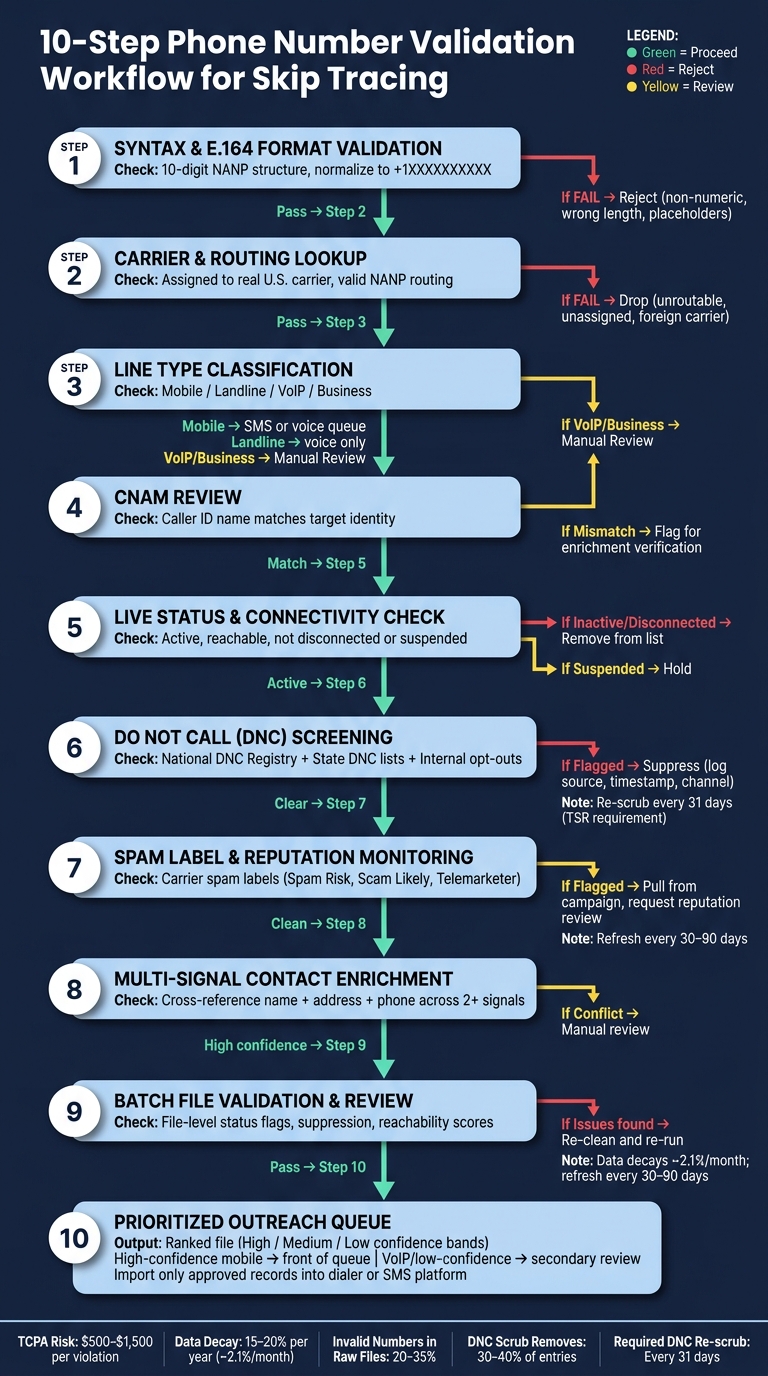
10-Step Phone Number Validation Workflow for Skip Tracing
The table shows what each method confirms. This section puts those methods into a practical workflow.
Order matters here. Each step relies on the one before it, so changing the sequence can lead to bad data, wasted spend, or compliance risk.
Start with Format Cleanup and Normalization
Every check that comes later depends on the phone number being in one consistent, machine-readable format. So this is the first move.
Normalize each number to E.164, strip non-numeric characters, reject impossible NANP patterns, and dedupe records before running any lookup. After that, every later check should use that same normalized value as the source key.
If you skip this step, things get messy fast. The same phone number can appear in several formats, and that can throw off lookups or create duplicate records in your file.
Run Carrier and Line Type Checks Next
Once the numbers are normalized, move to carrier and line type checks.
Carrier lookup confirms the current carrier and porting status. Line type classification labels each record as mobile, landline, VoIP, or business. Those two signals help you split records into the right paths:
- SMS
- Voice-only
- Review
This is the point where the file starts to become usable. These results decide which records move ahead and which ones need a second look.
Add CNAM and Live Status for Confidence
After carrier and line type are confirmed, add CNAM and live status to build confidence in the match.
CNAM shows how the line presents. That helps flag plain mismatches between the contact you expect and what the carrier database returns. Live status shows whether the line is currently reachable.
Use these checks to sort likely matches from records that still need more work. If CNAM and live status still leave ownership unclear, move to enrichment next. If the signals conflict, send the record to enrichment review.
Think of this as the gut-check layer. The number may be formatted right and tagged right, but you still want to know whether it looks like the right person and whether the line is active.
Screen for DNC and Reputation Before Contact
Before any number enters a dialer, SMS platform, or call queue, run DNC and reputation checks.
Cross-reference the National Do Not Call Registry, state DNC lists, and any internal suppression lists. Federal rules require scrubbing against the national registry at least every 31 days for U.S. outbound campaigns.
Reputation checks should run at the same time, querying spam-label databases, call analytics, and carrier-level spam tagging. Only records that pass both checks should move into outreach.
This step is not the place to cut corners. A number that looks reachable but fails DNC or spam screening should stay out of the contact stream.
Use Enrichment and Batch Review to Prioritize Files
After a file clears format, carrier, line type, CNAM, live status, DNC, and reputation checks, enrichment and batch review turn that file into a ranked outreach list.
Append ownership and alternate-contact data, then score each record based on the mix of factors that matter most to your campaign. From there, prioritize the records most likely to be reachable and compliant.
For large files, break the batch into priority bands such as high, medium, and low. Those scores then feed the bulk delivery step next. The ranked file is what enters bulk delivery and the next workflow stage.
That workflow is where BatchData fits in the stack.
Where BatchData Fits in a Phone Validation Stack
BatchData comes in after the core phone checks are done and the list is ready for action. Once numbers are normalized, checked for carrier data, screened against DNC lists, and reviewed in bulk, BatchData helps teams decide who to contact first and with which number.
Phone Verification and Skip Tracing Support
BatchData pulls from 12 primary sources and 3,200+ supporting sources, with a reported 76% RPC rate. For each enriched record, it can return up to 10 phone numbers and 3 email addresses per owner, then sort them based on recency, line type, and activity signals.
That matters in practice. Instead of getting one number and hoping it works, a team can work through a ranked set of contact options tied to the same owner.
API and Bulk Delivery Options for U.S. Teams
The API works well for real-time use cases, like when a new lead enters the CRM or during nightly enrichment jobs. Bulk delivery is a better fit for CSV-based campaigns. It returns verified phone numbers, line type, and DNC flags that can be imported straight into dialers or marketing systems.
So the setup is pretty flexible. If your team works lead by lead, use the API. If you run list-based outreach, bulk delivery is usually the simpler path.
How BatchData Maps to the 10 Validation Methods
| Validation Method | BatchData Capability |
|---|---|
| 1. Integrated Phone Verification | Returns owner-linked verified phones |
| 2. Syntax and E.164 Format Validation | Normalizes numbers to standard U.S. format before any lookup |
| 3. Carrier Lookup | Identifies current carrier and porting status per number |
| 4. CNAM Review | Uses caller-name signals to flag mismatches with the expected owner |
| 5. Line Type Classification | Labels each number as mobile, landline, or VoIP for outreach routing |
| 6. Live Status and Connectivity Checks | Surfaces activity signals to flag inactive or unreachable lines |
| 7. Do Not Call Screening | Flags numbers on DNC lists or carrying regulatory flags |
| 8. Spam Label and Reputation Monitoring | Identifies high-risk numbers before they enter a dialer |
| 9. Multi-Signal Contact Enrichment | Appends phones, emails, and property attributes |
| 10. Batch File Validation and Review | Runs file-level normalization, tagging, and suppression screening |
This mapping makes BatchData’s role pretty clear. It doesn’t just check whether a phone number looks valid. It helps sort, tag, and enrich contact data so outreach teams can route records with fewer guesswork moments.
Plan Options: Pay-As-You-Go and Custom Solutions
BatchData offers pay-as-you-go access for smaller teams. It also offers custom plans with negotiated volumes, dedicated support, and integration and enrichment services for data workflows. A lot of teams start with pay-as-you-go, then move to a custom setup as list volume and integration needs increase.
Common Mistakes When Validating Skip Trace Numbers
Even strong teams slip up here. The pattern is usually the same: they treat one signal like it’s enough. It isn’t. Skip-trace validation tends to break when people rely on a single check instead of looking at the full picture.
Using Syntax Checks as the Only Filter
A number can look fine and still be dead on arrival. Good formatting doesn’t tell you whether the line is disconnected, reassigned, or flagged as spam by carriers. Syntax should be your first pass, not your final decision.
Treating CNAM as Proof of Ownership
Caller ID data gets overused all the time. CNAM can help, but it doesn’t prove ownership. It may be out of date or tied to a previous owner. Before you mark a number as a confirmed match, check CNAM against carrier data, line type, and enrichment data.
Rejecting All VoIP Numbers by Default
This one sounds safe, but it can hurt coverage. Not every VoIP number is useless. It’s better to treat VoIP as a routing signal than a hard reject. If you’re doing high-volume outbound calling, you may want to down-rank those numbers. But they can still work for secondary channels or manual review.
Skipping DNC and Spam-Risk Checks
A number isn’t fully validated until compliance is cleared. Reachable does not mean callable. Scrub numbers against the National Do Not Call Registry every 31 days, and check spam risk before dialing. TCPA violations can run $500 to $1,500 per call. On top of that, initial DNC scrubbing alone can remove 30–40% of entries from a contact list.
Not Refreshing Large Lists Before Each Campaign
Phone data gets old fast. Even a clean file won’t stay clean for long. Data decays at roughly 15–20% per year, which means a list that passed validation at intake may already include disconnected, reassigned, or reclassified numbers by the time the next campaign starts. For large files, refresh before each campaign. Even a list that’s 60 to 90 days old can already have those issues.
Conclusion
In skip tracing, one check alone doesn’t tell you much. A number can pass a syntax check and still be disconnected. It can show an active carrier record and still belong to the wrong person. It can even match a name and still sit on the National Do Not Call Registry. If you want confidence in a contact file, you need to stack signals instead of leaning on just one. That’s why the order of checks matters just as much as the checks themselves.
The flow is simple: validate, screen, enrich, then batch-review. Phone data changes fast, so it’s smart to re-validate before each campaign. Re-check key lists before every calling sprint, refresh your core databases on a set schedule, and flag a review when no-answer rates climb or connection quality slips. Once the file is ready, one workflow can take care of verification, enrichment, and delivery.
For teams that want one stack for phone verification, skip tracing, enrichment, and bulk delivery, BatchData – Ivo Draginov fits that role. It covers phone verification, carrier and line type data, skip tracing, contact enrichment, and bulk delivery through API and bulk workflows. Pay-as-you-go and custom solutions are available based on volume and workflow needs.
Treat the 10 methods like a scoring system. The more signals a record passes, the higher it should move up your list. That’s how a raw contact file becomes a clean, compliant, and callable list.
FAQs
Why isn’t a syntax check enough?
A syntax check only tells you whether a phone number looks right for the U.S. format. That’s it.
It does not tell you if the number is active, who owns it, or whether it’s a mobile, landline, or VoIP line.
That gap matters. If you rely on syntax alone, you can end up calling disconnected numbers, running into TCPA compliance issues, or reaching numbers listed on the National Do Not Call registry.
How often should I re-validate phone numbers?
Phone validation isn’t a one-and-done job. It needs to happen on a regular basis because contact data decays by more than 2% per month.
A good rule of thumb is to update phone numbers at least monthly. If you’re working with high-value records, re-enrich that data every 6 to 12 months. You can also run a periodic check on a sample of 500 to 1,000 leads through an enrichment API to catch outdated details before they pile up.
What checks matter most before calling?
Before calling, put compliance first. It cuts legal risk right away.
Start by scrubbing your contact lists against the National Do Not Call Registry. Then screen for known TCPA litigators.
Next, run a carrier lookup to check line status and confirm whether each number is a mobile phone, landline, or VoIP line. After that, use confidence scores to move high-confidence, active numbers to the top of the queue so your team can improve contact rates.
Related Blog Posts
- Phone Verification Tools: Top 5 Solutions
- How Phone Number Matching Improves Skip Tracing
- Property Data Validation for Skip Tracing Teams
- “Reverse Phone Lookup vs. Skip Tracing: What’s the Difference (and Why Real Estate Investors Need Both)” – owns “reverse skip trace” conceptually without needing a product name; strong internal-linking bridge to your existing skip-tracing cluster.