SEO Title: Flat File Database: Guide to Formats, Use Cases & Tools
Meta Description: A direct guide to flat file databases. Learn CSV, JSON, and Parquet formats, key differences from relational databases, and how to manage them at scale.
Meta Keywords: flat file database, flat file vs relational, csv file, json format, parquet file, data integration, bulk data transfer
A flat file database is the simplest data storage method, but its efficiency is the reason it powers high-volume data operations. At its core, a flat file database is a single plain text file where each line is a unique record, with data fields separated by a consistent delimiter like a comma. This raw, back-to-basics approach is its greatest strength, making it the fastest and most portable format for transferring enormous datasets, such as the 155 million property records delivered by BatchData.
| Core Takeaway | Description |
|---|---|
| Definition | Data is stored as plain text in a single file with simple rows and no complex relationships. |
| Primary Use Case | Bulk data transfer, archiving, logging, and configuration files. |
| Key Advantage | Universal portability and extreme speed for read/write operations on entire datasets. |
| Common Formats | CSV (Comma-Separated Values), JSON (JavaScript Object Notation), Parquet, and Avro. |
This guide breaks down exactly how flat files work, how they stack up against relational databases, and the operational strategies required to manage them effectively at scale.
What is a flat file database?
A flat file database is a database that stores data as plain text in a single file, organizing individual records as simple rows. Unlike a relational database (e.g., SQL), it has no built-in structure for defining relationships between multiple tables or executing complex queries. It is, quite literally, a flat list of information.
That simplicity is its most powerful feature. Because it's just text, a flat file is universally readable by nearly any application on any operating system without special drivers or software. This makes it the ideal format for transferring enormous amounts of data between different systems—a critical requirement in data-heavy industries like real estate.
Key Characteristics
| Attribute | Description | Best For |
|---|---|---|
| Structure | A single table within a single text file. Each row is a self-contained record. | Data transfer, archiving, simple lookups, and configuration files. |
| Portability | Human-readable and system-agnostic; easily opened and parsed by any program. | Sharing large datasets between disparate systems or organizations. |
| Simplicity | Requires no complex schema, relationships, or specialized query language. | Initial data ingestion, logging, or as an input for analytics pipelines. |
| Performance | Extremely fast for sequential read/write operations on the entire dataset. | Bulk data delivery, machine learning model training, and system backups. |
This foundation of simplicity and portability is why the flat file database remains a workhorse in modern data pipelines. It acts as the essential bridge for getting data from a provider like BatchData into a sophisticated analytical environment, setting the stage for deeper analysis.
How do flat file and relational databases differ?

The primary difference is structure. A flat file database is a single, self-contained list, like one giant spreadsheet. A relational database is a collection of multiple, interconnected tables, like a library's card catalog system with separate but linked drawers for authors, books, and borrowers.
This structural distinction impacts everything from data integrity to query complexity. Relational databases prioritize data integrity using strict rules (schemas) and relationships to prevent errors. A flat file database discards that complexity for raw simplicity, making it incredibly fast for bulk data delivery and direct processing.
Structure and Relationships
In a flat file, all data for a single entity lives in one row. A real estate record might contain property details, owner information, and transaction history in the same line, often leading to redundant data.
Relational databases (SQL) normalize this data into separate, logical tables:
- A
Propertiestable holds addresses and specs. - An
Ownerstable stores contact information. - A
Transactionstable logs sales history.
These tables are linked by keys (e.g., PropertyID), which eliminates data duplication and enables complex queries that join information from multiple tables. This power comes with operational overhead that flat files lack.
Data Integrity and Complexity
Relational databases enforce consistency through a predefined schema that dictates data types (text, number, date) and rules. You cannot insert a text string into a column defined for numbers, ensuring data remains clean and predictable.
Flat files operate on a "schema-on-read" model, where structure is interpreted by the application reading the file, not enforced by the file itself. This flexibility offers incredible speed but places the entire burden of data validation on the end-user's application. While relational databases present challenges like needing to scale Amazon RDS instances on a schedule, the challenges with flat files revolve entirely around data governance.
Head-to-Head Comparison
| Feature | Flat File Database | Relational Database (SQL) |
|---|---|---|
| Structure | Single table in one file | Multiple interconnected tables with defined relationships |
| Data Integrity | Low; no built-in enforcement | High; enforced by a strict schema and constraints |
| Query Complexity | Simple; typically requires parsing the entire file | High; supports complex JOINs and aggregations across tables |
| Scalability | Scales by file size; becomes unwieldy for transactional updates | Scales by adding resources; built for concurrent transactional loads |
| Best Use Case | Bulk data transfer, logging, backups, configuration files | Web applications, transactional systems, business intelligence |
What are the most common flat file formats?

The format you choose for a flat file database directly impacts its performance, readability, and utility. The four dominant formats are CSV and JSON, which are human-readable text formats ideal for quick checks and APIs, and Parquet and Avro, which are binary formats engineered for large-scale data analytics.
CSV (Comma-Separated Values)
Definition: The most common flat file format, consisting of a simple text file where values are separated by a delimiter, typically a comma.
Its primary strength is its universal, human-readable nature; you can open a CSV in any text editor or spreadsheet program. However, it lacks an enforced schema, struggles with delimiters inside data fields, and processes large datasets (millions of records) very slowly due to its uncompressed text format.
JSON (JavaScript Object Notation)
Definition: A human-readable text format that uses key-value pairs to store data, easily supporting nested data structures and arrays.
JSON is the standard for data exchange in web applications and APIs, as its structure mirrors the objects developers use in code. It excels at representing complex, hierarchical information, like a property record containing a list of past owners. The trade-off is larger file sizes and high memory consumption when parsing massive files, making it suboptimal for petabyte-scale analytics.
Parquet
Definition: A free and open-source binary file format that stores data in columns instead of rows, designed for efficient data storage and retrieval.
This columnar storage is its superpower. When querying a 100-million-row dataset for just two columns (sale_price and square_footage), Parquet allows the system to read only those columns, ignoring all others. This results in query performance up to 10x faster than row-based formats like CSV and reduces storage costs by up to 75% through efficient compression. It is the preferred format for training machine learning models. A real estate data format converter can be essential when working with varied formats.
Avro
Definition: A binary data serialization system that embeds the data's schema (structure and data types) directly within the file itself.
Avro's key feature is schema evolution. Because the schema is included in the file, applications can seamlessly read both old and new versions of a data feed even if fields have been added or removed over time. This makes Avro the top choice for data streaming and ingestion pipelines where long-term data compatibility and consistency are critical.
Why are flat files still used?
Flat files remain a cornerstone of modern data systems for one reason: unmatched efficiency and portability for bulk data transfer. When the objective is to move a massive volume of information from point A to point B quickly and reliably, a flat file outperforms more complex database systems. They are the standard for data delivery, machine learning model training, and low-cost data archiving.
High-Performance Data Acquisition
The primary role of a flat file database in a modern stack is as a high-speed data transport container. For a platform like BatchData, delivering datasets on over 155 million U.S. properties via API would be a nightmare of rate limits and connection issues. Instead, packaging the data into flat files allows clients to ingest it immediately, regardless of their internal tech stack.
This simplifies workflows for:
- Mortgage Lenders: Ingesting daily updates on property liens and pre-foreclosures.
- Proptech Platforms: Seeding a new application with a comprehensive, nationwide property dataset.
- Insurance Carriers: Accessing historical property data to build underwriting models.
Machine Learning and Analytics
Machine learning (ML) models require enormous amounts of clean, structured historical data for training. A flat file, particularly in a columnar format like Parquet, is the perfect delivery mechanism. Data scientists can easily version files to track experiments, share them with colleagues, and distribute training jobs across a cluster of machines. A single file provides the exact data snapshot needed to train a robust model without the overhead of constantly querying a live database.
A Statista report found that 35% of IoT edge devices rely on flat files. For more on the database market, see this Mordor Intelligence report.
Low-Cost Data Archiving
Not all data requires immediate, high-performance access. Historical records and compliance logs must be retained for years but are rarely accessed. Storing this "cold" data in a premium relational database is cost-prohibitive.
Flat files offer an optimal archival solution:
- Export: Data is dumped from an operational database into a compressed flat file (e.g., Gzipped CSV).
- Store: The file is moved to low-cost object storage, such as Amazon S3 Glacier.
- Retrieve: On the rare occasion it is needed, the file is retrieved and loaded into an analytical tool.
This strategy ensures long-term data retention at a fraction of the cost of active storage.
How do you manage flat files at scale?
Managing multi-gigabyte flat files requires a deliberate operational strategy focused on schema management, partitioning, compression, and security. The goal is to treat the file not as a monolithic data blob but as a structured asset that can be optimized for performance and reliability.
Implement a Schema-on-Read Strategy
Definition: The practice of defining and applying a data structure as you process a file, rather than relying on the file itself to enforce rules.
This approach brings the discipline of a relational system to the flat file world.
- Define a Schema: Create a version-controlled definition of expected column names, data types (string, integer, date), and nullability rules.
- Apply on Ingestion: As your application reads the flat file, it validates each row against the predefined schema.
- Handle Deviations: Automatically quarantine or flag any records that fail validation, preventing malformed data from corrupting an entire analytics job.
For more on building robust pipelines, see our guide to a scalable BI data integration architecture.
Partition Your Data
Definition: The process of breaking a single large logical dataset into smaller, more manageable physical files based on a specific key.
Querying a single 100 GB file of national pre-foreclosure data for records from one state is inefficient, as it requires a full file scan. Partitioning solves this. Common partitioning strategies include:
- By Date:
/year=2024/month=05/day=15/ - By Geography:
/state=CA/county=Los_Angeles/ - By Category:
/property_type=SFR/
When partitioned, a query for "all California properties in May 2024" navigates directly to the /state=CA/year=2024/month=05/ directory, reducing query times by over 90% by reading only the relevant files.
Use Compression
Compression is non-negotiable for reducing storage costs and boosting query speed by minimizing disk I/O.
| Algorithm | Type | Best For | Key Trait |
|---|---|---|---|
| Gzip | General Purpose | Text-based files (CSV & JSON) | High compression ratio, moderate CPU usage. |
| Snappy | Performance-Focused | Analytics workloads (Parquet) | Lower compression ratio but extremely fast to compress/decompress. |
| Zstandard (zstd) | Balanced | Modern data pipelines | Excellent balance of high compression ratio and speed. |
Choose a high-ratio algorithm like Gzip for archiving and a high-speed algorithm like Snappy for interactive analytics.
Enforce Validation and Security
Simple file formats do not excuse lax governance.
- Data Validation: Before ingestion, run automated checks for duplicates, null values in critical fields, and out-of-range values.
- Access Control: Use cloud IAM policies to restrict read/write access to storage buckets.
- Encryption: Encrypt data both in transit (TLS) and at rest (AES-256) to protect sensitive information.
How do you integrate flat file data into a workflow?
Integrating flat file data requires a planned process to move it from a static file into a dynamic system where it can generate business value. The three primary integration patterns are automation via cloud storage, direct ingestion into a data warehouse, and custom programmatic processing.
Cloud Storage Automation
The most common method involves automating data pulls from a cloud storage service like Amazon S3. The flat file is delivered to a designated S3 bucket on a regular schedule, and an automated script retrieves and loads it into an internal system. This is ideal for periodic bulk updates, such as a daily feed of new pre-foreclosure listings. This workflow relies on solid application integration principles.
Direct Data Warehouse Ingestion
For serious analytics, the goal is to load flat file data into a data warehouse like Snowflake. Data warehouses are optimized to run complex queries on massive datasets and have built-in tools for ingesting structured files like Parquet or CSV.
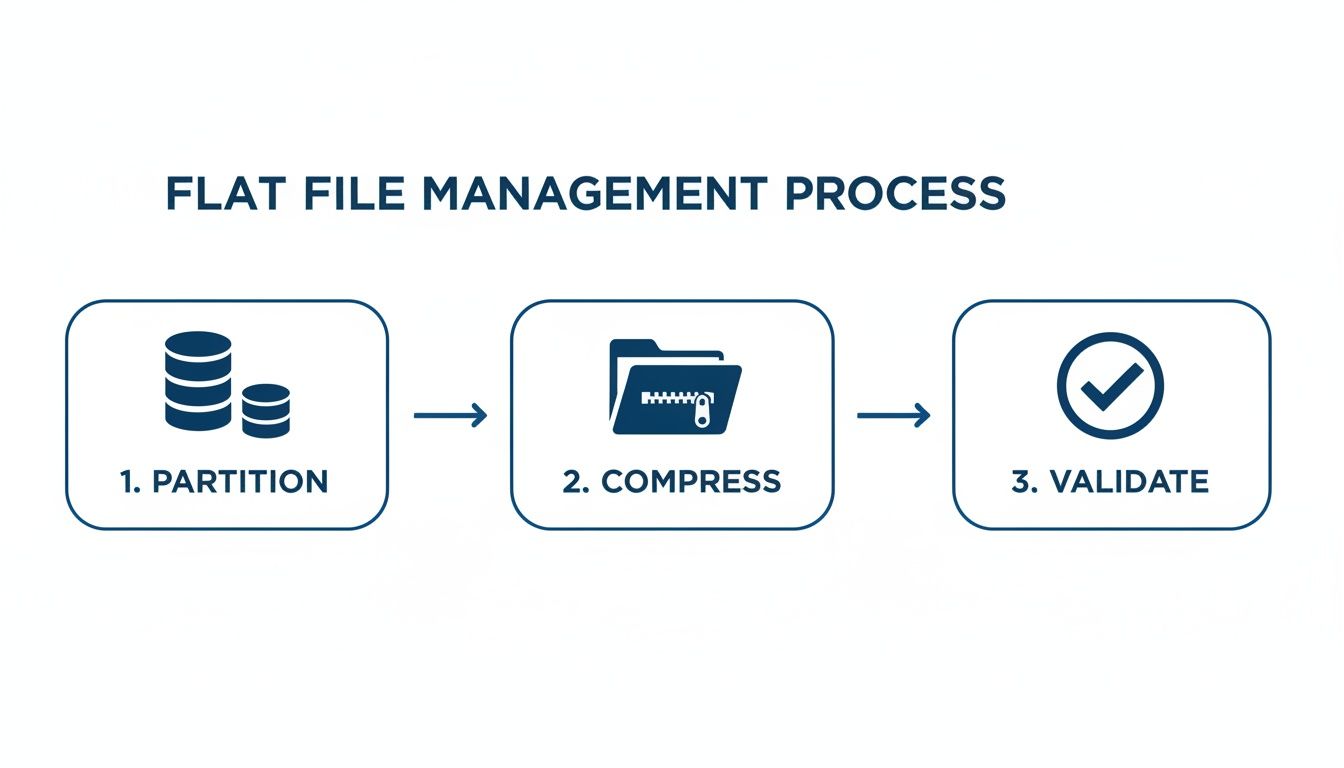
The process involves partitioning and compressing the data for cost and query optimization before using a simple SQL command like COPY INTO to load it directly into a Snowflake table. The data is then immediately available to BI and data science teams. For more, explore these smart data integration techniques.
Programmatic Processing
For maximum flexibility, developers process files directly using code. Python libraries like Pandas (for smaller files) and Dask (for large, distributed datasets) allow for the creation of custom ETL (Extract, Transform, Load) pipelines. This approach is used to weave property data into a custom application or feed it into a machine learning model, such as a script that ingests property records, enriches them with demographic data from another API, and then scores them for investment potential.
What are some common questions about flat file databases?
Here are direct answers to practical questions that frequently arise when working with flat files.
Can you edit a flat file directly?
Yes, but you should not. While you can open a CSV or JSON file in a text editor and make changes, this is extremely risky in a professional environment. A single misplaced comma or quote can corrupt the entire file and break all downstream processes. Data modifications should always be handled programmatically through a script or application that enforces the correct structure upon saving.
Are flat files secure?
No, not by themselves. A flat file has no inherent security features. Securing them requires external controls.
- Encryption at Rest: Use algorithms like AES-256 to encrypt the file on disk.
- Access Controls: Use file system permissions or cloud IAM policies on services like Amazon S3 to restrict who can access the file.
- Encryption in Transit: Use protocols like TLS to protect the file as it moves across a network.
When is using a flat file a bad idea?
A flat file is the wrong choice for any system that requires frequent, small, simultaneous updates from multiple users or systems. Examples include real-time inventory management, e-commerce order processing, or banking applications.
These transactional systems require a database that can manage concurrent operations safely. Flat files lack a "locking" mechanism, meaning if two users write to the file at the same time, one user's changes will overwrite the other's, leading to data corruption known as a race condition. For these use cases, a relational or NoSQL database is required.
Ready to harness the power of bulk property data without the integration headaches? BatchData delivers over 155 million U.S. property records in clean, analysis-ready formats—including optimized flat files—directly to your S3 or Snowflake instance. Explore our data solutions today.