
BatchData’s Real Estate Data API simplifies CRM automation by providing access to over 155 million U.S. property records and 700+ attributes. It eliminates manual data entry by enriching CRM systems with real-time property insights, including square footage, mortgage history, and contact details. Key benefits include:
- Lead Prospecting: Identify motivated seller leads using financial indicators like foreclosures or liens.
- Contact Enrichment: Retrieve verified phone numbers and emails with high accuracy.
- Data Verification: Clean and validate addresses, phone numbers, and geolocation data.
The API supports flexible integration through direct calls, bulk data delivery (e.g., AWS S3, Snowflake), or custom datasets. Pricing starts at $500/month for 20,000 records, scaling up to enterprise solutions. Developers can test endpoints using tools like Postman or Python’s requests library for seamless integration.
Use cases include automating lead enrichment, managing CRM workflows, and building scalable pipelines with platforms like Snowflake or Apache Airflow. BatchData’s tools help streamline CRM tasks, reduce errors, and improve data accuracy, making it a valuable resource for real estate, proptech, and home service industries.
Prerequisites and API Setup
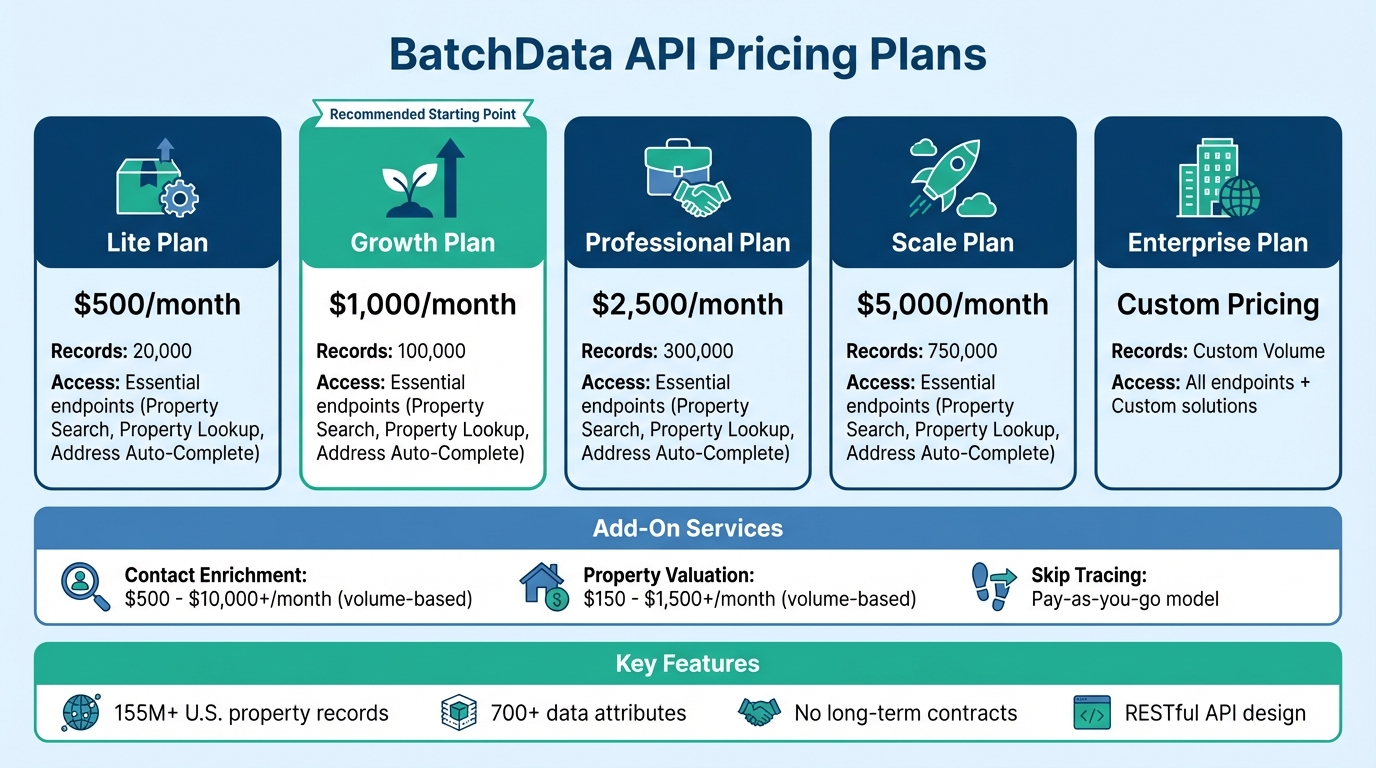
BatchData API Pricing Plans and Features Comparison
Start by creating an account, generating an API key, and selecting a pricing plan that aligns with your CRM automation needs. These initial steps enable you to incorporate real-time property data into your CRM workflows seamlessly. The platform is particularly suited for developers seeking flexibility, as it doesn’t require long-term contracts or minimum commitments.
API Key Generation and Authentication
Once you’ve signed up, head to the dashboard to generate your API key. This key is essential – it authenticates your requests and tracks your monthly usage. Authentication is straightforward: include your API key in the Authorization header of every request. The API’s RESTful design ensures smooth integration into your existing systems.
BatchData uses Stoplight to host its API documentation and management tools. This structured interface allows you to explore endpoints, view sample requests and responses, and test API calls before deploying them into your production environment. Be sure to review usage limits and choose a plan that fits your operational requirements.
Usage Limits and Pricing
BatchData offers five subscription plans, ranging from Lite at $500/month (20,000 records) to custom Enterprise pricing for higher volumes. Each plan grants access to essential endpoints, including Property Search, Property Lookup, and Address Auto-Complete. The Growth plan, priced at $1,000/month, supports up to 100,000 records, while the Professional ($2,500/month) and Scale ($5,000/month) tiers handle 300,000 and 750,000 records, respectively.
If you need additional datasets without upgrading your entire plan, you can purchase them separately. For example, Contact Enrichment ranges from $500 to over $10,000 per month, depending on volume, while Property Valuation costs between $150 and $1,500+. For skip tracing services, BatchData offers a pay-as-you-go model, making it a great option for sporadic contact enrichment needs. Consider starting with the Lite or Growth plan to test your workflows, and request a demo to explore the API’s full capabilities before committing to a larger investment.
Developer Tools for API Testing
Once your setup is complete, you can efficiently test endpoints using developer tools. Postman is excellent for quickly testing API calls – you can import the API structure directly from the Stoplight documentation and create collections for frequently used endpoints. For Python developers, the requests library offers a simple way to integrate the API. With authenticated GET and POST requests, you can interact with endpoints like Property Search and Skip Tracing effortlessly.
The documentation includes detailed code examples and parameter specifications, streamlining the process of moving from testing to production. These tools and resources are designed to help you implement the API quickly and effectively, so you can focus on optimizing your workflows.
sbb-itb-8058745
Core BatchData API Endpoints for CRM Automation
The BatchData API taps into a massive database of over 155 million properties, offering the tools needed to streamline CRM workflows. Its endpoints are designed to address specific CRM tasks, enabling developers to automate everything from finding leads to verifying contact details. Here’s a closer look at how these endpoints can optimize your CRM processes.
Property Search for Lead Prospecting
If your CRM system aims to generate high-quality leads, the property search endpoint is a game-changer. It filters properties based on factors like property specs, lot details, and construction characteristics. Features like Smart Search simplify lead generation by automatically compiling lead lists using these criteria. It also identifies motivated sellers using financial distress indicators such as pre-foreclosure status, notices of default, unpaid balances, and high equity or loan-to-value (LTV) ratios.
Property Lookup and Skip Tracing
Taking property search a step further, these endpoints provide detailed property records and contact information to boost your outreach efforts. The lookup-property endpoint retrieves comprehensive data for specific properties, while skip tracing endpoints deliver verified contact details for property owners. BatchData’s database includes over 9 million phone numbers and 3 million email addresses, with a 76% right-party contact accuracy rate – a figure that’s three times the industry standard. The Entity Resolution feature adds another layer of precision by identifying the people behind corporate ownership structures.
Address and Contact Verification
The verify-address, geocode-address, and phone verification endpoints ensure your CRM data stays clean and compliant. Address verification removes duplicates and invalid entries from your mailing lists, cutting down on wasted marketing resources. Phone verification identifies disconnected numbers and flags contacts listed on Federal Do Not Call (DNC) lists, helping you steer clear of compliance risks. The geocoding endpoint validates property coordinates, which is vital for accurate mapping, field routing, and other location-based CRM tasks. By integrating these verification tools at the point of data entry, you can maintain a database of valid addresses and active phone numbers.
Integrating BatchData API with CRM Systems
To connect BatchData’s API with your CRM system, you’ll use RESTful HTTP requests, as previously discussed. The API adheres to standard REST principles, making it easy to work with Python’s requests library and most modern CRM platforms. Authentication is handled by including your API key in the HTTP request headers, typically as Authorization: Bearer <API_KEY> or x-api-key. For guidance on setting up your API key, refer to earlier documentation. All responses are returned in JSON format, which integrates smoothly with CRM objects like Leads, Contacts, or Properties.
Python Integration Example

Here’s a practical example of using BatchData’s API with Python. Begin by installing the necessary libraries with:
pip install requests python-dotenv Store your API key in a .env file to keep it secure. Then, construct headers using your API key, make API calls with requests.get() or requests.post(), and process the responses using response.json().
If you’re updating existing CRM records, map BatchData’s JSON keys (such as total_equity, owner_occupied, or estimatedValue) to your CRM’s specific field IDs. This ensures data merges seamlessly without manual effort. To handle potential issues like timeouts, invalid addresses, or authentication failures, wrap your API calls in try-except blocks. Additionally, manage rate limits to avoid 429 Too Many Requests errors by using Python’s time.sleep() or the ratelimit library, staying within BatchData’s usage caps.
Bulk Data Delivery and Custom Datasets
For large-scale CRM databases, BatchData offers bulk delivery options and batch endpoints, allowing you to process multiple records in a single request. This method reduces latency and API overhead compared to handling individual records one at a time. You can also request custom datasets tailored to your CRM workflow, which is especially useful for enterprise-level automation where standard endpoints might not address all requirements. Bulk processing is cost-efficient under BatchData’s Pay-As-You-Go pricing model, as it consolidates multiple requests into fewer API calls. This approach minimizes overhead and streamlines integration.
Endpoint Parameter Comparison Table
The table below highlights key endpoint parameters for CRM automation, helping you choose the right endpoint for your needs.
| Endpoint | Primary CRM Use Case | Key Parameters | Response Fields |
|---|---|---|---|
| Property Search | Lead Prospecting | Location (City/State/Zip), Property Type, Market Value Range | Property Address, Market Value, Year Built, Building Area |
| Property Lookup | Lead Qualification | Street Address, City, State, Zip or Parcel ID | Detailed Property Records, Ownership History, Tax Info |
| Skip Trace | Contact Enrichment | Property Address or Owner Name | Owner Phone Numbers, Email Addresses, Mailing Address |
CRM Workflow Automation Examples
These workflow examples illustrate how to use BatchData’s API to automate CRM tasks effectively.
Automating Lead Enrichment
Turn basic CSV lead data into actionable sales opportunities with BatchData’s API. Start by loading your lead data using Python’s pandas library. Each row should include basic address details like street address, city, state, and ZIP code. For example, you can load a file named leads.csv containing columns such as street_address, city, state, and zip_code. Using this data, make POST requests to BatchData’s property-search endpoint with your API key. The API will return JSON responses with enriched details like owner_name, phone, estimated_value, and sqft, all pulled from BatchData’s database of 155M+ properties and 700+ data points.
Once you have the API responses, extract the relevant fields and append them as new columns to your DataFrame. Finally, export the enriched data to a new file, enriched_leads.csv, ready for CRM import.
To streamline the process, map the API response fields directly to your CRM’s corresponding fields. For batch processing, structure your JSON payload with a "requests" array, which allows you to handle multiple addresses in one API call. This not only reduces the number of calls but also helps you stay within API rate limits.
While automating lead enrichment can save time, robust error handling is critical to ensure the process runs smoothly.
Error Handling and API Rate Management
After enriching your leads, focus on protecting your workflow from errors and managing API rate limits effectively. Wrap your API calls in try-except blocks to handle exceptions, and use exponential backoff (e.g., 2 seconds, then 4 seconds, and so on) for transient issues. Log any non-200 HTTP responses along with the lead details for troubleshooting. For server-side errors (5xx), retry the request with exponential backoff to avoid overloading the API.
To avoid hitting 429 Too Many Requests errors, insert delays between API calls using time.sleep() or use a rate-limiting library to throttle requests automatically. Since BatchData’s Pay-As-You-Go model charges per request, caching frequently accessed property data in a local database or key-value store can help minimize redundant lookups and reduce costs.
Before syncing the enriched data back into your CRM, validate critical fields like phone and estimated_value to ensure they aren’t null or improperly formatted. This step prevents "dirty data" from entering your sales pipeline. Additionally, set up failure notifications via Slack or email to stay informed about issues, and enable detailed execution logs to monitor success rates and identify bottlenecks in your automation processes.
Scaling with Custom Data Pipelines
Building Scalable Data Pipelines
When your CRM automation demands grow to handle thousands of API calls daily, a custom data pipeline becomes a necessity. Platforms like Snowflake and Databricks provide a solid foundation for managing large-scale real estate data, allowing you to store enriched information in a central location while cutting down on redundant API requests.
To manage the sequencing of API calls efficiently, tools like Apache Airflow, Prefect, or Dagster are excellent for orchestrating tasks. For instance, you can automate nightly batch jobs to pull BatchData’s daily updates into your data warehouse. Once there, tools like dbt (data build tool) can transform raw JSON responses into structured data that aligns with your CRM’s schema, whether you’re using Salesforce or HubSpot. This streamlined process ensures data is clean, normalized, and ready for use across multiple CRM instances, even in different sales regions.
For handling millions of records, BatchData’s bulk delivery options – like AWS S3, Snowflake Data Sharing, or Azure – offer an efficient alternative to individual API calls. Pairing these delivery methods with serverless middleware, such as AWS Lambda or Google Cloud Functions, enables event-driven processing of BatchData responses before they are pushed to your CRM. To further optimize performance and cut costs, adding a caching layer like Redis can store frequently accessed property data, avoiding repeated API calls for the same information. These strategies provide the scalability and efficiency needed for enterprise-level automation.
Custom Solutions for Enterprise Automation
Beyond scalable pipelines, BatchData supports enterprise clients with tailored solutions for complex environments. Their professional consulting services are designed to help organizations build custom integrations that meet specific needs. These services include creating bespoke data pipelines, developing custom mappings for BatchData’s extensive property attributes, and implementing synchronization strategies that handle high volumes of data across multiple CRM systems or geographic regions.
For enterprises requiring compliance-ready verification or advanced capabilities like uncovering ownership details behind LLCs or corporations during contact enrichment, BatchData offers custom integration bridges. These bridges ensure data quality and prevent duplicate records, which is especially important for businesses operating across multiple states or managing several CRM instances. By maintaining centralized data governance and consistent enrichment logic, organizations can enhance their sales processes while staying aligned with enterprise-level requirements.
Conclusion
BatchData’s API transforms CRM automation by streamlining processes like lead management, contact enrichment, and prospecting workflows. From generating API keys to leveraging key endpoints such as property search, skip tracing, and contact verification, this guide has walked through the essential steps to integrate BatchData’s Real Estate Data API into your workflows. With tools like Python integrations and bulk data delivery through platforms like Snowflake or Azure, manual data entry becomes a thing of the past, replaced by real-time automation and seamless property data integration.
Practical use cases highlight how to enrich leads, manage API rate limits, and build scalable data pipelines using tools like Apache Airflow and dbt. Whether it’s enhancing CRM records with financial distress indicators, identifying LLC ownership, or syncing updates across regions, these workflows ensure precise data handling and enterprise-grade automation.
As the industry moves toward cloud APIs and AI-driven decision-making by 2025, BatchData equips your CRM with the tools to stay competitive. The API’s compliance-ready verification and ability to provide accurate contact information help reduce spam risks and boost marketing ROI. By centralizing property intelligence and automating data hygiene, you can manage leads more effectively and make faster, data-driven decisions.
With flexible pricing options and tailored solutions, BatchData offers a seamless experience for both small-scale and large enterprise integrations. The pay-as-you-go model and expert consulting services eliminate barriers to adopting real estate data solutions. The result? A highly optimized CRM delivering actionable insights on demand, enabling efficient automation across industries like real estate, proptech, and home services.
FAQs
Which endpoint should I use first for my CRM workflow?
The Property Search API is your starting point for CRM workflows. This API delivers detailed property information, such as addresses, valuations, and ownership details. It’s perfect for kicking off tasks like lead generation or enhancing property data. By integrating this into your system, you can simplify processes like enriching contact details or scheduling follow-ups, making your CRM automation more efficient.
How do I map API fields into my CRM without duplicates?
To ensure API fields map into your CRM without creating duplicates, follow these steps:
- Clean and Audit Data Regularly: Regularly review and clean your data to remove duplicates, verify contact details, and maintain consistency across records.
- Standardize Data Formats: Ensure uniform formats for key data points like phone numbers, addresses, and dates to avoid mismatches.
- Use Unique Identifiers: Map fields to unique CRM identifiers, such as email addresses or contact IDs, to accurately match records.
- Implement Deduplication Logic: Set up API workflows that check for existing records before adding new ones, helping to prevent duplicate entries.
What’s the best way to scale enrichment for large lead lists?
When working with large lead lists, scaling enrichment can feel overwhelming. BatchData’s Real Estate Data API simplifies the process by enabling automated workflows that handle high data volumes with ease. By leveraging real-time, API-driven enrichment, you can cut down on manual tasks and minimize errors.
To take it a step further, pair this with bulk data transformation techniques. These methods help with cleaning up, standardizing, and syncing your data, ensuring everything remains organized and actionable.
Finally, make sure to implement regular monitoring and testing. This helps maintain scalability and keeps data quality intact, even as your lead database continues to grow. It’s all about creating a system that supports your expanding needs without compromising accuracy or efficiency.