If your reporting data is even one day late, you can miss cost issues, field delays, and rework before the crew changes course. I’d boil this down to one simple point: the right setup depends on how many systems you run, how fast you need updates, and whether you report at one-job or portfolio level.
Here’s the short version:
- Direct APIs fit small teams that need one system to pass data into another with low setup time.
- ETL and data warehouses fit companies that need one reporting layer across many jobs, entities, or regions.
- Middleware, queues, and event streaming fit teams that need dashboard updates in minutes, not tomorrow.
- Data enrichment services help when reports break because addresses, contacts, or property records are incomplete or messy.
A few numbers make the case plain:
- Manual report prep can drop from about 3 hours to 20 minutes
- Manual entry errors often run 1% to 4% per entry
- Bad project data contributes to about $177 billion per year in rework in U.S. construction
- Manual reporting can leave teams working from data that is 2 to 6 weeks old
My takeaway: if you only need one field app tied to one accounting system, start with APIs. If you need roll-up reporting across many jobs, use a warehouse. If teams need near-live updates, add event-driven pipelines. And if records are incomplete, clean the master data before you trust the dashboards.
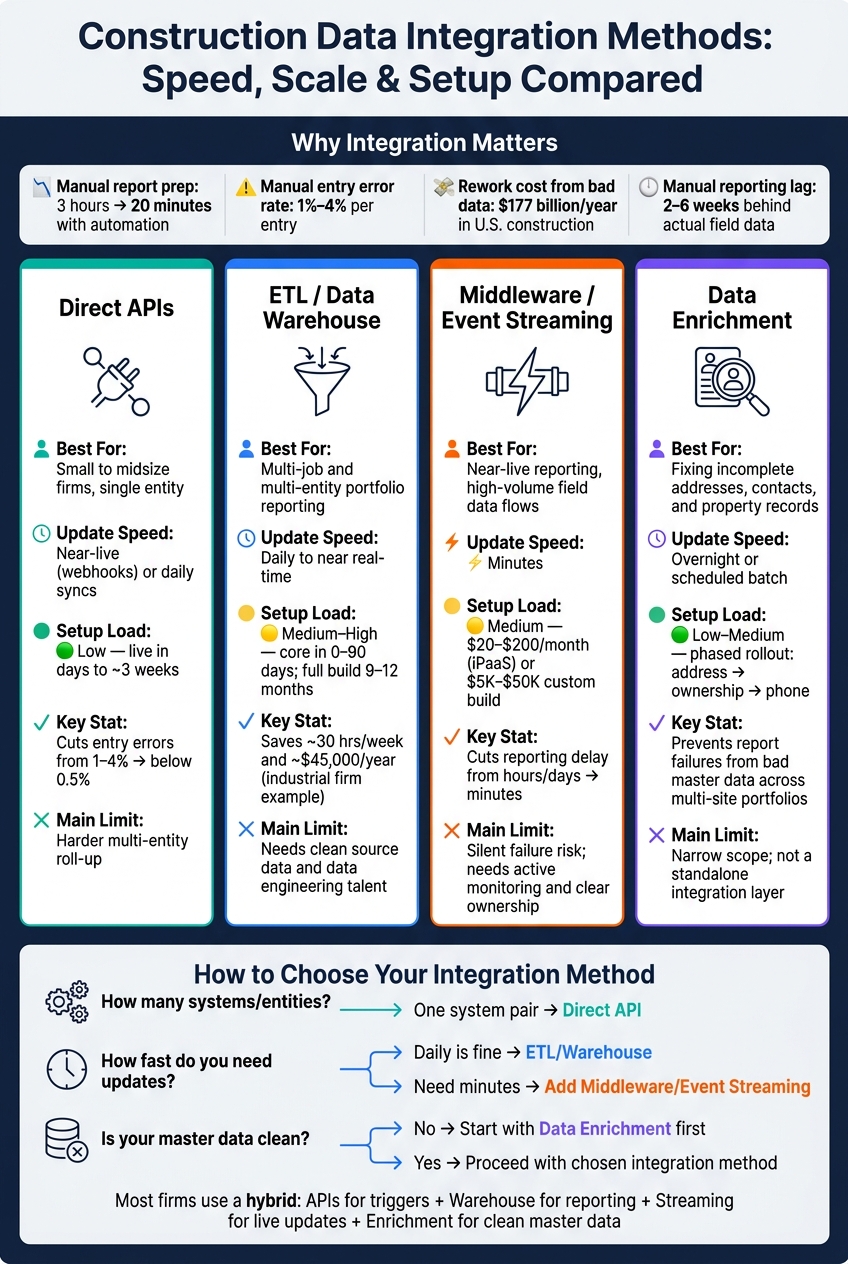
Construction Data Integration Methods: Speed, Scale & Setup Compared
Track All Your Construction Data From Multiple Sources – On One Screen
sbb-itb-8058745
Quick Comparison
| Method | Best for | Update speed | Setup load | Main limit |
|---|---|---|---|---|
| Direct APIs | Small to midsize firms, single entity | Near-live with webhooks or daily syncs | Low | Harder multi-entity roll-up |
| ETL / Warehouse | Multi-job and multi-entity reporting | Daily to near real-time | Medium to high | Needs clean source data and data skills |
| Middleware / Event Streaming | Near-live reporting and high-volume flows | Minutes | Medium | Needs monitoring and ownership |
| Data Enrichment | Fixing weak property/contact records | Overnight or scheduled batches | Low to medium | Narrow scope; not a full integration layer |
If I were choosing, I’d match the method to the reporting deadline first, then to company scale, then to data quality.
1. Direct System-to-System API Integrations
Direct APIs link construction, ERP, and scheduling systems so approved data moves on its own. When a foreman submits a daily log in Procore, crew hours, quantities, and cost codes can flow straight into the progress dashboard and ERP without anyone re-entering the same numbers. That matters more than it may sound at first glance. A clean handoff can cut manual entry error rates from 1–4% per entry to below 0.5% when the integration is set up well. The catch shows up later, when teams need reporting that rolls up across more than one entity.
Scalability
Native connectors usually work best at the single-entity level. That fits a smaller contractor that wants to connect one field tool to one accounting system. But once a company runs a multi-LLC portfolio, things get messier. Those setups often need extra consolidation before data can roll up into portfolio-level reports.
Scale isn’t the only issue here. Speed also matters, because data that arrives too late can miss the moment when a team could have acted on it.
Latency
APIs that use webhooks can send a notice as soon as data changes. In plain English, that gives project managers a much faster view of cost overruns – within 24–48 hours instead of waiting for weekly reports. That kind of timing can make a big difference on a busy jobsite.
By contrast, scheduled daily or nightly syncs leave job-cost data at least 24 hours behind. If a superintendent needs to make a same-day call, that lag can get in the way.
Data Governance
Each integration account should run with minimum necessary access. That means only the permissions needed to move specific data types, and nothing extra. It’s a simple rule, but it keeps the blast radius small if something goes wrong.
Clear ownership matters just as much. The ERP should own financial records, while Procore should own field logs, and those lines shouldn’t get blurry. Automated audit trails for every edit and transfer help keep everyone honest and make month-end reconciliation less of a scramble.
Implementation Effort
Native connectors can go live in days. If a team needs more flexibility, a specialized integration layer can be put in place in about three weeks without replacing the software already in use.
2. ETL and Data Warehouse Integration
Where direct APIs shine with current data, ETL is built for consolidation, history, and portfolio-wide analysis. ETL pipelines and a data warehouse pull field, cost, and schedule data into one consistent progress-reporting layer across projects, regions, and divisions. For firms running many projects at once, that means no more manual stitching together exports from tools like Procore and Sage. That matters because construction teams spend about 13 hours per week searching for and reconciling information.
ARCO Construction made this shift in 2026. The company pulled siloed Procore and Viewpoint data into a Microsoft Azure data warehouse, which gave leadership one shared view of project performance. Before that, putting the same picture together took a lot of manual work.
Scalability
Cloud warehouses are built to grow with the business. Snowflake, for example, is built to handle billions of records with low maintenance, which makes it a good fit as project count or geographic reach grows. But there’s a catch: if your source systems use messy cost codes, automation will just spread the mess faster. Standardize cost codes before you automate. If naming differs across ERP, project management, and payroll systems, those errors will multiply at scale.
Tools like dbt help in the transformation layer. They enforce naming rules and data types so cross-project comparisons stay dependable.
Scale is one part of the story. The other part is speed. If reports land too late, teams can’t do much with them.
Latency
ETL is not built for live updates, but it can make a big difference in how current your reporting feels. Manual reporting cycles often leave teams working with data that is 2 to 6 weeks old. Automated ETL pipelines can cut that down to daily syncs or near real-time updates. A daily refresh won’t flag a same-day issue, but it gets problems in front of the team much sooner than month-end reporting.
Data Governance
A warehouse is also the right place to lock down access and track what happens to the data. It can enforce role-based access, encryption, and audit trails for financial and contract records. DPR Construction tackled this by standardizing on Autodesk Construction Cloud as a single source of truth, so teams could work from the same records for financials and schedules.
Implementation Effort
This kind of setup usually works best in phases. Core integrations can be in place within 0–90 days, while more advanced features like predictive analytics often take 9–12 months after the data foundation is cleaned up. That slower buildout is normal. You don’t want to pile analytics on top of messy inputs.
The payoff can be meaningful. One industrial construction firm saved 30 hours per week and about $45,000 per year after replacing manual workflows with automated ETL.
For teams that need updates faster than a daily warehouse refresh, event streaming can bridge the gap between warehouse reporting and live operations.
3. Middleware, Message Queues, and Event Streaming Pipelines
When a once-a-day warehouse refresh can’t keep up, middleware and event streaming help construction data move in near real time. They route transactions, smooth out traffic spikes, and push report updates to teams in the field. That’s a big deal when daily logs, RFIs, shift-close transactions, and equipment signals need to hit dashboards before the next shift begins.
Here’s the simple split:
- Middleware handles mappings and business rules
- Message queues buffer bursty submissions
- Event streaming moves high-volume telemetry and sensor data at scale
Scalability
Middleware can scale across multiple nodes, and queues help soak up shift-close and mobilization bursts without crushing downstream systems. Think of it like a traffic on-ramp: instead of dumping every vehicle onto the highway at once, the flow gets spaced out so the road keeps moving.
Latency
Compared with daily warehouse refreshes, event-driven pipelines can cut reporting delay from hours or days down to minutes. In construction, that time gap matters. If a field issue shows up late, the crew may already be building on bad information. Rework costs the U.S. industry an estimated $177 billion each year.
Data Governance
Middleware can check entries against reference data, map them to a canonical model, and send failed records to a dead-letter queue. That gives teams a way to catch bad data before it spreads into reports and downstream apps.
Security is part of this layer too. Common controls include OAuth 2.0, token rotation, and role-based access. If upstream records still arrive half-filled or messy, the next step is master-data enrichment.
Implementation Effort
Middleware and iPaaS tools usually land in the middle on complexity. They’re more involved than native integrations, but much less brittle than custom-built APIs.
Costs vary by approach:
- Integration platforms often run $20–$200 per workspace per month
- Custom builds can cost $5,000–$50,000 upfront, plus $1,000–$5,000 per year in upkeep
One practical warning: middleware failures can sit unnoticed for weeks if nobody is actively watching the pipeline. Clear ownership for pipeline health needs to be set from day one.
When source records are incomplete or inconsistent, the next layer is master-data enrichment.
4. Specialized Data Enrichment Services for Property and Contact Master Data
Even a solid pipeline can fall short when the source data is thin. If records come in with missing owner names, unverified phone numbers, or messy property addresses, those problems show up in reports too. Services like BatchData help fill in those gaps by appending verified property and contact fields, standardizing addresses to USPS format, and adding geocodes to project records. In practice, enrichment sits right after integration: it improves report quality without forcing changes to source systems.
Scalability
For large U.S. contractors running hundreds of active sites across several states, real-time enrichment doesn’t make sense at portfolio scale. The pattern that works is scheduled bulk enrichment: run a full portfolio refresh each month or quarter, then apply incremental updates only to new or changed records. Bulk refreshes handle scale better than live enrichment for large portfolios. That makes scheduled enrichment a better match than live lookup for multi-site reporting.
Latency
For most reporting cycles, overnight enrichment is enough. Contact data tends to change faster than property data, so it makes sense to refresh contact records more often than static property fields. A simple setup is to pre-enrich property and contact master data on a set schedule, then join that cached data to event streams or dashboard queries. That avoids live lookups inside dashboard queries, which helps keep reporting steady.
Data Governance
Enriched contact data comes with real compliance duties in the U.S., including TCPA and CAN-SPAM rules. Teams need to track the source, update time, and match confidence for every enriched field, and they need to limit contact data access to authorized users. That lineage matters. If a phone number or ownership field is wrong in a report, you can trace it back to where it came from and fix the root issue instead of patching the dashboard.
Implementation Effort
Starting with enrichment is far more narrow than building the same capability in-house. A phased rollout usually begins with three high-impact steps:
- Address normalization
- Ownership enrichment
- Phone verification
These fixes cut down manual cleanup in reporting workflows right away. Once teams hit their data quality goals, they can add more attributes. For teams that can’t standardize source records first, this is the fastest path to cleaner automated reporting.
Pros and Cons by Integration Method
No single integration method works best in every case. The right pick depends on a few plain factors: how many active jobs you’re running, how much technical skill your team can spare, and how up-to-date your reporting needs to be. Each option comes with its own ceiling for scale and its own setup load.
The table below turns the earlier method-by-method review into a decision guide based on scale and upkeep. Use it to line up integration depth with reporting speed, data volume, and team capacity.
| Integration Method | Strengths | Limitations | Maintenance Burden | Ideal Project Scale |
|---|---|---|---|---|
| Native APIs | Fast deployment; lowest cost; vendor-supported | Limited customization; limited to vendor-supported workflows; often cannot support multi-entity consolidation | Low | Small to midsize (single entity) |
| Custom APIs | Maximum flexibility; bespoke workflows | High technical debt; breaks when connected systems update | High | Large / enterprise-scale, specialized needs |
| Middleware/iPaaS | Managed layer; more flexible than native tools | Licensing fees; third-party dependency; silent failure risk | Medium | Mid-market to large |
| ETL/Data Warehouse | High scalability; supports AI/BI; multi-entity consolidation | High setup complexity; requires data engineering talent | Medium (after setup) | Enterprise / multi-entity |
| Specialized Enrichment (OCR + master-data enrichment) | Unlocks data from PDFs and scans; reduces manual entry | Narrow focus; requires structured output validation | Low to medium | High-volume AP and contract workflows |
What shows up pretty clearly here is a tradeoff between control and cost. More control usually means more setup, more upkeep, or both.
- Native APIs – the fastest and easiest option for standard system pairs, but usually limited to single-entity workflows.
- Custom APIs – the most flexible choice for specialized needs, but also the hardest to maintain, with upkeep of $1,000–$5,000 per year to handle vendor changes.
- Middleware/iPaaS – sits in the middle on speed and flexibility, but adds third-party dependence and the risk of silent failures.
- ETL/Warehouse – the best match for multi-entity, portfolio-scale reporting, but it needs clean source data and data engineering support before it starts paying off.
- Specialized Enrichment – improves source data before APIs, queues, or warehouses use it; in practice, it turns unstructured documents into data that’s ready for analysis.
Conclusion
The right integration method comes down to a few plain factors: how many projects you manage, how fast reports need to update, and where the business is headed next. It also depends on the main goal. Some teams want faster progress reporting. Others need tighter, portfolio-level reporting with stronger control.
Direct real estate APIs make sense for smaller firms linking a handful of systems. ETL and warehouse setups work better for auditable, portfolio-wide progress reporting across multiple entities. Event streaming is a better match for large, spread-out programs where near-real-time visibility matters.
In multi-site portfolios, report quality often breaks because of bad addresses and stale contacts long before the data pipeline fails. In those cases, specialized enrichment helps keep property and contact master data clean across the portfolio. Most firms land on a hybrid setup. In practice, that usually means APIs for triggers, a warehouse for governed reporting, event streaming for live updates, and enrichment for cleaner master data. That blend gives construction teams speed at the edge, control in the middle, and reporting leadership can trust at the top.
FAQs
How do I choose the right integration method?
Choose the integration method that fits your project’s complexity, data volume, and how often data changes. Start by looking at your current systems and checking whether they support native integrations, APIs, or middleware.
If you deal with high-frequency or high-volume data, lean toward APIs or middleware instead of manual methods. Use synchronous APIs when you need instant validation, asynchronous messaging for large data flows, and ETL into a central warehouse when you want unified reporting.
When do I need a data warehouse?
You need a data warehouse when your construction firm relies on separate systems – like field management software, financial platforms, and BIM tools – and the data starts living in silos.
At that point, spreadsheet-based reporting usually begins to crack. It gets slow, error-prone, and hard to scale. A data warehouse pulls that scattered data into a single source of truth, so your team can analyze the business more clearly, use predictive analytics, and make decisions in real time.
Why does data enrichment matter for reporting?
Data enrichment matters because raw data is often incomplete, inconsistent, or stripped of the context people need to make sound decisions. When you add verified details like ownership, contact data, or past performance, scattered records start to become information you can actually use.
That added context also helps close information gaps and cut reporting errors. The result is more accurate forecasting and stronger project documentation.