
If your team still runs leads through spreadsheets, inboxes, and memory, you’re likely losing deals. In this comparison, I show the short answer first: CRM integration usually wins on response time, data quality, team visibility, scale, and return.
Here’s the core of it:
- Manual lead handling is slow. Average response time can stretch to 15 hours, while many buyers contact only one agent before making a choice.
- CRM-connected workflows reply fast. Many teams can send a first text or email in 90 seconds or less and keep replies under 5 minutes.
- Manual systems leak revenue. About 15%–20% of incoming real estate leads may get no follow-up within 48 hours.
- Data gets messy by hand. Without property enrichment tools, teams struggle to keep records accurate. Duplicates, wrong numbers, broken formulas, and missing lead-source notes make reporting harder to trust, especially without a real estate API to automate data flow.
- The cost gap is not just software vs. free. Manual work can drain staff time and selling time, while CRM tools often pay back in 3–9 months.
If I had to sum it up in one line: manual lead management can work at low volume, but once leads, handoffs, and tools pile up, a CRM-connected setup is usually the better path.
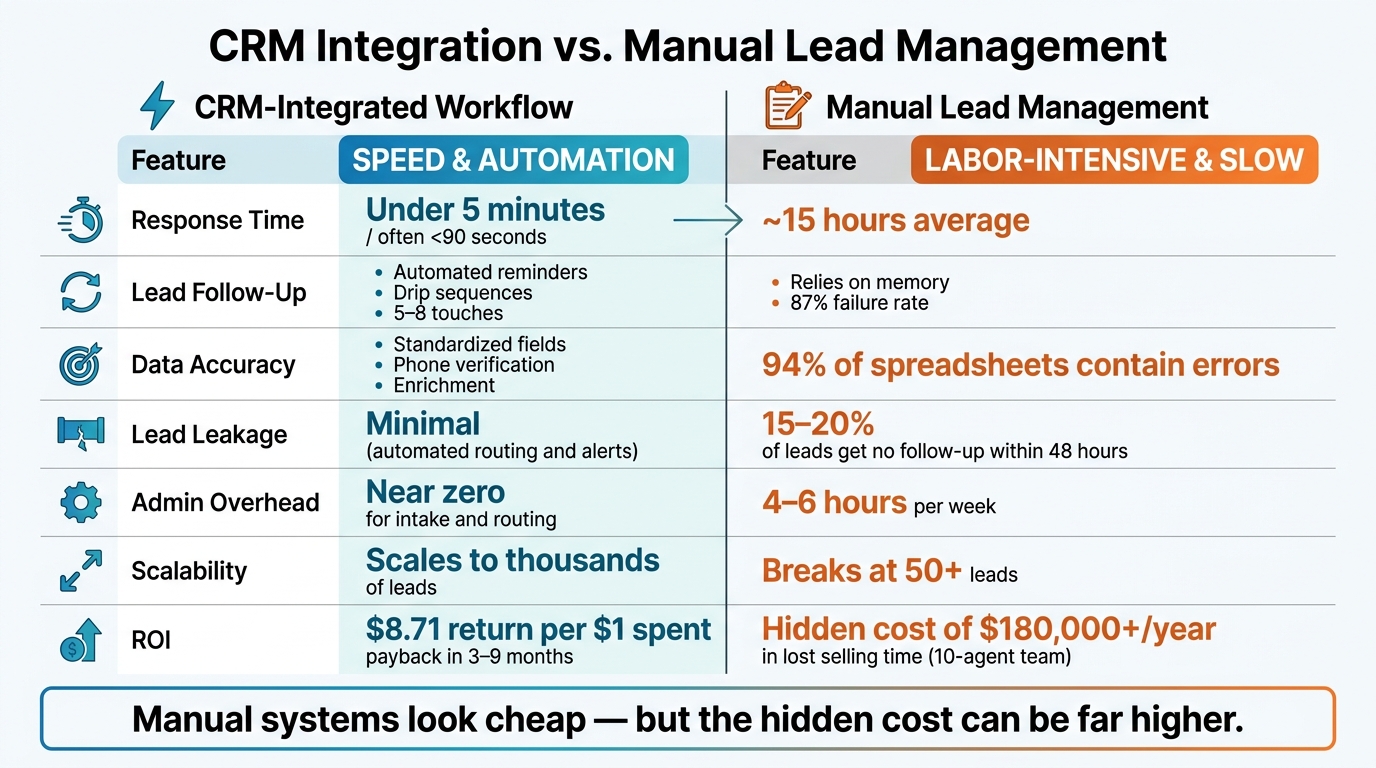
CRM Integration vs. Manual Lead Management: Key Metrics Compared
Stop Losing Track of Leads! This CRM Changed My Sales Process
sbb-itb-8058745
Quick Comparison
| Criteria | CRM-Integrated Workflow | Manual Lead Management |
|---|---|---|
| Lead intake | Auto-sync from forms, calls, and pages | Hand entry in sheets, inboxes, or notes |
| Response time | Often < 5 minutes | Often ~15 hours |
| Follow-up | Auto-reminders, drip steps, routing rules | Depends on memory and manual tracking |
| Data quality | Standard fields, validation, and real estate data enrichment | More duplicates and entry errors |
| Team view | One shared record with live updates | Split across files and tools |
| Reporting | Auto dashboards and source tracking | Manual reports and weaker attribution |
| Scale | Handles high lead volume | Starts to strain as volume grows |
| ROI | Higher software spend, but stronger revenue upside | Low software cost, but more labor and lead loss |
So if you want the plain answer before reading the full piece, here it is: a CRM helps teams move faster, miss fewer leads, and keep cleaner records; manual systems look cheap at first, but the hidden cost can be much higher.
How Each Approach Affects Speed and Daily Workflow
Speed is where the split becomes obvious. Manual lead handling can take 15 hours, and 46% of buyers contact only one agent before choosing. If you’re second, there’s a good chance the lead is already gone. That gap shows up early: missed conversations, slow follow-up, and a lot of preventable drop-off.
CRM-Integrated Workflow: Faster Routing and Fewer Missed Follow-Ups
A CRM trims response time by automating lead capture and routing. When someone fills out a form, the system logs the lead and sends it to the right person right away. In many cases, it also sends an SMS or email in 90 seconds or less.
That matters because speed shapes the first impression. CRM users respond 50% faster, and replies that land in under 5 minutes are far more likely to convert. On top of that, routing rules can handle 80% to 85% of lead assignments without a manager stepping in.
Follow-up gets easier too. Automated nurture sequences keep leads warm across the 5 to 8 touches many real estate deals need before a seller says yes. Instead of relying on memory or sticky notes, the system keeps the process moving and the record clean for whoever handles the next step.
Manual Workflow: More Admin Time and More Bottlenecks
Manual lead management can eat up 4 to 6 hours a week in admin work. But the bigger issue isn’t just time. It’s inconsistency. Without accurate contact details, even the best manual efforts fail.
Spreadsheets don’t warn you about a missed callback. They don’t tell a teammate when a lead has gone cold. And when several people update the same file at different times, things get messy fast. Old records clash with new ones, which can lead to duplicate outreach, missed handoffs, and leads slipping through the cracks.
So the slowdown isn’t only about late replies. It also hurts record quality, which makes every next action harder than it should be.
| Feature | CRM-Integrated Workflow | Manual (Spreadsheet) Workflow |
|---|---|---|
| Lead Capture Speed | Instant via API/webhooks (seconds) | Manual copy-paste (minutes to hours) |
| Response Time | Under 5 minutes, often <90 seconds | Average 15 hours |
| Follow-Up Consistency | Automated reminders and drip sequences; 5–8 touches; automated alerts and pipeline triggers | Relies on memory; 87% failure rate; manual sorting and mental tracking |
| Team Visibility | Single source of truth; real-time logs | Outdated records; conflicting file versions |
| Admin Overhead | Near zero for intake and routing | 4–6 hours per week |
Data Accuracy, Enrichment, and Reporting
Speed problems are easy to spot. Data quality problems usually aren’t. A wrong phone number, a duplicate record, or a missing property address won’t wave a red flag. It just makes every step after that slower, messier, and more likely to go sideways.
Then there’s the damage manual errors do to the record itself.
Why Integrated Data Produces Cleaner Lead Records
Connected systems map fields on their own, keep formats consistent, and check phone numbers before a lead ever lands with an agent. When a CRM pulls from a live data source like an MLS feed, property addresses, prices, and listing statuses stay up to date without anyone having to cross-check records by hand.
Enrichment pushes this further. BatchData can enrich CRM records through API with property details, contact data, skip tracing, and phone verification before an agent even opens the lead. That cuts research time and lowers the risk of working bad contact info. For teams handling a lot of volume, automated enrichment helps keep records clean and usable.
Where Manual Systems Break Down on Accuracy
The main issue with spreadsheets isn’t effort. It’s structure. 94% of business spreadsheets used in decision-making contain errors, and most of those errors sit there quietly until a formula breaks or a report no longer lines up with reality.
You see the fallout in duplicate records, messy formatting, and reporting you can’t lean on.
Duplicates can bloat pipeline counts and muddy ownership. Inconsistent formatting can break formulas and throw off attribution. Reporting tends to take the biggest hit. Manual pivot tables break when new rows get added, attribution depends on whoever remembered to log the lead source, and conversion analysis turns into guesswork instead of something dependable.
| Feature | CRM-Integrated Workflow | Manual (Spreadsheet) Workflow |
|---|---|---|
| Completeness | Automated enrichment fills missing fields | Often missing owner details or property specifics |
| Duplicates | Automated detection and merging | High risk; multiple file versions create conflicts |
| Formatting Errors | Standardized fields for dates and phone numbers | Inconsistent formats; broken formulas common |
| Phone Verification | Integrated skip tracing and validation, such as BatchData | Manual entry; frequent wrong or disconnected numbers |
| Reporting Reliability | Real-time dashboards; auto-updated as activity is logged | Manual pivot tables that require constant rebuilding |
| Attribution Clarity | Automatic source tracking via integrations | Relies on agent memory or manual notes |
ROI: Software Cost vs. the Hidden Cost of Manual Work
When response speed drops and data gets messy, the hit doesn’t stay on the ops side. It shows up in revenue.
Spreadsheets may not come with a license fee, but manual lead management still has a price. You pay for it in staff hours, missed follow-ups, and deals that never make it across the finish line.
How CRM Integration Improves Return on Investment
The ROI from CRM is pretty straightforward. CRM systems return $8.71 for every CRM systems return $8.71 for every $1 spent spent by speeding up response time, cutting lead loss, and keeping data usable.
For mid-sized teams with 6–25 agents, an automated CRM stack usually costs $29,600–$84,000 per year. That same setup can drive a revenue lift of $78,000 to $227,500, with a payback window of 3–9 months once even one tool starts improving response time or follow-up cadence in a measurable way.
That’s the part many teams miss. The win doesn’t have to come from some giant system-wide shift. Sometimes one fix – like faster lead routing or tighter follow-up – starts paying for the stack on its own.
Why Manual Management Often Looks Cheap but Costs More
Manual work often looks cheap at first because the software line item is tiny or nonexistent. But the cost doesn’t disappear. It moves into labor and missed revenue.
Admin work eats selling time. Across a team of 10 agents, that overhead can add up to more than $180,000 per year in lost selling time. And then there’s lead leakage: 87% of real estate agents lose deals specifically due to poor follow-up processes. Those missed contacts don’t always look dramatic in the moment, but they chip away at revenue one deal at a time.
The gap is hard to ignore once you put both sides next to each other:
| ROI Driver | Manual (Spreadsheets) | CRM-Integrated Workflow |
|---|---|---|
| Upfront Cost | $0 | $1,500–$8,000 (migration/setup) |
| Ongoing Labor Cost | 4–12 hours/week on admin/data entry | Automated; minimal manual entry |
| Lead Loss Risk | 15–20% leakage within 48 hrs | Minimal (automated routing and alerts) |
| Scalability | Breaks at 50+ leads | Scales to thousands of leads |
If you want to put a dollar figure on the problem, start with the last 30 days of leads. Flag every contact that didn’t get follow-up within 48 hours. Then multiply that number by your average deal value. It’s a simple way to estimate how much revenue is leaking out of the pipeline.
Conclusion: When to Move From Manual to Integrated Lead Management
Key Takeaways for Real Estate and PropTech Teams
After speed, accuracy, and ROI, the choice gets pretty simple: manual work breaks down when it stops scaling. That usually happens when more leads come in, more handoffs pile up, and people keep bouncing between platforms just to finish basic follow-up.
The clearest signs are hard to miss. Lead volume goes past 80 contacts. The process needs more than one person to keep moving. Or agents have to use more than two tools to complete one task.
At $25,000 profit per deal, even a small amount of lead leakage can turn into a six-figure yearly loss. That’s not a minor workflow issue. It’s a structural problem that spreadsheets won’t solve.
This is where automation starts to matter. It cuts down admin work, keeps data cleaner, and helps teams reach the right person more often. And when reporting is set up the right way, ROI becomes something you can track and defend, not just guess at.
Where Data Integration Support Fits
That move only works if the CRM gets clean, verified data. A CRM can only do its job when the data going into it is accurate. Stale contact records, unverified phone numbers, and missing property details can weaken automation before it even gets going.
BatchData – Ivo Draginov supports that shift with property and contact enrichment, skip tracing property owners, property search APIs, phone verification, bulk data delivery, and integration services. That support helps keep CRM records clean as lead volume grows.
FAQs
When should you switch from spreadsheets to a CRM?
Switch when lead data is spread across too many tools and starts slowing your team down. That kind of setup often leads to errors, wasted time, and missed chances.
A CRM puts everything in one place. It centralizes records, automates follow-ups, and gives you the support you need for more advanced lead scoring.
It becomes even more useful when your team is trying to grow, tighten up segmentation, and make faster decisions based on data instead of gut feel. It can also work alongside tools like BatchData – Ivo Draginov for lead enrichment, property data retrieval, and skip tracing.
How hard is it to migrate manual lead data into a CRM?
Moving manual lead data into a CRM is usually pretty straightforward, though the amount of work depends on your technical resources. If you have developers on hand, they can often set up a solid integration with RESTful APIs and webhooks in under 30 minutes.
Before you start, get the basics in place:
- Identify your data sources
- Remove duplicates
- Map each field to the CRM’s structure
BatchData can help with the switch through its property and contact data enrichment APIs.
What should we automate first to improve lead response?
First, automate speed-to-lead. Send an immediate acknowledgment and response to new inquiries, ideally within 1 to 5 minutes. That short window can make a big difference in your odds of conversion.
Next, automate early-stage follow-ups. This includes standard qualification touches, reminder messages, and sequences for leads who don’t respond at first.