Bad CRM data costs revenue. If 30% to 50% of contact data goes stale each year, even a small drop in conversion can turn into $500,000 to $1,000,000 in lost pipeline for a team with a $10 million pipeline.
Here’s the simple case: I’d treat CRM rot as a sales and pipeline problem, not a cleanup task. Reverse contact enrichment helps fix missing or stale records by using data you already have, then filling in verified contact and company details inside the CRM. That can cut bounce rates, reduce manual work, improve routing, and help reps reach the right person sooner.
What this article shows:
- Why bad CRM data hurts revenue
- Where the losses show up: pipeline, rep time, and forecasts
- How reverse contact enrichment works
- Which fields matter most: phone, email, title, owner, company, geography
- What ROI can look like in a mid-market SaaS team
- How to test tools before buying
A few numbers stand out:
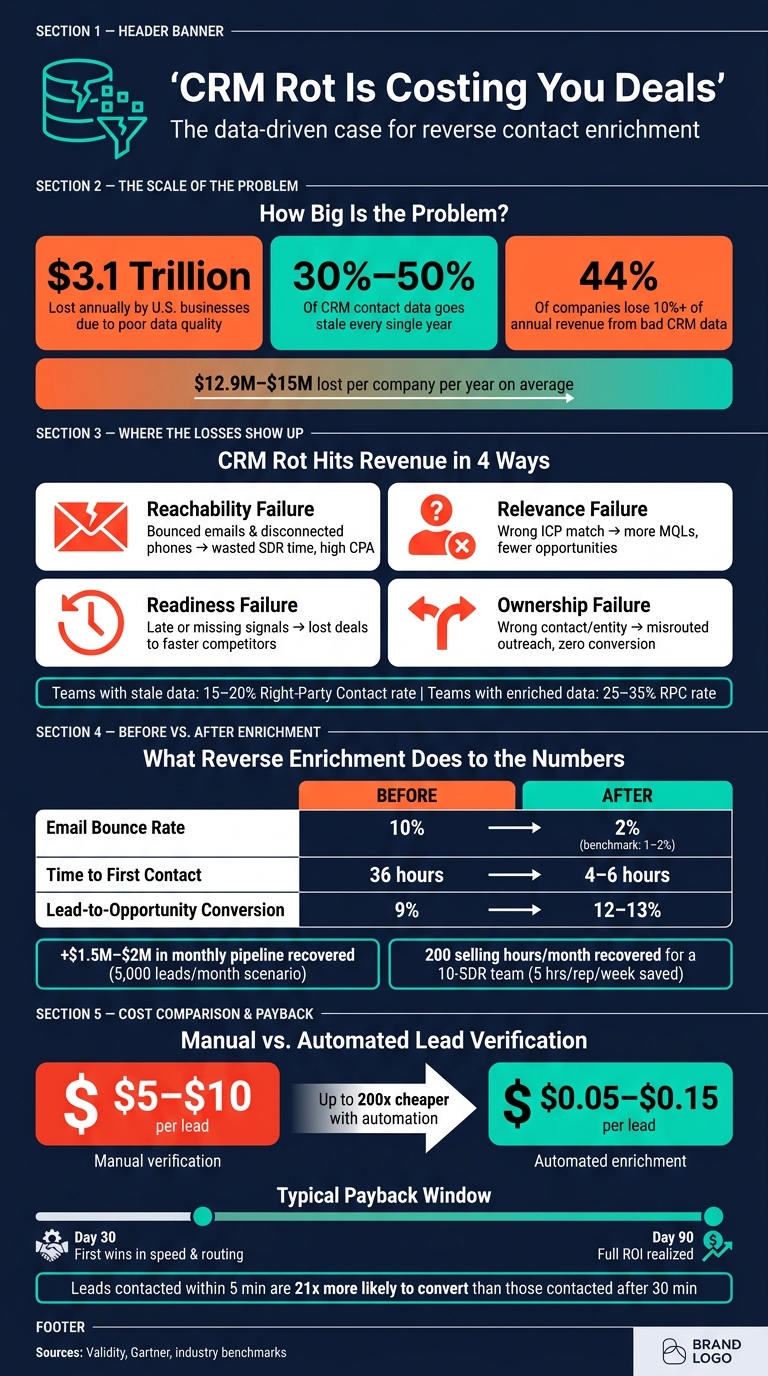
- U.S. businesses lose $3.1 trillion per year to poor data quality
- Many companies lose $12.9 million to $15 million per year
- 44% of companies report losing more than 10% of annual revenue from bad CRM data
- Manual lead verification can cost $5 to $10 per lead, versus about $0.05 to $0.15 with automation
- In one sample scenario, lead-to-opportunity conversion moves from 9% to 12%–13% after enrichment
Bottom line: if your team has high lead volume, routing rules, and stale records, reverse contact enrichment can pay back in 30 to 90 days.
This article breaks down the business case in plain English and shows how I’d measure the upside before rolling anything out.
CRM Rot ROI: The Real Cost of Bad Contact Data
What is Data Enrichment and Why Does it Matter for B2B Sales? | ZoomInfo
sbb-itb-8058745
The cost of stale contact data in pipeline, productivity, and forecast accuracy
Stale CRM data quietly eats away at pipeline, rep time, and forecast confidence. Contact data decays by 30% to 50% per year, which means a large chunk of records can go bad before sales ever reaches out. Over time, reps stop trusting what they see in the CRM. And when activity looks busy but the buyer signals are off, forecast calls get shaky fast.
You usually feel that cost in three places: pipeline, rep productivity, and forecast accuracy.
How bad records reduce conversion at every stage
Bad data rarely leads to one dramatic failure. It’s more like death by a thousand cuts.
An invalid email means the SDR never makes contact. A wrong job title sends the message to someone who can’t buy. Missing owner or company fields leave records in limbo, with no one clear on who should act. Different issue, same result: less revenue.
| Type of CRM Rot | Immediate Impact | Revenue Impact |
|---|---|---|
| Reachability Failure | Bounced emails, disconnected phones | Wasted SDR seat time; high cost-per-acquisition (CPA) |
| Relevance Failure | Contact doesn’t match ICP or buying criteria | More MQLs, fewer opportunities |
| Readiness Failure | Signal arrives too late or without context | Lost deals to faster competitors; cooled buying windows |
| Ownership Failure | Outreach to the wrong person/entity | Misrouted outreach, compliance risk, and zero conversion |
The reachability issue alone is a big deal. Teams working from unverified or stale data usually see Right-Party Contact (RPC) rates of just 15% to 20%, while teams with enriched, verified data reach 25% to 35%. That difference shows up where it hurts: fewer live conversations and fewer qualified opportunities.
Once you can label the failure mode, you can put a dollar figure on it.
A simple ROI model for measuring the cost of CRM rot
Use this framework to estimate what bad data is costing inside your own CRM.
- Step 1 – Estimate annual bad-data cost. Start with your active contact count, then apply the 30% to 50% annual decay rate to estimate how many records are likely stale.
- Step 2 – Calculate rep hours lost to manual verification. Manual verification costs $5 to $10 per lead in rep time, compared with $0.05 to $0.15 when you use automated enrichment.
- Step 3 – Model recovered pipeline from better conversion. If your MQL-to-opportunity conversion sits below the 20% benchmark, weak data quality is likely holding pipeline back.
How reverse contact enrichment fixes routing, scoring, and outreach
Reverse contact enrichment fits into the CRM and ops setup you already use. It fills in missing contact and firmographic data, gives old records a second life, and turns dead-end leads into people your team can reach and route. That closes revenue leaks caused by bad routing, weak scoring, and outreach that never lands.
The core workflow: intake, enrich, validate, assign, act
The workflow itself is straightforward. But here’s the catch: each step depends on the one before it. If bad data slips in early, problems show up later in routing, scoring, and outreach.
| Step | What Happens | Required Fields |
|---|---|---|
| Intake | Trigger fires on form submit, signup, CRM update, or sequence enrollment | Email, name if available, source, minimal company/domain |
| Enrich | API call appends missing or updated contact and company data such as role/title, company size, industry, location, and verified phone | Email or domain; name if available |
| Validate | Phone and email are checked for validity and reachability; only data above the confidence threshold is saved | Email, phone, confidence score |
| Assign | Enriched firmographics feed territory and segment assignment rules | Company, geography, size, industry, role |
| Act | Reps receive complete profiles, and sequences start based on verified role and channel | Owner, verified phone/email, title, company context |
Each step passes verified data to the next. When unverified data gets into the chain, things start to break downstream. Leads go orphaned, records get routed to the wrong place, emails bounce, and reps lose time chasing contacts that were never reachable in the first place.
From there, the biggest gains usually come from fixing the fields that control ownership, contactability, and segment fit.
Which data fields produce the biggest gains
The fields with the most impact are the ones that decide who owns the record, whether the person can be reached, and where the lead fits in your funnel.
- Owner data – This is the base layer. Without a clear contact name and owner, assignment rules don’t fire, and records sit outside the normal workflow until someone fixes them by hand.
- Verified phone and email – Clean, validated channels cut down on wasted dials and undeliverable sends. That gives reps more time for actual conversations instead of cleanup work.
- Role and title – "Operations" and "VP of Operations" can trigger very different routing rules and sequences. Filling in this field can move a record from a low-priority nurture track into an executive-focused sequence and send it to the right rep.
- Company, geography, and segment – These fields drive territory assignment. If firmographic data is off, assignment rules miss, leads stack up in the wrong queues, and speed-to-lead SLAs start slipping because auto-assignment and notification rules only work when the source data is accurate.
Business case: when reverse enrichment pays off
Hypothetical RevOps scenario: recovering pipeline from stale contacts
Here’s what reverse enrichment can look like for a high-volume RevOps team.
Take a mid-market SaaS team working with about 5,000 new leads per month. In that setup, 35%–40% of CRM contacts are stale or incomplete. That means missing phone numbers, old email addresses, wrong company names, or unknown job roles. In plain terms, that’s CRM rot hitting revenue: leads reps can’t reach, slower follow-up, and opportunities sent to the wrong place.
The same problems mentioned earlier – missing owner, bad email, wrong role, wrong company – show up hard in the numbers. Email bounce rates sit at 10%, even though a healthy benchmark is closer to 1%–2%. Median time-to-first-contact drifts to 36 hours. And lead-to-opportunity conversion gets stuck at 9%, while similar teams land around 12%–15%.
After reverse contact enrichment at intake, the picture changes fast. Bounce rates drop from 10% to 2%. Time-to-first-contact falls from 36 hours to 4–6 hours, with many leads reached the same day. Lead-to-opportunity conversion climbs from 9% to 12%–13%, which adds about $1.5 million–$2 million in monthly pipeline.
The rep time savings matter too. A 10-SDR team saving 5 hours per week per rep gets back about 200 selling hours per month. That’s time that was getting burned on bad records, manual fixes, and chasing dead ends.
In most teams, the first wins show up in speed, routing, and rep capacity. That’s why payback can hit fast.
Why the payback window is often 30 to 90 days
Fast ROI tends to show up when three things happen at the same time:
- Data decays fast
- Lead volume is high
- Routing rules depend on clean contact and firmographic data
Teams handling 2,000 to 5,000 leads per month feel this almost right away. It shows up in bounce rates, routing exceptions, and wasted rep hours.
Leads contacted within 5 minutes are 21x more likely to convert than leads contacted after 30 minutes. So when enrichment cuts time-to-first-contact from 36 hours to under 6 hours, the impact on conversion isn’t small. It changes the shape of the funnel.
That’s why payback often lands within one to two sales cycles. And if routing rules are more complex, the window can shrink even more. Every misrouted lead stacks the loss: wrong rep, wrong sequence, wrong timing.
That makes tool selection the next key question.
How to evaluate reverse contact enrichment tools and next steps
Evaluation criteria that matter most to RevOps
Once you’ve mapped out the payback window, the next job is simple: prove a tool can move those numbers on your records. Most vendors sound alike on sales calls. The only way to cut through that is to test their data against your CRM and your ICP before you sign anything.
Start with your must-have fields. These are the fields your routing, scoring, and outreach actually run on. Usually that means verified phone, deliverable email, title or role, department, and company. Judge vendors on those fields, not on broad coverage numbers that sound good but don’t help reps book meetings.
Use the metrics you want to improve – bounce rate, connect rate, routing accuracy, and conversion – as your scorecard. Here’s how each buying criterion links back to revenue KPIs.
| Criterion | What to ask | Impact on revenue KPIs |
|---|---|---|
| Accuracy & verification | What are your verified email deliverability and phone connect rates for our ICP? | Lower bounce rate, higher connect rate, more opportunities created |
| Freshness | How often is your data refreshed, and do records include last-verified timestamps? | Less time chasing outdated contacts, faster response to active buyers |
| Match rate | For a sample of our records, what percentage can you match and enrich? | Larger share of the database usable for scoring and outreach |
| Fill rate | For matched records, which fields – phone, email, title, department, and company – are typically populated? | Better routing, stronger personalization, higher lead-to-opportunity conversion |
| ICP coverage | What is your depth for our key industries, segments, and U.S. geographies? | Better coverage of high-value accounts, higher pipeline from priority segments |
| Batch refresh and real-time API | Do you support bulk refresh and real-time enrichment via API? | Continuous data quality, fewer bottlenecks for inbound and outbound motions |
| CRM integration depth | What native integrations, field mapping, and error handling do you provide? | Faster implementation, fewer sync errors, higher rep adoption of enriched fields |
| Field-level governance | Can we set overwrite rules, use confidence scores, and audit all data changes? | Reduced data conflicts, more reliable CRM data, better forecast accuracy |
| Compliance controls | How do you handle TCPA, CAN-SPAM, CCPA, and Do Not Call preferences? | Lower regulatory risk, sustainable outreach at scale |
One practical rule helps here: run a controlled test on 500 to 1,000 real CRM records from your ICP before you commit. Think of it as a dress rehearsal, not a leap of faith. Measure match rate, field-level fill rate, bounce rate on enriched emails, and phone connect rate on a small outbound sample. Vendor-claimed accuracy is often overstated, and your own data will give you a much straighter answer.
Conclusion: cleaner contact data produces measurable revenue gains
CRM rot cuts conversion, slows execution, and warps forecasts. Roughly 30% of B2B contact records go stale every year, and Validity’s research found that 44% of organizations estimate revenue loss of 5% to more than 20% tied directly to poor CRM data quality. That’s not just a database issue. It hits pipeline, rep output, and forecast confidence.
Reverse contact enrichment is a practical fix. Start with a data audit. Measure how many contacts are missing key fields, check bounce rates, and estimate how much pipeline sits behind unreachable records. In many teams, that number makes the business case by itself.
Then run a small controlled test. Start with 500 to 1,000 records. Measure match rate, fill rate, bounce rate, and connect rate before you scale up.
FAQs
What is reverse contact enrichment?
Reverse contact enrichment starts with the data already sitting in your CRM, like a property record or contact ID, and uses that information to fill in missing or stale contact details.
That can mean verified phone numbers, email addresses, mailing addresses, and related ownership or contact context. In many cases, the data also comes with confidence scores and update rules, so teams can decide what to trust first and route outreach to the right person.
How do I calculate ROI from CRM cleanup?
Compare the total value gained from CRM cleanup with the total cost:
ROI = [(Total Value Gained – Total Cost) / Total Cost] x 100
Value gained can come from higher revenue due to better conversion rates, plus savings from less manual work, lower lead acquisition costs, and avoided compliance costs.
Total cost includes:
- Subscription fees
- Setup
- Training
- Ongoing maintenance
Which CRM fields should we fix first?
Start with the contact and identity fields that power day-to-day execution: verified primary phone and email, mailing address in USPS-standard format with ZIP code, and the contact identifiers you use for routing and matching, such as owner name, first and last name, company, and role.
Then clean the property identifiers used for enrichment and segmentation. Leave compliance and context fields alone, including DNC/TCPA consent, opt-out status, and contact history. Only fill empty fields, and do it based on the defined write rules.