
Your CRM data can make or break your real estate business. Outdated contact details and incomplete property records waste time and money, while verified data helps close deals faster and boosts revenue. BatchData‘s Skip Tracing API simplifies the process by cleaning and verifying your CRM data at scale. It updates phone numbers, emails, and property ownership details, ensuring your team only works with accurate, actionable leads.
Here’s what you’ll learn:
- How skip tracing works to verify contact and property data.
- Steps to prepare your CRM data for integration.
- How to use the API for bulk processing and DNC compliance.
- Benefits of verified data for real estate operations.
BatchData’s API is a powerful tool for turning messy CRM data into a reliable resource, saving time and improving efficiency. Let’s explore how you can use it to streamline your workflows and focus on closing deals.
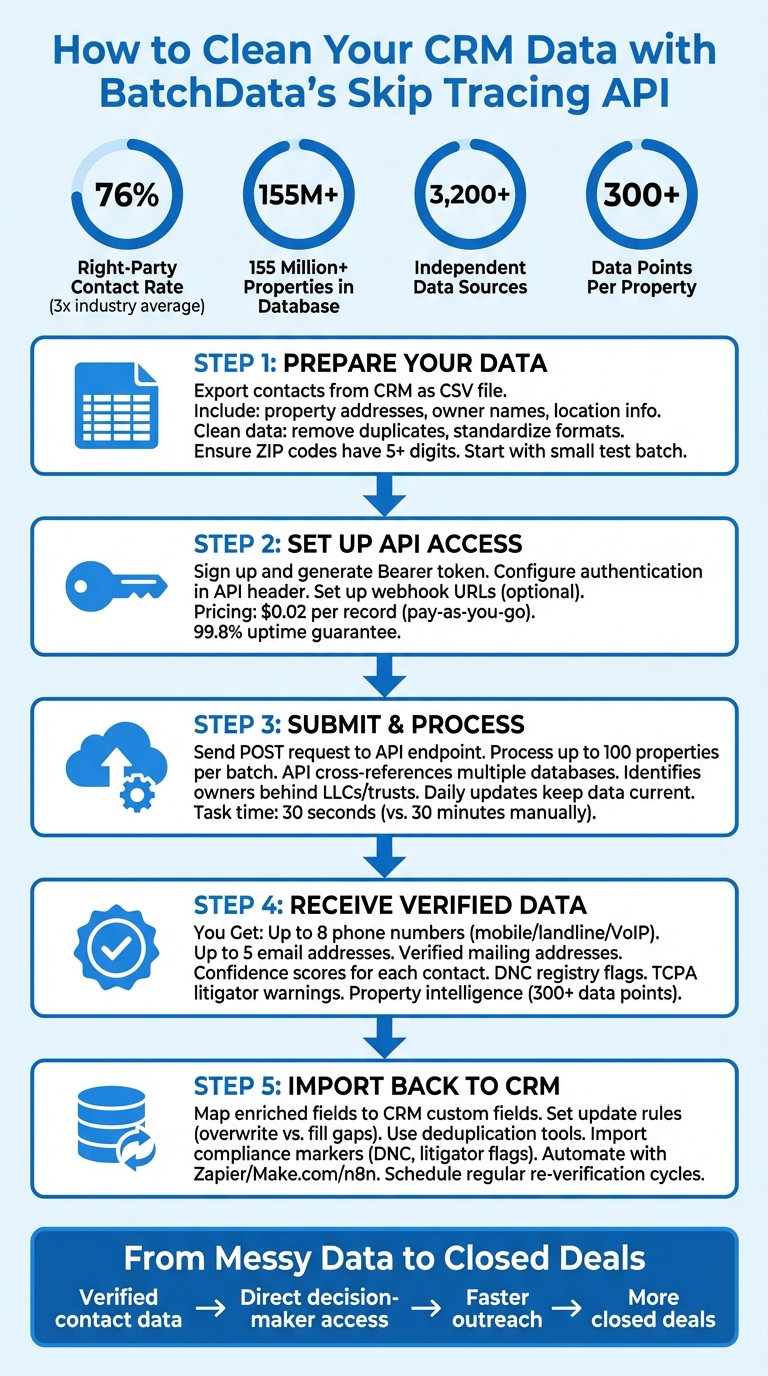
Complete Workflow for Cleaning CRM Data with BatchData Skip Tracing API
What is BatchData‘s Skip Tracing API?
BatchData’s Skip Tracing API is a tool designed to verify property-related data and provide accurate contact information. By inputting a property address (including street, city, state, and ZIP code), users receive verified details like phone numbers and email addresses. The system identifies the current property owner by analyzing property records and cross-referencing multiple databases, ensuring the contact information is accurate and organized.
The API taps into a massive database of over 155 million properties, pulling data from more than 3,200 independent sources. Using proprietary algorithms, it can even uncover individual owners hidden behind LLCs or trusts, offering direct contact details. This feature is especially useful for real estate professionals who need to connect with decision-makers instead of just reaching generic business addresses.
BatchData boasts impressive performance, achieving a 76% right-party contact (RPC) rate – almost three times the industry average. This accuracy is continually refined through feedback from over 20,000 active users. As Chris Finck, Director of Product Management, noted:
“What used to take 30 minutes now takes 30 seconds. BatchData makes our platform superhuman.”
The API also supports bulk processing, allowing users to verify up to 100 properties in a single request. Each response includes confidence scores to help prioritize leads based on data reliability. This efficiency and precision set the stage for the advanced features highlighted below.
Main Features of the Skip Tracing API
The API addresses common CRM data issues by delivering verified, multi-channel contact information. For each property address submitted, users receive validated phone numbers (mobile and landline), email addresses, and mailing addresses linked to the current owner. The system eliminates duplicates and invalid entries, flagging disconnected phone numbers to ensure clean results.
Built-in geocoding and property intelligence add further value. Each property record includes validated geocodes and over 300 data points, such as property age, lot size, construction details, tax records, sales history, and equity positions. This information helps users identify key indicators like pre-foreclosure, tax delinquency, vacancies, and absentee ownership – ideal for spotting motivated sellers.
Efficiency is a key focus. Tasks that once took 30 minutes can now be completed much faster, while regular updates help keep data current.
For current BatchData pricing and volume-based rates, contact the BatchData sales team.
Integration is straightforward, with options for direct API calls, automation tools like Zapier, Make.com, and N8N, or AI-native MCP servers. This flexibility allows users to automate skip tracing as soon as new leads enter their CRM, ensuring immediate access to verified contact details without manual effort.
Regulatory Compliance and Data Protection
BatchData’s API prioritizes compliance alongside data accuracy. It screens against the Federal Do Not Call (DNC) registry and TCPA litigator databases, helping users avoid legal risks. Numbers are checked against the National DNC list, and known TCPA litigators are flagged, allowing businesses to remove high-risk contacts before outreach. This process integrates directly into the data verification workflow, ensuring CRM data is both accurate and legally actionable.
The system is designed to comply with the California Consumer Privacy Act (CCPA), respecting opt-out requests and data deletion requirements. It also distinguishes between mobile and landline numbers, helping users adhere to stricter TCPA rules for automated calls and texts to mobile devices. This is especially important for real estate professionals using SMS or robocall campaigns.
Data privacy and security are integral to the API. All requests are processed over encrypted connections, and the contact data is sourced from enterprise-grade providers that meet legal standards. Dedicated endpoints for DNC and TCPA screening can be integrated directly into the data enrichment process, ensuring compliance is automated and seamless.
sbb-itb-8058745
Getting Your CRM Data Ready for API Integration
Before you can send data to BatchData’s Skip Tracing API, you’ll need to format your CRM records into a standardized CSV file. The API processes data in bulk using CSV files, so start by exporting your contacts, leads, or property records from your CRM platform and preparing them for submission. Clean, well-organized data is critical because even the most advanced API won’t deliver good results without it. Simply put, better data means better outcomes.
Your CSV file should include key details like property addresses, owner names, and location information as the bare minimum. These fields allow the API to enrich your records with additional contact details – such as up to 8 phone numbers (categorized as mobile, landline, or VoIP), 5 email addresses, and verified mailing addresses. To ensure everything works smoothly, start with a small test batch of known contacts. This lets you check for formatting issues and confirm the API provides accurate, high-quality results before scaling up to larger datasets. BatchData boasts a 76% right-party contact (RPC) rate – around three times higher than the industry average – but achieving this depends heavily on submitting clean, properly formatted data.
How to Export and Format Your CRM Data
Most CRM platforms include a built-in option to export contact lists as CSV files, usually found under a “Settings” or “Export” menu. For instance, in ONLYOFFICE, navigate to CRM > Settings > Common settings, and export your data as a CSV ZIP archive. If you’re using Dynamics 365 Customer Insights, go to the Data > Exports menu to set up a new export connection. This can send your data to destinations like Azure Data Lake Gen2 for further processing.
When working with large datasets, split them into smaller files and stagger the export process by 30 minutes to an hour to avoid overloading your system. Filtering your data before exporting is also a smart move. Create segments based on criteria like location, engagement dates, or spending thresholds. This not only reduces the file size but ensures you’re only processing records that actually need verification.
Before submitting your data, take time to clean it thoroughly. Remove duplicates, standardize address formats, and ensure ZIP codes have at least five digits. Focus on essential fields like lead source, campaign, phone number, and property address, while cutting out unnecessary columns to keep your CSV file streamlined. Consistency is key – fields like phone numbers, ZIP codes, and country names should follow a uniform format. For example, avoid mixing “USA” with “United States” as this can create processing errors. CSV files are ideal because they’re plain-text and compatible with most APIs and spreadsheet tools.
Once your CSV is clean and ready, the next step is setting up your API key for secure integration.
Setting Up Your API Key and Authentication
After obtaining your BatchData API token, include it in the Authorization header of your API requests using the Bearer authentication scheme:
Authorization: Bearer <token>
BatchData provides API capabilities for skip tracing and other data workflows. For the current API contract, including available endpoints, request formats, and authentication details, refer to the BatchData developer documentation.
For current BatchData pricing and volume-based rates, contact the BatchData sales team.
With your data formatted and authentication configured, you can use the BatchData API to integrate skip tracing and related data workflows into your applications.
How to Clean CRM Data Using the Skip Tracing API
Once your CRM data is properly formatted and your BatchData API token is ready, you can submit property information for skip tracing. The process involves sending the appropriate property data to the API and reviewing the returned results.
Sending Requests to the API
The BatchData API uses the following base URL:
https://api.batchdata.com/api/v1
For property skip tracing, use the following endpoint:
POST /property/skip-trace
Include your Bearer token in the Authorization header and set the content type to JSON:
Authorization: Bearer <token>
Content-Type: application/json
Use the request format and supported fields documented in the BatchData developer documentation rather than relying on an example schema that may become outdated.
Providing complete and accurate property information can help improve the quality of your results. Refer to the current API documentation for the supported request fields and response attributes.
Receiving Verified and Updated Contact Data
The API provides a detailed contact profile for each property. This includes phone numbers, email addresses, and verified mailing addresses. Each phone number is accompanied by a Confidence Score and metadata like carrier information and line type, helping you decide between SMS or voice calls for outreach.
In many cases, the mailing address differs from the property address. This difference can signal an absentee owner – an important insight for real estate professionals targeting off-market opportunities. Verified email addresses reduce the risk of bounced messages, streamlining your outreach efforts.
The API also flags phone numbers listed on the National Do Not Call registry and identifies known TCPA litigators through its built-in Litigator Scrub. This feature helps safeguard your business from potential legal issues and ensures compliance with relevant regulations.
Understanding API Responses and Fixing Errors
Results should be handled according to the response schema documented for the relevant BatchData API endpoint. Review the returned fields and status information to determine whether each request was processed successfully.
Common issues can include incomplete or incorrectly formatted input data. Validate your request structure and input fields against the current API documentation if a request does not return the expected results. For high-volume integrations, monitor API usage and follow the documented rate limits and resource requirements.
After receiving the results, map the supported response fields to the corresponding fields in your CRM and review the data for consistency before updating existing records.
For information about asynchronous processing, webhooks, or other integration features, refer to the current BatchData developer documentation rather than relying on undocumented endpoints or workflows.
Importing Cleaned Data Back into Your CRM
Now that your CRM data has been processed, you can integrate the returned data into your system. Use the response fields documented for the relevant BatchData API endpoint and map the available data to the corresponding fields in your CRM.
When integrating the results, make sure the BatchData response fields are mapped consistently with your CRM’s custom fields. Refer to the BatchData developer documentation for the current response schema and supported fields.
Before importing, establish rules for updating your data. For instance, decide whether you want to overwrite existing phone numbers with the verified ones or only fill in gaps where information is missing. If a property has separate mailing and property addresses, make sure both fields are updated in your CRM to avoid any issues with direct mail delivery. These steps help ensure a smooth import process and improve the accuracy of your CRM data across all contact points.
Take advantage of your CRM’s deduplication tools to match unique identifiers like parcel numbers or property addresses instead of relying on owner names, which can vary in format. Automating updates based on these identifiers will help keep your database up-to-date and consistent.
As you map the fields, include compliance-related data for better oversight. For example, import the Do Not Call (DNC) status and Litigator Scrub flags as custom fields or tags. This makes compliance markers easily accessible for your sales team and ensures they’re integrated into automated dialer rules. Additionally, map the Phone Number Confidence Scores to prioritize high-quality leads for quick follow-up, while flagging lower-confidence records for manual review.
For ongoing data accuracy, consider integrating the API with your CRM using middleware platforms like Zapier, Make.com, or n8n. This setup allows you to verify every new lead in real time, keeping your contact information accurate even as phone numbers and addresses change. To maintain reliability, schedule regular re-verification cycles – monthly or quarterly – to refresh older records and ensure your database stays dependable over time.
How Verified CRM Data Improves Real Estate Operations
Clean, verified CRM data can completely change the way real estate professionals connect with property owners and close deals. Instead of wasting time chasing outdated or incorrect contacts, your team can focus on reaching decision-makers directly. This not only saves valuable time but also opens doors to off-market opportunities that might otherwise be missed.
The API’s ability to identify the actual property owners – whether they’re behind LLCs or trusts – gives you a clear advantage when targeting off-market properties. You can bypass intermediaries like registered agents and go straight to the people who can make decisions. This is especially critical in fast-paced situations where timing can make or break a deal.
Accurate contact data also makes your marketing efforts more effective. Features like the Phone Number Confidence Score help you prioritize outreach by identifying leads that are most likely to connect. Mobile versus landline flags ensure that SMS campaigns reach numbers capable of receiving text messages. Plus, with BatchData’s automated daily refresh, your team always works with the most current information, avoiding the pitfalls of outdated data. Combined with automated workflows, these tools make your daily operations much smoother.
Real-time data processing takes it a step further by enabling immediate follow-up on new leads. With verified contact information integrated into automated CRM workflows, your team can engage motivated sellers within minutes of spotting an opportunity. This level of accuracy and speed turns data into a powerful advantage for your operations.
Conclusion
Having clean CRM data is essential for running a successful real estate operation. Outdated phone numbers, incorrect addresses, and generic agent contacts can waste both time and money, leading to outreach efforts that fall flat. BatchData’s Skip Tracing API solves this problem by providing accurate skip tracing data with an impressive 76% right-party contact rate.
This API handles the heavy lifting of data verification by cross-checking details from over a dozen sources, identifying the actual decision-makers behind LLCs and trusts, and ensuring your lists are scrubbed against the National Do Not Call registry and known TCPA litigators. With daily updates, your team works with fresh, accurate information, enabling faster and smarter decisions in real estate. This level of verification ensures a smooth start-up process.
Getting started is simple: create a BatchData account and integrate the API into your CRM using the current developer documentation. BatchData provides documentation and support to help with integration and onboarding.
Once your integration is configured, you can use the BatchData API to access the data and workflows supported by your account and the API.
Say goodbye to bad data and hello to better deals. When you can connect with property owners within minutes of spotting an opportunity, you gain a decisive advantage. In real estate, reaching a motivated seller first often means the difference between securing an off-market property or losing it to someone else.
Take the first step toward cleaning your CRM data today. Spend less time chasing dead ends and more time closing deals.
FAQs
What CRM fields do I need before skip tracing?
The key CRM fields for skip tracing include owner name, address, phone number, and email address. Having these details ensures you can locate property owners accurately and efficiently. To get the best results, make sure this data is both complete and consistently formatted within your CRM.
How do I handle low-confidence matches and missing results?
To handle low-confidence matches, establish confidence thresholds in your verification process. Any results falling below this threshold should be flagged for manual review to ensure accuracy. For missing results, consider fallback strategies such as re-trying with alternative data, broadening search parameters, or supplementing with additional data sources. Regular audits, combined with automated processes, can help keep your CRM data accurate, supporting more informed decision-making in real estate operations.
How often should I re-verify my CRM data?
Regular re-verification is key to maintaining accurate CRM data. Many real estate professionals choose to update their information on a monthly or quarterly basis, particularly for details that can change often, like contact information or property records. This routine not only helps cut down on errors but also minimizes legal risks and boosts the success rate of outreach efforts.
To keep your CRM effective and up to date, establish a schedule that works best for your operations and the data sources you rely on. Consistency in updates ensures your system stays reliable and ready to support your goals.