
BatchData‘s API simplifies real estate lead enrichment by transforming basic property data into detailed profiles. This process helps real estate professionals focus on high-potential leads by providing insights like ownership details, property characteristics, and financial data. Here’s a quick overview:
- Why It Matters: Spot motivated sellers, prioritize outreach, and reduce wasted effort on unqualified leads by transforming business operations.
- How It Works: BatchData’s API enriches raw data with over 700 data points, including verified contact info, mortgage history, and equity levels.
- Getting Started:
- Create a BatchData account and obtain an API key.
- Choose a pricing plan based on your lead volume.
- Prepare your CRM data for API integration.
- Steps to Build the Pipeline:
- Import raw lead data from your CRM.
- Use the API to enrich property details.
- Score and qualify leads based on enriched insights.
- Update your CRM with enriched data and set automated notifications.
BatchData’s API ensures fast, accurate data delivery with compliance safeguards, making it easier to target the right leads and close more deals.
Prerequisites for Using BatchData‘s API
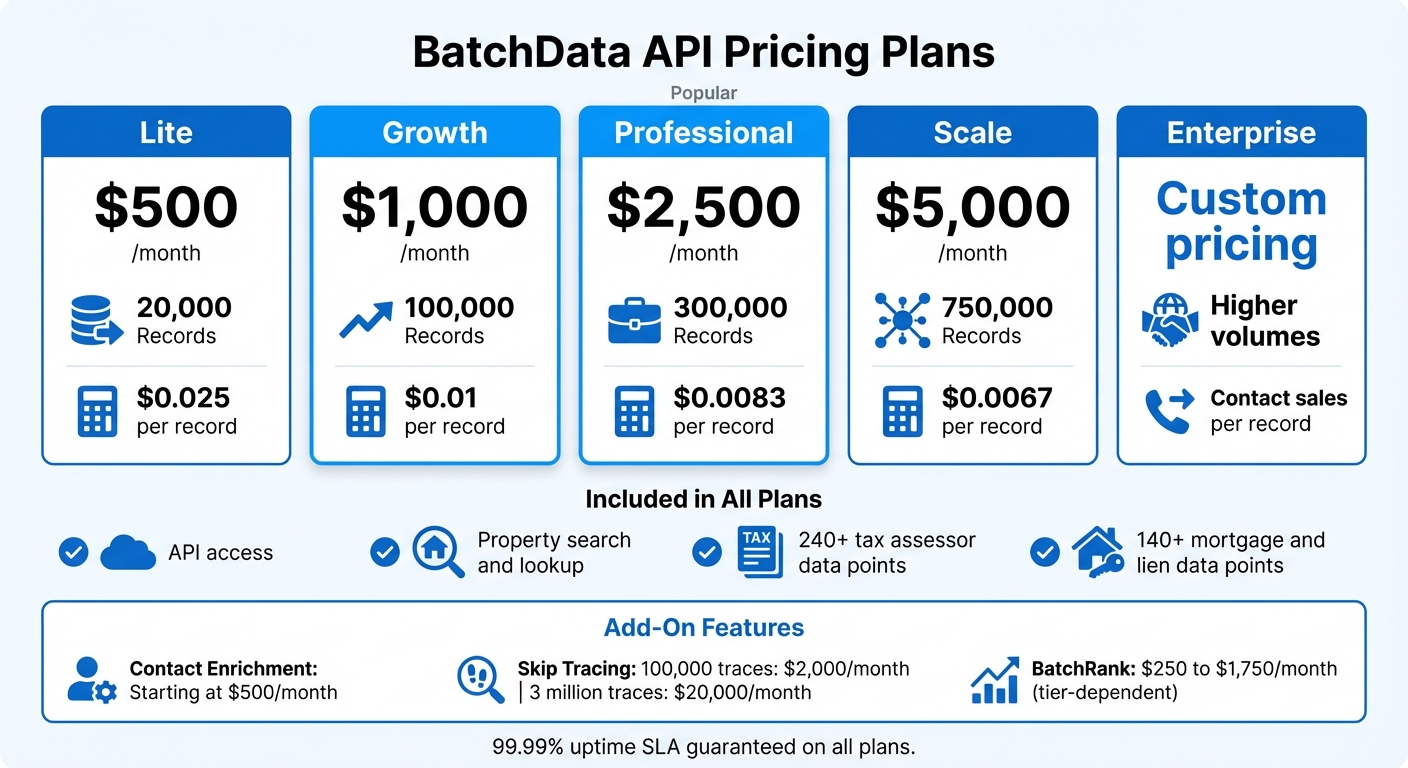
BatchData API Pricing Plans Comparison for Real Estate Lead Enrichment
Follow these essential steps to get started with BatchData’s API. Unlike many self-service platforms, BatchData takes a consultation-based onboarding approach, ensuring your pipeline is tailored to your specific data and volume needs from the start. This means you’ll collaborate with their team to configure everything before accessing the API.
Create a BatchData Account and Get Your API Key
Begin by scheduling a consultation on BatchData’s website. During this session, you’ll discuss your lead volume, data requirements, and integration goals. After your account is set up, BatchData will provide your API credentials and grant access to sandbox testing environments. These sandboxes allow you to validate your integration, test endpoints, and review JSON responses – all without touching live data.
Once your sandbox is ready, choose a plan that aligns with your monthly lead volume.
Select the Right Plan for Your Lead Volume
BatchData offers five pricing tiers based on the number of property records you process each month:
- Lite: $500/month for 20,000 records
- Growth: $1,000/month for 100,000 records
- Professional: $2,500/month for 300,000 records
- Scale: $5,000/month for 750,000 records
- Enterprise: Custom pricing for higher volumes
Every plan includes API access, property search and lookup, and datasets featuring 240+ tax assessor data points and 140+ mortgage and lien data points. For additional features like owner contact information, you can add Contact Enrichment starting at $500/month. If you require more advanced options, such as skip tracing and how it works, plans range from $2,000/month (100,000 traces) to $20,000/month (3 million traces).
For example, if you process 50,000 leads monthly, the Growth plan would be a good fit. However, if you also need sale propensity scores or listing data, consider budgeting for add-ons like BatchRank, which costs between $250 and $1,750/month depending on your tier.
Once your plan is set, the next step is to prepare your development environment for seamless API integration.
Prepare Your Development Environment
BatchData’s API is built for reliability and speed, delivering data through RESTful endpoints in JSON format. For bulk data, you can choose from AWS S3, Snowflake, Databricks, Azure, or CSV delivery. Supported formats include CSV, JSON, and Parquet. To test API calls and inspect responses, tools like Postman are invaluable. For production, you can integrate the API using Python or JavaScript frameworks.
The platform guarantees a 99.99% uptime SLA, ensuring rapid responses. To optimize performance, consider using asynchronous webhooks for event-driven updates instead of constant polling. This approach minimizes latency and keeps your pipeline responsive and efficient.
sbb-itb-8058745
Building the Lead Enrichment Pipeline: Step-by-Step
Step 1: Import Raw Lead Data from Your CRM
Begin by pulling raw lead data from your CRM – whether it’s HubSpot, Follow Up Boss, Zoho CRM, or Wise Agent. Most CRM platforms allow you to export data as CSV files or integrate directly via webhooks to feed new leads into your pipeline in real time. The critical part here is ensuring your address data is clean and formatted consistently. BatchData’s API requires addresses to follow standard U.S. formats, with street, city, state, and ZIP code fields clearly separated.
Before submitting to the API, take time to deduplicate and verify addresses. Incomplete or incorrectly formatted addresses will cause errors and waste valuable API calls. Once your data is cleansed and standardized, you’re ready to move on to the enrichment stage using BatchData’s API.
Step 2: Enrich Data Using BatchData’s Property Lookup API
With clean lead data ready, use BatchData’s Property Lookup API to gather detailed property intelligence. This API delivers over 700 data points per address, including ownership details, property features (like square footage, number of bedrooms and bathrooms, and year built), and financial information such as assessed value, mortgage specifics, tax details, and sales history.
This enrichment process transforms a simple address into a robust property profile with hundreds of actionable details. For example, you’ll know if the property is owned by an LLC, the estimated equity percentage based on mortgage data, or whether it’s in foreclosure or pre-foreclosure. These insights allow you to qualify leads quickly, saving hours of manual research.
Make sure to implement error handling in your API calls. If an address returns incomplete or missing data, log it for manual review instead of letting it disrupt your pipeline. Once the enrichment process is complete, you can use this detailed information to score and prioritize your leads effectively.
Step 3: Score and Qualify Leads Based on Enriched Data
Now that your data is enriched, it’s time to score your leads as "hot", "warm", or "cold." Use key criteria like property value, equity percentage, and other indicators of seller motivation. For instance, a property with 60% equity might qualify as a hot lead.
Mortgage details and foreclosure status are especially useful for spotting motivated sellers. Properties with recent liens, tax delinquencies, or pre-foreclosure notices often indicate owners who may need to sell quickly. Top-performing agents typically aim for a 25–30% lead-to-appointment conversion rate, and a strong scoring system helps you focus on leads most likely to convert. Keep in mind that consistent follow-up drives results – over 60% of real estate deals come from persistent outreach. Even warm leads can become opportunities with the right approach.
Step 4: Update Your CRM and Set Up Automated Notifications
Finally, push your enriched data back into your CRM using its API or through bulk import options. Platforms like HubSpot and Zoho CRM support JSON or CSV uploads, allowing you to map enriched details – like property characteristics, owner demographics, and financial metrics – to custom fields. This ensures all your insights are centralized, making it easier for your sales team to access everything in one place.
To streamline your workflow, set up automated notifications for high-priority leads. For instance, configure your CRM to send an email or Slack notification whenever a lead scores above a certain threshold, such as properties with 50% or more equity. Additionally, BatchData’s Geocoding API can convert addresses into precise geographic coordinates, enabling location-based alerts for field agents working in specific neighborhoods. By centralizing your data and automating alerts, you create a seamless pipeline that ensures no valuable lead is overlooked, freeing your team to focus on closing deals instead of managing data manually.
Optimizing and Scaling Your Pipeline
Once your lead enrichment pipeline is up and running, it’s time to fine-tune and expand it to handle growing demands while keeping it efficient and reliable.
Track API Performance and Usage Limits
Keeping an eye on API performance is crucial, especially during peak times when real estate teams often process leads in batches – like mornings or weekly prospecting sessions. Use logging to monitor daily API call counts, average response times, and failed requests. This data helps you spot bottlenecks before they become full-blown issues.
Set up alerts when your usage hits 80% of your API limit. This gives you time to either upgrade your plan or stagger requests to avoid interruptions. If you’re consistently maxing out your limits, it might be time to scale up. BatchData’s Pay-As-You-Go pricing model is a great option for flexible scaling, letting you pay only for what you use without committing to a fixed subscription.
Use Bulk Data Delivery for Large Datasets
For large campaigns requiring the enrichment of thousands of leads, direct API calls can be inefficient. Instead, consider using BatchData’s Bulk Data Delivery service. This service integrates with platforms like AWS S3, Snowflake, Databricks, Azure, or even simple CSV files. It’s designed for large-scale processing with 99.9% accuracy, thanks to multi-source validation from over 50 sources. This ensures you maintain high data quality even when handling massive datasets. For everyday operations, stick with direct API integrations for real-time property enrichment of individual leads as they enter your CRM.
Build in Error Handling and Redundancy
A robust pipeline should be prepared for hiccups. Add request queuing to temporarily store and retry failed API requests if there’s a service disruption. This way, you don’t lose valuable leads due to connectivity issues.
Incorporate circuit breaker logic to halt requests after repeated failures, preventing widespread disruptions. Keep a local cache of recently enriched data so you can serve cached results for repeat lookups if the API goes down. Flag these as potentially outdated to maintain transparency. Most importantly, design your system to let leads flow into your CRM with their original data intact if enrichment fails. This prevents your entire process from grinding to a halt. To ensure everything works smoothly, simulate API outages quarterly to test and refine your failover mechanisms.
Conclusion
Key Takeaways
Using BatchData’s API to build a lead enrichment pipeline can completely change how real estate teams approach prospecting. By automating lead research and CRM updates, you can access deeper insights much faster. This means better-quality leads, quicker follow-ups, and more time spent closing deals instead of sifting through data.
The pipeline provides access to hundreds of data points, covering everything from property valuations and mortgage details to tax records and owner demographics. This detailed perspective allows you to score leads effectively and focus on prospects with the highest conversion potential. Plus, with built-in error handling and monitoring, the system is designed to scale with your business without adding extra manual work.
Getting Started with BatchData
Ready to build your lead enrichment pipeline? Start by signing up for a BatchData account to get your API key. Their Pay-As-You-Go pricing model means you only pay for what you use, making it a great option for testing without a long-term commitment. If you need help tailoring the API to your workflow, you can schedule a free consultation with BatchData’s team for personalized guidance.
Check out the API documentation to find code samples in Python, JavaScript, and other languages, along with structured request and response examples. Begin with a pilot project in a single market to evaluate the results before scaling up. BatchData offers multiple delivery options, including real-time API calls, bulk data via AWS S3 or Snowflake, and on-demand list building. This flexibility ensures the pipeline can adapt to your evolving needs while maintaining the step-by-step approach described earlier for a reliable and scalable solution.
FAQs
What fields do I need before calling the API?
Before using the BatchData API, make sure you’ve gathered the following essential details:
- Location data: Include the city, state, and ZIP code.
- Property details: Provide information like price, size, and key characteristics of the property.
- Ownership information: Include the owner’s name and their ownership status.
- API key: Required for secure authentication.
Preparing these fields in advance helps ensure your API requests are accurate, targeted, and securely authenticated.
How do I score leads using equity and distress signals?
When using BatchData to identify motivated sellers, focusing on properties with multiple distress indicators can make a big difference. For example, look for properties that are in pre-foreclosure while also having tax liens or code violations. These combinations often point to owners who may be more inclined to sell.
On the equity side, BatchData’s enriched property data provides valuable details like ownership information and property valuations. This helps you zero in on leads with significant equity, allowing you to prioritize those that are more likely to result in successful deals.
To make the process even more efficient, you can automate it using real-time APIs. This not only boosts the accuracy of your targeting but also simplifies your outreach efforts.
When should I use bulk delivery instead of live API calls?
When working with large datasets for tasks like market research, forecasting, or training machine learning models, bulk delivery is your go-to option. It’s perfect for handling high volumes of data (10,000+ records) and works well with scheduled updates, making it ideal for extensive analysis or long-term projects.
On the other hand, if you need real-time access to property data, live API calls are the better choice. They provide up-to-date information on demand, making them a great fit for immediate or time-sensitive needs.
In short, use bulk delivery for deep dives into data, and live API calls when speed and current information are essential.