Real estate workflow automation is about using technology to handle repetitive tasks like lead management, scheduling, and document routing. This saves time, reduces errors, and improves response times – key factors in boosting efficiency and client satisfaction. For example:
- Lead Response: Automating follow-ups can increase engagement by up to 100x if done within 5 minutes.
- Time Savings: Agents save 2+ hours daily by automating administrative tasks.
- Efficiency Gains: Tasks like document preparation drop from hours to minutes.
With tools like CRMs, automated scheduling, and e-signature platforms, as well as property and contact data APIs, real estate professionals can focus on client relationships and closing deals. Automation also minimizes risks, such as wire fraud, and ensures secure, error-free processes. Start small by automating high-impact areas like lead responses and transaction data tracking, then expand as needed. The result? Better productivity, faster processes, and happier clients.
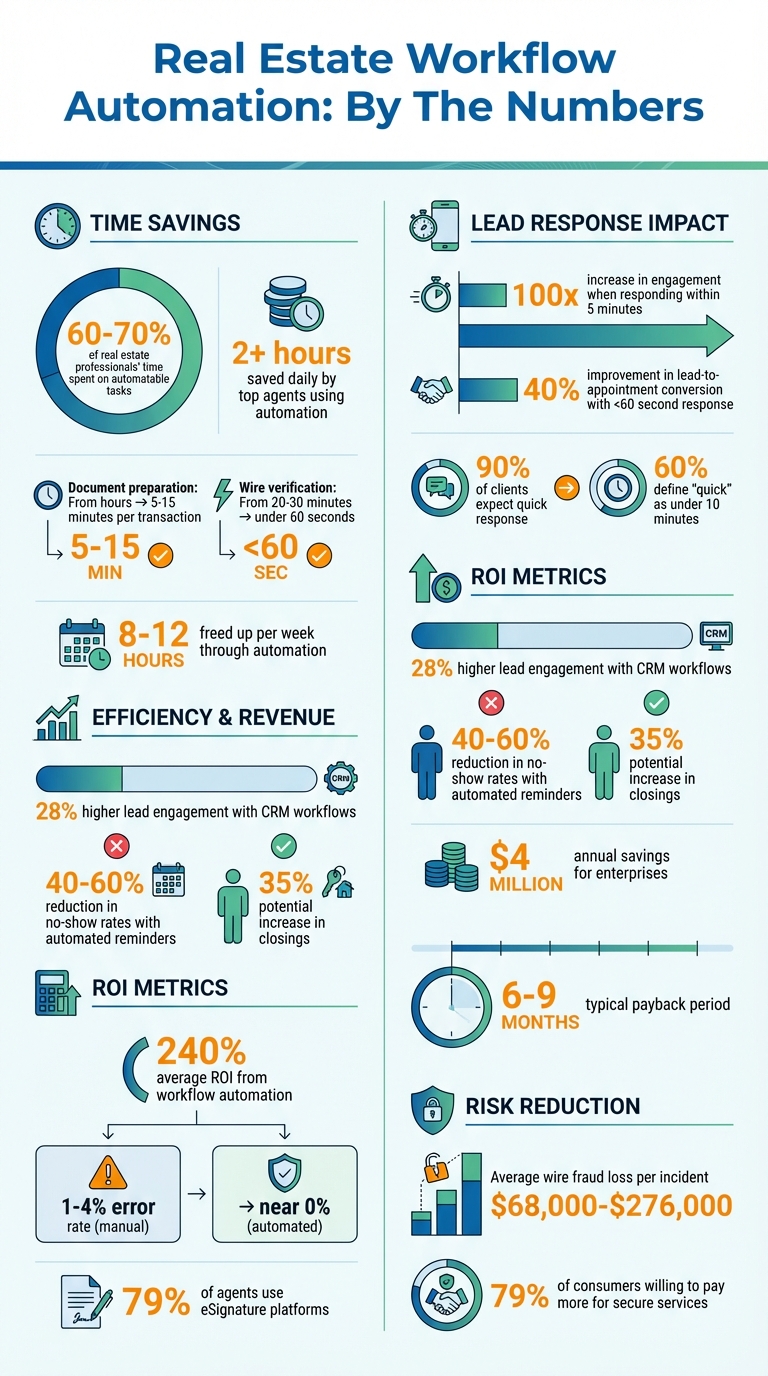
Real Estate Workflow Automation ROI and Impact Statistics
Get Ahead in Real Estate with These 10 Time-Saving Automation Tools!
sbb-itb-8058745
How Workflow Automation Works in Real Estate
Grasping how automation functions in real estate can help transform operations into smoother, more efficient systems that save time and increase revenue.
What is Workflow Automation?
Workflow automation relies on technology to handle repetitive tasks, approvals, and processes automatically, based on pre-set rules and triggers. Here’s how it works: a trigger – like a new lead form submission from Zillow – initiates the process. Then, an action – such as sending a welcome email – follows automatically. Conditions, like "assign leads with budgets over $500,000 to a senior agent", guide the next steps.
In real estate, automation touches every part of the transaction process. Lead management, for instance, becomes nearly instantaneous. Inquiries from platforms like Facebook or property portals are automatically routed to agents based on factors like location or budget, ensuring a fast response. Transaction coordination also benefits, with tasks like title clearing triggering automatic e-signature requests. Even security processes, such as wire verification, are streamlined – what once took 20–30 minutes can now be done in under a minute. On top of that, client nurture campaigns – like sending home anniversary messages or market updates – run effortlessly in the background.
These automated workflows not only reduce manual effort but also lead to noticeable time and cost savings, as detailed below.
Benefits of Automation in Real Estate
The time saved through automation is a game changer. Real estate professionals spend an estimated 60–70% of their time on tasks that could be automated. By handing off administrative work to automation, top agents save over two hours every day. For example, document preparation, which used to take hours per transaction, now takes just 5–15 minutes.
Speed is everything in real estate. Responding to leads within five minutes increases engagement by 100 times, while cutting response times to under 60 seconds can improve lead-to-appointment conversion rates by 40%. With 90% of clients expecting a quick response – and 60% defining "quick" as 10 minutes or less – automation becomes essential to meet these expectations.
Automation also boosts financial and operational efficiency. Agents using CRM workflows experience 28% higher lead engagement compared to those relying on basic contact management. Automated appointment reminders help reduce no-show rates by 40–60%. On a larger scale, workflow automation can save enterprises up to $4 million annually. Additionally, security-focused automation mitigates risks like wire fraud, where losses can range from $68,000 to $276,000 per incident. With 79% of consumers willing to pay more for secure services, automation also enhances trust.
Problems with Manual Real Estate Workflows
Despite its advantages, many real estate professionals still rely on manual workflows, which often lead to delays and errors. For example, leads that come in after business hours might not be addressed until the next morning, by which time potential clients may have already contacted other agents. Scheduling showings through back-and-forth texts or emails wastes time that could be spent meeting clients face-to-face.
Manual processes also increase the risk of human error. Re-entering data across multiple systems can create inconsistencies, and important follow-ups may slip through the cracks when agents are managing multiple deals. In property maintenance, teams often spend up to 80% of their time on clerical tasks like coordinating, documenting, and invoicing, rather than focusing on actual repair work.
Manual wire verification is another pain point. Without automated audit trails, proving compliance becomes a cumbersome process. Relying on callbacks to verify wires not only slows the process but also opens the door to costly errors, potentially leading to significant financial risks.
Finding Automation Opportunities in Your Business
Pinpointing where automation can make the biggest difference is essential for streamlining your operations. Research shows that professionals often spend 60–70% of their time on tasks that could easily be automated. The challenge lies in distinguishing between tasks that demand human input – like negotiating deals or advising clients – and repetitive, rules-driven processes that follow predictable patterns.
Which Processes to Automate First
Start with lead management. Speed is critical here: responding to leads within five minutes increases the likelihood of a meaningful conversation by an astonishing 100 times. Automating lead capture can instantly sort leads by factors like location, budget, or property type, ensuring faster and more efficient follow-up.
Next, look at document creation. Real estate agents, for instance, can spend over 20 hours per transaction on administrative work. Using automated templates that pull information directly from your CRM can cut down the time spent on contracts, disclosures, and presentations significantly.
Appointment scheduling is another time sink. Instead of endless back-and-forth emails or texts, automated scheduling tools let clients book showings directly from your calendar. Automated reminders ensure appointments happen on time. Similarly, transaction follow-ups – like sending home anniversary messages or market updates – can run on autopilot, keeping you connected with past clients effortlessly.
For high-stakes tasks, compliance tracking is key. Take wire verification, for example: manual callbacks can take 20–30 minutes, while automation completes the same task in under 60 seconds. With wire fraud losses averaging between $68,000 and $276,000 per incident, automating these processes not only saves time but also protects your clients and your business.
Once these areas are identified, the next step is to prioritize them based on their potential impact and ease of implementation.
How to Prioritize Tasks for Automation
Not every automation opportunity will deliver the same results. A simple scoring system can help you decide where to start: rate tasks by Impact (1–5), Difficulty (1–5), and calculate the ROI (Impact divided by Difficulty). Tasks with higher ROI scores should be tackled first.
| Automation Task | Impact (1–5) | Difficulty (1–5) | ROI Score |
|---|---|---|---|
| Appointment Scheduling | 4 | 1 | 4.0 |
| Document Templates | 3 | 1 | 3.0 |
| Lead Response | 5 | 2 | 2.5 |
| Rent Collection | 5 | 2 | 2.5 |
| Lead Qualification | 5 | 3 | 1.7 |
| Transaction Tracking | 5 | 3 | 1.7 |
Start with "quick wins" (ROI ≥3.0) to see immediate benefits. Once those are in place, move on to high-impact but more complex tasks like lead qualification or multi-channel communication. Save specialized workflows – like predictive maintenance or advanced market analysis – for later phases.
Before diving into automation, take time to review and optimize your workflows from start to finish. Identify bottlenecks and eliminate redundant data entry. Fixing inefficiencies upfront ensures automation doesn’t amplify existing problems. Standardize naming conventions, checklists, and data formats across your tools to avoid integration headaches.
"Automation is not here to save labor. It’s here to build velocity. To reduce pipeline friction." – INSIDEA
Focus your efforts on areas where the stakes are highest. For example, prioritize tasks with high fraud risks (like wire verification), those that directly impact revenue (such as quick lead responses), or processes prone to errors due to manual data entry. This targeted approach ensures your automation efforts deliver measurable results right from the start.
Building Your Real Estate Automation Tech Stack
Your tech stack is the backbone of your automation strategy. Instead of relying on bulky all-in-one solutions, many real estate professionals are opting for "best-of-breed" setups – where specialized tools connect seamlessly through powerful APIs.
Types of Automation Tools You Need
To build a functional tech stack, start with the essentials. A CRM platform should be your foundation, managing lead stages, contact history, and global opt-out lists. From there, include AI-driven lead engagement tools to handle initial responses and qualification, reducing the need for manual follow-ups.
Next, add integration platforms that connect your CRM, website, SMS tools, and forms. These platforms eliminate repetitive data entry by syncing information automatically. Other must-haves include:
- Communication tools for automated SMS and email sequences
- Transaction management software to trigger document requests and milestone updates
- Marketing distribution tools to automate listing announcements
- eSignature and digital documentation platforms – used by 79% of agents – to streamline remote closings
To supercharge your workflows, incorporate property and contact data services. Platforms like BatchData provide APIs that enrich your CRM with verified property data, phone numbers, and skip tracing capabilities. For instance, if a lead capture form collects only a name and address, data enrichment tools can fill in missing details, speeding up your response time and reducing manual research.
With these tools in place, the next step is ensuring your data is accurate and up-to-date.
Why Data Quality Matters for Automation
Automation can magnify both successes and mistakes. If your CRM contains outdated phone numbers or incomplete property records, every automated email or text could fail to reach its target. High-quality, enriched data ensures that your workflows rely on accurate, timely information.
BatchData‘s enrichment services integrate directly into your automation stack, appending verified details in real time as new leads are added. Features like phone and address verification ensure that communications – whether SMS, email, or direct mail – land with the right audience.
Accurate data is the key to making your automation efforts effective and reliable.
Connecting Your Tools Through Integration
Proper integration is what ties your tech stack together. Without it, you risk "communication collisions", where multiple systems send conflicting or redundant messages. By connecting your tools, you can create a global suppression list that automatically removes contacts from all automated sequences when they opt out.
Your CRM should act as the central hub for contact status and consent. Before integrating additional tools, standardize naming conventions for tags and pipeline stages to avoid data silos and reporting errors. Regular audits – such as monthly health checks – can identify broken connections or duplicate messages, keeping your workflows running smoothly.
"Tooling doesn’t create outcomes by itself – an operating model does." – Tom Deutch, Roof AI
At the end of the day, your tech stack is only as effective as the connections between its tools. Regular maintenance and monitoring are essential to ensure everything works in harmony.
Implementing and Improving Your Automation Strategy
As real estate workflows increasingly rely on automation, having a well-planned implementation strategy is essential to ensure everything runs smoothly. Once your tech stack is integrated, roll out your automation in phases to get the most out of it.
Step-by-Step Implementation Process
Instead of launching everything at once, take a gradual approach. Start with the basics – focus on automating your CRM processes in the first 1–2 months. This includes lead capture and simple follow-up sequences. Over the next 2–3 weeks, connect your CRM with tools like email, SMS, and e-signature platforms. Then, move on to client engagement workflows (another 2–3 weeks) and document automation, which may take 3–4 weeks to set up.
Here’s an example of a 30-day rollout plan:
- Week 1: Clean up duplicate contacts and standardize tags.
- Week 2: Set up lead intake and routing rules.
- Week 3: Build nurture sequences with clear stop conditions.
- Week 4: Create transaction reporting dashboards.
Before automating, map out your contract-to-close process to spot bottlenecks, like delays during handoffs. Document every point where staff manually re-enter data or follow up. This audit helps pinpoint workflows with the highest potential for improvement. For instance, automating wire verification, lead response (especially since 90% of customers expect a quick reply, with 60% defining "quick" as under 10 minutes), and transaction checklists can deliver excellent results.
Once you’ve planned your rollout, follow these best practices to make your automation reliable and impactful.
Best Practices for Workflow Automation
Keep things straightforward. Overly complicated workflows with nested logic can cause "silent failures" that go unnoticed until critical tasks are delayed. Design each automation with clear triggers and outcomes, and test it in a sandbox environment using real-world scenarios before going live.
Standardization is key. Use consistent naming conventions for files, tags, and pipeline stages across your brokerage. Enforce mandatory fields and validation rules to prevent missing or inconsistent data from disrupting your automation. Conduct monthly health checks to review execution logs, update suppression lists for opt-outs, and ensure compliance with TCPA and FTC guidelines by logging consent details. Tracking metrics like speed-to-lead remains critical for improving conversion rates.
Remember, automation isn’t just about software – it’s about creating an operational framework. Assign a team member to oversee quality assurance, set performance goals, and regularly gather feedback to refine your workflows.
Common Automation Mistakes to Avoid
Even with a solid plan, there are pitfalls to watch out for when implementing automation.
One common mistake is automating flawed processes. If your manual workflows are inefficient, automation will only speed up those inefficiencies. Fix the process first, then introduce automation.
Tool sprawl is another issue. Using too many disconnected platforms can lead to fragmented data and require staff to enter the same information multiple times. Focus on ensuring your core tools integrate well through real estate APIs or connectors rather than piling on features.
Also, avoid automating tasks that require a personal touch. Automation works best for repetitive tasks like scheduling, document routing, and follow-up reminders. However, decisions involving pricing strategy, negotiations, and seller relationships should remain in the hands of experienced professionals. Administrative tasks often take up more than 20 hours per transaction, so automate those instead of the conversations that build trust and close deals.
Lastly, prioritize data quality. Tools like BatchData can enrich your records in real time, ensuring your workflows rely on accurate, up-to-date information. This step is crucial for maintaining the reliability of your automation processes.
Measuring Automation ROI with Key Metrics
Once you’ve set up efficient workflows and started reaping the benefits of automation, the next crucial step is measuring ROI. This is how you validate your investment and prove its value. Tracking the right metrics not only justifies your automation spending but also helps identify areas for improvement. On average, companies see an ROI of 240% from workflow automation and recover their investment within 6–9 months.
Which Metrics to Track
With automated workflows in place, the focus shifts to metrics that confirm their effectiveness. Start with operational efficiency. Measure time saved per task – for example, how long it takes to complete a purchase agreement. Look at error reduction rates and the speed from contract initiation to closing. Another key metric is how many additional transactions your team can handle without hiring more staff.
For lead management, track metrics like speed-to-lead response time, contact rates within the first 24 hours, and appointment show rates. Pipeline velocity – the time from lead to appointment – gives insight into how automation is speeding up your sales process.
When presenting to stakeholders, financial metrics are crucial. Calculate cost per transaction, total labor cost savings, and deferred hiring costs (positions you no longer need to fill due to increased efficiency). Real estate professionals, for instance, spend 15–20% of their time on paperwork. Even small efficiency gains here can quickly add up.
Don’t forget quality indicators like rejection rates for documents from lenders or title companies, audit-readiness scores, and the accuracy of legal documents. Manual processes typically have an error rate of 1–4%, but automation brings this down to nearly zero. Lastly, monitor client experience with metrics like Net Promoter Score (NPS) and customer satisfaction ratings to ensure automation enhances, rather than hinders, relationships.
How to Calculate Return on Investment
The formula for ROI is simple: ROI % = [(Total Benefits – Total Costs) / Total Costs] × 100. The challenge lies in accurately calculating both sides.
For total costs, include platform subscriptions, implementation labor (both internal and external), training, and ongoing maintenance – usually 5–10% of setup costs annually. When calculating labor savings, use a fully-loaded hourly rate (which includes salary, benefits, and overhead). This rate is typically 25–33% higher than base wages. For example, if an agent earning $50,000 annually saves 10 hours per week on admin tasks, the annual savings amount to $15,600 using a fully-loaded rate of $30/hour.
Be conservative when estimating benefits. Assume automation will cut 70–80% of manual time, as humans will still manage exceptions and provide oversight. For instance, reducing contract completion time from 45–60 minutes to 10–15 minutes translates into clear dollar savings based on your team’s hourly rates. Similarly, cutting data entry time from over 10 minutes to about 2 minutes per form directly improves efficiency and impacts your bottom line.
Projects with an ROI above 200% should be prioritized immediately. Those between 100–200% are worth considering based on complexity, while anything below 50% should only proceed if driven by compliance or customer experience needs. Compare actual ROI to projections at the 6-month mark to validate your strategy and build support for future automation projects. Regular ROI tracking not only strengthens your case for automation but also uncovers opportunities for further optimization.
Conclusion
Workflow automation isn’t about replacing real estate professionals – it’s about helping them work smarter. By taking over repetitive tasks, automation can free up 8–12 hours a week and potentially increase closings by 35%. The idea is straightforward: let technology handle the routine stuff so you can focus on what matters most – building client relationships, negotiating deals, and expanding your business.
"The goal of real estate workflow automation software is to operate quietly in the background as a support partner. It handles repeatable steps, so you don’t have to rely on memory or find time you don’t have." – MoxiWorks
This approach highlights the importance of starting small and staying focused. Try automating a single, high-impact workflow – like lead response or wire verification – for 30 days to see how it performs. Take time to map out your current processes, pinpoint where manual work slows things down, and prioritize automations that tackle your biggest pain points or reduce fraud risks.
One key to success is ensuring your data is clean and well-connected. Poor data quality can lead to duplication, lost context, or integration issues. Tools like BatchData can help by enriching your property and contact data in real time through skip tracing, phone verification, and bulk delivery. With accurate data fueling your workflows, your tech stack becomes a powerful edge in the competitive real estate market.
FAQs
What should I automate first in my real estate business?
Automating repetitive tasks can make a huge difference in managing client interactions and leads. Begin with areas like lead capture, personalized follow-ups, and scheduling reminders. These steps not only save time but also help ensure you don’t miss out on potential opportunities.
After mastering these basics, move on to automating property listings, appointment scheduling, and transaction workflows. By focusing on these priorities, you’ll create a more efficient and scalable process while cutting down on manual work.
How do I connect my CRM, email/SMS, and e-signature tools without duplicates?
To link your CRM, email/SMS, and e-signature tools without creating duplicate entries, automation platforms like Zapier can be a game-changer. Here’s how to make it work:
- Map out your workflows: Clearly define how data should flow between tools.
- Set up filters: Use filters to block duplicate entries from being created.
- Test thoroughly: Run tests to confirm data updates as expected across all platforms.
Don’t forget to audit and maintain your workflows regularly. This helps ensure everything stays consistent and keeps duplicates at bay over time.
How can I measure ROI from real estate workflow automation?
To gauge the ROI of real estate workflow automation, focus on tracking time savings, cost reductions, and efficiency improvements. Start by comparing metrics such as the time required to complete tasks, error rates, and transaction speeds before and after implementing automation.
The main advantages include cutting down on manual labor, speeding up transactions, and boosting client satisfaction. These gains often lead to noticeable cost savings and increased revenue, clearly showcasing the return on your automation investment.