Chasing cold leads is inefficient and costly. BatchData integrates with your CRM to automate lead prioritization, so you can focus on prospects that are more likely to convert. Here’s how it works:
- Search smarter: BatchData’s API finds properties based on your criteria.
- Score leads: Factors like equity and absentee ownership determine lead quality.
- Verify contacts: Skip tracing ensures accurate owner details.
- Automate workflows: Enriched, prioritized leads go directly into your CRM.
- Route effectively: Assign high-value leads to top agents for faster follow-ups.
This system is ideal for real estate professionals managing large datasets or targeting motivated sellers. By automating lead scoring and contact verification, you save time, reduce manual work, and improve your chances of closing deals. Ready to streamline your process? Start by connecting BatchData to your CRM and let automation handle the rest.
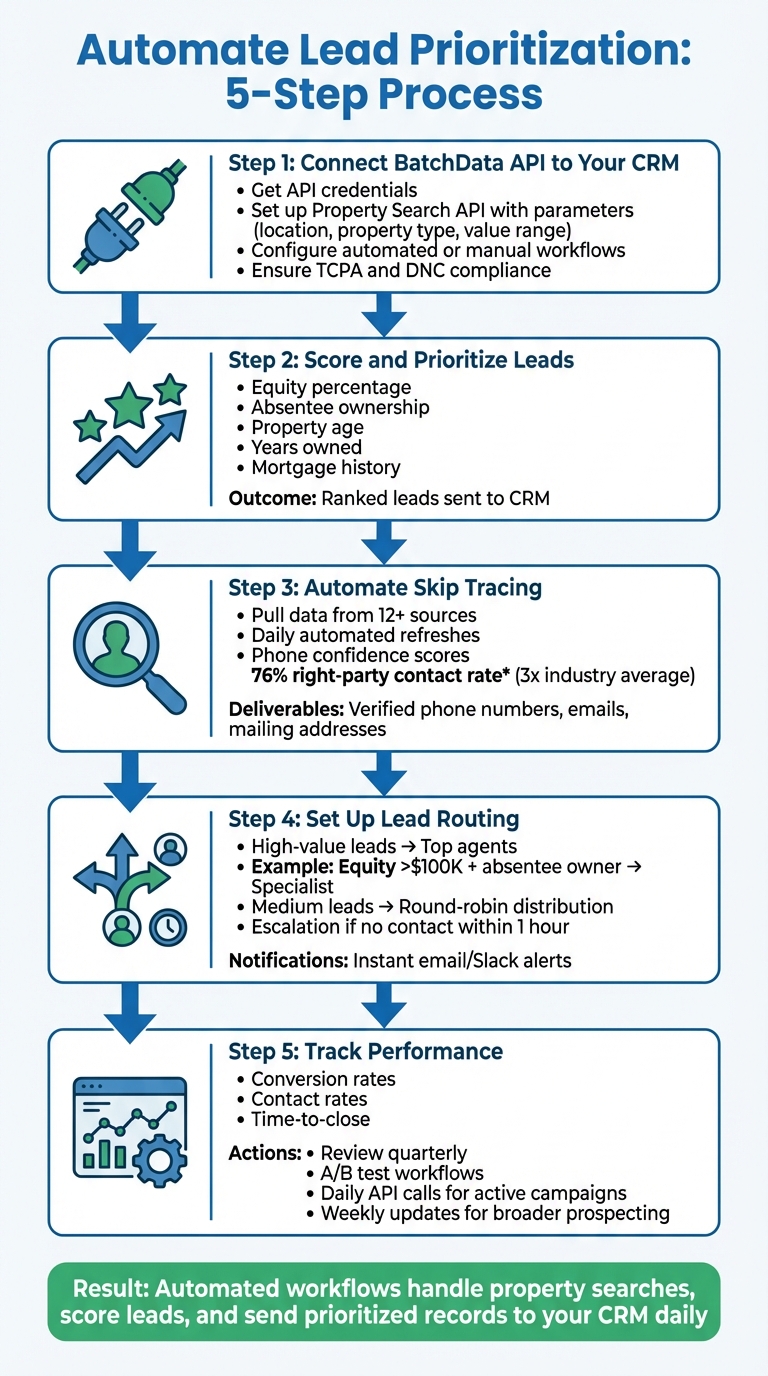
5-Step Process to Automate Lead Prioritization with BatchData and CRM Integration
Step 1: Connect BatchData API to Your CRM
Get Access to the BatchData API
Start by creating an account and obtaining your API credentials. These credentials are essential for accessing property data and skip tracing services. Treat them like a key to your data pipeline – keep them safe and confidential.
BatchData uses a pay-as-you-go pricing model. There’s no need for a subscription, so you only pay for what you use, whether it’s property searches, contact enrichment, or bulk data delivery. This setup is perfect for testing the integration without committing to ongoing fees.
Link BatchData to Your CRM Platform
Once you have your API credentials, the next step is connecting BatchData to your CRM. Begin by setting up BatchData’s Property Search API with parameters like location, property type, and value range. The API processes this information to generate leads based on criteria such as absentee ownership or equity percentage.
From there, BatchData performs skip tracing to retrieve owner contact details, formats the data, and imports it into your CRM. You can configure this workflow to run automatically or trigger it manually. For added efficiency, platforms like n8n allow you to build automated systems that compare new search results with previous data, making it easier to spot fresh listings or property updates without extra effort.
Protect Your Data and Follow Compliance Rules
After setting up the integration, it’s crucial to ensure compliance with all relevant regulations. For example, you must adhere to the Telephone Consumer Protection Act (TCPA) and respect the National Do Not Call (DNC) Registry. BatchData simplifies this by flagging DNC-listed numbers and identifying high-risk contacts, like those on "litigious caller" lists, so your team can avoid potential legal issues.
To safeguard your data, enforce strict access controls for your API keys and rotate them regularly. This reduces the risk of unauthorized access and helps you stay compliant with security and privacy standards. Protecting your credentials is not just about security – it’s about ensuring the integrity of your entire data operation.
sbb-itb-8058745
Step 2: Score and Prioritize Leads with BatchData
What Factors Determine Lead Quality
Lead quality depends on specific property and ownership characteristics. Factors like equity percentage, absentee ownership, property age, and years owned play a major role. BatchData’s Property Search API provides these details, allowing you to filter and assign weight to each factor based on your market’s needs and your strategy.
BatchData doesn’t stop there – it enhances property records with additional data, giving you a more refined way to evaluate leads.
Find Better Leads with Enriched Property Data
BatchData takes property records to the next level by adding critical details that help identify high-potential prospects. Beyond basic information like square footage and lot size, you’ll get insights into mortgage history, ownership duration, and estimated equity based on current market valuations. It also identifies absentee owners by comparing mailing addresses with property locations and flags high-equity properties by cross-referencing assessed values with outstanding loan balances. This enriched data turns a simple property list into a powerful tool for targeting the right opportunities.
Real Example of Lead Scoring
By creating a scoring model that prioritizes these key indicators, you can rank your leads effectively. By automating property searches and CRM lead enrichment, BatchData’s workflows analyze properties, calculate scores, and seamlessly move ranked leads into your CRM. This means your team can focus their efforts on the highest-scoring prospects, ensuring top-tier leads get immediate attention.
Step 3: Automate Skip Tracing and Contact Verification
What Skip Tracing Does and Why It Matters
Once you’ve scored and prioritized your leads in Step 2, the next step is making sure you can actually connect with them. Skip tracing helps you track down the most accurate contact details for property owners – like phone numbers, email addresses, and mailing addresses. Without this step, your outreach efforts might hit a wall, with incomplete records leading to wasted time. Accurate contact data ensures you’re connecting with real prospects instead of chasing dead ends.
For real estate professionals focusing on absentee owners or properties held under LLCs, skip tracing becomes even more important. It helps uncover the actual decision-makers behind corporate veils, not just the registered agents. This level of precision ensures your CRM is updated with actionable contact details, paving the way for seamless follow-ups.
How BatchData Ensures Accuracy
BatchData takes contact verification to another level by pulling owner information from over a dozen high-quality sources. Their automated enrichment engine refreshes data daily and delivers results in milliseconds via API. This process provides multiple phone numbers (labeled by type), verified email addresses, and accurate mailing addresses. Each phone number is assigned a confidence score, guiding your outreach strategy.
The platform boasts a 76% right-party contact rate, which is nearly three times the industry average. Even for properties held in LLCs or trusts, BatchData digs deeper to connect you with the actual property owners, not just intermediaries.
Automating Contact Verification in Your CRM
To streamline your workflow, set up your CRM to automatically trigger skip tracing after lead scoring. For example, when BatchData identifies high-equity absentee owners, it can instantly pull enriched contact details and feed them into platforms like HubSpot or Salesforce.
Leverage phone confidence scores to prioritize your outreach efforts – high-confidence mobile numbers can be routed to your top-performing agents for immediate follow-ups, while lower-confidence leads can be placed in nurture sequences. This automation completes the lead enrichment process, turning raw property data into actionable insights that drive conversions.
Step 4: Set Up Automatic Lead Routing in Your CRM
Build Lead Routing Rules
Once you’ve established lead scoring, the next step is automating how leads are distributed in your CRM. Lead routing ensures high-value prospects get assigned to your top agents, while lower-priority leads are evenly distributed across the team. Platforms like HubSpot and Salesforce make this possible through workflow automation, which can trigger actions based on BatchData scores and property details.
For example, you can create workflows to automatically assign leads with an equity score over $100,000 and an absentee owner flag to a specialist. Add layers of criteria to make sure leads with specific equity or ownership characteristics are routed to the most qualified agent for follow-up.
The secret lies in using BatchData’s insights – like equity position, ownership type, property condition, and contact confidence scores – combined with your team’s strengths. Filters can help sort and score leads before they’re assigned, so only prospects meeting your quality standards are routed through your system.
Make Sure Your Team Handles Leads Efficiently
Even the best routing system won’t matter if your team doesn’t act quickly. Timely responses are critical for converting high-priority leads. Set up your CRM to send instant notifications – via email or Slack – when a high-value lead comes in. This way, agents can follow up within minutes, not hours. For medium-priority leads, using a round-robin system can help evenly distribute the workload and avoid overburdening any one agent.
To ensure no leads slip through the cracks, configure escalation rules that reassign leads if they aren’t contacted within an hour. This safety net is particularly important for high-value prospects identified by BatchData, as these leads often have verified contact details and strong buying signals. Quick action ensures these opportunities don’t go cold due to delays or scheduling conflicts.
Step 5: Track Performance and Improve Your System
Which Metrics Matter Most
To measure how well your system is working, focus on three key metrics:
- Conversion rates: The percentage of leads that turn into closed deals.
- Contact rates: The proportion of enriched phone numbers and emails that successfully lead to connections.
- Time-to-close: The number of days it takes from the first contact to signing a contract.
These metrics will show whether BatchData’s real estate investing intelligence and skip tracing are making a difference in your pipeline. It’s a good idea to track these numbers separately for high-value leads and standard leads to get a clearer picture.
Set up custom fields in your CRM dashboard to monitor these metrics weekly. For contact rates, compare verified contacts against unverified ones to assess data quality. Verified data often improves connection rates, but results can vary depending on your market and lead sources. Use this data to fine-tune your system as needed.
Adjust Your System Based on Results
Once you’ve established these metrics, use the data to refine your strategy. Review your results quarterly to spot trends in lead conversion. For example, if leads with higher equity or absentee ownership consistently convert faster or more often, tweak your scoring rules to prioritize those types of leads.
You can also test your adjustments by running A/B tests in your CRM workflows. For instance, divide high-value leads between your top-performing closer and your regular process, then compare conversion rates to see which approach works better. Make one change at a time to clearly identify what drives improvement.
Keep Improving with BatchData Tools
After making adjustments, focus on continuous improvement by leveraging BatchData’s tools. Regular updates are critical to keeping your system accurate. For active campaigns, schedule daily API calls, and for broader prospecting efforts, set up weekly updates. These updates will capture changes like new liens, ownership transfers, or tax delinquencies, ensuring your lead scores stay relevant as market conditions evolve.
Compare new data scans with previous ones regularly to refine your scoring models. BatchData’s API is flexible, allowing you to test different enrichment combinations without overhauling your entire system. Start small – add a new property attribute to your scoring formula or adjust your contact verification rules – and track the results before making additional changes. This step-by-step approach helps you build a more effective and efficient system over time.
Conclusion
Main Points to Remember
Save time and energy by automating lead prioritization. Using property intelligence, the system filters leads based on factors like equity percentage, absentee ownership, years owned, and tax status. This process assigns lead scores, helping you focus on the most promising prospects . Verified skip tracing ensures you’re working with accurate contact details, allowing your team to concentrate on closing deals.
Every day, automated workflows handle property searches, score leads, and send enriched, prioritized records straight to your CRM . The system keeps lead scores updated to reflect market changes, while tracking verified contact rates helps you refine your strategy. These tools work together to speed up and improve your deal-closing process.
How to Get Started
Ready to take advantage of these tools? Start by connecting BatchData’s API to your CRM – whether it’s HubSpot, Salesforce, or another platform . Test your workflow with a couple of key criteria, such as high equity and absentee ownership. Set up daily scans for active campaigns to catch new opportunities as they appear.
You can also tweak your scoring formula by adding new property attributes, then monitor conversion rates to see what works best. BatchData’s flexible API lets you experiment with different enrichment combinations without needing to overhaul your entire system. This adaptability allows you to fine-tune your strategy to fit your market’s unique demands.
HubSpot Lead Scoring Tutorial 2025: New Tool Setup, AI & Best Practices | HubSpot Excellence
FAQs
How do I choose the best lead scoring factors for my market?
To zero in on the best real estate leads, rely on data-driven insights that combine key property details, financial metrics, and behavioral cues. Here’s what to focus on:
- Property Data: Look at factors like property value, equity levels, and mortgage status. These details can reveal a lot about a lead’s potential and readiness to act.
- Financial Indicators: Assess financial health, such as income and debt levels, to gauge whether a lead is in a position to buy or sell.
- Behavioral Signals: Pay attention to urgency and engagement. For instance, frequent visits to listings or quick responses to outreach can indicate higher interest.
Using tools and automation, you can efficiently evaluate these factors and prioritize leads. The secret is to customize your scoring criteria to reflect your market’s specific dynamics. This way, you can focus your efforts on the leads most likely to convert into clients.
How often should I refresh BatchData leads and scores in my CRM?
To keep your CRM accurate and prioritize leads effectively, make it a habit to refresh your BatchData leads and scores daily. Frequent updates ensure you’re targeting the most valuable prospects, ultimately boosting your sales efficiency.
What do I need to do to stay TCPA and DNC compliant?
To ensure compliance with TCPA and DNC regulations, make sure to have explicit written consent for every lead and type of communication by January 27, 2025. Starting April 11, 2025, all opt-out requests must be processed within 10 business days. If you’re using purchased leads, confirm that the consent is explicitly tied to your business to prevent any violations.