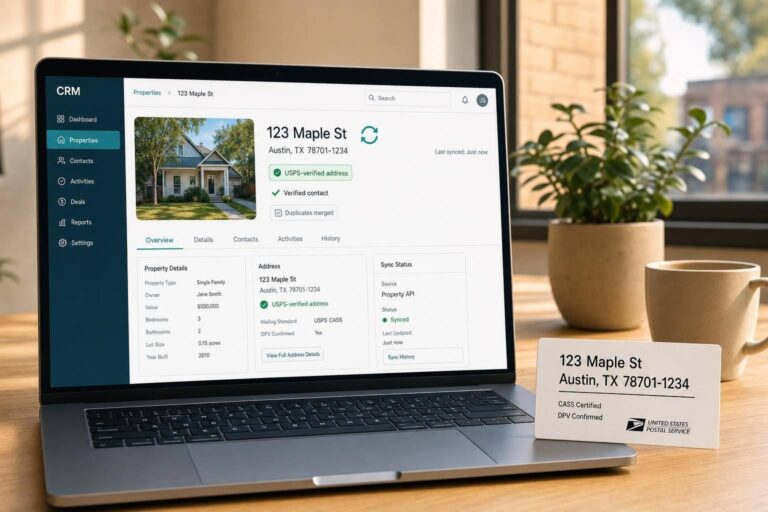
Bad property sync costs money. When CRM data goes stale, teams miss leads, create duplicate records, and make decisions from old listing, owner, and valuation data.
Here’s the short version: APIs fix property data sync by moving clean, structured updates between systems automatically. Instead of relying on CSV uploads or manual edits, I’d use APIs to standardize fields, normalize U.S. addresses, validate contact data, and send updates by webhook or batch job based on how time-sensitive the data is.
A few numbers make the case clear:
- Up to 30% of CRM data goes out of date each year
- For property teams, data freshness should be 95%+ within 24 hours
- Teams that move from CSV imports to API sync often cut data prep time by 50% to 80%
- One case cut sync lag from 6 hours to 45 seconds
If I were setting this up, I’d focus on four things first:
- Pick one source of truth for each field so systems stop fighting each other
- Normalize addresses to USPS Publication 28 format and match with APN/parcel ID
- Use webhooks for live changes like lead intake and listing status updates
- Validate and enrich data before it hits the CRM so bad records do not overwrite clean ones
This article explains where CRM sync breaks, how APIs solve the main failure points, and what rules help keep U.S. property data clean over time.
The main problems: stale records, mismatched addresses, and disconnected systems
CRM sync issues usually begin with fragmented data and inconsistent formatting. APIs are meant to cut down on those weak spots, but when things go wrong, the same problems keep showing up: stale records, mismatched addresses, and disconnected systems.
Fragmented data across CRMs, property systems, and marketing tools
Property data, owner records, and campaign activity often live in separate platforms with no automatic link between them. That leaves teams copying data by hand, which opens the door to errors. On top of that, each system may return the same address in a different format.
Without normalization, the CRM may read those entries as separate records. That’s when duplicates start stacking up.
Sync can also break because of field mismatches. An API might send nested data, while the CRM expects flat fields. Once the formatting starts to drift, record matching falls apart, and address normalization turns into the next headache.
Address normalization and record-matching failures
Inconsistent address formatting is one of the most common reasons duplicate CRM records appear. A property listed as 123 Main St NW in one system might show up as 123 Main Street Northwest or 123 Main St., NW in another. A person can spot that they’re the same place right away. A CRM matching on string values often can’t.
The issue gets messier with multifamily properties. Unit numbers may appear as Apt 4B, #4B, or Unit 4B. If that data isn’t normalized, the system won’t make a clean match.
When the CRM fails to match the address, updates stop flowing to the right record. Then valuations go stale.
Even when the match is clean, timing can still throw everything off.
Latency, duplicates, and accidental overwrites
Address matches alone don’t solve the problem. Timing creates another one. If updates run on a schedule instead of in real time, a property can change status and still show old data in the CRM for hours.
For investor and lender platforms, the target for data freshness should be 95% or higher, which means records update within 24 hours of a market change.
Duplicates make the latency issue even worse. Split records chip away at agent trust and drag out closing times. And when field mapping is off, data can land in the wrong place – or the sync can fail altogether when more than one source system is in the mix.
How APIs fix property data sync in CRMs
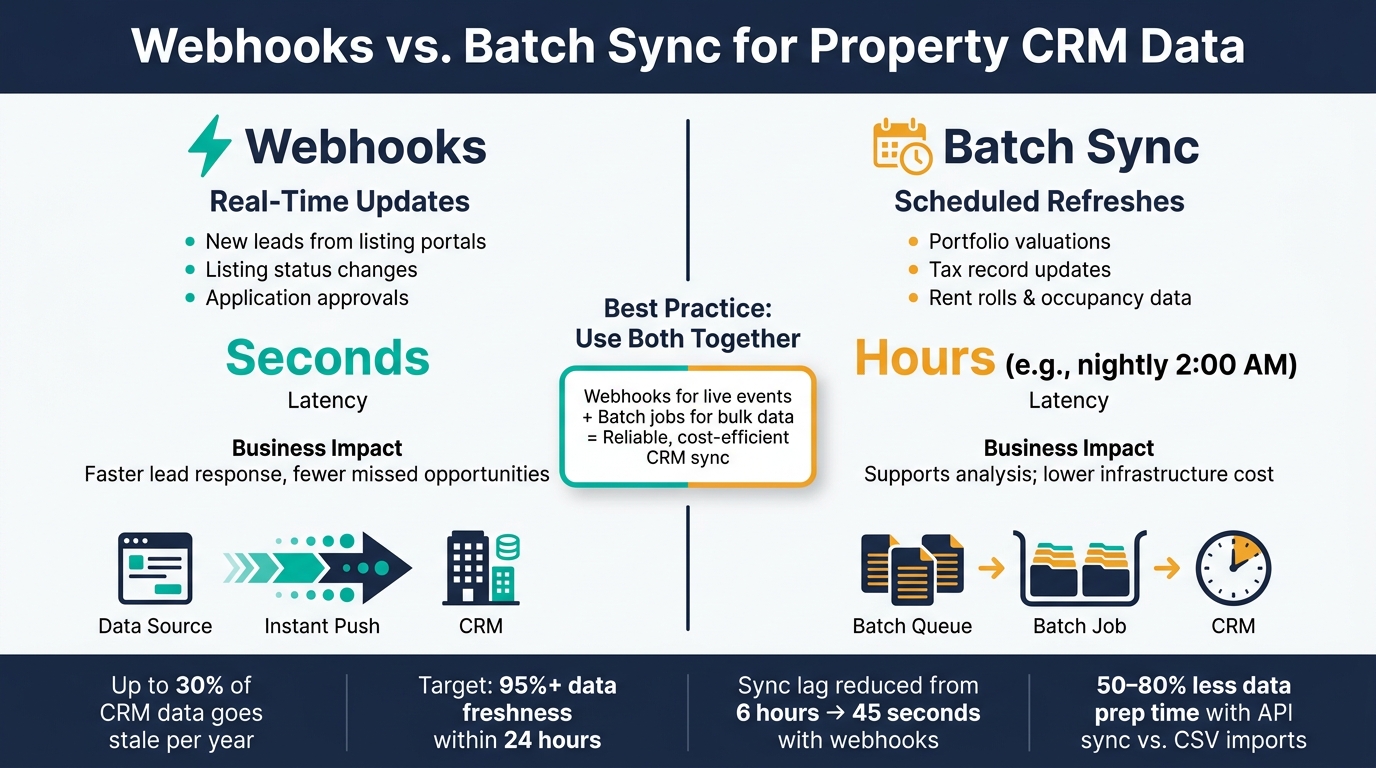
Webhooks vs. Batch Sync: API Property Data Methods Compared
APIs fix these breakdowns by moving property data through structured endpoints instead of manual uploads. A property endpoint like /properties returns the same field names on every call, and a contact endpoint like /contacts does the same for owner data. That consistency helps the CRM take in clean records instead of trying to sort out mismatched entries. The payoff is simple: fewer duplicates, faster updates, and better follow-up on active leads.
Standardized data exchange with structured property records
A standard property record usually includes fields like property_id, normalized addresses, city, state, ZIP_code, county, property_type, square_feet, and list_price in USD. On the contact side, fields like owner_id, first_name, last_name, primary_phone, and contact_role round out the record.
That structure matters more than it may seem at first glance. If a new building is added in an asset system, the CRM can automatically create the property, unit, and owner records without someone cleaning up a spreadsheet first. Teams that switch from CSV imports to standardized API sync often report 50–80% cuts in data prep time, along with fewer errors in ZIP codes, owner names, and unit numbers.
Real-time updates, webhooks, and batch sync
Not every property update needs to move at the same speed. Some changes need to hit the CRM in seconds. Others can wait for a nightly refresh without causing trouble.
| Sync Method | Typical Use Cases | Latency | Business Impact |
|---|---|---|---|
| Webhooks | New leads from listing portals, listing status changes, application approvals | Seconds | Faster lead response, fewer missed opportunities |
| Batch sync | Portfolio valuations, tax record updates, rent rolls, occupancy data | Hours (e.g., nightly at 2:00 AM) | Supports analysis; lower infrastructure cost |
In practice, a hybrid setup tends to work best. Webhooks handle time-sensitive events like new leads or listing status changes, while nightly batch jobs refresh larger data sets like property valuations or tax records. That way, the CRM doesn’t get slammed with every bulk update in real time, but the records tied to live conversations still stay current.
Validation and enrichment before data reaches the CRM
Normalization by itself won’t cut it. Records also need validation before write time. Address verification checks standard formatting and geocoding. Phone validation confirms that numbers match U.S. phone format and marks whether the line is mobile or landline.
This step becomes even more useful when the incoming record is messy. Say a tax-delinquent property enters the pipeline with only a partial owner name and a mailing address. An enrichment API can add confirmed phone numbers, email addresses, and sometimes corporate ownership details before the record ever lands in front of a sales or acquisitions team.
Skip tracing property owners belongs in this same pre-CRM step. For owners who are hard to reach, skip tracing APIs search across multiple databases to find alternate contact points. Records that don’t meet a set confidence threshold are flagged for manual review instead of overwriting clean CRM data. It’s a small rule, but it saves a lot of cleanup later. BatchData provides APIs for address verification, phone verification, enrichment, and skip tracing.
These API patterns show up in live CRM workflows across listings, leasing, and enrichment.
What research and case studies show about API-based CRM sync
Case studies show that APIs can slash sync lag and cut manual rekeying. The pattern is pretty simple: each one tackles the same set of problems – stale records, mismatched data, and systems that don’t talk to each other.
Listing and property data connected to CRM workflows
In listing workflows, one real estate platform case reported that end-to-end sync latency fell from 6 hours to 45 seconds after webhook-based synchronization.
A Rentals United case shows what happens when availability data goes stale. Availability and booking status drifted across systems until a two-way API connected the CRM directly, which reduced double bookings and data mismatches.
Another real estate platform case replaced fragmented systems and duplicate records with a real estate API layer. Once every system shared one master listing record, duplicate entries dropped sharply, and listings went live faster with better consistency across channels.
ERP and leasing data synced with customer-facing systems
In leasing systems, the main issue was lease status falling out of sync with CRM records. Re-Leased supports real-time two-way synchronization between its property management platform and ERP, accounting, and business intelligence tools. That means leasing teams can see vacancy status without backend checks, while CRM records update as lease milestones happen.
Lead enrichment and owner contact updates via API
For lead enrichment, REA Group‘s Lead Enrichment API deals with lead data that needs controlled enrichment before CRM use. Partner CRM providers get partner-only access to lead-enquiry data so they can update contact records before those records reach the CRM.
The next step is to define which system owns each field and how often each field should update.
How to build a reliable API sync strategy for U.S. property teams
Define source-of-truth systems and field update rules
Once you’ve mapped the sync paths, the next job is simple in theory and messy in practice: decide which system owns which field.
Each field should point to one system of truth. That usually means property data comes from MLS or property feeds, lease data comes from an ERP or property management system, contacts live in the CRM, and engagement data comes from marketing tools.
After that, bake field-level update rules into the integration layer. Use fill-if-empty for stable fields, always-update for fast-changing fields, and strict priority for regulated fields. Store a last-updated timestamp and source system ID with every field so there’s an audit trail when something looks wrong.
That sounds a bit technical, but the payoff is plain: fewer stale records, fewer duplicate matches, and fewer cases where good data gets overwritten by bad data.
Use normalization, monitoring, and confidence scoring
Once ownership is set, every write should be normalized and checked.
For U.S. property data, address normalization isn’t optional. Normalize every address to USPS Publication 28 standards before matching or syncing. That means expanding street suffixes, fixing ZIP Codes, and standardizing unit notation. Then use the normalized address plus APN (parcel ID) as the main join key between API responses and CRM records. If the address data is messy, the joins will be messy too.
Monitoring matters just as much. Track latency, error rates, and sync success at the endpoint level. Retry failed calls, and send bad payloads to a dead-letter queue. That keeps CRM records current enough for follow-up, reporting, and outreach.
For enriched fields, add confidence scores based on source reliability, recency, and agreement across sources. A phone number confirmed through a phone verification API should carry more weight than one pulled from a single marketing list, and your CRM update rules should reflect that.
This is where sync moves from “we have rules somewhere” to a system people can trust.
| Design Principle | Technical Practice | Business Outcome |
|---|---|---|
| Define source of truth | Field ownership matrix encoded in integration middleware | Fewer conflicting records, consistent reporting |
| Set field update rules | Fill-if-empty for stable fields; always-update for volatile ones | No accidental overwrites of user-entered data |
| Normalize addresses | USPS-standard validation + APN as primary join key | Lower undeliverable mail rates, fewer duplicate property records |
| Monitor APIs and errors | Latency dashboards, retry logic, dead-letter queues | Reliable sync, faster incident detection |
| Apply confidence scoring | Score enriched fields by source quality; threshold-based update rules | Higher-quality outreach, less low-confidence data entering workflows |
BatchData supports this API-first model directly. Its APIs support property search, enrichment, skip tracing, phone verification, and bulk delivery for portfolio sync.
Conclusion: APIs turn CRM sync from manual cleanup into a repeatable system
The biggest sync failures in U.S. real estate CRMs usually come from the same place: data scattered across MLS feeds, ERPs, and marketing tools that never line up.
The cost of that mess adds up fast. Research shows CRM data decays at 30% to 70% per year, and 31% of CRM admins say poor data quality costs their organization at least 20% of annual revenue.
APIs help fix that by replacing one-off exports and manual rekeying with standardized, automated data exchange. Webhooks cut sync lag by pushing updates as events happen. Scheduled batch jobs keep portfolio-level data current without putting too much strain on systems during the workday. Validation and enrichment happen before the data reaches the CRM, not after. And when ownership, normalization, and confidence scoring are set up the right way, automation improves accuracy instead of spreading mistakes faster.
FAQs
How do APIs reduce duplicate property records?
APIs cut down duplicate property records with bidirectional syncing and upsert logic. The idea is simple: use one clear identifier – like a property ID, APN, or a standardized address – to tell the system whether it should update a record that already exists or create a new one.
Address verification endpoints help at the point of entry by standardizing data before messy variations slip in. That matters because tiny differences in spelling or formatting can create two records for the same property. Add fuzzy matching and deduplication rules to the mix, and your CRM data stays accurate and consistent.
When should I use webhooks instead of batch sync?
Use webhooks when timing matters and you need data updates the moment something changes. They’re a good fit for time-sensitive events like new lead submissions, listing status changes, or price updates. Instead of waiting for the next scheduled sync, webhooks push data right away, which makes them the better choice when immediate action is needed.
Use batch sync for high-volume work that doesn’t need an instant update. This includes jobs like historical reporting, large dataset enrichment, address cleansing, or bulk compliance checks. It’s more efficient for this kind of workload and usually easier to manage with scheduled updates.
What should be my CRM source of truth?
Pick a master system for each data field so every team knows where the “official” value lives. That keeps data in sync and cuts down on conflicts. For example, your CRM may own contact names, while a different system handles lead scores.
When you sync data, use upsert logic with unique IDs to prevent duplicates. It also helps to keep a clear data dictionary that maps fields across systems, so reporting stays accurate and numbers line up.