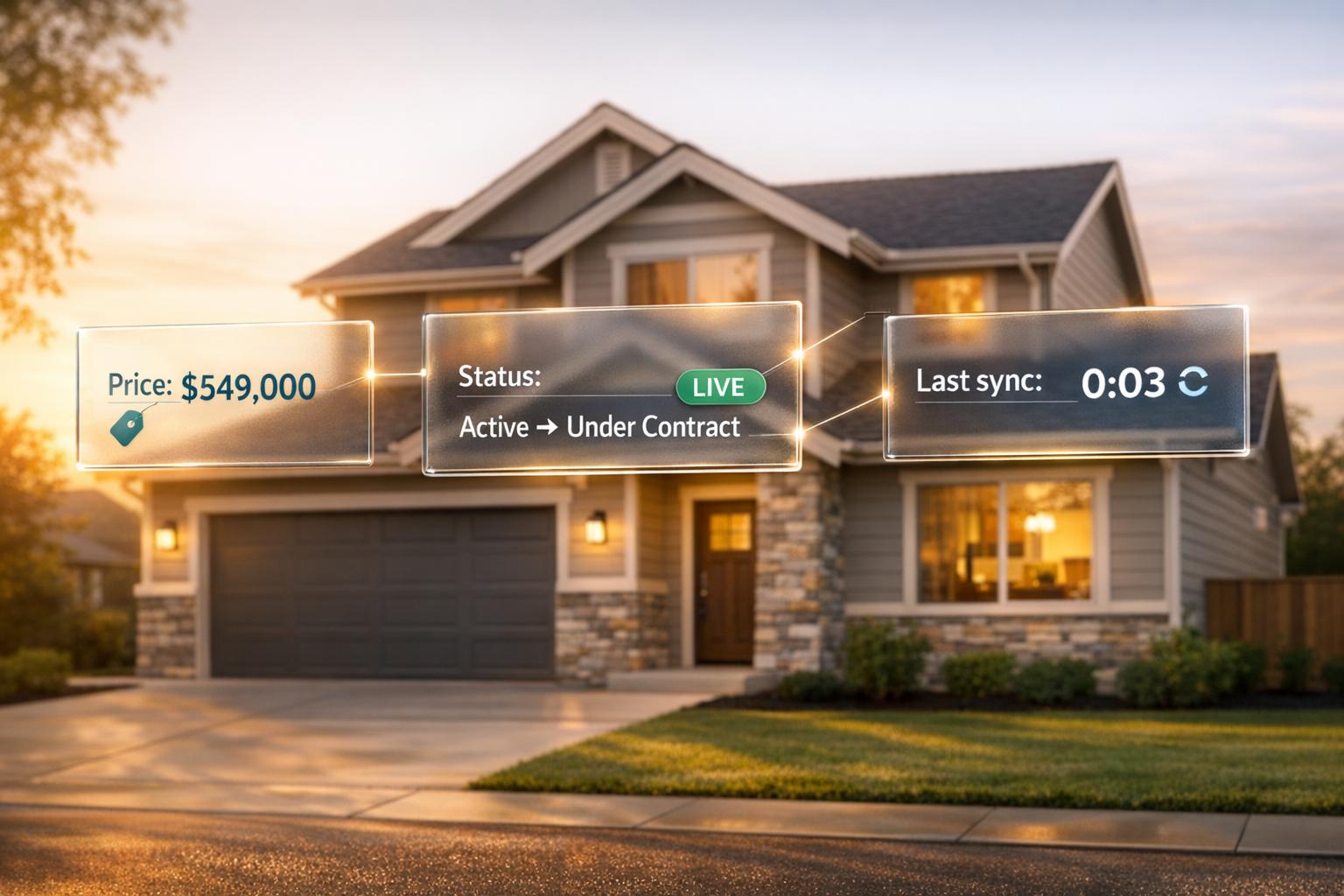
Outdated property data can cost real estate professionals time, money, and trust. APIs solve this by syncing property information in real-time, ensuring teams always work with accurate data. This is especially important in a fast-moving market where listings can change status or price within hours. APIs automate updates across platforms, eliminating manual errors and delays.
Here’s how APIs improve property data management:
- Real-time syncing: APIs push updates like price changes or status updates instantly, ensuring accuracy.
- Critical fields: Listing status, price, and geolocation require constant updates to avoid missed opportunities.
- Efficiency: Event-driven triggers reduce API traffic and improve speed.
- Enrichment: APIs can add valuable context, like tax records or ownership history, without manual input.
APIs like BatchData integrate property data into CRMs seamlessly, helping real estate teams make faster, more informed decisions while avoiding costly mistakes.
Homesage.ai Real Estate APIs: Complete Real Estate Data Integration and Getting Started Guide
sbb-itb-8058745
Key Data Fields to Keep in Sync
Not every piece of property data needs constant updates, but some fields absolutely do. Knowing which ones require real-time syncing can help cut API costs, reduce system strain, and improve overall efficiency. Separating essential data from supplementary information ensures smooth operations without unnecessary overhead.
Core Fields to Sync
Certain fields demand real-time updates because delays can lead to missed opportunities or compliance issues. Take listing status, for example. Whether a property is Active, Pending, Under Contract, or Sold, this information needs to be accurate at all times. A study on major U.S. real estate platforms revealed that 15–20% of listings were either no longer for sale or had outdated pricing. Most MLSs mandate updates to status and price within 24 hours, making near-instant syncing essential.
Price fields are another critical category. This includes the current list price (in USD), original list price, price change history (with timestamps), and price per square foot. Many CRMs use price brackets for lead-routing, so any price drop should automatically trigger alerts for potential buyers. Beyond price and status, property identity fields are pivotal. These include USPS-formatted addresses, unit numbers, city, state, ZIP+4, latitude/longitude, parcel IDs/APN, MLS listing IDs, and internal CRM property IDs. Mismatched or outdated data here can lead to duplicate listings, broken links, or lost records.
Physical details – like the number of bedrooms and bathrooms, living area (in square feet), lot size, property type, and year built – are vital for search filters and automated valuation models (AVMs). Errors in these fields can result in poor search results or inaccurate valuations. Similarly, ownership and contact data (owner name, mailing address, phone numbers, and email) must stay current to ensure offers, disclosures, and follow-ups reach the right person. Lastly, media and marketing assets – such as photo URLs, virtual tours, and listing descriptions – must remain consistent across platforms to drive engagement.
"What used to take 30 minutes now takes 30 seconds. BatchData makes our platform superhuman." – Chris Finck, Director of Product Management, BatchData
Additional Fields for Data Enrichment
While core fields demand immediate updates, enrichment fields provide extra context and insights without requiring constant syncing. For example, property tax records – including assessed values, annual taxes, last assessment dates, and exemptions (like homestead) – help agents and investors calculate ownership costs and estimate net operating income. Sales and ownership history, covering previous sale prices, deed dates, and holding periods, is invaluable for equity analysis and prospecting.
Zoning and land use codes (e.g., R1, R2, commercial, mixed-use) are essential for evaluating renovation potential or short-term rental feasibility. Building permit history adds another layer of detail, confirming whether major upgrades – like a kitchen remodel or roof replacement – were properly permitted and completed. Other enrichment fields include school district assignments, neighborhood market indicators (e.g., average days on market, local price trends, walkability scores), and demographic data for targeted marketing. A 2023 CoreLogic report highlights that a typical U.S. property record can include over 200 distinct attributes, showcasing the sheer volume of data available.
| Field Category | Update Frequency | Primary Use Case |
|---|---|---|
| Listing status & lifecycle dates | Real-time | Compliance, marketing, showing scheduling |
| Price & valuation | Real-time | Lead routing, buyer alerts, AVM accuracy |
| Property identity & geolocation | Real-time | Record matching, map search, routing |
| Physical characteristics | Near real-time | Search filters, valuation models |
| Ownership & contact data | Near real-time | Outreach, legal notices, routing |
| Tax records & assessment history | Daily/weekly | Cost analysis, equity prospecting |
| Zoning & permit history | On-demand | Investment underwriting, listing narratives |
| School districts & neighborhood data | Weekly | Pricing strategy, relocation decisions |
BatchData offers a single API solution that integrates core and enrichment fields into one cohesive data layer. By combining public records, ownership details, contact enrichment, and phone verification, this approach reduces the number of integrations your team needs to manage while ensuring data accuracy across systems.
How to Set Up an API Integration for Property Data Sync
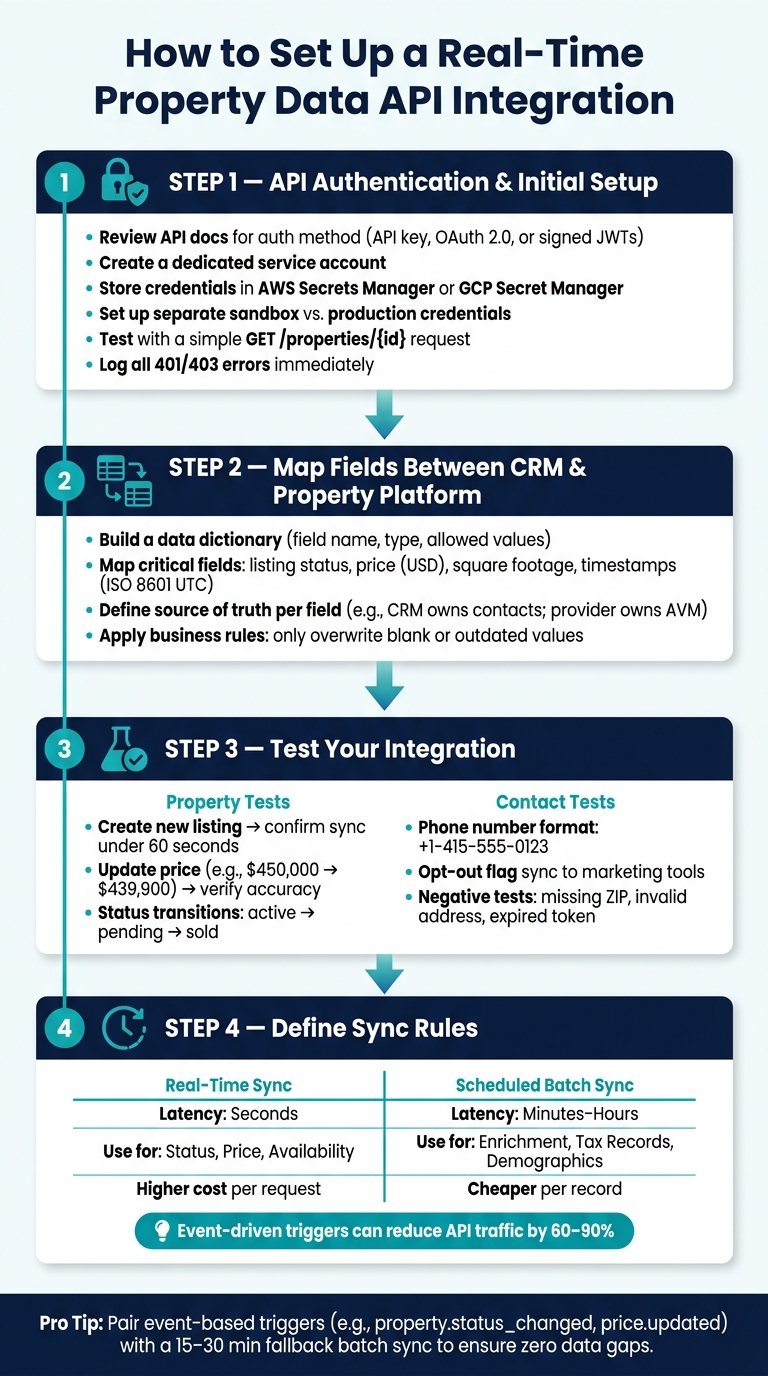
How to Set Up a Real-Time Property Data API Integration
API Authentication and Initial Setup
Before diving in, carefully review the API documentation to understand the required authentication method – whether it’s an API key, OAuth 2.0, or signed JWTs. Once you’ve identified the method, set up a dedicated service account instead of linking credentials to an individual user. This approach avoids disruptions when team members leave or change roles. Store these credentials securely in tools like AWS Secrets Manager or GCP Secret Manager, and, if possible, restrict API access by IP range for added security.
From the start, create separate credentials for sandbox and production environments. Use distinct base URLs for each and test authentication with a simple request (e.g., GET /properties/{id}) using tools like Postman. This ensures everything works before you proceed further. Make error logging a priority – ensure 401 and 403 errors are captured and flagged immediately to troubleshoot credential issues quickly. Once authentication is secure, focus on aligning data fields between systems.
Mapping Fields Between Your CRM and Property Platform
Start by creating a data dictionary that outlines each API field’s name, type, allowed values, and examples. Then, map these fields to corresponding ones in your system, applying any necessary transformations.
Here are a few key mappings you’ll want to get right:
- Listing status: For example, your CRM might use "Under Contract", while the property platform expects
"pending". Clearly define these translations. - Price: Standardize prices to USD and use consistent precision, such as integer cents, to avoid rounding issues.
- Square footage and lot size: Make sure units are consistent across systems and document any conversions.
- Timestamps: Use ISO 8601 UTC format (e.g.,
2026-06-05T18:30:00Z) for storing and exchanging date/time values. Convert to local US time zones only in the user interface.
Establish which system serves as the source of truth for each field to avoid conflicting data during synchronization. For example, your CRM might own contact details, while your property data provider owns AVM estimates and physical characteristics.
If your team plans to enhance records with additional property details, consider integrating a property data API like BatchData. This can provide standardized addresses, ownership data, last sale prices, and contact information whenever a property record is created or updated. Be sure to map these enrichment fields to corresponding CRM fields and apply business rules to maintain clean and accurate data. For instance, only overwrite a field if the current value is blank or outdated.
Testing Your API Integration
Start with a small batch of records to test your integration before going live. Once fields are mapped correctly, validate each step using targeted tests. Your testing should cover both property and contact workflows, as well as intentional error scenarios.
Testing ensures that updates reflect real-time property data, which is critical for making timely decisions. For properties, include the following scenarios:
- Create a new listing: Add a property to your CRM (e.g., address, price in USD, beds, baths, and status set to "active") and confirm it appears on the property platform within your defined SLA – typically under 60 seconds for real-time sync.
- Update a list price: Change a price (e.g., from $450,000.00 to $439,900.00) and confirm the updated value is reflected accurately.
- Test status changes: Transition a property through statuses like "active → pending → sold" and ensure sold listings are either unpublished or marked off-market according to your business rules.
For contact data, test updates like phone number changes to ensure they sync in a normalized format (e.g., +1-415-555-0123). Verify that opt-out flag changes are respected by downstream marketing tools.
Don’t skip negative tests – submit records with missing ZIP codes, invalid addresses, or expired API tokens. Log these failures with timestamps and correlation IDs, retry transient errors, and notify the appropriate teams. Once all sandbox tests pass, roll out the integration to production, starting with a pilot group or a small subset of properties. This limits risk and allows for adjustments before a full-scale launch.
Defining Sync Rules for Real-Time Updates
After testing your integration, it’s time to decide how often data should flow and under what conditions. Keep in mind, not every field needs to be updated instantly. Overusing real-time syncs can waste API calls, increase costs, and put unnecessary stress on your infrastructure, which is why choosing how the right real estate API will transform business operations is critical for efficiency.
Real-Time vs. Scheduled Syncs
Start by categorizing your property data fields based on how quickly they need to be updated. Fields like listing status, price, and availability are highly time-sensitive – delays of even a few minutes could result in missed deals or double bookings. These belong in real-time syncs. On the other hand, fields like school district details, ownership history, or demographic overlays can be updated less frequently. A nightly batch sync at 2:00 AM local time is usually sufficient for these.
| Aspect | Real-Time Sync | Scheduled Batch Sync |
|---|---|---|
| Typical Latency | Seconds | Minutes to hours |
| Best For | Status, price, availability, showings | Enrichment fields, analytics, bulk imports |
| API Load | Many small requests | Fewer, larger jobs |
| Failure Handling | Per-event retries, dead-letter queues | Re-run failed batches; easier rollback |
| Cost | Higher per-request | Cheaper per record |
| Example | Status change (“active” → “pending”), price drop from $499,000 to $489,000 | Nightly owner contact updates, monthly tax record refresh |
Here’s a simple guideline: if outdated data could lead to a lost sale, compliance issues, or a frustrated client, it belongs in real-time sync. For everything else, scheduled syncs are more than adequate.
Event-Based Triggers and Fallback Syncs
Real-time syncs work best when they’re event-driven rather than relying on constant polling. Instead of repeatedly checking for updates, your integration can listen for specific triggers like property.status_changed, price.updated, or listing.created. When one of these events occurs, the system fires an API call immediately. This method can cut down API traffic by 60–90%, according to API management platforms.
But no system is foolproof. Webhooks can fail, networks can time out, and events can be lost. That’s why pairing event-based triggers with a fallback batch sync is critical. For example, you could run a reconciliation job every 15–30 minutes to catch any records that were missed. Use the updated_at timestamp to identify changes since the last sync and re-sync those records. For critical fields like listing status, you might even set up a 5-minute safety batch to ensure nothing slips through the cracks. Failed updates should be routed to a dead-letter queue for manual review, and logging correlation IDs can help trace any affected records.
Monitoring and Maintaining Your API Integration
When you’re working with real-time data in the real estate world, keeping your API integration running smoothly is non-negotiable. While getting your sync rules up and running is a big step, the job doesn’t end there. Over time, as data volumes grow, APIs change, and unexpected issues arise, even the best integration can falter. The key to staying on top of things? Monitor the right metrics and act quickly when something goes wrong.
Tracking Sync Speed and Success Rates
To ensure your API integration keeps pace, track metrics like total sync time, API response times, success rates, and data freshness. For high-priority events like price drops or status changes, aim for latency under 60 seconds – ideally between 5–15 seconds. API response times should stick to p50 < 200 ms and p95 < 1 second for core operations. Your success rate should remain above 99% over a 24-hour period, with alerts set to trigger if errors exceed 1–2%.
Use structured logging to capture essential details like listing IDs, operation types, timestamps, durations, and error codes for every sync. Tools like Datadog, Grafana, or CloudWatch can help you visualize trends in latency, error rates, and event throughput. For non-technical stakeholders, keep it simple – a report that shows how many active listings are synced across platforms can be far more helpful than raw error logs. If you’re leveraging BatchData’s APIs, their monitoring endpoints can provide actionable insights for both technical and non-technical users.
Set clear alert thresholds. For example, trigger a warning if p95 latency for status-change events exceeds 90 seconds for 10 minutes, and escalate it to critical if it hits 180 seconds. If no events are processed for 10 minutes during business hours (8:00 AM–8:00 PM local time), treat it as a critical alert – it likely points to an outage rather than just a slowdown. With these metrics in place, tackle issues promptly using structured troubleshooting approaches.
Fixing Common Integration Problems
Once you’re tracking performance, resolving common issues becomes much easier. Many sync failures boil down to a handful of recurring causes. Here’s a quick guide to diagnosing and fixing them:
| Problem | Likely Cause | How to Fix It |
|---|---|---|
| Fields blank or not updating | Field renamed or removed in a schema update | Recheck field mappings and add validation tests to catch missing critical fields |
| Duplicate listings | Multiple sources sending the same record without a shared key | Use a canonical ID (e.g., parcel ID, MLS ID) to deduplicate; switch to upsert instead of insert |
| Status or price "flipping" | Race condition between systems writing to the same field | Assign a clear source-of-truth per field and use last_updated timestamps with conflict resolution rules |
| Spike in 429 or 5xx errors | Rate limiting or provider downtime | Add exponential backoff, queue requests, and schedule batch syncs during off-peak hours to clear backlogs |
| Sudden 401/403 errors | Expired API token or rotated credentials | Automate token refresh, store secrets securely, and track token expiry dates proactively |
Including a correlation ID in every log entry is a game-changer. It allows you to trace a failed sync back to the specific listing and the exact failure point without sifting through unrelated logs.
Keeping Your API Integration Up to Date
APIs change over time – endpoints get deprecated, fields get renamed, and schema drift can quietly disrupt your integration. The tricky part? These changes don’t always throw immediate errors; they can just stop certain fields from updating correctly.
The solution is simple but requires diligence. After every CRM or property platform update, revalidate your field mappings. Maintain a documented field map as a living resource, not a one-time setup. Regularly cross-check your integration against a known set of records to ensure it’s still returning accurate and complete data – think of it like verifying a database query against a trusted baseline. When a provider announces a deprecation, don’t wait for issues to crop up in production. Schedule migrations well before the cutoff date. Staying proactive ensures your integration remains reliable and supports timely decision-making.
Conclusion: What Real-Time Property Data with APIs Delivers
APIs transform property data into a live, constantly updated resource. Whether it’s a listing status update, a price adjustment, or refreshed owner contact information, these changes sync instantly to your CRM and connected platforms. This eliminates the need for manual updates and reduces delays.
Studies show that poor data quality can cost organizations 15–25% of their revenue, especially when it comes to lead management, pricing strategies, and outreach efforts. For real estate teams, this means missed opportunities, duplicate records, and agents relying on outdated data. A properly designed API integration solves many of these issues by ensuring all systems operate from a single, dependable source of truth. This synchronization is achieved through careful field mapping and a well-thought-out API structure, as discussed earlier.
However, the real value of integration lies in its execution. As mentioned in the earlier sections, steps like detailed field mapping, token management, and consistent monitoring are critical. Authentication, sync rules, testing, and ongoing oversight are what keep a data pipeline reliable. Without these, even the most advanced system can fail when an API token expires or a schema changes. Real-time data requires ongoing attention – it’s not a one-and-done process.
Advanced API integrations also enhance your data. With the right tools, property records can be automatically enriched with additional details – ownership history, phone number verification, valuation data, and more – without any manual input. Platforms like BatchData excel at this, offering developer-friendly APIs to handle property searches, contact enrichment, skip tracing, phone verification, and bulk data delivery. Covering over 155 million U.S. properties with more than 700 attributes per record, BatchData simplifies the integration process outlined in this article.
FAQs
What should be real-time vs. batch synced?
When deciding between real-time syncing and batch syncing, it all comes down to how quickly you need your data updated and the volume you’re handling.
- Real-time syncing is ideal for tasks where immediacy is key. Think of scenarios like updating listings, adjusting prices, or sending lead alerts. These updates happen within seconds using APIs or Webhooks, keeping everything current.
- On the other hand, batch syncing works best for handling large datasets or tasks that aren’t time-sensitive. It’s perfect for things like historical reporting, bulk data imports, or analyzing market trends. Here, the focus is on processing efficiency rather than speed.
Choosing the right approach depends on your specific needs and priorities.
How do I prevent duplicate listings and ID mismatches?
To prevent duplicate listings and mismatched IDs, it’s essential to implement idempotent request handling. This involves using unique message identifiers for every transaction, ensuring that repeated API calls – especially during high-traffic periods – don’t lead to duplicate records.
On top of that, automated data cleaning and normalization can help fix issues like inconsistent parcel IDs or poorly formatted addresses. By incorporating standardized and validated address inputs (with proper abbreviations and uppercase formatting), you can further reduce mismatches and improve the accuracy of property mapping.
What happens when webhooks fail or updates get missed?
When webhooks fail or updates don’t go through, it can lead to outdated information, mismatched data, and mistakes in operations. To tackle this, you can:
- Set up retry mechanisms: Automatically reattempt failed webhook deliveries to ensure the data gets through.
- Use message queues: These can help manage heavy traffic by storing and processing requests in order, preventing overloads.
- Ensure idempotency keys: These keys stop duplicate records from being created, even if the same request is processed multiple times.
By using these strategies, you can keep your data accurate and in sync, even when facing network issues or downtime.