If you need property data in seconds, use live enrichment. If you need to update large lists at a lower per-record cost, use batch. Most teams should use both.
I’d break it down like this:
- Live enrichment fits lead forms, search pages, and deal review
- Batch enrichment fits CRM refreshes, list building, and backfills
- Live costs more per lookup – often $0.02 to $0.10 per property
- Batch costs less at scale – often $0.003 to $0.02 per record at 1,000,000+ rows
- Live latency is often 200 ms to 3 seconds
- Batch turnaround is often 1 to 3 hours for smaller jobs, or overnight for larger runs
- Live updates only triggered records
- Batch updates entire portfolios, but data can lag until the next scheduled run
In plain terms: if a user is waiting on-screen, I’d use live. If I’m updating 50,000, 500,000, or 1,000,000+ records, I’d use batch. And if I need both coverage and current checks, I’d run a hybrid setup.
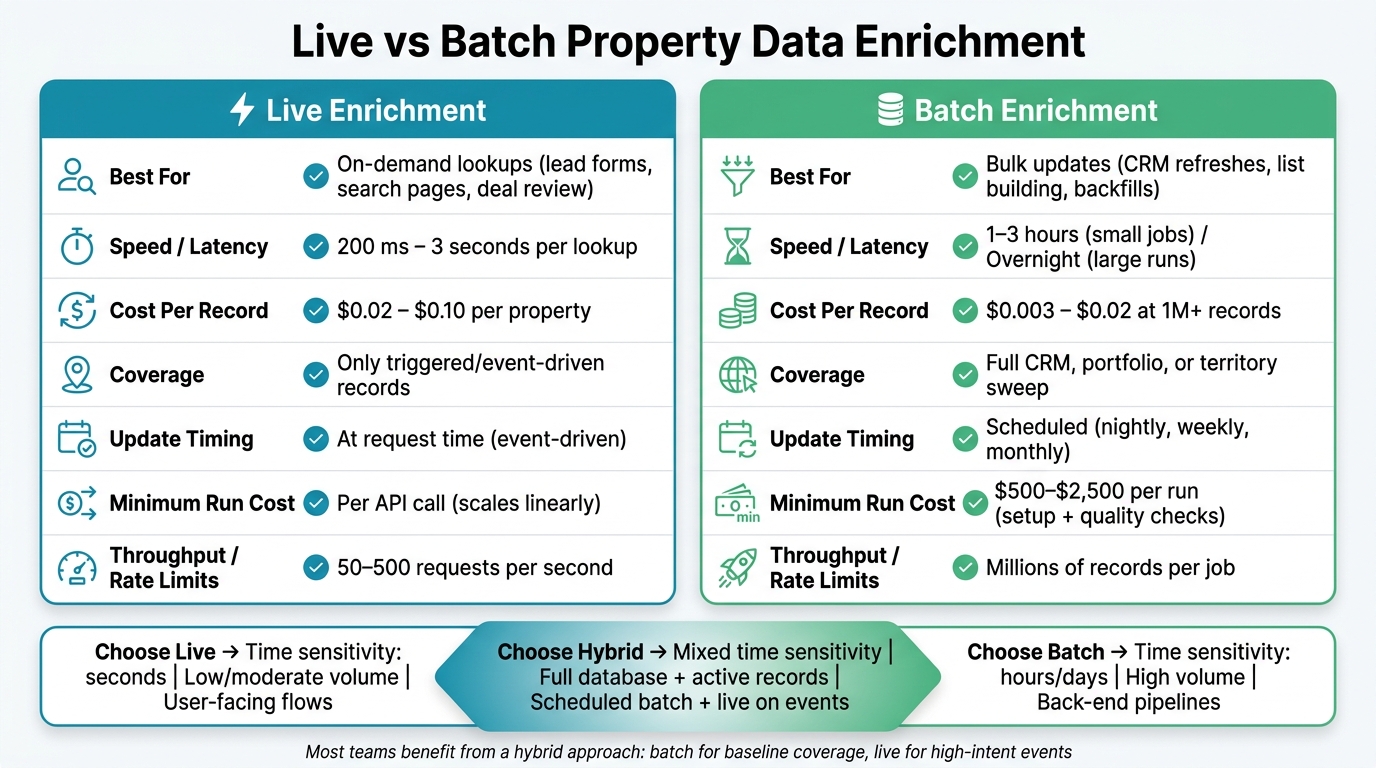
Live vs Batch Property Data Enrichment: Key Differences at a Glance
Streaming Vs. Batching: How to Choose the Right Approach for Your Use Case
Quick Comparison
| Criteria | Live Enrichment | Batch Enrichment |
|---|---|---|
| Best for | On-demand lookups | Bulk updates |
| Speed | 200 ms–3 seconds | Hours to overnight |
| Cost per record | Higher | Lower at volume |
| Coverage | Only triggered records | Full list or database |
| Update timing | At request time | On a schedule |
| Common use cases | Lead intake, search, review | CRM refreshes, campaigns, backfills |
My takeaway: this is mostly a speed vs. scale decision. Live handles the records you need right now. Batch handles the records you need to process all at once.
How Live and Batch Enrichment Work
Live Enrichment: On-Demand Property Lookups
Live enrichment is synchronous. When someone submits an address or a system opens a record, the app sends an API call using an address, APN, owner name, or internal ID. It then returns matched property, ownership, valuation, and contact fields from parcel, tax, and contact data in seconds.
That speed matters, but there’s a catch. The workflow has to wait for the response, so a slow lookup can hold up forms, routing, or agent actions. To avoid that drag, teams often use timeouts, cached results, and fallback data so the experience keeps moving.
Live enrichment fits cases where the data needs to show up before the user can take the next step.
Batch enrichment handles the same job on a much larger scale.
Batch Enrichment: Bulk Refreshes and Backfills
Batch enrichment runs asynchronously. A team sends a file or table of properties, CRM leads, or parcel records to the enrichment provider through a bulk API endpoint, SFTP transfer, or a cloud storage handoff. The provider processes the input, matches records against its national property and contact datasets, adds updated fields, and sends back the enriched output as a finished file or a direct warehouse load.
This setup is built for throughput, not sub-second response. Teams usually schedule these refreshes nightly, weekly, or monthly based on how fast the source attributes change.
In practice, many teams run batch jobs through ETL pipelines so refreshes stay repeatable and auditable. Those nuts and bolts shape the cost, freshness, and coverage tradeoffs below.
Live vs Batch: Cost, Latency, Coverage, and Freshness Compared
Live and batch enrichment split most clearly across four things: cost, latency, coverage, and freshness. Which one makes sense comes down to a simple point: do you need an answer right now, or do you need to refresh a large dataset in one pass?
| Criteria | Live Enrichment | Batch Enrichment |
|---|---|---|
| Cost per record | Higher – typically $0.02–$0.10 per property | Lower – often $0.003–$0.02 at 1M+ records |
| Total cost at scale | Scales linearly with every API call | Drops sharply with volume; batch usually wins at high volume |
| Latency | 200 ms–3 seconds per lookup | 1–3 hours for smaller jobs; overnight or longer for larger runs |
| Coverage | Only records that trigger an event | Full sweeps – entire CRM, portfolio, or territory |
| Update timing | Event-driven – data reflects the moment of the call | Scheduled refreshes – e.g., last refreshed 06/30/2026, 2:00 a.m. |
| Complexity | API orchestration, retry logic, rate limit handling | ETL pipelines, scheduling, data mapping, quality checks |
Cost and Overhead by Delivery Model
Live enrichment costs more per call because the provider has to answer in real time, every single time. That means spend climbs with each lookup. Batch works differently. Unit cost tends to fall as volume grows, which is why batch usually comes out ahead when you’re working through big datasets.
That said, batch isn’t just “cheap data in bulk.” It comes with setup costs and run-level overhead. Batch jobs often have minimum fees of $500–$2,500 per run to cover data prep and quality checks. They also need ETL pipelines, scheduled compute windows, and storage for full portfolio snapshots.
Live enrichment has its own kind of overhead. Instead of big data runs, you’re dealing with API mechanics: retry logic, backoff for rate limits, and throughput controls when you’re near caps like 50–500 requests per second. So the tradeoff isn’t just price. It’s also where the work shows up.
Latency, Coverage, and Update Timing
Live enrichment returns results in seconds, usually in the 200 ms–3 second range. That’s a big deal when someone is waiting on-screen. But there’s a catch: you only enrich records that hit a trigger. If nothing happens, nothing updates. A record can sit unchanged until the next event wakes it up.
Batch flips that model. Instead of waiting for activity, it refreshes the full portfolio. Your entire CRM, territory, or property set gets a sweep, not just the records in motion.
The downside is freshness lag. If your last full refresh ran on 06/30/2026 at 2:00 a.m., then any owner change, new lien, or listing status update after that time won’t appear until the next scheduled run. And if you’re running batch on a quarterly cadence, that lag can stretch to 90 days for some records. That’s the heart of it: batch gives you breadth, but not the latest moment-by-moment view.
Workflow Fit and Hybrid Architecture
This is where the choice gets practical. Live enrichment fits user-facing flows. Think lead routing right after form submission, property checks on a search page, or pre-offer review where an analyst needs current data within seconds. In those cases, waiting until tomorrow just doesn’t work.
Batch fits the back-end side of the house: ETL pipelines, portfolio analytics, and model training. If a job runs overnight and the data is ready by the next business day, that’s often just fine. No one is sitting there staring at a spinner, so a longer run time is easier to live with.
For a lot of teams, the best setup is a hybrid one. Use batch to keep a broad baseline across the full dataset at a lower cost. Then use live API calls only for the fields that are time-sensitive, like lien status, listing status, and current owner, on the records you’re working right now.
That approach gives you two things at once:
- Broad coverage without paying live-call pricing across the board
- Fast checks where timing matters most
It’s a good middle path. You’re not paying for instant lookups on every record, and you’re not making time-sensitive calls off data that may be days – or even weeks – old.
Which Model Fits Your Team: Investors, Proptech, and Home Service Marketing
The right setup comes down to who uses the data and when they need it. Some teams need broad screening at scale. Others need current data the moment a person opens a record or submits a lead.
Investors and Acquisition Teams
Investors and acquisition teams usually get the best results from a mix of batch and live enrichment.
Batch works well for list building. If you’re pulling 50,000 county records to screen for absentee owners, high-equity properties, or pre-foreclosure signals, that’s the right fit. At that stage, the data doesn’t have to be current to the minute. It just needs to be good enough for scoring and sorting.
Live enrichment comes in later, when a deal is active and timing matters more. If a property moves into review, or a lead responds, that’s when you want the current owner record and checked contact details.
A common setup looks like this:
- Use batch to refresh the CRM each month and keep the pipeline sorted
- Trigger live lookups when a lead replies or moves into deal review
Proptech Product and Data Teams
Proptech teams tend to split the work differently because, in many cases, the product is the data experience.
That means they often use both models at the same time. Live enrichment fits user-facing parts of the product, like search results, property detail pages, underwriting screens, and map-based browsing. When someone opens a property profile, pulling current data on demand helps keep the experience accurate and useful.
Batch handles the heavy lifting in the background. That includes address standardization, parcel-level attribute backfills, and matching duplicate property records across several sources. Then teams cache those results so live API calls only have to deal with fields that change more often, such as listing status, recent recordings, and price changes.
Home Service Marketers and Sales Ops
Home service teams – roofing, solar, HVAC, and windows – often use a simple two-step workflow: batch enrichment builds the audience, and live enrichment qualifies the lead.
At the campaign stage, batch enrichment helps marketers shape the list before outreach starts. A solar marketer might enrich a large homeowner file and filter by roof type, home age, estimated value, and ownership profile. A roofing company might run batch jobs to prepare seasonal campaign files and remove records that no longer fit the target area or homeowner profile.
That gives teams a much tighter audience. Instead of broad ZIP-code targeting, they can filter by specific property traits.
When a lead comes in, live enrichment can check the address, phone number, and contact details before the record enters the sales queue.
Picking the Right Model and Putting It to Work with BatchData
A Decision Framework for Live, Batch, or Hybrid
Pick live, batch, or hybrid based on five factors: time sensitivity, volume, cost tolerance, coverage, and refresh cadence.
The tradeoffs above help you choose the right operating model.
| Criteria | Choose Live | Choose Batch | Choose Hybrid |
|---|---|---|---|
| Time sensitivity | Seconds | Hours/days | Mixed |
| Record volume | Low/moderate | High | Full database + active records |
| Cost tolerance | Higher per-call cost | Lower per-record cost | Mixed |
| Coverage needs | Single property or lead | Nationwide portfolio or campaign list | Both |
| Refresh cadence | On-demand | Nightly, weekly, or monthly | Scheduled batch + live on events |
Use a hybrid setup when you need scheduled refreshes across a full portfolio, but also need live checks for a smaller set of active records.
Once you’ve picked the model, the next step is execution. That choice only pays off if your enrichment provider can support it in a steady, dependable way.
How BatchData Supports Both Enrichment Paths
BatchData supports both live and batch enrichment with property search APIs, phone verification, bulk data delivery, and professional services.
For live enrichment, property search APIs return property, owner, and contact data on demand. That makes them a fit for proptech apps, CRM intake, and underwriting screens. Phone verification endpoints check numbers at the point of entry, which cuts wasted outreach and helps outbound sales teams work more efficiently.
For batch workflows, BatchData supports bulk data delivery across large U.S. property datasets, including property and contact enrichment and skip tracing at scale. Teams can send files by address, parcel ID, or internal ID and get enriched records back nightly, weekly, or monthly. Professional services can help with file formats, mappings, integrations, and governance, so large jobs run reliably inside existing ETL and warehousing workflows.
Conclusion: Speed vs Scale, Not One-Size-Fits-All
Live enrichment works best when seconds matter. Batch enrichment works best when scale and lower unit cost matter. For most teams, the sweet spot is using both: batch for the baseline and live for high-intent events.
FAQs
When should I use a hybrid setup?
Use a hybrid setup when you need immediate action on new leads and periodic analysis of large datasets.
This setup works well when your team needs real-time enrichment for each new incoming record, but also needs batch processing for larger, lower-priority jobs like market research or deeper portfolio analysis.
How often should batch enrichment run?
It depends on your needs and how current your data needs to be.
Because the property and contact datasets update daily, a daily batch enrichment run helps keep your records in sync with current market data.
For large-scale updates or routine database cleanup, you can run batch processing as needed. Results are usually delivered within hours.
To cut duplicate costs, avoid processing the same records more than once every 30 days.
What data fields should stay live?
Live enrichment works best for fields that change often or shape fast decisions. If a field affects lead priority, contact reachability, or compliance, it should usually stay live.
That includes fields like:
- Verified phone numbers
- Email addresses
- Real-time DNC flags
- Litigator status flags
Time-sensitive fields also make more sense as live data. Think current foreclosure status, vacancy, and recent loan-to-value ratios. When those fields stay up to date, your outreach is based on what’s happening right now, not what was true a week ago.