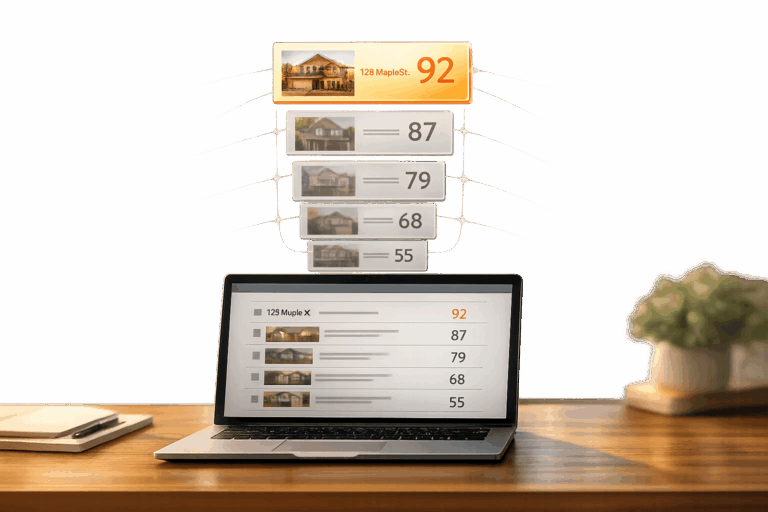
Real estate agents often struggle to manage and prioritize leads effectively. BatchData‘s Propensity Scoring API, when integrated with Salesforce, solves this by using machine learning to rank leads based on their likelihood to convert within 6 months. This allows agents to focus on high-potential prospects, save time, and improve results.
Key Takeaways:
- Lead Prioritization: BatchData assigns scores (0-100) to leads, categorizing them as hot, warm, or cold.
- Data-Driven Insights: The API evaluates 700+ property attributes, including equity, financial distress, and owner motivation.
- Integration with Salesforce: Automate lead scoring and workflows using custom fields, Flow, and Process Builder.
- Efficiency Boost: Tasks that took 30 minutes now take 30 seconds, freeing agents to focus on closing deals.
This system eliminates guesswork, speeds up decision-making, and ensures agents direct their efforts where it matters most. Keep reading to learn how to set up and maximize this integration.
Everything a Salesforce Admin Needs to Know About Lead Score
What Is BatchData‘s Propensity Scoring API

Tackling the challenge of identifying high-potential leads, BatchData’s Propensity Scoring API offers a solution that delivers precise, actionable insights. This tool evaluates and ranks real estate leads based on their likelihood of closing, assigning each a score from 0 to 100. With this system, leads are categorized as hot, warm, or cold, making it easier to focus on the most promising opportunities.
The API leverages an extensive database of 155 million properties and over 700 attributes – including valuations, tax details, sales records, and ownership data – to assess factors like financial readiness, property distress, and owner motivation. Chris Finck, Director of Product Management, highlights its efficiency:
What used to take 30 minutes now takes 30 seconds. BatchData makes our platform superhuman.
Features and Benefits of BatchData’s Propensity Scoring API
The API boasts a 76% right-party contact accuracy, which is about three times higher than the industry average. This level of precision minimizes time spent on unqualified leads, allowing more focus on prospects who are ready to close. Additionally, it incorporates compliance safeguards, such as Federal DNC scrubbing, litigator lists, and real-time verification of phone numbers and addresses, ensuring campaigns remain both effective and legally sound.
Beyond scoring, the API provides access to over 300 property-specific data points, covering details like property age, lot size, construction specs, liens, pre-foreclosure status, and full owner portfolios. This in-depth information not only identifies who to contact but also explains why a lead may be ready to transact.
How Propensity Scores Are Calculated
The scoring process combines explicit data – like a lead’s budget and timeline – with implicit data, such as responsiveness. Multiple factors are considered to calculate a lead’s score. For instance, a higher budget and urgent timeline increase the score, while vague intentions decrease it. Motivation is also evaluated through indicators like high equity, liens, or notable life events.
Additional elements include responsiveness and pre-approval status, which can add bonus points for mortgage-ready buyers. The source of the lead plays a role too, with referrals often scoring higher due to their trustworthiness. Furthermore, property-specific data – such as financial distress, equity positions, and the owner’s full real estate portfolio – ensures the score accurately reflects both the lead’s readiness and the property’s potential.
These well-defined scoring metrics pave the way for seamless integration with Salesforce, which will be explored in the next section.
How to Integrate BatchData’s Propensity Scoring API with Salesforce
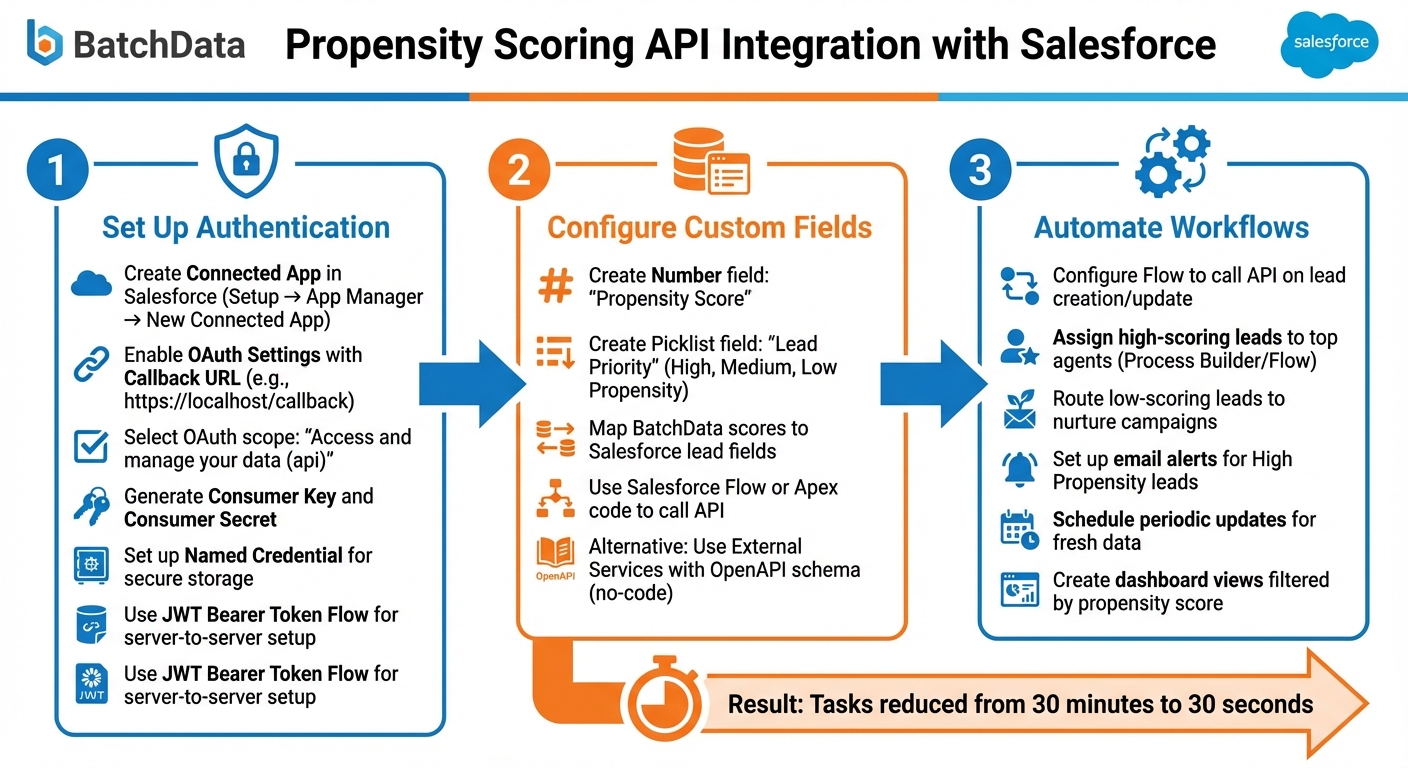
How to Integrate BatchData Propensity Scoring API with Salesforce in 3 Steps
Integrating BatchData’s Propensity Scoring API with Salesforce allows you to automate lead prioritization by connecting the two platforms securely. The integration uses OAuth 2.0 through a Salesforce Connected App, ensuring secure communication. Before diving in, confirm that your Salesforce organization has API access enabled. You can verify this in the “Company Information” section under Setup. Developer, Enterprise, and Unlimited editions all support this functionality.
Setting Up the Integration
To get started, you’ll need to create a Connected App in Salesforce. This sets up the framework for authentication. Here’s how:
- Go to Setup, search for “App Manager”, and click “New Connected App.”
- In the app settings, enable OAuth Settings and provide a Callback URL (e.g.,
https://localhost/callbackfor testing purposes). - Choose the necessary OAuth scopes, such as “Access and manage your data (api)”, while adhering to the principle of least privilege.
Once saved, Salesforce will generate a Consumer Key and Consumer Secret, which act as your authentication credentials. For server-to-server setups that don’t involve user interaction, use the JWT Bearer Token Flow. To simplify things further, set up a Named Credential in Salesforce to securely store the BatchData API endpoint and authentication details.
From here, your technical team can directly call the API using Apex code or Flow. Alternatively, for a no-code solution, use Salesforce External Services with an OpenAPI schema to handle the integration.
Once authentication is complete, you can map BatchData’s propensity scores to your Salesforce lead fields.
Customizing Lead Scoring Workflows in Salesforce
Now that the integration is in place, it’s time to tailor your Salesforce workflows to make the most of the propensity scores. Start by creating two custom fields:
- A Number field for “Propensity Score.”
- A Picklist field for “Lead Priority” with values like High, Medium, and Low Propensity.
Using Salesforce Flow, configure the system to automatically call the BatchData API whenever a new lead is created or updated. The API will return a propensity score, which can then be used to populate the custom fields. To keep your data fresh, schedule periodic updates so that your dashboards always reflect the latest market trends. Be mindful of Salesforce API call limits, especially during bulk operations.
Automating Lead Prioritization and Follow-Up
Take your integration a step further by automating lead prioritization and follow-up tasks based on propensity scores. Here’s how to streamline your sales process:
- Assign high-scoring leads to your top-performing agents using Salesforce Process Builder or Flow.
- Route lower-scoring leads into nurture campaigns to keep them engaged over time.
- Configure email alerts to notify agents when a lead’s score moves into the High Propensity category.
- Set up task automation rules to schedule follow-up actions based on lead scores, ensuring timely engagement.
Finally, integrate these scores into your lead queue views and dashboards. This allows agents to easily filter and sort leads based on their propensity, helping them focus their efforts on the most promising opportunities. By aligning your workflows with real-time data, your team can maximize efficiency and improve conversion rates.
How Real Estate Professionals Can Use Propensity Scoring
With the integration of Salesforce and BatchData’s scoring system, real estate professionals now have a powerful tool to refine lead management. Propensity scoring simplifies decision-making by ranking leads on a 100-point scale, allowing you to prioritize tasks like pipeline management, resource allocation, and deal closures more effectively.
Identifying High-Priority Leads
Propensity scoring takes the guesswork out of lead prioritization. It highlights which prospects are most likely to convert, letting you focus on high-scoring leads who may already have mortgage pre-approvals or pressing buying timelines. These leads should naturally take precedence, while lower-scoring ones can be set aside for follow-ups later.
This method is a game-changer for both new agents generating wholesale leads and juggling numerous inquiries and seasoned professionals managing vast contact lists. Instead of spreading your efforts evenly, you can zero in on the top-tier prospects, ensuring you don’t miss out on the best opportunities.
Optimizing Marketing Campaigns Using Lead Scores
Propensity scores aren’t just for prioritizing calls – they can also supercharge your marketing efforts. High-scoring leads are ideal candidates for immediate, personalized outreach, while moderate leads can benefit from educational content designed to nurture their interest. Lower-scoring leads, on the other hand, can be included in automated campaigns that keep your brand in their minds without exhausting your resources.
By aligning your follow-up strategies with each lead’s readiness, you can maximize engagement with those most likely to act while still maintaining a presence with others. This approach not only boosts conversion rates but also ensures your team’s time and energy are spent wisely.
Improving Team Productivity with Data-Driven Insights
Propensity scoring also helps streamline team workflows. High-value leads can be assigned to experienced agents, while those with moderate scores can be given to newer team members looking to gain experience. This strategic allocation of resources ensures everyone is working efficiently and effectively.
Of course, while the scores provide a strong foundation for prioritization, they work best when paired with professional judgment. Combining data insights with your expertise allows you to uncover opportunities that might not be immediately obvious, ensuring no potential lead slips through the cracks.
Conclusion
Managing real estate leads becomes far more efficient when you pair BatchData’s Propensity Scoring API with Salesforce. This integration takes the guesswork out of lead prioritization by ranking prospects based on their likelihood to convert. High-value opportunities receive immediate attention, while lower-priority leads are seamlessly nurtured.
But it doesn’t stop at prioritization. Automated workflows enrich your CRM with critical property details – like valuations, square footage, and transaction history – in just seconds. This eliminates the need for time-consuming manual research. High-scoring leads can even trigger instant notifications through tools like Slack or initiate automated follow-up sequences, ensuring no opportunity slips through the cracks.
The financial benefits are undeniable. By focusing on prospects with mortgage pre-approvals, tight timelines, or strong investment potential, you can significantly improve conversion rates and ROI. Whether you’re managing 50 leads or hundreds, this system streamlines your workflow and maximizes results.
On a team level, propensity scoring offers even greater advantages. Assign top-tier leads to experienced agents, while newer team members gain experience handling moderate-priority prospects. Use enriched property data – such as lot size or property age – to create targeted marketing campaigns in Salesforce. You can even prioritize non-owner-occupied properties to quickly identify investment opportunities. Together, these strategies help your team stay ahead in an ever-changing market.
FAQs
What propensity score ranges should I treat as hot, warm, and cold?
Propensity scores are typically divided into three categories: High (Hot), Medium (Warm), and Low (Cold):
- Hot (High): Scores above 80 or 85, showing a strong likelihood of conversion.
- Warm (Medium): Scores ranging from 50 to 80, reflecting moderate potential.
- Cold (Low): Scores below 50, signaling a lower likelihood and often given less priority.
These ranges can be fine-tuned based on your historical data and the specific needs of your application.
How often should I refresh propensity scores in Salesforce?
Real estate data changes fast. To keep lead prioritization accurate in Salesforce, it’s smart to update scores frequently. Ideally, this means refreshing them daily or whenever new data becomes available. Many businesses rely on real-time or near-real-time updates to ensure their insights stay relevant and actionable.
What’s the easiest way to call the API from Salesforce without Apex?
The easiest approach to interact with the Salesforce REST API without using Apex is through JavaScript’s fetch() function in Lightning Web Components (LWC). This method allows you to make direct HTTP requests within your LWC. Just make sure to configure remote site settings in Salesforce for external API access and manage authentication tokens securely.
Starting with the Spring ’23 release, Salesforce also introduced the HTTP Callout feature in Flow Builder, enabling no-code API calls for even simpler integration.