Finding the right property can be overwhelming, but Property Search APIs with dynamic filters make it faster and more precise. These APIs allow you to search massive real estate databases instantly, using detailed filters like price range, location, and property features. By integrating dynamic filters, you can create a search experience that matches user needs, whether it’s finding homes with basements, filtering by loan types, or searching within custom boundaries.
Here’s what you’ll learn:
- How Property Search APIs work and their key features (e.g., data accuracy, response speed, and scalability).
- Setting up dynamic filters for user-friendly searches (e.g., location, price, property type).
- Best practices for constructing API queries and handling responses.
- Tips for error handling, caching, and performance optimization.
- A look at BatchData‘s API, which offers advanced filtering and enriched property insights.
Dynamic filters simplify real estate searches, saving users hours by delivering results in seconds. Whether you’re building a proptech platform or enhancing an existing one, this guide covers everything you need to know.
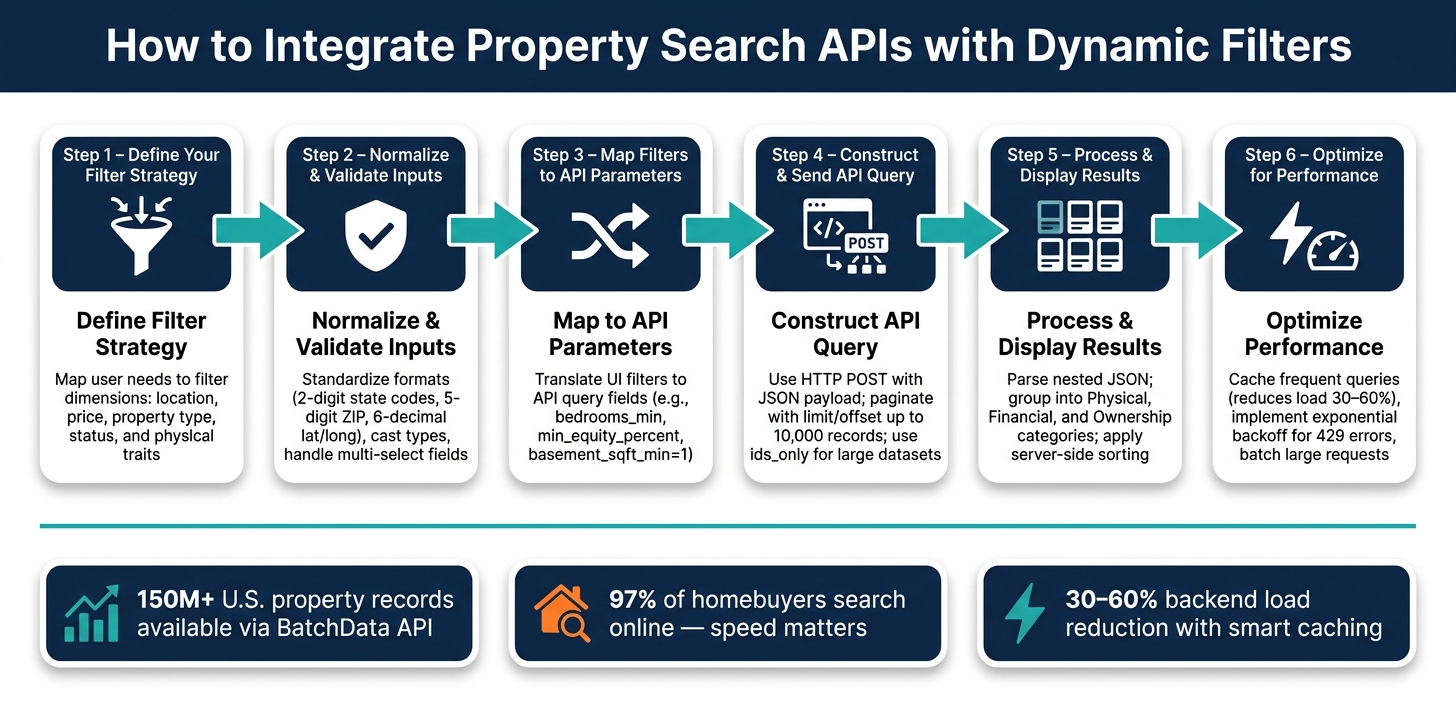
How to Integrate Property Search APIs with Dynamic Filters
Understanding Property Search APIs
Before diving into dynamic filters, it’s important to grasp how property search APIs streamline access to real estate data. These APIs allow developers to query large real estate databases for properties that match specific criteria, like investment potential, market trends, or physical features. Instead of manually scraping websites or juggling static spreadsheets, developers can send structured requests and receive clean, organized data in return. This foundational knowledge is key to effectively implementing dynamic filters.
These APIs are versatile, supporting tasks like MLS scouting, foreclosure searches, how to find property owners, and mortgage analysis. Their flexibility makes them indispensable for serious proptech applications.
Key Features of Property Search APIs
When evaluating a property search API, focus on three main attributes: data accuracy, response speed, and scalability. Accurate data ensures the API reflects current market conditions – like active listings, recent sales, and updated ownership records. Speed is critical in a fast-moving market where delays can mean missed opportunities. Scalability ensures the API performs well, whether handling a handful of queries or thousands.
Another crucial factor is the range of filterable data fields. A strong API provides access to a variety of data categories:
| Category | Example Fields |
|---|---|
| Geographic | Address, city, state, zip, latitude/longitude, census tract |
| Property Characteristics | Beds, baths, building size (sq ft), year built, pool, basement |
| Financial | Estimated equity, assessed value, tax delinquency status |
| MLS / Market | Listing status (active/pending/sold), days on market, listing price |
| Ownership | Owner type (corporate vs. individual), absentee status, years owned |
| Distress Indicators | Foreclosure status, auction date, tax liens, judgments |
Some advanced APIs also offer geospatial queries, enabling searches based on custom boundaries like polygons or multi-polygon coordinates, going beyond simple radius-based filters.
With these features in mind, the next step is learning how to efficiently structure API requests.
Request and Response Patterns
Most property search APIs rely on HTTP POST requests for complex queries. These requests typically include a JSON object with filters, pagination settings, and output preferences. For example, a basic request might look like this:
{"size": 50, "property_type": "SFR", "state": "TX"}.
More advanced queries can layer in financial or ownership filters for greater precision.
The API’s response is usually in JSON format, containing property objects, a total record count (num_found), and pagination details. To optimize performance, many APIs include options like an ids_only flag to return just unique property IDs or a summary flag for condensed records when full details aren’t immediately needed. Single responses are often capped at 500 records, but you can paginate through larger datasets – up to 10,000 records – using limit and offset parameters.
Here’s a practical tip: standardize your inputs before making requests. State codes should be 2 characters, zip codes must be 5 digits, and latitude/longitude coordinates should have at least 6 decimal places for accurate geolocation. Even minor formatting issues can lead to inaccurate results.
Next, we’ll explore how to map these filters to API query parameters for precise and effective property searches.
sbb-itb-8058745
Setting Up Dynamic Filters for Property Searches
Dynamic filters should reflect how users naturally think about properties, rather than simply mimicking the structure of a database. For instance, a buyer looking for a 3-bedroom house in Austin, TX, priced under $450,000 is simultaneously considering location, size, and budget. Your filtering system needs to handle these dimensions effortlessly to provide relevant results.
Key Filter Dimensions
To make property searches effective, filters usually fall into a few main categories:
- Geographic filters: Help narrow down results by city, state, ZIP code, or even latitude/longitude.
- Property type filters: Allow users to pick from common categories like Single Family Residential (SFR), Multi-Family Residential (MFR), condos, mobile homes, land, or other types.
- Financial filters: Cover price ranges and other metrics related to property value.
- Physical characteristic filters: Address details like the number of bedrooms, bathrooms, square footage (both living area and lot size), year built, and amenities like pools or basements.
- Status filters: Include information on MLS activity, foreclosure stages, or auction dates.
For numerical filters – like price, square footage, or bedroom/bathroom counts – use range-based parameters with _min and _max fields (e.g., beds_min: 2 and beds_max: 4). This gives users flexibility without limiting them to a single fixed value. Additionally, boolean filters work well for amenities by offering clear true/false options (e.g., pool: true or air_conditioning_available: true) instead of exposing raw database values.
These structured filters ensure accurate and detailed queries when integrating with APIs.
Normalizing and Validating User Inputs
User inputs can be inconsistent, and passing them directly to an API may lead to errors. For example, users might describe the same property type as “single family home”, “detached house”, or “SFR.” By normalizing these terms to a standard category, you can ensure the API processes them correctly.
Type casting is also crucial. Convert inputs for price or square footage using functions like parseInt() or parseFloat() before including them in queries. For location fields, use case-insensitive matching (e.g., new RegExp(location, 'i')) so that variations like “austin”, “Austin”, and “AUSTIN” are treated the same. For multi-select fields – such as property types or amenities – split comma-separated values into arrays on the backend to maintain proper query logic.
Finally, always define reasonable default behaviors for missing inputs. For instance, if a filter field is left empty, the system could return all results or show a default view. This ensures the search process remains smooth and avoids errors caused by incomplete filters.
Mapping Filters to API Query Parameters
Once your filters are normalized and validated, the next step is making sure they align perfectly with your API’s expected format. Even small mismatches in naming or structure can cause your search results to fail silently, so attention to detail is key.
Constructing API Queries
The concept here is simple: each filter selected by a user corresponds to a specific API parameter. For instance:
- A location filter might translate to
city=Phoenix&state=AZ&zip=85001 - A bedroom range could become
bedrooms_min=2&bedrooms_max=4 - A financial filter like minimum equity might look like
min_equity_percent=40
Since the labels in your UI often differ from the API’s parameter names, it’s a good idea to maintain a lookup table to keep track of these translations.
You should only include optional filters when a user explicitly provides them. For fields that allow multiple selections, like property types, use a single parameter with comma-separated values (e.g., property_type=SFR,MFR) to represent a logical OR. Separate parameters, on the other hand, are treated as logical AND across different fields.
Boolean filters may need extra handling. For example, if your API uses square footage to indicate whether a property has a basement, you might translate “Has basement” into a range query like basement_sqft_min=1. Keeping a mapping table for these kinds of transformations helps avoid tricky logic errors down the line.
| User Filter | Example API Parameter | Notes |
|---|---|---|
| City / State / ZIP | city, state, zip |
State: 2-digit code; ZIP: 5-digit code |
| Bedrooms range | bedrooms_min, bedrooms_max |
Use explicit min/max for numeric ranges |
| Equity threshold | min_equity_percent |
Numeric value, e.g., 40 for 40% |
| Ownership type | owner_type, is_absentee |
Corporate or Individual; boolean values |
| Has basement | basement_sqft_min=1 |
Map boolean toggles to numeric ranges |
With a clear mapping system in place, you’re ready to explore how to structure these queries effectively.
Comparing Query Styles
Once you’ve built out the individual query parameters, it’s important to think about how to structure the overall query. The right approach depends on the complexity of your filters and the capabilities of your real estate API. Let’s break down the options:
- Query string parameters: For straightforward searches, appending parameters to the URL (e.g.,
/property/search/property/search?city=Phoenix&bedrooms=3) is the easiest solution. This method works well withGETrequests, is human-readable, and can be debugged directly in a browser. - JSON payload via
POST: When filters get more complex – like nested conditions, multi-select arrays, or deeply structured criteria – a JSON payload is often a better choice. It avoids the hassle of URL encoding, keeps things organized, and supports nesting. However, keep in mind thatPOSTrequests aren’t cacheable by default, which could impact performance at scale. - LHS bracket notation: This is a middle-ground option (e.g.,
price[gte]=100000&price[lte]=450000). It allows you to include comparison operators in query strings without needing a full JSON body. Parsing libraries likeqsin Node.js make this style easy to work with, and it keeps the requests compatible withGETcalls.
“Good API design improves the overall Developer Experience (DX) for any API program and can improve performance and long term maintainability.” – Moesif
Choosing the right query style depends on your API’s design and the complexity of your filters. Each option has its strengths, so pick the one that aligns best with your property data needs.
Processing API Responses and Displaying Results
When working with API responses, it’s crucial to organize the parsed data effectively for user display. Property search APIs often return nested JSON objects, so identifying the correct paths for each field is key. For example, propertyInfo.address.city might be used to display the property’s city, while fields like estimatedValue and estimatedEquity can populate financial summary cards. Using the API’s field guide, you can map these internal paths to user-friendly labels – like linking propertyInfo.livingSquareFeet to “Square Footage.” This approach ensures the UI remains clear, consistent, and easy to maintain.
To streamline the UI, group parsed data into three main categories:
- Physical characteristics: Includes data like bedrooms, bathrooms, and square footage.
- Financial data: Covers AVM values, equity, liens, and last sale prices.
- Ownership details: Features owner names and mailing addresses.
This structure makes it easier to build modular UI components. When certain fields (e.g., livingSquareFeet) are unavailable, use fallback fields like buildingSquareFeet to avoid leaving gaps in the display.
Sorting and Ranking Results
Once the data is parsed and mapped, the next step is organizing it for display. It’s best to use the API’s built-in sort parameter for server-side sorting, as this avoids the need to process large datasets on the client side. By default, most property search APIs sort results based on geo-distance ranking when a location and radius are provided. However, you can override this by specifying an explicit sort field.
Here are some common sort fields and their corresponding data paths:
| Sort Field | Target Data Path | Usage |
|---|---|---|
listing_price |
listing.leadTypes.mlsListingPrice |
Sort by cheapest or most expensive |
listing_date |
listing.leadTypes.mlsListingDate |
Sort by newest listings |
living_area |
listing.property.livingArea |
Sort by largest homes |
year_built |
listing.property.yearBuilt |
Sort by newest or oldest homes |
lot_size |
listing.property.lotSizeSquareFeet |
Sort by largest lots |
sold_date |
listing.soldDate |
Sort by most recently sold |
Adding a toggle for users to switch between sorting options – such as by price, listing date, or home size – can improve the search experience without adding much complexity.
Managing Pagination and Result Counts
For large datasets, start by requesting the total count of results. This gives users immediate feedback on how many properties match their search filters (e.g., “1,247 results”) while keeping the initial load time quick.
Set a standard page size (around 50 results per page) and use the resultIndex parameter to ensure accurate pagination. For massive datasets, consider using an ids_only mode. This retrieves only the unique property identifiers at first, allowing you to fetch full property details only when a user selects a specific listing. This method significantly reduces data transfer and speeds up the user experience.
Maintaining Data Quality, Performance, and Reliability
Once you’ve displayed results, the next step is to prepare for challenges like unexpected inputs, API rate limits, and increasing data volumes. These issues can strain even the most well-designed property search API, so ensuring data quality, performance, and reliability is key.
Error Handling and Input Validation
APIs can throw all sorts of errors, but most fall into four main categories. Each requires a specific approach to keep your application running smoothly:
| Error Type | HTTP Status Code | Recommended Action |
|---|---|---|
| Not Found | 404 | Log the missing resource, skip it, or notify the user |
| Rate Limit Exceeded | 429 | Use exponential backoff with increasing delays |
| Invalid Query | 400 | Validate user input against the API schema beforehand |
| Server Error | 500/503 | Retry after a delay; alert system administrators if persistent |
For rate limit errors (HTTP 429), implementing exponential backoff is essential. This means your retry logic waits progressively longer between attempts – starting with 1 second, then 2 seconds, then 4 seconds, and so on. This approach prevents overwhelming the API while still recovering gracefully from temporary limits.
Input validation is equally important. Always check API response data for logical issues. For instance, flag prices that are zero or negative, bedroom counts below zero, or square footage values that seem implausibly small. Missing fields can also cause crashes, so use safe access methods with fallback defaults. For example, if the bedrooms field is absent, defaulting it to 0 ensures your application doesn’t break.
Caching and Performance Optimization
Error handling is just one piece of the puzzle. For a responsive and reliable system, you also need smart performance strategies.
Repeatedly calling the API with the same parameters can create unnecessary latency. Caching frequently requested results can solve this problem. Tools like Python’s lru_cache or external solutions like Redis are great for storing and retrieving popular queries quickly. You can also integrate APIs with n8n to automate these workflows and manage data more efficiently.
For large-scale operations, batching requests and using thread pools can process multiple queries at once while respecting API rate limits. Additionally, you can optimize your cache by pre-calculating useful derived fields – like price per square foot – based on the raw API data. This not only reduces extra API calls but also improves filtering capabilities, making your integration faster and more user-friendly.
Integrating BatchData‘s Property Search API
To deliver precise and dynamic property searches, integrating powerful APIs is a must. Building on the earlier discussion about dynamic filters and query optimization, BatchData brings an all-in-one solution by combining property search capabilities with ownership insights and contact data.
Features of BatchData’s Property Search API
BatchData’s Property Search API taps into a database of over 150 million U.S. property records, covering both residential and commercial properties across the country. What sets this API apart is its ability to provide data across three key layers:
- Physical characteristics: Includes details like the number of bedrooms and bathrooms, square footage, year built, and property type.
- Financial and transaction data: Offers insights such as estimated market value, last sale price and date, mortgage balance, and equity estimates.
- Ownership details: Provides information about the owner, occupancy status (owner-occupied or absentee), and mailing address.
These layers allow for highly refined filtering. For instance, you can search for absentee-owned single-family homes with a loan-to-value (LTV) ratio below 50%, or properties in ZIP code 75201 that were last sold before January 1, 2020. Additionally, BatchData offers a Contact Append endpoint to enrich owner records with verified phone numbers and email addresses. The Phone Verification API ensures that phone numbers are validated in real time before being used in outreach campaigns.
| Data Layer | Key Fields | Example Filter Use |
|---|---|---|
| Physical characteristics | Beds, baths, sq ft, year built, property type | “3+ beds, 1,500–2,500 sq ft, built after 2000” |
| Financial & transaction | AVM, last sale price, last sale date, equity % | “Estimated value $300,000–$600,000, LTV < 50%” |
| Ownership & contact | Owner name, occupancy status, phones, emails | “Absentee owners with a verified mobile number” |
How to Integrate BatchData Step-by-Step
To start, define the data you need and the workflow you want to support. Integrating BatchData involves a straightforward process:
Set Up Your Account
Contact BatchData to discuss your use case and API access. Store your API token securely using environment variables or an appropriate secrets-management system.
Map Your Filters to API Fields
Before implementing your integration, map your application’s filters to the request fields supported by the relevant BatchData API endpoint. Always use the current developer documentation as the source of truth for supported parameters and field names.
For property search, the documented endpoint is:
POST /api/v1/property/search HTTP/1.1
Host: api.batchdata.com
Authorization: Bearer <token>
Content-Type: application/json
Use the request body and supported search parameters specified in the current BatchData API documentation rather than relying on an outdated example.
The API response should be handled according to the current documented response schema. Map returned property data to the appropriate fields in your application or CRM and format values according to your user interface requirements.
For additional property or owner-related data, use the endpoints documented by BatchData for the specific workflow. Do not assume that an enrichment or skip-tracing endpoint supports fields or request formats that are not documented.
For advanced integrations, validate your field mapping and API usage against the current developer documentation to help ensure your implementation remains compatible with the supported API contract.
Conclusion: Building Better Property Search Solutions
Creating a robust property search platform is a continuous process that requires thoughtful planning and execution. The steps outlined here provide a roadmap: start by defining your filter strategy based on actual user needs, ensure inputs are normalized and validated before reaching the API, map those inputs to precise query parameters, and implement features like pagination, sorting, caching, and error handling to maintain consistent performance, even under heavy usage. This process not only improves search accuracy but also enhances the overall efficiency of the system.
Each improvement builds on the last. For example, clean input validation minimizes errors, optimized queries reduce latency, and caching frequently used searches – like “3-bed home under $500,000 in Dallas, TX” – can decrease backend load by as much as 30–60%. Considering that 97% of U.S. homebuyers rely on the internet for their search and 53% of mobile users abandon slow-loading pages, the importance of getting these details right cannot be overstated.
Once your platform is live, treat it as a work in progress. Keep an eye on which filters users interact with most, identify combinations that yield no results, and use this data to refine your user interface and API mapping logic. These post-launch adjustments can significantly improve both lead quality and conversion rates.
For teams that want to skip the complexity of building a raw data pipeline, BatchData offers a nationwide property search API with built-in enrichment. It provides access to comprehensive U.S. property data and supports advanced filtering options, including absentee ownership, estimated equity, last sale date, and verified contact data – ideal for professional and investor workflows. As BatchData’s Director of Product Management, Chris Finck, explains:
“We want to supplement your work and make you superhuman so you can do things in seconds, not hours. That’s where BatchData comes in. What used to take 30 minutes now takes 30 seconds.”
FAQs
How do I turn UI filters into the exact API fields?
To ensure accurate search results, it’s essential to align each UI filter with its corresponding API field as outlined in the Property Search Field Guide. Here’s how you can approach it:
- City: Map to
propertyInfo.address.city - State: Map to
propertyInfo.address.state(ensure the value is a valid 2-digit state code, e.g., “CA” for California) - Zip Code: Map to
propertyInfo.address.zipCode(validate as a 5-digit numeric code, e.g., “90210”) - MLS Listing Price: Map to
mlsListingPrice
Why Validation Matters
Proper validation of filter values is crucial for maintaining accurate API requests. For example:
- State codes should always follow the 2-character standard (e.g., “NY” for New York).
- Zip codes must be strictly 5 digits to avoid mismatches or errors in the search results.
By directly connecting user inputs to the appropriate API parameters, you create a seamless bridge between the interface and the backend, ensuring users get the most precise and relevant results.
When should I use GET query parameters vs POST JSON for filters?
When deciding how to handle filters in your API, consider the complexity of the filtering requirements:
- Use GET query parameters for straightforward, exact-match filters like status or category. This works well when the number of filters is small and keeps things simple.
- Opt for POST with JSON when dealing with more intricate filters, such as ranges, operators, or nested conditions. This approach keeps your URLs clean and allows for more detailed and flexible filtering.
The choice between GET and POST ultimately depends on how complex your filters are and the level of flexibility your API design demands.
What’s the best way to cache and paginate property searches?
To handle property searches efficiently, implement a paging system with a fixed page_size – let’s say 50 records per page. Use a resultIndex to keep track of your position in the dataset. Start with resultIndex at 0, and after each API call, increase it by the number of records retrieved. Store each batch locally to minimize repeated API requests, which speeds up access and reduces server strain.