
Bulk data mapping ensures data from source systems aligns with target systems during migration. Errors in this process can disrupt operations and cost businesses millions annually. Detecting and fixing these errors early saves time and prevents major issues. Here’s how you can identify mapping errors effectively:
- Real-Time Monitoring: Set up alerts to catch issues immediately, reducing the time it takes to detect and resolve problems.
- Systematic Validation: Validate data at field, record, and batch levels to ensure accuracy and consistency.
- Cross-Validation: Compare mapped data with source systems to confirm no errors occurred during migration.
- Detailed Documentation: Maintain updated records of mapping decisions to simplify troubleshooting and meet compliance requirements.
- Automated Tools: Use error reconciliation tools to identify and fix issues efficiently, reducing manual work.
These steps are crucial for ensuring clean, reliable data, especially in industries like real estate where accurate information is vital for decision-making. Implementing these practices can save businesses time, money, and resources.
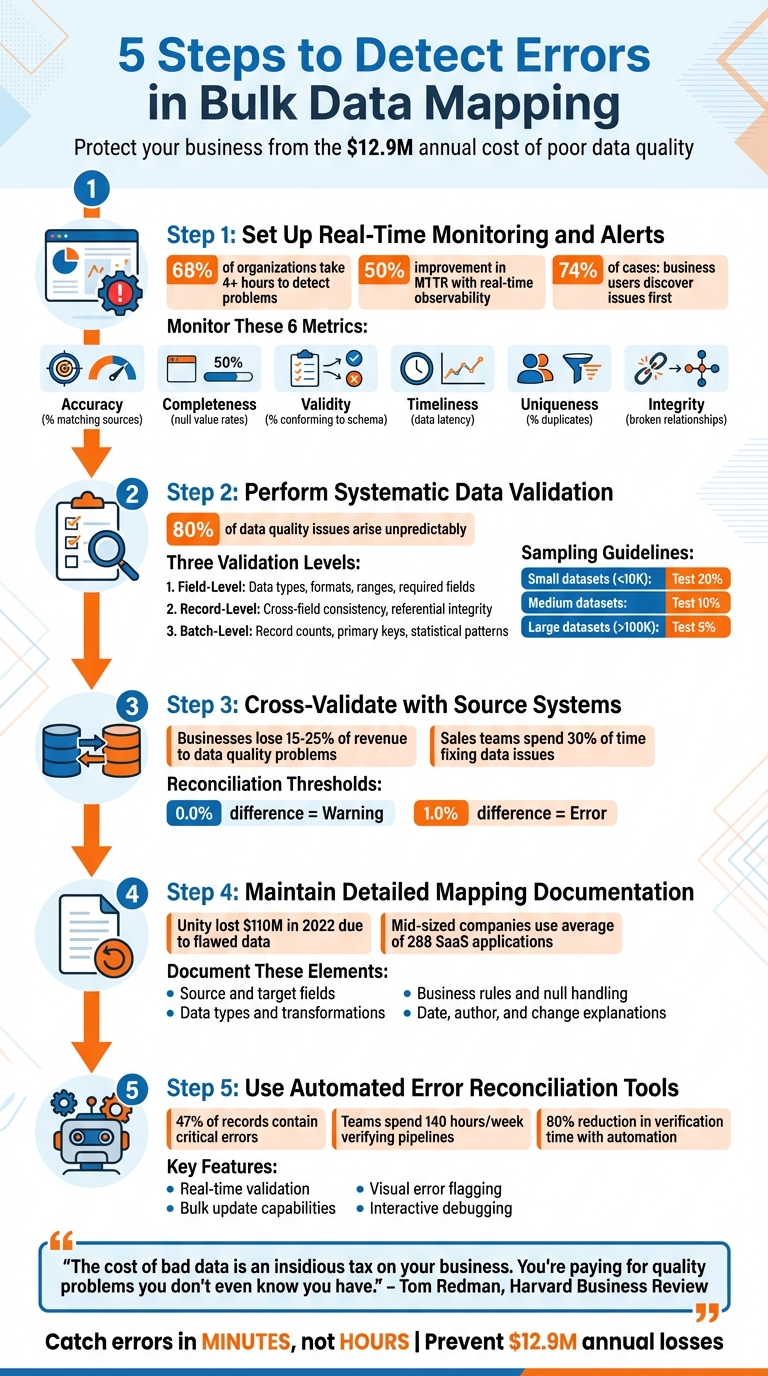
5 Steps to Detect Errors in Bulk Data Mapping
Debugging Mapping Errors in Data Integration
sbb-itb-8058745
Step 1: Set Up Real-Time Monitoring and Alerts
Real-time monitoring is your first line of defense against mapping errors, catching issues as they happen and safeguarding dashboards and downstream systems. Here’s why it matters: a staggering 68% of organizations take more than 4 hours to detect problems. By then, errors have often spread widely. On the other hand, companies using real-time observability report a 50% or more improvement in their mean time to resolution (MTTR). This proactive approach prevents the frustrating scenario where business users discover issues – a situation that occurs in 74% of cases.
"Bad data equals bad decisions." – Confluent
Real-time monitoring tracks data as it moves through each stage of the mapping process. It flags records that fail validation or fields that don’t meet expected formats. This "shift-left" strategy identifies errors right at ingestion, limiting their impact – or "blast radius" – on downstream systems. These steps lay the groundwork for an effective error detection framework.
Define Critical Mapping Metrics to Monitor
To ensure your data stays clean and reliable, keep an eye on these six key metrics:
| Dimension | What to Monitor | Why It Matters |
|---|---|---|
| Accuracy | % of records matching verified sources | Ensures mapping logic aligns with source data |
| Completeness | Null value rates in required fields | Prevents missing data from disrupting downstream models |
| Validity | % of records conforming to schema rules | Stops invalid formats or mismatched data types |
| Timeliness | Average data latency intervals | Supports real-time analytics and timely decisions |
| Uniqueness | % of duplicate records detected | Protects against data corruption and skewed analysis |
| Integrity | Number of broken relationships between tables | Maintains trust in mapped datasets |
Start by focusing on field-level metrics. Monitor null rates, flag invalid formats (e.g., incorrect dates), and conduct range analyses to catch outliers. At the table level, check row counts after each ETL job to spot missing or duplicate records. Also, verify logical relationships – like ensuring delivery dates occur after order dates. Keep an eye on schema changes to detect anomalies early.
Configure Alerts for Immediate Action
Alerts are essential for quick responses. Design a system that categorizes alerts based on severity. For example:
- Critical issues like pipeline failures or data loss should trigger immediate alerts via tools like PagerDuty or Slack.
- Less severe problems, such as low-volume null values or minor schema drift, can be logged for daily review.
Set threshold-based triggers to prioritize responses. For instance, a "Warning" alert might activate at 100 error records, while a "Critical" alert fires at 1,000 records. High-value tables often require stricter service level objectives (SLOs) and more sensitive monitoring.
To streamline workflows, route alerts based on the type of issue. Freshness and volume anomalies, for example, often point to pipeline breaks. For routine errors like transient network failures, automate responses by retrying operations or sending failed records to a dead-letter queue.
This layered approach ensures minimal disruptions while maintaining the integrity of your data pipelines.
Step 2: Perform Systematic Data Validation
Validation acts as your safety net, catching problems that might slip through real-time monitoring. While alerts can highlight immediate issues, systematic validation ensures data is not just flowing through the pipeline but also arriving intact and accurate. A well-structured, layered approach to validation helps avoid costly errors.
This process operates on three levels: field-level, record-level, and batch-level checks. Field-level checks focus on individual data points, record-level checks ensure rows are internally consistent, and batch-level checks evaluate the dataset as a whole. This multi-layered approach addresses the fact that the majority of data quality issues – about 80% – arise in unpredictable ways. Automated checks are crucial here, as manual testing alone can’t anticipate or catch every anomaly. Let’s break down each layer.
Field-Level Validation
Field-level validation zeroes in on individual data points to confirm they meet predefined standards. For example:
- Data types should align with expectations (e.g., integers stay integers, dates stay dates).
- Formats like email addresses, phone numbers, or zip codes can be validated using regular expressions.
- Ranges for numeric values should make sense (e.g., percentages between 0 and 100).
- Required fields must not be left blank.
For large-scale workflows, these checks should be automated using SQL. Commands like MIN() and MAX() can spot outliers, while DISTINCT helps identify unexpected categorical values. Sampling is key: test about 20% of smaller datasets (fewer than 10,000 records) and 5% of larger ones (over 100,000 records).
Record-Level Validation
At the record level, validation ensures that each row makes sense as a whole. For instance:
- A "Shipping Date" should never come before an "Order Date."
- If a status field says "Cancelled", there should be a corresponding reason code.
- Referential integrity must be checked – IDs should link to valid entries in related tables.
In some cases, remote lookups can be used to confirm that identifiers exist in the live target database before importing. These cross-field checks are essential for catching errors that might not be obvious when looking at fields in isolation.
Batch-Level Validation
Batch-level validation takes a step back to assess the dataset as a whole. This includes:
- Record count reconciliation: Use SQL
COUNT(*)queries to compare the number of source records with target records. Any mismatch could signal missing or duplicated data. - Primary key checks: Ensure keys remain unique across the batch to avoid data corruption.
- Statistical pattern monitoring: Techniques like Z-scores can flag anomalies in the data.
- Schema integrity: Verify column names, data types, and constraints (e.g., NOT NULL) to ensure they’ve been preserved during transfer.
Post-load validation is particularly important to catch issues like data truncation or implicit conversion errors. These final checks ensure the dataset remains complete and accurate after processing.
Step 3: Cross-Validate with Source Systems
Once you’ve validated data integrity internally, the next step is to cross-check it against your source systems. This ensures that no external factors have compromised your mapping.
Even with thorough internal checks, cross-validation with source systems is essential to catch nuanced errors. This step acts as a final safeguard, ensuring that data hasn’t been corrupted, truncated, or altered in meaning during the mapping process. It goes beyond simple record counts, helping to uncover issues like encoding problems, timezone mismatches, or undetected corruption.
Data quality problems can be costly – businesses lose an average of 15–25% of their revenue to such issues, and sales teams often spend up to 30% of their time fixing them. Cross-validation helps create a reliable "single source of truth", ensuring that teams like finance and business analysts can make decisions based on accurate data. It also supports compliance with regulations such as GDPR and HIPAA [14, 25].
"Reconciliation is the truth test: compare counts, keys, and hashes – otherwise your ‘golden record’ is just gold paint." – Raj Mohan Achanta, Datagaps
The process involves directly comparing your mapped data to the original source system. This can include table-level checks (like row and column counts) and column-level aggregates (such as sums, averages, or null counts). For large datasets, sampling is an effective strategy: check 20% of small datasets, 10% of medium ones, and 5% of large ones to quickly spot discrepancies.
Schedule Regular Reconciliation Processes
Reconciliation shouldn’t be a one-time task – it works best as a routine practice. Regular checks, whether daily, monthly, or on another schedule, help catch discrepancies early and prevent them from affecting downstream systems. For critical workflows, consider a quick "5-minute sanity test" immediately after bulk mapping. This could include verifying row counts, performing table-level hash comparisons (e.g., using SHA-256), and reviewing migration logs for issues like duplicate keys or null constraints.
To stay proactive, set up automated alerts for anomalies. For example, DQOps recommends thresholds where a 0.0% difference triggers a warning and a 1.0% difference signals an error. Alerts can also flag sudden spikes in transaction volumes or unexpected null values, ensuring a timely response.
Once you’ve confirmed overall data integrity, shift your focus to verifying specific fields.
Verify Field-Level Mappings
Field-level cross-validation targets individual data points, catching errors that broader table-level checks might miss. Start with critical fields, such as customer details or revenue-impacting data. Conduct independent programmatic checks by extracting raw source data and applying mapping rules in a separate tool (like Excel or a custom script). Then, compare these results to the target system to identify errors in your primary ingestion process.
Aggregated comparisons can also reveal subtle issues. For numeric fields, check that sums, averages, minimums, and maximums match between systems. Monitor null counts to ensure no data is lost during transformations, and verify distinct counts to confirm that unique identifiers (like Customer IDs) remain consistent. Be on the lookout for transformation errors, such as character encoding problems, type mismatches, or lookup failures [14, 24].
For tables with different levels of granularity – like a fact table versus a summary table – group the source data by shared identifiers before comparing aggregates.
Document any discrepancies, prioritize fixes, and refine your mapping logic to support compliance and improve accuracy.
Step 4: Maintain Detailed Mapping Documentation
Once you’ve cross-validated your data, the next priority is creating a detailed record of every mapping decision. Without up-to-date documentation, troubleshooting becomes a guessing game, and compliance efforts can falter.
The stakes are high. For instance, Unity reported a staggering $110 million financial loss in 2022 because flawed data fed into its ad targeting tool. Inadequate documentation only worsens such risks, making it harder to trace and fix errors swiftly.
"If your mapping document is older than your last pipeline change, it’s already wrong."
- Sarwat Batool, Content Strategy Lead, Data Ladder
To avoid these pitfalls, document every detail: source and target fields, data types, transformation logic, and business rules. Capture specifics like how null values are handled, which codes are filtered out, and the conditions that trigger specific logic paths. This level of detail minimizes errors, such as truncation or misapplied rules.
Track Mapping Configurations and Updates
Mapping documentation isn’t static – it needs to evolve with your pipeline. Each time you make changes, record the date, the author, and a clear explanation of what was adjusted.
While spreadsheets may seem convenient, they lack critical features like version control and automated validation. Dedicated mapping tools, on the other hand, provide automated lineage tracking, rule-based validation, and dependable versioning. These tools ensure your documentation stays aligned with your pipeline.
To keep everything current, establish a regular review schedule – quarterly updates work well for many teams. Automated monitoring tools can also be invaluable, flagging schema changes or API updates in real time. This allows you to address potential issues before they disrupt downstream processes.
Support Compliance and Audit Requirements
Accurate documentation is essential for meeting regulatory requirements. Laws like GDPR (Article 30 ROPA and Article 35 DPIA), HIPAA, and CCPA demand transparency about data flows within your systems. Well-maintained mapping documentation serves as a clear audit trail, showing exactly where sensitive data travels and how it’s safeguarded.
For example, when customers file Data Subject Access Requests (DSARs), having current mapping documentation lets you quickly locate and retrieve their personal information. This is especially critical for mid-sized companies, which rely on an average of 288 different SaaS applications. Automated documentation tools simplify the task of managing these complex data inventories.
"If lineage exists only implicitly in code, the organization is just one incident away from losing confidence in its data."
- Sarwat Batool, Content Strategy Lead, Data Ladder
To ensure accountability, assign clear ownership for every mapping decision. Document who approved specific transformations and who is responsible for maintaining accuracy. This transparency prevents undocumented changes and ensures that validation rules – like record count reconciliation, domain value checks, and key uniqueness constraints – are clearly defined and communicated.
Step 5: Use Automated Error Reconciliation Tools
After performing thorough validation and cross-checks, the next step is to automate error reconciliation. Manual corrections simply don’t scale – consider this: 47% of records contain critical errors, and teams can spend up to 140 hours a week just verifying pipelines. Automated reconciliation tools step in to identify and fix mapping errors, cutting out the need for human intervention.
"Automated error handling checks and fixes errors in data quality – such as data completeness, timeliness, validity – without the need for any manual effort."
These tools validate incoming data in real time, applying business rules like ensuring dates follow the MM/DD/YYYY format or verifying ZIP codes against state data. They also provide visual cues, such as red lines or warning icons, to flag invalid mappings instantly. On top of that, interactive debugging features allow you to trace transformations step-by-step, helping you pinpoint exactly where a mapping fails.
Implement Bulk Update Capabilities
One of the standout features of automated tools is their ability to handle bulk updates efficiently. They can fix widespread formatting issues – like state abbreviations, currency symbols, or time zone offsets – across entire datasets in one go. Once corrected, the tools reintegrate the clean records automatically.
When using scripts to adjust data types, make sure the conversion function is in the final line of your script. This ensures the returned value comes from the last statement. Additionally, tools should validate data against target system constraints before executing bulk updates, flagging potential issues like missing primary keys or conflicts with unique identifiers (e.g., Salesforce IDs) that could cause transaction failures.
Leverage Error Handling Mechanisms
Advanced error handling features are essential for maintaining data consistency during corrections. Conditional breakpoints, for example, can pause execution when critical conditions arise – like detecting negative values in fields meant only for positive numbers – making testing and troubleshooting more efficient.
Set up error thresholds and designate reject file directories to capture problematic records without disrupting the entire process. The best tools follow a structured "Fix → Validate → Save" workflow, ensuring that corrections don’t inadvertently introduce new mapping errors. For large datasets, techniques like checksumming or random sampling (e.g., reviewing 10% of records) can quickly assess discrepancies without overloading system resources.
Conclusion
Spotting errors in bulk data mapping goes beyond just technical know-how. By implementing real-time monitoring, systematic validation, cross-referencing with source systems, maintaining detailed documentation, and using automated reconciliation tools, you can safeguard your business against the hidden costs of poor data quality.
"The cost of bad data is an insidious tax on your business. You’re paying for quality problems you don’t even know you have."
- Tom Redman, Data Doc at Harvard Business Review
This is especially important for real estate professionals managing large volumes of property and contact data. Accurate information in critical fields like property values, commission rates, and client contacts is non-negotiable. Automated error detection can reduce verification time by up to 80%, giving your team more bandwidth to focus on tasks that drive revenue.
By following these practices, you can build trust with stakeholders while reducing the guesswork. Validating data at every step ensures errors are caught in minutes, not hours, acting as a safety net against the staggering annual cost of poor data quality – estimated at $12.9 million. Whether you’re merging databases after an acquisition or scaling your operations, systematic error detection ensures your data infrastructure keeps pace with your business growth.
At BatchData, we integrate these principles into our real estate data solutions, helping professionals maintain accuracy and make smarter decisions. With these strategies, your data infrastructure will be as reliable as the goals you’re striving to achieve.
FAQs
What’s the fastest way to spot mapping errors before they hit dashboards?
The best way to spot mapping errors before they surface on dashboards is to use validation tools and perform thorough testing. By validating mappings during the development phase and utilizing automated checks, you can catch inconsistencies early. This method helps maintain data accuracy and reduces potential problems later on.
Which validation checks matter most for bulk data mapping?
When it comes to bulk data mapping, a few validation checks are essential to maintain accuracy, completeness, and consistency. These include:
- Ensuring no critical data points are missing.
- Cross-referencing trusted sources to spot discrepancies.
- Applying standard formats to keep everything uniform.
On top of that, validating the data against specific business rules is crucial. This step helps catch potential errors early, safeguards the integrity of the data, and ensures smooth, reliable mapping, even in high-volume workflows.
How often should I reconcile mapped data with the source system?
To keep your data accurate and reliable, it’s important to regularly reconcile mapped data with the source system. How often you do this will depend on how critical the data is and how frequently it gets updated. Experts suggest either ongoing or periodic reconciliation as a best practice to ensure everything stays consistent and trustworthy.