
Bulk skip tracing automates the process of finding accurate contact details for property owners, saving hours of manual work. BatchData‘s API simplifies this by allowing you to process up to 100 properties per request with a 76% right-party contact rate. It pulls data from over 3,200 sources and includes compliance tools to reduce legal risks.
Key Highlights
- Who Benefits: Real estate investors, marketers, PropTech developers, and data-driven businesses.
- Setup: Create a BatchData account and integrate with the API using the current developer documentation.
- Authentication: Authenticate API requests with a Bearer token in the
Authorizationheader. - Input: Format your data according to the request fields supported by the relevant BatchData API endpoint.
- Integration: Use your preferred programming language or API client to integrate BatchData into your workflow.
- Output: Review the data returned by the relevant BatchData API endpoint and map the supported response fields to your application or CRM.
- Compliance: BatchData provides phone-related endpoints, including DNC and TCPA functionality. Refer to the current developer documentation for the supported request and response fields.
Start small with test batches, track metrics like match rate and cost per lead, and integrate results into your CRM for efficient lead management. This method can boost outreach efficiency by up to 30%.
Getting Started with BatchData‘s API
To skip trace property owners at scale, start by preparing your data and configuring your BatchData integration according to the current API documentation. Once your integration is set up, you can submit supported property data for skip tracing and process the returned results within your workflow.
Obtaining API Credentials
BatchData API Authentication
To use the BatchData API, obtain an API token through your BatchData account and authenticate requests with a Bearer token.
Use the following authentication header:
Authorization: Bearer <token>The BatchData API uses the base URL:
https://api.batchdata.com/api/v1Do not use OAuth 2.0, client_credentials, scopes, or an apikey header when authenticating with BatchData.
For the current authentication setup, API endpoints, and request examples, refer to the official BatchData developer documentation.
Your dashboard provides a snapshot of your account, including usage limits like daily batch quotas (e.g., 10,000 records), billing information, and options to regenerate or revoke keys. For added security, enable two-factor authentication (2FA) to safeguard your credentials during large-scale operations.
With your API key in hand, the next step is to properly format your input data.
Preparing Your Input Data
Your data needs to be formatted correctly before submission. Four fields are mandatory: address (complete street address), city, state (2-letter US code), and zip_code (5-digit format). Data can be submitted as a JSON array or a CSV file. You can also include optional filters like equity_percentage (e.g., >30% to identify motivated sellers) or ownership_duration (e.g., >10 years). Here’s an example of a JSON entry:
[{ "address": "123 Main St", "city": "Austin", "state": "TX", "zip_code": "73301", "equity_percentage": 40 }] For CSV submissions, ensure your headers align with API requirements: address,city,state,zip_code,equity_percentage,ownership_duration. Use tools like Excel to clean your data by removing duplicates and verifying ZIP codes follow the standard US format (e.g., 12345 or 12345-6789).
Once your data is ready, you can set up your development environment for integration.
Setting Up Your Development Environment
Integrating BatchData’s API doesn’t require advanced programming skills. Python users can install the necessary libraries with pip install requests pandas, while those using Node.js can rely on axios for similar tasks. If coding isn’t your thing, no-code platforms like Postman, n8n, Zapier, or Make.com can handle bulk requests. For example, in Postman, create an HTTP Request node with a POST to https://api.batchdata.com/api/v1/property/skip-trace and include an Authorization: Bearer {API_KEY} header.
To keep your API key secure, store it in a .env file (e.g., BATCHDATA_API_KEY=your_key) instead of hardcoding it directly into your scripts. This practice minimizes the risk of exposing sensitive information.
sbb-itb-8058745
Step-by-Step Guide to Implementing Bulk Skip Tracing
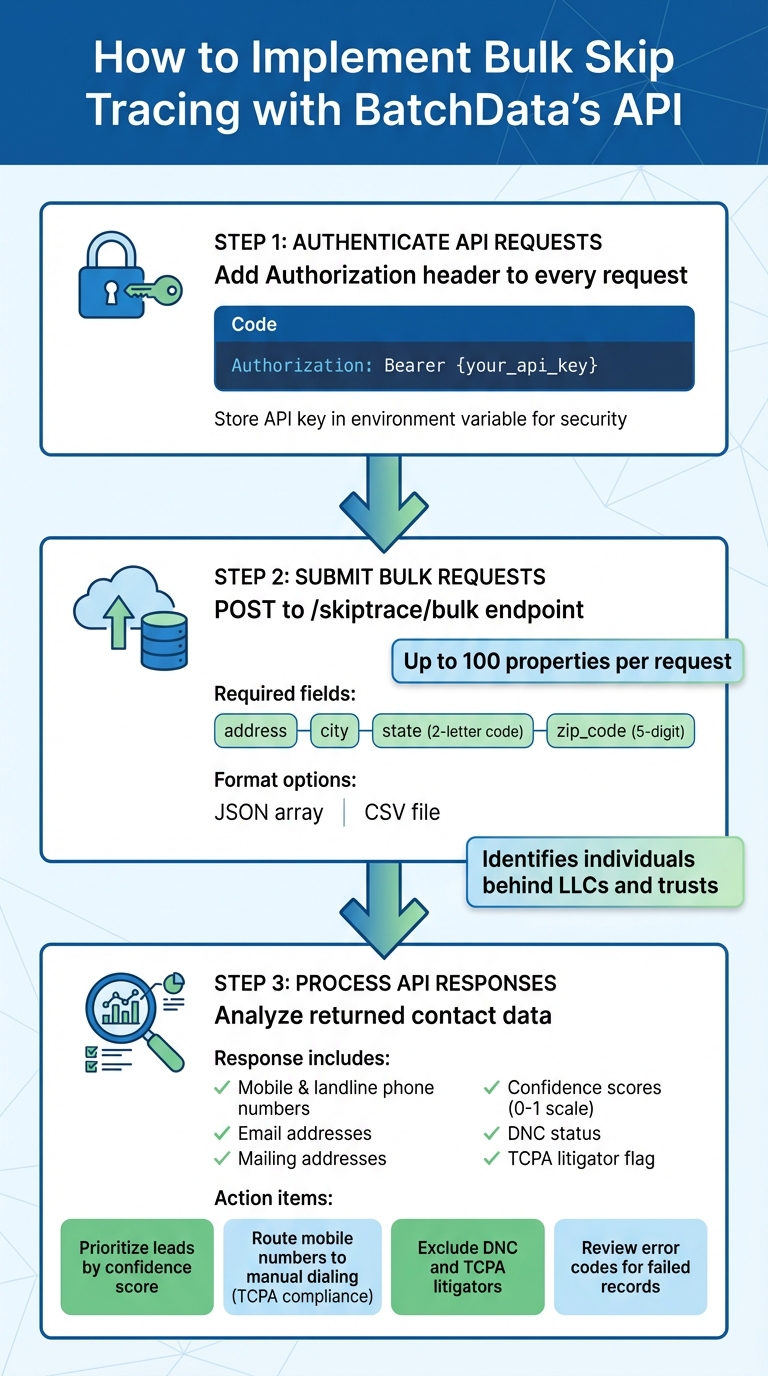
Step-by-Step Guide to Implementing BatchData Bulk Skip Tracing API
Once your environment is set up, you’re ready to carry out your first bulk skip trace. This process involves three main steps: authenticating your API requests, submitting property data, and processing the results. BatchData allows you to handle up to 100 properties per request.
Authenticating API Requests
To interact with the BatchData API, include your API token in the Authorization header using the Bearer authentication scheme:
Authorization: Bearer <token>
For example, in Python:
import requests

headers = {
    "Authorization": "Bearer <token>",
    "Content-Type": "application/json"
}
If you’re using Node.js with Axios, use the same Authorization header:
const headers = {
  Authorization: `Bearer ${process.env.BATCHDATA_API_TOKEN}`,
  "Content-Type": "application/json"
};
Store your token securely, such as in an environment variable, rather than hard-coding it in your application code.
For the current API authentication details and endpoint documentation, refer to the BatchData developer documentation.
Submitting Bulk Skip Tracing Requests
After authentication, you can submit your property data. Send a POST request to the /property/skip-trace endpoint. The API accepts data in JSON arrays or CSV files, with a limit of 100 properties per request. Here’s an example in Python:
url = "https://api.batchdata.com/api/v1/property/skip-trace" payload = [ { "address": "456 Oak Ave", "city": "Dallas", "state": "TX", "zip_code": "75201" }, { "address": "789 Pine Rd", "city": "Houston", "state": "TX", "zip_code": "77002" } ] response = requests.post(url, json=payload, headers=headers) For larger datasets, break them into batches of up to 100 properties to maximize efficiency. The API provides enriched data, including phone numbers (categorized as mobile or landline), valid email addresses, and mailing addresses. It can also identify the individuals behind LLCs and trusts, enabling you to reach decision-makers directly instead of intermediaries.
Next, you’ll need to analyze the returned data to get the most out of your skip tracing efforts.
Processing and Interpreting API Responses
The API delivers a JSON response with detailed contact information, success rates, and cost breakdowns. Each result includes multiple contact details such as mobile and landline numbers, email addresses, and the owner’s mailing address. Here’s an example of what a response might look like:
{ "results": [ { "address": "456 Oak Ave", "owner_name": "John Smith", "mobile_phone": "+1-214-555-0123", "landline_phone": "+1-214-555-0456", "email": "jsmith@example.com", "mailing_address": "456 Oak Ave, Dallas, TX 75201", "confidence_score": 0.92, "phone_type": "mobile", "dnc_status": false, "tcpa_litigator": false } ], "total_matches": 98, "total_cost": 6.86, "failed_records": 2 } Use the confidence scores to prioritize your leads and focus your outreach efforts. The phone_type field is particularly useful for ensuring compliance with TCPA regulations – route mobile numbers to manual dialing or SMS platforms, while landline numbers can go into traditional call campaigns. Be sure to exclude any records flagged as “TCPA Litigators” or listed on the National Do Not Call registry before passing the data to your outreach team. For entries with errors, review the error codes to resolve issues such as incomplete or invalid addresses.
Integrating Skip Tracing Results into Your Workflow
Once you’ve processed your API responses, the real work begins: turning that data into actionable leads. This involves exporting the results for analysis, integrating them with your existing tools, and prioritizing outreach efforts. Start by converting the JSON response into a spreadsheet format for easier analysis.
Exporting Results for Analysis
Transforming API responses into spreadsheets allows you to identify trends and evaluate performance metrics. Python’s pandas library makes it simple to convert JSON data into CSV files that can be opened in Excel or Google Sheets:
import pandas as pd df = pd.read_json('api_response.json') df.to_csv('skip_tracing_results.csv', index=False) Once your data is in a spreadsheet, you can use pivot tables to analyze performance metrics such as hit rate, contact rates, and cost per lead. Tracking these metrics over time can help identify which property types or geographic areas are generating the best results and where your lead-generation process can be improved.
For current BatchData pricing and volume-based rates, contact the BatchData sales team.
Pushing Data to CRM or Automation Tools
Streamlining CRM integration is key to reducing manual data entry and speeding up follow-ups. For Salesforce, you can authenticate via OAuth and use the API to create new account records directly:
POST /services/data/vXX.0/sObjects/Account/ { "properties": { "phone": "retrieved_mobile_number", "email": "skip_traced_email", "owner_name": "John Smith" } } For HubSpot, their contacts API allows you to automatically create leads from high-confidence matches provided by BatchData. No-code platforms like n8n simplify this even further. You can set up workflows to poll BatchData for completed batches, filter results based on confidence scores, and push qualified leads to your CRM – all within minutes. This approach cuts manual data entry by 80% and ensures your sales team gets fresh leads within 24 hours of a skip trace.
With your leads now in the CRM, you can focus on scoring and prioritizing them to maximize your outreach efforts.
Using Results for Lead Scoring and Targeting
High-confidence data from your API results can be used to score leads and zero in on the most promising prospects. Assign points based on data quality: +20 points for verified phone and email combinations, +15 points for owner-occupied properties, and -10 points for low confidence scores (below 0.7). Tools like Salesforce Einstein or HubSpot workflows make it easy to implement these scoring rules by mapping the confidence_score field from BatchData’s API.
Once scored, focus on leads with 70+ points. Use personalized campaigns to engage them: SMS messages for mobile-verified contacts are great for time-sensitive offers, while email nurturing sequences work well for building longer-term relationships. Segment leads further by property details – such as square footage or market value – to craft tailored messages. Real estate professionals who use scored leads from skip tracing data often see 25-40% higher conversion rates compared to generic outreach.
To keep the momentum going, schedule automated follow-ups based on confidence levels and contact types. For example, set up your CRM to send an SMS on Day 1, make phone calls on Day 3, and follow up with emails on Day 7 for high-confidence matches. This multi-touch strategy not only shortens sales cycles but also ensures compliance with TCPA regulations by routing mobile numbers to manual dialing systems.
Best Practices and Tips for Bulk Skip Tracing
When it comes to bulk skip tracing, keeping a close eye on performance, running targeted tests, and staying compliant are key to success.
Tracking Performance Metrics
Set up a simple dashboard to track critical metrics like match rate (the percentage of records with valid contact data), cost per match, and right-party contact (RPC) rate. For context, BatchData boasts a 76% RPC rate – nearly three times higher than the industry average. Use a spreadsheet to log weekly data, including batch size, successful matches, total costs, and any notes on data quality issues. For instance, if your match rate suddenly dips from 85% to 72%, it’s a red flag that your input data might have formatting problems or outdated sources. Regularly reviewing these metrics ensures you catch issues early and avoid wasting API credits.
Starting with Small Batches
Begin with small test batches of 50 to 500 records before scaling up. This method helps validate your input data, identify mapping errors, and establish a baseline without stretching your budget. Make sure to standardize phone number formats to prevent processing glitches. Testing in small increments also allows you to fine-tune confidence score thresholds. For example, BatchData offers confidence scores for phone numbers, helping you focus on high-quality leads. Once you consistently hit match rates between 70% and 85% in your test batches, gradually scale up. As you expand, enforce compliance checks to maintain data accuracy and integrity.
Ensuring Compliance and Data Accuracy
To avoid costly fines under the TCPA (ranging from $500 to $1,500 per illegal call), scrub all numbers against the DNC registry and verify active lines through BatchData’s verification API. BatchData not only handles DNC scrubbing but also includes a Litigator Scrub feature to flag known TCPA litigators. Their phone verification API (costing around $0.02–$0.05 per number) confirms whether numbers are active and distinguishes between mobile and landline lines – important since TCPA regulations treat these differently. Maintain audit logs of your DNC checks and verification results for at least five years. For added accuracy, cross-reference data from multiple sources. BatchData, for example, draws from over 12 sources and updates its datasets daily.
Conclusion and Next Steps
Using data-driven insights effectively can transform how you approach property owner outreach. With BatchData’s API, bulk skip tracing becomes a game-changer, combining high contact rates with access to extensive data sources.
To get started, consider running a small pilot batch. This will help you establish key metrics like match rates and cost per qualified lead. Once you’ve achieved consistent and positive results, you can scale up confidently. Ensure compliance by incorporating DNC scrubbing and paid skip tracing tools and TCPA litigator screening into your process. Use a dashboard to keep tabs on batch sizes, match success rates, and overall data quality. You can also take advantage of advanced features such as property pre-qualification filters, CRM automation tools like Zapier or Make.com, and multi-channel contact data to diversify your outreach efforts. These tools integrate smoothly into your existing workflow, making your operations more efficient.
Ready to begin? BatchData offers a flexible pay-as-you-go model with no contracts or minimum commitments. For high-volume needs, subscription tiers are available. Dive into the API documentation, reach out to BatchData’s support team for technical assistance, and plan quarterly business reviews to fine-tune your strategy as your operations grow.
FAQs
What should I do if a record comes back with no match or an error?
If a record shows no match or encounters an error, start by reviewing your request parameters for any missing or incorrect information. In cases of no matches, double-check your input data – it might be outdated or not available in the system. For temporary issues, consider retrying with a backoff strategy. Additionally, confirm that your API keys and permissions are valid to prevent authentication errors. Tackling these areas can help enhance both accuracy and outcomes.
How do I safely scale past 100 properties per request without hitting limits?
To handle more than 100 properties per request safely, take advantage of BatchData’s bulk skip tracing tools, built for high-volume processing. With the API, you can upload data in batches, allowing thousands of records to be processed efficiently.
Make sure your data is formatted as a clean CSV file, utilize batch uploads for streamlined processing, and keep an eye on your API usage. Features like real-time validation and compliance filters help ensure accuracy and adherence to legal requirements.
How should I set a confidence-score cutoff for outreach and CRM lead scoring?
BatchData offers filtering tools to help you prioritize leads based on factors like equity, ownership duration, or distress status. The key is to analyze your data and strike the right balance between accuracy and outreach volume. Experiment with different confidence-score cutoffs – like 70%, 80%, or 90% – and keep an eye on success rates to refine your approach.
Additionally, BatchData ensures compliance by implementing features such as DNC filtering, so you can optimize lead scoring while maintaining both accuracy and efficiency.