
Most off-market leads do not come from one flag. They come from a small group of signals that point in the same direction.
I’d sum up this guide like this: if I want a usable off-market list, I start with location, property type, and value, then I layer in no active listing, absentee ownership, 5+ years owned, equity, and distress data. After that, I sort the results, enrich owner records, and send the list into a CRM or outreach flow.
Here’s the short version:
- Off-market filtering means finding properties without an active public listing
- The best lists usually combine ownership, equity, and distress signals
- A simple starting filter is:
- Off-market status
- Absentee owner = true
- Ownership length > 5 years
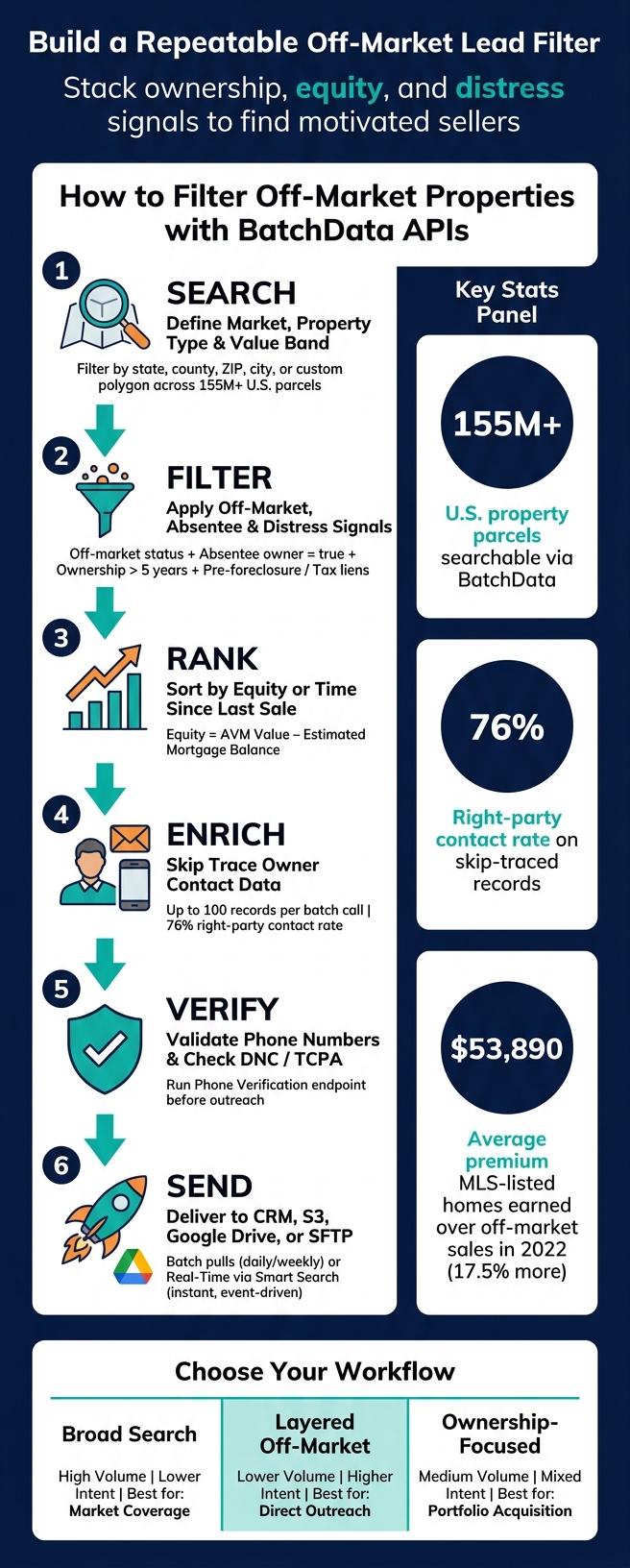
- BatchData’s Property Search API works across 155 million U.S. parcels
- For contact data, BatchData supports skip tracing in batches of up to 100 records per call
- BatchData reports a 76% right-party contact rate
- One study cited in the article found MLS-listed homes sold for 17.5% more than similar off-market homes, or about $53,890 more in 2022
If I were building this from scratch, I’d use a simple workflow:
- Search by market, property type, and value band
- Filter by off-market status, absentee owner, equity, and distress
- Rank by equity or time since last sale
- Enrich with phone and email data
- Verify numbers before outreach
- Send the records into batch delivery or real-time monitoring
A quick side-by-side view:
| Workflow | What I’d use it for | Lead volume | Lead intent |
|---|---|---|---|
| Broad status-only search | Market coverage | High | Lower |
| Layered off-market search | Direct outreach | Lower | Higher |
| Ownership-focused search | LLCs, trusts, portfolios | Medium | Mixed |
Bottom line: this article is about turning raw property data into a repeatable lead filter. I’m not just pulling records. I’m building a search logic I can run again by market, sort by seller signals, and pass into outreach without doing the same manual work each time.
How to Build a Repeatable Off-Market Property Filter with BatchData APIs
Choose the Right Filters for Off-Market Property Searches
Finding off-market properties comes down to lining up the right signals: ownership type, equity, timing, and property details that hint an owner may be ready to sell. The simplest way to do this is to start with filters that shrink the market, then add signals that point to seller motivation. That filter mix shapes the request you’ll build in the next section.
Start with Geography, Property Type, and Value Range
Begin with your market boundaries, property type, and price band. Geography defines the search area. BatchData lets you filter by state, county, ZIP code, city, or a custom polygon, which helps when a target market doesn’t fit neatly inside ZIP code lines. Property type trims the list to single-family or multifamily. For value range, you can use either tax-assessed value or an automated valuation model (AVM) estimate. Use square feet for building area and acres for lot size.
These three filters set the baseline. They define the full pool of parcels in a market before you add any motivation signals. They also become the first query parameters you pass to the API. Once the market is boxed in, the next step is ownership and distress.
Add Off-Market Status, Ownership, and Timing Signals
First, filter out active, pending, and recently sold records. After that, ownership filters do most of the work.
Absentee ownership means the owner’s mailing address is different from the property address. That’s a strong off-market signal. Trust or LLC ownership filters help separate individual homeowners from corporate or portfolio owners, which matters if you’re after a portfolio deal or a commercial buy.
Timing signals help you spot holding period. Last sale date and ownership duration can show which owners have built up a lot of equity. Owners who have held a property for 5+ years are more likely to sell than people who bought recently. Then you can layer in distress signals like pre-foreclosure status, tax delinquency, or liens to find owners with stronger reason to move. Put together, that signal stack becomes the filter logic for the API request below.
Broad vs. Strict Filter Combinations: A Side-by-Side Look
How strict you go depends on what you’re trying to do. Every setup is a tradeoff between lead volume and lead quality.
| Filter Combination | Pros | Cons | Best Use Cases |
|---|---|---|---|
| Broad (Status-Only) | Maximum reach; captures every potential lead in a market | High marketing costs; many low-intent leads | Market monitoring |
| Strict (Layered Signals) | High conversion rates; identifies motivated sellers | Low volume; may miss leads that don’t meet every criterion | Direct outreach |
| Ownership-Focused | Targets specific entities like LLCs or Trusts; identifies professional vs. individual owners | Requires more complex skip tracing to find the actual decision-maker (see our guide on how to skip trace property owners) | Portfolio acquisition |
For most workflows, a good starting point is:
- Off-market status
- Absentee ownership
- 5+ years owned
From there, add equity or distress filters based on your outreach goals. Use that filter mix as the base request in the API example that follows.
Step-by-Step: Build an Off-Market Query with BatchData APIs
Set Up API Access and Create the Base Property Search Request
Now it’s time to turn that filter stack into an actual request.
Authenticate with BatchData APIs by sending your API key as a Bearer token in the request header. Don’t hard-code the key. Put it in an environment variable instead, so it stays out of version control and is easier to rotate safely.
Start the base request with geography, property type, and core property attributes. Once that’s in place, add ownership and distress signals on top.
Layer In Off-Market, Equity, and Distress Filters
First, remove active and pending listings. Then add ownership signals like absentee owner status and longer ownership duration to surface owners who may be more open to selling.
Next comes value and equity. A useful starting point is:
Estimated Equity = AVM Value − Estimated Mortgage Balance
You can also use loan-to-value ratios and mortgage lien details, including lender, interest rate, and origination date, to tighten the list. For distress, add pre-foreclosure status, foreclosure filings, tax delinquency, or involuntary liens.
Some records stand out fast. A tax lien plus a pre-foreclosure notice usually tells a stronger story than a single signal alone. Even then, check that each signal is still active before outreach.
After filtering, rank the remaining records and enrich them.
Paginate Results, Sort the List, and Enrich Owner Records
Large searches need pagination. Pull results in manageable batches, then sort by estimated equity or time since the last sale so you can work the strongest leads first.
After sorting, use BatchData’s Skip Trace endpoint to add verified phone numbers and email addresses. The batch workflow supports up to 100 records per call, and BatchData reports a 76% right-party contact rate.
Before you launch a campaign, run phone numbers through the Phone Verification endpoint to check DNC registries and identify TCPA litigators. That gives you a cleaner handoff from filtered list to outreach-ready records.
Here’s a simple way to think about the tradeoff between lead quality and volume:
| Workflow Type | Filters Used | Typical Record Count | Lead Quality |
|---|---|---|---|
| High-Equity Absentee | Absentee Flag: True, Equity: >50%, Listing Status: Not Active | Moderate | High |
| Distressed/Motivated | Pre-foreclosure: True, Tax Delinquency: True, Listing Status: Not Active | Low | Very High |
| Geographic Farming | ZIP Code, Property Type: Single Family, Length of Ownership: >10 years – best for list-building at scale | High | Medium |
| Institutional Buy-Box | Square Footage: 1500-2500, Year Built: >2000, LTV: <70% | Moderate | High |
Use High-Equity Absentee when you want cleaner leads and Geographic Farming when you need broader coverage. Go with Distressed/Motivated when conversion matters most.
Put Off-Market Filtering Into Production Workflows
Once your filter logic is set, move it into a repeatable delivery pipeline.
Run Batch Pulls or Real-Time Monitoring by Market
Production workflows need repeatable delivery, not one-off queries. BatchData supports two core deployment patterns: scheduled batch pulls and event-driven monitoring via Smart Search.
Smart Search sends new matches as soon as they appear, so teams can act without polling. That’s a strong fit when speed matters.
For scheduled workflows, BatchData can deliver CSV files to Amazon S3, Google Drive, or SFTP on a set cadence. This works well for analysts running weekly market reports or feeding a data warehouse.
After delivery, standardize each record before storage or outreach.
Normalize U.S. Property Data for Storage and Reporting
Normalize real estate API responses before loading them into a CRM, warehouse, or report. Use the Address Verification endpoint to validate and standardize addresses according to USPS conventions before syncing records.
Use U.S. number formatting: commas for thousands and periods for decimals. Keep square footage, acreage, and state abbreviations consistent. BatchData returns structured JSON responses, so you can apply those rules in one normalization function before records hit your database.
Pick a Pipeline Pattern Based on Freshness and Complexity
Choose the pipeline that fits how fast your leads need to update.
| Pattern | Typical Use Case | Data Freshness | Complexity |
|---|---|---|---|
| Batch Pulls | Data warehousing, large-scale analytics, ML model training | Daily or weekly | Medium |
| Real-Time Monitoring (Smart Search) | Active acquisition pipelines, CRM lead triggers, immediate outreach | Instant – event-driven push | Low to medium |
| Hybrid Pipeline | Enterprise PropTech apps needing both scale and speed | Real-time updates + daily bulk syncs | High |
For most acquisition teams, Smart Search is the best place to start. It removes polling overhead and sends fresh leads into a CRM the moment a property matches your filters.
Teams running large-scale analytics or training machine learning models across BatchData’s over 155 million property parcels will usually get more from batch delivery through S3 or Snowflake. And if you’re building a PropTech product that needs both scale and speed, plan for a hybrid architecture from day one.
No-code teams can also trigger CRM updates and outreach when a property matches the filter.
Conclusion: Build Cleaner Off-Market Lists with Repeatable API Filters
Once your filters, sorting rules, and enrichment steps are set, the main job is simple: make the process easy to run again and again. That’s the big lesson here. Off-market filtering works best as a repeatable workflow, not a one-off search.
Start with layered signals. When you stack distress signals, you get a clearer priority list than you would from any single indicator.
Begin with broad searches to map the market. Then tighten your filters to surface the strongest leads. Use both approaches, and adjust your thresholds based on response.
After filtering, the next move is turning records into leads you can use. Contact enrichment takes a filtered list and makes it ready for outreach.
BatchData APIs help keep that workflow reusable. You can document your filters, rerun them across markets, and update them as conditions shift. That repeatable process is what makes off-market prospecting scale.
FAQs
How strict should my off-market filters be?
Your filters should line up with your investment strategy and the kind of lead quality you want. When you have access to granular data points, you can get very specific by mixing filters like location, property traits, equity, and distress.
For off-market deals, a layered approach usually works best. Pairing signals like high equity, vacancy, and out-of-state ownership turns a broad dataset into a more usable list.
Which signals matter most for motivated sellers?
The strongest signals usually come from a mix of financial distress, major life events, and ownership patterns.
That often includes pre-foreclosure filings like Notices of Default or Lis Pendens, tax delinquency or liens, and signs of property distress, such as code violations, deferred maintenance, or stalled construction.
Many investors also watch for divorce, retirement, or estate transitions. Then they stack those signals with high equity, long-term ownership, and absentee ownership to spot leads that are more likely to act.
How often should I refresh my off-market list?
You usually don’t need to refresh your off-market list by hand.
BatchData refreshes its database daily, and Smart Search can run your criteria automatically 24/7.
That means it keeps scanning for properties that match what you’re looking for and alerts you when it finds updates that matter, like a new deed recording or a property status change.