
Standardizing property data is critical for real estate professionals managing large datasets from various sources. Without a consistent format, mismatched information like addresses, owner names, and property details can cause delays, errors, and inefficiencies. Here’s how to fix it:
- Step 1: Collect and Review Data
Start with reliable sources like county records or aggregators offering updated, detailed datasets. Prioritize key fields such as standardized addresses, owner names, and property details. - Step 2: Clean and Parse the Data
Remove duplicates, fill missing values, and normalize formats (e.g., USPS-compliant addresses). Use tools like fuzzy matching and entity resolution for accuracy. - Step 3: Apply Standard Formats
Ensure consistency in addresses (ZIP+4, geocodes), owner names, and property measurements (e.g., square feet, USD). - Step 4: Add Missing Data
Use enrichment services to fill gaps with verified details like ownership updates, square footage, or tax amounts. - Step 5: Verify and Deliver
Run final quality checks (e.g., USPS validation, DNC scrubbing) and format data for integration (e.g., CSV or Parquet). Choose delivery methods like APIs or cloud platforms for ease of use.
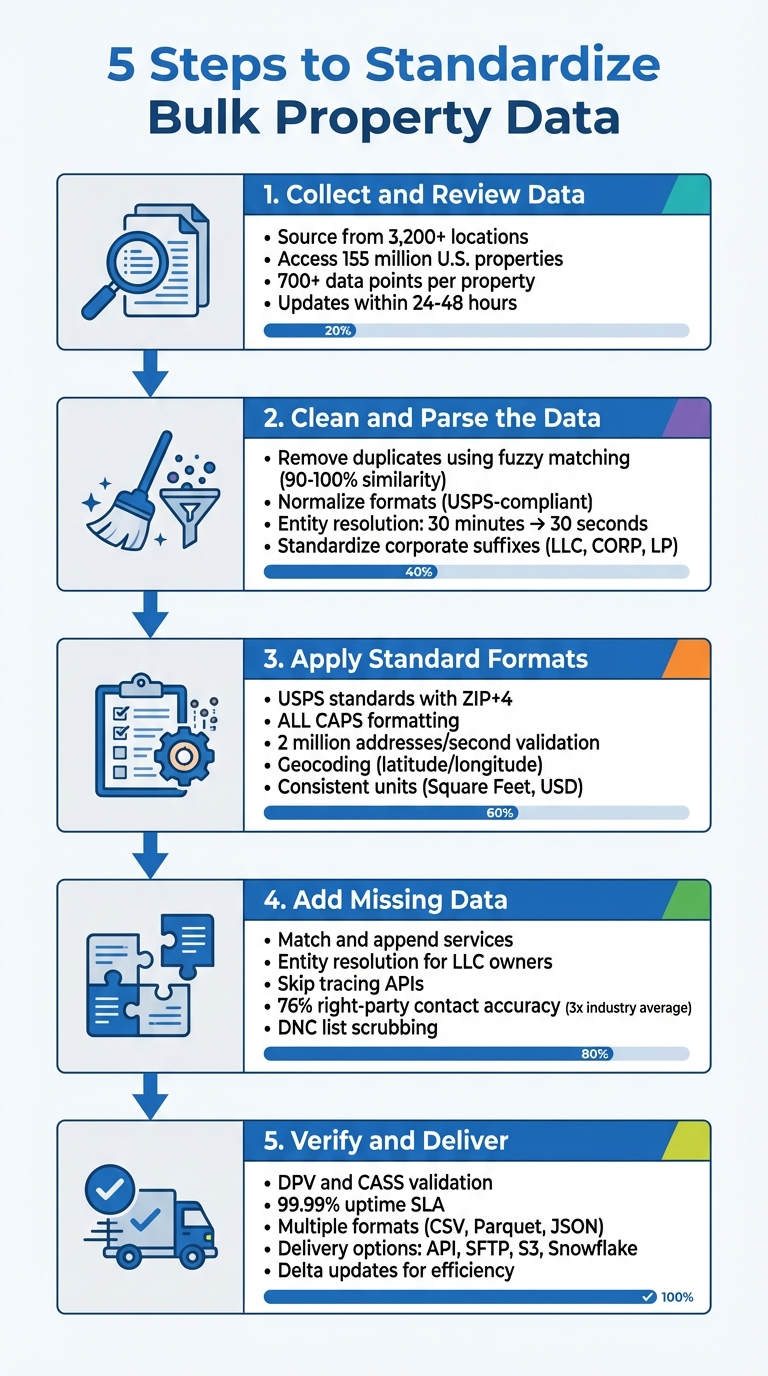
5-Step Process to Standardize Bulk Property Data
Step 1: Gather and Review Your Property Data
Find Trusted Data Sources
Property data comes from thousands of locations across the country. County recorder offices and tax assessors maintain the original records, but each jurisdiction has its own way of formatting and updating this information. This lack of standardization creates challenges when processing data on a larger scale.
To simplify this, rely on data aggregators that compile information from multiple sources in one place. For instance, BatchData collects data from over 3,200 sources, providing access to 155 million U.S. properties and offering more than 700 unique data points per property.
Before committing to a provider, request a sample dataset for your target region. Test how well the data integrates with your systems and confirm they support modern delivery methods like AWS S3, Snowflake Data Sharing, or real-time APIs. Also, make sure the provider updates their records daily, allowing you to access data within 24–48 hours. Once you’ve secured a dependable source, identify the data fields that are most critical for your needs.
List Your Key Data Fields
Once you’re confident in the data’s reliability, prioritize the fields that are essential for your workflow. Addresses are a top priority – they must comply with USPS standards to ensure accurate geocoding and successful mail delivery. Owner names are equally important, especially if your work involves outreach or determining the actual decision-makers behind LLCs or corporate entities.
Here’s a breakdown of the key data categories to focus on:
| Data Category | Key Fields to Standardize | Importance |
|---|---|---|
| Location | Standardized Address, ZIP+4, FIPS Codes, Geocodes | Necessary for mapping, routing, and merging data from various sources |
| Ownership | Owner Names, Mailing Address, Corporate vs. Individual | Crucial for lead generation and identifying decision-makers |
| Property Characteristics | Beds, Baths, SqFt, Year Built, Land Use | Important for property valuations and physical analysis |
| Financial | Assessed Value, Sale Price, Loan Amount, Tax Amount | Key for investment decisions and risk evaluations |
Evaluate your dataset’s field density, meaning how frequently important attributes – like square footage or year built – are included. If critical fields have missing data, you’ll need to address those gaps before relying on the dataset for analysis. A data dictionary can be a helpful tool here, outlining the expected formats, data types, and field sizes for each category, whether you’re working with Property, Transaction, or Valuation datasets.
Step 2: Clean and Parse Inconsistent Data
Remove Duplicates and Fill Missing Values
When working with raw property data, you’ll often encounter duplicate records that aren’t immediately obvious. For instance, "Elizabeth Smith" might also appear as "Beth Smith", or "Acme Corp." could show up as "ACME Corporation" – all referring to the same entity. To tackle this, use fuzzy matching algorithms with a similarity threshold: aim for 90–100% to catch minor typos and 80–89% for broader variations. Start cautiously – it’s easier to miss duplicates and address them later than to reverse incorrect matches. Additionally, normalize addresses using USPS standards to ensure consistency.
For corporate entities, standardize suffixes by converting terms like "CORPORATION" to "CORP", "LIMITED PARTNERSHIP" to "LP", and "L L C" to "LLC". Clean up names and addresses by removing punctuation, extra spaces, and common terms such as "Properties", "Group", or "Holdings" using stop word lists. This helps algorithms focus on unique identifiers.
Take it a step further with entity resolution to uncover the actual owners hidden behind corporate structures. For example, in 2024, Crexi, a commercial real estate platform, adopted BatchData’s entity resolution services. This upgrade slashed their processing time from 30 minutes to just 30 seconds.
Break Down Complex Data Fields
Multi-line addresses and combined owner names can complicate your data. Break these down into standardized components using CASS-certified tools or libraries like Python or Excel add-ins. CASS certification ensures compliance with USPS formatting guidelines, allowing you to split addresses into building number, street name, suffix, unit number, city, state, and ZIP+4.
Before parsing, run preprocessing scripts to clean up the data. Convert text to lowercase, remove extra spaces, and fix transposed characters. These steps help ensure your data is ready for accurate parsing.
To streamline the process, consider integrating RESTful JSON APIs for real-time validation. These APIs prevent incorrect data from entering your system in the first place. Tools like Smarty, for example, can take a single-line address and parse it into detailed components, adding missing details like ZIP+4 codes, city names, or even county information. Their database includes over 20 million valid non-postal addresses.
Once your data is cleaned and parsed, you’re ready to apply standardized formats to property fields in the next step.
Step 3: Apply Standard Formats to Property Fields
Format Addresses Correctly
Once your data is cleaned, it’s time to ensure every address aligns with USPS standards. According to USPS, addresses should be either fully spelled out or use approved abbreviations, and they must always include the ZIP+4 extension to pinpoint specific delivery areas. For example, convert addresses to ALL CAPS, abbreviate "Street" to "St", and include the ZIP+4 for accuracy.
To streamline this process, rely on CASS-certified software, which can validate and format addresses at lightning speeds – up to 2 million addresses per second when using cloud-based tools. For business addresses, secondary details like suite numbers are crucial. Tools like SuiteLink can help verify these details, ensuring accurate delivery sequencing.
Additionally, consider incorporating geocoding to assign each property latitude and longitude coordinates. This not only supports accurate mapping but also provides a stable reference point for properties, even if their address details change over time.
Once your addresses are standardized, apply the same level of care to owner names and property details.
Standardize Owner Names and Property Details
Owner names should be broken down into individual components: first name, middle name, last name, and suffix (e.g., Jr. or III). This avoids inconsistencies like having "John A. Smith Jr." appear differently across systems. For corporate entities, identify the type of owner – such as an individual, trust, LLC, or corporation – and ensure suffixes are formatted consistently.
When it comes to property measurements, stick to a single unit of measurement. Convert all building and lot sizes to square feet (SF). Similarly, monetary fields should follow a standardized format in USD, with consistent decimal placement. For example, store tax amounts as decimals (e.g., 11,2 format) for accuracy, while assessed values can be kept as integers, ensuring compatibility across platforms.
| Property Field | Standardized Format | Example |
|---|---|---|
| Building Area | Square Feet (Integer) | 2,450 SF |
| Lot Size | Square Feet or Acres | 10,890 SF or 0.25 acres |
| Tax Amount | USD (Decimal 11,2) | $3,245.67 |
| Assessed Value | USD (Integer) | $425,000 |
| Owner Name | Parsed Components | SMITH, JOHN A JR |
sbb-itb-8058745
Step 4: Add Missing Data and Verify Accuracy
Add Missing Property Details
Once your data is standardized, the next step is to fill in any gaps and ensure everything is accurate. Even after cleaning and formatting, datasets often have missing pieces, like square footage or outdated owner details. This is where data enrichment comes in, connecting your records to massive third-party databases that cover over 155 million U.S. properties.
This process uses "match and append" services, which rely on persistent identifiers to link your property data to external sources. These sources pull information from thousands of feeds, including county tax assessors for structural details, recorder offices for ownership updates, and even satellite imagery for geographic insights. For example, BatchData offers access to over 700 unique data points per property, letting you add details like the year a property was built or verified owner contact information.
For properties owned by corporate entities like LLCs, entity resolution is key. This technique uncovers the true individual owners and their contact information, bypassing the corporate shield. Chris Finck, Director of Product Management at Crexi, highlighted the efficiency of these tools:
"What used to take 30 minutes now takes 30 seconds. BatchData makes our platform superhuman."
To complete the process, you can use skip tracing APIs to find missing phone numbers and emails. These APIs also validate contact details in real time, removing disconnected numbers or entries on the Do Not Call (DNC) list. Once enriched, cross-check the data with trusted sources to confirm its accuracy.
Verify Data Against Trusted Sources
After filling in the blanks, it’s time to double-check your data. Cross-reference property details, like square footage or bedroom counts, with official county assessor records – some of the most reliable sources available. For ownership information, compare your records with data from county recorder offices and foreclosure databases.
While automated tools can handle large volumes of data efficiently, manual reviews are essential for catching the subtleties that algorithms might overlook. For contact information, you can scrub your data against the Federal DNC registry and known litigator lists to ensure compliance and accuracy.
BatchData achieves a 76% right-party contact accuracy rate, which is nearly three times the industry average. This high level of precision is maintained through daily updates, ensuring your data reflects the latest property and listing changes. Regular updates like these are crucial for keeping your information current and reliable, preventing outdated data from undermining your efforts.
Step 5: Check Quality and Deliver Your Data
Run Final Quality Checks
Before delivering your standardized property data, it’s essential to validate its accuracy. Start by running DPV (Delivery Point Validation) to ensure every address aligns with the USPS delivery file. Then, use CASS (Coding Accuracy Support System) processing to confirm that your address data meets postal standards.
Don’t overlook contact details. Verify that phone numbers and email addresses are active and valid. Additionally, scrub your data against the Federal Do Not Call (DNC) registry and known litigator lists to avoid potential legal issues. For properties with geocodes, double-check that latitude and longitude coordinates accurately match property records – this is crucial for applications like mapping and routing.
The most effective approach combines automated tools with manual review for a thorough quality check. This dual process ensures your data meets enterprise-level standards. Once you’re confident in the accuracy, reformat the data to ensure smooth integration with your systems.
Format Data for Integration
After validation, prepare your data for seamless integration into various platforms. The most universally compatible format is CSV, with clear headers like "address" and "postalCode" for easy use in CRMs and spreadsheets. Stick to the MM/DD/YYYY format for dates in the U.S., and ensure consistent data types (e.g., varchar for names, bigint for address keys) to prevent errors during integration.
For more advanced analytics or machine learning tasks, Parquet files are a better option due to their performance advantages over flat files. If you’re working with cloud data warehouses like Snowflake or BigQuery, they support direct data sharing without requiring traditional ETL (extract, transform, load) workflows. Choose the format that aligns with your technical stack – real-time APIs are ideal for on-demand lookups, while bulk file formats work well for database updates and large-scale analytics.
Deliver Data to Your Systems
Once your data is formatted, select a delivery method that fits your operational needs. For real-time applications, RESTful APIs are an excellent choice, offering sub-second response times and 99.99% uptime SLAs. For bulk data transfers, consider encrypted delivery via SFTP or direct uploads to AWS S3 buckets. If you’re leveraging cloud data warehouses, platforms like Snowflake allow you to access live datasets directly within your environment without needing to move files manually.
| Delivery Method | Best Use Case | Format Options |
|---|---|---|
| Real-Time API | On-demand lookups, user-facing apps | RESTful JSON |
| Bulk Data (SFTP/S3) | Large-scale analytics, database enrichment | CSV, Parquet, Pipe-delimited |
| Snowflake Sharing | Direct data warehouse integration | Direct Table Access |
| Professional Services | Custom integrations, white-labeling | Tailored Specifications |
For ongoing updates, implement delta updates instead of downloading the full dataset repeatedly. This strategy helps keep your systems updated while reducing data transfer costs. BatchData offers flexible delivery options, including pay-as-you-go pricing with no monthly subscription commitments, making it easy to scale your operations as needed.
Conclusion
Standardization is more than just tidying up spreadsheets – it lays the groundwork for every real estate decision. By sourcing reliable data, cleaning up inconsistencies, applying uniform formats, filling in missing details, and verifying accuracy, you create datasets that work seamlessly with CRMs, analytics platforms, and marketing tools. This approach eliminates wasted marketing dollars caused by invalid addresses, avoids compliance risks with DNC scrubbing, and ensures your outreach connects with the right audience. The result? Streamlined workflows and measurable performance gains.
BatchData takes the hassle out of this process by offering flexible delivery options. Whether you need real-time API access for instant lookups or bulk cloud delivery for large-scale analytics, BatchData has you covered. With features like CASS-certified processing, DPV validation, and a pay-as-you-go model without monthly subscriptions, you can efficiently scale your data operations without the headaches of outdated systems.
FAQs
How do I verify the accuracy of property data after standardizing it?
To keep your property data accurate and dependable, start by verifying it against a trusted source. This means double-checking essential details like ownership records, property valuations, tax information, and mortgage data. Using tools with real-time updates and automated verification features can quickly pinpoint outdated or incorrect entries, saving time and effort.
Once you’ve standardized fields like addresses, ZIP codes, square footage, and prices (e.g., $350,000), take it a step further with address verification and phone validation services. These tools can help identify and fix inconsistencies in your data. Scheduling regular audits – whether weekly or monthly – can also catch updates such as ownership changes or shifts in market value. By integrating these practices, you can ensure your property data stays consistent and dependable for any analysis or decision-making needs.
What are the best methods for cleaning and organizing bulk property data?
To manage and tidy up bulk property data efficiently, start with tools specifically designed for address standardization and validation. These tools help correct mistakes, standardize formats, and remove duplicates, ensuring your data remains both accurate and consistent. For instance, BatchData offers APIs that not only validate addresses but also enhance records with additional details like ownership information and geocodes.
When dealing with raw data, such as property listings scraped from the web, modern data extraction tools can be a game-changer. They can organize information like prices, square footage, and tax details into a structured format. After extracting the data, run it through a cleaning tool to prepare it for analysis, lead generation, or integration into your real estate systems. By following these steps, you’ll end up with high-quality property data that’s ready to meet your specific goals.
Why should you use enrichment services to complete missing property data?
Enrichment services enhance property records by adding precise, current details like ownership information, property valuations, and contact data. This ensures your records are both complete and dependable, laying a solid foundation for analysis.
By leveraging enriched property data, you can make quicker, well-informed decisions, seize market opportunities with confidence, and refine the accuracy of your real estate strategies.