




































To build a real estate lead scoring system, you need to prioritize quality over quantity by using real estate APIs to evaluate leads based on key factors like equity, ownership history, and market trends. Here’s how it works:
- Scoring Criteria: Define what makes a lead valuable (e.g., long ownership, high equity, or financial distress) and assign point values to these factors.
- Property Insights: Use APIs to gather data on property attributes like location, equity percentage, and condition to identify motivated sellers.
- Ownership History: Evaluate lead potential by analyzing ownership duration, absentee status, and distress signals like pre-foreclosure.
- Market Data: Incorporate trends like days on market, inventory levels, and price changes to refine your scoring system.
- Automated Integration: Connect APIs to your CRM for real-time data updates, scoring, and lead prioritization.
By combining these elements, you can focus on high-value leads, automate workflows, and improve conversion rates.
Key Takeaway: Use property data APIs to create a scoring model that prioritizes motivated sellers and streamlines your real estate prospecting process.
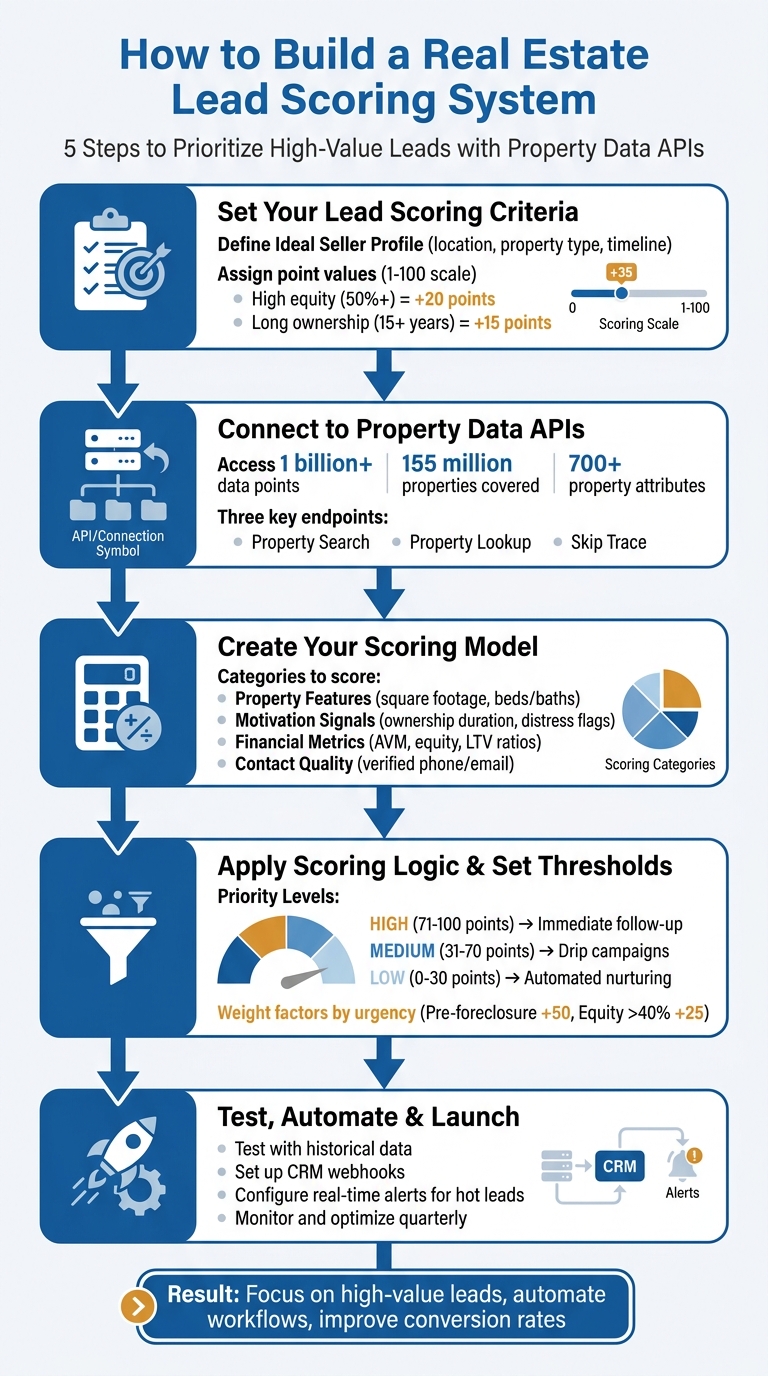
5-Step Real Estate Lead Scoring System Implementation Process
Set Your Lead Scoring Criteria
Before diving into API connections, it’s crucial to establish your lead scoring criteria. This ensures that the property data you receive aligns with your target seller profile. A scoring system shifts the focus from sheer volume to quality, helping you concentrate on prospects most likely to convert. By combining property details, ownership history, and market trends, you can paint a clearer picture of seller motivation.
Start by outlining your Ideal Seller Profile. This should include factors like preferred locations, property types, and expected selling timelines. For instance, if your focus is on single-family homes in suburban Dallas with equity above 50%, those specifics become the backbone of your scoring model. Assign point values (from 1 to 100) to each criterion to filter “Hot Leads” and activate automated follow-ups.
“Most wholesalers spend 70% of their time on leads that won’t convert. Smart investors flip that ratio by focusing on where the money is.” – Sharad Mehta, Founder, REsimpli
By using scoring criteria, you can separate motivated sellers from less promising leads. For example, a lead with high equity, long-term ownership, and a property in a high-inventory market might score 85 points, prompting an immediate call. On the other hand, a lead with low equity and recent purchase activity might score just 25 points, placing them in a nurture campaign. The secret lies in weighing your criteria based on what drives conversions in your market. From there, you can analyze specific property attributes to quantify seller motivation.
Score Leads by Property Attributes
Certain property attributes – like location, equity, type, and size – are essential for building an effective scoring model. Location is a key demographic factor that aligns leads with your Ideal Seller Profile. For example, properties in targeted zip codes might earn +15 points, while those with equity levels above 50% could get +20 points.
Equity percentage is one of the strongest indicators of a seller’s flexibility. High equity (typically 50% or more) suggests the seller can offer discounts or cover costs. A lead with 60% equity might score +20 points, while one with only 20% equity might earn just +5.
Property condition can also reveal seller urgency. If your API flags deferred maintenance, code violations, or tax delinquencies, these signals can increase a lead’s score. For example, a property with tax delinquency might earn +10 points due to the financial pressure it indicates.
Property type and size are essential for narrowing down leads that fit your strategy. If you focus on single-family homes between 1,200 and 2,500 square feet, properties in that range should score higher. For instance, a 1,800-square-foot single-family home might earn +10 points, while a 4,000-square-foot luxury estate earns zero if it doesn’t align with your goals.
Use Ownership History to Identify Motivated Sellers
Ownership history provides valuable insights into seller motivation. Length of ownership is a strong indicator – long-term owners are often more likely to sell. For example, a homeowner who has held a property for 15+ years might earn +15 points, while someone who bought their home just two years ago might score much lower.
Absentee ownership is another critical factor. Out-of-state landlords managing rental properties from afar are often eager to sell. If your API identifies absentee ownership, assign 10 to 15 points depending on other factors like equity or deferred maintenance.
Foreclosure status and pre-foreclosure flags are among the highest-scoring attributes. A lead in pre-foreclosure with over 40% equity could score +75 points. These sellers often face urgent timelines and are motivated to sell quickly to avoid losing their equity. Similarly, tax liens or code violations can signal financial distress, warranting higher scores.
When reaching out, ask specific questions about property condition and moving timelines to validate the data retrieved from APIs. While ownership history provides a great starting point, it’s only as useful as the conversations you have with leads. For example, a long-term owner may not intend to sell, making their high score irrelevant. Use the data to prioritize outreach, then qualify leads through direct communication.
With property and ownership factors in place, integrating market trends will complete your scoring framework.
Add Market Trends to Your Scoring Model
Market trends add valuable context to property data, helping you determine whether a lead is in a high-growth, volatile, or declining area. For example, a property with solid fundamentals in a declining market might offer better opportunities than a mediocre property in a booming area. APIs make it possible to automate the inclusion of forward-looking risk signals and performance forecasts instead of relying solely on historical public records.
Days on market (DOM) is a key metric to consider. A property listed far longer than the local average may indicate a motivated seller. For instance, if the average DOM in a zip code is 30 days and a property has been listed for 6 months, it might earn +10 points, signaling higher negotiation potential.
Inventory levels and price trends also reveal seller pressure. High inventory often means more competition, making sellers more willing to negotiate. Use your API to pull zip-code-level averages for rent and sale prices, assigning higher scores to properties in appreciating or low-inventory markets. For instance, a property in a zip code with six months of inventory might earn +8 points, while one in a market with less than two months earns zero.
Volatility metrics offer another dimension of insight. In highly volatile markets, leads may require faster follow-up to capitalize on rapid price changes. If your API provides volatility scores, use them to adjust lead priority. For instance, a property in a volatile market with a motivated seller (e.g., pre-foreclosure) could earn an extra 5 to 10 points.
“Valuations and forecasts update automatically alongside rental performance, market trends, and neighborhood context within the systems you already use.” – HouseCanary
sbb-itb-8058745
Connect to BatchData Property Data APIs
Once your scoring criteria are in place, the next step is integrating BatchData’s APIs to access the exact property data your model needs. BatchData provides access to over 1 billion data points covering 155 million properties and more than 700 property attributes. With a 100% uptime guarantee, the platform offers two endpoint types: standard endpoints for single-property lookups and asynchronous endpoints for bulk queries, which handle large datasets in the background and return results via webhooks.
The APIs are designed for real-time integration and offer three main endpoints for building a lead scoring system:
- Property Search API: Enables property discovery using advanced filters.
- Property Lookup API: Provides detailed property information.
- Property Skip Trace API: Appends verified contact details.
“What used to take 30 minutes now takes 30 seconds. BatchData makes our platform superhuman.” – Chris Finck, Director of Product Management
These APIs provide data in key categories essential for lead scoring, such as:
- Core property details: Beds, baths, square footage, lot size, zoning.
- Ownership history: Owner names, ownership duration, absentee status.
- Financial data: AVM, estimated equity, LTV ratios.
- Distress indicators: Pre-foreclosure status, auction dates, open liens.
- Market activity: Active/sold status, days on market.
This data integrates seamlessly into your scoring model, helping identify high-value leads quickly. Additionally, BatchData includes compliance features like DNC list scrubbing and litigator filtering, ensuring your outreach efforts remain compliant.
Configure API Authentication and Endpoints
To connect to BatchData’s APIs, start by signing up and generating an API key via the developer dashboard. This key is your authentication tool and should be stored securely in environment variables – never hardcoded into your source code.
BatchData uses POST requests for its endpoints, with the API key included in the headers. The base URL for API calls is:
https://api.batchdata.com/v1/
Specific endpoints include:
- Property Search:
https://api.batchdata.com/v1/property/search - Property Lookup:
https://api.batchdata.com/v1/property/lookup.
Your API key comes with rate limits, and usage can be tracked on the dashboard. BatchData operates on a pay-as-you-go pricing model, so monitor your usage during testing to understand costs and set alerts for high-volume systems.
To test your setup, make a simple API call to the Property Lookup endpoint using a known property address. A successful response confirms your credentials are configured correctly, allowing you to proceed with retrieving property data.
Retrieve Property Data Using the Property Search API
The Property Search API is the go-to tool for identifying properties that match your lead scoring criteria. It supports filtering across multiple locations – cities, counties, or zip codes – using advanced queries.
“Precision meets ease of use with our Property Search API. Utilize advanced filters and access over 700 data points to discover properties that meet your exact criteria effortlessly.” – BatchData
You can filter results by:
- Property attributes: Property type, bedrooms, bathrooms, square footage.
- Ownership details: Duration of ownership, absentee status.
- Financial metrics: AVM, equity, LTV ratios.
- Distress indicators: Pre-foreclosure status, auction dates, open liens.
The API returns results in JSON format, with each record including details like property address, APN, owner information, estimated equity, and distress flags. This data feeds directly into your scoring algorithm, helping you prioritize leads based on factors like long-term ownership or distress signals.
For larger datasets, the asynchronous Property Search endpoint processes queries in the background and delivers results via a webhook or downloadable file.
After identifying promising properties with the Search API, use the Property Lookup API to gather deeper insights, such as construction details, full ownership history, or valuation data for your top-scoring leads.
Finally, complete your lead scoring process by appending contact information by skip tracing property owners using the Property Skip Trace API. This endpoint delivers verified phone numbers and email addresses with a 76% right-party contact accuracy rate – three times the industry average. This ensures your scoring system leads to effective and actionable outreach.
Create Your Lead Scoring Model
Leverage BatchData’s property data to design a scoring model that assigns numerical values to various factors like property characteristics, motivation signals, financial metrics, and contact quality. The result? A single score that reflects the likelihood of conversion.
Start by organizing your data into four main categories:
- Property Features: Metrics like square footage, number of bedrooms and bathrooms, and lot size.
- Motivation Signals: Indicators such as long-term ownership, absentee ownership, or distress flags.
- Financial Metrics: Data like Automated Valuation Models (AVMs), equity levels, and Loan-to-Value (LTV) ratios.
- Contact Quality: Factors like verified contact details and reachability scores.
Boost scores for high-motivation indicators. For example, assign extra points to absentee-owned properties or those owned for over 10 years. Conversely, reduce scores for owner-occupied homes or recently purchased properties with high LTV ratios – unless distress signals are present.
Assign Point Values to Data Metrics
Next, break down each category into specific point values. Here’s how you can do it:
- Property Value: Use AVMs to estimate deal size. Assign:
- 10 points for properties valued between $200,000–$400,000.
- 20 points for $400,000–$600,000.
- 30 points for properties above $600,000.
- Square Footage and Lot Size: Award 15 points for homes over 2,000 sq ft, but only 5 points for those under 1,200 sq ft. Properties with lots exceeding 10,000 sq ft could earn an additional 10 points for development potential.
- Ownership Duration: Properties owned for 10+ years can earn 20–25 points, with absentee-owned properties receiving an extra 15–20 points.
- Financial Metrics: High equity (LTV below 50%) should earn 25–30 points, while properties with LTVs over 80% get minimal points unless paired with distress signals like pre-foreclosure notices or unpaid property taxes, which could add 30–40 points.
Here’s a quick comparison of high-score versus low-score indicators across key categories:
| Data Category | High-Score Indicators | Low-Score Indicators |
|---|---|---|
| Ownership | Absentee-owned, long-term ownership (10+ years) | Recently purchased, owner-occupied |
| Financials | High equity, low LTV, distress signals | Low equity, high LTV, no distress |
| Property | Large lot size, high AVM, updated systems | Small lot, low AVM, aging infrastructure |
| Contact | Verified mobile, high reachability score | Landline only, flagged on DNC, no email |
Don’t forget to consider market trends. Neighborhood data – like price growth forecasts – can add future potential to your scoring. If BatchData’s API offers climate risk scores (e.g., flood or fire exposure), adjust scores accordingly. Properties in high-risk areas might lose 5–10 points to account for higher insurance costs or resale challenges.
Add Contact Data to Your Scoring Formula
Finally, refine your scoring model by integrating contact data. Use BatchData’s Property Skip Trace API to prioritize leads with verified contact information and learn how skip tracing works to improve your outreach. Here’s how to assign points:
- Phone Numbers: Award 20–25 points for verified mobile numbers linked to active carriers. Landline-only contacts should earn just 5–10 points.
- Email Addresses: Add 10–15 points for verified emails, especially if they aren’t generic or role-based.
Incorporate compliance measures. BatchData includes Do Not Call (DNC) list scrubbing and litigator filtering. Leads flagged as non-compliant should lose all or nearly all points, ensuring your team avoids legal risks.
For a more advanced approach, include identity resolution data like PersonIDs. This ensures you’re targeting the right individual. Leads with multiple verified contact methods – such as a mobile number, email, and secondary phone – should rank much higher than those with a single unverified contact.
Automate the process by using BatchData’s asynchronous endpoints to enrich contact data in bulk. Feed the updated records directly into your CRM, complete with pre-calculated scores. This ensures every lead is ranked by both property potential and contact quality, helping your team focus on the most promising opportunities.
Apply Scoring Logic and Set Priority Thresholds
Once you’ve assigned point values to your lead attributes, the next step is to weigh each factor and establish priority thresholds. This process converts raw scores into actionable lead priorities.
Not all factors carry the same weight. Signals like pre-foreclosure filings or tax delinquencies should take precedence, as they indicate a seller’s urgency to act. For instance, a property entering pre-foreclosure represents a time-sensitive opportunity, far more pressing than a property with appealing square footage. Similarly, equity percentages act as a secondary filter, ensuring there’s enough financial flexibility to structure a deal.
Advanced systems combine multiple filters to refine accuracy. For example, pairing 40%+ equity with an out-of-state owner and a notice of default creates a “stacked” profile. These layered signals significantly increase the likelihood of conversion by identifying leads with multiple motivating factors.
Weight Your Scoring Factors
Assigning appropriate weights to each factor ensures your scoring system reflects the urgency and feasibility of a deal. Below is a table showing how to prioritize based on impact:
| Lead Attribute | Score | Rationale |
|---|---|---|
| Pre-Foreclosure Status | +50 | Indicates a highly motivated seller who needs immediate attention. |
| Equity > 40% | +25 | Ensures there’s sufficient financial margin to structure a viable deal. |
| Out-of-State Owner | +15 | Absentee owners are often more pragmatic and less emotionally attached. |
As shown, pre-foreclosure status carries nearly twice the weight of high equity, emphasizing the importance of seller urgency. Additionally, assign negative points for low-quality leads – for instance, subtract 20 points for unsubscribes and 10 points for invalid contact details. This approach not only filters out poor prospects but also ensures compliance with Do Not Call registries.
Once your weighted factors are in place, you can translate these scores into actionable lead priority levels.
Define Priority Levels for Leads
Establishing clear score ranges helps categorize leads into High, Medium, and Low priority tiers. This ensures your team focuses on the most promising opportunities, avoiding wasted effort on leads unlikely to convert.
A simple 0–100 scale works well for defining thresholds. Here’s a practical breakdown:
| Priority Level | Score Range | Action / Resource Allocation |
|---|---|---|
| High (Hot) | 71–100 | Immediate follow-up; assign to top acquisitions representatives. |
| Medium (Warm) | 31–70 | Engage through personalized drip sequences to maintain interest. |
| Low (Cold) | 0–30 | Place in automated nurturing campaigns for long-term follow-up. |
For leads scoring 71 or higher, set up real-time CRM alerts to notify your top acquisitions managers. These “hot” leads warrant same-day outreach. Medium-priority leads (31–70 points) benefit from targeted drip campaigns that keep them engaged without overloading your team. Low-priority leads (0–30 points) should remain in automated email sequences until their circumstances shift.
For even greater precision, consider a dual-axis system evaluating both “Fit” (property attributes and equity) and “Engagement” (response behavior). This creates nuanced categories like A1 for high-fit, high-engagement leads or C3 for low-fit, low-engagement prospects. Tools like BatchData’s APIs can automate score updates in real time, ensuring your prioritization adapts as lead data evolves.
Test, Automate, and Launch Your System
Before rolling out your lead scoring system powered by property data APIs, it’s crucial to test its accuracy with historical data and set up automation for a smooth workflow. This ensures your system operates effectively and allows your team to focus on closing deals.
Test Your Model with Historical Data
Start by evaluating your scoring system against historical lead data to confirm it accurately identifies high-converting leads. Pull a comprehensive set of past property data from your CRM and apply your scoring formula. Then, compare the scores to actual conversion results. If your high-scoring leads aren’t converting as expected, tweak the weights or criteria in your formula.
Tools like BatchData’s Skip Tracing Accuracy Estimator can help verify the reliability of owner and contact information before scoring. Additionally, validate your scores by cross-checking them with proven motivation indicators. For faster processing, you can integrate AI tools with the BatchData API using a Model Context Protocol (MCP) server to analyze historical datasets in just minutes.
Address any inconsistencies before moving on to automation. Once your model is fine-tuned and validated, you’re ready to automate your lead scoring process for real-time efficiency.
Automate Your Workflow with BatchData Professional Services
Connect your CRM to BatchData using webhooks that activate when new lead addresses are added. The API will automatically pull detailed property data and calculate scores.
Set up your system to organize leads by their scores and sync the enriched data back to your CRM. For high-priority leads, configure real-time CRM alerts to notify your acquisitions team immediately. These instant alerts help ensure your team can act quickly on time-sensitive opportunities, increasing the chances of conversion success.
Conclusion
A data-driven scoring system brings together valuable insights to transform how real estate professionals achieve success. By leveraging property data APIs, you can shift from relying on guesswork to making informed decisions, helping prioritize opportunities and allocate resources more effectively. Incorporating elements like property attributes, ownership history, and market trends into a weighted scoring model can significantly enhance conversion rates and ROI.
Creating a scalable process begins with establishing clear scoring criteria and implementing automated lead generation workflows. Tools like BatchData’s APIs streamline this process, removing manual inefficiencies and enabling real-time lead prioritization. As BatchData explains:
“From creating data pipelines to integrating raw data into your sales, marketing and product motions, our professional services team helps you make informed decisions, create reliable data platforms, and deliver data-driven products and services”.
It’s essential to keep your scoring system up-to-date. Regularly tracking performance and conducting quarterly strategy reviews ensures your model stays in sync with shifting market conditions and business goals. When high-priority leads consistently convert at better rates, the benefits of targeting qualified opportunities become clear, driving both efficiency and growth.
BatchData offers an all-in-one solution for property, ownership, and contact data, delivered through modern APIs with flexible pricing. This allows you to deploy quickly and focus on closing deals with the most promising leads.
FAQs
What data points should I score first?
When evaluating a property’s potential, begin with the data that delivers quick and clear insights into its value and ownership status. Key areas to focus on include property valuation estimates (AVMs), which provide a snapshot of the property’s market value, as well as ownership details that clarify who holds the title. Other important factors are the property’s age and its equity status, which can reveal financial opportunities or challenges.
You should also take into account how long the current owner has held the property and whether the property is in distress. These details can offer clues about the owner’s motivation to sell, making it easier to prioritize leads. By focusing on these critical elements, real estate professionals can streamline their lead scoring process and zero in on high-value prospects with speed and precision.
How do I choose score weights and thresholds?
When setting up score weights and thresholds, start by identifying the property attributes that matter most to your goals. For instance, factors like equity, ownership duration, or property age might be key indicators. Assign greater weight to the attributes that have a bigger impact on lead quality. For example, you could prioritize leads where equity exceeds 40%.
It’s also important to establish clear thresholds to filter for high-value opportunities. But don’t stop there – regularly test and fine-tune these settings. Use lead conversion data to see what’s working and adjust accordingly. Integrating detailed property data through APIs can provide deeper insights, helping you refine your approach even further.
How often should I retrain the scoring model?
The frequency of retraining largely hinges on factors like market fluctuations, property data updates, and shifts in user behavior. While real-time automation is the gold standard, most models perform best when retrained on a monthly or quarterly basis. This schedule helps them stay in sync with evolving trends. Consistent updates are especially crucial in fast-moving markets to keep the scoring system accurate and reliable.


