When working with property data from BatchData‘s API, responses come in JSON format with over 1,000 data points per property. Parsing this data is essential to make it usable for analytics, CRMs, or investment tools. Here’s the core process:
- Why Parse JSON? Automates data flow, ensures accuracy, and integrates property insights into your systems. Examples include identifying high-equity properties or absentee owners.
- What’s in the API Response? Data is structured into categories like property details (square footage, lot size), financial history (mortgages, liens), and ownership information (owner names, contact details).
- How to Parse JSON? Use Python or Node.js for parsing. Python‘s
pandas.json_normalize()or Node.js’sJSON.parse()simplifies handling nested data.
Key Steps:
- Set Up: Secure API keys using environment variables. Use tools like
.envfiles for local development. - Authentication: BatchData uses API keys for access. Avoid hardcoding keys to ensure security.
- Parsing Techniques:
- Python: Use
pandas.json_normalize()to flatten JSON into tables for analysis. - Node.js: Leverage
JSON.parse()and array methods for quick data extraction.
- Python: Use
- Error Handling: Validate JSON structures, handle missing fields, and manage rate limits with retries.
- Optimize for Scale: Use streaming parsers for large datasets and implement pagination for efficient data handling.
By following these steps, you can transform raw property data into actionable insights, enabling better decision-making and smoother workflows.
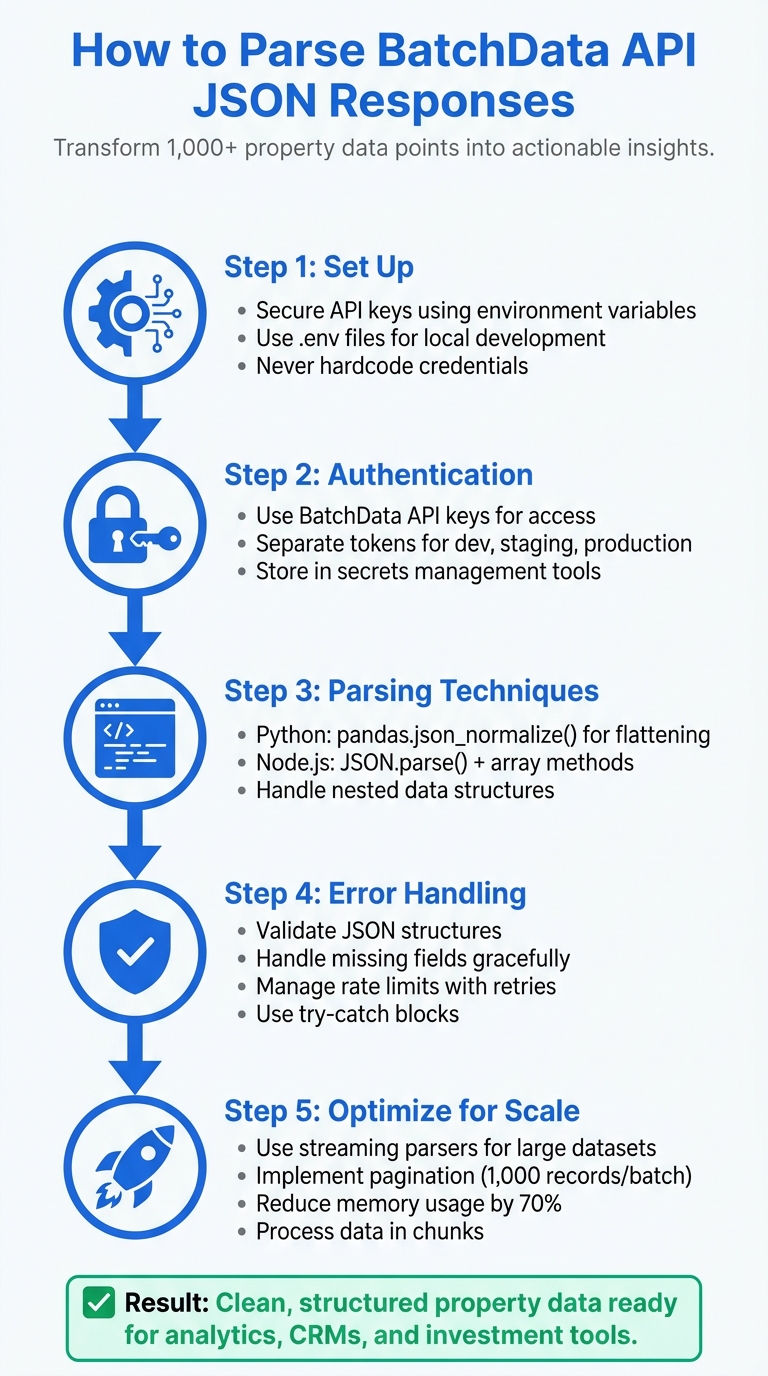
5-Step Process for Parsing BatchData API JSON Responses
HOW TO PARSE JSON FROM AN API: USING PYTHON
sbb-itb-8058745
Prerequisites: Setting Up for BatchData API Integration
Before diving into parsing JSON responses, it’s crucial to prepare your development environment and secure API credentials. This ensures a smooth testing process without impacting production data. The setup involves three main steps: obtaining and safeguarding API credentials, configuring your programming tools, and fetching sample responses for testing. Once everything is in place, you can move on to authenticating the API and working with sample responses.
API Authentication and Access
The BatchData API relies on API keys (tokens) for authenticating requests and managing access to its endpoints. To avoid security risks, never hardcode API keys directly into your source code. Instead, store them securely using environment variables or a secrets management tool like AWS Secrets Manager or HashiCorp Vault. This approach not only protects your credentials but also simplifies key rotation when needed.
For local development, you can use a .env file in your project’s root directory to store API keys. Be sure to include this file in your .gitignore to prevent accidental commits. An example .env file might look like this:
BATCHDATA_API_KEY=your_api_key_here When working with these variables, you can load them at runtime using libraries like python-dotenv for Python or dotenv for Node.js. It’s also a good practice to use separate API tokens for development, staging, and production environments. This way, if one token is compromised, the impact is limited to that specific environment.
Programming Environment Requirements
Two popular programming languages for integrating with the BatchData API are Python and Node.js. Each has its own strengths:
- Python: Ideal for data analysis and batch processing. Use libraries like
requestsfor HTTP calls,jsonfor parsing, andpandasfor data transformation. - Node.js: Great for real-time applications and server-side processing. Tools like
axiosor the built-infetchAPI handle HTTP requests effectively.
To ensure consistent setups across your team, consider using Docker for containerization. This eliminates the "it works on my machine" problem and makes onboarding new developers much easier. Additionally, install any required libraries and configure linting tools to maintain code quality. After setting up the environment, test its functionality using sample API responses.
Getting Sample API Responses
Start your integration by accessing BatchData’s sandbox environment, which allows you to test API endpoints without affecting live data or consuming rate limits. Focus on key endpoints like Property Search, Property Details, and Contact Append to familiarize yourself with the data structure.
Save these sample responses as JSON files in a dedicated directory within your project, such as /samples or /fixtures. Include a variety of scenarios in your samples, such as:
- Successful queries with complete data
- Responses with missing fields
- Large datasets that require pagination
- Error cases
Validating these samples against the API’s documented schema ensures that your parsing logic remains accurate and reliable throughout the development process.
Step-by-Step Guide to Parsing BatchData API JSON Responses
Transforming BatchData API JSON responses into structured data is a critical step for analyzing, storing, or integrating real estate investing data into your applications. Depending on your workflow, Python and Node.js provide distinct methods for this task, each with its own strengths.
Parsing JSON with Python
Python’s pandas library is a powerful tool for handling BatchData API responses, especially when dealing with nested property data. The pd.json_normalize() function is your go-to for converting semi-structured JSON into flat DataFrames ready for analysis.
Here’s how to get started:
- Import Libraries and Load Data: Begin by importing the necessary libraries. If your API response is a string, use
json.loads()to convert it into a Python dictionary. - Flatten JSON: Use
pd.json_normalize(data)to flatten simple nested dictionaries. For example, a key likeaddress.citywill turn into a column namedaddress_city.
For more complex structures, such as mortgage histories or owner records, use the record_path parameter to target specific nested lists. For instance, record_path=['property', 'mortgages'] creates a new row for each mortgage entry. To retain top-level fields like property_id, use the meta parameter. If some keys are missing, set errors='ignore' to avoid crashes and fill in missing values with NaN.
Here’s a quick reference table for key parameters:
| Parameter | Purpose | Usage Example |
|---|---|---|
data |
The JSON object to parse | data=api_response |
record_path |
Expands nested lists into rows | record_path=['results', 'owners'] |
meta |
Includes top-level fields in every row | meta=['property_id', 'status'] |
sep |
Joins nested keys into column names | sep='_' (e.g., address_city) |
errors |
Handles missing keys | errors='ignore' |
For very large datasets, handle data in chunks to avoid memory issues. Use df.explode() for lists like property tax history, followed by json_normalize() for further flattening.
Parsing JSON with Node.js
Node.js simplifies JSON parsing with its native JSON.parse() method, making it ideal for server-side and real-time processing. After fetching a response using axios or fetch, convert the string response into a JavaScript object with JSON.parse(responseText).
To extract data, use dot notation or bracket syntax. For example, property.address.city retrieves the city from a property object. When dealing with arrays of properties, use array methods like map(), filter(), and reduce() to transform and extract the fields you need. This approach is effective for moderate-sized datasets that need quick processing for frontend applications or databases.
For larger responses that might strain memory, libraries like JSONStream or stream-json are invaluable. These tools process data incrementally, parsing chunks as they arrive instead of waiting for the entire response. This method is especially useful when handling thousands of property records in a single API response, as it keeps memory usage manageable and enhances performance.
Error Handling and Validation
No matter which language you use, robust error handling is essential for smooth data processing. Here are some strategies:
- Use Try-Catch Blocks: Wrap parsing logic in try-catch blocks to handle invalid JSON, network errors, or unexpected data structures.
- Check HTTP Status Codes: Always verify the response status code before parsing. A 200 status indicates success, while 4xx and 5xx codes point to client or server issues, respectively.
- Validate JSON Structure: Compare the parsed JSON against expected schemas. In Python, use
.get()to safely access properties, likeproperty.get('owner', {}).get('name', 'Unknown'). In Node.js, optional chaining (property?.owner?.name) achieves the same goal. - Handle Rate Limits: For HTTP 429 errors, implement exponential backoff to retry requests with progressively longer delays.
- Log Errors: Record parsing errors with details like timestamps, endpoints, and request parameters for easier debugging.
- Schema Validation: Use libraries like
jsonschemain Python orajvin Node.js to ensure API responses match expected formats before processing.
Extracting and Transforming Key Data Fields
Once your data is parsed, the next crucial step is extracting and refining key fields to build reliable real estate analytics. This process ensures your dataset is clean, actionable, and ready for in-depth analysis.
Key Fields to Extract
Focus on pulling essential identifiers like parcel_id, address, and mls_number, alongside valuation metrics such as estimated_value, assessed_value, and market_trend. These fields are the backbone of analytics and valuation models. For instance, summing up estimated_value across multiple properties can reveal portfolio totals – imagine a combined value of $500 million across properties.
Ownership details such as owner_name, ownership_date, and mailing_address, as well as contact information like phone_number, email, and owner_occupation, add depth for outreach and investment strategies.
Here’s a quick example in Python: to extract parcel_id, use data['properties']['parcel_id']. In Node.js, you’d access it with response.properties.parcel_id. To handle multiple records, iterate with built-in checks to avoid missing values. For example, given {"properties": [{"parcel_id": "12345", "estimated_value": 450000}]}, you can use Python to create a dictionary:
extracted = {prop['parcel_id']: prop for prop in data['properties'] if 'parcel_id' in prop} Flattening Nested JSON Structures
Deeply nested JSON fields, like owners.contact_details.phone, can be tricky to handle without flattening. If left unaddressed, these structures may result in incomplete datasets. For example, take this JSON snippet:
{"property": {"owners": [{"name": "John Doe", "contact": {"phone": "555-1234", "email": "john@example.com"}}]}} Flattening this structure transforms it into a tabular format, making it easier to use in tools like Excel, Tableau, or SQL databases. In Python, you can use pandas.json_normalize(data['properties']) to automatically flatten nested data into columns like owners.name. For more control, a custom recursive function can cleanly extract rows, ensuring the data is ready for analysis.
Flattening isn’t just about convenience – it also speeds up queries in business intelligence tools. For example, aggregating data with queries like AVG(estimated_value) GROUP BY city becomes much faster when working with a flattened dataset.
Formatting Data for US Standards
When working with US-based datasets, ensure the formatting aligns with local conventions. Currency should appear as $450,000.00, dates in MM/DD/YYYY format, and measurements in imperial units. In Python, you can achieve this with:
- Currency formatting:
locale.setlocale(locale.LC_ALL, 'en_US.UTF-8')andlocale.currency(450000, grouping=True) - Date formatting:
datetime.strftime('%m/%d/%Y')for converting ISO strings to the US standard.
For Node.js, similar transformations can be applied using:
- Currency:
new Intl.NumberFormat('en-US', {style: 'currency', currency: 'USD'}).format(450000) - Dates:
new Date(raw_date).toLocaleDateString('en-US').
Always validate your transformations. For example, use pandas.to_datetime(errors='coerce') in Python to catch invalid dates and prevent data loss (which can reach up to 20% in unvalidated pipelines). Schema validation is another critical step – default missing values like estimated_value to zero to maintain dataset integrity. These steps ensure your data is ready for analysis and integrates seamlessly into US-based applications.
Best Practices for JSON Parsing and Integration
When working with JSON data, ensuring scalability and reliability is key, especially in high-demand situations. A well-designed JSON parsing workflow should handle large volumes of data, prevent failures, and maintain consistent performance.
Managing Rate Limits and Pagination
APIs often impose rate limits to maintain service availability, and exceeding them can disrupt your data pipeline. To handle this, implement exponential backoff when encountering HTTP 429 errors. For example, after the first error, wait 1 second, then 2 seconds, then 4 seconds, and so on. Pay attention to the X-RateLimit-Remaining header to monitor your usage, and use the Retry-After header to determine how long to pause. In Python, you can pause execution with time.sleep(int(retry_after)), while in Node.js, setTimeout serves the same purpose.
Pagination is another critical factor. Many APIs use parameters like next_page_token or offset to divide data into smaller chunks. Iterate through these pages until a flag like has_more indicates no further data. In Python, a generator function can simplify this process:
def paginate_api(url, params): while True: resp = requests.get(url, params=params) data = resp.json() yield from data['records'] if not data['has_more']: break params['page'] += 1 For Node.js, async iterators can fetch paginated data incrementally, reducing memory usage for extensive datasets. To avoid overwhelming the server with simultaneous requests, introduce jitter – a small random delay (e.g., 0 to 1 second) – to prevent the "thundering herd" problem.
Once rate limits and pagination are under control, the next step is optimizing performance for massive data payloads.
Improving Performance for Large Payloads
Loading a large JSON response – say, 2GB – into memory can crash most applications. Instead, use streaming parsers to process data incrementally. For Python, the ijson library can parse JSON chunks without loading the entire payload into memory. In Node.js, tools like JSONStream or clarinet can handle similar tasks, reducing memory usage from 2GB to under 100MB and cutting parsing time by up to 70%.
Batch processing is another effective strategy. Break data into manageable chunks, such as 1,000 records at a time:
for batch in batched(data['records'], 1000): df = pd.DataFrame(batch) transform(df) This approach minimizes memory overhead and avoids delays caused by garbage collection. For even faster processing, use worker threads to handle data in parallel. For instance, in Node.js, you can create workers like this:
new Worker('./parseChunk.js', { workerData: jsonChunk }); This can triple throughput for datasets with tens of millions of records while keeping memory usage under 1GB.
With performance optimized, it’s essential to monitor and address issues effectively.
Logging and Error Recovery
Structured logging is vital for diagnosing problems in production. Tools like Python’s structlog and Node.js’s pino help capture critical details such as request IDs, payload sizes, error types, and affected records. For example:
{ "event": "parse_error", "endpoint": "/batchdata/properties", "records": 5000, "error": "Invalid lat field" } Log at different levels: use INFO for successful operations and ERROR for issues like validation failures. Rotate logs daily to avoid disk space issues and integrate with systems like the ELK stack (Elasticsearch, Logstash, Kibana) to analyze failures by endpoint or timestamp.
To recover from transient failures, such as network glitches or server overloads, aim for idempotency. Assign unique job IDs to prevent duplicate processing, and maintain data lineage to trace errors back to their source.
Conclusion: Working with BatchData API JSON Responses
By applying the right parsing techniques and best practices, you can turn BatchData API’s raw JSON responses into actionable real estate insights. With proper authentication, parsing in Python or Node.js, and robust error handling using try-catch blocks and schema validation, you can build a dependable data pipeline. This pipeline can handle everything from individual property lookups to bulk operations while ensuring data aligns with U.S. standards for currency, dates, and measurements – critical for seamless analytics.
To maintain performance with large datasets, techniques like managing rate limits using exponential backoff, handling pagination with next_page tokens, and using streaming parsers are essential. These methods help prevent crashes and keep operations smooth, even when working with millions of records. Adding structured logging, ensuring idempotent processing, and tracking data lineage further strengthens your production pipelines, making them easier to debug and recover.
Start by experimenting with a sample BatchData response, implement parsing in your preferred programming language, and monitor metrics like data freshness and query speed. This will help you measure ROI as you transition from small test runs to full-scale batch processing. A well-integrated API not only enhances pipeline efficiency but also positions you to act quickly in competitive real estate markets, where opportunities can disappear in a matter of hours. By streamlining your data workflow, you’ll be better equipped to stay ahead of the competition.
FAQs
How do I choose between Python and Node.js for parsing BatchData JSON?
Choosing between Python and Node.js comes down to your project’s requirements and your team’s skill set. Python’s straightforward syntax and libraries like json make it a go-to choice for tasks like data analysis and automation. On the other hand, Node.js, with its event-driven design and built-in JSON handling, shines in building real-time applications and web services. The right choice depends on how well each fits into your existing tech stack and the specific needs of your data parsing tasks.
What’s the best way to flatten nested fields like owners or mortgages?
Flattening nested fields, such as owners or mortgages in JSON responses from the BatchData API, involves using JSON parsing techniques designed for handling complex structures. In SQL Server, you can achieve this by:
- Using
OPENJSON: Start by parsing the main JSON object to break it down into manageable pieces. - Applying
OUTER APPLYwithOPENJSON: This helps you dive into nested fields and extract their contents. - Extracting properties with
JSON_VALUEorJSON_QUERY: Use these functions to pull specific values or entire objects from the JSON data.
These steps transform intricate JSON structures into a flat table format, making the data much easier to analyze.
How can I safely handle missing fields and schema changes over time?
When working with BatchData API responses, it’s crucial to handle missing fields and schema changes effectively to avoid potential errors. Start by using robust JSON parsing – always check if a field exists before trying to access it. This simple step can save you from dealing with unexpected missing data issues.
To stay prepared for schema updates, implement dynamic key checks or use schema validation tools. These approaches help your system adapt quickly when the API structure changes.
Finally, make it a habit to audit and validate your data regularly. This helps you catch any discrepancies early and adjust your parsing logic as needed, keeping your system reliable and responsive to changes.