
If your team still moves property data with CSVs and manual imports, you’re losing time and adding errors. I’d sum it up this way: cloud APIs help me connect property records, owner data, contact details, comps, and CRM workflows into one live system that updates on schedule or in near real time.
Here’s the short version:
- I can pull structured property and owner data by API instead of downloading files by hand.
- I can standardize addresses, dates, values, and owner fields before data hits the warehouse.
- I can sync clean records into Salesforce, HubSpot, or a deal system with upserts and validation.
- I can use bulk loads for large U.S. portfolios and API calls for day-to-day record updates.
- I can track rate limits, retries, queues, and failed jobs so the pipeline doesn’t fall apart at scale.
- I can feed dashboards and alerts with data by ZIP code, county, metro, and portfolio segment.
A few numbers make the case fast. Poor data quality costs U.S. businesses about $3.1 trillion per year. BatchData reports coverage of 155,000,000+ U.S. parcels, with 800+ attributes per parcel, plus a 76% right-party contact rate for contact workflows. For me, that means less spreadsheet cleanup and more time spent judging deals.
What matters most is not the API by itself. It’s the setup around it: a clean flow from source API → ETL job → warehouse → CRM, dashboard, or underwriting tool. When I put that structure in place, I get fewer duplicates, cleaner owner records, and data I can use without second-guessing it.
Zillow Data Analytics (RapidAPI) | End-To-End Python ETL Pipeline | Data Engineering Project |Part 3

sbb-itb-8058745
Quick Comparison
| Approach | Setup | Scale | Update speed | Error risk |
|---|---|---|---|---|
| Manual spreadsheet imports | Low at first, high later | Low | Weekly or monthly | High |
| Point-to-point integrations | Medium | Medium | Daily or near real time | Medium |
| Central cloud API pipeline | Higher at first, lower later | High | Real time or daily | Low |
If I were starting today, I’d first replace the most painful manual workflow, lock down the data model, and then expand from there.
Design a Cloud-Based Real Estate Data Architecture
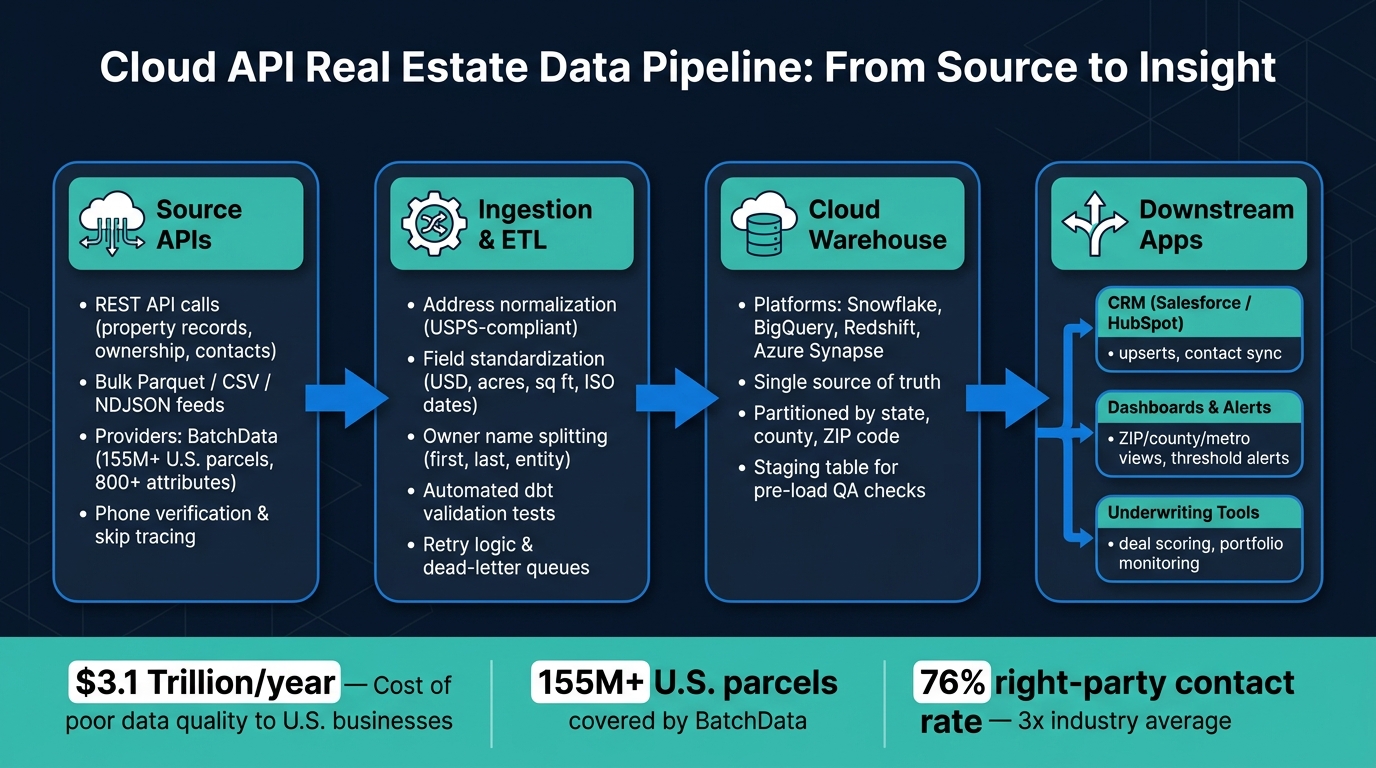
Cloud API Real Estate Data Pipeline: From Source to Insight
A solid real estate data stack usually has four layers that work in order: source APIs, ingestion/ETL jobs, cloud warehouse, and downstream applications. Source APIs send raw data. Ingestion jobs clean it up and standardize it. The warehouse stores one single source of truth. Then downstream apps – CRMs, dashboards, and underwriting tools – use that data.
Map Your Source, Ingestion, Storage, and Application Layers
Think of the stack like a pipeline. Instead of building a bunch of one-off connections, use live data sources to feed one central flow.
At the source layer, REST API calls pull property records, ownership data, contact details, and phone verification results from providers like BatchData. For large loads, bulk Parquet feeds can land in S3 or go straight into a warehouse. After that, ingestion jobs extract, transform, and load the data into a central warehouse, normalizing each field before it lands.
The warehouse – Snowflake, BigQuery, Redshift, or Azure Synapse – becomes the single source of truth. Partition data by state, county, or ZIP code so investor, marketing, and risk teams can filter by market without rewriting queries every time. From there, reverse ETL tools or custom API services can send curated segments into CRMs like Salesforce or HubSpot, deal management platforms, and underwriting models. The upside is simple: one logic layer instead of a tangled mess of scripts.
Standardize U.S. Data Formats Before You Scale
Standardize data before loading it. That saves a lot of cleanup later.
Before any record enters the warehouse, ingestion jobs should enforce the same U.S. formatting rules across every field.
- Addresses should follow USPS-compliant formatting with separate fields for street number, street name, unit, city, 2-letter state abbreviation, and 5-digit ZIP code.
- Property values should be stored as numeric USD with two decimals, not text.
- Lot size should be stored in acres, and building size in square feet.
- Dates should be stored in ISO format, displayed as MM/DD/YYYY, and localized by U.S. time zone.
- Owner names should be split into
first_name,last_name, andentity_nameso the model works for individuals, LLCs, and trusts.
These rules should live in a data dictionary and be enforced with automated tests. For example, dbt tests can flag any ZIP code outside a valid 5- or 9-digit range or any square footage value outside a plausible range. If you catch bad data during ingestion, it won’t slip into dashboards or throw off underwriting models later.
Manual Imports vs Cloud API Architecture: Comparison Table
| Approach | Setup Effort | Scalability | Update Frequency | Error Risk |
|---|---|---|---|---|
| Manual Spreadsheet Imports | Low initial / High ongoing | Very low | Weekly or monthly | High – formatting errors, stale data, copy/paste mistakes |
| Point-to-Point Integrations | Moderate | Moderate | Daily or near-real-time | Moderate – schema changes in one system break others |
| Centralized Cloud API Pipeline | High initial / Low ongoing | High | Real-time or daily | Low – automated validation, standardized schemas |
Manual imports are fine for one-off lists, but they fall apart when you start dealing with scaled portfolios. A centralized pipeline costs more upfront, but adding a new market or source usually means extending an ingestion job instead of building a brand-new integration from scratch. Once the pipeline is in place, you can connect it directly to CRM and deal workflows.
Implement API Workflows for Real Estate Data
Start by normalizing the address. Then move the record through lookup, enrichment, verification, and CRM sync.
Connect Property and Contact Data to Your CRM or Deal System
Normalize the address into structured USPS fields before you run any API lookup. That one move can improve match rates across the rest of the workflow.
After the address is cleaned up, call a property search API to pull the fields your acquisitions team cares about: square footage, lot size in acres, year built, bed/bath count, last sale date in MM/DD/YYYY format, and assessed value in USD. BatchData exposes hundreds of property attributes across more than 155 million U.S. property parcels.
Next, map the JSON response to your internal schema. For example:
property_idnormalized_addressowner_namevaluation_estimate
Use a transformation layer in your ETL tool or custom middleware to handle that mapping cleanly.
Then pass the owner name and mailing address into a contact enrichment API to pull phone numbers and email addresses. Before anything gets written to your CRM, run each phone number through a phone verification API. Mark only verified, active numbers as primary contacts. Flag the rest so your outreach team doesn’t burn time calling dead lines. BatchData reports a 76% right-party contact rate, which is about 3x the industry average.
A few setup rules matter here:
- Store API keys in a secrets manager
- Use upserts keyed to a single property ID
- Batch requests and add retry logic for rate limits and server errors
The same pipeline works for larger portfolio refreshes too. The core flow stays the same. Only the load method changes.
When to Use Bulk Loads for Large U.S. Portfolios and Market Studies
Operational syncs and portfolio loads use the same setup. The difference is volume.
For large market studies, bulk data delivery makes more sense. Providers like BatchData deliver bulk datasets as CSV or NDJSON files that land straight in cloud object storage like Amazon S3 or Google Cloud Storage, or go directly into Snowflake, BigQuery, or Redshift without a separate ETL step. Use NDJSON when records are nested. Use CSV when parcel data is flat.
Once the files land in object storage, partition them by state, county, or snapshot date before loading them into your warehouse. Use native bulk load tools like Snowflake’s COPY INTO or BigQuery load jobs instead of row-by-row inserts. Also, load into a staging table first.
That staging layer gives you a place to run checks before data reaches production. Look for null values in APN and address fields. Sanity-check square footage and price values. If something looks off, catch it there instead of letting bad records flow downstream.
Once that load is automated, the same dataset can power live dashboards and alerts.
UI Exports vs API-Based Ingestion: Process Comparison Table
| Workflow Aspect | UI Export-Based Workflow | API-Based Ingestion Workflow |
|---|---|---|
| Step count | 8–12 steps (search, export, download, clean, import) | 3–5 steps (trigger, fetch, transform, load) |
| Automation level | Low – manual file handling | High – scripted or fully orchestrated |
| Data freshness | Daily to monthly, depending on export cadence | Near real-time or scheduled hourly/daily |
| Typical processing time | Hours to days for large lists | Minutes to hours, even for large batches |
| Scalability | Limited by human capacity | Scales via cloud pipelines |
Scale and Update Real Estate Data in Real Time
Once bulk loads and CRM syncs are running, the next job is keeping data current as the portfolio gets bigger.
Scale API Usage Without Breaking Data Pipelines
The main issue with scaling real estate API pipelines isn’t raw volume. It’s fragility. A setup that works for a small local portfolio can fall apart when it stretches across all 50 states if the right patterns aren’t in place.
Use pagination to pull large result sets in smaller batches. Store the pagination token between runs so the pipeline can pick up where it left off after an interruption. Then pair that with asynchronous queues. Instead of sending records straight into processing, land them in a queue first and let workers process them in parallel. That smooths out load spikes during big portfolio refreshes.
Serverless processing helps control spend. Functions that standardize addresses, format USD values, or enrich owner data run only when new records come in. Add exponential backoff for 429 rate-limit responses, and send records that fail again and again to a dead-letter queue for review.
You’ll also want to watch API usage all the time:
- Calls per minute
- Error rates
- Response times by endpoint
If you’re getting close to rate limits on a steady basis, that’s the sign to change call patterns before an outage forces the problem.
Once the pipeline is steady, send only changed records into reporting and alerts.
Build Real-Time Dashboards and Market Alerts
Use incremental refreshes so dashboards update only the data that changed.
Match the refresh schedule to the data type. Pricing and inventory can refresh hourly. Rent and days on market can update daily. Ownership and contact data usually fit a weekly schedule.
For U.S. market dashboards, organize views by ZIP code, county, and metro area, with drill-downs from national to neighborhood level. Show all financial metrics in USD with standard U.S. number formatting: commas for thousands and periods for decimals. For example, $1,250,000.00 median price and $1,850.00 median rent. Use MM/DD/YYYY across all time axes.
For acquisitions teams, the most useful dashboard cards usually show median price per square foot, rent-to-price ratios, and days on market by ZIP code. Portfolio monitoring views should highlight occupancy trends, rent roll health, and delinquency trends by property and metro area. Marketing and risk dashboards can pull owner record changes – mailing address updates, phone verification results, and new LLC ownership – straight from contact and skip-tracing APIs.
Set automated alerts when thresholds are crossed. For example:
- Inventory in a target county jumps 20%
- Median asking rent in a ZIP code drops below $1,500
- A key owner sells adjacent parcels
That shifts the dashboard from a passive reporting tool into an early-warning system. Instead of waiting for someone to log in and check the numbers, the system flags risk and opportunity on its own.
That gap becomes easiest to see in acquisition timing and portfolio monitoring.
Static Reports vs Real-Time API-Fed Analytics: Comparison Table
| Dimension | Static Reports | Real-Time API-Fed Analytics |
|---|---|---|
| Data currency | Weekly or monthly snapshots; often stale | Hourly to daily incremental updates; near-current |
| Decision speed | Days to weeks after data changes | Hours or less; automated alerts on threshold breaches |
| Error risk | High – manual exports, spreadsheet joins, copy-paste errors | Low – programmatic ingestion with consistent validation |
| Market visibility | Coarse-grained; often state or county-level monthly averages | Granular ZIP, county, and metro area views updated in near real time |
| Scalability | Capped by analyst headcount | Scales via cloud pipelines across all 50 states |
Conclusion: Build a Faster, Cleaner Real Estate Data Operation
The right real estate API cuts out manual slowdowns in data work by keeping property, contact, and portfolio data in one live pipeline. The fastest wins usually come from fixing the worst manual step first.
Start with a standard data model for properties, owners, contacts, and financial metrics. Then swap out the highest-friction manual workflow with one API-driven integration. That lets you check the schema, mapping, and monitoring before you roll out more.
From there, structured ingestion, normalization, and a serving layer can feed dashboards, CRMs, and alerts in near real time. That’s where a single platform can shift the workflow from fragmented to repeatable.
BatchData supports this workflow with property search, enrichment, skip tracing, phone verification, bulk delivery, and integration services. Start with one high-friction workflow, prove the value, then scale it.
FAQs
How do I choose between API calls and bulk loads?
Choose based on data volume and timing.
Use API calls for real-time, transactional requests. That works well when you need a single property’s details right away or want to trigger an update from an event.
Use bulk loads for large-scale jobs, like initial data loads, routine imports, or analytics work. In practice, many teams use both: real-time APIs for immediate requests, then scheduled bulk jobs during off-peak hours for bigger batches.
What should I standardize before loading real estate data?
Standardize formats before loading real estate data so your APIs work cleanly and your records stay accurate. Start with a data dictionary that defines field names, data types, and allowed values. Then map source data to those rules and apply the same transforms every time.
Key standards should cover:
- Dates in MM/DD/YYYY for user-facing fields and ISO 8601 UTC for system-to-system exchanges
- USD values with the same decimal precision across all money fields
- USPS-formatted addresses
- Square footage stored in consistent units
- Listing status translation logic across source systems
- Numeric fields stored as decimals, not text
This step sounds simple, but it saves a lot of pain later. If one feed says Active, another says A, and a third says For Sale, you need one rule for how those values land in your system. Same idea with dates, prices, and property size. Without that, reporting gets messy fast, and API payloads can break in ways that are hard to trace.
How can I prevent API rate limits from breaking my pipeline?
Use exponential backoff so retries happen gracefully instead of hammering the server when something fails. And when you can, rely on webhooks for real-time updates instead of polling over and over.
If you need to handle a lot of traffic, BatchData offers enterprise plans with dedicated infrastructure and custom rate limits. There’s also Direct Cloud Access, which sends datasets straight to your cloud storage so you can avoid API limits.
On top of that, circuit breakers and sandbox testing can help make your setup more resilient.