
If I want a real estate segment that people can use, I don’t start with a giant data pull. I start with rules, filter property records first, enrich later, verify phones, and export in a clean format.
That’s the whole job in plain English. A good segment is not just a list of addresses. It’s a rule-based list built from property data, owner data, geography, and contact checks. And if I do it right, I cut wasted enrichment spend, lower bad dial volume, and keep DNC/TCPA risk in check.
Here’s the short version:
- I define the segment in clear logic
- absentee owner
- high equity
- older single-family homes
- multifamily by unit count and ZIP Code
- I map only the fields I need
- property
- owner
- contact
- compliance
- calculated metrics like equity or LTV
- I filter property records first
- then enrich only the records that pass
- I join records with the strongest match keys first
- APN
- normalized address + unit
- document IDs
- I verify phones before outreach
- active status
- carrier type
- DNC
- TCPA flags
- I refresh data on a set schedule
- daily for fast-changing leads
- weekly for contact and owner data
- monthly for AVMs, equity, and loan balances
- I export in the format the team can use
A few numbers stand out. The article notes 22%–30%+ yearly contact-data decay, about 3.6% monthly email decay, and a reported 76% right-party contact rate when skip tracing is used well. That’s why stale data and weak joins cost so much.
What matters most is simple: clean inputs, strict joins, verified contact data, and repeatable refresh rules. Once those are in place, building the same segment in a new market using a real estate API becomes more like setup work than manual list building.
This article walks through that workflow from start to finish, with a focus on field mapping, filtering, matching, contact checks, refresh timing, and export choices.
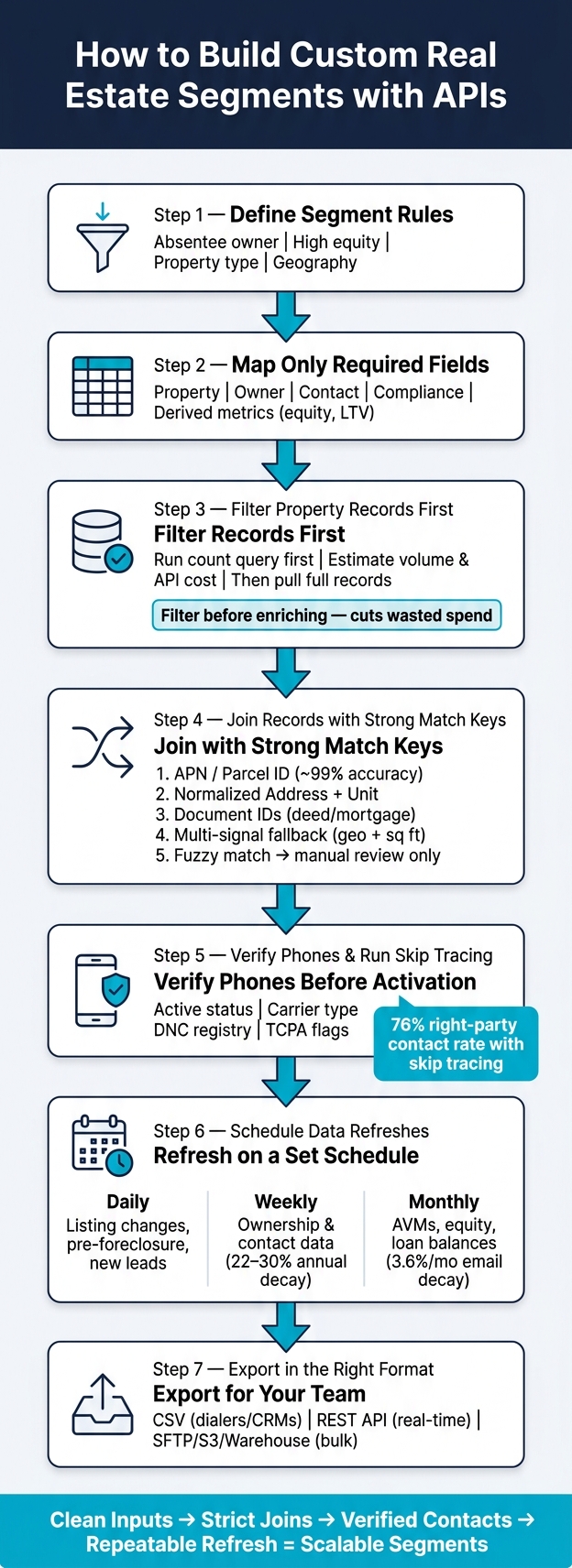
Real Estate Segment Building Workflow: From Rules to Export
Property Data for List Building for Motivated Sellers
Select and map the fields your segment depends on
Once your segment rules are set, map the smallest set of fields needed to support them. A lean schema keeps filters, joins, and exports lined up across your CRM, data warehouse, and dialing tools.
Pick core property, owner, and contact fields
Most segments depend on three field groups working together.
Property fields anchor the record. That usually means street address, APN, ZIP Code, and a few basic property details. Square footage, lot size, year built, property type, and bedroom/bathroom count help you narrow the physical profile.
Ownership and financial fields turn a property record into a lead you can target. Pull owner name, ownership type, such as individual, trust, or LLC, plus mailing address, tax assessed value, estimated market value (AVM), and mortgage lien details. From those raw fields, you can calculate equity position and loan-to-value, or LTV.
Contact and compliance fields round out the record. That includes verified phone numbers, email addresses, DNC registry status, and TCPA litigator flags.
Normalize addresses, units, and overwrite rules
Messy addresses can wreck joins fast. “123 North Main Street Apt 4” and “123 N MAIN ST APT 4” point to the same place, but a plain string match treats them like two different records.
Address canonicalization fixes that by converting each address to USPS standard format. Standardize directionals, unit labels, and ZIP Code length. Run address verification before joins so street, unit, and ZIP formatting all match. BatchData‘s address verification endpoint does this automatically, which means your pipeline doesn’t need custom parsing logic.
Use consistent U.S. formatting across the board: $250,000, 1,500 sq ft, and MM/DD/YYYY.
Overwrite rules decide what happens when API data and CRM data disagree:
- fill-empty-only adds data only to blank fields, which helps protect records your team already checked
- always-update replaces old values with the latest API response, which makes sense for fast-moving fields like listing status or valuations
- preserve CRM-owned values locks selected fields so automated enrichment leaves them alone
Comparison table: source fields vs. enriched fields vs. derived metrics
Use these groups to decide what should come from the source API and what your pipeline should calculate later.
| Field Category | Examples | When You Need It |
|---|---|---|
| Source Property Fields | APN, Sq Ft, Lot Size, Year Built, Property Type | Core identification and physical filtering |
| Source Financial Fields | Tax Assessment, Last Sale Price, Mortgage Amount, Deed Type | Equity logic and financial targeting |
| Enriched Identity Fields | USPS Address, Geocode, Verified Phone, Email, Mailing Address | Outreach and cross-platform record matching |
| Compliance Flags | DNC Registry Status, TCPA Litigator Flag | Compliance checks before dialing or SMS |
| Derived Metrics | Equity Position, LTV Ratio, Absentee Owner Flag, Property Age | Targeting logic calculated from source and enriched fields |
Derived metrics should be computed in your pipeline. They are not raw API fields.
Take the absentee-owner flag as an example. You set it when the owner mailing address does not match the property address. That flag comes from your join logic, not from the API itself.
These mapped fields become your filters and join keys in the next step. With the schema locked, you can apply filters and join property, owner, and enrichment records.
Build the filter logic and join the datasets
Once your schema is mapped, the next move is simple: turn those fields into API filters in the right sequence. Start with property traits, check that the segment size makes sense, and then layer in owner and contact enrichment data. Put source fields first. Add derived metrics only after the joins.
Create property filters that match the use case
Build filters in steps. Start broad with geography, then narrow into property and financial rules. For a fix-and-flip investor, that could mean state=TX, then property_type=single_family, year_built<=1975, and estimated_value between $150,000 and $400,000. A buy-and-hold landlord would use a different mix, such as property_type=multifamily, units_count between 2 and 20, and vacant_indicator=false. The point is straightforward: each use case lines up with a different field combination from the schema you already chose.
Run a count query first to estimate match volume and API cost before pulling full records. BatchData’s property search API supports this count-first search, which helps teams size the segment and estimate page counts before they commit to a bulk pull. When you later join owner and enrichment data, stick with the same normalized fields from the schema step.
Join property, owner, and enrichment records cleanly
If the count looks right, move to record matching. Assessor Parcel Numbers (APNs) are usually the safest key. They’re county-issued, stable over time, and often tied to tax, deed, and assessment records. Store the county FIPS code with every APN so your pipeline can tell apart parcel formats that may look the same in different jurisdictions.
The join order should stay tight and predictable:
- APN first
- Normalized address + unit second
- Document IDs third for deed and mortgage joins
- Weak signals last
If APN is missing, fall back to normalized address + unit. Use document IDs for deed and mortgage-event joins. Only when those three paths fail should you move to weaker signals. And even then, don’t rely on just one. Use at least two signals together, such as geolocation within about 15 meters and square footage within ±5%.
A single weak signal by itself, like owner name similarity, should never trigger an automatic match in a bulk segment. That’s where lists get dirty fast. Score those records lower, flag them, and send them to manual review instead of pushing them into the active list.
Comparison table: deterministic keys vs. fallback matching signals
| Join Method | Typical Accuracy | Complexity | Best-Fit Scenario |
|---|---|---|---|
| APN / Parcel ID | Very high (~99% when present) | Low | Core property-to-owner linkage, portfolio analytics |
| Assessor ID / Account Number | High | Low–Medium | API workflows that already store source identifiers |
| Document ID | High | Medium | Deed and mortgage joins |
| Normalized Address + Unit | High (when data is clean) | Medium | Residential and multifamily records without APNs |
| Geolocation + Sq Ft (multi-signal) | Medium–High | Medium–High | Rural areas or datasets with inconsistent addressing |
| Fuzzy Address / Name Match | Medium or lower | High | Last-resort matching; manual review only, not bulk activation |
After the joins finish, spot-check the output before activation. Make sure each property has either a matched owner record or a flagged multi-owner record. Check that contact fields are verified or scored above your threshold. Then compare the final count against the estimate.
If there’s a big gap between the count estimate and the joined output, that’s usually a sign of a broken join key or a normalization mismatch. Fix it upstream, before enrichment or export, not after activation.
Verify phones, schedule refreshes, and export usable segments
After the joins are done, the next step is simple: check the contact data, refresh the records on a set schedule, and export a segment people can actually use.
Add phone verification and skip tracing before activation
Before you activate anything, verify every phone number for:
- format
- carrier type
- active status
- DNC status
- TCPA risk
Save those results in fields like phone_verification_status, phone_carrier_type, and phone_last_verified_at. That way, your dialer, CRM, or campaign tool can filter records cleanly instead of relying on assumptions.
If a record has a missing phone number or a phone that fails verification, don’t drop it right away. Run skip tracing first. A batch enrichment call can add updated phone numbers, emails, and mailing addresses from outside data sources.
BatchData’s skip tracing API supports this batch enrichment flow, and BatchData reports a 76% right-party contact rate when skip tracing is used well. After enrichment, run DNC filtering again on any new phone numbers that were added. If a record still doesn’t have a usable contact path, keep it out of outbound calling.
"Phone Verification: Check phone numbers against DNC registries, verify reachability, identify carriers, and flag TCPA litigators. Essential for compliant outreach campaigns." – BatchData
Once phone data is in shape, set a refresh schedule so the segment doesn’t go stale.
Set refresh schedules by data type and business urgency
Contact and property data go stale fast. Industry benchmarks put B2B contact data decay at 22–30%+ per year, and some high-churn fields like email decay at about 3.6% per month.
A simple way to handle that is to match refresh timing to the type of data:
- Daily: listing changes, pre-foreclosure notices, and new leads
- Weekly: ownership and contact data
- Monthly: AVMs, estimated equity, and loan balances
Use scheduled ETL jobs for batch loads, Airflow or Prefect for dependency-based workflows, and webhooks for urgent changes. Webhooks are handy for events like a new ownership transfer or a listing status change, where waiting for a nightly scan is just too slow.
With the refresh plan in place, the next move is choosing the export path that fits how the team works.
Comparison table: refresh frequency and export method by team need
| Team / Use Case | Refresh Frequency | Export Method | Cost | Notes |
|---|---|---|---|---|
| Sales (Outbound) | Daily | CSV or Dialer API | Low–Medium | Nightly pull of active owners; export with MM/DD/YYYY dates and $ values |
| Acquisitions | Daily or Weekly | Bulk delivery + API | Medium–High | Daily property feed to warehouse; API for real-time high-priority leads |
| Marketing (Email/SMS) | Weekly | Bulk delivery to CRM | Medium | Weekly warehouse feed with U.S. address and phone normalization via ETL |
| Risk / Portfolio | Monthly | Warehouse bulk (SFTP/S3) | Medium | Monthly AVM and equity updates with U.S. currency formatting |
| Compliance / Legal | Weekly | API + Webhooks | High | Webhook-driven DNC updates; CRM calls verification API before each campaign |
The export method should line up with the job.
CSV is fine for dialers and simple CRMs, but the data needs to be clean. Dates should use MM/DD/YYYY, currency should use U.S. dollar formatting, and addresses should follow U.S. conventions.
Bulk delivery through SFTP, S3, or Snowflake fits data teams that run nightly warehouse loads or push data into marketing systems. API connections give dev teams the most current data and the most control. A CRM or dialer can pull updated segments on demand, or receive webhook pushes, without anyone passing around files by hand.
BatchData supports REST API, bulk delivery, and flat file exports.
Conclusion: A repeatable API workflow for high-quality real estate segments
Once the schema, joins, and verification rules are set, the whole process becomes repeatable in a practical way. You define the segment with targeting rules, map the fields, apply filters, run the joins, verify the output, refresh the data, and export. Each step connects to the next, and property data plus enrichment APIs power the full workflow.
If you skip those steps, things fall apart fast. You end up with broken joins, wasted dials, and compliance risk. That structure is what makes the final segment usable at scale – clean, targeted, and compliant before activation.
API-driven segments cut bad dials, returned mail, and wasted enrichment spend.
When mappings, filters, joins, and refresh rules are automated, building the same type of segment for a new market becomes mostly a configuration job instead of a manual rebuild. That’s the main advantage: faster segment creation, cleaner outreach, and tighter compliance on every campaign.
FAQs
How do I decide which fields to map first?
Start with the core data tied to your business goals, like your Ideal Seller Profile or search criteria. Focus first on the fields you can’t do without: street address, city, state, ZIP code, property type, and ownership information.
Then add secondary fields you can use for filtering, such as equity, bedrooms, bathrooms, square footage, or listing status. A data dictionary keeps field names, data types, and transformations consistent across systems.
What should I do when APN data is missing?
When Assessor Parcel Number (APN) data is missing, use a tiered matching approach to keep records accurate. A USPS-standardized address combined with high-confidence geospatial proximity – like latitude/longitude or parcel centroids – is a solid fallback.
If the APN is inconsistent, keep both the raw version and the normalized one. And if a record still looks uncertain, use fuzzy matching to flag it for manual review instead of betting everything on a single identifier.
How often should I refresh a real estate segment?
How often you refresh a segment should depend on how fast that data changes. BatchData updates property profiles daily, but your own refresh schedule should line up with the type of data you’re pulling.
For fast-moving fields like listing status, price, and valuation, use real-time or near-real-time updates. For tax records and assessment history, a daily or weekly refresh is usually enough. And for static property details like year built or square footage, you may only need to collect them once.