
Bad address matching leads to missed property links, duplicate outreach, returned mail, and lower model accuracy. In this article, I show that most failures come from three core issues: messy input data, mismatched address formats, and duplicate or unclear records.
Here’s the short version:
- I start with the main fix: clean and standardize addresses before matching
- I cover why exact match alone fails once typos, abbreviations, or missing unit numbers show up
- I explain when to use field-by-field scoring, blocking, and manual review
- I show how geocoding, parcel data, DPV, and APN checks help confirm a match
- I lay out a simple pipeline: ingest → profile → parse → standardize → validate → block → score → review → merge
- I point to the KPIs that matter most, like duplicate rate, manual review rate, and undeliverable mail rate
A few numbers make the stakes clear: poor address data can cut model accuracy by up to 25%, tax jurisdiction errors can drop by up to 95% with precise validation, and skip tracing costs can fall by 42% when address and contact data are cleaned first.
If you work with U.S. property data across county records, CRMs, mailing lists, and parcel files, this gives you a plain roadmap for getting more matches right and wasting less time and money.
The Most Common Address Matching Problems
Incomplete, Inconsistent, and Outdated Address Data
The first place things go wrong is the source data itself. Data from web forms, CRMs, and third-party feeds is almost never clean. You see transposed numbers, mixed casing, misspellings, punctuation changes, and odd abbreviations all the time. So "123 Main St #4B" and "123 Main Street Apt 4B" may point to the same unit, but exact matching reads them as two different addresses.
Missing pieces make the issue worse. Leave out a unit number, a directional prefix like N, S, E, or W, or a ZIP+4 code, and the match gets a lot less clear. Downstream logic can only do so much when the input is vague. On top of that, address data changes. Property and ownership records shift when building permits are issued, liens are recorded, or new transactions are added. If the reference data isn’t current, matches start to miss.
And even when the input looks clean, different systems may still store the same property in different ways.
Structural Mismatches Across Address Types
Not every address follows the same pattern. That’s where basic one-line matching tends to fall apart. USPS delivery addresses are built for mail delivery. County parcel records, on the other hand, track legal and tax data. Same property, different structure.
Some address types are especially messy. Rural routes, PO Boxes, mobile home parks, and new subdivisions often don’t have the standard parts your matching system expects. Sub-premise variation is another headache. "Suite 200", "Ste. 200", and "Unit 200" may all mean the same space, but datasets don’t always treat them the same way. That leads to false negatives.
It may be tempting to strip unit details to make matching easier. Sometimes that works at the household level. But in multifamily or commercial records, that shortcut can backfire fast. Different tenants can share the same building address, so removing unit identifiers can create false positives instead.
At scale, those small formatting gaps pile up and turn into duplicate records and unclear matches.
Duplicates, Ambiguity, and Scale Problems
Duplicate records with slight address differences can create expensive mistakes in large property datasets. One property may show up several times across a CRM, a county feed, and a mailing list, each with its own formatting. If you deduplicate too aggressively, you merge records that should stay separate. If you’re too strict, you end up with broken lead histories and contact counts that look bigger than they are.
Dense urban areas make this even harder. Similar street names and repeated house numbers across nearby localities can push several candidates above the similarity threshold at once. Then the system has no obvious winner.
At national scale, brute-force comparison becomes a problem too. You can’t compare every record to every other record forever and expect things to hold up. At some point, you need to narrow the search space first. If you don’t, performance starts to crack.
| Failure Type | Where It Appears First | Operational Impact |
|---|---|---|
| Missing unit numbers | Lead forms, CRM input | False matches in multifamily data |
| Abbreviation inconsistency | Third-party data feeds | Failed joins across datasets |
| Outdated street names | County records, mailing lists | Returned mail, broken parcel links |
| Duplicate records | CRM + county feed merges | Fragmented lead history, duplicate outreach |
| Urban near-duplicates | Dense metro datasets | False positives, inflated match scores |
These are the kinds of problems that make normalization and layered matching necessary.
Solutions That Improve Match Rates and Data Reliability
Standardize and Validate Addresses Before Matching
The first fix happens upstream: clean and standardize data before matching begins. Incomplete and inconsistent records are the most common reason matches fail, so normalization needs to happen before any comparison logic runs.
Start by parsing raw addresses into separate parts:
- House number
- Street
- Unit
- City
- State
- ZIP Code
Then normalize capitalization, spacing, and common abbreviations so records follow the same format.
Use a CASS-certified USPS check to confirm deliverability. Also, keep the original raw input next to the standardized version. That gives you a fallback for similarity checks and makes debugging much easier when something looks off.
Add real-time property enrichment API validation at data entry points like web forms and CRM inputs so bad records don’t make it into the database in the first place. After that, run a bulk batch process on older records before turning on real-time checks across the rest of your workflows.
Use Layered Matching Logic Instead of Exact Match Only
Duplicates and gray-area records need more than one comparison step. Exact match alone usually falls apart once typos, missing unit numbers, or formatting differences show up.
A better approach is a layered pipeline: parse, normalize, pre-filter likely matches, score matches, then review or merge.
For similarity checks, trigram similarity works well for candidate retrieval. Jaro-Winkler is often a better fit for shorter labels like street names. And instead of treating the whole address as one string, score the house number, street, and unit as separate fields.
Set clear threshold bands so the system knows what to do next:
- High-confidence matches are auto-accepted
- Borderline cases go to manual review
- Low scores are rejected
Those thresholds shouldn’t be guesses. Calibrate them against a benchmark set filled with hard cases, like typo-heavy inputs, missing units, and rural routes. To handle scale, use blocking keys such as ZIP Code + house number or geohash before running more expensive similarity checks.
Add Geospatial and Reference Data Checks
When text similarity isn’t enough, bring in parcel and coordinate checks to confirm identity. Geocoding turns an address into coordinates, and those coordinates can be used in a spatial join to anchor the record to official parcel boundaries.
Rooftop-level geocoding carries much more weight than a ZIP centroid, especially for underwriting or deduplication. Store the resolution level as metadata – rooftop, entrance, parcel centroid, or ZIP centroid – so downstream logic knows how much trust to put in the result.
| Check Type | Data Source | Purpose |
|---|---|---|
| Spatial Join | GIS/Parcel Boundaries | Anchors the address to official tax and land records |
| DPV | USPS/Postal Authority | Confirms the address is a real, deliverable location |
| Assessor’s Parcel Number (APN) match | County Assessor | Links the address to a unique parcel identifier |
| Ownership History | Registry of Deeds | Helps resolve identity when records are outdated |
| Geocode Level | Geocoding Provider | Shows whether the match is rooftop-precise or a coarse centroid |
Cross-checking county assessor records and registry sources also helps when property records shift over time. A periodic refresh – weekly or monthly – helps pull in new deeds, mortgages, and municipal updates.
For day-to-day workflows, reference data needs to stay current. When teams need ongoing verification and enrichment, BatchData can support bulk address data delivery.
How to Build an Address Matching Pipeline
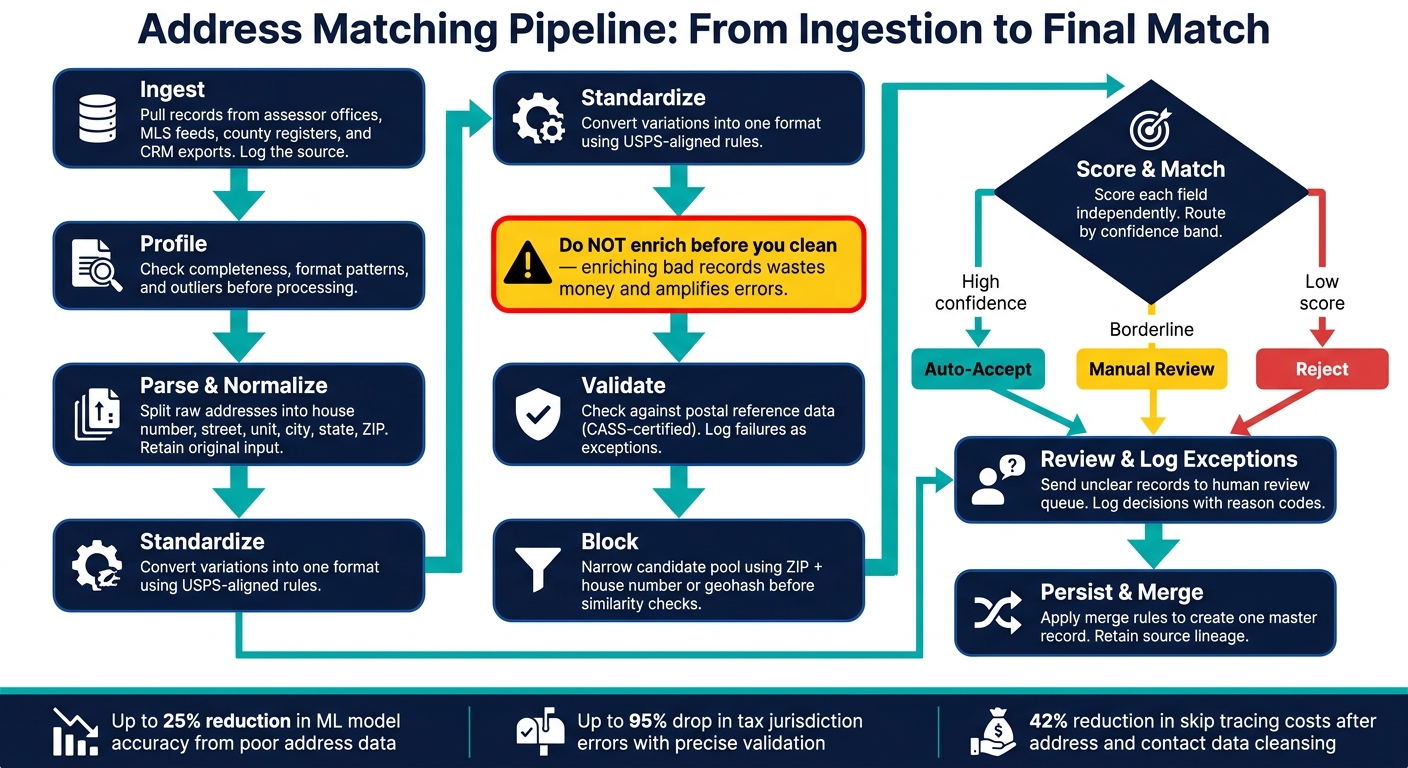
Address Matching Pipeline: From Ingestion to Final Match
A Step-by-Step Pipeline from Ingestion to Final Match
Once the rules are in place, the next job is turning them into a pipeline your team can run the same way every time. That’s how you deal with missing fields, format conflicts, and duplicate records without making a mess. The safest order is fixed: ingest, profile, parse, standardize, validate, block, score, review, and merge.
One rule matters more than it looks: don’t enrich before you clean. If you enrich bad records, you’re just spending money to make bad data bigger.
- Ingest: Pull records from assessor offices, MLS feeds, county registers, and CRM exports. Log the source for each record as it comes in.
- Profile: Check completeness, format patterns, and outliers before you process anything.
- Parse and normalize: Split raw addresses into parts like house number, street name, unit, city, state, and ZIP. Keep the original input too, so you have a fallback for matching.
- Standardize: Convert common variations into one format using USPS-aligned rules.
- Validate: Check the address against postal reference data and log failures as exceptions.
- Block: Cut down the candidate pool with ZIP + house number or geohash before you run similarity checks.
- Score and match: Score each field on its own, then route records by confidence band. High scores can be auto-accepted, borderline cases can go to review, and low scores can be rejected.
- Review and log exceptions: Send unclear records to a human review queue. Log each decision with a reason code so you can tune thresholds over time.
- Persist and merge: Apply merge rules to create one master record. Pick the most complete or most recent values across duplicates, and keep source lineage.
KPIs That Show Whether Matching Is Improving
A pipeline only earns its keep if the numbers move in the right direction.
| KPI | Definition | Why It Matters |
|---|---|---|
| Unmatchable Address Rate | % of records that fail to link to a reference database or parcel | Flags poor source quality or ingestion errors |
| Duplicate Rate | % of redundant records for the same property | Inflates audience counts and wastes mailing spend |
| Geocode Coverage | % of records with rooftop-level vs. ZIP-centroid coordinates | Rooftop accuracy drives risk models and underwriting |
| Manual Review Rate | % of records requiring human intervention | High rates mean thresholds are too strict or data is too noisy |
| Undeliverable Mail Rate | % of outreach returned as undeliverable | Measures CASS validation and standardization effectiveness |
| Contact Match Lift | Increase in successful owner/phone links after address cleansing | Shows direct impact on skip tracing and outbound workflows |
When to Use Specialized Data and Service Support
At scale, manual cleanup stops being enough. This usually happens when you’re dealing with multi-state portfolios spread across county systems that all do things a little differently. It also shows up when property records drift over time as new deeds, permits, and liens get recorded, or when linking an address to the right owner sits at the center of your workflow.
Put simply: if the address layer is shaky, anything built on top of it will be shaky too.
BatchData provides address verification, property search APIs, and contact enrichment for address-based identity resolution.
Conclusion: Fix the Inputs, Improve the Match, Cut Waste
Most address matching problems start with messy inputs: scattered county records, mixed formatting, and data drift as new deeds and liens get filed. Those issues feed the three main failure modes – incomplete data, structural mismatches, and duplicates – and each one has a direct fix.
Poor address data creates waste long before a team spots the mistake. Unclean address data can reduce machine learning model accuracy by as much as 25%, and integrated address cleansing with owner contact scrubbing can cut skip tracing costs by 42%. If the data stays messy, those costs pile up fast.
This isn’t a theory problem. It’s a process problem.
Key Points to Take Away
Start with the input: standardize and validate data before enrichment or matching. After that, use field-level scoring, geospatial checks, and reference data to sort out edge cases. Put simply, record quality drives match quality.
When teams work at scale, they need clean data and repeatable tools. BatchData supports that workflow with property and contact enrichment, skip tracing, APIs, phone verification, and bulk data delivery.
FAQs
How do I know if exact match is failing my data?
Exact matching breaks down when tiny differences – typos, abbreviations, or formatting changes – stop two records for the same place from lining up.
A common red flag is missed duplicates like "123 Main St #5" and "123 MAIN STREET APT 5." Same location, different wording.
If your address data changes a lot from one source to another, exact matching is probably too limited.
What should I standardize before matching addresses?
Before you match addresses, clean and standardize the data. That step cuts down on the little inconsistencies that often cause match failures.
A few common fixes make a big difference:
- Remove extra spaces and stray punctuation
- Normalize text
- Parse the address into parts, such as house number, street name, and unit number
- Standardize those parts to official postal conventions, including approved abbreviations, consistent casing, and accurate ZIP+4 codes
Think of it like lining up two mailing labels side by side. If one says “123 Main Street, Apt. 4” and the other says “123 MAIN ST #4,” they may point to the same place, but a system can miss that if the format is messy. Cleaning the data first helps both records speak the same language.
When should I use manual review in address matching?
Use manual review when matches land in that gray area of similarity scores, or when the raw address data is incomplete, inconsistent, or just plain messy.
It also matters when a record passes CASS validation but fails DPV. That usually points to a missing secondary unit number, like an apartment or suite. BatchData can help support these workflows with data enrichment and decision-making services.